VB-M741LE/VB-M740E - Surveillance Camera CANON - Free user manual and instructions
Find the device manual for free VB-M741LE/VB-M740E CANON in PDF.


| Product type | Fixed network surveillance camera |
| Brand | Canon |
| Model | VB-M741LE / VB-M740E |
| Image resolution | Up to 1920 x 1080 (2 megapixels) |
| Viewing angle | Approximately 100° (depending on lens) |
| Night vision | Yes, with built-in infrared |
| Connectivity | Ethernet RJ45 10/100 Base-T |
| Power supply | Power over Ethernet (PoE) IEEE 802.3af |
| Dimensions | Approximately 70 x 70 x 120 mm |
| Weight | Approximately 500 g |
| Video compression | H.264 / MJPEG |
| Audio function | Two-way audio input and output |
| Motion detection | Built-in, configurable |
| Storage | On NAS server or network recorder |
| Supported protocols | TCP/IP, HTTP, RTSP, ONVIF |
| Operating temperature | -10°C to +50°C |
| Protection rating | IP66 (outdoor model) |
| Maintenance | Clean the lens with a soft, dry cloth |
| Security | Password authentication, HTTPS encryption |
| Included accessories | Mounting kit, quick installation guide |
| Repairability | Spare parts available through after-sales service |
Frequently Asked Questions - VB-M741LE/VB-M740E CANON
User questions about VB-M741LE/VB-M740E CANON
0 question about this device. Answer the ones you know or ask your own.
Ask a new question about this device
Download the instructions for your Surveillance Camera in PDF format for free! Find your manual VB-M741LE/VB-M740E - CANON and take your electronic device back in hand. On this page are published all the documents necessary for the use of your device. VB-M741LE/VB-M740E by CANON.
USER MANUAL VB-M741LE/VB-M740E CANON
VB-M741LE & VB-M740E

Keep every outdoor angle covered
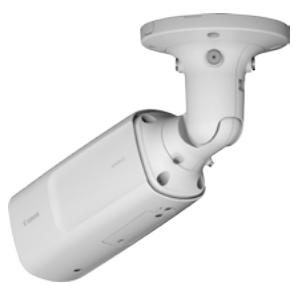
Ideal for use in extremely cold and hazardous outdoor areas these 1.3 MP bullet cameras offer built-in IR LED* an ultra wide 113.4° angle of view for high quality imaging day or night.
natural_image
Exterior view of a white surveillance camera (no text or symbols visible)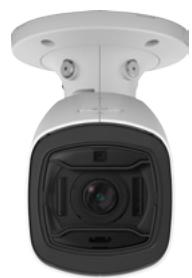
natural_image
Front view of a modern security camera (no visible text or symbols)- Outdoor 1.3 MP bullet cameras with inbuilt Infrared illumination* for high quality imaging day or night
- Bright f/1.2-1.8 IR Corrected 2.4x zoom Super-UD lens with ultra wide 113.4° angle of view and extended low light capabilities
- Outdoor-ready with extensive weatherproofing and environmental protection
- Reliable start up at -30^ and operation in extremely cold environments down to -50^^*
- Easy and convenient installation with remote zoom and focus set up and simple pigtail connection
natural_image
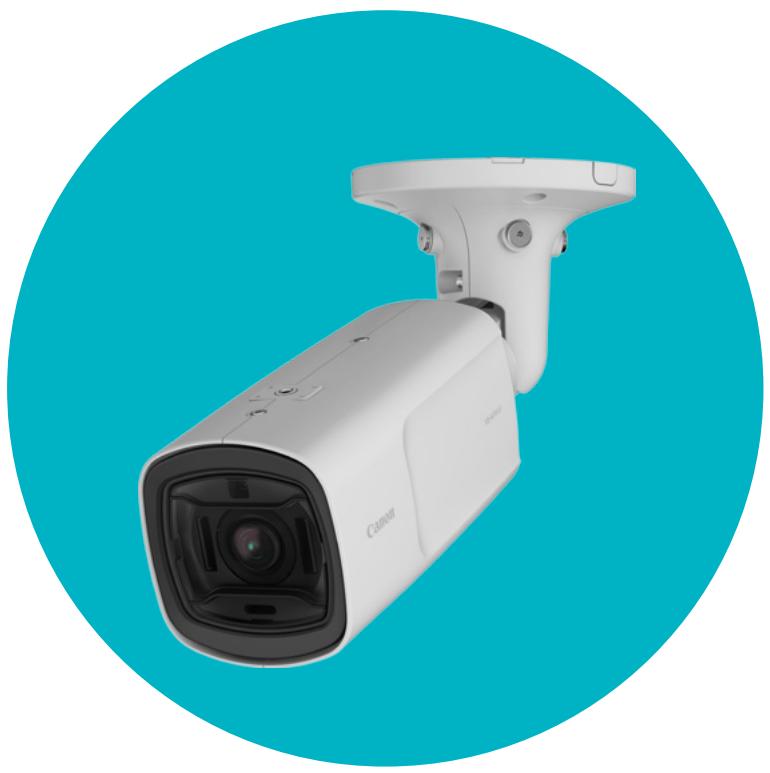
White Canon security camera mounted on a blue circular background (no text or symbols visible)Product Range
VB-M741LE
VB-M740E
VB-H730F
VB-M720F


(All Weather Model, Scream, PoE+, Linked Event and Infrared Illumination - VB-M741LE only)
Technical Specifications
| VB-M741LE | VB-M740E | |
| CAMERA | ||
| Image Sensor | 1/3 type CMOS (primary color filter) | |
| Number of Effective Pixels | Approx. 1.3 million pixels | |
| Scanning Method | Progressive | |
| Lens | 2.4 optical zoom (4x digital zoom) lens (electric drive) | |
| Focal Length | 2.55 (W) - 6.12 mm (T) | |
| F-number | F1.2 (W) - F1.8 (T) | |
| Viewing Angle | For 16:9 aspect ratiosHorizontal: 113.4° (W) - 46.5° (T)Vertical: 61.4° (W) - 26.2° (T)For 4:3 aspect ratiosHorizontal: 113.4° (W) - 46.5° (T)Vertical: 83.0° (W) - 34.9° (T) | |
| Day/Night Switch | Auto / Manual | |
| Min. Subject Illumination | (F1.2, shutter speed 1/30 sec., when smart shade control is off, 50IRE)Day Mode (colour) : 0.02 luxNight Mode (mono): 0 lux (with IR lamp on)0.001 lux (with IR lamp off) | |
| Focus | Auto / One-shot AF / Manual / Fixed at infinity | |
| Shooting Distance (from front of lens) | Day Mode: 0.3 m (12 in.) - infinityNight Mode: 0.3 m (12 in.) - infinity | |
| Shutter Speed | 1, 1/2, 1/4, 1/8, 1/15, 1/30, 1/60, 1/100, 1/120, 1/250, 1/500, 1/1000, 1/2000, 1/4000, 1/8000, 1/10000, 1/16000 sec. | |
| Exposure | Auto / Auto (Flickerless) / Auto (Shutter-priority AE) / Manual(Shutter Speed, Aperture, Gain) | |
| White Balance | Auto / Light Source / ManualLight Source: Daylight Fluorescent / White Fluorescent / Warm Fluorescent / Mercury Lamp / Sodium Lamp / Halogen LampManual: One-shot WB / R Gain / B Gain | |
| Metering Mode | Center-Weighted / Average / Spot | |
| Exposure Compensation | 9 levels | |
| Smart Shade Control | Auto / Manual / DisableAuto: 3 levelsManual: 7 levels-Brightens shaded areas of a video | |
| Haze Compensation | Auto / Manual / DisableAuto: 3 levelsManual: 7 levels | |
| AGC Limit | 6 levels | |
| Image Stabilizer | 2 levels (digital) | |
| IR Illumination Range | 30 m (98.4 ft.) (When using 24 V AC, PoE+) | - |
| Pan Angle Range | 344° (±172°) | |
| Tilt Angle Range | 93° (-3° - +90°)- Camera is at 0° when attached to the ceiling and facing strait down, and 90° when at a horizontal position. | |
| Rotation Angle Range | 344° (±172°) | |
| SERVER | ||
| Video Compression Method | JPEG, H.264 | |
| Video Size | JPEG, H.264: 1280 x 720, 640 x 360, 320 x 1801280 x 960, 640 x 480, 320 x 240 | |
| Video Quality | JPEG, H.264: 10 levels | |
| Frame Rate | JPEG: 0.1 - 30 fpsH.264: 1/2/3/5/6/10/15/30 fps- Values represent streaming performance from the camera.- The frame rate may be reduced due to Viewer computer's specs, the number of clients accessing at the same time, network loads, video quality setting, type or movement of the subject or other reasons.Maximum frame rate when used in the following combinations:When streaming H.264(1) (1280 x 720) and H.264(2) (1280 x 720) simultaneously: 15 fpsWhen streaming H.264(1) (1280 x 960) and H.264(2) (1280 x 960) simultaneously: 15 fps | |
| I-Frame Interval | 0.5/1/1.5/2/3/4/5 sec. | |
| Simultaneous Client Access | Max. 30 Clients + 1 Admin Client- H.264: Max. 10 Clients | |
| Bit Rate Control | Target Bit Rate: 64 / 128 / 256 / 384 / 512 / 768 / 1024 / 2048 / 3072 / 4096 / 6144 / 8192 / 10240 / 12288 / 14336 / 16384 kbps | |
| ADSR: Area-specific Data Size Reduction | Number of Specified Areas: Max. 8 areas | |
| Security | Camera Control: Administrator, Authorized user, Guest user (level of control varies depending on user)Access Control: User authority (user name and password), Host Access Restrictions (IPv4, IPv6)IEEE802.1X: EAP-MDS, EAP-TLS, EAP-TTLS, EAP-PEAPEncrypted Communications: SSL/TLS, IPsec | |
| Protocol | IPv4: TCP/IP, UDP, HTTP, FTP, SNMP (MIB2), SMTP (Client), DHCP (Client), DNS (Client), mDNS, ARP, ICMP, POP3 (Client), NTP (Client), SMTP authentication (POP before SMTP, SMTP-AUTH), AutolIP, RTP/RTCP, RTSP, SSL/TLS, IPsec, WV-HTTP (Canon proprietary), ONVIF (Profile S, Profile G)IPv6: TCP/IP, UDP, HTTP, FTP, SMTP (Client), DHCPv6 (Client), DNS (Client), mDNS, ICMPv6, POP3 (Client), NTP (Client), SMTP authentication (POP before SMTP, SMTP-AUTH), RTP/RTCP, RTSP, SSL/TLS, IPsec,WV-HTTP (Canon proprietary), ONVIF (Profile S, Profile G) | |
Canon Inc.
canon.com
Canon Europe
canon-europe.com
English edition
© Canon Europa N.V.,2015
VB-M741LE & VB-M740E
| VB-M741LE | VB-M740E | |
| Audio Compression Method | G.711 μ-law (64 kbps) | - |
| Audio Communication Method | Full-duplex (two-way) - Echo cancellation function compliant RTP, Sound Transfer Protocol by Canon | - |
| Audio File Playback | Available (audio files can be played back when an event is triggered by the intelligent function or external device input.)- A third-party amplifier speaker is necessary | - |
| Privacy Mask | Number of registration: Max. 8 places, Number of mask colors: 1 (select from 9 colors) | - |
| Preset | Number of registers: Max. 20 positions (+Home Position)Items to Reg.: Digital Pan/Digital Tilt/Digital Zoom, Exposure, Smart Shade Control, Focus, White Balance, Video Quality Adjustment, Day/Night, Haze CompensationNumber of Preset Tour Route: Max. 1 | |
| Intelligent Function (Video) | Detection Types: Moving Object Detection, Abandoned Object Detection, Removed Object Detection, Camera Tampering Detection, Passing Detection, and Intrusion DetectionDetection Settings: Max. 15 | |
| Intelligent Function (Audio) | Volume Detection, Scream Detection | |
| Event Trigger Type | External Device Input, Intelligent Function (Video), Intelligent Function (Audio), Timer, Day/Night SwitchNumber of Linked Events: 2Linked Event Conditions: AND, OR (whether or not there is a sequence to events) | Intelligent Function (Video), Timer, Day/Night Switch |
| Image Upload | FTP/HTTP/SMTP (e-mail) | |
| Event Notification | HTTP/SMTP (e-mail) | |
| Image Cropping Function | Digital PTZCropping sizes: 640 × 360 / 512 × 288 / 384 × 216 / 256 × 144 / 128 × 72 640 × 480 / 512 × 384 / 384 × 288 / 256 × 192 / 128 × 96 | |
| On-Screen Display | Available | |
| Daylight Saving Time | Available | |
| APPLICATION | ||
| Viewer | Camera-side: Admin ViewerVB ViewerClient-side: RM-Lite Viewer | |
| Admin Tools | Privacy Mask Setting ToolIntelligent Function Setting ToolLog ViewerRecorded Video Utility | |
| Included Software | Camera Management ToolCamera Angle Setting ToolRM-LiteProxy Authentication Admin Tools/Admin Viewer | |
| Language | German/English/Spanish/French/Italian/Russian/Turkish/Chinese (Simplified)/Japanese | |
| Operating Environment (PC specifications and OS (does not apply to RM-Lite)) | OS:Windows Vista Ultimate / Business / Enterprise / Home Premium SP2 32 / 64-bitOperating System Language:German / English / Spanish / French / Italian / Russian / Turkish / Chinese (Simplified) / Japanese- Language switching environment using language-packs is not supportedCompatible Browser:Internet Explorer 8/9 32-bitInternet Explorer 10/11- Must be configured to allow use of JavaScript, XAML browser applications, and IFRAME (html tag).- For VB Viewer only, cookies must be enabledSoftware (Runtime Libraries):.NET Framework 3.5 SPI (When using Internet Explorer 8/9)- Must be installed on Windows Vista and Windows Server 2008 systems.NET Framework 4.5 (When using Internet Explorer 10/11)- Must be installed on Windows 7 and Windows Server 2008 R2 systemsCPU (Recommended):Intel Core i7-2600 or higherGraphics Board (Recommended):Not specifiedMemory (Recommended):2 GB or higherViewer Display (Recommended):1920 x 1080 or higher | |
| INTERFACE | ||
| Network Terminal | LAN x 1 (RJ45, 100Base-TX (auto/full-duplex/half-duplex)) | |
| Audio Input Terminal (common for LINE IN & MIC IN) | 3.5 mm ( 0.14 in.) mini-jack connector (monaural)LINE IN (connect to an amplifier microphone) or MIC IN (connect to a microphone w/o amplifier)- Switch LINE IN/MIC IN in the setting page. | - |
Technical Specifications
VB-M741LE & VB-M740E
| VB-M741LE | VB-M740E | |
| Audio Output Terminal (LINE OUT) | 3.5 mm ( 0.14 in.) mini-jack connector (monaural) LINE OUT(connect to an amplifier speaker) | - |
| External Device I/O Terminal | Input x 2, Output x 2 | - |
| Memory Card | SD Memory Card, SDHC Memory Card, SDXC Memory Card Compatible. Recorded Content: Log, Video (Event, Manual, ONVIF, Timer, Upload)Frame Rate: Max. 1 fps (JPEG)Max. 30 fps (H.264) | |
| OTHER | ||
| Operating Environment | TemperatureOperating Temperature Range(including direct sun exposure)AC, PoE+: -50°C - +55°C(-58°F - +131°F)DC, PoE: -10°C - +55°C(+14°F - +131°F)Start-up Temperature Range(including direct sun exposure)AC, PoE+: -30°C - +55°C(-22°F - +131°F)DC, PoE: -10°C - +55°C(+14°F - +131°F)Humidity5% - 85% (without condensation) | TemperatureOperating Temperature Range(including direct sun exposure)PoE: -10°C - +55°C (+14°F - +131°F)Humidity5% - 85% (without condensation) |
What's in the box?
- Setup CD-ROM
• Safety Wire & fixing screw
• Ceiling Plate & fixing screws - Wrench
-
Template
• Power Interface Cable -
I/O Interface Cable
- Installation Guide
- Warranty Card
- Leaflet of Warranty Card
- Packaging
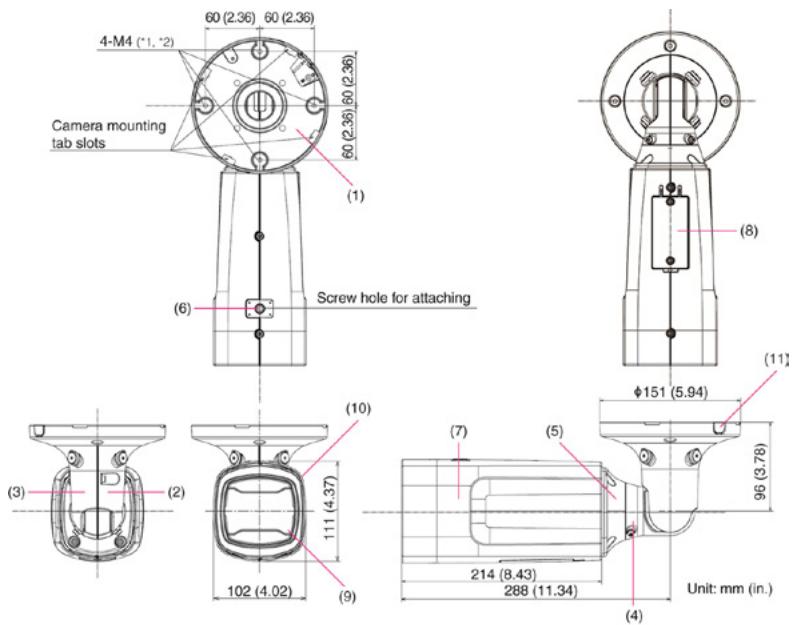
Dimensions
text_image
4-M4 (*1, *2) 60 (2.36) 60 (2.36) 60 (2.36) 60 (2.36) Camera mounting tab slots (1) (6) Screw hole for attaching (8) (11) φ151 (5.94) (3) (2) (10) 111 (4.37) (7) (5) 96 (3.78) 102 (4.02) (9) 214 (8.43) 288 (11.34) Unit: mm (in.) (4)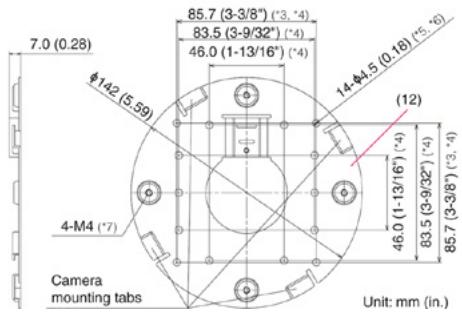
text_image
7.0 (0.28) Ø142 (5.59) 4-M4 (*7) Camera mounting tabs 85.7 (3-3/8") (*3, *4) 83.5 (3-9/32") (*4) 46.0 (1-13/16") (*4) 14.44,5 (0.18) (*5, *6) (12) 46.0 (1-13/16") (*4) 83.5 (3-9/32") (*4) 85.7 (3-3/8") (*3, *4) Unit: mm (in.)*1 Ceiling Plate mount holes
*2 Option unit mount holes
*3 Ceiling/Wall mount holes position
*4 Junction box fixing holes position
*5 Ceiling/Wall mount holes
*6 Junction box fixing holes
*7 Camera mounting holes
| VB-M741LE | VB-M740E | |
| Power Supply | PoE: PoE+ power supply via LAN connector (IEEE802.3at Type2 compliant)AC Adapter: PA-V18(100 - 240 V AC) (sold separately)External power source: 24 V AC/12 V DC | PoE: PoE power supply via LAN connector (IEEE802.3at Type1 compliant) |
| Power Consumption | PoE+: Max. approx. 21.2 WPoE: Max. approx. 10.1 WAC Adapter PA-V18:Max. approx. 12.8 W (100 V AC)Max. approx. 12.8 W (240 V AC)DC: Max. approx. 11.1 WAC: Max. approx. 22.2 W | PoE: Max. approx. 7.4 W |
| Dimensions | (H x W x D) 111 x 102 x 214 mm (4.37 x 4.02 x 8.43 in.) (camera body only)- Length when joint fully extended (D): 384 mm (15.12 in.) | |
| Weight | Approx. 2120 g (4.68 lb.) | Approx. 2040 g (4.50 lb.) |
| Dust-resistant/WaterproofSpecification | IP66 ratedNEMA Type 4X, IEC 60950-1/22 | |
Compatible Accessories
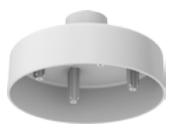
PC640-VB
Pendant Mounting Kit
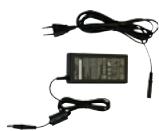
PA-V17 / PA-V18
AC Power Supply
*Available in Euro 2-Pin
& UK 3-Pin plug