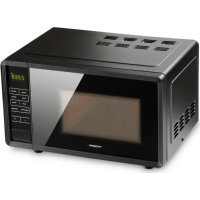
MWO 240 - Microwave Oven DOMETIC - Free user manual and instructions
Find the device manual for free MWO 240 DOMETIC in PDF.


| Product Type | Microwave Oven |
| Brand | Dometic |
| Model | MWO 240 |
| External Dimensions (H x W x D) | 283 x 451 x 353 mm |
| Internal Dimensions (H x W x D) | 181.5 x 303 x 321 mm |
| Capacity | 17 L |
| Weight | 11.5 kg |
| Power Supply | 230 V, 50 Hz |
| Microwave Power | 700 W |
| Frequency | 2450 MHz |
| Power Levels | 5 levels: 20%, 40%, 60%, 80%, 100% |
| Main Functions | Express cooking, programmed cooking (COOK), auto defrost (DEFROST), clock, timer |
| Multi-Stage Cooking | Up to 4 stages |
| Child Lock | Yes (button lock) |
| Recommended Use | Caravans and motorhomes, heating and defrosting up to 60 min |
| Warranty | Statutory warranty |
| Package Contents | Microwave oven, instruction manual |
Frequently Asked Questions - MWO 240 DOMETIC
User questions about MWO 240 DOMETIC
0 question about this device. Answer the ones you know or ask your own.
Ask a new question about this device
Download the instructions for your Microwave Oven in PDF format for free! Find your manual MWO 240 - DOMETIC and take your electronic device back in hand. On this page are published all the documents necessary for the use of your device. MWO 240 by DOMETIC.
USER MANUAL MWO 240 DOMETIC
natural_image
Line drawing of a modern microwave oven with control panel and display (no text or symbols)MWO240
EN Microwave Oven
Operating manual 4
DE Mikrowelle
Please read this instruction manual carefully before first use, and store it in a safe place. If you pass on the product to another person, hand over this instruction manual along with it.
Table of contents
1 Explanation of symbols....4
2 Safety instructions....5
3 Scope of delivery 7
4 Intended use ....7
5 Technical description ....8
6 Connecting and setting the microwave....9
7 Operating the microwave oven ....10
8 Cleaning and care....17
9 Troubleshooting....18
10 Warranty 18
11 Disposal....19
12 Technical data....19
1 Explanation of symbols
WARNING!
Safety instruction: Failure to observe this instruction can cause death or serious injury.
CAUTION!
Safety instruction: Failure to observe this instruction can lead to injury.

NOTICE!
Failure to observe this instruction can cause material damage and impair the function of the product.

NOTE
Supplementary information for operating the product.
2 Safety instructions
WARNING!
- Use this device only for its intended use as described in this instruction manual.
- Do not use corrosive chemicals in this device.
-
Do not operate the device when it is empty.
• Do not put this device into operation -
if cables or plugs are damaged
- if it is not functioning properly
-
if it has been damaged or dropped.
-
If the connection cable is damaged, it must be replaced by the manufacturer or its customer service or a similarly qualified person in order to prevent safety hazards.
- This device can be used by children aged 8 years or over, as well as by persons with diminished physical, sensory or mental capacities or a lack of experience and knowledge, providing they are supervised, or have been taught how to use the device safely and are aware of the resulting risks.
- Cleaning and user maintenance must not be performed by unsupervised children.
- This device is not intended for use by persons (including children) with reduced physical, sensory or mental abilities or lack of experience and knowledge, unless they are given supervision or extensive instruction concerning use of the device by a person responsible for their safety.
- Children must be supervised to ensure that they do not play with the appliance.
- Always keep and use the device out of the reach of children under 8 years of age.
• To reduce the risk of fire inside the microwave oven:
- When heating food in plastic or paper containers, check the microwave oven for possible ignition.
- Remove wires from microwave-safe paper or plastic bags before placing them in the microwave oven.
- In case of smoke, turn off the device or unplug the power plug. Keep the door closed to smother any flames.
- Do not use the interior for storage purposes. Do not leave paper products, cooking utensils or food in the microwave oven if you are not using it.
- Dishes should be checked for appropriate use in a microwave oven.
- The microwave oven must be repaired by qualified personnel only. It is dangerous for untrained people to perform service or repair work which includes removal of cover panels, as these provide protection against exposure to microwave energy.
CAUTION!
- Liquid or other foodstuffs may not be heated in sealed containers, because it could explode.
- Heating drinks can lead to delayed sudden upward spraying, so use care when handling the container.
- Do not fry food in the microwave oven. Hot oil can damage oven parts and utensils and cause burns to the skin.
- Eggs in the shell and hard-boiled eggs should not be heated in microwave ovens, since they may explode even after heating.
- To prevent burns, the contents of baby bottles and baby jars should be stirred or shaken and the temperature should be checked before consumption.
- Cooking utensils may become hot because of heat transferred from the heated food. Potholders may be required for use.
- Beware of burns! All surfaces, including the device door, can become hot during operation. Keep small children away from the device. The heating elements in the device can remain hot after operation. Do not touch the heating elements in the device.
- Do not use the microwave oven with the door open, as this can lead to harmful exposure to microwaves. Protection devices may not be bypassed or tampered with.
- Do not place an object between the front surface of the microwave oven and the door.
- Remove cleaning residue that could accumulate on sealing surfaces.
- Do not operate the device if it has been damaged. It is particularly important that the microwave oven door closes properly and that there is no damage to
- T h e d o o r ( b e n t )
– Hinges and latches (broken or loosened) - Door seals and sealing surfaces
- Do not use the microwave oven while driving.
- Do not use the microwave oven as additional storage space (e.g. for clothing).

NOTICE!
- Check that the voltage specification on the type plate is the same as that of the energy supply.
3 S c o p e o f d
- Microwave oven
- Operating manual
4 Intended use
The microwave oven is designed for setting up in caravans and motorhomes. It is suitable for defrosting and heating food for short periods of up to 60 minutes. This type of microwave oven is specifically designed to heat or cook. It is not designed for industrial or laboratory use.
The microwave oven is designed to operate on the AC mains.
5 Technical description
The microwave oven has the following components and control elements:
Components
| Item in fig. 1, page 3 | Explanation |
| 1 Control panel | |
| 2 Door opener | |
| 3 Ceramic plate | |
| 4 Door lock | |
| 5 Microwave window | |
Control elements
| Item in fig. 2, page 3 | Explanation | |
| 1 Display for indicating the cooking time, power and current time | ||
| 2 POWER Select the required microwave power 100P, 80P, 60P, 40P, 20P | ||
| 3 EXPRESS Select the EXPRESS operating mode: 0:30, 1:00 or 1:30 | ||
| 4 COOK Select the COOK operating mode | ||
| 5 | DEFROST | Select the DEFROST operating mode to defrost frozen food |
| 6 | CLOCK | Set the time |
| 7 | PRESET | Set the timer |
| 8 | INSTANT/ START | Start or stop the current cooking or defrosting program |
| 9 | PAUSE/ CANCEL | Cancel during settings During operation: Press once: Pause operation, press twice: Stop operation |
| Item in fig. 2, page 3 | Explanation |
| 10 – Set the cooking time | During operation: Reduce the cooking time or the weight during operation |
| 11 + Set the cooking time | During operation: Increase the cooking time or the weight during operation |
| 12 Door opener |
6 Connecting and setting the microwave
6.1 Setting up the microwave
Observe the following instructions when setting up:
• Make sure that all packaging materials are removed from the inside of the door.
- Check the microwave oven for damage such as a misaligned or bent door, damaged door seals and sealing surfaces, broken or loose door hinges, and latches and dents inside or on the door. If you notice any damage, do not put the microwave oven into operation and contact qualified service personnel.
- The microwave oven must be placed on a flat, stable surface that can support its weight as well as the heaviest possible food.
- Place the microwave oven at least 85 cm above the ground.
- Do not place the microwave oven near heat, moisture, high humidity or flammable materials.
- Proper operation of the microwave oven requires a sufficient air supply. Keep a sufficient distance (approx. 5 cm) to the outer walls in order to ensure heat exchange. Do not cover or block openings on the microwave oven. The feet should not be removed.
- Make sure that the connection cable is undamaged and does not run under the microwave oven or across a hot or sharp surface.
- Do not use the microwave oven outdoors.
6.2 Connecting the microwave oven to the power supply
▶Connect the power plug to the AC mains.
√The display flashes three times and displays “-:-”.
6.3 Setting the time
▶ Press the CLOCK button to set the time.
√The display shows 00:00.
▶ Press the + or - buttons to set the hours.
▶ Press the CLOCK button.
▶ Press the + or - buttons to set the minutes.
▶ Press the CLOCK button or wait 5 seconds to save the time.
7 Operating the microwave oven

NOTE
A new microwave oven can cause odors due to production residues. Ventilate the living space when using the microwave oven the first few times. Heating a cup of water at high power multiple times is recommended to eliminate odors.
7.1 Information on cooking food
- Arrange the food carefully. Place the thickest areas towards the outside.
- Pay attention to the cooking time. Always cook for the shortest indicated time and increase it if necessary. Overcooked foods may produce smoke or catch fire.
- Cover food during cooking. Covers prevent splashing and ensure uniform cooking.
- Turn foods such as chicken and hamburger once during the cooking process. Large food such as roasts must be turned over at least once.
- Rearrange foods such as meatballs after half the time from top to bottom and from the center outwards.
7.2 Information about cookware
- The ideal material for a microwave oven is permeable to microwaves, allowing energy to penetrate the container and heat the food.
- Microwaves cannot penetrate metal, so metal dishes or dishes with metallic trim should not be used.
- Do not use recycled paper products for cooking in a microwave oven, as they may contain small metal fragments which may cause sparks and/or fires.
- Round/oval dishes are better than square/oblong dishes, because food may overheat in the corners of the dish.
The following list serves as a guideline for suitable dishes:
Cookware Microwave-safe
Heat-resistant glass Yes
Non-heat-resistant glass No
Heat-resistant ceramic Yes
Microwave-safe plastic dishes Yes
Plastic wrap Yes (only at low power)
Metal bowls No
Metal frames No
Aluminum foil and aluminum foil containers No
Bamboo tableware No
Cardboard tableware
No
7.3 Cooking

NOTE
• You can set a maximum cooking time of 60 minutes.
- You can adjust the microwave power and the cooking time in any order (for example, the cooking time first and then the microwave power or vice versa).
- At maximum microwave power the unit reduces the power after some time to extend the service life of the microwave oven.
- Poke holes in food with hard skins such as potatoes, whole pumpkins, apples and chestnuts, before heating them.
▶ Place the food in the microwave oven and close the door.
▶If necessary, press the POWER button repeatedly to select the required microwave power:
100P 100% microwave power; quick heating of food
80P 80% microwave power; heating food
60P 60% microwave power; steaming food
40P 40% microwave power; defrosting food
20P 20% microwave power; keeping food warm
▶ Press the + or - buttons to set the cooking time.
▶ Press the INSTANT/START button.
√ After the set cooking time is finished, the display shows "End". Three consecutive signal tones sound if the door of the microwave oven has not yet been opened.
WARNING! Risk of burns from heated food!
Use suitable potholders to remove heated food from the microwave oven.
▶Open the door and remove the heated food.

NOTE
The signal tone is repeated every three minutes until you open the door.
Opening the door during cooking
Opening the door stops the cooking process. The display shows the remaining time.
Continue the cooking process as follows:
▶Close the door.
▶Press the INSTANT/START button.
7.4 Heating liquids (EXPRESS operating mode)
▶Place the food in the microwave oven and close the door.
▶If necessary, press the EXPRESS button repeatedly to select the required cooking time of 0:30, 1:00 or 1:30.
▶ Press the INSTANT/START button.
√ After the set cooking time is finished, the display shows "End". Three consecutive signal tones sound if the door of the microwave oven has not yet been opened.
WARNING! Risk of burns from heated food!
Use suitable potholders to remove heated food from the microwave oven.
▶Open the door and remove the heated food.

NOTE
The signal tone is repeated every three minutes until you open the door.
7.5 Defrosting (DEFROST operating mode)
- Place the food in the microwave oven and close the door. - Press the DEFROST button and enter the type of food according to the following table:
d.1 Defrost meat (0.1 to 2.0 kg)
d.2 Defrost poultry (0.2 to 3.0 kg)
d.3 Defrost fish (0.1 to 0.9 kg)
▶ Press the + or - buttons to set the weight.
▶ Press the INSTANT/START button to start the defrosting program.
Upon completion of the defrosting program, the display shows "End" and three consecutive signal tones are sounded.

NOTE
The thawing times specified are guidelines. The actual thawing time required depends on the type of food and its water content (meat, fish, vegetables, fruit, bread, etc.). The higher the water content of the food, the more time is required for thawing. To distribute the heat evenly, turn the food over or around during the thawing process.
7.6 Heating specific dishes (COOK operating mode)
▶ Place the food in the microwave oven and close the door.
▶If necessary, press the COOK button repeatedly to select the required dish:
| A.1 Popcorn85 g | For a typical pack of microwave popcornwith package size of 85 g. Press the PAUSE/CANCEL button when only 1 kernel of corn pops every 1 to 2 seconds. |
| A.2 Popcorn100 g | As for A.1, for package size 100 g. |
| A.3 Pizza Warm up 1 piece of frozen pizza (0.15 kg). | |
| A.4 Beverages250 ml | For a cup containing 250 ml of liquid at a temperature of about 5 to 10 °C. Use a wide cup. Do not cover the cup. |
| A.5 Beverages500 ml | As for A.4, for a cup with 500 ml of liquid. |
| A.6 Potatoes Cook potato strips (cut to 5-mm wide pieces). For a mass of 0.45 kg. Spread the strips out on a large plate. Cover the potatoes with suitable plastic wrap to prevent drying out. | |
| A.7 Potatoes As for A.6, for a mass of 0.65 kg. | |
| A.8 Fish | For cooking fish gently. For a mass of 0.45 kg. Cut slits in the prepared fish. Place the fish on a large plate, season the fish and cover the fish with a suitable plastic wrap to prevent it from drying out. Let the fish rest for 2 minutes after the cooking. |
▶ Press the INSTANT/START button.
√ After the set cooking time is finished, the display shows "End". Three consecutive signal tones sound if the door of the microwave oven has not yet been opened.
WARNING! Risk of burns from heated food!
Use suitable potholders to remove heated food from the microwave oven.

NOTE
The specified automatic cooking programs are based on guidelines. The actual cooking time required depends on the temperature, type and weight of the food. You can adjust the microwave power and cooking time in several stages to suit your needs (see chapter “Setting the multi-stage cooking program” on page 15).
▶Open the door and remove the heated food.

NOTE
The signal tone is repeated every three minutes until you open the door.
7.7 Setting the multi-stage cooking program
You can adjust the microwave power and cooking time in up to 4 stages to meet your needs.
Example of a 2-stage cooking program: You would like to cook a dish at 100P for 3 minutes, then at 20P for 9 minutes.
▶ Place the food in the microwave oven and close the door.
▶If necessary, press the POWER button repeatedly until the required microwave power of 100P is selected.
▶ Press the + or - buttons to set the cooking time to 3:00.
▶If necessary, press the POWER button repeatedly until the required microwave power of 20P is selected.
▶ Press the + or - buttons to set the cooking time to 9:00.
▶ Press the INSTANT/START button.
7.8 Programming the timer
The timer function allows you to set a preferred time to start microwave operation.
An example of setting the timer function: It's 12:30 pm. At 2:30 pm, you would like to cook a dish at 100P for 3 minutes.
▶ Place the food in the microwave oven and close the door.
▶ Press the CLOCK button to set the time.
√The display shows 00:00.
▶ Press the + or - buttons to set the hours to 12:00 pm.
▶ Press the CLOCK button.
▶ Press the + or - buttons to set the minutes to 12:30 pm.
▶ Press the CLOCK button again.
▶If necessary, press the POWER button repeatedly until the required microwave power of 100P is selected.
▶ Press the + or - buttons to set the cooking time to 3:00 pm.
▶ Press the PRESET button to set the timer.
▶ Press the + or - buttons to set the hour to 2:00 pm.
▶ Press the PRESET button.
▶ Press the + or - buttons to set the minutes to 2:30 pm.
▶ Press the PRESET button again to save the timer setting.
√The microwave oven starts at the set time.
You can check the timer function by pressing the PRESET button. The display shows the preset start time.
7.9 Locking the buttons
You can set a button lock as a child safety feature.
▶ To activate the button lock, hold the PAUSE/CANCEL button down for 3 seconds.
▶ To deactivate the button lock, hold the PAUSE/CANCEL button down for 3 seconds.
8 Cleaning and care
• Turn off the power and unplug the power plug before cleaning.
- Do not use scouring agents when cleaning the device.
- Keep the inside of the microwave oven clean. If food splashes or spilled liquids stick to the walls of the microwave oven, wipe them clean with a damp cloth. Use a mild detergent if the microwave oven is very dirty. Avoid the use of spray and other harsh cleaners, as they may cause stained, streaked or dull surfaces on the door.
- The outside surfaces should be cleaned with a damp cloth. To prevent damage to the operating components inside the microwave oven, water should not be allowed to enter directly into the air vents.
- Regularly wipe the door, the door seals and the adjacent parts with a damp cloth to remove dirt or splashes.
- Do not allow the control panel to get wet. Clean it with a soft, damp cloth. Leave the door open to avoid accidentally turning on the microwave oven.
- If moisture accumulates inside or around the outside of the door, wipe it dry with a soft cloth. This can occur if the microwave oven is operated under high humidity conditions, and is normal.
- Odors in the microwave oven can be removed by a cup of water and lemon juice and peel. Pour and place them in a deep microwave-safe container and turn on the microwave oven for 5 minutes. Wipe it out thoroughly and dry it with a soft cloth.
• Have a defective microwave lamp replaced by a specialist dealer.
- The microwave oven should be cleaned regularly and any food scraps should be removed. Not maintaining the device in a clean condition may damage the surface and shorten the service life of the device.
9 Troubleshooting
Fault Solution
| The microwave oven is not functioning. | Make sure that the microwave oven is plugged in correctly. If it is not properly plugged in, unplug it, wait 10 seconds, and then plug the microwave oven in correctly. |
| Check if a fuse is blown or a circuit breaker has tripped. If they are functioning correctly, test the socket with another device. | |
| Make sure that the microwave oven and the cooking time are set correctly. | |
| Check whether the door is correctly closed. Otherwise, the microwaves will not reach the interior of the microwave oven. |
10 Warranty
The statutory warranty period applies. If the product is defective, please contact the manufacturer's branch in your country (see the back of the instruction manual for the addresses) or your retailer.
For repair and warranty processing, please include the following documents when you send in the device:
• A copy of the receipt with purchasing date
• A reason for the claim or description of the fault
11 Disposal
▶ Place the packaging material in the appropriate recycling waste bins wherever possible.
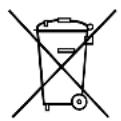
If you wish to finally dispose of the product, ask your local recycling centre or specialist dealer for details about how to do this in accordance with the applicable disposal regulations.
12 Technical data
| MWO 240 | |
| Ref. no.: 9600008377 | |
| Rated voltage: | 230 V---, 50 Hz |
| Microwave power: 700 W | |
| Microwave frequency: 2450 MHz | |
| External dimensions H x W x D: 283 x 451 x 353 mm | |
| Internal dimensions H x W x D: 181.5 x 303 x 321 mm | |
| Capacity: | 17 |
| Weight: | 11.5 |
5 Description technique
6.3 Configurar as horas
dometic.com/sales-offices
- EN Microwave Oven
- DE Mikrowelle
- Table of contents
- Explanation of symbols
- WARNING!
- CAUTION!
- NOTICE!
- NOTE
- Safety instructions
- S c o p e o f d
- Intended use
- Technical description
- Connecting and setting the microwave
- Setting up the microwave
- Connecting the microwave oven to the power supply
- Setting the time
- Operating the microwave oven
- Information on cooking food
- Information about cookware
- Cooking
- WARNING! Risk of burns from heated food!
- Opening the door during cooking
- Heating liquids (EXPRESS operating mode)
- Defrosting (DEFROST operating mode)
- Heating specific dishes (COOK operating mode)
- Setting the multi-stage cooking program
- Programming the timer
- Locking the buttons
- Cleaning and care
- Troubleshooting
- Fault Solution
- Warranty
- Disposal
- Technical data
- Description technique
- Configurar as horas
Brand : DOMETIC
Model : MWO 240
Category : Microwave Oven