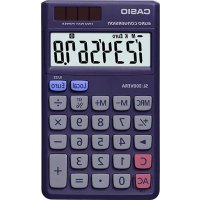
SL300VERA - Calculator CASIO - Free user manual and instructions
Find the device manual for free SL300VERA CASIO in PDF.


| Product Type | Desktop Calculator |
| Brand | Casio |
| Model | SL-300VER |
| Dimensions (H × W × D) | 7.5 × 70 × 118.5 mm |
| Power Supply | Dual source: solar cell and LR54 (LR1130) button battery |
| Battery Life | Approx. 3 years (1 hour of operation per day) |
| Operating Temperature | 0°C to 40°C |
| Display Capacity | 7 significant digits |
| Main Functions | Arithmetic calculations, Euro/currency conversion, constant calculations, independent memory, error correction, automatic power off |
| Memory | Independent with M indicator |
| Indicators | Negative value, error (E), constant (K), local currency, Euro, operations |
| Automatic Power Off | After approx. 6 minutes of inactivity |
| Maintenance | Clean with a soft, dry cloth |
| Precautions | Do not disassemble, avoid shocks, keep battery out of reach of children |
| Replacement Battery | LR54 (LR1130) button battery |
| Compliance | Regulation (EC) No. 1103/97 (Euro conversion) |
| Included Accessories | Instruction manual |
Frequently Asked Questions - SL300VERA CASIO
User questions about SL300VERA CASIO
0 question about this device. Answer the ones you know or ask your own.
Ask a new question about this device
Download the instructions for your Calculator in PDF format for free! Find your manual SL300VERA - CASIO and take your electronic device back in hand. On this page are published all the documents necessary for the use of your device. SL300VERA by CASIO.
USER MANUAL SL300VERA CASIO
- Please keep your manual and all information handy for future reference.
- The switches and keys available on your calculator depend on its model number. Be sure to check the calculator itself to see if explanations in this User's Guide apply to your calculator model.

01GY938_EU15_E_0712.p6505.7.12,1.00PM1


1/General Guide
■About the Display
- : Negative value indicator
M:Independent memory indicator
E:Error indicator
K: Constant calculation indicator
Euro :Euro currency indicator
Local : Local currency indicator
RATE : Conversion rate indicator
+ -x:Arithmetic operation indicators
2/ Correcting Input Errors
To completely clear a value you have just input, press (C) (or (C) (HL-820VER)).
If you press the wrong arithmetic operation key (☑, ☐, ☑, ☳), simply press the correct
key before inputting anything else.
Clearing Calculations
To clear the calculator except for the independent memory, press AC (or SW) twice
HL-820VER)
- T o clear the independent memory only, press twice.
-2-



■Error Indicator
If the error indicator "E" appears on the display, press (or [H-820VER]) to clear the error and continue with the calculation, or (or twice [H-820VER]) to clear the entire calculation.
3/Power Supply
HL-820VER
Battery Replacement
Replace the battery when the display darkens. After replacement, press and confirm that "0" appears on the display.
- Load battery so that: and ends are facing correctly.
- Keep battery away from small children. If swallowed consult with your physician immediately.
A dead battery can leak and damage the calculator it left in the battery compartment for long periods. - The battery that comes with this unit discharges slightly during shipment and storage.
- Because of this, it may require replacement sooner than the normal expected battery life.
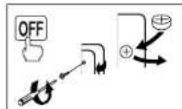



HS-8VER/MS-8VER/MS-80VER/SL-100VER/SL-160VER/ SL-300VER/SL-790VER
The Two-Way Power System of this calculator uses a solar cell, in addition to one LR54 (LR1130) button type battery. Unlike calculators equipped with a solar cell only, you can use this calculator under virtually any lighting conditions, as long as there is enough light for you to read the display.
Battery Replacement
Do not try to replace the battery yourself. Have it replaced by an authorized CASIO dealer or service center.
If the display becomes dim and difficult to read, or if nothing appears on the display when you press (especially when lightning is dim), you probably need to have the battery replaced.
- A dead battery can leak and damage the calculator if left in the battery compartment for long periods.
- The battery that comes with this unit discharges slightly during shipment and storage. Because of this, it may require replacement sooner than the normal expected battery life.
-4-
01GY938_EU15_E_0712.p65 05.7.12,1.01PM4


Auto Power Off Function
This calculator switches power off automatically about six minutes after the last key operation
is performed. To restore power, press AG (or GAG)
- When you press Ac (or Cg (HL-820VER)), the independent memory contents are not
cleared.
4/ Important Precautions
A void dropping the calculator and otherwise subjecting it to severe impact.
- Never try to take the calculator apart.
Wipe the unit with a soft, dry cloth to clean it.
The contents of these instructions are subject to change without notice
CASIO COMPUTER CO., LTD. assumes no responsibility for any loss or claims by third
parties which may arise from the use of this product.
-5-
01G938_EU15_E_0712.p8505.7.12,1.01PM5


5/ Specifications
Power Supply:
HL-820VER:One LR54 (LR1130) button type battery
HS-8VERMS-8VERMS-80VER/SL-100VER/SL-160VER/SL-300VER/SL-790VER
Two-Way Power System, with solar cell and one button type battery (LR64 (LR1130))
Battery Life
HL-820VER:Approximately 7,000 hours continuous operation
HS-8VER/MS-8VER/MS-80VER/SL-100VER/SL-160VER/SL-300VER/SL-790VER
Approximately 3 years (1 hour operation per day)
Operating Temperature: 0 C to 40°C (32°F to 104 F)
Imensions
HL-820VER/HS-8VER
Folded: 10 (H) × 62.5 (W) × 104 (D) mm (3/8" H × 2/15" W × 4/16" D)
Unfolded: 7.5 (H) × 127 (W) × 104 (D) mm (°/e" H × 5" W × 4" e" D)
MS-8VER: 31.7 (H) × 103 (W) × 145 (D) mm (1 ^1 /4 ^1 H × 4 ^1 /16 ^1 W × 5 ^1 /15 ^1 D)
MS-30VER: 30.7 (H) × 103 (W) × 145 (D) mm (1³/16 H × 4¹/16 W × 5¹/16* D)
SL-100VER
Folded: 13.5 (H) × 91 (W) × 55 (D) mm (8/8"H × 38/18"W × 21/8" D)
Unfolded: 9.4 (H) × 91 (W) × 110.5 (D) mm (3/8 H × 3/8 W × 4/8 D)



SL-160VER:
Folded: 10 (H) × 87 (W) × 58 (D) mm (3/8 H × 3/7 / 16 W × 2/4 / 16 D)
Unfolded: 8 (H) × 87 (W) × 117.5 (D) mm (°/16 H × 3/16 W × 4/16 D)
SL-300VER.7.5[H]x70(W)x118.5(D)mm(Hx24Wx41)D
Weight:
HL-820VER/HS-8VER: Approximately 45 g (1.6 oz) (including the battery)
MS-8VER:Approximately 100 g (3.5 oz) (including the battery)
MS-80VER:Approximately 120 g (4.2 oz) (including the battery
SL-100VER:Approximately 55 g (1.9 pz) (including the battery)
SL-160VER:Approximately 35 g (1.2 oz) (including the battery)
SL-300VER:Approximately 50 g (1.8 oz) (including the battery)
SL-790VER:Approximately 40 g (1.4 oz) (including the battery).
6/Euro Currency Conversion
- Pressing (or twice (HL-820VER)) to clear the calculation memory does not clear
the conversion rate setting


01Gy938_EU15_E_0712.p5505.7.12,1.01PM7


Setting a Conversion Rate
Example: To set the conversion rate for your local currency as 1 euro = 1.95583 DM (Deutsche marks).
- Press [or twice (HL-820VER)].
- Hold down for about two seconds and the currently set rate appears on the di
- Input the conversion rate (1.95583) and then press W to store it in memory. 1.95
a For rates of 1 or greater, you can input up to six digits. For rates less than 1 you can input up to 8 digits, including 0 for the integer digit and leading zeros (though only six significant digits, counted from the left and starting with the first non-zero digit, can be specified). Examples: 0.123456, 0.0123456, 0.0012345 - You can check the currently set rate at any time by pressing (or twice (HL-820VER)) and then
- The rate is retained in memory even when calculator power is turned off by pressing (H)-820VER) or by operation of Auto Power Off.
-8-

01GY938_EU15_E_0712_p6505.7.12,1.01PM8


Espanol
1/ Guía general 10
2/ Corrección de errors de ingreso. 10
3/Alimentacion 11
4/Precauaciones Importantes. 13
5/ Especialidades 14
6/ Conversion de divisa europea (Euro) 15
7/ Caleculos de exemple 121
8/ Eloquent de conversion de divisor 137
jIMPORTANTE!
HL-820VER/HS-8VER:Environ 45 g (pile comprise)
MS-8VER:Environ 100 g (pile comprise)
MS-BOVER:Environ 120 g (pile comprise)


SL-70
Conversion en Eurodevise
Apera: 8 (A) × 87 (L) × 117.6 (P) mm
SL-300VER75(A)×70(L)×118.5(P)mm
SL-790VER:7,8(A)×68(L)×98(P)mm
P950:
HL-820YEBHS-BYER Circa 45g (compressa la pilia)
MS-RYER: Cima 100 g (compresaa la pila)
MS-BCYEB: Cigar 120 n (cnpnccsla pila)
SL-100VER: Circa 55 g (compresa la pila)
SL-160VER: Circa 35 g (compresa la pila)
SL-300VEH: Circa 50 g (compresa la pila).
SL-790VER: Circa 40 g (compresa la pila)
6/Conversionedella valuta euro
Bruksterperature: 0^ t40°C
SL-300VER7,5(H)×70(B)×118,5(L)mm
SL-790VER:7,8(H)×68(B)×98(L) mm
Gewicht:
HL-820VER/HS-8VER: Ca. 45 g (inclusief de battenj)
SL-300VER75(H)×70(B)×118.5(D)mm
SL-790VER:7,8(H)×68(B)×98(D) mm
Yang:
HL-820VER/HS-BVER:Omkring 45g (inklusive baller)
MS-PYER: Omkring 100 g (inklusive battery)
MS-80VER: Omkring 120 g (inklusive battery)


6/Euro-valuta omregning
Indrykning at A (eiffer to gange (HL-520VER) for at stete udregnings-hukommelisen
vilijke slette indstillingen at omregningskursen.
-79-

10GY938_EU15_Dc.0712.p65057.12,1.06PM79


Exempler:0.123456,0.0123456,0.0012345
Defet um gelit then villver fidi at bekrafte den vaige kurs ved at fryke pa ac (eifer to gange (HL-820VER) afterfulgel of 1
Kursen biehobels h i kuhmelsen, selv his vris der slukkes for lommergerees ved at man tryker pa [HL-820VER] ell via den autismeis kluuksekfektum.
-80-

10GY938_EU15_Dc.0712.p65057.12,1.06PM80


Portugués
Sumário
Exemplice:0.123456,0.0123456.0.0012345
Wipakatop BcMnHcNcHcTnHcH
Euro HAnKaTOp eBpO
Local Hdkkataop MeChHsBanotbl
RATE Wukatop oohmnhrc kpc
- -x= WqdkatoppaWppeMeRckRx

2/1ncpabJe
- Dn nonHoro yanaeHN BBepeHHOr 3HaueHN HaxaTb HaKnabNv [C] (m)
B20VEB1
B. CRYJAE OHKOHNHOHAXAHTNHE HA TV KNAHBHY APNDYNETNEQDPDRECTBNI
区,F1DOCTAToHOpeE BEOOM 3HaeHHH HAXaTH HA HYKHNO KNAUYU.
YdaeneHHe BbIHCJIeHH
- Dn ydaenHnB C6ex 3HaOHn KPOMe cOeOpKIMrO HeJaCNMn NAMrN HaKaTb Ha
Knabnuy (nnna da paa ha (HL-820VER)) - ydaneHH TcBKO codePKMOT He3ABYCMH NAMRTn Daa P3a HAKATb HkNABWy


HdkaTop ow6kn
B Cnyuah nonenbneHH na cunnene uHnkndatopa OHbHK e HxNkath aJn cnpoc aOHbHK h KnaBHAYU C (mH 100 HL-820VER) HcnpOaXHTbHbKHe, a Jn pRybnEHH Bcero BuHcMKH - HA cHbAHUYC [mN]baPaa HsO (HL-820VER).
3/Питаннe
HL-820VER
3aMeHa 6aTapeu
3AEMHsBtBnepo npntmEHnHnJpncn. Pnne 3AEMHb HxabHb KAnBnHbU 10yDgTbC, TTO Hcnnnne nnoaHnBnHnBnHnBnBnBnBnBnBnBnBnBnBnBnBnBnBnBnBnBnBnBnBnBnBnBnBnBnBnBnBnBnBnBnBnBnBnBnBnBnBnBnBnBnBnBnBnBnBnBnBnBnBn
BCTAIVbTaPeOxT,YTObEeNPOKIXTeHnH H CTPhuATeHnH CTOPOHbEyOpENHTPOBaHbI pINHOH
XpHbHTBCTABEPBOHEOCTBOMM DAN MABHNOB TETB NECTE. ENEPB60BcCNYAHHIO pONOTAN BATEPBO, HEMEHNHBOOCHPTBTOK K 508VY
ESTHNOINHOCTBOPAKHTAETABPOHAROIOEPOBEOEPOBECTABMTOBDEHEYNIMDIA BPTABE, OAOXMTOPNEPHYN BIOBATEBPOCPODEKHNKALIUPYTORA.
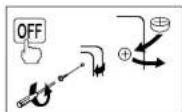



NCTAHHHBMKOMNGE6BATAPOR3aepnTpaHNOPTPOOKNXHPANHNNHECKONbKO BPAKAKOTB.8C03N C3M,MOKOTNpEOOBATcB 8EMHOHHEKTOPOE6PPOAO DIO HNTCHHNOXKDMATOCPKAcBeyCJyCkF
HS-8VER/MS-8VER/MS-80VER/SL-100VER/SL-160VER/ SL-300VER/SL-790VER
B CROCTE BOOHOHANNAKKYTNOPA BONONHENHE KCONHNNHYEMNHTY NPOHNHETON OPHB batapen TWA LR54 (LR1130);B OTNIHNT OKAUYTNOPOB. PABOTAOX TNOHO HCNHOHNOM ENMEHTA, HACTONJANKKYTNOPMOXN NOCTOBATPRAKTIKHNOPIIIOIOOCCBEHIN, ECLN DCTATOHO CHETNO, YTOBO CINTHIBATNOKAAHARADNNE.
3aMeHa 6aTapei
HeNtATeBc. camaTaeHbATEpae. JnTo 0oOpalBaIeR K yOhoHOMHOHHOMTO TOpOBMOPOPeHNOH-CASIO-UmBgUPTOcOyEBAHNN
4/BaxKhble MepbI npEoctOpoxHOctn
HepohatbKaibkyarTop HnKaKHMdpa3oHnopeprato 0nB
yapam.
He natae bpaabpaKa bnkyntnp.
Ia aae KAAKANBNTNPAAETPRAE 1
C DEPREHHEVHTKYNMOKWOTBYSMHHOO03
ΦHnusCASIOCOMPUTERCO,LTD.>HEHOEOTCBETBENHOCTHNIHKKOKO BHAHNEHPINHHMEHTHKKKOPOA pTeTbEH CTpTeBH CTOCNH CUNONJ30BAHHEAHDHOHVDJIYMA
-93
12GY836EU15R0712p6505.7.123.11PMG


5/TexHnueckx xapaKtepuctkN
NTAHNE
HL-820VER 1 Satapen KhoHNO THA TINLSR54 (LR1130) HS-BVER,MS-BVER,MS-80VER,SL-100VER,SL-160VER,SL-300VER,SL-790VER: cactena Deao HIO TnTANK KauKnyTAPORA C coHHeHmE hENHOTN HcHJHO BATAPER LR54 (LR1130) KOHOHNHO THA
Cpok cnjx6b6aTapen
HL-820VER npnepno7 Tlcacn HneppebHOB paOoTH
HS-8VER,MS-8VER,MS-80VER,SL-100VER,SL-160VER,SL-300VER,SL-790VER: npnpnepHO 3 rOa [npu cyonpaBaoT 1 vae BnE]
PbOan Temnepatyp0-40C
Paaepb
HL-820VER, HS-SVER BpackbTOMBm10 - 10(τ)×62.5(μ)×104(μ)MM 3aakprrnBm0 - 7.5(τ)×127(μ)×104(μ)MM
MS-8VER 31.7(i) × 103(u) × 145(u)MM MS-80VER 30.7(r) × 103(u) × 145(u) MM
SL-100VER backpontm 13.5(1)×91(u)×85(u)mm a 3kaypont mBnE -9.4(1)×(u)×110.5(u) mm
-94-
12GY958_EU15_R0712.p65 05.7.12.3.11PM54


SL-160VER bpackpTOM u#e - 10 (r) x87 (u) x58 (a) MM
3aekpHOMBnE-8(r)×87(u)×117.5(d)MM
SL-100VER: Szlozeno: 13.5 (N) × 91 (S) × 55 (D) mm Rozlozeno: 9.4 (N) × 81 (S) × 115.5 (D) mm
-110-


SL-160VER: Siozeno: 10 (V) x 87 (S) x 58 (D) mm
Pozlozene:8Mx87Sx117.5Dmm
SL-300VER:7.5(M×70(€)×118.5(D) mm
SL-790VER:7,8(M)×68(S)×95(D)mm
Hmolhost:
HL-620VER/HS-8VER: pniblzne 45 g (vctne baterie)
MS-8VER: pblizne 100 g (vctne baterie)
MS-80VER: priblne 120 g (vctne bate
SL-100VER: pbl2ne 55 g (wefne baterie)
SL-160VER: priblizne 35 g (wetne baterie)
SL-300VER: priblizne 50 g (votne baterie)
SL-790VER: prblizne 40 g (voetne baterie)
6/PrevodmenyEuro
Stiknutl klyesy AC nebo dyakrat pG (IL-820VEF) pro wzmani pamet ypoctu
nevyma nastaveni plevodovho pomereu.
-111-

14GY938_EU15_Oz_0712_p65_05.7.12,3:12 PM111


Nastaveni prevedovho pomeru
Pfiklad: Nastaveni pravodovno pro pamu pro Vasi mislimi naju kjo 1 Euro - 1,95583 DM (Deutsche mark)
-
Sliiskneta (nebo dvalkrat [HL-620VER]).
-
Podrţe ulistniţu [W] po doobov dovu sekund a na dispielje se objevi stavajci nastaveni prevedovodho pamur.
-
Viziode prudovodny pomer (1,95583) a potel stakite (27) pro jeho ulozheni do pameti.
-
Pro kuryz vétītān ne 1 zse vloztār ās mǐsté dīsī. Pro kuryz menēn ne 1 zse vloztār ās mǐsté dīsī vóteḥ nǐ integrovecu nul yā nα zacěkū (lze všsk spečikfolov pouze 6 platěch mīst, podčitano zieva a podášne prvnī nenuhovym dīaěm).
Priklad:0.123456,0.0123456,0.0012345
Nastavemy kurz kekyko zinkrolovst stikem (nebo dvrk/ (IL-820VER) a pote
Kurz je uchovn v pemst, i kdyj de kalkulator yvuput stskunit (HL-820VER) nebo pomfni fucne automatichko yvupnil.
-112-

14GY98 EU15 Cz0712p65 05.7.12,3:13PM112


Polski
Spis Tresci
Input the number you want to use as a constant, and then press one of the arithmetic keys twice. This causes the "K" indicator to appear on the display, indicating constant calculations.
Cáculos con constantes
Adds the displayed value to independent memory.
Subtracts the displayed value from independent memory.
Recalls and clears independent memory
| FRF | |
| € 1.00 = | 6.55957 |
| € → FRF | 15.244.90 → 99.895.99 |
| FRF → € | 655.957.00 → 100.000.00 |

-141-

03_GY936_EU15_Ex_0712p85D5.7.12,3.15PM141


MEMO


03.GY936.EU15.Ex.0712p8505.7.12,4.22PM142


MEMO


03.GY936.EU15.Ex.0712p8505.7.12,4:22PM143


MEMO


03.GY936.EU15.Ex.0712p8505.7.12,4.22PM144
- 1/General Guide
- ■About the Display
- 2/ Correcting Input Errors
- Clearing Calculations
- ■Error Indicator
- 3/Power Supply
- HL-820VER
- Battery Replacement
- HS-8VER/MS-8VER/MS-80VER/SL-100VER/SL-160VER/ SL-300VER/SL-790VER
- Auto Power Off Function
- 4/ Important Precautions
- 5/ Specifications
- Weight:
- 6/Euro Currency Conversion
- Setting a Conversion Rate
- Espanol
- jIMPORTANTE!
- Conversion en Eurodevise
- 6/Conversionedella valuta euro
- 6/Euro-valuta omregning
- Portugués
- Sumário
- 2/1ncpabJe
- YdaeneHHe BbIHCJIeHH
- HdkaTop ow6kn
- 3/Питаннe
- 3aMeHa 6aTapeu
- 3aMeHa 6aTapei
- 4/BaxKhble MepbI npEoctOpoxHOctn
- 5/TexHnueckx xapaKtepuctkN
- Hmolhost:
- 6/PrevodmenyEuro
- Nastaveni prevedovho pomeru
- Polski
- Spis Tresci
- Cáculos con constantes
Brand : CASIO
Model : SL300VERA
Category : Calculator