Sonnet Duo - Headphones ProXtend - Free user manual and instructions
Find the device manual for free Sonnet Duo ProXtend in PDF.


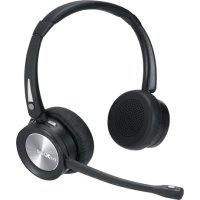
| Product Type | Bluetooth headset with charging station |
| Brand | ProXtend |
| Model | Sonnet Duo |
| Headset Weight | 95 g |
| Charging Station Weight | 115 g |
| Battery Type | Lithium-ion polymer, 320 mAh |
| Charging Voltage | 5 V DC (Micro USB) |
| Charging Time | 2 hours |
| Talk Time | 20 hours |
| Standby Time | 200 hours |
| Bluetooth Range | Up to 30 meters |
| Bluetooth Version | CSR V5.0, dual mode |
| Supported Protocols | A2DP, AVRCP, HFP, AAC |
| Frequency Response | 20 Hz - 20 kHz (Hi-fi) |
| Total Harmonic Distortion | ≤ 1% |
| Microphone | Directional noise-canceling microphone with DSP |
| Main Functions | Simultaneous pairing with 2 devices, music and call controls, microphone mute, charging station with speaker |
| Care and Cleaning | Clean with a soft, dry cloth. Avoid contact with water. Do not expose to extreme temperatures. |
| Safety Precautions | Do not listen at high volume to prevent hearing damage. Do not expose the battery to fire or water. Use a suitable charger (max 6.4 V). |
| Repairability | Built-in battery not replaceable by the user. No spare parts available. Contact after-sales service. |
| General Information | Manufacturer: Convena Distribution A/S, Industriholmen 51, 2650 Hvidovre, Denmark. Website: proxtend.com |
Frequently Asked Questions - Sonnet Duo ProXtend
User questions about Sonnet Duo ProXtend
0 question about this device. Answer the ones you know or ask your own.
Ask a new question about this device
Download the instructions for your Headphones in PDF format for free! Find your manual Sonnet Duo - ProXtend and take your electronic device back in hand. On this page are published all the documents necessary for the use of your device. Sonnet Duo by ProXtend.
USER MANUAL Sonnet Duo ProXtend
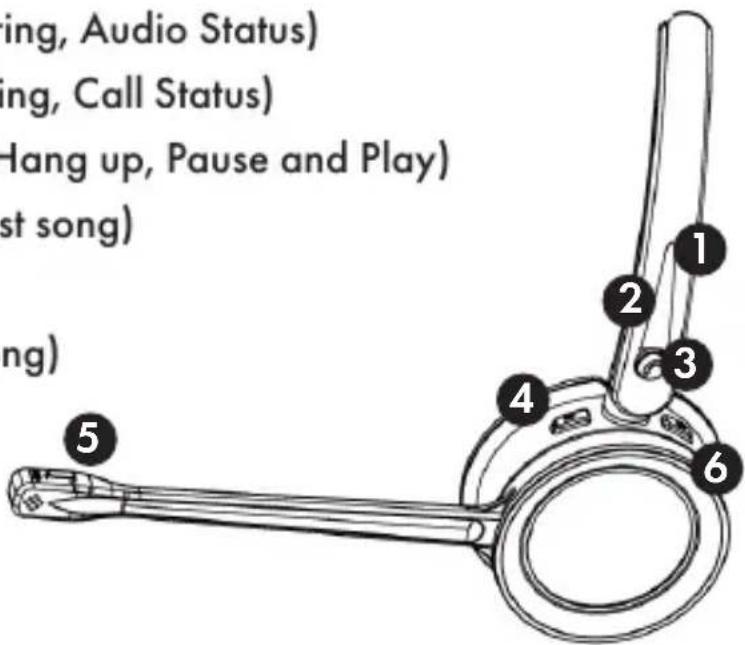
1: Blue LED Indicator (Battery, Pairing, Audio Status)
2: Red LED Indicator (Battery, Pairing, Call Status)
3: Multi-Function Button (Answer, Hang up, Pause and Play)
4: Minus Button (Volume down, Last song)
5: Microphone Mute Button
6: Plus Button (Volume up, Next song)
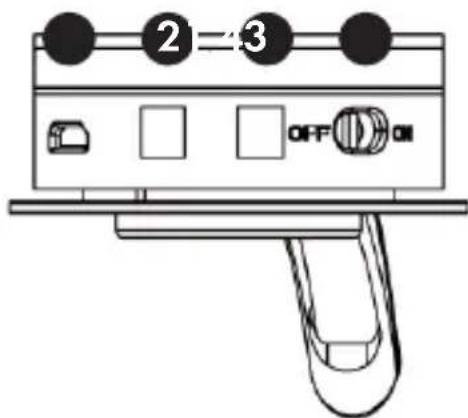
1: MicroUSB Charging
2: Gold-Plated Charging Dome
3: Gold-Plated Charging Dome
4: On/Off Button
ENGLISH
Button Functions
| Button Function Action | ||
| On/Off Button H | Headset on Slide switch to "ON" | |
| Headset off Slide switch to "OFF" | ||
| Plus Button Volume | up Tap to increase speaker volume | |
| Next song Long press to switch to next song when playing music | ||
| Mic Mute Mic mute | Activates mic mute during a call. You will hear a "toot" every 3 seconds while mute. Repress mute button to cancel mic mute | |
| Minus Button Volume | down Tap to decrease speaker volume | |
| Last song Long press to switch to last song when playing music | ||
| Multi-function Button | Pause Tap the multi-function button playing music | |
| Answer/end call | Tap the multi-function button | |
| Reject call | Long press the multi-function button for 2 seconds | |
ENGLISH
Promt Tone Introduction
| Headset Tone | |
| Power On Power On | |
| Power Off Power Off | |
| Pairing successful Connected | |
| Volume up/down "toot" | |
| Battery low "toot" every 5 seconds | |
| Mic Mute "toot" every 5 seconds | |
Headset LED Indicators
| Headset | LED status |
| Pairing Mode Light flashes blue and red | |
| Pairing successful Light flashes blue every 5 seconds | |
| Battery Low Light flashes red rapidly | |
| Charging Mode Red light continuously on | |
| Fully Charged Blue light continuously on | |
| Audio Status Blue light "breathing", red light off | |
| Call (Busy) Status Red light "breathing", blue light off | |
Pairing with Bluetooth Device
-
Activate the Bluetooth function on your smart phone, laptop or desk phone.
-
Turn your headset on. You will hear prompt tone "power on". The LED indicator flashes red and blue alternately, indicating headset is now in pairing mode.
-
If pairing fails, the headset will power off automatically after indicator flashes 5 mins, with prompt tone "power off".
-
Pair headset to your smart phone, laptop or desk phone.
a) Search Bluetooth device on your smartphone, laptop or desk phone.
b) Open "Bluetooth" menu and press "discover" or "add" to search "ProXtend Sonnet".
c) When "ProXtend S onnet" shows on your Bluetooth devices list, click to start pairing. Prompt tone "connected" is heard when pairing is successful, and the LED indicator will flash blue every 5 seconds.
d) When powered on, the headset will automatically connect to the most recent devices in memory.
Functions
1. Pair with 2 devices simultaneously
ProXtend sonnet can pair with 2 devices simultaneously.
a) Connect the first device with "ProXtend Sonnet".
b) Turn off the Bluetooth function of the first device.
c) Connect the second device with "ProXtend Sonnet".
d) Turn on Bluetooth on first device. Now "ProXtend Sonnet" is paired to both devices.
2. Redial function
Quick press the multi-function button twice to redial the last call.
3. One-touch play function
Press the multi-function button once, the default music player of the mobile phone will play automatically (some mobile phones cannot implement this function).
4. Automatic re-connection function
Bluetooth connection can be automatically re-connected even if disconnected within 5 minutes in the effective distance. If reconnect fails, please turn off the headset and turn it on again to reconnect.
5. Mic mute function
Press the Mute button to activate mic mute during a call, repress the mute button to cancel mic mute. The tone "toot" will be heard every 3 seconds during mic mute status.
ENGLISH
Charging Base with Bluetooth Dongle
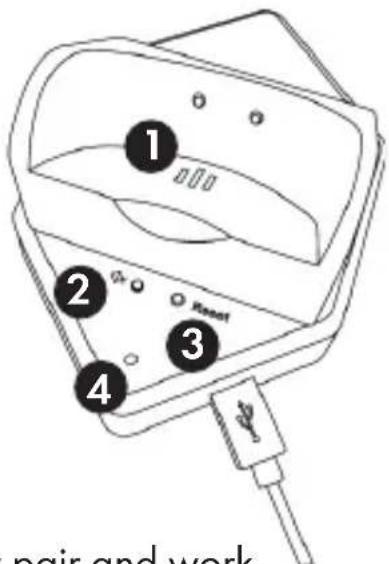
1: Outer ringer speaker holes
2: Switch Button for outer ringer
3: Reset button
4: Status indicator
Pairing Headset and Charging Base
The Bluetooth headset and charging base will automatically pair and work immediately once the charging base is connected to the PCs USB port.
- Connect the USB cable to PC.
- Turn on Bluetooth headset. The LED indicator on base will flash red and blue alternately, which indicates the adapter is in pairing mode.
- When pairing is successful, you will hear prompt tone "connected".
Status Indicator
| Adapter in pairing mode LED indicator on | base flashes red and blue |
| Pairing is successful Blue light is continuously on | |
| The adapter has already been paired with the bluetooth device | Purple LED indicator continuously on |
| Outer ringer has been turned off Red LED | indicator continuously on |
Switch Button for Outer Ringer
The ringtone on base is on by default, and it will ring when calls come in. Press this button once to turn off the ringtone.
Reset Button
Press the reset button for 3 seconds to restart pairing mode, the LED indicator flashes red and blue when pairing.
Cautions
- Most mobile phones indicates headset power on the screen display. When headset battery is low, the headset will beep once in 5 minutes and the indicator will turn red. Please charge it in time.
- Overcharging will shorten battery life.
- Please keep the headset battery safe. Do not put the battery or the headset into fire or water to avoid explosion.
- Always listen at a moderate volume level.
- Don't charge with high voltage device, it may cause damage to the headset.
- If unused for a long time make sure headset is fully charged before using it.
- Lifetime of the battery will be significantly reduced if your device is left uncharged for a long time. We therefore recommend that you recharge your device at least once a year.
- The input voltage of adapter may not be exceed 6.4V when charging.
Sonnet Features Sonnet \$pecifications
- Up to 30m Transmission Distance
- Charging Base with Integrated Bluetooth and Speaker
• 20 hours Talk Time
• 2 hours Charge Time - Noise Cancelling Microphone
• Dual Device Connection -
Light Weight Design
• Comfortable and Replaceable Ear Cushions -
Pairing Name: "ProXtend Sonnet" or "ProXtend Sonnet Duo"
- Bluetooth Specification: CSR-V5.0, dual mode, downward compatible
• Frequency Range: 2.4GHz - 2.480GHz
• Support Protocols: A2DP, AVRCP, HFP, AAC, etc. - Two Bluetooth devices can be connected at the same time
• Transmission Distance: up to 30 meters (depends on environment and Bluetooth device)
• Maximum Talk Time: 20 hours
• Standby Time: 200 hours
• Working Temperature: 0°C to 45°C
Speaker:
• Frequency: 20Hz - 20KHz, Hi-fi
• Distortion: ≤ 1%
Sound Channel: Binaural: Stereo / Monaural: Mono
Microphone:
• Directional noise reduction microphone
• Acoustic Noise Canceling Structure
• Crystal clear sound and voice (DSP)
Headset Battery:
• Type: Lithium-ion polymer
• Battery Capacity: 320mAh
• Charging Voltage: 5V DC
• Life Time: Minimum recharging 1000 times
- Operating Temperature: -10^ to +60^
• Charging Time: 2 hours
• Charging Interface: Micro USB
Charging Base: Net Weight: 115 g
Headset Net Weight: Sonnet: 70g / Sonnet Duo: 95g
proxtend.com
ENGLISH