
DOCK3X4KUSBC - Computer accessory ProXtend - Free user manual and instructions
Find the device manual for free DOCK3X4KUSBC ProXtend in PDF.


| Product Type | USB-C Triple 4K Docking Station |
| Brand | ProXtend |
| Model | DOCK3X4KUSBC |
| Upstream Port | USB3.2 Gen 1 Type-C (to computer) |
| Downstream Ports | 5x USB3.2 Gen 1 Type-A (1 front with fast charging), 1x USB3.2 Gen 1 Type-C |
| Video Outputs | 2x DisplayPort (4096x2160@60Hz), 1x HDMI (3840x2160@30Hz) |
| Ethernet | Gigabit RJ45 |
| Audio | 2.1 channel via headphone and microphone jacks |
| Power Adapter | 20V/6.75A, 135W; PD charging up to 60W for laptop |
| Supported Operating Systems | Windows 10, Mac OS |
| Compliance | CE, FCC Class B |
| Housing Material | PC+ABS, Black |
| Operating Temperature | 0°C to 40°C |
| Storage Temperature | -20°C to 70°C |
| Included Cable | USB-C cable, 100 cm |
| Package Contents | Dock, USB-C cable, power adapter |
| Driver Installation | Download from DisplayLink website |
| Special Features | Triple 4K display, 5K support with two DP, fast charging on front USB-A |
| Maintenance | Clean with a dry cloth. Avoid humidity and extreme temperatures. |
| Safety | Read user manual before use. Keep away from moisture. Unplug during storms. |
Frequently Asked Questions - DOCK3X4KUSBC ProXtend
User questions about DOCK3X4KUSBC ProXtend
0 question about this device. Answer the ones you know or ask your own.
Ask a new question about this device
Download the instructions for your Computer accessory in PDF format for free! Find your manual DOCK3X4KUSBC - ProXtend and take your electronic device back in hand. On this page are published all the documents necessary for the use of your device. DOCK3X4KUSBC by ProXtend.
USER MANUAL DOCK3X4KUSBC ProXtend
natural_image
Front view of a gray electronic device with ports and buttons, labeled 'Manual' at bottom left (no other text or symbols visible)User Manual
ProXtend
Safety Instructions
Always read the safety instructions carefully
- Keep this User Manual for future reference
- Keep this equipment away from humidity
- In any of the following situations, get the equipment checked by a service technician:
- The equipment has been exposed to moisture.
- The equipment has been dropped and damaged.
- The equipment has obvious sign of breakage.
- The equipment has not been working well or cannot get it to work according to the User Manual.
Copyright
This document contains proprietary information protected by copyright. All rights are reserved. No part of this manual may be reproduced by any mechanical, electronic or other means, in any form, without prior written permission of the manufacturer.
Trademarks
All trademarks and registered trademarks are the property of their respective owners or companies.
Introduction
Before attempting to connect, operate or adjust this product, please read the User Manual.
The USB-C Triple 4K Dock is designed for extra connectivity demands. With the USB-C Docking station, you can extend the connection of a computer to more USB peripherals, Ethernet network, speaker and microphone via the USB-C interface.
Adopting PD Charging technology, upstream charging function through USB-C interface, you can charge the docking station. With the built-in USB3.2 Gen 1 ports, the docking station enables you to enjoy the super speed data transmission between USB peripherals.
The docking station is equipped with three display video outputs. With triple Ultra HD display simultaneously, the docking station allows you to split up the content to triple display devices.
Features Package Contents
- Enabling Triple 4K display extension
- Upstream port
USB3.2 Gen 1 Type-C port x1
- Downstream port
USB3.2 Gen 1 Type-A ports (5V/0.9A) x4
USB3.2 Gen 1 Type-A port (Fast Charging) x1
USB3.2 Gen 1 Type-C port x1
• Supports audio 2.1 channel
• Supports Gigabit Ethernet
• Supports DisplayPort (4096 x 2160@60Hz)
• Supports 5K (connect to 2 DP displays simultaneously)
• Supports HDMI (3840x2160@30Hz)
• Supports PD Charging (for NB)
20/15/12/9/5V@3A, up to 60W
• USB-C Triple 4K Docking Station x1
• USB-C Cable (length: 100 cm) x1
• Power Adapter (20V/6.75A) x1
Supported Operating Systems:
Windows®10
Mac OS®10
Product Overview
FRONT

- Power button Switch to power on /off
- Power indicator LED shows blue when power on
- USB connection indicator LED shows green when USB is connected
- USB-C port Connect to USB-C device only
- USB3.2 Gen 1 port (Type-A) Connect to the USB3.2 Gen 1 device. This port supports fast charging
- Headphone jack Connect to a speaker or headphone
- Microphone jack Connect to a microphone
Product Overview
REAR
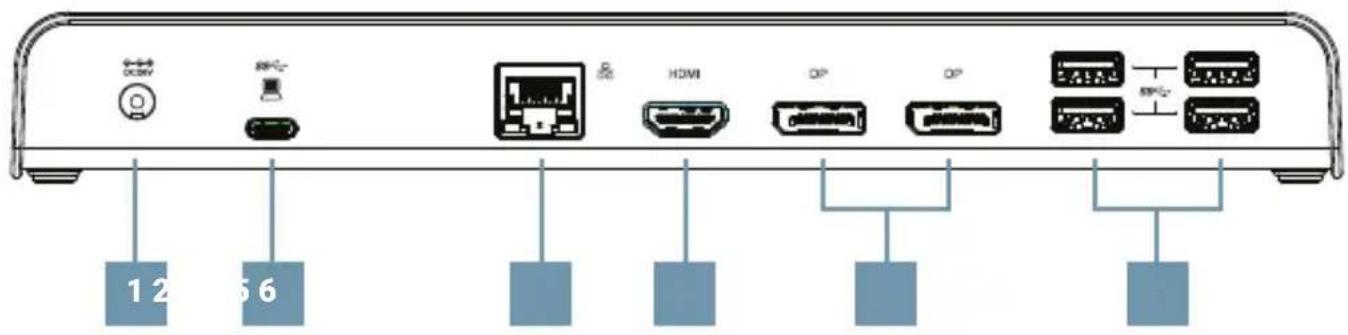
- Power jack Connect to power adapter
- USB-C port Connect to the USB-C port of a computer
- RJ45 port Connect to Ethernet
- HDMI connector Connect to HDMI monitor
- DP connector x 2 Connect to DP monitors
- USB3.2 Gen 1 port x 4 (Type-A) Connect to USB devices
Product Overview
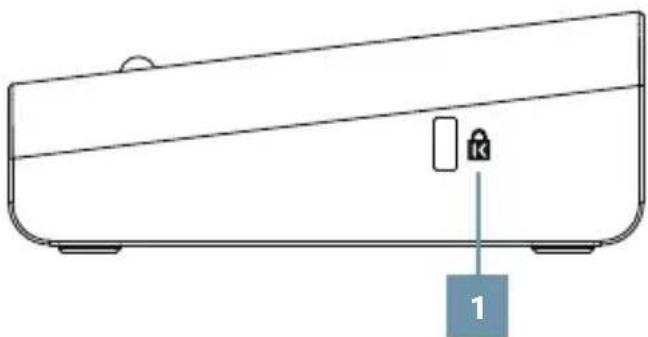
SIDE
- K-lock Keyed laptop lock
natural_image
Line drawing of a rectangular electronic device with a labeled component (no text or symbols on the device itself)Driver Installation
Go to https://www.displaylink.com/downloads
On the download page choose your operation system and select the correct driver.
Click on download and save the file to your computer.
With the docking station unplugged run the file to install the driver on your system.
Connect the Docking Station to your computer after the driver installation is completed. For connection details, refer to the Connection chapter.
Connection
To connect the USB peripherals, Ethernet, speaker and microphone, follow the illustrations below to connect the corresponding connectors.

ENGLISH
Specifications
| Connector Upstream US | B3.2 Gen 1 Type-C female connector x 1 | |
| Video Output DP connector x 2 | ||
| Downstream USB3.2 Gen 1 | Type-A female connector x 5(one front port supports fast charging) | |
| USB Type-C female connector | ||
| Power Power Mode Self-powered (Power adapter) | ||
| Video Display Mode Supported Extended Desktop (Default) | ||
| OS Supported Windows® 10 | ||
| Mac OS® | ||
| Physical Properties Housing PC+ABS (Plastic) | ||
| Color Black | ||
| Working Environment O | Operation Temperature 0°C - 40°C | |
| Storage Temperature | -20°C - 70°C | |
| Compliance | CE, FCC | |
FCC Conditions
Regulatory Compliance
This equipment has been tested and found to comply with Part 15 Class B of the FCC Rules. Operation is subject to the following two conditions: (1) This device may not cause harmful interference. (2) This device must accept any interference received and include interference that may cause undesired operation.
FCC Caution: Any changes or modifications not expressly approved by the party responsible for compliance could void the user's authority to operate this equipment.
CE
This equipment is in compliance with the requirements of the following regulations: EN 55 022: CLASS B
WEEE Information
For EU (European Union) member users: According to the WEEE (Waste electrical and electronic equipment) Directive, do not dispose of this product as household waste or commercial waste. Waste electrical and electronic equipment should be appropriately collected and recycled as required by practices established for your country.

Brand : ProXtend
Model : DOCK3X4KUSBC
Category : Computer accessory