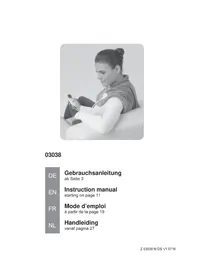
03038 - Heated blanket/cushion VitalMaxx - Free user manual and instructions
Find the device manual for free 03038 VitalMaxx in PDF.


| Product Type | Heating blanket/pad |
| Brand | VitalMaxx |
| Model | 03038 (HB57-5563M) |
| Intended Use | Heating the neck, shoulders and upper back for relaxation |
| Power Supply | 220-240 V ~ 50 Hz |
| Power | 100 W |
| Protection Class | II |
| Heat Levels | 6 levels (1-2 low, 3-4 medium, 5-6 high) |
| Auto Shut-off | After approximately 90 minutes |
| Material | 100% polyester |
| Care | Hand wash at max 30°C, do not machine wash, do not use fabric softener, air dry |
| Safety | Built-in overheat circuit breaker, do not use folded or wet, do not insert needles |
| Supplied Accessories | Heating pad, power cord, control unit |
| After-Sales Service | DS Produkte GmbH, Am Heisterbusch 1, 19258 Gallin, Germany, Tel. +49 38851 314650 |
| Warranty | Excludes normal wear, improper use and unauthorized repairs |
Frequently Asked Questions - 03038 VitalMaxx
User questions about 03038 VitalMaxx
0 question about this device. Answer the ones you know or ask your own.
Ask a new question about this device
Download the instructions for your Heated blanket/cushion in PDF format for free! Find your manual 03038 - VitalMaxx and take your electronic device back in hand. On this page are published all the documents necessary for the use of your device. 03038 by VitalMaxx.
USER MANUAL 03038 VitalMaxx
www.service-shopping.de
Safety Instructions 12
Items Supplied and Device Overview 15
Use 16
Care and Storage 17
Troubleshooting 18
Technical Data 18
Disposal 18
Explanation of Symbols

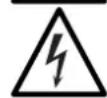

Safety instructions:
Please read these
carefully and comply with
them in order to prevent
personal injury and
damage to property.
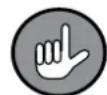
Supplementary
information
Read operating instruc
tions before use!
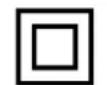
Protection class II
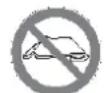
Do not use when folded
up or pushed together.
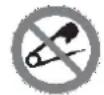
Do not pierce with
needles.
Dear Customer,
We are delighted that you have chosen this warming cushion.
Before using the device for the first time, please read the instructions through carefully and keep them for future reference. If the device is given to someone else, these instructions should also be handed over with it.
The manufacturer and importer do not accept any liability if the information in these instructions is not complied with.
If you have any questions about the device and about spare parts / accessories, contact the customer service department via our website:
www.service-shopping.de
Intended Use
- The device is intended to be used for warming your neck, shoulder and upper back region and is used for relaxation. It is not a replacement for medically required treatment.
- Never stand on the device.
- The device is for personal use only and is not intended for commercial applications.
- Use the device only as described in the instructions. Any other use is deemed to be improper.
- The following are excluded from the warranty: all defects caused by improper handling, damage or unauthorised attempts at repair. This also applies to normal wear and tear.
Safety Instructions
This device may be used by children aged 8 and over and by people with reduced physical, sensory or mental abilities or a lack of experience and / or knowledge if they are supervised or have received instruction on how to use the device safely and have understood the dangers resulting from failure to comply with the relevant safety precautions.
Children must not play with the device.
- Cleaning and user maintenance may not be performed by children, unless they are older than 8 years of age and are supervised.
Children younger than 8 years of age and animals must be kept away from the device and the connecting cable.
The warming cushion becomes hot during use. People who are insensitive to heat must not use the device.
Babies and sleeping or unconscious people may not be placed on the device.
- The device should only be used and stored out of the reach of children and animals. Improper use can lead to injuries and electric shock. The mains cable must also be kept out of the reach of children and animals.
- Do not use the warming cushion if it is still damp. The device must be completely dry before it may be switched back on again.
- Do not use the mains cable with a different device and never use the device with a different mains cable. Only ever use the mains cable which is supplied with this device.
The device must always be disconnected from the mains power before it is assembled, disassembled or cleaned.
- Do not insert any safety pins, drawing pins or other pointed objects into the device.
- Do not switch on the warming cushion when it is folded up.
The device has built-in overheating protection. Once it has been activated, the device needs to be checked by the manufacturer.
If the device, the connecting cable or the mains plug of the device is damaged, it must be replaced by the manufacturer or customer service department or a similarly qualified person (e.g. specialist workshop) in order to avoid any hazards.
Always allow the warming cushion to cool down sufficiently before you wash it, fold it up or store it away.
■ ATTENTION: Note the cleaning instructions in the "Care and Storage" chapter!

Dangers of Injury
- Keep children and animals away from the packaging film. There is a danger of suffocation!
Pregnant women should not use the device or use it only after consultation with their doctor.
People with a pacemaker may use the device only after consultation with their doctor.
Do not use the device on swelling or sore areas of skin.
Switch the device off immediately if you experience pain or feel unwell while using it.
If you have any health concerns, consult your doctor before using the device.
Make sure that the connected mains cable does not present a trip hazard.
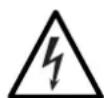
Danger of Electric Shock and Fire
- Always check the device and accessories for damage before putting them into operation. If the device, the control unit, the mains cable or plug shows visible signs of damage, the device must not be used.
Ensure that the mains cable and the control unit cannot fall into water or become wet. In addition, the warming cushion must not fall into water or become wet during use.
If liquid should enter the device during operation, remove the plug immediately. Have the device checked by a specialist workshop before putting it into operation again.
Use and store the device only in closed rooms. Do not operate it outdoors or in rooms with high humidity. - Do not use the device if highly flammable gases are present in the air. Never operate the device in the vicinity of a gas source.
EN 14
- To prevent overheating, do not use the warming cushion under a blanket or similar cover. Do not place the mains cable or the control unit on or under the warming cushion during operation.
- Do not place any combustible materials or materials that melt easily (such as cardboard, plastic, paper or candles) on the device.
Make sure that the mains cable is not squashed, bent or laid over sharp edges and does not come into contact with hot surfaces. - The plug should only be connected to a plug socket that has been properly installed. The socket must also be readily accessible after connection. The mains voltage must match the technical data for the device (see the "Technical Data" chapter).
Remove the plug from the plug socket in the event of a thunderstorm.
Always pull the plug and never the mains cable!
Avoiding Damage to Material, Property and the Device
In the event of damage / faults, switch the device off immediately.
- Do not expose the device to extreme temperatures, strong temperature fluctuations, direct sunlight or moisture.
- Maintain a sufficient distance from sources of heat, such as hobs or ovens.
Do not use any other accessories.
Do not drop the device or allow it to be knocked violently.
- Never place heavy objects on the device.
- Keep the device away from sharp objects.
- Do not pull or carry the device by the mains cable. Never wind the mains cable around the control unit or the warming cushion.
- Never leave the device unattended when it is switched on or connected to the mains power.
Do not place any objects on the folded warming cushion to prevent any bends.
Items Supplied and Device Overview
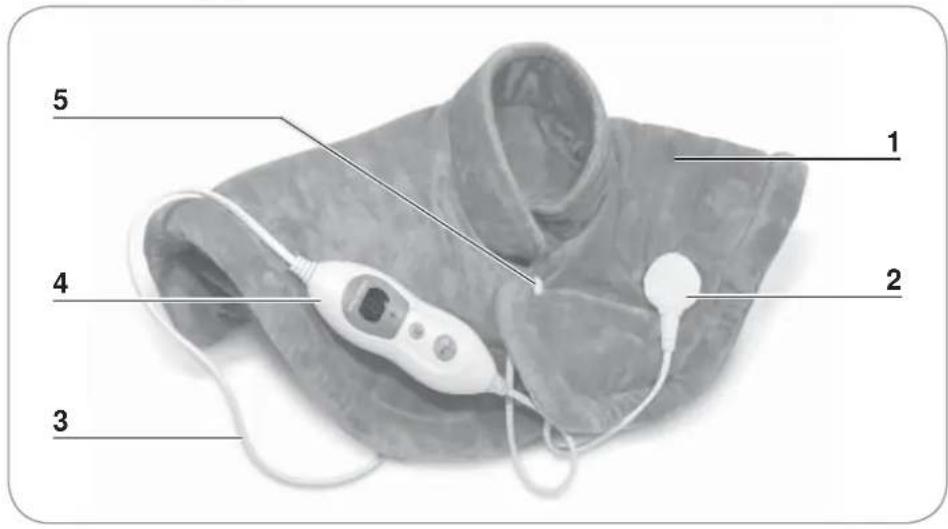
1 Warming cushion
2 Connecting socket for mains cable
3 Mains cable
4 Control unit
5 Press button
Control Unit
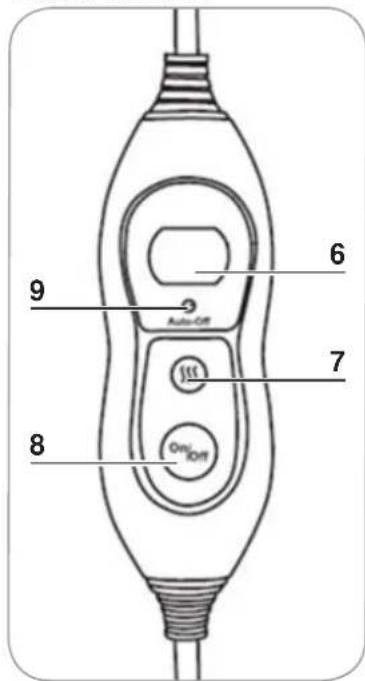
6 Display
7 Button for setting the temperature
8 On/Off switch
9 Operating lamp
Before Initial Use
ATTENTION!
- Keep children and animals away from the packaging material. There is a danger of suffocation!
Unpack all parts and check the items supplied for completeness (see "Items Supplied and Device Overview") and transport damage. If you find any damage to the components, do not use them (!); instead, contact our customer service department.
Use

ATTENTION!
- Do not use the device if the warming cushion is still damp. The warming cushion must be completely dry before it may be switched back on again.
If you have any health concerns, consult your doctor before using the device. -
The warming cushion must not be folded up or covered when it is switched on. Do not place the mains cable or the control unit on or under the warming cushion during operation.
For the power supply, use only the mains cable which is also supplied. -
Connect the mains cable (3) to the connecting socket (2) on the warming cushion (1).
- Wrap the warming cushion (1) around your shoulders and fix it in place with the press button (5).

Leave the press button (5) open if you are using the device in bed and might potentially fall asleep!
- Connect the plug to an easily accessible plug socket which corresponds to the technical data of the device (see the "Technical Data" chapter). The display (6) lights up for a short time. The operating lamp (9) is lit up permanently.
- Switch on the device by pressing the On/Off switch (8). A "1" appears on the display (6) and the device starts to heat up. The device has 6 different heating levels:
| Level 1 and 2 Low temperature |
| Level 3 and 4 Medium temperature |
| Level 5 and 6 High temperature |
- Press the button repeatedly for setting the temperature (7) until the heating level you want is displayed.

The device has an automatic switch-off function and switches off after around 90 minutes of continuous operation.
- Switch off the device by pressing the On/Off switch (8). The display (6) goes out. The operating lamp (9) remains lit up until the device is disconnected to the mains power.
- Remove the plug from the plug socket. The operating lamp (9) goes out.
- Disconnect the mains cable (3) from the device.
- Allow the device to cool down before you store it away or wash it.
Care and Storage

ATTENTION!
- Disconnect the device from the mains power before each wash and disconnect the mains cable from the connecting socket on the warming cushion.
Always allow the warming cushion to cool down sufficiently before you wash it, fold it up or store it away. Do not place any objects on the folded warming cushion.
Do not wash the warming cushion in the washing machine!
Do not use any fabric softener!
The warming cushion may only be dried in the air! Never place it on a radiator or heating system.
Do not wind the mains cable around the control unit or the warming cushion.
Materials: 100% polyester

Hand wash

Do not bleach

Do not dry in the tumble dryer

Do not iron

Do not dry-clean
- Wash the warming cushion separately or with identical colours at no more than 30^ by hand. Allow the warming cushion to dry completely before you use it again.
- When storing it away, do not press the warming cushion together too strongly and do not use any force. It could be damaged.
- Keep the device in its respective packaging in a dry place which is protected from sunlight and is not accessible to children or animals.
Troubleshooting
If the device stops working properly, first check whether you are able to correct the problem yourself.

Do not attempt to repair a defective electrical device yourself!
| Problem Possible cause Solution | ||
| The device does not work. | The device is not receiving any power supply. | Check whether • the mains cable is properly connected to the connecting socket. • the plug is inserted in the plug socket.. • the plug socket is defective. • the fuse of your mains connection has been activated. |
| The On/Off switch has not been pressed (correctly). | Press the On/Off switch. | |
| The overheating protection has been activated. | Have the device checked by the manufacturer. | |
Technical Data
Article number: 03038
Model number: HB57-5563M
Voltage supply: 220-240 V AC ~ 50 Hz
Power: 100
Protection class: II


Customer Service /
Importer:
DS Produkte GmbH
Am Heisterbusch 1
19258 Gallin
Germany
Tel.: +49 38851 314650
(Calls to German landlines are subject to charges. The cost varies depending on the service provider.)
Disposal

The packaging material is recyclable. Please dispose of it in an environmentally friendly manner and take it to a recycling centre.
Dispose of the device in an environmentally friendly manner. It should not be disposed of in the normal domestic waste. Dispose of it at a recycling centre for used electrical and electronic devices.
You can obtain more information from your local authorities.
Contenu
Chere cliente, cher client,
www.service-shopping.de
www.service-shopping.de