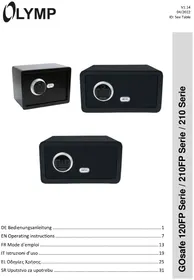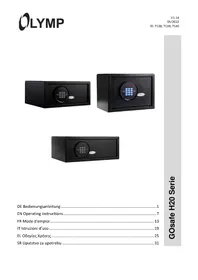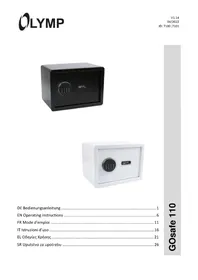
GOsafe 50D - Safe Olymp - Free user manual and instructions
Find the device manual for free GOsafe 50D Olymp in PDF.



| Product type | Electronic safe |
| Brand | Olymp |
| Model | GOsafe 50D |
| External dimensions (H × W × D) | 756 × 584 × 330 mm |
| Weight | 64 kg |
| Door thickness | 4 mm |
| Wall thickness | 1.5 mm |
| Power supply | 4 AA LR6 batteries (1.5 V) |
| Lock type | Digital code (3 to 8 digits) + emergency key |
| Code capacity | 1 programmable user code |
| Alarm on incorrect code | 3 errors: 20 s, then 5 min after 3 more errors |
| Main functions | Opening by code or emergency key, anti-break-in alarm |
| Package contents | Safe, 4 AA batteries, 2 emergency keys, mounting kit, user manual |
| Mounting | Wall mounting (expansion screws for concrete, tightening screws for wood) |
| Cleaning | Soft dry cloth, without solvent |
| Warranty | In-store return with packaging and receipt |
| Compliance | CE marking, declaration available online |
| Reference | GOsafe 50D |
Frequently Asked Questions - GOsafe 50D Olymp
User questions about GOsafe 50D Olymp
0 question about this device. Answer the ones you know or ask your own.
Ask a new question about this device
Download the instructions for your Safe in PDF format for free! Find your manual GOsafe 50D - Olymp and take your electronic device back in hand. On this page are published all the documents necessary for the use of your device. GOsafe 50D by Olymp.
USER MANUAL GOsafe 50D Olymp
EN Operating instructions
The operating manual represents a component part of the device. It contains important information regarding safety, use and disposal. Familiarize yourself with all the operating and safety information before starting to use the device. Only use the device as described and for the purpose for which it is intended. Hand over all the documents with the device if it is transferred to third parties.
Overview
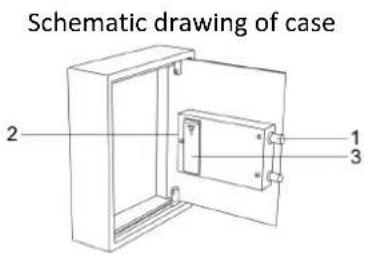
- Bolts
- Reset Button
- Battery Compartment
-
Handle
-
Emergency Lock Cover
- Green Light
- Red Light
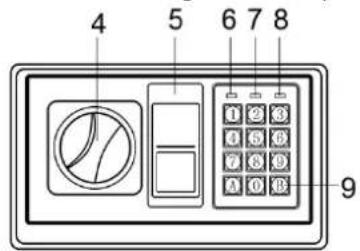
Schematic drawing of control panel
- Yellow Light
- Confirming button
- Power supply: 4 X AA LR6 batteries
Safety information regarding handling batteries
Warning! Risk of suffocation through batteries.
- Keep batteries out of reach of children.
- Seek medical attention immediately if one is swallowed.
Caution! There are different risks involved when dealing with batteries.
- Never attempt to recharge standard batteries, never short circuit batteries and/or open batteries. Doing so leads to a potential risk of overheating, fire or explosion.
-
Improper handling of batteries/rechargeable batteries can endanger your health and the environment. Batteries/rechargeable batteries may contain toxic and environmentally harmful heavy metals (Cd = cadmium, Hg = mercury, Pb = lead). Therefore, hand in used batteries at a municipal collection point. Therefore, separate disposal and recycling of spent batteries is essential for the environment and health.
-
Ensure the connection terminals are not short-circuited.
- Never throw batteries into a fire or water.
- Never expose batteries to any mechanical loads.
Leaking batteries could cause damage to the device. If a battery should start to leak, remove it from the device immediately to prevent any further damage. Take the utmost care when handling damaged or leaking batteries and always wear protective gloves. - Avoid any contact with the skin, eyes and mucous membranes. Rinse any parts of the body which have come into contact with battery acid with plenty of clean water and contact a doctor immediately. Avoid extreme conditions and temperatures which could affect the batteries, e.g. by placing them on radiators or exposing them to direct sunlight.
- Only use batteries of the type specified.
- Never use batteries of different types or new and old batteries together.
- Ensure batteries are inserted with the correct polarity.
If the device will not be used for a longer period, switch the device off and remove the batteries. - Remove empty batteries from the device and dispose of them according to the applicable directives.
- The batteries must be removed from the device before its disposal.
- You are legally obliged to dispose of batteries at your dealer or at the collection points provided by the responsible waste disposal authority.
Package Contents
Check the package contents of the safe before you actually use the safe. If anything is missing or damaged, contact our Service Department.
-
1x Safe
-
1x Instruction manual
4x AA LR6 batteries
- 2x emergency key
Key fobs
- 4x fixing screws
Open the safe for the first time / Open the safe with the emergency key:
When opening the safe for the first time, it must be opened with the emergency key.
- Remove the cover of the emergency lock.
- Insert the emergency key and turn it anticlockwise.
- Do not let go of the key, otherwise it will return to its original position.
- Turn the knob clockwise to open the door.
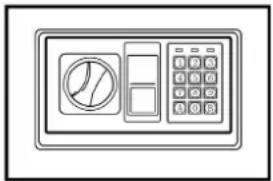
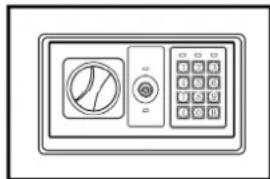
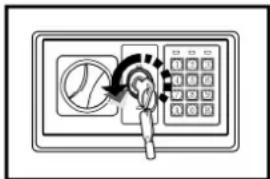
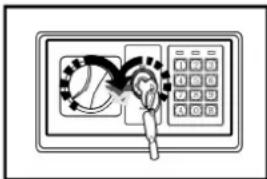
CAUTION: When finished, remove the emergency key and keep it in a safe place. !!!NOT IN THE SAFE!!!
Inserting the batteries
- Open the door and remove the battery cover.
- Insert 4 x AA LR6 batteries into the battery compartment.
Low battery level
If the red and green lamps light up at the same time, new batteries must be inserted.
ATTENTION: Replace 4 fresh batteries by arranging them as indicated by the "+" and "-" signs. If the unit is out of use for more than thirty minutes, you should reset the user code.
Removing the batteries
Follow the steps below to remove the batteries.
Remove the battery compartment cover.
Caution! Danger of short circuit.
- Remove batteries only with a non-conductive object, e.g. a wooden or plastic spatula.
Remove the batteries.
Replace the battery compartment cover.
Closing the door
- Close the door of the safe
- Turn the knob anticlockwise to close the door.
Open door with user code
- Enter your user code (3 to 8 digits).
Each time you press it, a beep sounds and the yellow light flashes. - Press the "A" or "B" key.
The green light lights up. - Turn the knob clockwise and pull it outwards within 5 seconds to open the door.
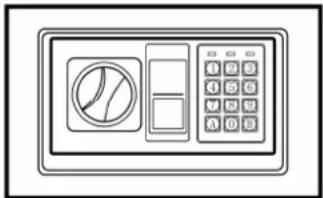
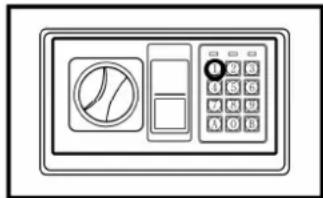
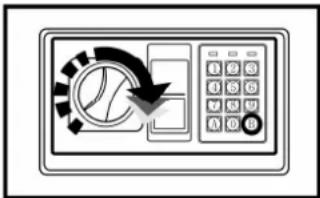
ATTENTION: The user code "159" is preset. Please enter the user code again when the yellow light flashes and three beeps sound.
Setting the user code
- With the door open, press the reset button.
- When the yellow light turns on, start setting the code.
- Enter the new code (3-8 digits).
- Press the "A" or "B" button.
- Acceptance and storage of the new code is confirmed with 2 beeps.
If the yellow light flashes and 3 signal tones sound, the code change is not effective and it must be tried again.
Alarm - Wrong code
If 3 consecutive incorrect entries are made, the warning tone sounds for 20 seconds.
If another 3 consecutive incorrect entries are made, the warning tone will sound for 5 minutes.
CAUTION: The keypad is disabled during the beep. You can only stop the beeps by opening the safe with the emergency key and disconnecting the power supply by removing the battery.
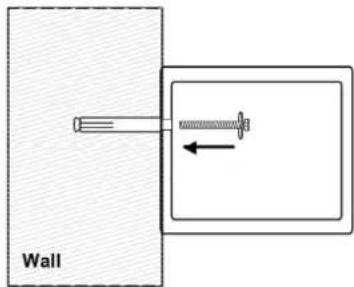
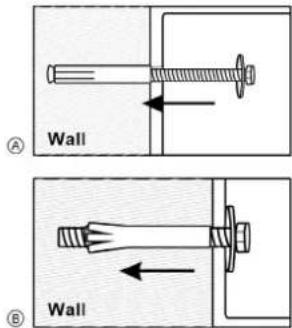
Mounting method
Mount the safe in a place that is not easy to move.
- Drill the holes for the expansion screws (or clamping screws) in the right place.
- Turn the expansion screws anticlockwise to loosen them.
- Use the expansion screws (or the clamping screws) to fix the cabinet to the wall.
- Make sure the enclosure is fixed in the right place, then tighten all the screws.
CAUTION: Use the expansion screws if there is a concrete wall. Use the clamping screws if there is a wooden wall.
Technical data
| Dimensions (H × W × D) | |
| GOSafe 50A | Outside: 360 × 300 × 100 mm |
| GOSafe 50B | Outside: 450 × 360 × 120 mm |
| GOSafe 50C | Outside: 650 × 420 × 120 mm |
| GOSafe 50D | Outside: 756 × 584 × 330 mm |
| Weight | |
| GOSafe 50A | 7 kg |
| GOSafe 50B | 11,5 kg |
| GOSafe 50C | 18,5 kg |
| GOSafe 50D | 64 kg |
| Lock variant Code, emergency key | |
| Door thickness 4 mm | |
| Wall thickness 1.5 mm | |
| Batteries | 4 × AA LR6 (Mignon) |
Warranty
Dear customer,
We are delighted that you have chosen this equipment.
In the case of a defect, please return the device together with the receipt and original packing material to the point of sale.
Cleaning
Clean the surface of the housing with a soft, dry, lint-free cloth. Do not use any solvents or cleaning agents.
Disposal
| BER GRÜNE PUNKT | Packaging materials must be disposed of according to local regulations. |
| The device and packaging materials can be recycled; sort them for disposal to simplify waste management. The Triman logo is only relevant for France. | |
| The packaging is made of environmentally friendly materials that you can dispose of at local recycling points. Advice on the options with which to dispose of your old device can be obtained from your municipal or local administration offices. | |
| The adjacent symbol indicates laws dictate that electrical and electronic apparatus no longer required must be disposed of separate from domestic waste. Dispos of your device at a collection point provided by your local public waste authority. Packaging materials must be disposed of according to local regulations. | |
| Defective or empty batteries must be recycled in accordance with Directive 2006/66/EC and its amendments. Return batteries and the device via the collection points provided. | |
| a b | Observe the identification on the packaging materials during the waste sorting process; they are identified by abbreviations (b) and numbers (a) which have the following significance: 1-7: plastic/20-22: paper and cardboard/80-98: composite materials. |
| lo Riciclo! d c a b Seguile regole del sua comune | The device and the packaging material can be recycled, so sort them prior to disposal for better waste management. Contact your local authorities for information on the various options available to ensure correct disposal. Observe the following identifications of the packaging materials: (a) numbers, (b) abbreviations and (c) materials which have the following significance: 1-7: plastics / 20-22: paper and cardboard / 80-98: composite materials and (d) type of packaging. The logo is only applicable to Italy. |
| i | Find out about the possibilities of taking back old appliances and used batteries free of charge from your dealer. |
Conformity

The CE Mark on the device confirms conformity.
The Declaration of Conformity can be read online at www.go-europe.com or
http://productip.com/?f=1670dd
The full EU Declaration of Conformity is available online by scanning the QR code:
Manufacturer
GO Europe GmbH
Zum Kraftwerk 1
D-45527 Hattingen
Germany