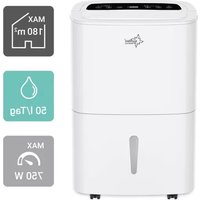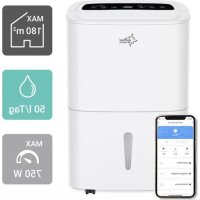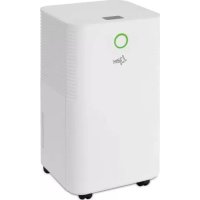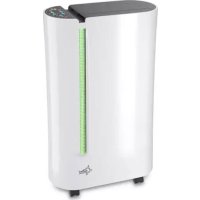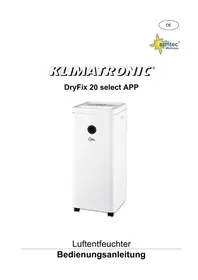
DryFix 20 select APP - Dehumidifier SUNTEC - Free user manual and instructions
Find the device manual for free DryFix 20 select APP SUNTEC in PDF.



| Product type | Dehumidifier |
| Brand | SUNTEC |
| Model | DryFix 20 select APP |
| Dehumidification capacity | 20 L/24h (at 30°C, 80% RH) |
| Water tank | Approx. 4 L |
| Power supply | 220-240 V ~ 50 Hz |
| Power consumption | Approx. 500 W |
| Dimensions (W × D × H) | Approx. 350 × 250 × 500 mm |
| Net weight | Approx. 15 kg |
| Noise level | Approx. 45 dB(A) |
| Recommended area | Up to 50 m² |
| Operating temperature range | 5 °C to 32 °C |
| Relative humidity range | 10% to 90% |
| Operating modes | Manual dehumidification, automatic, laundry drying, ventilation |
| Timer | 0 to 24 hours |
| Remote control | SUNTEC Wellness App (Wi-Fi) |
| Air filter | Washable anti-dust |
| Refrigerant | R290 (quantity < 1 kg, closed circuit) |
| Safety functions | Automatic shut-off when tank full, automatic defrost, anti-freeze protection |
| Maintenance | Regular filter cleaning, housing cleaning with a soft cloth |
| Spare parts and repairability | Anti-dust filter available as spare part; work on the refrigerant circuit only by a certified professional |
Frequently Asked Questions - DryFix 20 select APP SUNTEC
User questions about DryFix 20 select APP SUNTEC
0 question about this device. Answer the ones you know or ask your own.
Ask a new question about this device
Download the instructions for your Dehumidifier in PDF format for free! Find your manual DryFix 20 select APP - SUNTEC and take your electronic device back in hand. On this page are published all the documents necessary for the use of your device. DryFix 20 select APP by SUNTEC.
USER MANUAL DryFix 20 select APP SUNTEC
Suntec Wellness APP download

GET IT ON
Google Play

Download on the
App Store
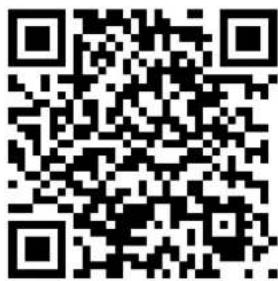
WLAN (Suntec Wellness APP download: Bild 3)
R290, GWP: 3, 60g = 0.00018t CO2e
- Please place the appliance on a stable flat surface to avoid loud noises and vibrations.
- Please do not operate the appliance near heating appliances and flammable or hazardous objects.
- If the dehumidifier is used in a room with appliances that emit gas, the room must be regularly and frequently ventilated.
- Please empty and dry the water tank and the appliance if it is not used for a long time. This will prevent mould growth and unpleasant odours inside the appliance.
- Please do not place heavy objects on the appliance.
- Please do not hang curtains or wet clothes directly in front of the air outlet, this will cause the unit to overload.
- Do not lead the drainage tube outside when the temperature is low. Please empty the water tank before moving the unit to avoid water spillage.
- Please do not tip the appliance as leaking water may cause damage to the appliance.
- If the connection cable has been damaged, please do not use the drain hose outside.
If the connection cable has been damaged, please contact your supplier to avoid danger.
- Please do not operate the appliance outside. Sun, rain, or low temperature may cause damage to the unit or electric shock.
- Please never cover the outlet or inlet of the unit.
- The unit should be placed at least 50~cm away from the wall or other obstacles/objects.
- Please keep the dust filter and air outlet/inlet grilles clean. They should be cleaned regularly to ensure best performance.
Important.
The appliance must always be stored and transported in an upright position.
If in doubt, we recommend that you wait at least 24 hours before switching the hours before switching the unit on again.
Control via smartphone / SUNTEC Wellness -App
- Please download the "SUNTEC Wellness" app from the App Store or Google Play and install it.
- Please follow the step-by-step instructions in the app to connect your device to the WLAN and set up the control.
If you have any further questions about the app, please visit our web page at www.suntec-wellness.de/suntec-app/
Installation
To save energy and ensure optimal performance of the appliance, please close all doors and windows in the room.
- Please place the appliance on a flat level surface.
- To avoid loud noises and vibrations, you can place a small carpet or rubber mat under the unit.
Parts (pic. 1)
1 Air outlet
4 Water tank
2 Humidity control light/colour indicator
5 Handles
3 Air inlet with dust filter
6 Drainage hole
Control Panel (pic. 2)
Buttons:
Light indicators:
3 Fan speed
1 Low fan speed
7 On/Off
2 High fan speed
8 Mode/ Reset (press 5 sec)
4 Timer
11 Digital slider
5 Defrost mode
13 Timer
6 Full water tank
14 Sleep mode
9 Fan mode
10 Automatic dehumidification
12 Manual dehumidification
15 Laundry drying
16 Wi-Fi
Functions
On/off:
- Please plug in the unit.
- Please make sure that the water tank is empty before switching on.
- Please press the On/Off button (7) to switch the unit on or off.
- The unit starts automatically with the previous setting.
Mode:
- Please press the mode button (8) after switching on the appliance to select manual dehumidification (12), laundry drying (15), fan mode (9) or automatic dehumidification (10).
Manual dehumidification :
- Please press the mode button (8) to switch on the dehumidification mode. The corresponding mode indication lights up. In this mode, you can set the desired level of dehumidification and the fan speed.
Please use the digital slider (11) to set the dehumidification from 30% -80% . - Please use the speed button (3) to select between low and high fan speed.
Automatic dehumidification:
- Please press the mode button (8) to switch on the automatic dehumidification mode. The corresponding mode indication (10) lights up.
- The fan speed and humidity level cannot be set in this mode, the unit dehumidifies automatically and with low fan speed
Laundry drying function:
-
Please press mode button (8) to switch on the laundry drying function. The corresponding mode indication (15) lights up.
-
The ventilation speed and humidity level are set automatically and cannot be set manually, the appliance dehumidifies automatically and with high wind speed.
This function helps you to dry clothes, shoes or rugs faster.
Fan mode:
- Please press the "mode" button (8) to switch on the ventilation mode. The corresponding mode indication (9) lights up.
- In this mode, only the fan is working, dehumidification function is not available.
- For low fan speed, press the fan speed button once, the low fan speed indication (1) and the fan mode indication (9) light up.
For a high fan speed, press the fan speed key again. The high fan speed indicatioion (2) and the fan mode indication (9) light up.
Timer:
- Please press the timer button (13) to set the timer from 0 to 24 hours.
- When the unit is switched on, press the timer button to set the shut-off time as described above.
- When the unit is switched off, press the timer key to set the switch-on time as described before.
Sleep mode:
- Please press the sleep mode button (14) to switch on the sleep mode. All indication lights (except WIFI and sleep mode) and the display are switched off. The "Water tank full" light will light up in case the water tank should be emptied.
Colour light indication:
If the humidity of the ambient air is below 50% , the indicator light lights up in blue.
If the humidity is between 50% and 70% , the indicator light is green.
If the humidity is above 70% , the indicator light is red.
WIFI (Suntec Wellness APP download: pic. 3)
- When connecting the device, the WLAN indicator (16) will start blinking. Please follow the step-by-step instructions in the app to connect your device to the Wi-Fi and set up the control.
- The Wi-Fi indicator will be continuously lighted when the app and device are connected.
Resetting the WIFI in case of connection errors and for new connections
- If you want to connect the device to a new WLAN or if there are problems when trying to connect the device to the app, it is necessary to reset the WLAN. Press and hold the Mode button (8) for 5-10 seconds. The WLAN indicator will blink 2 times per second and is ready to be connected to the app again.
- Please follow the step-by-step instructions in the app to connect your device to the Wi-Fi and set up the control.
- The Wi-Fi indicator will light up continuously when the app and device are connected.
Drainage
Water tank:
- As soon as the water tank is full, the unit stops working, a warning signal sounds and the 'water tank full' indication (6) lights up on the display.
- Please switch off and unplug the unit.
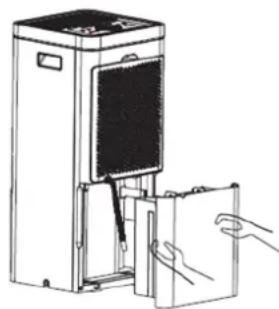
- Carefully pull out the water tank and tip out the water by using the handle.
- Please clean and dry the empty tank, and carefully place it back into the machine.
Continuous drainage:
- Please pull the plug out of the outlet.
- Please remove the water tank from the appliance as described above and remove the drainage hose.
- Carefully push the water tank back into the appliance without the drainage hose.
- You will find the drainage opening on the back of the machine.
- Please insert the drainage hose into the opening and place the other end of the hose into a container so that the water can drain off continuously.
- Please make sure that the hose is connected tightly to prevent the water from leaking.
Cleaning and maintenance
To avoid injury, please switch off and unplug the appliance before starting service or cleaning.
Cleaning:
- Please unplug the unit.
- Please clean the unit with a dry and soft cloth. For heavy dirt, please use a slightly damp cloth.
- Please do not use any chemical products (such as petrol, alcohol, etc.). The unit's housing and the unit's surface may be damaged.
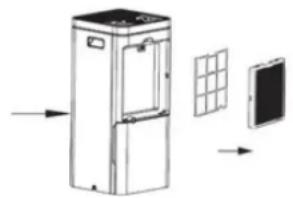
Cleaning the dust filter:
- Please open the filter cover on the backside of the unit and carefully remove the filter.
To remove dust from this filter, please use a vacuum cleaner or to tap it out carefully.
If the filter is very dirty, wash it in water with neutral detergent, rinse well with water and let it dry. - Carefully put the filter back into the unit and close the filter cover.
Storage
- Please unplug the unit and bundle the power cord.
- Please empty the water tank, wipe out the tank with a cloth and reinstall it.
- Please clean the air filter as described above and then reinstall it in the unit.
- For storage, place the unit in an upright position and avoid direct sunlight.
Troubleshooting
| problem | cause | solution |
| The unit is not working | Is the unit connected to the power source? | Plug-in the unit. |
| Is the 'water tank full' indicator lighting up (water tank is full or incorrectly placed)? | Empty the water tank and install it correctly. | |
| Is the water tank installed correctly? | Please check the position of the water tank. | |
| Are the air outlet slats open? | Please open the air outlet slats. | |
| The unit is in defrost mode. | This is a normal process and helps to protect internal parts. Once the process is complete, the unit returns to normal operation. | |
| The dehumidification performance is insufficient | Is the air inlet or outlet blocked? | Check the air inlet and outlet and remove any obstructing objects |
| Is the air filter dirty? | Clean the air filter as described in the operating instructions | |
| Does the unit operate in the fan mode? | Please switch to dehumidification mode. | |
| Is the room temperature/humidity too low high? | The unit should be operated at the air temperature of 5°C - 32°C and a humidity of 10%-90%. The unit cannot dehumidify the air optimally at ambient temperature and/or humidity level below/above this. | |
| Humidity does not drop | Is the room size too large? | Please observe the recommended room size indicated on the packaging. |
| Are all windows and doors in the room closed? | Please close all doors and windows if necessary. | |
| Loud noises during start-up | Does the unit stand upright on the stable surface? | Place cheek the position of the unit. |
| The circulation of the refrigerant inside may cause noise. | The noises disappear as soon as the refrigerant circuit has stabilised. | |
| Unpleasant smells during start-up. | This is not a defect. | Unpleasant smells during start up are normal and will disappear after a short time. If the surrounding objects are heavily soiled, e.g. by cigarette smoke, this can also lead to unpleasant smells from the air outlet. |
| The start-up is interrupted. | Is the room temperature higher than the operating temperature? | The unit restarts automatically as soon as the ambient temperature has dropped. |
| The clothes do not get dry. | Is the laundry too far away from the unit? | Please make sure the laundry is exposed to the air flow. |
| Is the room temperature lower than the operating temperature? | The laundry dries more slowly when the ambient temperature is low. Try drying your laundry in another room. | |
| There is water in the water tank (before the first start-up). | This is not a defect. | Some water may remain after the factory function test has been carried out. |
Refrigerant
(CE) N 842/2006: This dehumidifier contains the refrigerant R290. The amount of refrigerant is less than 1kg and is in a closed cooling circuit. The coolant does have zero ozone depletion potential, but is a so-called greenhouse gases under the Kyoto Protocol and may thus contribute to global warming, if it is released to the atmosphere. Therefore, only trained technicians with refrigerant certificate make a filling or emptying. Suntec your dehumidifier does not have to use if used properly and undamaged coolant circuit can be refilled with refrigerant.
R290, GWP: 3, 60g = 0.00018t CO2e
Wifi (Suntec Wellness APP download:Imagen 3)
R290, GWP: 3, 60g = 0.00018t CO2e
Composants (Image 1)
1 Sortie d'air
4 Réservoir d'eau
Wi-Fi (Suntec Wellness APP download: Image 3)
R290, GWP: 3, 60g = 0.00018t CO2e
Controllo tramite smartphone / app SUNTEC Wellness
WLAN (Suntec Wellness APP download: Imagine 3)
R290, GWP: 3, 60g = 0.00018t CO2e
R290, GWP: 3, 60g = 0.00018t CO2e
REDE SEM FIOS (Suntec Wellness APP download: Imagem 3)
R290, GWP: 3, 60g = 0.00018t CO2e
- Postavite urežaj na ravnu i stabilnu površinu, kako bi se sprijecilo vibriranje i glasni šumovi pri radu urežaja.
- Ne stavljajte urežaj u rad u blizini grijača, zapaljivih ili opasnih predmeta.
- Ako se odvlaživač zraka koristi u prostoriji u kojoj istovremeno rade aparati na plin, prostorija se mora redovito i Često prozračiti.
- Ispraznite i osušite spremnik za vodu i urežaj ako se neće koristiti dulje vrijeme. To ce sprijeciti rast plijesni i neugodne mirise unutar urežaja.
- Nemojte vješati zavjese ili mokru odjecu ispred ispusta za zrak, to vodi ka preopterećenju urežaja.
- Drenažna gumena cijev ne smije se izvoditi vani pri niskim temperaturama.
- Kako biste sprijeci prosipanje vode, ispraznite spreznik za vodu prise nego transportirate urejad.
- Molimo Vas ne naginjite urežaj, jer voda koja istiće moze izazvati štete na urežaju.
- Molimo da ne uvodite strane objekte u urejad.
- Molimo da s urežajem nikada ne radite vani. Sunte, kista ili niske temperature mogu dovesti do ostećenja urežaja ili do strujnog udara.
- Molimo da nikada ne prekrivate izlaznu ili ulaznu rešetku.
- Urečaj treba biti postavljen uz rastojanje od majmanje 50 cm prema zidu ili drugim preprekama/objectkima.
- Molimo držite filtrar za prasinu i ulazne/izlazne rešetke za zrak Čistim. One moraju biti redovno Čišcene, kako bi bio zajamčen optimalni učinak.
Vazno.
WLAN (Suntec Wellness APP download: Slika 3)
- Prilikom prikljucivanja uredaja WLAN-indikator (16) pocinje treptati. Molimo sijedite upute korak po korak uaplikaciji, da biste povezali Vaš uredaj i WLAN i podesili upravljanje.
- WLAN-indikator trajno svijetli, kada su aplikacija i uredaj medusobno povezani.
R290, GWP: 3, 60g = 0.00018t CO2e
Vremenski programator:
- Za podesavanje vremena od 0-24 sata molimo pritisnite tipku za vremenski programator (13).
Kada je uredjuklučen, pritisnite tipku vremenskog programatora da podesite vrijeme isključivanja na prethodno opisan nacin.
Kada je uredaj iskljucen, pritisnite tipku vremenskog programatora da podesite vrijeme uključivanja na prethodno opisan nacin.
Stanje mirovanja:
WLAN (Suntec Wellness APP download: Slika 3)
R290, GWP: 3, 60g = 0.00018t CO2e
WLAN (Suntec Wellness APP download: slika 3)
- Ob priklucitvi naprave zaene utripati znak WLAN (16). Sledite navodilom po korakih v napravi, da svojo napravopovezete z omrezejem WLAN in prijavite upravljanje.
- Lučka WLAN sveti neprekinjeno, ko sta aplikacija in naprava povezani.
R290, GWP: 3, 60g = 0.00018t CO2e
WLAN (Suntec Wellness APP download: obrzok 3)
R290, GWP: 3, 60g = 0.00018t CO2e
© 2022 KLIMATRONIC® DryFix 20 select APP
WLAN (Suntec Wellness APP download: obrzek 3)
- Pri pripojeni zaireneni zaene bilkat indikator WLAN (16). Pro pripojeni sveho zaireneni prostrednictvim site WLAN a nastaveni ovladani postupujte krok za krokem podlePokynu v aplkaci.
Kdyz se aplikace spoji se zafrzenim, sviti indicator WLAN trvale.
R290, GWP: 3, 60g = 0.00018t CO2e
R290, GWP: 3, 60g = 0.00018t CO2e