AURA BluNote - Speaker Spracht - Free user manual and instructions
Find the device manual for free AURA BluNote Spracht in PDF.


| Product Type | Portable Bluetooth® Speaker |
| Brand | Spracht |
| Model | AURA BluNote |
| Dimensions (W × H × D) | 24 cm × 8 cm × 3 cm |
| Weight | 245 g |
| Power Supply | AC Adapter (5 V, 1 A) or 4 AA alkaline batteries |
| Battery Life | Up to 10 hours |
| Bluetooth Version | 1.1/1.2 or higher |
| Supported Bluetooth Profiles | A2DP, AVRCP, Hands-free |
| Bluetooth Range | Up to 10 meters |
| Speaker Power | 2 × 2 W |
| Audio Input | 3.5 mm Jack |
| Audio Functions | Bass Boost, Stereo Widening, noise reduction and echo cancellation |
| Control Buttons | Power On/Off, Volume +/-, PTT (Push-To-Talk), Pause/Play, Previous/Next, Bass Boost, Stereo Widening |
| LED Indicator | Blue LED: slow flashing (on), steady (pairing), fast flashing (pairing successful) |
| Included Cable | 3.5 mm audio cable for non-Bluetooth devices |
| Operating Temperature | -10°C to +40°C |
| Certifications | FCC, CE, IC, A-TICK |
| Warranty | 1 year |
| Care and Cleaning | Clean with a soft, dry cloth. Do not use abrasive products or solvents. |
| Safety | Do not expose to water, excessive heat, or flames. Follow usage instructions. |
| Spare Parts and Repairability | For any repairs, contact Spracht. Opening the device by an unauthorized person voids the warranty. |
Frequently Asked Questions - AURA BluNote Spracht
User questions about AURA BluNote Spracht
0 question about this device. Answer the ones you know or ask your own.
Ask a new question about this device
Download the instructions for your Speaker in PDF format for free! Find your manual AURA BluNote - Spracht and take your electronic device back in hand. On this page are published all the documents necessary for the use of your device. AURA BluNote by Spracht.
USER MANUAL AURA BluNote Spracht
Or interrupt your music to take/make calls with your paired cell phone
USERGUIDE
International version: English, French, Spanish, Italian, Portuguese, German
TABLE OF CONTENTS
Introduction 1
Aura BluNote™ Design 2
Safety Precautions 3,4
User Guide
Compatibility 5
Powering 5
What is "Pairing" 6
Pairing 6,7,8
Bluetooth® connection 8
Listening to music 9
Taking and making calls 10
Troubleshooting
Specifications
12
13
Warranty Information 14
FCC statements 15, 16
PACKAGE CONTENTS
- Aura BluNote™
- AC power adapter
3.3.5 mm cable for non-Bluetooth® devices
4.4 AA Alkaline Batteries - User Guide
- Warranty/registration sheet
Introduction
艺
The Aura BluNote™ is a portable Bluetooth® speaker that is compatible with any A2DP Bluetooth® Stereo source. It has been designed and developed specifically to stream your music wirelessly and to allow you to listen to your playlist from your Bluetooth® A2DP mobile phone, or make calls wirelessly using the Push-To-Talk (PTT) button on the Aura BluNote™ speaker in stereo sound quality. It can also be used with your PC or Mac for VoIP (Voice over Internet Protocol). It can be powered by an AC power adaptor or 4 AA Alkaline Batteries – perfect for travelling.
FEATURES:
A2DP Bluetooth® Speaker for high fidelity wireless audio.
- Make and receive phone calls in stereo quality using the PTT button.
- Noise reduction and echo cancellation.
- Bass boost feature produces rich, deep, bass tones for a more powerful overall sound.
- Stereo widening feature for 3-dimensional sound.
- Compact and lightweight for ultimate portability.
- Quick and easy to set-up.
- Blue illuminated status LED.
- 2 way power supply: AC adaptor / 4 AA Alkaline batteries.
For complete specifications, see page 14 of this manual.
1
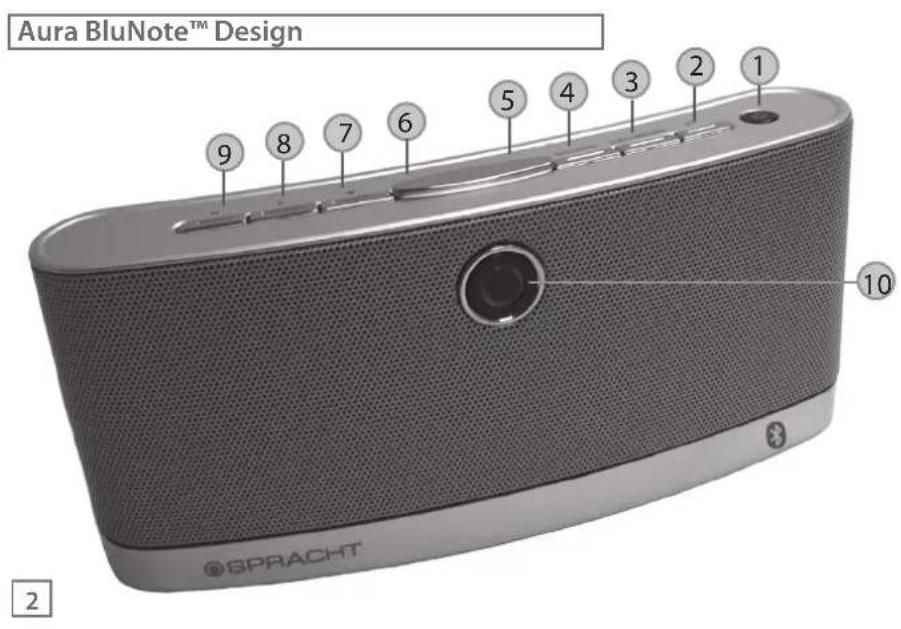
BUTTONS
- Power On / Off
- PTT (Push-To-Talk)
- Stereo Widening
- Bass Boost
- Volume Up
- Volume Down
- Fast Forward/Next Track
- Pause/Play
- Back/Previous Track
LEDs
- Bluetooth® - Blue

Safety Precautions
- Please read the operating instructions and safety precautions carefully before use.
- Explain the content and the hazards associated with using the device/accessories to your children.
- Remember to comply with legal requirements and local restrictions when using the device, for example: in airplanes, gas stations, hospitals or while driving.
The functioning of medical devices such as hearing aids or pacemakers can be impaired. Keep at least 9 inches/20cm between the device and the pacemaker. For more information consult your doctor. - Do not throw the device into an open fire.
- Do not exceed the voltage specified on the power supply unit (6V). Exceeding the voltage may destroy the device.
- Plug the power adapter into an easily accessible AC power socket. The only way to turn it off is to unplug it.
If you use the Aura BluNote™ to take mobile phone calls wirelessly in your car, please obey all cell phone and driving laws in your area.
The device may only be opened by authorized service partners. All other changes to this device are strictly prohibited and will invalidate the guarantee. - Dispose of unusable devices and their accessories according to the legal regulations.
Precautions
- Permanent hearing loss may occur if you use the device at high volume. You can adapt over time to a higher volume, which may sound normal but can be damaging to your hearing. Set your volume to a safe level. If you experience ringing in your ears, reduce the volume or discontinue use of your system.
- Use only original accessories. This will avoid potential damage to health or property and ensure compliance with all relevant regulations.
- Do not use the Aura BluNote™ near water, such as a sink or bath tub, or in a wet area.
- Do not use the Aura BluNote™ during an electrical storm or near a gas leak or vapors that could be ignited.
- Do not expose batteries to excessive heat, such as direct sunlight or fire.
- Please replace batteries only with the same or equivalent, as there is a danger of explosion with an incorrect replacement.
Please Note: Improper use will invalidate the guarantee!
In some countries there may be restrictions to the use of Bluetooth® devices. Please make enquiries with the authorities responsible.
Compatibility
- Mobile phones*
- Smart phones*
- Tablets, iPad and others
PC / Laptops
Game consoles - MP3/MP4 players
- PDAs*
*Compatible with all Bluetooth® devices supporting the A2DP profile.
The 3.5mm audio cable (included) provides instant audio connectivity for any non-Bluetooth® devices such as PC/Mac/Laptops, Game consoles or MP3/MP4 players. If you use the cable in a Bluetooth® device, please turn off Bluetooth® in the device.
1. Powering your Aura BluNote™
Before you can pair your Aura BluNote™ to a Bluetooth® device, you must power it either by plugging in the AC power adapter or by using the 4 AA Alkaline Batteries. To install the batteries, open the battery compartment located on the base of the Aura BluNote™ speaker, insert the batteries as shown on the inside of the battery cover. Note: Rechargeable batteries will not be charged through the use of the power adapter.
User Guide
2. Powering On/Off
- Powering On: Press and hold the Power button until the blue LED flashes. The blue LED will flash every few seconds to indicate the Aura BluNote™ is on.
- Powering Off: Press the Power button until the front LEDs turns off.
3.What is "Pairing"
Pairing is the process of two Bluetooth compatible devices linking or communicating with one another. A mobile phone identifies a Bluetooth device and uses a password or PIN to establish the pairing. This process allows only a verified device to connect to your mobile phone, ensuring security.
4. Pairing the Aura BluNote™ with a Bluetooth® enabled Mobile Phone or other device
IMPORTANT: When pairing the Aura BluNote™ to a Bluetooth® device, pair as "speaker" or "wireless speaker". Your device may list different pairing options: choose the one that most closely fits "speaker". If your Bluetooth® enabled device does not list a speaker option, please make sure your device is: 1) A2DP compatible, and, 2) has the latest Bluetooth® driver available for your device installed. You may need to check with your device's manufacturer for compatibility. The only exception is the MacBook Pro which only has the "Headset" option available. Check the Spracht website for more information. If you need assistance with pairing, please call Spracht Customer Service at
+1 650-215-7500, Monday to Friday 9AM-6PM Pacific time, or email support@spracht.com.
- Make sure that your Aura BluNote™ is powered on.
- Power on your Bluetooth® enabled mobile phone or other device.
- Activate the pairing mode on the Aura BluNote™ speaker by pressing the PTT button until the LED lights continuously.
- Next, activate Bluetooth® on your mobile phone (or other Bluetooth® enabled device) and search for Bluetooth® devices (if in doubt please refer to your mobile phone user manual for details on activating Bluetooth®).
- Follow your mobile phone's instruction guide to connect to a Bluetooth® device. Typically, you will click on a Bluetooth® icon and click "Discover device."
- Your A2DP Bluetooth® device should give you an option to choose to pair your Aura BluNote™ as a "Headset" or a "Speaker". The preferred pairing option is "Speaker". NOTE: Choosing the "Headset" option will enable you to accept calls, however, it may make your music sound distorted. If you do not see a "Speaker" option, please check with your device's manufacturer for compatibility.
- Your mobile phone should find the Aura BluNote™ which is displayed as "BluNote".
- Click on "BluNote" and click "OK" if your phone prompts you to confirm.
- Your mobile phone will then prompt you to enter a PIN or password. Enter: 0000
If the pairing is successful, your mobile phone will indicate a successful pair and the blue LED Bluetooth® indicator will flash quickly and you will hear a tone.
User Guide
- Depending on the mobile phone software concerned, your phone may then CONNECT automatically to the Aura BluNote™. You will then see the message CONNECTED on the unit's LCD display. In this case you will be able to stream music and make and receive calls immediately. If you do not become connected automatically, you should return to your phone's Bluetooth® menu, select "Blunote" from the list of paired devices and select CONNECT. You will then be connected and ready to make and receive calls.
5. Bluetooth® connection
- If you switch off your mobile phone and switch it back on again the Bluetooth® connection should be re-established automatically - although this can depend on the software in your phone. If your phone does not reconnect automatically to the Aura BluNote™ you can re-connect by pressing the PPT button once. If you are unable to reconnect automatically, the Aura BluNote™ may already be paired to another device. Press and hold the Pause/Play button to delete previously paired devices. The blue LED will flash rapidly then return to flashing every few seconds.
- If you switch off the Aura BluNote™ speaker and switch it back on again the Bluetooth® connection should be re-established automatically – Otherwise you should receive a request to your mobile phone to reconnect the Aura BluNote™.
6. Playback
- You can operate playback from your mobile phone or any other audio device that is compatible with any Bluetooth ® Stereo (A2DP) source. Alternatively you can use the audio cable included in the box for all non-Bluetooth® devices.
7. Volume Adjustment
- + / - Press briefly: Increases/decreases volume step by step.
- + / - Press and hold: Increases/decreases volume continuously.
8. Advanced Audio Features Are Located On The Top Of The Aura BluNote™
- Bass-Boost: Press once to increase the bass. Press again to deactivate the bass.
- Stereo-Widening: Press once to activate the three-dimensional sound playback. Press again to deactivate the stereo widening feature.
9. Listening to music
Only mobile phones with Media Player and other playback devices with A2DP/AVRCP Bluetooth® profiles will work with the Audio BluNote™ speaker.
Listening to music with a Bluetooth® (A2DP) enabled device
- Once you have successfully paired your A2DP mobile phone (or any other A2DP audio device) to the speaker you will be ready to stream your music to it.
- Enter the media player or playback feature on your A2DP device.
- Press the play button on your mobile phone to stream the track to the Aura BluNote™.
User Guide
User Guide
- The music should automatically start playing through the Aura BluNote™ - although this can depend on the software in your phone. If your phone does not stream automatically to the Aura BluNote™ you can manually select to play your tunes via a Bluetooth® device. (if in doubt please refer to your mobile phone user manual for details on how to play to music via Bluetooth®).
- External devices can be connected using the supplied audio cable.
- You can pause the music playing by pressing the Pause/Play button on the top of the Aura BluNote™; just press again to resume play. You can also go to the next track by pressing the » button or back to the beginning of the track or previous track by pressing the « button. You can also use the controls from your phone, whichever is most convenient.
Please Note: Functionality may be limited depending upon the devices used.
- Taking and making calls using the Push-To-Talk (PTT) button
Accepting and Rejecting a Call
- PTT Press briefly: Accept call.
- PTT Press and hold: Reject call or end call.
Please Note: Playback is interrupted by incoming calls. You will hear a beep or ring tone informing you of the incoming call.
Making a call using your mobile phone
- Dial as usual on the mobile phone.
- Press PTT briefly when the call is ringing to transfer the call to the Aura BluNote™ (If supported by the phone).
Please note: If the Bluetooth® connection to the mobile phone is interrupted for several seconds during a handsfree call you can only continue the call with the mobile phone.
If the Aura BluNote™ is connected to your mobile phone and is in "idle" mode, you can press the PTT button and it will dial the last number dialed in phone memory.
- LED flash sequences
The flash sequence of the LED indicates the different operating states of the Aura BluNote™.
- LED flashing every few seconds - Powered on
- LED on continuously - Pairing mode
- LED quickly flashing 4 times - Pairing successful
User Guide
艺
11
User Guide
12. Troubleshooting
Q: The sound is not working
A: If the battery is running low, the LED will flash. Change the battery, or use the power supply instead.
Q:Bluetooth connection problems
A: 1. The Bluetooth® profiles of your mobile phone and your Aura BluNote™ speaker are not compatible.
or 2. No mobile phone connected.
or 3. Your mobile phone is out of range.
Q: Poor audio quality
A: Confirm that the Aura BluNote™ has been paired as "speaker" or "wireless speaker" and not as headset or earphone. If you find it is paired incorrectly, re-pair.
A: If the audio quality deteriorates the connection is about to drop.
A: Reduce the distance between the speaker and the mobile phone.
Q: The BluNote is connected but no sound is playing.
A: Make sure you have selected bluetooth speaker as your default sound output on your device.
All information is believed to be reliable, however specifications are subject to change without notice.
AURA BLU NOTE
Order Information: Part Number WS-4010
Features
Bluetooth® version: 1.1 and 1.2 (or higher)
Certifications:FCC,CE,IC,A-TICK
Operating Range: Up to 33^ (10m)
Play Time (4 AA Alkaline Batteries): Up to 10 hours
Speaker Output Power: 2 × 2W
700 mVpp (at 10 kOhm)
Operating Temperature: 14^ to 104^ (-10^ to +40^)
Audio Input: Jack socket 3.5 mm
Controls and Interfaces
Buttons:
On/Off, Volume Up/Down, PTT, Bass Boost, Stereo
Widening, Play/Pause, Next Track, Back
Specifications
Operating Mode:
Noise reduction and echo cancellation
Electrical Specifications
Power: 4AA Alkaline Batteries, or AC power adapter
Charger Input: AC120V 60Hz/240 VAC 50Hz/
Output: 5 VDC, 1.0A
Physical Specifications
Aura BluNote™: (LxWxH)
9.4^ (24cm)× 3.15^ (8cm)× 1.2^ (3cm)
Weight 8.6 oz (245 g)
Spracht Limited Warranty Policy
Spracht warrants its products against defects or malfunctions in material and workmanship under normal use and service, with the exceptions stated below. This warranty lasts for one year from the original date of purchase. Coverage terminates if you sell or otherwise transfer the product. In order to keep this warranty in effect, the product must have been handled and used as prescribed in the instructions accompanying the product.
Spracht shall (at its option) repair or replace a defective unit covered by this warranty, or shall refund the product purchase price. Repair, replacement with a new or reconditioned unit, or refund, as provided under this warranty, is your exclusive remedy. This warranty does not cover any damages due to accident, misuse, abuse, or negligence. Spracht shall not be liable for any incidental or consequential damages. Some states do not allow limitation or exclusion of incidental or consequential damages, so the above limitation or exclusion may not apply to you. Implied warranties of merchantability and fitness for a particular purpose are limited in duration to the duration of this warranty. Some states do not allow limitations on how long an implied warranty lasts, so the above limitation may not apply to you. To make a warranty claim, the purchaser must obtain a return authorization number (RA) from Spracht (serial number and purchase date required), and then return the product to Spracht at purchaser's expense. A copy of the original dated receipt or shipping document must accompany the product. To obtain a return authorization, see "Warranty" on our website at www.spracht.com, send an e-mail to info@spracht.com, or contact us at:
Spracht
2672 Bayshore Parkway, Bldg 900
Mountain View, CA 94043 USA
Tel: +1 650-215-7500 Fax: +1 650-318-8060
For repair or replacement of a failed product, allow 4 to 6 weeks for processing and shipment.
This warranty gives you specific legal rights, and you may also have other rights which vary from state to state.
Interference Statement
This device complies with Part 15 of the FCC Rules. Operation of this device is subject to the following two conditions:
(1) This device may not cause harmful interference, and
(2) this device must accept any interference received, including interference that may cause undesired operation.
NOTE: This device has been tested and found to comply with the limits for a Class B digital device pursuant to Part 15 of the Federal Communications Commissions Rules and Regulations. These limits are designed to provide reasonable protection against harmful interference when the equipment is operated in a commercial environment. This equipment generates, uses, and can radiate radio frequency energy and, if not installed and used in accordance with the instruction manual, may cause harmful interference to radio communications. However, there is no guarantee that interference will not occur in a particular installation. If this equipment does cause harmful interference to radio or television reception (which can be determined by turning the equipment off and on), the user is encouraged to try to correct the interference by one or more of the following measures:
Reorient or relocate the receiving antenna.
- Increase the separation between the device and the receiver.
- Connect the device into an outlet on a circuit different from that to which the receiver is connected.
- Consult the dealer or an experienced radio/TV technician for help.
NOTE: This Bluetooth® radio device must be installed and used in strict accordance with the instructions as described in the Aura BluNote™ User Guide that accompanies the product. Any other installation or use will violate FCC Part 15 regulations. Modifications not expressly approved by Spracht could void the user's authority to operate the equipment.
Important Information
The Manufacturer is not responsible for any radio or TV interference caused by unauthorized modifications to this equipment. Such
FEDERAL COMMUNICATIONS COMMISSION STATEMENT
modifications could void the user's authority to operate the equipment
FCC Radiation Exposure Statement
WARNING: To comply with FCC RF exposure compliance requirement, the antenna used for this transmitter must be installed so that it is at a distance of at least 2.5cm from all persons and must not be collocated or operating in conjunction with any other transmitter.
Radio Approvals
It is important to ensure that you only use your radio device in countries where the device is approved for use. To determine whether you are allowed to use your wireless network device in a specific country, please check to see if the radio type number that is printed on the identification label of your device is listed as approved for that country on the radio approval list posted on the vendor's support website.
AURA BLU NOTE™
HAUT-PARLEUR PORTABLE SANS FIL
ÉCOUTEZ DE LA MUSIQUE DEPUIS N'IMPORTE QUEL APPAREIL BLUETOOTH® A2DP
Connection Bluetooth 8
Ecouter de la musique - - - - - - - - - - - - - - - - - - - - - - - - - - - - - - - - - - - - - - - - - - - - - - - - - - - - - - - - - - - - - - - - - -
- Power On / Off
- PTT (Push-To-Talk)
- Stereo Widening
- Bass Boost
- Volume Haut
- Volume Bas
- Fast Forward/Next Track
- Pause/Continuer
- Retour/Morceau precedent
LEDs
- Bluetooth® - Bleue
Widening, Pause/Play, >>, <<
2672 Bayshore Parkway, Bldg 900
Mountain View, CA 94043 USA
Tel: +1 650-215-7500 Fax: +1 650-318-8060
2672 Bayshore Parkway, Bldg 900
Design Aura BluNoteTM
BUTTONS
- Accensione / Spegnimento
- PTT (Push-To-Talk)
- Stereo Widening
- Bass Boost
- Volume +
- Volume -
- Fast Forward/Brano successivo
- Pausa/Riprende
- Back/Brano Precedente
LED
- Bluetooth® - Blu
On/O, Volume +/-, PTT, Bass Boost e Stereo Widening, Pausa/
Play, Avanzare >>, Percedente <<
13
Modalità operativa:
Aura BluNoteTM (L x L x A)
24cm (9.4^ )× 8cm(3.15^ )× 3cm(1.2^ )
Peso 245 g (8.6 oz)
Garanzia limitata Spracht
2672 Bayshore Parkway, Bldg 900
Mountain View, CA 94043 USA
Tel: +1 650-215-7500 Fax: +1 650-318-8060
Design do Aura BluNoteTM
BOTOES
2672 Bayshore Parkway, Bldg 900
Mountain View, CA 94043 USA
Tél: +1 650-215-7500 Fax: +1 650-318-8060
O processo e envio de produits defeituuos reparados ou substituidos, demora circa de 4 a 6 semanas.
Esta garantia aribui-Ihe direitos legais espacicos, podera ser titular de outros direitos que varieim de estado para estado.
AURA BLU NOTE™
TRAGBARER WIRELESS-LAUTSPRECHER
MUSIK PER WIRELESS STREAMÜBER A2DP BLUETOOTH® GERÄT
An/Aus, Lauter/Leiser, PTT, Bass Boost, and Stereo Widening
Pause/Play, Springer >>, Vorherigen <<
Betriebsmodus:
Aura BluNoteTM: (LxBxH)
9.4^ (24cm)× 3.15^ (8cm)× 1.2^ (3cm)
2672 Bayshore Parkway, Bldg 900
Mountain View, CA 94043 USA
Tél: +1 650-215-7500 Fax: +1 650-318-8060
© 2013 Spracht. All rights reserved. Spracht, the Spracht logo, and Aura BluNote™ are trademarks and registered trademarks of Spracht. All other trademarks are property of their respective owners. Visit our website at www.spracht.com.