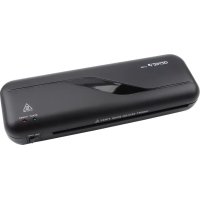
LA 200 - Laminating machine Genie - Free user manual and instructions
Find the device manual for free LA 200 Genie in PDF.


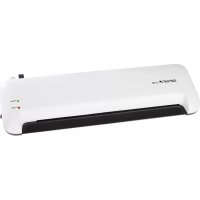
| Product Type | Laminating machine with trimmer and corner rounder |
| Brand | Genie |
| Model | LA 200 |
| Dimensions (laminator) | 330 x 106 x 60 mm |
| Weight (laminator) | 910 g |
| Power supply | 230-240 V AC, 50 Hz, 265 W |
| Lamination width | 230 mm (up to A4) |
| Recommended film thickness | 80 to 125 microns |
| Preheat time | 3 to 5 minutes |
| Lamination speed | 220 mm/min |
| Features | Hot lamination, ABS release, cutting (max 3 sheets), corner rounding |
| Included accessories | Trimmer (capacity 3 sheets, cutting length 300 mm), corner rounder, lamination pouches (10xA4, 10xA5, 10xA6, 20 business cards) |
| Safety | Hot surface, auto shut-off, jam protection, do not use near water |
| Maintenance | Unplug before cleaning, damp cloth, no solvents, brush for cutting residue |
| Repairability | Not user-serviceable, contact customer service if defective |
| Warranty | Return with proof of purchase to point of sale |
| Standards | CE, GS (tested safety) |
| Intended use | Lamination of documents, cutting paper and photos, corner rounding |
| Packaging materials | Recyclable, dispose according to local regulations |
Frequently Asked Questions - LA 200 Genie
User questions about LA 200 Genie
0 question about this device. Answer the ones you know or ask your own.
Ask a new question about this device
Download the instructions for your Laminating machine in PDF format for free! Find your manual LA 200 - Genie and take your electronic device back in hand. On this page are published all the documents necessary for the use of your device. LA 200 by Genie.
USER MANUAL LA 200 Genie
natural_image
Black Genie L476 printer with attached paper feed and a clear grid mat, no visible text or symbols on the device itself.(EN) Operating Instruction
Dear customer,
thank you for buying this quality product from GENIE. Please read this instruction carefully before initial operation.
Particularly take note of the following safety instructions. Please keep this instruction for future reference and pass it, when handing over this item. If you should have any further questions on the device or complaints you will find our service information at the end of this instruction.
Intended Use
The laminator is only suitable for laminating documents.
Any other use or modification shall be deemed to be improper and involves substantial risk of accidents.
The trimmer is suitable for cutting paper (max. 3 sheets 80 g/m 2 ) and photos to size. The corner cutter is suitable for rounding the corners of documents and photos evenly.
Unintended Use
The laminator is not suitable for laminating unsuitable materials or for use beyond the permitted ambient conditions described in the Technical Data.
The trimmer is not intended for cutting unsuitable materials.
The corner cutter is not intended for rounding the corners of unsuitable materials.
Any use other than that defined as intended use is considered unintended use. Unauthorised modifications or alterations are not permitted.
Under no circumstances open the devices or complete any repair work yourself.
Important advice about safety
- Read through these operating instructions carefully and completely before using the machine for the first time.
- Only put the machine on a flat and dry surface. It must be freely accessible from all sides. It is not recommended to use an extension cable!
- Do not open or repair the laminating machine yourself but take it to your specialized dealer whenever it is damaged or contact our service hot line.
- Only use films of the correct size (up to DIN A4 max.) and thickness (80 to 125 microns). Films that are too thin cause a blockage of the film in the machine.
- Do not touch the hot surface of the machine after it has started up.
- The laminating machine is not allowed – for safety reasons – to be used by children, unless they are supervised by an adult.
-
Never use the machine outdoor or near water.
-
Hot lamination: do not laminate in this mode any materials that are sensitive to heat with this machine, like thermo-fax paper for example. These materials are only suitable for cold lamination.
- Do not pour or spill any liquid into the machine or onto it.
- Do not insert any metal objects into the machine. Avoid touching the media feed opening with hands, clothing or hair.
- The laminating machine is unsuitable for constant use commercially. It is recommended to switch „O“ the machine for 30 minutes, after it has been operating for a period of approximately 30 minutes.
- The socket should be near the device and easily accessible.
- Unplug this equipment when not in use for an extended period of time.
- Do not oil or sharpen the blades of the trimmer and corner cutter. Never take hold of the blades.
WARNING: Hazardous moving part is in this equipment, keep body parts away from moving parts.
Useful Instructions and Tips
The following instructions and tips help you achieve an optimal cut every time and avoid damaging the trimmer.
- Please read the following information thoroughly and observe the instructions and information contained when operating the device.
• Always use both hands to operate the device. - Keep loose clothing, ties, jewellery, long hair and other loose objects away from the device.
- Remove any staples and/or paper clips from the document before starting to cut it.
The following instructions and tips help you achieve an optimal cut every time and avoid damaging the corner cutter.
- Please read the following information thoroughly and observe the instructions and information contained when operating the device.
- Keep loose clothing, ties, jewellery, long hair and other loose objects away from the device.
- Remove any staples and/or paper clips from the document before starting to cut it.
Starting up the laminating machine
Lamination
- Push the plug into the mains socket outlet and set the switch to 'I'. The blue LED (Power) lights up and the heating process will begin.
- The orange LED (Ready) lights up after approximately 3 - 5 minutes. Now you can begin the laminating process.
- Open the laminating film and lay the material that is to be laminated directly onto the closed side. Leave a margin of between 3 mm and 5 mm approximately beyond the edges while doing so.
Caution
a) Choose a film of correspondingly suitable size in relation to the material that is to be laminated respectively.
b) It is not recommended to process several smaller materials in one film.
c) Do not cut up the film before the laminating is done.
d) The material that is to be laminated, is not allowed to be thicker than 0.5 mm including the film.
e) It is imperative to only laminate very thin or soft materials, like newspaper or serviettes for example, with thicker films (100 microns). We recommend refraining from any attempt to do so!
f) Do not insert any laminating film without the contents.
g) Never utilize laminating pockets on one side or when they are rolled up.
h) Only utilize laminating foils that are also described as such. Other kinds of film, like transparent wallets for example, are unsuitable for laminating!
- Insert the material within the laminating film straight and with the closed side first into the feed opening on the machine's front side. The material will feed it in automatically now.
- The laminated material that emerges from the delivery opening on the machine's back side is not allowed to be pulled out by force. Wait until it has run out of the machine completely. Let the laminated material to cool down briefly!
- Switch off the machine after the laminating has ended, by setting the switch to 'O'. Let the machine cool down and always pull the plug out of the mains socket outlet after using the machine.
Note: Do not feed the laminator further with foil in case of a blockage. Turn off the device immediately!
Clearing a blockage of the film
-
This machine is equipped with a film blockage function in order to resolve any blockage of the film. Such function is featured by ABS button on BACK SIDE of the laminator.
-
Please switch off the machine immediately by setting the switch to "O" and pull out the plug from the mains socket outlet, let the machine to cool down briefly (for hot laminating) and push the 'ABS' anti-film blockage button on back whenever there is a blockage of the film.
-
Hold the ABS switch firmly with one hand and pull out the film completely from the machine's feed opening or delivery opening with the other hand.
-
After you have resolved the blockage of the film and released the ABS switch, this will go back to its starting position again. Now you can use the machine again completely.
-
Please contact our service hot line if there is a blockage of the film again.
Trimmer
-
Set the trimmer down on a level, stable working base.
-
Slide the cutting head to one side of the guide rail
-
Place the material to be cut under the guide rail and press the rail downwards.
Use the visual positioning aids on the trimmer to help produce a clean cut.
-
Draw the cutting head along the guide rail to the other side of the trimmer.
-
Remove the material cut.
Corner Cutter
-
Set the corner cutter down on a level, stable working base.
-
Lay a corner of the material to be cut in the opening of the corner cutter.
-
Press the top half of the corner cutter down.
-
Remove the material cut.
Cleaning and care
- Please pull out the plug from the mains socket outlet always, in order to clean the machine. Take care while doing so that the plug does not come into contact with any liquids.
- Allow the machine to cool down before cleaning it.
- Clean the machine with a slightly moist, soft cloth. Do not use any caustic or abrasive cleaning agents while doing so.
Clean the trimmer and corner cutter at regular intervals.
- Use a slightly damp, lint-free cloth to clean the surfaces of the devices. Do not use any solvents or cleaning agents.
- Remove any cut material with a brush.
Delivery:
Laminator GENIE LA 200
Instruction manual
Trimmer
Corner cutter
Laminating pouches (10 × A4, 10 × A5, 10 × A6, 20 × business card)
| Technical data | |
| Laminator | |
| Mains voltage (V) 230 V to 240 V ac, 50 Hz | |
| Consumption | 265W |
| Laminating width 230 mm | |
| Film of utilizable thickness (microns) | 80 minimum, 125 maximum |
| Heating up time 3-5 min. approx. | |
| Speed 220 mm / min | |
| Dimensions ca. 330 x 106 x 60 mm | |
| Weight | 910 g |
| Trimmer | |
| Maximum cutting capacity 3 sheets, 80 g/m2 | |
| Cutting length | 300 mm |

The CE Mark on the device confirms conformity.
The Declaration of Conformity can be read online at
www.go-europe.com.
The «Geprüfte Sicherheit» mark (GS tested safety mark) certifies that the product satisfies the requirements defined by the German Product Safety Act (ProdSG).
The GS tested safety mark indicates that when implemented for its intended use and in the event of foreseeable misuse the identified product will not endanger the safety and health of the user. It concerns a voluntary safety mark which was issued by an authorized testing institute.
Warranty
Dear customer,
we are delighted that you have chosen this equipment.
In the case of a defect, please return the device together with the receipt and original packing material to the point of sale.
Disposal

The packaging is made of environmentally friendly materials that you can dispose of at local recycling points. Advice on the options with which to dispose of your old device can be obtained from your municipal or local administration offices.

Observe the identification on the packaging materials during the waste sorting process; they are identified by abbreviations (b) and numbers (a) which have the following significance: 1–7: plastic/20–22: paper and cardboard/80–98: composite materials.

Packaging materials must be disposed of according to local regulations.

The device and packaging materials can be recycled; sort them for disposal to simplify waste management. The Triman logo is only relevant for France.
The device and the packaging material can be recycled, so sort them prior to disposal for better waste management. Contact your local authorities for information on the various options available to ensure correct disposal. Observe the following identifications of the packaging materials: (a) numbers, (b) abbreviations and (c) materials which have the following significance: 1–7: plastics / 20–22: paper and cardboard / 80–98: composite materials and (d) type of packaging. The logo is only applicable to Italy.
- (EN) Operating Instruction
- Intended Use
- Unintended Use
- Important advice about safety
- Useful Instructions and Tips
- Starting up the laminating machine
- Lamination
- Caution
- Clearing a blockage of the film
- Trimmer
- Use the visual positioning aids on the trimmer to help produce a clean cut.
- Corner Cutter
- Cleaning and care
- Delivery:
- Warranty
- Disposal
Brand : Genie
Model : LA 200
Category : Laminating machine