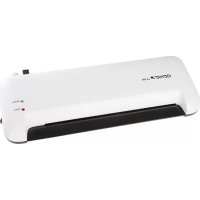
LA 300 A4 - Laminating machine Genie - Free user manual and instructions
Find the device manual for free LA 300 A4 Genie in PDF.



| Product type | Laminating machine (pouch laminator) |
| Brand | Genie |
| Model | LA 300 A4 |
| Dimensions (W x H x D) | 455 x 157 x 63 mm |
| Weight | Approximately 1.35 kg |
| Power supply | 220-240 V AC, 50 Hz, 1.3 A |
| Power consumption | 300 W |
| Lamination width | 330 mm |
| Compatible film thickness | 80 - 125 microns |
| Maximum document size | A4 |
| Release function (ABS) | Yes |
| Number of heating rollers | 2 |
| Preheating time | Approximately 3 minutes |
| Lamination type | Hot lamination |
| Lamination speed | 400 mm/min |
| Intended use | Document lamination (domestic use, non-intensive) |
| Protection class | Double insulation (class II) |
| Maintenance | Clean with a soft, dry, lint-free cloth; unplug before cleaning; allow to cool down |
| Package dimensions (W x H x D) | 468 x 160 x 66 mm |
| Package contents | Laminator, instruction manual |
| Warranty | Return to store with original packaging and proof of purchase in case of defect |
Frequently Asked Questions - LA 300 A4 Genie
User questions about LA 300 A4 Genie
0 question about this device. Answer the ones you know or ask your own.
Ask a new question about this device
Download the instructions for your Laminating machine in PDF format for free! Find your manual LA 300 A4 - Genie and take your electronic device back in hand. On this page are published all the documents necessary for the use of your device. LA 300 A4 by Genie.
USER MANUAL LA 300 A4 Genie
natural_image
White Genie® LA 300 air conditioner with black and white casing, labeled 'Ready' and 'Power' (no additional text or symbols visible)(DE) BEDIENUNGSANLEITUNG 2
(GB) OPERATING INSTRUCTION 7
(IT) ISTRUZIONI OPERATIVE 12
(FR) MODE D'EMPLOI 17
(ES) INSTRUCCIONES DE FUNCIONAMIENTO 22
the operating manual represents a component part of the device. It contains important information regarding safety, use and disposal. Familiarize yourself with all the operating and safety information before starting to use the device. Only use the device as described and for the purpose for which it is intended. Hand over all the documents with the device if it is transferred to third parties.
Intended Use
The laminator is only suitable for laminating documents. Any other use or modification shall be deemed to be improper and involves substantial risk of accidents.
Important advice about safety
- Read through these operating instructions carefully and completely before using the machine for the first time.
- Only put the machine on a flat and dry surface. It must be freely accessible from all sides. It is not recommended to use an extension cable!
- Do not open or repair the laminating machine yourself but take it to your specialized dealer whenever it is damaged, or contact our service hotline.
- Only use films of the correct size (up to DIN A4 max.) and thickness (80 to 125 microns). Films that are too thin cause a blockage of the film in the machine.
- Do not touch the hot surface of the machine after it has started up.
- The laminating machine is not allowed – for safety reasons – to be used by children, unless they are supervised by an adult.
- Never use the machine outdoor or near water.
- Hot lamination: do not laminate in this mode any materials that are sensitive to heat with this machine, like thermo-fax paper for example. These materials are only suitable for cold lamination.
- Do not pour or spill any liquid into the machine or onto it.
- Do not insert any metal objects into the machine. Please do not grasp inside the machine with your fingers.
- The laminating machine is unsuitable for constant use commercially. It is recommended to switch off „O“ the machine for 30 minutes, after it has been operating for a period of approximately 120 minutes.
- The socket should be near the device and easily accessible.
Starting up the laminating machine
-
Push the plug into the mains socket outlet and set the switch to 'I'. The red LED (Power) lights up and the heating process will begin.
-
The green LED (Ready) lights up after approximately 2 - 3 minutes. Now you can begin the laminating process.
-
Open the laminating film and lay the material that is to be laminated directly onto the closed side. Leave a margin of between 3 mm and 5 mm approximately beyond the edges while doing so.
Caution:
a) Choose a film of correspondingly suitable size in relation to the material that is to be laminated respectively.
b) It is not recommended to process several smaller materials in one film.
c) Do not cut up the film before the laminating is done.
d) The material that is to be laminated, is not allowed to be thicker than 0.5 mm including the film.
e) It is imperative to only laminate very thin or soft materials, like newspaper or serviettes for example, with thicker films (100 microns). We recommend refraining from any attempt to do so!
f) Do not insert any laminating film without the contents.
g) Never utilize laminating pockets on one side or when they are rolled up.
h) Only utilize laminating foils that are also described as such. Other kinds of film, like transparent wallets for example, are unsuitable for laminating!
- Insert the material within the laminating film straight and with the closed side first into the feed opening on the machine's front side. The material will feed it in automatically now.
- The laminated material that emerges from the delivery opening on the machine's back side is not allowed to be pulled out by force. Wait until it has run out of the machine completely. Let the laminated material to cool down briefly!
- Switch off the machine after the laminating has ended, by setting the switch to 'O'. Let the machine cool down and always pull the plug out of the mains socket outlet after using the machine.
Note: Do not feed the laminator further with foil in case of a blockage. Turn off the device immediately!
Clearing a blockage of the film
- This machine is equipped with a film blockage function in order to resolve any blockage of the film. Such function is featured by ABS button on BACK SIDE of the laminator.
- Please switch off the machine immediately by setting the switch to "O" and pull out the plug from the mains socket outlet, let the machine to cool down briefly (for hot laminating) and push the 'ABS' anti-film blockage button on back as direction indicated by the arrow sign, whenever there is a blockage of the film.
- Hold the ABS switch firmly with one hand and pull out the film completely from the machine's feed opening or delivery opening with the other hand.
- After you have resolved the blockage of the film and released the ABS switch, this will go back to its starting position again. Now you can use the machine again completely.
- Please contact our service hot line if there is a blockage of the film again.
Cleaning and care
- Switch off the unit.
- Please pull out the plug from the mains socket outlet always, in order to clean the machine. Take care while doing so that the plug does not come into contact with any liquids.
- Allow the machine to cool down before cleaning it.
- Clean the surface of the housing with a soft, dry, lint-free cloth. Do not use any solvents or cleaning agents.
Delivery
Laminator GENIE LA 300 A4
Instruction manual
| Technical data | |
| Mains voltage (V) | 220-240 AC, 50 Hz>V.3 A |
| Consumption | 300 W |
| Laminating width 330 mm | |
| Film of utilizable thickness 80 | - 125 Micron |
| Foil size | A4 max. |
| ABS function Yes | |
| Heating rollers 2 | |
| Heating up time 3 Min | |
| Laminate | Hot lamination |
| Speed 400 mm / min | |
| Dimensions (W x H x D) 455 x 157 x 63 mm | |
| Weight approx. 1.35 k | g |
| Packing (W x H x D) 468 x 160 x 66 mm | |
Disposal

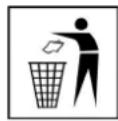
Find out about the possibilities of taking back used appliances free of charge from your dealer.
The packaging is made of environmentally friendly materials that you can dispose of at local recycling points. Advice on the options with which to dispose of your old device can be obtained from your municipal or local administration offices.

Packaging materials must be disposed of according to local regulations.
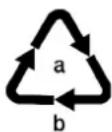
Observe the identification on the packaging materials during the waste sorting process; they are identified by abbreviations (b) and numbers (a) which have the following significance: 1–7: plastic/20–22: paper and cardboard/80–98: composite materials.

The adjacent symbol indicates laws dictate that electrical and electronic apparatus no longer required must be disposed of separate from domestic waste. Dispose of your device at a collection point provided by your local public waste authority. Packaging materials must be disposed of according to local regulations.
The device and the packaging material can be recycled, so sort them prior to disposal for better waste management. Contact your local authorities for information on the various options available to ensure correct disposal. Observe the following identifications of the packaging materials: (a) numbers, (b) abbreviations and (c) materials which have the following significance: 1–7: plastics / 20–22: paper and cardboard / 80–98: composite materials and (d) type of packaging. The logo is only applicable to Italy.

The device and packaging materials can be recycled; sort them for disposal to simplify waste management. The Triman logo is only relevant for France.
The following symbols are provided on the packaging or on the device itself. This section explains the significance of the individual symbols.

The «Geprüfte Sicherheit» mark (GS tested safety mark) certifies that the product satisfies the requirements defined by the German Product Safety Act (ProdSG).
The GS tested safety mark indicates that when implemented for its intended use and in the event of foreseeable misuse the identified product will not endanger the safety and health of the user. It concerns a voluntary safety mark which was issued by an authorized testing institute.

Only use the product indoors.
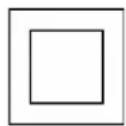
The symbol indicates that the design of the product complies with Protection Class II (double insulation). A safety connection to the electrical earthing (ground) is not necessary.
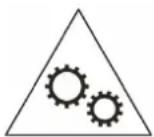
Warning!
This device is not intended to be used by children. Prevent hands, clothes and hair coming into contact with the insertion slot.
Unplug the power plug if the device will not be used for a longer period. This device is equipped with hazardous moving parts, so ensure you keep limbs well away from the moving parts
Guidelines

The CE Mark on the device confirms conformity.
The Declaration of Conformity can be read online at
www.go-europe.com.
Warranty
Dear customer,
We are delighted that you have chosen this equipment.
In the case of a defect, please return the device together with the receipt and original packing material to the point of sale.
Manufacturer
GO Europe GmbH
Zum Kraftwerk 1
D-45527 Hattingen
Germany
www.go-europe.com
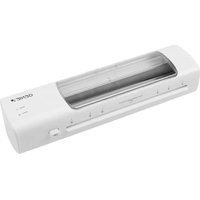
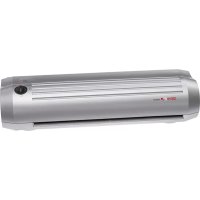
Brand : Genie
Model : LA 300 A4
Category : Laminating machine