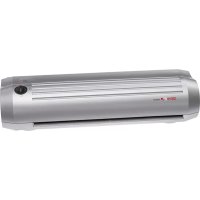
LA500 A3 - Laminating machine Genie - Free user manual and instructions
Find the device manual for free LA500 A3 Genie in PDF.


| Product Type | Laminating Machine |
| Brand | Genie |
| Model | LA500 A3 |
| Dimensions (W x D x H) | 440 x 138 x 114 mm |
| Power Supply | 220-240 V, 50 Hz, 300 W |
| Current Consumption | 1.4 A |
| Laminating Width | 330 mm (up to A3) |
| Film Thickness (Microns) | 80 (min) to 125 (max) |
| Heating Time | ≤ 5 minutes |
| Laminating Speed | 350 mm/min (80 micron), 250 mm/min (125 micron) |
| Lamination Modes | Hot and Cold |
| Anti-Blocking System (ABS) | Yes, for jam release |
| Ready Indicator | Green LED |
| Maximum Document Thickness | 0.5 mm (including film) |
| Warranty | 24 months |
| Cleaning | Wipe with slightly moist, soft cloth; unplug before cleaning |
| Safety Features | Auto shut-off recommended after 30 min; do not use near water; children under adult supervision |
Frequently Asked Questions - LA500 A3 Genie
User questions about LA500 A3 Genie
0 question about this device. Answer the ones you know or ask your own.
Ask a new question about this device
Download the instructions for your Laminating machine in PDF format for free! Find your manual LA500 A3 - Genie and take your electronic device back in hand. On this page are published all the documents necessary for the use of your device. LA500 A3 by Genie.
USER MANUAL LA500 A3 Genie
natural_image
Exterior view of a modern stainless steel air conditioner (no signage or text visible on body)Thank you for buying this high-quality product. Please carefully read through these operating instructions before using the device for the first time. In particular, please comply with the safety notices. Our service information is located at the bottom of these instructions.
Intended Use
The laminator is only suitable for laminating documents. Any other use or modification shall be deemed to be improper and involves substantial risk of accidents.
Scope of Delivery
Laminator GENIE LA 500 A3
Instruction manual
Information:
The included laminating pouches can only be used for hot laminating! Laminating pouch strength is 80 Micron.
Important advice about safety
- Read through these operating instructions carefully and completely before using the machine for the first time.
- Only put the machine on a flat and dry surface. It must be freely accessible from all sides. It is not recommended to use an extension cable!
- Do not open or repair the laminating machine yourself but take it to your specialized dealer whenever it is damaged, or contact our service hot line.
- Only use films of the correct size (up to DIN A3 max.) and thickness (80 to 125 microns). Films that are too thin cause a blockage of the film in the machine.
- Do not touch the hot surface of the machine after it has started up.
- The laminating machine is not allowed – for safety reasons – to be used by children, unless they are supervised by an adult.
- Never use the machine in the open air or near water.
- Hot lamination: do not laminate in this mode any materials that are sensitive to heat with this machine, like thermo-fax paper for example. These materials are only suitable for cold lamination.
- Do not pour or spill any liquid into the machine or onto it.
- Do not insert any metal objects into the machine. Please do not grasp inside the machine with your fingers.
-
The laminating machine is unsuitable for constant use commercially. It is recommended to switch off the machine for 30 minutes, after it has been operating for a period of approximately 30 minutes.
-
The socket should be near the device and easily accessible.
Description of machine components

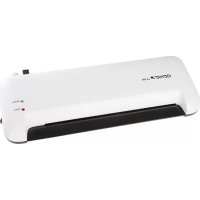
A Insert opening
B Controller 80 micron/ ABS (OFF)/ 125 micron
ABS: Antiblocking system or jam release
C Power/ Ready
D Hot/ Cold
Hot laminating ('Hot')
- Push the plug into the mains socket outlet and set the switch to 'Hot'. The Power LED lights up and the heating process will begin.
- The Ready LED lights up after approximately 5 minutes. Now you can begin the laminating process.
- Open the laminating film and lay the material that is to be laminated directly onto the closed side. Leave a margin of between 3 mm and 5 mm approximately beyond the edges while doing so.
Caution
a) Choose a film of correspondingly suitable size in relation to the material that is to
be laminated respectively.
b) It is not recommended to process several smaller materials in one film.
c) Do not cut up the film before the laminating is done.
d) The material that is to be laminated is not allowed to be thicker than 0.5 mm including the film.
e) It is imperative to only laminate very thin or soft materials, like newspaper or serviettes for example, with thicker films (125 microns). We recommend refraining from any attempt to do so!
f) Do not insert any laminating film without the contents.
g) Never utilize laminating pockets on one side or when they are rolled up.
h) Only utilize laminating foils that are also described as such. Other kinds of film, like transparent wallets for example, are unsuitable for laminating!
-
Insert the material within the laminating film straight and with the closed side first into the feed opening on the machine's front side. The material will feed it in automatically now.
-
The laminated material that emerges from the delivery opening on the machine's back side is not allowed to be pulled out by force. Wait until it has run out of the machine completely. Let the laminated material cool down briefly!
-
Switch off the machine after the laminating has ended, by setting the switch to 'OFF'. Let the machine to cool down and always pull the plug out of the mains socket outlet after using the machine.
Cold laminating ('Cold')
- Push the plug into the mains socket outlet and set the switch to 'Cold'. You can begin laminating whenever the LED indicator lights up.
- Open the laminating film and lay the material that is to be laminated directly onto the closed side. Leave a margin of between 3 mm and 5 mm approximately beyond the edges while doing so.
- Pull the protective sheet – if there is one – off the laminating foil.
Caution
a) Only use films for cold laminating that are expressly suitable for cold laminating.
b) It is recommended not to process several materials in one film.
c) Do not cut up the films before the laminating is done.
d) When the product is in condition of "Cold" lamination, the green light means it is ready to use.
Change between hot and cold laminating
-
You can easily change to hot laminating by setting the switch to 'Hot' whenever you have been using the machine in the cold laminating mode. Wait until the green LED has lit up after approximately 5 minutes. The machine is ready for hot laminating now.
-
Now proceed as described by point hot laminating.
- Set the switch to 'Cold' whenever you have been using the hot laminating mode and you would like to change to the cold laminating mode. Please note
that the cooling down time amounts to approximately 2 hours for switching over from hot to cold laminating. You can only begin the cold laminating – as described by point “Cold laminating” – whenever the LED lights up green.
ATTENTION:
When the laminated pouch is ejected from the laminating film output it is still hot and its shape may change slightly. For this reason, allow the laminated pouch to cool down for at least 1 minute before touching it.
NOTE:
Do not feed the laminator further with foil in case of a blockage. Turn off the device immediately!
Clearing a blockage of the film
- This machine is equipped with a film blockage function in order to resolve any blockage of the film (ABS).
- At the start of the lamination process, the pouch may be pulled in at an angele or jam itself inside the appliance.
- Slide the Anti-Blocking switch (ABS) into position ABS. The laminating pouch is not pulled any further in.
- Remove the lamination pouch completely from the machine's feed opening or delivery opening.
- After you have resolved the blockage of the film and released the ABS switch put it back to the desired foil thickness. Re-start the lamination process.
Attention: If the ABS switch have been paced at ABS position for a long time, pleas slide the switch to the deird foil thickness 80 or 125 mic, and the machine need to heat up. Please wait until the LED "Ready" glows. - Please contact our service-hotline if there is a blockage of the film again.
Cleaning and care
- Please pull out the plug from the mains socket outlet always, in order to clean the machine. Take care while doing so that the plug does not come into contact with any liquids.
- Allow the machine to cool down before cleaning it.
- Clean the machine with a slightly moist, soft cloth. Do not use any caustic or abrasive cleaning agents while doing so.
| Technical data | |
| Mains voltage (V) 220 V to 240 V, 50 Hz, 300 W | |
| Consumption 1.4 A | |
| Laminating width 330 mm | |
| Size of the machine (mm) 440 x | 138 x 114mm |
| Film of utilizable thickness (microns) | 80 minimum, 125 maximum |
| Heating up time | 5 min. |
| Laminating speed 350mm/min | for 80 mic and 250mm/min for 125 mic. |
HANDLING THE GUARANTEE
Thank you very much for purchasing this GENIE product. Please note the following advice whenever this machine does not function faultlessly, contrary to expectations.
The guarantee period amounts to 24 months from the date of purchase, provided that the machine has been used appropriately. Please keep the proof-of-purchase voucher and original packaging in a safe place. The warranty is only valid for defects in materials or fabrication. However, it is invalid for damage that has occurred to breakable parts, e.g., on the casing. Machines that have been damaged by inappropriate use externally, are excluded from being exchanged. A guarantee will expire whenever any repairs have been carried out without the express consent of our customer service department.
Repairs under the guarantee can only be made when the proof-of-purchase voucher is enclosed with the defective machine – please notify us about the return by telephone! Please give your name, address, post code, town and telephone number with the dialing code. Please state the reason for your complaint too. We regret any inconvenience caused!
Our service hot line
Tel. +49 (0) 6122-7279891 • Fax +49 (0) 6122-705952
E-mail: hotline@genie-online.de
Address: GENIE GmbH & Co. KG, -Service-, Berta-Cramer-Ring 22, D-65205
Wiesbaden. Deutschland/ Germany
Disposal:
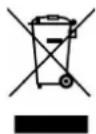
Guideline 2012/19/EC concerning the handling, collection, recycling and disposal of electrical and electronic equipment and their components ('waste electrical and electronic equipment', known as WEEE).
The crossed symbol on a rubbish container indicates that the machine or device is not allowed to be disposed of but it must be handed over to a suitably equipped collection centre for proper recycling or disposal.
Directives:

We declare that this device has been manufactured in accordance with the applicable rules and regulations.
Importer:
GENIE GmbH & Co. KG
Berta-Cramer-Ring 22
65205 Wiesbaden, Germany
FR GUIDE D'UTILISATION
Cher client,
Notre Hotline service clients:
- Intended Use
- Scope of Delivery
- Information:
- Important advice about safety
- Description of machine components
- Hot laminating ('Hot')
- Caution
- Cold laminating ('Cold')
- Change between hot and cold laminating
- ATTENTION:
- NOTE:
- Clearing a blockage of the film
- Cleaning and care
- HANDLING THE GUARANTEE
- Disposal:
- Directives:
- Importer:
- FR GUIDE D'UTILISATION
- Cher client,
Brand : Genie
Model : LA500 A3
Category : Laminating machine