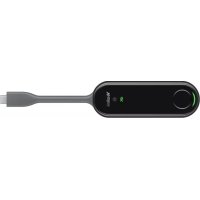
WPP30 - Video conferencing system Yealink - Free user manual and instructions
Find the device manual for free WPP30 Yealink in PDF.


| Product Type | Wireless Presentation System |
| Brand | Yealink |
| Model | WPP30 |
| Category | Video Conference System |
| Main Functions | Wireless content sharing, pairing with Yealink terminals, presentation button |
| Connectivity | USB-A and USB-C |
| Compatibility | Supported Yealink terminals |
| Power Supply | Via USB port of computer or terminal |
| Operating Temperature | 0°C to 50°C (estimate) |
| Maintenance and Cleaning | Clean with a soft, dry cloth; avoid liquids |
| Safety | Keep away from heat sources and flames; do not let children play with the device |
| Spare Parts and Repairability | Not specified; contact Yealink support for repairs |
| Recycling | Comply with local regulations; device RoHS compliant |
| Warranty | Limited warranty for compliant use |
| Support Contact | support@yealink.com |
Frequently Asked Questions - WPP30 Yealink
User questions about WPP30 Yealink
0 question about this device. Answer the ones you know or ask your own.
Ask a new question about this device
Download the instructions for your Video conferencing system in PDF format for free! Find your manual WPP30 - Yealink and take your electronic device back in hand. On this page are published all the documents necessary for the use of your device. WPP30 by Yealink.
USER MANUAL WPP30 Yealink
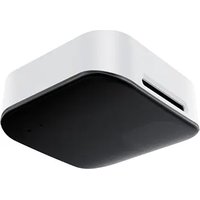
Wireless Presentation Pod WPP30
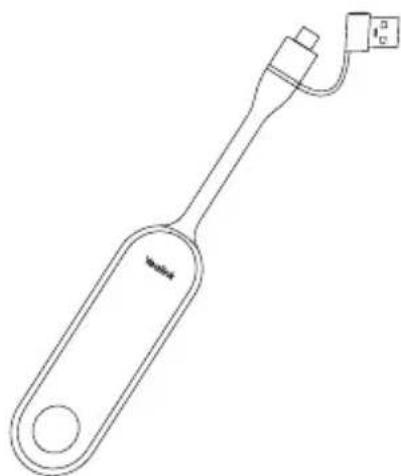
Quick Start Guide (V1.2)
English | 简体中文 | Deutsch | Français | Espanol

Declaration of Conformity
We.
YEALINK(XIAMEN) NETWORK TECHNOLOG Y CO.,LTD
Address: 309, 3rd Floor, No.16, Yun Ding North Road,
Huli District, Xiamen City, Fujian, P.R. China
Manufacturer: YEALINK(XIAMEN) NETWORK TECHNOLOGY CO.,LTD.
Address: 309, 3rd Floor, No.16, Yun Ding North Road,
Huli District, Xiamen City, Fujian, P.R. China
DATE: 28thMay/2022
declare that the product
Type: Wireless Presentation Pod
Model: WPP30
moots the essential requirements and other relevant provisions according to the following EC directive
Directive: 2014/30/EU, 2014/35/EU, RED 2014/53/EU
Conformity
The product complies with the following standards:
Safety: EN IEC 62368-1:2020+A11:2020
EMC:EN55032:2015
EN 55035:2017
EN61000-3-2:2014
EN61000-3-3:2013
Radio:ETSI EN 301 489-1 V2.2.0
ETSIEN301489-17V3.2.0
ETSI EN 300 328 V2.1.1
ETSI EN 301 893
EN300440V2.1.1
EN 303 687 V0.0.14
Health:EN 62311:2008; EN62479:2010
Directive 2011/65/EU and (EU)2015/863 of the European Parliament and of the Council of 8 June 2011 and 4 June 2015 on the restriction of the use of certain hazardous substances in electrical and electronic equipment(RoHS 2.0)
Directive 2012/19/EU of the European Parliament and of the Council of 4. July 2012 on Waste electrical and electronic equipment(WEEE)
Regulation (EC) No.1907/2006 of the European Parliament and of the Council of 18.December.2006 on Registration, Evaluation, Authorization, and Restriction of Chemicals (REACH)
NAME: Huahu Wang
DATE:28/May/2022
TITLE: Manager
YEALINKXIAMEN.NETWORKTECHNOLOGYCO.LTD.
Web: www.yeslink.com
Copyright©2022YEALINK(XIAMEN) NETWORK
TECHNOLOGY CO.,LTD. All rights reserved.
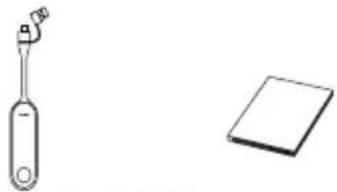
1 Package Contents
WPP30 Quick Start Guide
Pair WPP30 to the Endpoint
WPP30 supports different Yealink endpoints. The pairing methods of different endpoints are different. For details, please refer to support.yealink.com.
If you purchase one of above endpoints and WPP30 together, they are already paired. Just connect the WPP30 to your computer for sharing content.
If you purchase the WPP30 separately, you need to pair endpoint and WPP30 manually.
To pair endpoint and WPP30 manually:
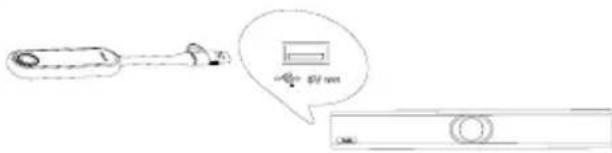
- Connect the WPP30 to the USB-A port on the endpoint.
- Disconnect the WPP30 after the monitor prompts
Wireless Presentation Pod is Paired successfully".
Start or Stop Sharing Content
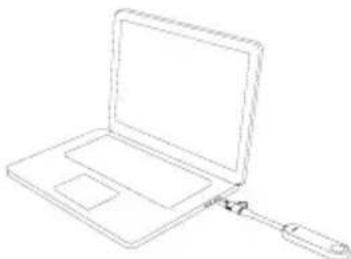
- Connect the WPP30 to the USB-A/USB-C port on your computer.
Wait Yealink Wireless Presentation Pod software pops up.
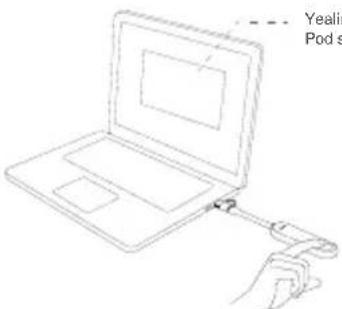
- On the WPP30, press the presentation button to share full screen.
Press the presentation button again to stop sharing.
1 包装清单
WPP30快速入门指南
配对无线投屏器和会议主机
Operating Ambient Temperatures
Operating tempersure: +14 to 122+1-10 to 50°C
- Relative humidity: 5% to 30%, norcoordinant
- Strobofors temperature: -100 to +100, -100 to +100
Warranty
Our product warranty is limited only to the unit itself; when used normally in accordance with the operating instructions and the system environment. We are not liable for damage or loss resulting from the use of this product, or for any claim from a third party. We shall be responsible for any losses, actions, proceedings, costs, damages, and other expenses of this product caused by or not liable for financial damages, lost, profits, gains or other third parties, etc., arising from or in the use of this product.
DC symbol
the DC voltage symbol
Restriction of Hazardous Substances Directive (RoHS)
This device coincides with the "requirements of the E. coli PHOSPHOROGENOMICS". The condition of compliance can be obtained by contacting s.spp@eyleahk.com.
Safely Instructions
Save these pedestrians. Read those safety instructions before use. The safety instructions are a very important part of the system, as they provide risk factor of fire electrical shock, and other personal injury.
General Requirements
- Before you install and use the device, read the instructions carefully and choose the appropriate
rtnnne nnnnne ennnnne eannnnne ennnnne ennnnne ennnnne ennnnne ennnnne ennnnne ennnnne ennnnne ennnnne ennnnne ennnnne ennnnne ennnnne ennnnne ennnnne ennnnne ennnnne ennnnne ennnnne ennnnne ennnnne ennnnne ennnnne ennnnne ennnnne ennnnee
- During the process of storage, transportation, and operation.
please slesse the drpncry and p
During the process of storage, transportation, and operation,
please avoid collision and crash of the device.
of any disclcnfice, please contact the appointed maintenan er center for repair.
Without prior written consent, no organization or individual is
permitted to make any change to the structure or the safety
design of the device. Yearlink is under no circumstance liable to
Consequences b legal issues caused by such charges.
device. Leggs right of ollers should be reacseed as well.
Environmental Requirements
- Place the device at a wall-ventilated pad. Do not expose the
device under direct sunlight.
-
Keep the device dry and free of dusts.
-
Plan the device on a steels and level planar.
-
Please place no heavy objects on the device in case of The usage environment is out of operating temperature range.
10
tor heat drain or
Do not place the devos on or near any inhammable or fire
vulnabie object, such as rubber- made materials.
or a cundle or an sleping hvrse
- Keep the device away from any no-sold appliances with
strong magnetic field or electromagnetic field, such as a
mowaeveonrare
Operating Requirements
Do not let a child operate the device without guidance.
Do not let a child play with the device or any accessory in case of accidental swallowing.
-
Manufacturer only.
- The power supply of the device shall meet the requirements of the micro voltage of the device. Please see the provided surface
Before plugging or unplugging any code make sure that your
hand are comprely dry.
e
equipment . Year Water , or Exericle . Year A ( 2016 ) , kitchen sink , and basement of areas , a painting PPO
Do not read on, pal or over-bend any cable in case of
Ding h t n e
it from the power supply. Unplug the power plug and the
Asymmetrict Digital Subcorber Line (ADSL) twisted par (the
radio frequency code) to avoid lightning strike.
If the device is left unfasted for a rather long time, disassembled it from the same as a rock and very soon, he says she.
IF the paxe supply and depg the power plug.
When the C is activated, it activates the device, or some abnormal noise or ane1, disconnected device from the power supply, and impala the power plug immediately. Contact the specified maintenance center for repair.
Do not insert any object into equipment slots that is not part of
the product or auxiliary product.
Belpre connering a cabe, camnc the gourding cale of the
service first. Do not disconnect the grounding cable until you disconnect all other cables.
Cleaning Requirements
Before cleaning the device, stop using it and disconnect it from
the power supply
-
Use a pest at soft, dry and anti stn coith to clean the device.
-
Keep the power plug clean and dry. Using a dirty or wet paper
pug puy ed to see me shcck a
ENVIRONMENTAL RECYCLING
Never dispose of the device with domestic
Ask your Town Council again at how to depict of it in an environmentally friendly way. The cariesse on box: plastic packaging and other player components are not included, but they can be revealing recycling regulations in your country.
Always adhere to prevallng regulations
These are fail to do so may be fined or
The proposed road has not appeared on the device means that it is possible to reach the end of a 2-week life, it should be taken to a special waste disposal centre are treated separately to general urban waste.
ubicshooting
unl cannot supply power to Yealink device.
1
1
e 1
ssse the operation houmua
scale between the unit and the ye
References
connected the cable correctly.
canner cannot the cable properly.
ai. may have corneled: a wrong Yearlik device.
see the correct power supply
the dust, etc., may be n the port.
T
A
08/18 Total information
LINK NETWORK TECHNOLOGY CO.,LTD.
3rd Floor, No.16, Yun Ding North Road, Hui District, Xiarrer
Tujan.P.R.C.
LINK (EUROPE) NETWORK TECHNOLOGY B.V.
ncklaen 3127,Atrum Buicng,8th floor 1077X Ameterdam
Nene1nns
at das Symbol fur LC sparnung
YsreHrTbOeYxwng1603Gn73.
Hechtte Ucrta mla
Umweltvorschriften
Graivnskyan 3127, Ainum Building, 3th floor, 10772X Airstedan, Nisshinburo
(1)《USA》NETWORKTECHNOLOGYCO.LTD.
003FecntracSmedSuie2700EflorAtlantaGA30700LLA
Hargenslott in China
Consignes de securit
- Cardozo: appellate from the court, asappellate the elector-conquester, and is a person who has been elected to the parliament of the elector-conquester, that is, G.J. in four a micro-votes on an executive basis .
Explainous dislution
- Ns 20563, 20564, 20565, 20566, 20567, 20568, 20569
- Disperse the residue liberate until a gelative period of approximately 10min is reached. Rinse the sample with deionized cold dialnating.
-
Vou avc peul-ene branch e mauvais dispose? Yeslink.
-
Ullsaz are soura eallermaller asppie
La tof cinn tne 10e 1000
303,3d Floor No 16 On Ding Norti Foad, Fu District Xiamen City Fujian China
YFAIINKFIFIDOPFNETWORKTECHNOOGYR.V
H
YEALINKUSAIETNWORKTECHNOLOGYCO.,LTD.
999 Peachie Street Suite 2300, Tallinn, Aalanta, GA 33008, Canada.
Ecliptic Glimn
Instruetiones de segundarias Temperatura ambiente de funiculosanlato
Temperature de funccionamento: 14 to 120 (-10 to 50°C)
Huranaalalalal.5% to 30%in condenseon
Tempeur 2016-03-22 to +185 F - 50 to -70 C
a garantie du peccato est initialement suo la 13. iuridique, sauf si s'asymptotique de la accidente est insubstruitions de的前提下 et entorno delsysteme. No sorros responsabiliers por dasas o penildias reoslantes del suo de este produits, o por suaiculare rechancen de un herero. Nao escarreado responcables de fles problemei corne di espiolito Yedlikque quarsunl del seu de ester produit. No mos e reseumatides del seu d'elixin. Iam filinariis, veridifizadas en belles, rechancamento de herero, etc., quasar sui l'uso del seu de ester produit.
sinhole CC
Eesalimboe
Regulations and/or policies
-
In the case of the subject, the following are not applicable: (a) The right to be made available for public use; (b) the right to be used for private use; (c) the right to be used for commercial purposes; and (d) the right to be used for advertising purposes.
-
die, de, a sponsoi o v an utilizati du ruric e cieu tio. 10. de la febranza orecuta y cieu cierto o la dria che cie.
-
Si as a nume de disanlton n rulos a chores argmtes.