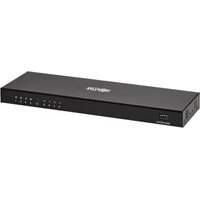
B127A008BH - Distributor Tripp Lite - Free user manual and instructions
Find the device manual for free B127A008BH Tripp Lite in PDF.



| Product Type | HDMI Splitter over Cat6 Cable |
| Brand | Tripp Lite |
| Model | B127A008BH |
| Number of Outputs | 8 |
| Maximum Resolution | 4K x 2K (3840 x 2160) @ 60 Hz with 4:4:4 chroma |
| Maximum Distance | 70 m (230 ft) over Cat6 24 AWG cable |
| HDR | Supported |
| HDCP | HDCP 2.2 compliant |
| Audio | 7.1 channels uncompressed, Dolby TrueHD |
| Power | External (included) and Power over Cable (PoC) to receivers |
| Local HDMI Port | Yes, local 4K/60 Hz output or daisy-chain |
| Mounting | Wall, 19-inch rack, pole mount (hardware included) |
| Required Software | None |
| Operating Temperature | 0°C to 40°C (estimated) |
| Operating Humidity | 10% to 85% RH (estimated) |
| Care | Clean with a dry soft cloth |
| Safety | Do not expose to moisture, unplug before cleaning |
| Warranty | 1-year limited |
| Country of Manufacture | China (estimated) |
Frequently Asked Questions - B127A008BH Tripp Lite
User questions about B127A008BH Tripp Lite
0 question about this device. Answer the ones you know or ask your own.
Ask a new question about this device
Download the instructions for your Distributor in PDF format for free! Find your manual B127A008BH - Tripp Lite and take your electronic device back in hand. On this page are published all the documents necessary for the use of your device. B127A008BH by Tripp Lite.
USER MANUAL B127A008BH Tripp Lite
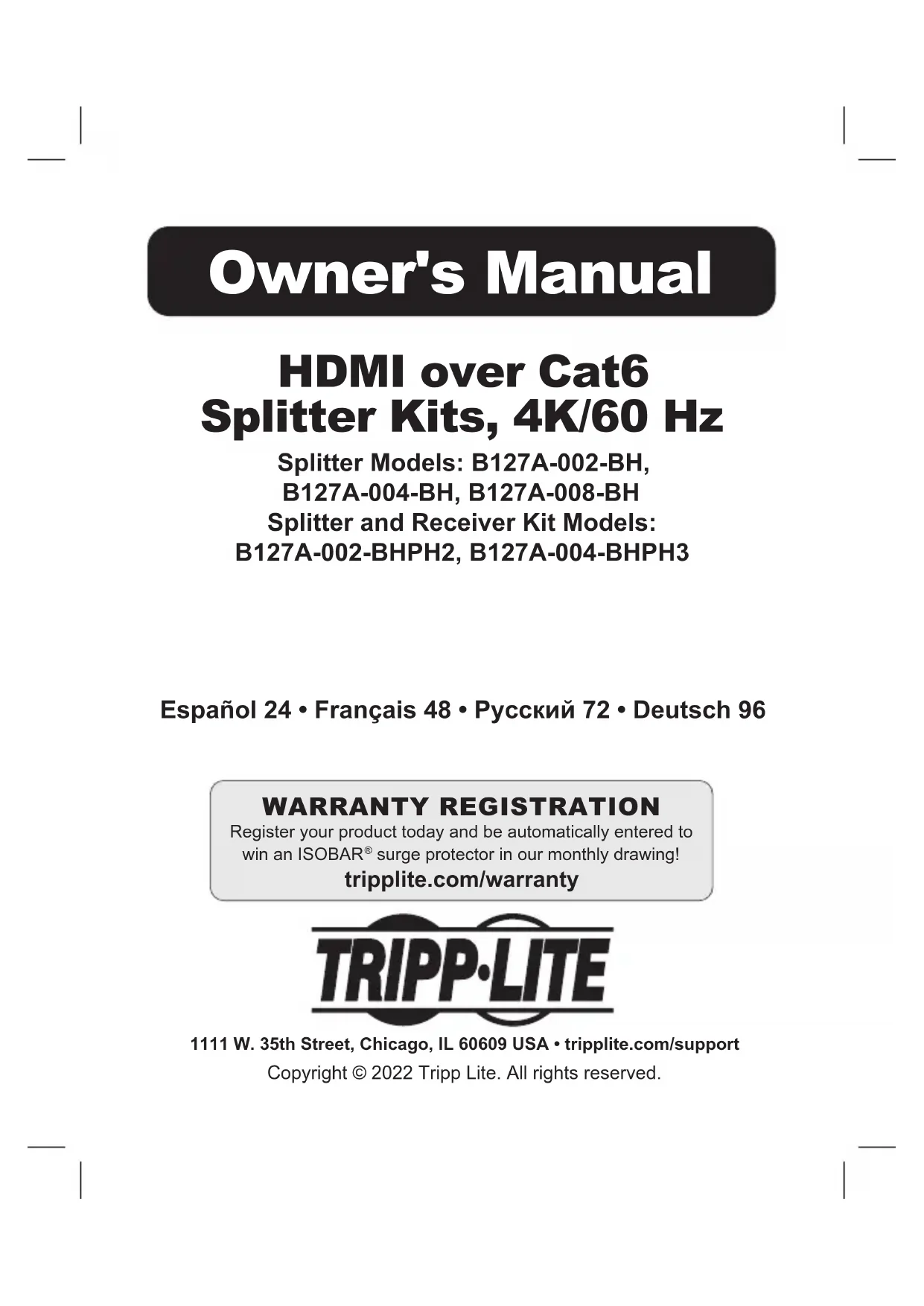
HDMI over Cat6 Splitter Kits, 4K/60 Hz
Splitter Models: B127A-002-BH,
B127A-004-BH, B127A-008-BH
Splitter and Receiver Kit Models:
B127A-002-BHPH2, B127A-004-BHPH3
Espanol 24 • Français 48 • Pycckn 72 • Deutsch 96
WARRANTY REGISTRATION
Register your product today and be automatically entered to
win an ISOBAR® surge protector in our monthly drawing!
triplite.com/warranty

1111 W. 35th Street, Chicago, IL 60609 USA · tripplite.com/support
Copyright © 2022 Tripp Lite. All rights reserved.
Package Contents
| External Power Supply | Mounting Hardware (Y/N) | HDMI Accessory Cable | |
| B127A-002-BH Y Y | N | ||
| B127A-002-BHPH2 | Y Y N | ||
| B127A-004-BH Y Y | Y | ||
| B127A-004-BHPH3 | Y Y Y | ||
| B127A-008-BH Y Y | N |
Product Features
All
- Extend 4K audio and video signals up to 230 ft. away to an HDMI display
- Support video resolutions up to 4K x 2K (3840 x 2160) @ 60 Hz, as specified in HDMI 2.0, with 4:4:4 Chroma Subsampling
- Carry High Dynamic Range (HDR) signals for expanded color accuracy
- Comply with HDCP 2.2 standards
- Power over Cable (PoC) technology provides power from splitter to connected receiver units over Cat6 cabling
- Plug and play - no software or drivers required
Product Features
B127A-002-BH
- Extends and splits a 4K audio/video signal with power to two displays up to 230 ft. away over 24 AWG Cat6 cabling
- Compatible with Tripp Lite B127A-Series Receiver units such as B127A-1A0-FH or B127A-1A0-BH (sold separately)
Supports true uncompressed 7.1-channel digital audio and Dolby TrueHD - Multi-resolution support allows receiver units to be used on any display that supports 1080p, 4K/30 Hz or 4K/60 Hz without affecting the video resolution of the other connected receiver.
- Power over Cable (PoC) technology provides power from the splitter unit to the connected receivers via Cat6 cabling
- Included mounting hardware allows splitter unit to be wall-mounted, rack-mounted or pole-mounted
B127A-002-BHPH2
- Extends and splits a 4K audio/video signal with power to two displays up to 230 ft. away over 24 AWG Cat6 cabling
Kit includes two pigtail receivers that each support 4K/60 Hz video resolutions - Compatible with Tripp Lite B127A-Series Receiver units such as B127A-1A0-FH or B127A-1A0-BH (sold separately)
Supports true uncompressed 7.1-channel digital audio and Dolby TrueHD
Product Features
- Multi-resolution support allows receiver units to be used on any display that supports 1080p, 4K/30 Hz or 4K/60 Hz without affecting the video resolution of the other connected receiver
- Power over Cable (PoC) technology provides power from the splitter unit to the connected receivers via Cat6 cabling
- Included mounting hardware allows splitter unit to be wall-mounted, rack-mounted or pole-mounted
B127A-004-BH
- Extends and splits a 4K audio/video signal with power to four displays up to 230 ft. away over 24 AWG Cat6 cabling
- Compatible with Tripp Lite B127A-Series Receiver units such as B127A-1A0-FH or B127A-1A0-BH (sold separately)
Supports true uncompressed 7.1-channel digital audio and Dolby TrueHD - Multi-resolution support allows receiver units to be used on any display that supports 1080p, 4K/30 Hz or 4K/60 Hz without affecting the video resolution of the other connected receiver
- Power over Cable (PoC) technology provides power from the splitter unit to the connected receivers via Cat6 cabling
- Local HDMI port supports 4K/60 Hz video resolution to display the image being transmitted to connected displays
- Cascade an additional B127A-002-BH, B127A-004-BH or B127A-008-BH splitter unit from the local HDMI port to expand your installation
Product Features
- Included mounting hardware allows splitter unit to be wall-mounted, rack-mounted or pole-mounted
B127A-004-BHPH3
- Extends and splits a 4K audio/video signal with power to four displays up to 230 ft. away over 24 AWG Cat6 cabling
Kit includes three pigtail receivers that each support 4K/60 Hz video resolutions - Compatible with Tripp Lite B127A-Series Receiver units such as B127A-1A0-FH or B127A-1A0-BH (sold separately)
Supports true uncompressed 7.1-channel digital audio and Dolby TrueHD - Multi-resolution support allows receiver units to be used on any display that supports 1080p, 4K/30 Hz or 4K/60 Hz without affecting the video resolution of the other connected receiver.
- Power over Cable (PoC) technology provides power from the splitter unit to the connected receivers via Cat6 cabling
- Local HDMI port supports 4K/60 Hz video resolution to display the image being transmitted to connected displays
- Cascade an additional B127A-002-BH, B127A-004-BH or B127A-008-BH splitter unit from the local HDMI port to expand your installation
- Included mounting hardware allows splitter unit to be wall-mounted, rack-mounted or pole-mounted
Product Features
B127A-008-BH
- Extends and splits a 4K audio/video signal with power to eight displays up to 230 ft. away over 24 AWG Cat6 cabling
- Compatible with Tripp Lite B127A-Series Receiver units such as B127A-1A0-FH or B127A-1A0-BH (sold separately)
Supports true uncompressed 7.1-channel digital audio and Dolby TrueHD - Multi-resolution support allows receiver units to be used on any display that supports 1080p, 4K/30 Hz or 4K/60 Hz without affecting the video resolution of the other connected receiver
- Power over Cable (PoC) technology provides power from the splitter unit to the connected receivers via Cat6 cabling
- Local HDMI port supports 4K/60 Hz video resolution to display the image being transmitted to connected displays
- Cascade an additional B127A-002-BH, B127A-004-BH or B127A-008-BH splitter unit from the local HDMI port to expand your installation
- Included mounting hardware allows splitter unit to be wall-mounted, rack-mounted or pole-mounted
Product Features
Optional Accessories:
N202-Series Cat6 24 AWG Solid Wire Patch Cables
- P569-XXX-CERT or P568-XXX-2A Series High-Speed HDMI 2.0 Cables
B127A-010-H Signal Booster
B127A-1A0-BH Box-Style Receiver
B127A-1P0-PH Pigtail Receiver
B127A-1A0-FH Faceplate Receiver
Disclaimer
Before installation, please check the following settings of your source(s) and TV/monitor(s):
- Set display to 60Hz . Double-check factory settings, as default can be set to a lower frequency (Hz) than advertised.
- Ensure the input setting of your monitor is set at HDMI 2.0. Some displays may have default setting at HDMI 1.4.
- Verify your monitor has the HDR feature enabled. Some displays may have this feature disabled as a factory setting.
- Check if the Ultra HD (UHD) Deep Color setting is enabled on your TV/monitor. Confirm with your TV/monitor manufacturer which HDMI ports support UHD Deep Color. Note for B127A-004-BH, B127A-004-BHPH3 and B127A-008-BH: To connect a local monitor to your installation, the UHD Deep Color setting may need to be disabled on your local TV/monitor (depending on make) to achieve 4K @ 60 Hz resolution.
Mounting Instructions
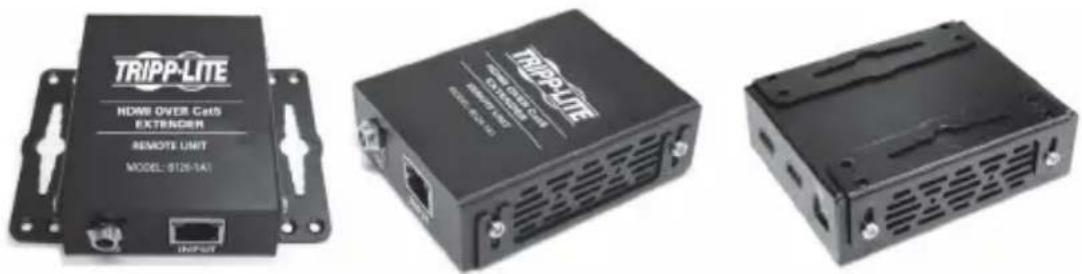
The B127A-002-BH, B127A-004-BH, B127A-008-BH, B127A-002-BHPH2 and B127A-004-BHPH3 include mounting hardware that allows for a variety of mounting methods.
The following images illustrate how the included mounting brackets can be attached for different installations.
Note: The model shown in the below images is for illustrative purposes only. Your product may vary by model number, size or port orientation. The mounting options for all over IP units are the same.
Wall-Mount
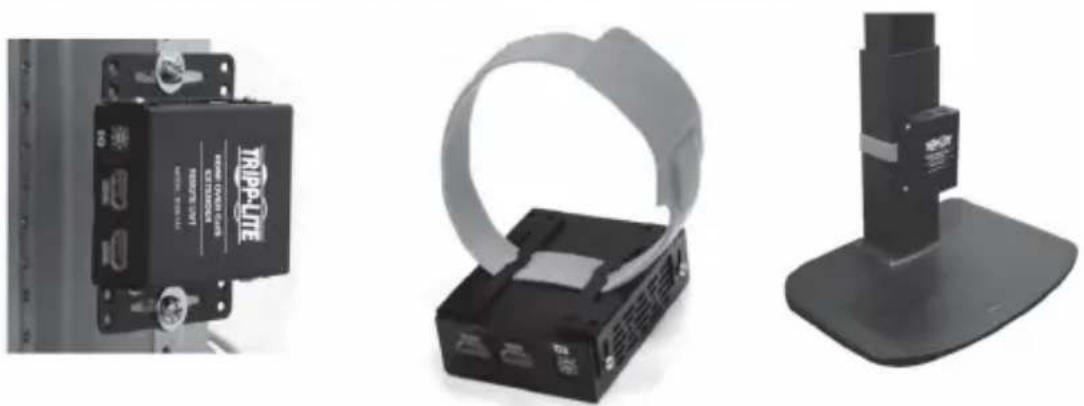
19" Rack-Mount Pole-Mount
Installation
Standard Splitter Kit Installation (2-Port Models)
Notes:
1) Test to ensure the entire installation works properly before pulling cables through ceilings/walls.
2) To achieve maximum distance and performance, use 24 AWG solid wire Cat6 cable. Using stranded wire Cat6 cable or cable with a gauge (AWG) size higher than 24 AWG will result in shorter extension distance. Higher gauge cabling, such as 26 AWG, has a more limited transmission capability than lower gauge cabling. All Tripp Lite N202-Series Cat6 cables are made with 24 AWG solid wire cabling.
3) The first installation diagram shows a B127A-002-BHPH2 kit, which includes a B127A-002-BH splitter unit and two B127A-1P0-PH receiver units. The second diagram shows the B127A-002-BH splitter used with an included B127A-1P0-PH receiver and B127A-1A0-BH receiver (sold separately at tripplite.com).
4) External power is not required for remote receiver units because of Power over Cable (PoC) technology incorporated in the transmitter units.
Installation
B127A-002-BH
Up to 230 ft. (70 m) Cat6 cable at 4K/60 Hz
Up to 15 ft. (4.5 m) HDMI 2.0 cable at 4K/60 Hz
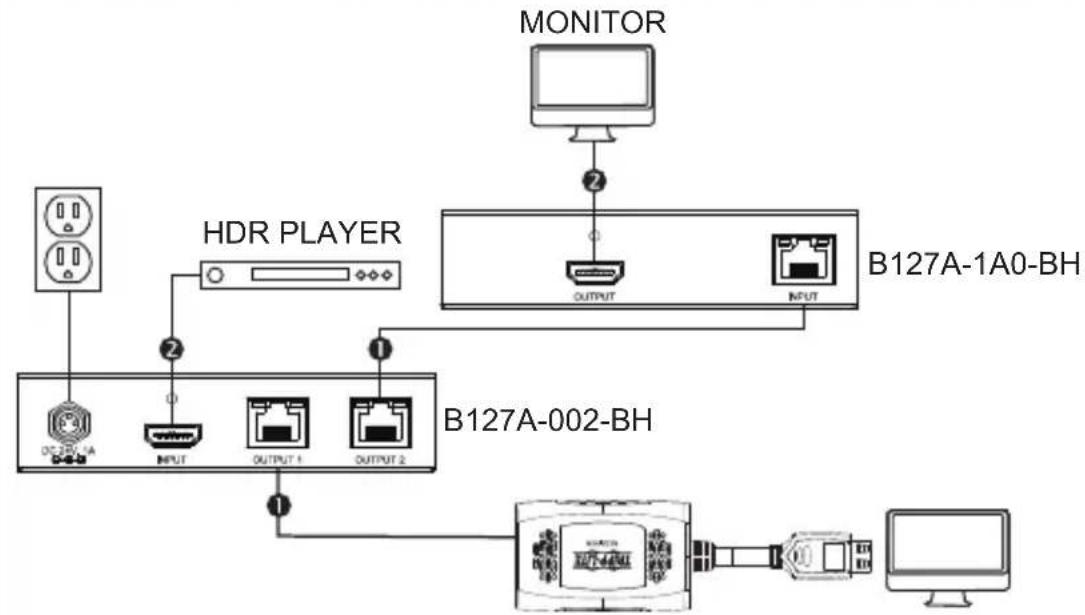
B127A-1P0-PH
Installation
B127A-002-BHPH2
Up to 230 ft. (70 m) Cat6 cable at 4K/60 Hz
Up to 15 ft. (4.5 m) HDMI 2.0 cable at 4K/60 Hz
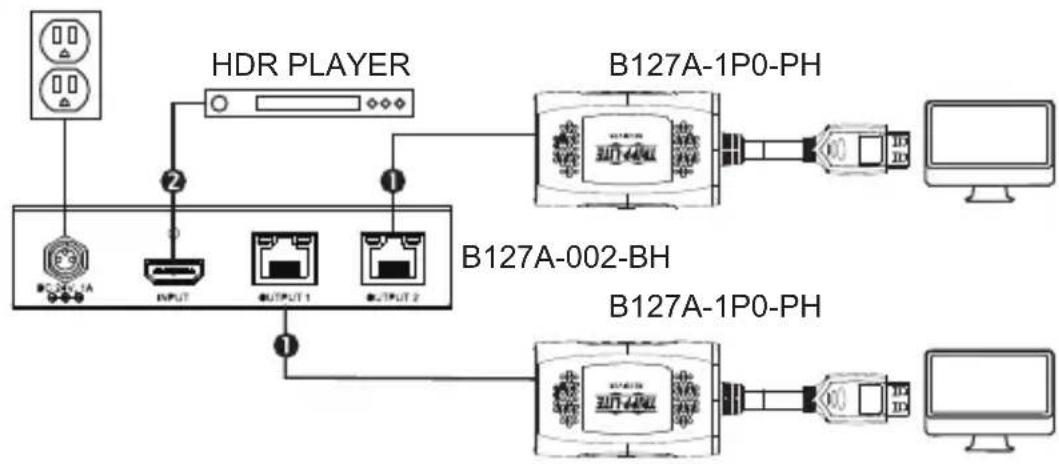
- Make sure all equipment in the installation—such as TVs, Blu-ray™ players and the transmitter—is powered OFF.
- Using an HDMI 2.0 cable (such as Tripp Lite P569-XXX-CERT or P568-XXX-2A Series cables), connect the HDMI source to the INPUT port on the local transmitter unit.
- Optional: For extended range, connect up to two B127A-010-H signal repeater units to the splitter and each receiver via Cat6 cabling.
- Using Cat6 cable (such as Tripp Lite N202-Series 24 AWG Cat6 Cabling), connect the RJ45 port on the local splitter unit to the RJ45 port on the remote receiver unit.
Installation
- Using an HDMI 2.0 cable (such as Tripp Lite P569-XXX-CERT or P568-XXX-2A Series cables), connect the remote receiver unit's HDMI port to a monitor.
- Turn on the power to your connected TVs/monitors. The LOCAL (orange) LED will illuminate to indicate the local port has been connected to a display.
- Connect the external power supply to the splitter unit. Plug it into an available wall outlet or a Tripp Lite surge protector, power distribution unit (PDU) or uninterruptible power supply (UPS). The POWER (green) LED on the local splitter unit will illuminate to indicate the unit is receiving power from the external power supply. The POWER (green) LED on the remote receiver unit's RJ45 port will illuminate to indicate the unit is receiving power from the local transmitter unit through PoC technology.
- Turn on the power to the HDMI source. The RJ45 (orange) LED will illuminate on both the local transmitter and remote receiver units to indicate a signal is being received from the source to display. The screen should now display on the connected monitor(s).
Installation
Standard Splitter Kit Installation (4-Port Models)
Notes:
1) Test to ensure the entire installation works properly before pulling cables through ceilings/walls.
2) To achieve maximum distance and performance, use 24 AWG solid wire Cat6 cable. Using stranded wire Cat6 cable or cable with a gauge (AWG) size higher than 24 AWG will result in shorter extension distance. Higher gauge cabling, such as 26 AWG, has a more limited transmission capability than lower gauge cabling. All Tripp Lite N202-Series Cat6 cables are made with 24 AWG solid wire cabling.
3) The first installation diagram shows a B127A-004-BHPH3 kit, which includes a B127A-004-BH splitter unit and three B127A-1P0-PH receiver units. The second diagram shows a B127A-004-BH splitter unit with an included B127A-1P0-PH receiver and additional B127A-1A0-BH, B127A-1A0-FH and B127A-2A0-FH receiver units (sold separately at tripplite.com).
4) External power is not required for remote receiver units because of Power over Cable (PoC) technology incorporated in the transmitter units.
Installation
B127A-004-BH
Up to 230 ft. (70 m) Cat6 cable at 4K/60 Hz
Up to 15 ft. (4.5 m) HDMI 2.0 cable at 4K/60 Hz
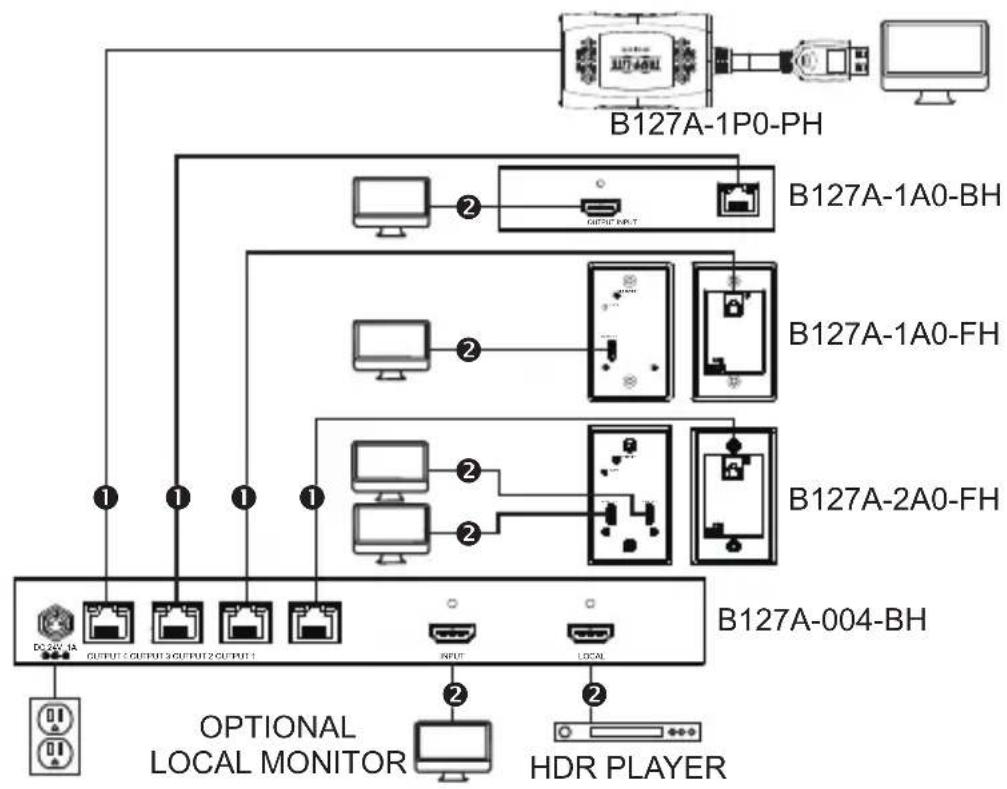
Installation
B127A-004-BHPH3
Up to 230 ft. (70 m) Cat6 cable at 4K/60 Hz
Up to 15 ft. (4.5 m) HDMI 2.0 cable at 4K/60 Hz
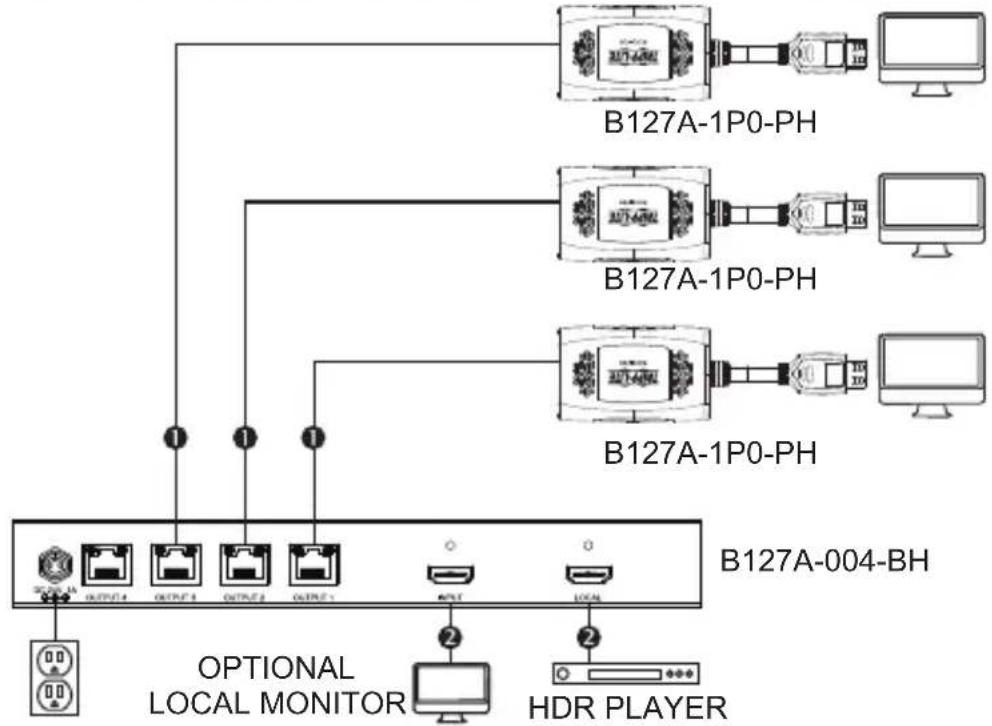
- Make sure all equipment in the installation—such as TVs, Blu-ray players and the transmitter—is powered OFF.
- Using an HDMI 2.0 cable (such as Tripp Lite P569-XXX-CERT or P568-XXX-2A Series cables), connect the HDMI source to the INPUT port on the local splitter unit.
Installation
- Optional: For extended range, connect up to four B127A-010-H signal repeater units between splitter and each receiver via Cat6 cabling.
4a. Optional for B127A-004-BHPH3: Using an HDMI 2.0 cable (such as Tripp Lite P569-XXX-CERT or P568-XXX-2A Series cables), connect a local monitor to the LOCAL OUT port on the B127A-004-BHPH3 local splitter unit. The LOCAL (orange) LED will illuminate to indicate a display has been connected to the local port.
Note: The HDMI local display port only supports 4K/60Hz resolutions and will not work properly with lesser resolutions.
or
4b. Optional for B127A-004-BHPH3: Cascade an additional B127A-002-BH, B127A-004-BH or B127A-008-BH splitter unit via the local HDMI port (sold separately). Repeat steps 4 and 5 below as necessary.
5. Using Cat6 cable (such as Tripp Lite N202-Series 24 AWG Cat6 Cabling), connect the RJ45 port on the local splitter unit to the RJ45 port on the remote receiver unit.
6. Using an HDMI 2.0 cable (such as Tripp Lite P569-XXX-CERT or P568-XXX-2A Series cables), connect the remote receiver unit's HDMI port to a monitor.
7. Turn on the power to your connected TVs/monitors. The LOCAL (orange) LED will illuminate to indicate the local port has been connected to a display.
Installation
- Connect the external power supply to the splitter unit. Plug it into an available wall outlet or a Tripp Lite surge protector, power distribution unit (PDU) or uninterruptible power supply (UPS). The POWER (green) LED on the local splitter unit will illuminate to indicate the unit is receiving power from the external power supply. The POWER (green) LED on the remote receiver unit's RJ45 port will illuminate to indicate the unit is receiving power from the local transmitter unit through PoC technology.
- Turn on the power to the HDMI source. The RJ45 (orange) LED will illuminate on both the local transmitter and remote receiver units to indicate a signal is being received from the source to display. The screen should now display on the connected monitor(s).
Installation
Standard Splitter Kit Installation (8-Port Model)
Notes:
1) Test to ensure the entire installation works properly before pulling cables through ceilings/walls.
2) To achieve maximum distance and performance, use 24 AWG solid wire Cat6 cable. Using stranded wire Cat6 cable or cable with a gauge (AWG) size higher than 24 AWG will result in shorter extension distance. Higher gauge cabling, such as 26 AWG, has a more limited transmission capability than lower gauge cabling. All Tripp Lite N202-Series Cat6 cables are made with 24 AWG solid wire cabling.
3) The installation diagram shows a B127A-008-BH splitter unit with an assortment of B127A-Series receivers, including B127A-1A0-BH, B127A-1P0-PH and B127A-1A0-FH (sold separately at triplite.com).
4) External power is not required for remote receiver units because of Power over Cable (PoC) technology incorporated in the transmitter unit.
Installation
B127A-008-BH
Up to 230 ft. (70 m) Cat6 cable at 4K/60 Hz
Up to 15 ft. (4.5 m) HDMI 2.0 cable at 4K/60 Hz
- Make sure all equipment in the installation—such as TVs, Blu-ray players and the transmitter—is powered OFF.
- Using an HDMI 2.0 cable (such as Tripp Lite P569-XXX-CERT or P568-XXX-2A Series cables), connect the HDMI source to the INPUT port on the local splitter unit.
- Optional: For extended range, connect up to eight B127A-010-H signal repeater units between splitter and each receiver via Cat6 cabling.
4a. Optional for B127A-008-BH: Using an HDMI 2.0 cable (such as Tripp Lite P569-XXX-CERT or P568-XXX-2A Series cables), connect a local monitor to the LOCALOUT port on the B127A-008-BH local splitter unit. The LOCAL (orange) LED will illuminate to indicate a display has been connected to the local port.
or
4b. Optional for B127A-008-BH: Cascade an additional B127A-002-BH, B127A-004-BH or B127A-008-BH splitter unit via the local HDMI port (sold separately). Repeat steps 4 and 5 below as necessary.
Note: The HDMI local display port only supports 4K/60Hz resolutions and will not work properly with lesser resolutions.
- Using Cat6 cable (such as Tripp Lite N202-Series 24AWG Cat6 Cabling), connect the RJ45 port on the local splitter unit to the RJ45 port on the remote receiver unit.
- Using an HDMI 2.0 cable (such as Tripp Lite P569-XXX-CERT or P568-XXX-2A Series cables), connect the remote receiver unit's HDMI port to a monitor.
Installation
- Turn on the power to your connected TVs/monitors. The LOCAL (orange) LED will illuminate to indicate the local port has been connected to a display.
- Connect the external power supply to the splitter unit. Plug it into an available wall outlet or a Tripp Lite surge protector, power distribution unit (PDU) or uninterruptible power supply (UPS). The POWER (green) LED on the local splitter unit will illuminate to indicate the unit is receiving power from the external power supply. The POWER (green) LED on the remote receiver unit's RJ45 port will illuminate to indicate the unit is receiving power from the local transmitter unit through PoC technology.
- Turn on the power to the HDMI source. The RJ45 (orange) LED will illuminate on both the local transmitter and remote receiver units to indicate a signal is being received from the source to display. The screen should now display on the connected monitor(s).
Warranty and Product Registration
1-Year Limited Warranty
TRIPP LITE warrants its products to be free from defects in materials and workmanship for a period of one (1) year from the date of initial purchase.
TRIPP LITE's obligation under this warranty is limited to repairing or replacing (at its sole option) any such defective products. To obtain service under this warranty, you must obtain a Returned Material Authorization (RMA) number from TRIPP LITE or an authorized TRIPP LITE service center. Products must be returned to TRIPP LITE or an authorized TRIPP LITE service center with transportation charges prepaid and must be accompanied by a brief description of the problem encountered and proof of date and place of purchase. This warranty does not apply to equipment which has been damaged by accident, negligence or misapplication or has been altered or modified in any way.
EXCEPT AS PROVIDED HEREIN, TRIPP LITE MAKES NO WARRANTY, EXPRESS OR IMPLIED, INCLUDING WARRANTY OF MERCHANTABILITY AND FITNESS FOR A PARTICULAR PURPOSE. Some states do not permit limitation or exclusion of implied warranties; therefore, the aforesaid limitation(s) or exclusion(s) may not apply to the purchaser.
EXCEPT AS PROVIDED ABOVE, IN NO EVENT WILL TRIPP LITE BE LIABLE FOR DIRECT, INDIRECT, SPECIAL, INCIDENTAL OR CONSEQUENTIAL DAMAGES ARISING OUT OF THE USE OF THIS PRODUCT, EVEN IF ADVISED OF THE POSSIBILITY OF SUCH DAMAGE. Specifically, TRIPP LITE is not liable for any costs, such as lost profits or revenue, loss of equipment, loss of use of equipment, loss of software, loss of data, costs of substitutes, claims by third parties, or otherwise.
PRODUCT REGISTRATION
Visit tripplite.com/warranty today to register your new Tripp Lite product. You'll be automatically entered into a drawing for a chance to win a FREE Tripp Lite product!*
- No purchase necessary. Void where prohibited. Some restrictions apply. See website for details.
Warranty and Product Registration
WEEE Compliance Information for Tripp Lite Customers and Recyclers (European Union)
Under the Waste Electrical and Electronic Equipment (WEEE) Directive and implementing regulations, when customers buy new electrical and electronic equipment from Tripp Lite they are entitled to:
- Send old equipment for recycling on a one-for-one, like-for-like basis (this varies depending on the country)
- Send the new equipment back for recycling when this ultimately becomes waste
WARNING
Use of this equipment in life support applications where failure of this equipment can reasonably be expected to cause the failure of the life support equipment or to significantly affect its safety or effectiveness is not recommended.
Tripp Lite has a policy of continuous improvement. Specifications are subject to change without notice. Photos and illustrations may differ slightly from actual products.

1111 W. 35th Street, Chicago, IL 60609 USA • triplite.com/support
1111 W. 35th Street, Chicago, IL 60609 USA • tripplite.com/support
B127A-002-BHPH2, B127A-004-BHPH3
English 1 • Espanol 24 • Pyszczny 72 • Deutsch 96

1111 W. 35th Street, Chicago, IL 60609 USA · triplite.com/support
1111 W. 35th Street, Chicago, IL 60609 USA • triplite.com/support
OxpanaTcA aBTopckn m npabom © 2022 Tripp Lite.
Pepeneutka 3anpeaaetc.
CopekHMoe ynaKOBKN
| Внешné Источник питаня | МоNTаЖная ОСн actka (дa/нeт) | HDMI-кавель дley покл�权еня akceccуаров | |
| B127A-002-BH ДА ДА N | |||
| B127A-002-BHPN2 ДА ДА N | |||
| B127A-004-BH ДА ДА | |||
| B127A-004-BHPN3 ДА ДА | |||
| B127A-008-BH ДА ДА N |
XapakTepnCTnKn n3deJn
Bce
- PetpaHcIpyIOT aydno- n BndeocnHaJIbI c pa3peWeHHeM 4K Ha HDMI-dncnne, pacnoJooKeHHbI Ha pacCTOaHHN do 70 m
- Пондерживает видаоразрешина Stандарта до 4К x 2K (3840 x 2160) рп 60 Гс согласно Требовим Stандарта HDMI 2.0 сцевов субдиackретиац neurop 4:4:4
-Обесеньваюперау сигналовВpacширеном Динhamчeckom диапазоне (HDR)сцелю повьшени.Toуности CBeTopepeDAUH - CoOTBETCTByIOT Tpe6OBAHnIaM cTaHdapToB HDCP 2.2
- TexhONorna PoC (nHTaHne no Ka6eJIIO) oBeCneuNBAeT nOdaCy 3JIeKTPoPNTaHnC pa3BETBNTeJI Na BCE nOdkNJUoyEHNbIe npHeMnIKu YpeE3 Ka6eJI Cat6
- ABTomatnuecka HactpoKa npN NOKJIuOeHm N O TexHOJOrn Plug-and-Play 6e3 Heo6xOIMocTn IcNoIb3OBaHn nporpaMMHoro oBeCneueHn nn DpaBepOB
XapakTepnCTnKn n3deJnna
B127A-002-BH
-Обесенььает ретрансяию и разВeТБеHne aydno-/ BИдEOсгнановсразpeшеним 4К ВмecTe C ЗлЕктponпанem Ha Два диспя, пacnoLOженнып pacctоун до 70 m, урета Кабел Cat6 kaлибpa 24 AWG
- CoBmecTnM c npneMHnKamn Tripp Lite cepnn B127A, B yactHOCTN B127A-1A0-FH nnn B127A-1A0-BH (npoDAOTc oTdeNbHo)
- ПовдержИВает сифpoBsIе ayДиоформТы 7.1-channel n Dolby TrueHD
- Подержka сигналов pa3лчьх pa3peшени обесnéчивает BOЗМожноctь ИСПОЛьзOBаня ппeMHкOB на Любом Дисп lee, подерживаюшем pa3peшени 1080р, 4K/30 Гц илп 4K/60 Гц 6e3 ухudшени вideорap3peшени другого подкючен Horo ппeMHиka
- TexHOrnepoC (nHTaHne no Ka6eJIIO) oBecepeuBaET nOdaUy 3JIeKTPoPntaHnC pa3BETBNTeJI Na NOdKJIIOueHHbIe npHeMHNKe UpeE3 Ka6eJI Cat6
B KOMnIeK T NOCTaBKn BXOJrT MOHTaXHbIe npuCnOCo6JIeHn, oBeCeuNBAUoUne BO3MOxHOCTb KaK HAcTeHHORo MOHTaJa pa3BeTBNTeJIa, TaK N erO MOHTaXa B CToIKe IIN Ha MaYTe
B127A-002-BHPH2
-Обесеньвает ретрансяю и pa3ВeТьеНe aydno-/ BИдEOСигналовсpa3peшенem 4К ВмecTe cэльктponпаннeм HaДBa Диспя,pacnoLOжЕHHbIe pacCTToHnДо 70 M,чepe3 ka6eI Cat6 kaII6pa 24 AWG
KoMnIeKT BKnIOuAeT B Ce6a DBa npneMHnKa C rN6kIM Ka6eJem, KaXdbI N3 KOTOpbIX NOdEprXnBAeT BnDeopa3peWeHn4K/60 T
XapakTepnCTnKn n3dJIIny
- CoBmecTnM c npHemHKamn Tripp Lite cepnn B127A, B uactHOCTN B127A-1A0-FH nnn B127A-1A0-BH (npoJauTc oTdeJIbHo)
- ПовдержИВает сифpoBs ie aydnocopMaTBi 7.1-channel n Dolby TrueHD
- Подержka сигналов pa3лчьix pa3peшenoi obecneuBaet BO3MOЖHOCt b INCNoIb3OBAHЯ ппeMHNKOB Ha IIO6OM dIcPJIee, PОдержИВaIoUeM pa3peшеня 1080p, 4K/30 Tц nIIn 4K/60 Tц 6e3 VXUDSEHNY BINDEOPa3peSHEN IApyrOTo NOdkJIOUeHHORO pPmeMHNka
- TexHONorna PoC (nITaHne no Ka6eJIIO) oBeceNeuBaET nOdaCy 3JIeKTPoNTaHnC pa3BETBNTeJI Na NOkJIIOUeHHbIe npHeMHNKu Chepe3 Ka6eJI Cat6
B KOMPJIeK T NOCTaBKn BXODaT MOHTaXHbIe PnucNocO6JIeHn, o6ecneuBaIOUcne BO3MOxHOCTb KaK HAcTeHHORo MOHTaJa pa3BETBNTeJIa, TaK I erO MOHTaXa B CToIKe NII Ha MaYTe
B127A-004-BH
-Обесеньвает petpaHCЯи npa3BETBHeHne aydno-/ BndeocnHaIOB c pa3peShenem 4K BmecTe c 3JIeKTponITaHneM HaДBaДиСпля,pacnoIooxeHHbIe pacCTOraHn Do70M,чep3 Ka6eJN Cat6 kaIb6pa 24 AWG
- CoBmecTnM c npneMHnKamn Tripp Lite cepnn B127A, B qactnoctn B127A-1A0-FH nnn B127A-1A0-BH (npoandaotc oTdeNbHo)
- ПовдержИВает сифpoBs ie aydnnoФopMaTbI 7.1-channel n Dolby TrueHD
- Пондержka сигналов pa3лчьх pa3peшени obecneунbaet BO3MOXHOCt b INCNoIb3OBaHnЯ ппeMHNKOB Ha JIO6OM dinCJIpe, пондержИBaIoUeM pa3peшени 1080p, 4K/30 Tц nIIN 4K/60 Tц 6e3 yxudshenя вideopa3peшени дpyrTO NOdkIQUeHHORO npneMHnka
XapakTepnCTnKn n3deJnna
- Лokальний HDMI-noprп подержиBaet вideopa3peшени 4К/60 Гд поka3a n3obpaженя, nepedabaemoro на поdkлючehны дисlen
- TexHOrnepoC (nHTaHne no Ka6eIIO) oBecepeuBaet noauy 3JIeKTPoPntaHnC pa3BETBNTeJIa Ha nOdkJIIOUeHHbIe npHeMHNKu chepe3 Ka6eJI Cat6
KackaHoe BKNIOUeHne DOONHHTeBHO rpa3BeTBNTeB B127A-002-BH,B127A-004-BH nBn B127A-008-BH n3 IokaIbHoro HDMI-nopTa dIpaCsiupeHHo yCTaHOBKn
B KOMnJIeK T NocTaBKn BXOJrT MOHTaXHbIe npncNOC6JIeHn, o6ecneuBaIOUzne BO3MOxHOCTb KaK HaCTeHHOro MOHTaJa pa3BETBNTeJIa, TaK n erO MOHTaXa B CToIKe IIN Ha MaUTe
B127A-004-BHPH3
OrpaHnueHne OTBETCTBeHHOCTN
Ipeed hauanom yctaHOBKn npOBepbTe cJeDyUOuNe HacTpoKn CBOeRO(-IX) nCTOUnKa(-OB) n TeLeBn3Opa(-OB)/MOHTopa(-OB):
- HactpoIte dinCpIeH na yactoty 60 Tc. IpepepoBepbTe 3aBOdCKne HactpoIKn, NocKoJIbky nO yMOJuaHNIO MOKeT 6bITb yCTaHOBJeHa 6Oonee Hn3KaayacToTa (B Tc) no cpaBHeHIO C 3aABJeHHoH.
- Y6eIITecb B TOM, yTO MOHITOp HAcTpoEH Ha BXoHDOn cnHaI cTaHdApTa HDMI 2.0. HeKOTopbie dncnpeMoryT 6bITb no yMOJuaHnIO HAcTpoEHbI Ha cTaHdApT HDMI 1.4.
- Поберп, Вкюда на льма монITOpe Функця HDR. НЕКOTOPБIX ДИСПLEЯХ эТа Функця может 6ыть OTКЮчЕHAВ Качеве 3авODСКОн Habстpoй.
- Поберът, Вклоча Ли Ha TeJeBn3ope/MOHTope NaCTpoJa Ultra HD (UHD) Deep Color. Y3haIte y npOn3BOJNTeЯ CBOero TeJeBn3opa/MOHTopa, KaKne HDMI-nOpTbI noДeprЖИBaIoT UHD Deep Color.
Приимechашидя моД.В127A-004-BH,B127A-004-BHPH3и B127A-008-BH.ДЯ NOДКЛЮЧЕНИΝΙΚΑЛБΗΟΤΟ мОНTOРаΚССВОЕ YCTАновке можетnotpeбоватьсЯOTКЛЮЧЕНИЕ habстpoйКУ HD Deep Color ha lokaJIbHOM TeJIeВИЗОпЕ/MОнTOpe (B 3aВИСИМОСТИ OT erO Марки) дЯdoctижениразршени 4К пи 60 Гц.
Yka3aHnI NO MOHTaJy
1111 W. 35th Street, Chicago, IL 60609 USA • tripplite.com/support
Bedienungsanleitung
1111 W. 35th Street, Chicago, IL 60609 USA • tripplite.com/support
22-05-092 93-3E30_RevA