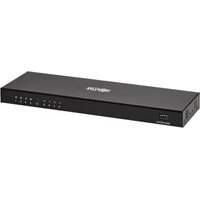
B118-008E-UHD-2 - Distributor Tripp Lite - Free user manual and instructions
Find the device manual for free B118-008E-UHD-2 Tripp Lite in PDF.


| Product Type | 8-Port HDMI Splitter with EDID |
| Supported Format | HDMI 2.0 |
| Maximum Resolution | 4096 x 2160 @ 60 Hz |
| Color Depth | 36 bits (12 bits per channel) |
| Supported Audio | DTS-HD, Dolby TrueHD, Dolby Digital Plus, LPCM 7.1 |
| HDCP Compatibility | HDCP 2.2 |
| HDMI Version | HDMI 2.0 |
| Input Power | 100-240 V ~50/60 Hz, 0.6 A |
| Output Power | 12 V, 2 A |
| Number of Output Ports | 8 |
| Input Port | 1 (HDMI) |
| Recommended Cable Length (4K) | ≤ 2 m (6 ft) |
| Recommended Cable Length (1080p) | ≤ 5 m (16 ft) |
| Daisy Chaining | Yes (3 levels max) |
| EDID Management | Adjustable DIP Switch (15 modes) |
| Included Accessories | User manual, mounting hardware, power supply |
| Warranty | 3-Year Limited |
| Not Recommended For | Life Support Equipment |
Frequently Asked Questions - B118-008E-UHD-2 Tripp Lite
User questions about B118-008E-UHD-2 Tripp Lite
0 question about this device. Answer the ones you know or ask your own.
Ask a new question about this device
Download the instructions for your Distributor in PDF format for free! Find your manual B118-008E-UHD-2 - Tripp Lite and take your electronic device back in hand. On this page are published all the documents necessary for the use of your device. B118-008E-UHD-2 by Tripp Lite.
USER MANUAL B118-008E-UHD-2 Tripp Lite
8-Port UHD 4K 60 Hz HDMI Splitter with EDID
Product Registration
Operation 5
Español 9 • Français 17
WARRANTY REGISTRATION
Register your product today and be automatically entered to win an ISOBAR surge protector in our monthly drawing!
www.tripplite.com/warranty



Manufacturing Excellence.
1111 W. 35th Street, Chicago, IL 60609 USA • www.tripplite.com/support
Copyright © 2019 Tripp Lite. All rights reserved.
Product Features
- Simultaneously transmit video and audio from an HDMI source to up to eight monitors
• Supports UHD 4K x 2K video resolutions up to 4096 x 2160 @ 60 Hz
• Supports 36-bit Deep Color (12 bits per channel) - Supports DTS-HD, Dolby® TrueHD, Dolby Digital Plus™ and LPCM 7.1 Channel Surround Sound audio
• HDCP 2.2 and HDMI 2.0 compliant - Plug and play; no drivers or software required
Package Contents
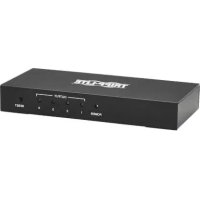
• B118-008E-UHD-2 8-Port UHD HDMI Splitter with EDID
- External Power Supply (Input: 100-240V\~50/60Hz, 0.6A; Output: 12V, 2A)
- Mounting Hardware
- Owner's Manual
Optional Accessories:
• P568-Series High-Speed HDMI Cables
• P569-Series HDMI 2.0 Premium High-Speed Cables
- P566-Series HDMI to DVI Adapter Cables*
*When using an HDMI to DVI adapter cable, only the video signal will be transmitted to the DVI monitor. Video resolutions will be limited to those supported by the adapter.
Ports
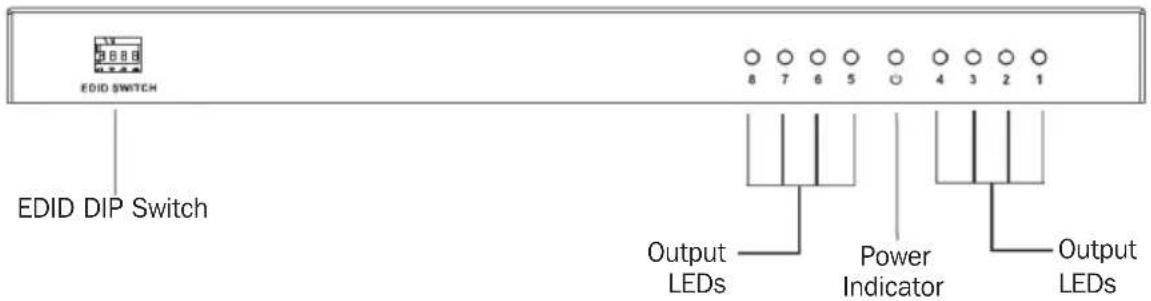
Front View
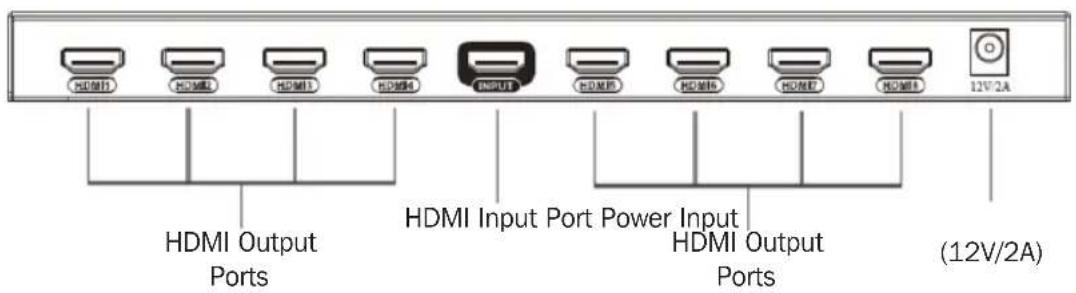
Rear View
Installation
Standard Installation:
Notes:
- When connecting monitors that support different maximum resolutions, the video resolutions displayed will be limited to the lowest maximum resolution. For example, if connecting a combination of 1080p and 4K × 2K monitors, a 1080p resolution will be displayed on all screens.
- For best results, the length of the HDMI cable(s) connecting the source to the splitter or splitter to the monitors must not exceed 6 ft. (2 m) for 4K x 2K and 16 ft. (5 m) for 1080p resolutions. Tripp Lite's P569-XXX-CERT HDMI 2.0 cables are recommended.
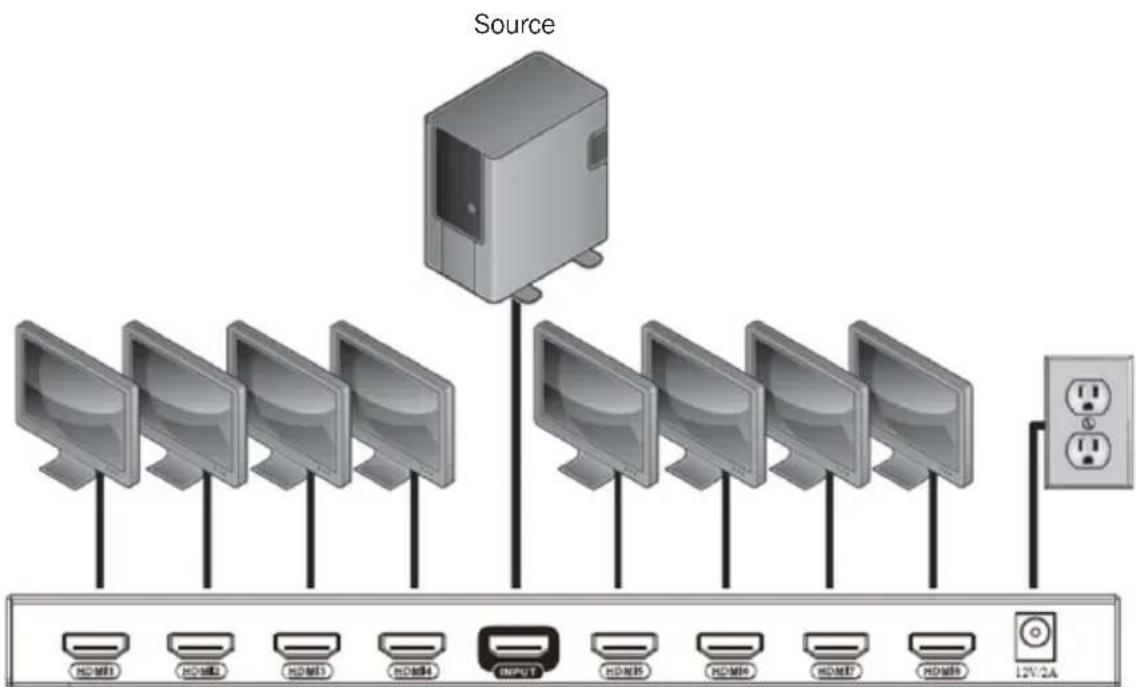
flowchart
graph TD
    A["Source"] --> B["Monitor 1"]
    A --> C["Monitor 2"]
    A --> D["Monitor 3"]
    A --> E["Monitor 4"]
    A --> F["Monitor 5"]
    A --> G["Monitor 6"]
    A --> H["Monitor 7"]
    A --> I["Monitor 8"]
    A --> J["Output Port"]
    B --> K["12V/2A"]
    C --> K
    D --> K
    E --> K
    F --> K
    G --> K
    H --> K
    I --> K
- Make sure the power to all devices you will be connecting is turned off.
- Connect your HDMI source (for example, Blu-ray™ player or cable receiver) to the port labeled Input on the splitter.
- Connect an available Output port (ex. HDMI 1) on the splitter to the HDMI input port of your display (for example, monitor or TV).
- Repeat Step 3 for the remaining Output ports on the splitter.
- Connect the included power supply to the splitter, then connect the power supply to an available AC outlet.
- Turn on the power to all the devices in the application.
Installation
Cascade Installation:
Notes:
- Only three levels of splitters can be cascaded in a single installation.
-
For best results, the length of the HDMI cable(s) connecting the source to the splitter or splitter to the monitors must not exceed 6 ft. (2 m) for 4K x 2K and 16 ft. (5 m) for 1080p resolutions. Tripp Lite's P569-XXX-CERT HDMI 2.0 cables are recommended.
-
Make sure the power to all devices you will be connecting is turned off.
-
Connect your HDMI source to the Input port on the first-level splitter.
-
Connect an available Output port on the first-level splitter to the HDMI Input port on the second level splitter.
-
Repeat Step 3 for each additional splitter you wish to add (no more than three levels of splitters).
-
Connect an available Output port to the display's HDMI input port.
-
Repeat Step 5 for each remaining Output port in the installation.
-
Connect the included power supplies to each splitter in the installation and plug them into available AC outlets.
-
Turn on power to the HDMI source and all displays connected.
Operation
- For each display connected to the splitter, the corresponding LED on the front of the unit will illuminate blue.
- Before outputting a signal, the splitter will read the EDID information of each connected display, while the HDMI source determines the appropriate output for all displays.
Note: The lowest video resolution and audio format of the connected displays will be outputted. Ex. If one TV supports 1080p and stereo audio and another supports 1080i and 5.1 audio. The HDMI source will output 1080i and stereo audio.
- Instead of the attached source determining the video output credentials, choose between 16 built-in EDID DIP switch settings that are user-adjustable, as shown in the table below.
EDID Management
A DIP switch is located on the front of the splitter, allowing for user definable EDID settings. See the EDID Management Table section for the different user adjustable settings.
Notes:
- The factory default setting is EDID mode MIX3. When in this mode, the lowest level of video format of the connected monitors will be used.
- In order to retain EDID settings, "Copy Once" (Mode 13) must be performed prior to making any changes.
EDID Management Table:
| Mode 1 2 3 4 EDID Information | |||||
| 1 Down Down | Down Down | 4K @ | 60 Hz 2-Channel | ||
| 2 Up | Down Down | Down Down | 4K @ 60 | Hz 7.1-Channel | |
| 3 Down Up Down | Down Down | 4K @ 30 | Hz 2-Channel | ||
| 4 Up | Up Down | Down 4K | @ 30 Hz | 7.1-Channel | |
| 5 Down Down | Up Down | 1080p @ | 60 Hz 2-Channel | ||
| 6 Up | Down Up | Down 1 | 1080p @ | 60 Hz 7.1-Channel | |
| 7 Down Up Up | Down 10 | 80i @ 60 | Hz 2-Channel | ||
| 8 Up | Up Up Down | 1080i @ | 60 Hz | 7.1-Channel | |
| 9 Down Down | Down Up | 720p @ | 60 Hz 2-Channel | ||
| 10 Up | Down Down | Down Up | 720p @ | 60 Hz 7.1-Channel | |
| 11 Down Up Down Up | Down Up | 480p @ | 60 Hz 2-Channel | ||
| 12 Up | Up Down | Up 480p | @ 60 Hz | 7.1-Channel | |
| 13 Down Down | Up Up Copy Once | ||||
| 14 Up | Down Up | Up MIX1 | |||
| 15 Down Up Up | Up MIX2 | ||||
| 16 Up | Up Up Up | MIX3 | |||
Copy Once: Read the EDID of the first connected output only
MIX1: Highest format of audio and lowest format of video
MIX2: Highest format of video
MIX3: Lowest format of video
Troubleshooting
- Is the external power supply that came with the product connected and plugged into a working power source?
For the product to function properly, it must be connected to and receiving power from the external power supply.
- Was the power to the connected devices turned off prior to the installation?
If not, restart them.
- What resolution are you trying to obtain?
Tripp Lite's 4K UHD B118-008E-UHD-2 HDMI splitter supports video resolutions up to 4K x 2K (4096 x 2160) @ 60 Hz at 36-bit Deep Color (12 bits per channel).
- What type of cabling are you using?
Inferior cabling can result in poor performance. It is important to use cables that can support the video resolution you are trying to obtain. For best results, use Tripp Lite's P568-Series High-Speed HDMI cables.
- Test the cables to ensure they are working.
For example, connect your HDMI cable between a trusted working source and a monitor that you know works to see if the cable is functioning properly.
- Are you connecting monitors that have different maximum resolutions?
When doing so, the video resolution displayed will be that of the lowest maximum resolution supported among the connected monitors.
Warranty & Product Registration
3-YEAR LIMITED WARRANTY
TRIPP LITE warrants its products to be free from defects in materials and workmanship for a period of three (3) years from the date of initial purchase. TRIPP LITE's obligation under this warranty is limited to repairing or replacing (at its sole option) any such defective products. To obtain service under this warranty, you must obtain a Returned Material Authorization (RMA) number from TRIPP LITE or an authorized TRIPP LITE service center. Products must be returned to TRIPP LITE or an authorized TRIPP LITE service center with transportation charges prepaid and must be accompanied by a brief description of the problem encountered and proof of date and place of purchase. This warranty does not apply to equipment, which has been damaged by accident, negligence or misapplication or has been altered or modified in any way.
EXCEPT AS PROVIDED HEREIN, TRIPP LITE MAKES NO WARRANTIES, EXPRESS OR IMPLIED, INCLUDING WARRANTIES OF MERCHANTABILITY AND FITNESS FOR A PARTICULAR PURPOSE.
Some states do not permit limitation or exclusion of implied warranties; therefore, the aforesaid limitation(s) or exclusion(s) may not apply to the purchaser.
EXCEPT AS PROVIDED ABOVE, IN NO EVENT WILL TRIPP LITE BE LIABLE FOR DIRECT, INDIRECT, SPECIAL, INCIDENTAL OR CONSEQUENTIAL DAMAGES ARISING OUT OF THE USE OF THIS PRODUCT, EVEN IF ADVISED OF THE POSSIBILITY OF SUCH DAMAGE. Specifically, TRIPP LITE is not liable for any costs, such as lost profits or revenue, loss of equipment, loss of use of equipment, loss of software, loss of data, costs of substitutes, claims by third parties, or otherwise.
PRODUCT REGISTRATION
Visit www.triplite.com/warranty today to register your new Tripp Lite product. You'll be automatically entered into a drawing for a chance to win a FREE Tripp Lite product!**
No purchase necessary. Void where prohibited. Some restrictions apply. See website for details.
WEEE Compliance Information for Tripp Lite Customers and Recyclers (European Union)

Under the Waste Electrical and Electronic Equipment (WEEE) Directive and implementing regulations, when customers buy new electrical and electronic equipment from Tripp Lite they are entitled to:
- Send old equipment for recycling on a one-for-one, like-for-like basis (this varies depending on the country)
- Send the new equipment back for recycling when this ultimately becomes waste
Use of this equipment in life support applications where failure of this equipment can reasonably be expected to cause the failure of the life support equipment or to significantly affect its safety or effectiveness is not recommended.
All trademarks are the property of their respective owners. Tripp Lite has a policy of continuous improvement. Specifications are subject to change without notice. Images may differ slightly from actual products. Tripp Lite uses primary and third-party agencies to test products for compliance with standards. Go to Tripp Lite's website for more information, including complete warranty terms and conditions.


1111 W. 35th Street, Chicago, IL 60609 USA • www.tripplite.com/support
1111 W. 35th Street, Chicago, IL 60609 EE UU • www.tripplite.com/support
1111 W. 35th Street, Chicago, IL 60609 EE UU • www.tripplite.com/support
1111 W. 35th Street, Chicago, IL 60609 USA • www.tripplite.com/support
1111 W. 35th Street, Chicago, IL 60609 USA • www.tripplite.com/support
- 8-Port UHD 4K 60 Hz HDMI Splitter with EDID
- WARRANTY REGISTRATION
- Product Features
- Package Contents
- Optional Accessories:
- Ports
- Installation
- Standard Installation:
- Notes:
- Cascade Installation:
- Operation
- EDID Management
- Troubleshooting
- Warranty & Product Registration
- 3-YEAR LIMITED WARRANTY
- PRODUCT REGISTRATION
- WEEE Compliance Information for Tripp Lite Customers and Recyclers (European Union)
Brand : Tripp Lite
Model : B118-008E-UHD-2
Category : Distributor