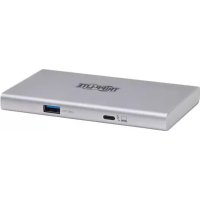
MTB4HUB301 - USB Hub Tripp Lite - Free user manual and instructions
Find the device manual for free MTB4HUB301 Tripp Lite in PDF.


| Product Type | Thunderbolt 4 USB Hub |
| Brand | Tripp Lite |
| Model | MTB4HUB301 (MTB4-HUB3-01) |
| Number of Thunderbolt 4 Ports | 3 outputs + 1 input (Thunderbolt 4 Type-C) |
| Additional USB Port | 1 USB 3.1 Gen 2 Type-A port (10 Gbit/s, up to 0.9 A) |
| Video Input | Thunderbolt 4 (backward compatible with Thunderbolt 3 and USB-C) |
| Maximum Video Output (1 monitor) | 8K (7 680 x 4 320) @ 30 Hz |
| Maximum Video Output (2 monitors) | 4K (3 840 x 2 160) @ 60 Hz |
| Thunderbolt Data Rate | 40 Gbit/s (shared between the 3 output ports) |
| USB Data Rate | 10 Gbit/s |
| External Power Supply | 100 W (input 100-240 V AC, output 20 V DC / 5 A) |
| Host Computer Charging | Up to 60 W (Power Delivery) |
| Thunderbolt 4 Port Power | Up to 15 W per port (5 V / 3 A) |
| Smart Power Technology | Automatic power distribution based on demand |
| Peripheral Daisy Chaining | Up to 6 Thunderbolt devices total |
| Compatible Operating Systems | Windows 10 or later, macOS 11 or later |
| Operating Temperature | 0 °C to 45 °C |
| Storage Temperature | -10 °C to 70 °C |
| Operating Humidity | 10 to 85% RH (non-condensing) |
| Warranty | 1 year (limited warranty) |
| Package Contents | Hub, Thunderbolt 4 cable (0.8 m), power adapter, 4 international plugs, manual |
| Maintenance and Cleaning | Unplug before cleaning; use a dry, soft cloth |
| Safety | Use only the provided adapter; avoid moisture and extreme temperatures |
| Spare Parts and Repairability | Contact Tripp Lite support for repairs; no user-serviceable parts |
Frequently Asked Questions - MTB4HUB301 Tripp Lite
User questions about MTB4HUB301 Tripp Lite
0 question about this device. Answer the ones you know or ask your own.
Ask a new question about this device
Download the instructions for your USB Hub in PDF format for free! Find your manual MTB4HUB301 - Tripp Lite and take your electronic device back in hand. On this page are published all the documents necessary for the use of your device. MTB4HUB301 by Tripp Lite.
USER MANUAL MTB4HUB301 Tripp Lite
Thunderbolt 4 Multi-Port Hub with 8K and Dual 4K Video and Thunderbolt Hub Ports
Model: MTB4-HUB3-01
USB Type-C™ and USB-C™ are trademarks of USB Implementers Forum.
Español 9 • Français 17 • Русский 25 • Deutsch 33
WARRANTY REGISTRATION
Register your product today and be automatically entered to win an ISOBAR® surge protector in our monthly drawing!
tripplite.com/warranty

1111 W. 35th Street, Chicago, IL 60609 USA • tripplite.com/support
Copyright © 2022 Tripp Lite. All rights reserved. All trademarks and registered trademarks are the property of their respective owners.
Package Includes
- MTB4-HUB3-01
• Thunderbolt 4 Passive Cable, M/M, 2.62 ft. (0.8 m) - External Power Supply (Input: 100-240V, 50/60 Hz, 1.5A; Output: 20V 5A)
• International Plug Adapters (x4) - Owner's Manual
Optional Accessories
• MTB3-XXM-5A-AB Active Thunderbolt 3 Cables
• MTB3-XXM-5A-B Passive Thunderbolt 3 Cables
• U420-Series USB 3.1 Gen 2 (10 Gbps) Thunderbolt 3 Compatible Cables
Product Features
- Thunderbolt 4 input supports data transfer rates up to 40 Gbps when used with a Thunderbolt 4-enabled host computer and are backward compatible with Thunderbolt 3, DisplayPort Alt Mode and USB
Note: Host computer must be a PC compatible with Thunderbolt 4 and running Windows 10 or higher, or a Mac compatible with Thunderbolt 3 and running macOS 11 or higher to function properly. See Troubleshooting section of the manual for details.
- Features three Thunderbolt 4 ports capable of transmitting 8K (7680 x 4320) @ 30 Hz video to a single port, or dual 4K (3840 x 2160) @ 60 Hz video
- Connect up to three Thunderbolt-compatible devices to the hub and cascade up to 6 levels in total. See Troubleshooting section for details.
- USB 3.1 Gen 2 port supports up to 10 Gbps data transfer rates and up to 0.9A downstream charging to a connected device
- Smart power technology allows the hub to distribute power between the host and connected devices evenly and efficiently, with each port providing up to 15W (5V 3A) to connected devices, according to the consumption of connected devices
System Requirements
- Host computer that is either a Thunderbolt 4-enabled Windows 10 PC or Thunderbolt 3-enabled Mac running at least macOS 11
Note: The host computer must support Windows 10 or higher or macOS 11 or higher for the hub to function properly. See Troubleshooting section for details.
- Thunderbolt or USB-C monitors capable of achieving video resolutions up to 8K (7680 x 4320) @ 30 Hz (single display) or 4K (3840 x 2160) @ 60 Hz (dual displays)
Note: If using a USB-C-enabled monitor, the dock will only function properly with a passive Thunderbolt cable, such as Tripp Lite's MTB3-XXM-5A-B cables. If using a Thunderbolt-enabled monitor, a passive or active cable can be used.
Product Overview
Front

1 Thunderbolt 4 Input Port
2 USB 3.1 Gen 2 (10 Gbps) Port
Rear

3 Thunderbolt 4 Output Ports
4 100W (20V 5A) DC Power Input
Installation
Note: The host computer must support Windows 10 or macOS 11 or the hub will not function. See Troubleshooting section for details.
- Connect the Thunderbolt 4 input port of the hub to the Thunderbolt 4 or Thunderbolt 3 port on your computer or laptop using the included Thunderbolt 4 cable.
- Connect up to three Thunderbolt devices to the hub's three Thunderbolt ports.
OR
- Connect the hub to a single 8K (7680 x 4320) @ 30 Hz-enabled display or two 4K (3840 x 2160) @ 60 Hz-enabled displays using Thunderbolt 3 cables (such as Tripp Lite MTB3-Series Active Thunderbolt 3 cables).
- Connect a USB peripheral to the USB 3.1 Gen2 port.
Troubleshooting
Does the host computer support Windows 10 or macOS 11?
The MTB4-HUB3-01 requires the host computer to support either Windows 10 or macOS 11 to function properly. If the host computer has a Thunderbolt 4 or Thunderbolt 3 port, but does not support either of those operating systems, then the hub will be able to charge the host computer and any connected devices, but will not transmit video to connected monitors.
How many displays can be connected at one time?
The MTB4-HUB3-01 supports video transmission to Thunderbolt- or USB-C-enabled monitors. A single display can achieve up to 8K (7680 x 4320) @ 30 Hz video. Two displays can be connected simultaneously at 4K (3840 x 2160) @ 60 Hz resolutions. The hub will not support video transmission from all three Thunderbolt ports simultaneously.
Troubleshooting
How is the unit able to support up to 6 Thunderbolt devices?
The hub's three Thunderbolt 4 ports are capable of directly supporting three Thunderbolt-compatible devices and can also cascade to up to six levels. This includes Thunderbolt docks and adapters (such as the Tripp Lite MTB3-Series) that allow you to connect peripherals such as hard disks, RAID memory, additional USB ports and more. The MTB4-HUB3-01 acts as the first level in the chain and can cascade an additional five levels vertically, with many more devices connecting horizontally. The dock supports 40 Gbps Thunderbolt 4 data transmission that is shared among the three ports and all connected peripherals and displays. For instance, if both displays are in use, roughly 32 Gbps is diverted to the displays, leaving 8 Gbps for the final port and anything connected to it.
How does the smart power charging affect devices connected to the unit?
The MTB4-HUB3-01 features a 20V 5A (100W) power input and is capable of providing up to 60W to charge the host computer. Each Thunderbolt 4 port is capable of providing up to 15W to connected peripherals, and the USB 3.1 Gen 2 port is capable of providing 0.9A to connected peripherals. The hub uses smart power technology to determine where the most power is required and divert it automatically. The hub receives up to 90W from the power adapter, with 10W allocated as a buffer.
Note: the hub does not support PD Charging on any of the three Thunderbolt 4 ports.
Specifications
| Input Connector | |
| Thunderbolt Thunderbolt 4 Type-C (Male) | |
| Output Connectors | |
| Thunderbolt Thunderbolt 4 Type-C, x3 (Female) | |
| USB USB 3.1 Gen 2 Type-A (Female) | |
| Display Specifications | |
| Thunderbolt / Type-C (Single Display) | 8K (7680 x 4320) @ 30 Hz |
| Thunderbolt / Type-C (Dual Displays) | 4K (3840 x 2160) @ 60 Hz |
| Data Transfer Specifications | |
| Thunderbolt 40 Gbps Downstream (shared between x3 Thunderbolt 4 ports) | |
| USB USB 3.1 Gen 2 (10 Gbps) | |
| Power Specifications | |
| DC Power Input 20V 5A (100W) | |
| Host Computer Charging 60W | |
| Thunderbolt, x3 (Female) 5V 3A (15W) per Thunderbolt 4 port | |
| USB-A, x1 (Female) 0.9A | |
| Environmental Specifications | |
| Operating Temperature Range | 32° to 113°F (0° to 45°C) |
| Storage Temperature Range 1 | 4° to 158°F (-10° to 70°C) |
| Operating Humidity Range 10% ~ 85% RH (Non-condensing) | |
| Storage Humidity Range 5% ~ 90% RH (Non-condensing) | |
| Operating Systems Supported | |
| Windows Windows 10 or higher | |
| Mac macOS 11 or higher | |
Warranty and Product Registration
1-Year Limited Warranty
Tripp Lite warrants its products to be free from defects in materials and workmanship for a period of one (1) year from the date of initial purchase. Tripp Lite's obligation under this warranty is limited to repairing or replacing (at its sole option) any such defective products. To obtain service under this warranty, you must obtain a Returned Material Authorization (RMA) number from Tripp Lite or an authorized Tripp Lite service center. Products must be returned to Tripp Lite or an authorized Tripp Lite service center with transportation charges prepaid and must be accompanied by a brief description of the problem encountered and proof of date and place of purchase. This warranty does not apply to equipment, which has been damaged by accident, negligence or misapplication or has been altered or modified in any way.
EXCEPT AS PROVIDED HEREIN, Tripp Lite MAKES NO WARRANTIES, EXPRESS OR IMPLIED, INCLUDING WARRANTIES OF MERCHANTABILITY AND FITNESS FOR A PARTICULAR PURPOSE. Some states do not permit limitation or exclusion of implied warranties; therefore, the aforesaid limitation(s) or exclusion(s) may not apply to the purchaser.
EXCEPT AS PROVIDED ABOVE, IN NO EVENT WILL Tripp Lite BE LIABLE FOR DIRECT, INDIRECT, SPECIAL, INCIDENTAL OR CONSEQUENTIAL DAMAGES ARISING OUT OF THE USE OF THIS PRODUCT, EVEN IF ADVISED OF THE POSSIBILITY OF SUCH DAMAGE. Specifically, Tripp Lite is not liable for any costs, such as lost profits or revenue, loss of equipment, loss of use of equipment, loss of software, loss of data, costs of substitutes, claims by third parties, or otherwise.
Product Registration
Visit tripplite.com/warranty today to register your new Tripp Lite product. You'll be automatically entered into a drawing for a chance to win a FREE Tripp Lite product!*
* No purchase necessary. Void where prohibited. Some restrictions apply. See website for details.
Tripp Lite has a policy of continuous improvement. Specifications are subject to change without notice. Photos and illustrations may differ slightly from actual products.

1111 W. 35th Street, Chicago, IL 60609 USA • tripplite.com/support
1111 W. 35th Street, Chicago, IL 60609, EE UU • tripplite.com/support
1111 W. 35th Street, Chicago, IL 60609, EE UU • tripplite.com/support
1111 W. 35th Street, Chicago, IL 60609 USA • tripplite.com/support
1111 W. 35th Street, Chicago, IL 60609 USA • tripplite.com/support
1111 W. 35th Street, Chicago, IL 60609 USA • tripplite.com/support
1111 W. 35th Street, Chicago, IL 60609 USA • tripplite.com/support
Bedienungsanleitung
1111 W. 35th Street, Chicago, IL 60609 USA • tripplite.com/support
1111 W. 35th Street, Chicago, IL 60609 USA • tripplite.com/support

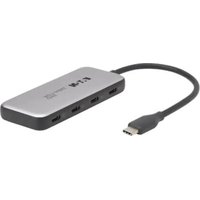
- Thunderbolt 4 Multi-Port Hub with 8K and Dual 4K Video and Thunderbolt Hub Ports
- WARRANTY REGISTRATION
- Package Includes
- Optional Accessories
- Product Features
- System Requirements
- Product Overview
- Front
- Rear
- Installation
- OR
- Troubleshooting
- Does the host computer support Windows 10 or macOS 11?
- How many displays can be connected at one time?
- How is the unit able to support up to 6 Thunderbolt devices?
- How does the smart power charging affect devices connected to the unit?
- Warranty and Product Registration
- 1-Year Limited Warranty
- Product Registration
- Bedienungsanleitung
Brand : Tripp Lite
Model : MTB4HUB301
Category : USB Hub