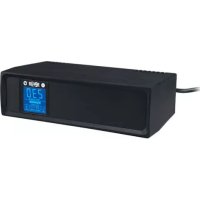
SMX1000LCD - Inverter Tripp Lite - Free user manual and instructions
Find the device manual for free SMX1000LCD Tripp Lite in PDF.


| Product Type | Digital UPS (Uninterruptible Power Supply) |
| Brand | Tripp Lite |
| Model | SMX1000LCD |
| Rated Power | 1000 VA |
| Input Voltage | 230 V AC |
| Output Voltage | 230 V AC regulated (AVR) |
| Battery Type | Lead-acid, maintenance-free, replaceable |
| Runtime | Proportional to load (up to 24 hours full recharge) |
| Protection | Surge protection, automatic voltage regulation (AVR), telephone/DSL protection |
| Output Receptacles | Battery backup + surge protected outlets, surge-only outlets |
| Communication | USB port for PowerAlert software (automatic shutdown) |
| Display | Rotatable LCD screen (horizontal or vertical) |
| Dimensions (L x W x H) | Approximately 30 x 20 x 15 cm |
| Weight | Approximately 12 kg |
| Operating Temperature | 0 to 40 °C (estimated) |
| Warranty | 2 years |
| Maintenance and Cleaning | No maintenance required; do not open the unit |
| Safety | Connect directly to a grounded wall outlet; do not use extension cords or surge protectors on the output |
| Spare Parts and Repairability | Replacement battery available (RBC); repair by qualified personnel only |
| General Information | Do not use in medical or mobile applications; WEEE recycling |
Frequently Asked Questions - SMX1000LCD Tripp Lite
User questions about SMX1000LCD Tripp Lite
0 question about this device. Answer the ones you know or ask your own.
Ask a new question about this device
Download the instructions for your Inverter in PDF format for free! Find your manual SMX1000LCD - Tripp Lite and take your electronic device back in hand. On this page are published all the documents necessary for the use of your device. SMX1000LCD by Tripp Lite.
USER MANUAL SMX1000LCD Tripp Lite
Not suitable for mobile applications
Important Safety Instructions 2
Quick Installation 3
Basic Operation 4
Storage & Service 6
Regulatory Compliance 6
Espanol 7
Français 13
Pycckn 19
Deutsch 25
SAVE THESE INSTRUCTIONS
This manual contains instructions and warnings that should be followed during the installation, operation and storage of all Tripp Lite UPS Systems. Failure to heed these warnings will void your warranty.
UPS LocationWarnings
The UPS is designed for indoor use only in a controlled environment, away from excess moisture, heat/cold, conductive contaminants, dust or direct sunlight.
- Leave adequate space around all sides of the UPS for proper ventilation.
- Do not mount unit with its front or rear panel facing down (at any angle). Mounting in this manner will seriously inhibit the unit's internal cooling, eventually causing product damage not covered under warranty.
UPS ConnectionWarnings
- Connect your UPS directly to a properly grounded AC power outlet. Do not plug the UPS into itself; this will damage the UPS.
- Do not modify the UPS plug, and do not use an adapter that would eliminate the UPS ground connection.
- Do not use extension cords to connect the UPS to an AC outlet. Your warranty will be voided if anything other than Tripp Lite surge suppressors are used to connect your UPS to an outlet.
- If the UPS receives power from a motor-powered AC generator, the generator must provide clean, filtered, computer-grade output.
- The AC plug serves as disconnect. The electrical outlets supplying power to the equipment should be installed near the equipment and easily accessible.
Equipment ConnectionWarnings
- Use of this equipment in life support applications where failure of this equipment can reasonably be expected to cause the failure of the life support equipment or to significantly affect its safety or effectiveness is not recommended.
- Do not connect surge protectors or extension cords to the output of your UPS. This might damage the UPS and will void the surge protectors and UPS warranties.
BatteryWarnings
- Your UPS does not require routine maintenance. Do not open your UPS for any reason. There are no user-serviceable parts inside.
- Batteries can present a risk of electrical shock and burn from high short-circuit current. Observe proper precautions. Do not dispose of the batteries in a fire. Do not open the UPS or batteries. Do not short or bridge the battery terminals with any object. Unplug and turn off the UPS before performing battery replacement. Use tools with insulated handles. There are no user-serviceable parts inside the UPS. Battery replacement should be performed only by authorized service personnel using the same number and type of batteries (Sealed Lead-Acid). The batteries are recyclable. Refer to your local codes for disposal requirements or visit http://www.triplite.com/support/recycling-program for recycling information. Tripp Lite offers a complete line of UPS System Replacement Battery Cartridges (R.B.C.). Visit Tripp Lite on the Web at http://www.triplite.com/products/battery-finder/ to locate the specific replacement battery for your UPS.
- Do not attempt to add external batteries to the UPS.
Quick Installation
STEP 1: Place the UPS in either a horizontal or vertical ("tower") position.
The UPS housing is designed with sides that slope slightly in order to tilt the LCD Display up for easy viewing in either position—horizontal or vertical. As another aid to easy viewing, the LCD Display can be rotated. To rotate the display: carefully insert a small tool in the slots on the sides of the display to pop it
out of the UPS housing; rotate the display, and snap it back into the UPS housing.

CAUTION: To safely balance the UPS when it is placed in a vertical ("tower") position, make sure the LCD Display is located at the top of the front panel.
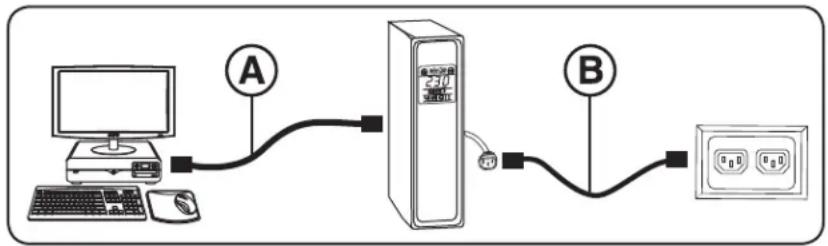
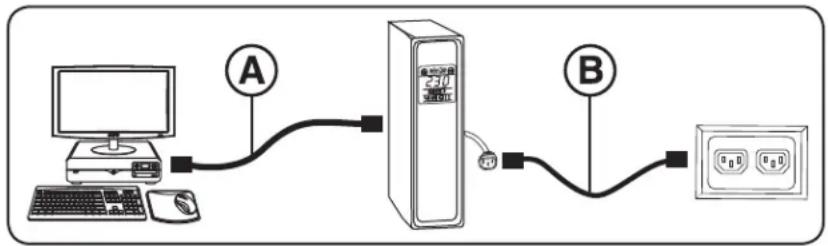
STEP 2: Using your computer's detachable power cord, plug the UPS into a wall outlet.
Remove your computer's detachable power cord. Insert the female plug of the computer's cord into your UPS AC input. Insert the male plug of your computer's cord into an AC wall outlet that does not share a circuit with a heavy electrical load (such as an air conditioner or refrigerator).
After plugging the UPS into a wall outlet, push the ON/OFF button for one second to turn the UPS on (see Basic Operation section).
Note: The UPS will not turn on automatically in the presence of live utility power.
STEP 3: Plug your equipment into the UPS.*
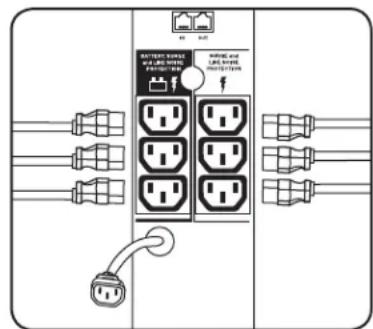
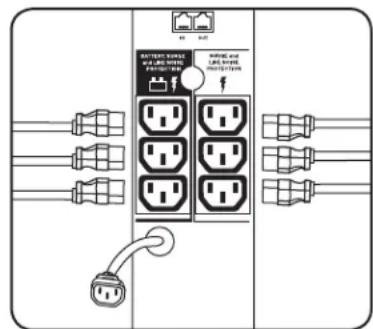
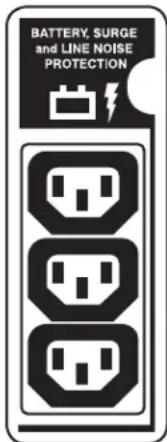
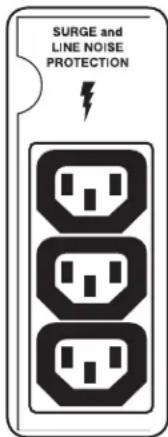
Insert the female plug of the detachable power cord that came with your UPS into the computer's AC input. Insert the UPS cord's male plug into any of your UPS female output receptacles. Select outlets (see diagram) will provide battery backup and surge protection; plug your computer, monitor and other critical devices here. Select outlets (see diagram) will provide surge protection only; plug your printer and other non-essential devices here.
- Your UPS is designed to support electronic equipment only. You will overload the UPS if the total VA ratings for all the equipment you connect to the Battery Backup Protected/Surge Protected outlets exceeds the UPS Output Capacity. To find your equipment's VA ratings, look on their nameplates. If the equipment is listed in amps, multiply the number of amps by 230 to determine VA. (Example: 1 amp × 230 = 230 VA). If you are unsure if you have overloaded the Battery Backup Protected/Surge Protected outlets, run a self-test (see "MUTE/TEST" Button description).

CAUTION: The UPS must be plugged into a live AC outlet and turned on for 24 hours after initial installation to fully charge the UPS internal battery. Your connected equipment will receive utility-supplied AC power (if present) immediately after the UPS is plugged in and turned on; however, your connected equipment may not receive full battery backup in the event of a blackout or severe brownout unless the UPS internal battery is fully charged.
Basic Operation
Front Panel
"ON/OFF" Button
- To turn the UPS on: Press and hold the ON/OFF Button for one second. If utility power is absent, pressing the Button will "cold-start" the UPS, i.e. turn it on and supply power from its battery.
To turn the UPS off: Press and hold the ON/OFF Button for one second. The UPS will be turned completely off (deactivated). - The alarm will beep once briefly after one second has passed. ** Providing runtime proportionate to the UPS battery's level of charge.
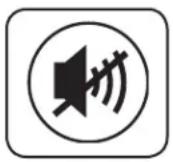
"MUTE/TEST" Button
- To Silence (or "Mute") UPS Alarms: Briefly press and release the MUTE/TEST button.
Note: continuous alarms (warning you to immediately shut down connected equipment) cannot be silenced.
- To Run a Self-Test: With your UPS plugged in and turned on, press and hold the MUTE/TEST button for two seconds. Continue holding the button until the alarm beeps several times and the UPS performs a self-test. See "Results of a Self-Test" below.
Note: you can leave connected equipment on during a self-test.
CAUTION! Do not unplug your UPS to test its battery. This will remove safe electrical grounding and may introduce a damaging surge into your network connections.
Results of a Self-Test: The test will last approximately 10 seconds as the UPS switches to battery to test its load capacity and charge. All LCD Display icons will be illuminated and the UPS alarm will sound.
- If the "FAULT" icon remains lit and the alarm continues to sound after the test, the battery-supported outlets are overloaded. To clear the overload, unplug some of your equipment from the battery-supported outlets and run the self-test repeatedly until the "FAULT" icon is no longer lit and the alarm is no longer sounding.

CAUTION! Any overload that is not corrected by the user immediately following a self-test may cause the UPS to shut down and cease supplying output power in the event of a blackout or brownout.
- If the "REPLACE" icon remains lit and the alarm continues to sound after the test, the UPS batteries need to be recharged or replaced. Allow the UPS to recharge continuously for 24 hours, and repeat the self-test. If the icon continues to illuminate after repeated self tests, contact Tripp Lite for service. Battery replacement should only be performed by qualified service personnel. If the UPS requires battery replacement, Tripp Lite offers a complete line of replacement batteries at www.triplite.com.
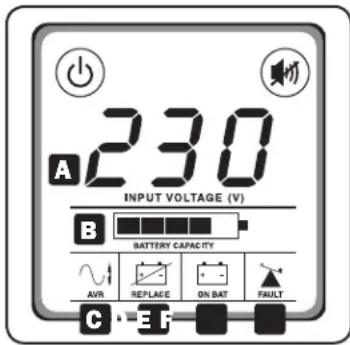
LCD Display
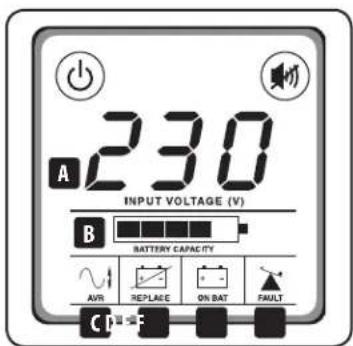
The LCD Display indicates a variety of UPS operational conditions. All descriptions apply when the UPS is plugged into an AC outlet and turned on. The LCD Display can be rotated for easy viewing, regardless of whether the UPS is in a horizontal or vertical ("tower") position. To rotate the display: insert a small tool in the slots on the sides of the display to pop it out of the UPS housing; rotate the display, and snap it back into the UPS housing.
A "Input Voltage" Meter: This meter measures, in real time, the AC voltage that the UPS system is receiving from the utility wall outlet. Although the Meter may occasionally display input voltages which stray (due to poor quality utility service) outside the range of standard computer tolerance, rest assured the UPS is designed (through the use of automatic voltage regulation) to continuously supply connected equipment with stable, computer-grade output voltage. In the event of a blackout (power loss), severe brownout (low power) or overvoltage (high power), the UPS will rely on its internal battery to supply computer-grade output voltage. The Input Voltage Meter can be used as a diagnostic tool to identify poor quality input power. By plugging the UPS into different outlets within a facility, you can identify individual circuits that are consistently providing low power, which can be caused by the combined equipment load demanding more power than the circuit is designed to supply. If all circuits within a facility consistently provide low power, the facility may be served by inadequate utility service or may be in an industrial or commercial area with an overburdened power grid.
B "BATTERY CAPACITY" Meter: This meter displays the approximate charge level (in 20% increments) of the UPS internal battery. During a blackout or severe brownout, the UPS will switch to battery power, the "ON BAT" icon will be illuminated, and the charge level will deplete.
C "AVR" (Automatic Voltage Regulation) Icon: This icon will illuminate whenever your UPS is automatically correcting low AC line voltage without depleting battery power. This is a normal, automatic operation of your UPS, and no action is required on your part.
Basic Operation
"REPLACE" (Battery Recharge/Replace) Icon: This icon will illuminate and an alarm will sound after a self-test to indicate the UPS battery needs to be recharged or replaced. Allow the UPS to recharge continuously for 24 hours, and repeat the self-test. If the icon continues to illuminate, contact Tripp Lite for service. Battery replacement should only be performed by qualified service personnel. If the UPS requires battery replacement, Tripp Lite offers a complete line of replacement batteries at www.triplite.com.
“ON BAT” (On Battery) Icon: During a severe brownout or blackout, this icon illuminates and an alarm sounds (4 short beeps followed by a pause) to indicate the UPS is operating from its internal batteries. Monitor the “Battery Capacity” Meter to determine the approximate battery charge level available to support equipment. During a prolonged brownout or blackout, the alarm will sound continuously (and the “BATTERY CAPACITY” Meter will show one 20% capacity segment shaded) to indicate the UPS batteries are nearly out of power; you should save files and shut down your equipment immediately.
“FAULT” Icon: This icon will illuminate and an alarm will sound after a self-test to indicate the battery-supported outlets are overloaded. To clear the overload, unplug some of your equipment from the battery-supported outlets and run the self-test repeatedly until the icon is no longer illuminated and the alarm is no longer sounding.

CAUTION! Any overload that is not corrected by the user immediately following a self-test may cause the UPS to shut down and cease supplying output power in the event of a blackout or brownout.
Rear Panel
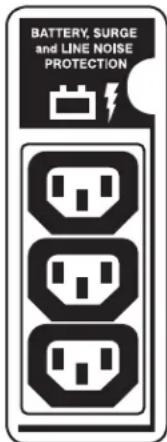
Battery Backup Protected/Surge Protected Outlets: Provide both battery backup and surge protection. Plug your computer, monitor and other critical equipment into these outlets.
Note: Do not plug laser printers into these outlets.
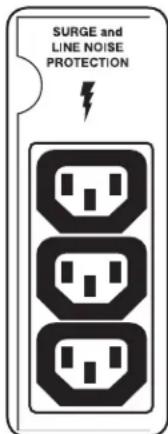
Surge-Only Protected Outlets: Provide surge and line noise protection, not battery backup. Plug equipment (such as a printer, scanner or fax machine) that does not require battery backup during a utility power failure into these outlets.
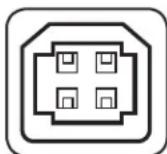
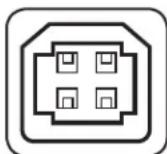
USB Communication Port: This port can connect your UPS to a computer in order to automatically save open files and shut down the computer if it is left unattended during an extended power failure. Use with Tripp Lite's PowerAlert® software and appropriate USB cable. PowerAlert software can be obtained for free via the Web at www.triplite.com and a USB cable is included with your UPS. Download the software to your computer and follow the installation instructions. Any user-supplied USB cable may be used to connect your UPS to your computer.
Notes:
- This connection is optional. The UPS will work properly without this connection.
This UPS System automatically provides basic communication compatibility with many integrated Windows®, Macintosh® and Linux® power management applications.

CAUTION: Users shall take proper care to minimize Electro-Static events. In the event of a severe Electro-Static Discharge on or near the USB port, this UPS may shut down automatically. In the case of a shut down, the UPS will need to be turned back on.
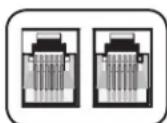
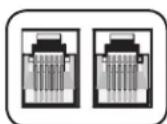
Tel/DSL Protection Jacks: RJ-style jacks protect connected equipment by stopping surges on a single phone, fax or modem line. Connect a phone cord from the wall jack directly to the Tel/DSL jack labeled "IN." Connect a phone cord from the Tel/DSL jack labeled "OUT" directly to the device to be protected. The UPS system must always be the first item connected in line from the wall jack. The UPS system must be plugged into a grounded AC outlet for Tel/DSL line surge protection to work. Connecting your equipment to these jacks is optional. Your UPS will work properly without this connection.
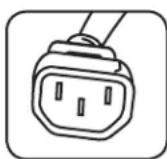
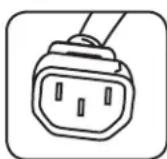
AC Input Outlet: This outlet accepts a user-supplied power cord with a country-specific plug.
Battery Replacement (back panel, not shown): Under normal conditions, the original battery in your UPS will last several years. Battery replacement should be performed only by qualified service personnel. Refer to "Battery Warnings" in the Safety section. Should your UPS require battery replacement, visit Tripp Lite on the Web at http://www.triplite.com/products/battery-finder/ to locate the specific replacement battery for your UPS.
Storage & Service
Storage
To avoid battery drain, all connected equipment should be turned off and disconnected from the UPS. Press and hold the ON/OFF button for one second. Your UPS will be completely turned off (deactivated), and will be ready for storage. If you plan on storing your UPS for an extended period, fully recharge the UPS batteries every three months. Plug the UPS into a live AC outlet, turn it on by pressing and holding the ON/OFF button for one second, and allow the batteries to recharge for 24 hours. If you leave your UPS batteries discharged for a long period of time, they will suffer a permanent loss of capacity.
Service
A variety of Extended Warranty and On-Site Service Programs are available from Tripp Lite. For more information on service, visit www.triplite.com/support. Before returning your product for service, follow these steps:
- Review the installation and operation procedures in this manual to insure that the service problem does not originate from a misreading of the instructions.
- If the problem continues, do not contact or return the product to the dealer. Instead, visit www.triplite.com/support.
- If the problem requires service, visit www.triplite.com/support and click the Product Returns link. From here you can request a Returned Material Authorization (RMA) number, which is required for service. This simple on-line form will ask for your unit's model and serial numbers, along with other general purchaser information. The RMA number, along with shipping instructions will be emailed to you. Any damages (direct, indirect, special or consequential) to the product incurred during shipment to Tripp Lite or an authorized Tripp Lite service center is not covered under warranty. Products shipped to Tripp Lite or an authorized Tripp Lite service center must have transportation charges prepaid. Mark the RMA number on the outside of the package. If the product is within its warranty period, enclose a copy of your sales receipt. Return the product for service using an insured carrier to the address given to you when you request the RMA.
Regulatory Compliance
For the purpose of regulatory compliance certifications and identification, your Tripp Lite product has been assigned a unique series number. The series number can be found on the product nameplate label, along with all required approval markings and information. When requesting compliance information for this product, always refer to the series number. The series number should not be confused with the marketing name or model number of the product.
WEEE Compliance Information for Tripp Lite Customers and Recyclers (European Union)

Under the Waste Electrical and Electronic Equipment (WEEE) Directive and implementing regulations, when customers buy new electrical and electronic equipment from Tripp Lite they are entitled to:
- Send old equipment for recycling on a one-for-one, like-for-like basis (this varies depending on the country)
- Send the new equipment back for recycling when this ultimately becomes waste
Tripp Lite has a policy of continuous improvement. Product specifications are subject to change without notice.
Note on Labeling
Two symbols are used on the label.
V~ : AC Voltage
V= : DC Voltage


Manufacturing Excellence.
1111 W. 35th Street, Chicago, IL 60609 USA · www.triplite.com/support
1111 W. 35th Street, Chicago, IL 60609 USA www.triplite.com/support
Bouton "ON/OFF" (Marche/Arret)
1111 W. 35th Street, Chicago, IL 60609 USA • www.triplite.com/support
PykoBODCTBO N0Ib30BaTeJia
SMX1000LCD
UΦpOBoNbP
(Homep cepnu: AGOM5506)
He npedna3aHaueHo nIy ppeBmKhoT Eeknki
Baxhblye yka3aHnno TeXnke 6e30nacHOCTn 20
PopdoK 6bictpo yCTAHOBKn 21
OchOBHoipeXIMpa6oTbI 22
XpaHHeH nTexHnueckoe 6cnyKbAHne 24
Co6nIOeHne yCTaHOBneHHbIX HOpM 24
English 1
Espanol 7
Français 13
Deutsch 25
EAC


PnpDyNnBnBnCnKo
KANCTBA.
1111 W. 35th Street, Chicago, IL 60609 USA - www.triplite.com/support
OxpaHnETcAbyOPckm npabOM © 2018 Tripp Lite. Nepeneuatka 3anpeuaTcA.
COXPAHNTHE HACTOUIE YKA3AHNA
B hactoJieM pykoOCTBe COepKATcYka3AHn H npEynpeXeHn, KOTOpbHe Heo6xOIMO co6HIOaTb B npOecce yctaHOBKn, 3KcnnyatauHn XpaHEnn BceN I5I MapKn Tripp Lite. HrhopopoBaHne 3TNx npEynpeXeHn MoKeT npBecTu KaHnuPoBaHHo rapaHTHn.
PpeynpexkdeHn oTHoCHTeNbHo MeTa pa3MeueHn H5Pi
- 16Bn npedha3aueh tonbko nIg HcnoIb3oBaHn B 3akpbItbIX NmoeuHnx C perynnpyembl MMkpoKlMaTOM BdAIN OT HCtOuHHKOB TOnBbUeHHOH BlaxHoCTN, TeNla HxIoDa, 3NeKTponpOBOHbIX 3aqr3HNHTeNE, nbHIn nPpMOrO cJHeHOrO CBeta.
CoBCExCtOPOH N5P Heo6xOuMnO oecneuHTb doCTaTOHc CBO6oHOro npocTpaHCTBa dner eero HADNeKaUe npOBETpMaHn.
3anpeaetcyaTahabnBaTb yctpoCTBO cpaonoloohenem ero IueboHnn 3adHe naneHn no happBneHIO BnH (noIIO6bIM ytnOM).YCTaHObKa NII NOO6bIM 06pa3OM npBBeTeK CO3dAnHIO cepe3bIX npenTCTBn DnA CNTeMb1 BHTpeHHe BEHTnIaun HycPoCTBA N, B KOHeHOM NTore, K nobpeXdeHIO IBN, HA KOtOpoe He paCnpocPraHIOrTa rapaHTnHbIe ycNOBIA.
PepypeKdHnOTHocHTeBHO nOIOKNIOUeHnN 16I
IIOKJIIOUaIte IbIHNocpeCTBeHNO K HADNEKAsIM O6pa3OM 3a3eMJIeHHo PO3eTKe cTeH nepeMeHHORTO KA. He IOKJIIOUaIte IbI K cAmOy ce6e -3To npMBeET K eR O BbIXOy I3 CTPOA.
He nepeedeIbBaIe TneKtpueckyBnky IbII n He nCnoIb3yIte nepexoHmK, He noDepExKBAoiu ero 3a3eMneHn.
He nCnOb3yIe shnpy-b-ynnnHnTEN nn noDknUeyHn IBn K pO3eKe cTeH npemEnHO ToKa. B cnuyae noKnUeyHn IBn K cTeBoi po3eTK e CnObl3oBaHem NIO60r OOBpyOBaHn, kPome cTeBbIX PhInbTpoB Tripp Lite, Baasa rapaTHna 6dyet AnHHyNPOBaHa.
Bcnyae nHTAHNVA 15POTn3eHbHO rHehepota nepeMeHHoro ToKa nOcIeHNi DoJIKeH oecneMaTb Ha BbIXOe UCTb OToHbTPOBaHHb CnIHAN,6e3OnacHb dJa 3NeKTPoNTAHNBAuNCInTeBHO orOpdyOBaHn.
PaBem nepemehHoro ToKa Cnykmt B KauyctBe yCtpoiCTBa 3aunTHoro OTKIOUeHn. 3neKtpuueckn po3eKn, Hepe3 KOtOpbIe ocuiectBnaTcra 3neKtpoNTaHHe o6OpyDobAHn, DOnJHb6bITb YCTAHOBHeB b IerKOIOCTyINOM MeTe BoJIIMN Hero.
IpeynpeKdene OTHocntelbNoIOKnloueHnO6OpydoBaHH
He pekomeHnyetca HcnoIb3ObaHnE daHnro 06OpDobAHHBn B chteMax Jx3Heo6cepeHH, rge erop bixoN3 cTPO npEnIOKHTbHO MOKeT pNBecTN K nepe6oAM B pa6ote 6OpDobAHnJX3Heo6cepeHHnB 3NaHTbHo Mepe Chn3tB er0 be30aCHOCTb nnn 4fkeKTMBHOCTb.
He npKIOHuaTe cTeBbEe nIbtpbI uINuHpyb-ynmHpyb-ynmHpyte K bXbOyUbI.3TO mOKeT npMBeCTn K bXbOy UbI.3C TPOR C notepe rapaHTm KaK Ha cTeBcB O mNbTp, TAK HA UbI.
IpeynpexkdeHn OTHoCtEnbHo 6aTaep
- 165n He tpe6yet pernyraeporo Toexnueckoro o6cnykBaHna. He BckpbaiTe kOpnc yIb n KaKm 6bTo H6bIn npuHAm. BBytpn Hero HET danei, o6cnykBaembix noB3OBaTeNEM.
Batape Moryr BnIb6c HTOCHOM OAnOCTH 3eKTPueckoro ynapa, a TAKKE BOCIIMaHEHIN B pe3yIbTaTe KOPoTKOr 3aMbKAHN. C6NIOaIte HaDJIeKaUHe MebpI ppeOCTOPOKHOCTH. He 6pocaiTe 6atapen B orOnb. He BCKpbBaIte KOpTcNbIIMn 6bapeH. He 3aMbkaIte N he UyHTnpYte KJIeMMb6bapen KaKMn-NIOpePMETAMn. Peped 3aMeHON 6bapen BblKIOuHTe NIT n OTKIOUHTe EOT 3eKTPueckoCetn. INCNb3yIte MHCTpyMeHtB cN30INPOBAHHMn pykamn. BHytpn IBHET dTeanE, oClyKNaEBmXn IOB30BeAtenem. 3aMeHa 6bapeH DOnJHKn npOn3BOHNTBCABTOHNHBM CEPBNCHMn EPcoHAIOM C NcNOB3OBAHmE 6bapeH aHANOTHQROTNa (repMeTHhBx CBNHIOBO-KNCIOThBX AKKMYIAIOTHPbX 6bape) c Takim Jne Homepom. Batape nproHOH bnn BTOPNUH nepepaOToKn. CM. MeCTbIe HOPMATNBn Tpe6OBAAHNIoo YTNIN3aUN mIo6 pykoBOCTByTECb IHOpmaueH no yTNIN3aUM HA Be-CTpaHnE http://www.triplite.com/support/recycling-program. AccoptiMeHTRipp LTE BKNOuaET Bce6aCMHeHb6 bApateHbIe KAPTpIXKn dNbaex MoeJe Nl. IocTe NT Be-CTpaHnU Tripp Lite no apecy http://www.triplite.com/products/battery-finder/, rde Bbl CMOKeTe NoO6paTb cmEHNo 6bapeo dna BaWae moeJI NlBn
He nbitai Tecb noKIOUaTb K I5Pi BHeuHme AkkymyIaTOpHbIe 6aTapei.
Popraok 6bictpoy yCTaHOBK
UAR 1. YctaHOBITE N5I B rOpH3OHTaNbHoe nnn BeptnKaJIbHoe NOIOKeHne.
Kopnyc IVIIMMeET CNErKa CKOWeHHBie 60KOBbIe CTENK, NIOBOLHIOUe HAKNHOHTY KX-DINCNIE BBEpX DnA YOObCTBa O63Opa B IHOOM NOLOXEHNN: ROPN3OHANTaBHOM INN BEPTHKaJIbHOM. KpOME TOrO, DnA yNUWHeHHo 6O3opa KK-DINCNIIe MOKeT NOBOpaUBaTcBA Ha HxHNb Iyron. IInNoBOPoTA XK-DINCNIIe CneDyET AKKyPaTHo BCTABITb OCTPOKooHEHb IpeDMET BOTBePCTHRe, pacNOLOXeHHBIE No 60kAM, UTO NO3BOJNT BYtONKHyTB Ero I3 Kopnyca IVI, 3aTeM NOBepHyTB DnCNIe Ha HxNHb Iyron I BCTABITb Ero o6paTHo B Kopnyc Do uenka.

BHHMAHNE! Dja 6e3oNaCHO rypaBHOeWbHaH NbB v BepTKaIbHom noloxhen KK-dncnleonk Hen Haxodntcbra Bepxne qactn nepehdne naHEn.
UAR 2. BkIIOHTe I6B HAcTeHHyIO po3eTKy uepe3 cbemHbI uHyp nHTaHn KOMnbIOtepa.
OToeDINHTe 1Hpy npitahnIOTOMKMBTOpeb. BCTabBe TRe3doBo pa3bEm KOMMbTOEPHORo 7Hpya BO BXOHOpa3bEmpeMeHHoro ToKa IVB. BCTabBe TeKeepbIpa3bEM (BNIky) KOMMbTOEPHO 7Hpya BV HcTeHHy0 po3eTKy peMeHHoro TOKa, BV cIIIM KOToPOH He IMeTcA 3HaHTeBHO 3NeKTpueeckO HArpy3KN (HanpIMep, KOHNIOHePA INXOIOHBNAKA). Pocne NOKJIOUeHn I5N K HacteHHoP o3eTke HAKMNTHa KHONKY ON/OFF (BKJI/BblIKI) IN YdePkmBaTe ee B TeueHne ODoHoe CekHydIg BKnIOueHn I5N (cm. pa3dE "OChOBHO peKUM pa60bI").
PmmeHne. Pn Hnnuun cetBorO 3eKtponHTAHN AToMAtWueckoe BKnUoHcHMe IV5N He npom3BouHtC.
UaF 3. Npoknouhtc cboe o6opydoBaHne K HbI.*
BCTabTe THe3D0Boi pa3bEm CbEMHOrO uHpya HHTAHn, NOCTABnREMOr B KOMNKeTe C IV5I, BO BXoHnO pa3bEm nepeMeHHOR TO KA KOMNbIbTepe. BCTabTe Wtekehpb pa3bEm (BnIKy) yka3AnHO rHpya B NIO6yIO N3 bixOHNbIX PO3eTK IV5I. HeKOTOpBe PO3eTK (CM. cxemy) o6cneuBAOT pe3epBHOe NITAHme O 6batae IN 3auNTy O TBb6pOB CHAPJxEHn; nCINONBJyTE IN Dn NDKNUCHEN KOMNbIbTepe, MOHtOPa IN DpyTHX KPNITWECKN BAXHBIX YCTPOiCTB. HeKOTOpBE PO3eTKM (CM. cxemy) o6cneuBAOT pe3epBHOe NITAHme O 6batae IN 3auNTy OT b1b6pOB HANPRAEHN; nCINONBJyTE IN Dn NDKNUCHEN PnHTPeA IN DpyTHX YCTPOICTB BTOPOCTENEHNO BAXHOCTM.
- I5II pIeIa3HaHaeTcToIbKO dIy nOIOpeJxHnApa6oTocncO6HOCT hEeKTPHOHO 6OpyOBaHn. Ecln CymMa HOMHaJIbHbIX 3HaueHnIOTpe6nEMoMouHOCHT (BA) BCEX 3JeNEMTOB O6OpyBaHn, NOckIOHEnO KpOETKAM c6ATapeHnO NOpeJHK / PO3eTAM C cTeBOV fHbIpaUe, INPBEICHTBbIXOHy MoOuOCTb I6I, To 3To pINBeTeK NepERpy3Ke NoCNEHeRo. HOMHaJIbHbIX 3HaueHnOTpe6nEMoMIOeHOTeMEOH TMeHOTb 3HaueHnO YkazAHbI Ha NcnpOHTbXb Ta6mHAc. Ecln HOMHaJIbHbIX 3HaueHnOTpe6nEMoMIOoHOTePOyOBaHn YkazAHBO BAMNEPAx TO dIOn pONeHENH COOTBCTBvUeero 3HaueHcynBBA YMooKbte eero ha 230. (IPmmeP: 1 amep × 230 = 230 BA). B cIyuee HeybePPOHCTOHTOHcEIOJIbHO B03MOXHO
peperpyk Bixb0hBx po3etok 6aapeHno noDpeKko/ Bixb0hBx po3eok Ccebeo htpaeHne BnOHNHE BHTpeHHN TECT (CM. ONHCNAH KONKN MUTE/TEST ("OTKnueHne 3Byka/Tect").

BHIMAHHE! HbI donKhen 6bItb BkIouen B po3eTKy c HanpKaHenHem nepEmHHoro ToKa n 3aIITbBaTcAOT He Ee B TeueHe 24acob noce nepbohaunho I yctahOBKn dnoecneHnnonHO 3apJa bHyTpHen He 6atapEn. NokluHoe o6OpDobAnHe nonyaet cTeBoe nTanHe nepemHHoro ToKa (npn hnnu nn TaKoBO) cpa3y nocne noKnIOUeHn K ctnn B kIouHn H5I, Ondako B cnyae otKnIOUeHn 3JeKtpueCtBA nN cyueCTBeHHoro nOnHexn CTeBOrn HapKHeHn OHO He 6yET nOlyuTaB nNoHOeHHoro nTANHn OT 6atape, eCN BHyTpEHHra 6atape He 3apJKeHaONHOCTbIO.
OchOBHOnpeXmpa60TbI
Ipeedna naneB
KhoNka ON/OFF (BKJI/BlkJI)
-ДяВКIOUHENIиП:нхмITEанКONKY ON/OFF(BKЛ/Бbl)иуджьмite ee B TeeHne OJHOI cekHy. *B cnyae otcyTcBnA cetEBOrO nITAHn npHaxaTHN ToI KONKN pnp3BOIDTCa "xOLOHbI 3anyC" N5I C nITAHmEOT batapeN.**
- IaBbKIOUeHnIbI: HaxMMte Ha KONky ON/OFF (BKN/BbIK) n yepxmbaiTe ee B TceHne OdoHcKyHdb. * NbI nonHOctbO tOKIOuaTcA (oBeCTOuBaTaC).
*IIOHTeEHMH OOH OH CekHbI pOoTHBODITc OHOKpHaTH NODa4 cKpKaOBpeMeHHOrO 3ByKOBORO CnHana. **BpMa paObTo bOceNeuHbAetor B COOTBeTbMn CypOBHM zpaHd6a6atapen HNI.
KhoNka "MUTE/TEST" ("OTKNoUcHHe 3ByKa/TecT")
-ДЯOTKIOUeHn(ИИN“3aIyUeHn)3bYkoBbIX CnRHaNoB NII: HAKMITE IN cpa3y OTNCTNE KONKY (OTKIOUeHn 3bYka/Tecr).
PnmeHne. HenpepbBHe Bc HrHaJIb (npdynpeKjaOuHne O HeMeDneHHom BbIKIOeHHN oDkIOeHHo 06OpydoBaHm) He 3aTnyauTOA
- BbnoHnBHyTpeHrtoTea: HxMnte Ha noKIOueHHOM K cetu BKNIOueHHOM IV5N KOHNy MUTE/TEST ("OTKnIOueHne 3Byka/Tect") m yepKBaTe ee B TeueHne DByx CekyHd.
Ipoonjxte yepkmbatb KONky do TOro MoMeHTa, KaK NpN3dact HeckOko 3ByKObix CnHAnOB HauHET BblOnHeHne BHyTpeHrero Tecta. Iopobhee cm. HnkeBpa3epe "PeynbTaBbHYtpHeHrTo Tecta".
PnmeaHne.Bo BpemBHytpenHeroTcTeaNoKIOHOeHoe KIbO6OpyOBaHHe MoKET OCTaBaTcBAKIOUeHHbIM

BHIMAHHE!Pn TcTnpoBAMn 6aTapeH N5I He OTKIOaHTeeroOT cTeH.3To PnPBedK OTKIOueHNO 3aunTHoro 3neKTpueckoro 3aemHe H MoKeT CTaTb PnPHHO B03HKnHOBeHn Bbl6pOca HApXeHn B CteBBIX CoEDHnX, CnoC6HOrO HAnecTu yep6 nokHouenHomy o6OpDobAHNO.
Pe3ynbTaBbHTpeHrero Tecta: npoJOnKmTeNbHcTb TcTeHpOBaHn CoCTaJIeTOKO 10 cekHy, He6xOummbx dI IpeKeKnueHn N5Pi Ha nIHTAme O batae C eIbIPOBepKne y npOBHa 3apda HcnoC6HOCTNaIepKmBaTb HarpzKy. PIn 3OM 3aOpaoTc Bce 3HaKN Ha KK-nAHeHn N5Pi nN3aTeTc 3ByKOBOcmHnA
- Ecnn noce BbnoHHeN Tecta 3haok "FAULT" (OTKA3) npoJOnkaet ropet, a 3bykoBc mHrHan He OTKIOaETCA, 3TO O3HaayeT, 4TO pOsetkN, nIHTaONIEcAOT 6atapei, neperpykeHb. IyraYCTpaHHe Npeperpy3Kn OTKIOUHTe HekToptbe 3neMeHtB o6OpDobAHMa OT pO3eTK, nITaIOuXxC8 OT batapei, n BblONHIne BHTpEHn Tect NOBtOpHo Do OTKIOUHEn 3HAuKa "FAULT" (OTKA3) n 3BykoBOrO CrtHana.

BHIMAHHE!IIO6aI neperpy3ka,he yCTpaHHeHHa NOB3ObaTeHem He3AmeNITeBHO NOcNE BHYTpEnerho Tecta,MOKET npMBecTN K OTKIIUeyHnIO IbI IN PpeKpaueHIO NOaHm IM BixoHoro 3NeKTpOniTahnB CnYae OTKnIOueHn3NeKTpueCTBa HnN OONJxEHnHn HapRJeHnB Cetn.
- Ecn nocle bblonHe Tecta 3aHok "REPLACE" (3AMEHA) npoJnoJaet ropeb, a 3BkyOB0m CmHn He oTKIOuAeTc, 3To 03Haayet, 4To 6aTapeN NpHnykdaotc B no3apJe nn 3aMehe. ObceNeBe BO3MOXHOCTb HnpepeBHOH NO3APAKM 6aTapeN V5B IN TeueHne KAK MMHNYM 24 cAcB N NobTOPO BVINONHTE BHTpeHHN Tect. Ecn nocle bblonHe NOBTOHPbIX BHYtpEHMHX TECTOB 3OT 3HaOK npOdoJAAeT ropeb, 6paTIEc 3a NOMUBO B KOMNAHIO Tripp Lite. 3aMeHa 6aTapei donKHa npO13BOITbc TOnbKO KBaIIHmIUPoBaHHBM cepBCHBM NepcoHAnOM. PIn HEo6xOIMOCTH 3aMeHb 6aTapeN NpHNI KOMNAHNI Tripp Lite npednaeraT noHHN accOPTMEHT CmEHbix 6aTapeH naCte www.triplite.com.
KK-dncnnne
Ha KK-dncnne oObpaHcTc pa3nnHbpeKmblpaoBtIbN5Pi. Bce npBeEHHbe OmcaHna DeCTbyoT npno kHouEHm N5P Kpo3eKe cetn nepeMeHHoro ToKa n BkIOUeHHOM NTaHNN. KK-dncnne moKet NobopaHbTaCn yO6cbTa OB3opa He3abHcMo OTTO, B KaKOM nonoxHeH -rOp3HOtaHBom Hn BPtKaIbHOM -yctahOBnH IVI. Ira nobopota KK-dncnner cJeDyET BCTaBHTb OCTPOKOHeHH bnpdMeT BOTBepTBA, paONoKHeHHbe No 60kAM, YTO NOBHTBbITOKHyTBero H3 KopnyCa IVI, a 3aTeM nobEPHTb DcHnne Ha HyXhBmyrONBHTB erO o6pTaBO KOPYc DO UeJyka.
A N3mepntenb BxOHO HapnKHeH: o6cneuBaet H3MepeHne B peaBnOB BpeMeHH HapnKeHHe NepeMeHHo TOKa, noDABAemorHa IV5OT nacthenno p03ekTN 3NeKTpueckoe Cetn. Hecmotra Ha To 4TO daHNbH 3meptelmb MoKet nepmoDnueckn OTobpaKaTb Kone6aHnB XBOHO HO npnApkeHn (Bb3BAHbIe IIOXMM KaeeCTBOM cTeBOrO nHTAH), BixOAnIe 3 a PpeIbI dnaIa30Ha CTANAPTHbIX DOyCKOB DnRA BUnCNIteBHO O6OpYOBAHN, FHKUABNTMauCeCKO CTaUNIN3aUMn HapnKeHHa ObceNueBaET HepepbHBHy NOdAhy HA BbXoD IV5T CTbIMN3KPOBaBHORO 3NeKTponTuHn, 6eONACHO rnn ONDKNouaero K Hemy BbUcnITeBHO O6OpYOBAHN. B Cnyae OTKNoueHH 3NeKTpueckTBa (NOTEPN nHTAH), a TAKKE cyueCTBEHHOR NOHKeHH (HEOCTAOHOrIO NTAHN) mN NobuWeHHn HapnKeHHa (N36BITOCHNO NTAHN) BHTpeHHa 6Batape IV5IOEocneuBaET BxOHOe HapnKeHHe, 6eONACHO rnn BbUcnITeBHO O6OpYOBAHN. IN3MePntEB BxOHOr HO npnApkeHHa MOKet hCNOL3BOATCB A KaueCTBe DNarHOCTNUCKERO CpeCTBn DA BnBHeHHe HEADJNEaIe KOaeeTBA BXOHOr 3NeKTponTuHn. IocpeCTBOM BKIOUeHHN IV5B p3NNHbIe POETK, YCTaHOBNEHBe Ha 06BeTE, MOxHO ONPeJIENTB KOHKPTbe IEN, CNCTMaTHueCKN o6cneuBAIOUe MAnyo MoUHOCTb, YoMOKET 6bTb BB3BaHO CO BOKyHN HoHarp2KOH co CTOpHb IObpOyOBAHN, notpeBLOHcEO BoJIwe MOUHOCTN NO CpABHEMO CpacHTbIMnnapaMetpamu eHI. Ecn BCE IMeEOUmeca Ha 06BeTE eIN CNCTMaTHueCKN o6cneuBAOT Manyo MOUHOCTb, 3To MOKET 06BACHTBCr HeODeTatoHbIM 3HePROChabKeHHe Me bEkTA IIN erO HaxOXJeHMe IpomblneHHo IIIN TopROBO 3OHe C nepepyKeHHo 3NeKTPOceTbIO.
B N3mepntenb EMKOCTH AKKMYNATOPHO BATAPEN: oTo6paxaet np6nmtentbHbI yOpeBa BHytpneHb 6atape (c) 20%).B cnyae OTKIOUeHn 3NEKTPueCTBa IIN cyueCTBEHrO NOHNKeHn HAnpJKeHn IVI nepeKnouaetcB pekn m 0TaTAHN OT 6atape,Ha dncnnee 3aropaeTc3hauok ON BAT,a yOpeHb 3apda yMeHBwaetc.
3HaOK "AVR" (abTomatueckra Cta6nnaHanaHapnKeHHa): 3OT 3HaOK 3aOpaeTcBcKaM pa3, KOrda NbIABOMATueckK KoppeKTIpyeT H3Koe CEToe BnnapKeHHe NepeMeHHoro Toka 6e3 pacXoObaHnA 3apda 6atape. 3To ABnEeTcHopMaNbHbIM peKMOM pa60bI, He Tpe6yUmm BInOnHeHHa KaKm-Xn6o DeCTBm CO CTOpBOH nNo3OBaTeJ.
OchOBHoi pexm pa60tbi
3aouk "REPLACE" (no3apka/3amena 6atapeu): 3OT 3Hauok 3a0paetc oNHOBpeMeHCO 3ByKOBbIM CnHaiom NocE BbIOnHeHBAHytpeHrero Tecta, yKa3bBaHa Hne6xmoimctb no3apdikm knn 3amehbl 6atapeu IV5II. 06ceuebte Bo3MOXHOCTb HenpepbHbO nO3apdikm 6atapeu IV5II B TeUeHMe KAK MHNIMyM 24 aocob NIOBtPOHO BbIOnHInTE BHTpeHHIn Tect. Ecln 3TOT 3auok npdoJnae1 ropeB, 6oPATECb 3a NMOUbB BO KOMNAHIO Tripp Lite. 3AemaHb 6atapeu DOnJHs Ka PON3BODHTCBra TOLkb KO BAAMnnpoBaHHIM cepBCHbIM nepcoHAlOM. Ppi neo6xoImocTH 3amehbl 6atapeu IV5II KOMNAHIN Tripp Lite npednaraet NOHbI acopTMeT CMeHHbx 6atapeu Ha caite We www.triplite.com.
E 3naOK ON BAT (nHTaHne ot 6atape): npu cyueCTBHeHOM NOHKeHH HAnpAeHH Nm OTKIOeHHN 3NEKTPUcTBA 3OT 3auok 3aropTaC o NDHO B0n CnHn3aIe (ytebIpe KOpOTKHX CnHnA c nocNeDyoIe nay3o), yKa3bBaHa T o, TcO I5Pi FyHKUHOHPyET OT CBOHX BHYTpEHNX 6atape. IpOBepBe NOKa3AHne IMMePHTe NkOCTn AKKymJATOPHO 6atape nIaONpeJIeHHN pnpBnHtEnbHoro yPOBn 3apJa 6atape. Pn DInTeBHom OKIOUeHHN 3NEKTPUcTBA Nm IOHNKeHHN HApAeHHN 13daTcN HepepbHbI 3Bykoob CNHnA, a INMepHTe NKOMCTN AKKYMLITOPHO BATAPEN oTO6paKaet OIN CEMeHT EMKCTN (20%), tO yKa3bBaET Na CKOpE ppeKaIeHne 3NEKTPOnNTAHn 07 batape.
3aouk FAULT (OTKA3): 3T03Hauok 3aFopaetcOdHOBpeMeHHo C3BkyOBbIM CMrHaIOM NocLe BbyINONHeHBA BYTpHeHrTo TcTa, yka3bIaBa HnpeRpy3ky po3eTK, ntaIOUxscr O6atepi. JnayctpaHEHn peperpy3kn OTKIOuHTe HeKOTOpbIe 3neMehbI o6opyoBaHnO TpO3eTK, ntaIOUxscr O6atapei, n bblonHtE BHTpeHnTtNt NobTopHO do OTKnIOueHnnykazahHoro 3NaUk 3BvKOBOrO CMrHana.

BHIMAHHE!IIO6aNpeperpy3ka,he yctpaenHna NOB3oBatelem He3aMeDnTeBHO NoCne BHTpeHrero TcTa,MOKET PnBecTH K OTKIOUeHNO Ibnn npekpaeeHHIO NOaHm BBIXoHDoro 3NeKTponHTaHH B CNYae OTKIOUeHH 3NeKTpueCTBa HIN NHONKHeHH HANPJAeHH B CETn.
3aHnaHnB
BbIXOHBIe po3eTKC 6batapeHoi NoIDepKko/ BbIXOHBIe po3eTKC cTeBOi OHNBTPaueH:
06ecneuBAOT KAK NITAHNE OT 6aTapei, TAK IN CTeBYIO
fMbIbTpauHIO.3TN PO3eTK NpeHa3NaHeHb I DnI NOkKnOueHn
KOMNbIbTePA,MOHHTOPA INpyTO KpNTUeCKN BaXHO
06opyoBaHHI.
PnmeaHne,3TN po3eTKn He paCCHTaHbHa NIOKIIOueHne na3epHBx pinnhtepob.
Po3eK TOnbko CfYHKneH NOaBHeHH Bb6pocOB HapXKeHH: oecneuBAOT 3aHTy OT b6pocOB
Hnpanm Hn mOB nHHn, He oecneuBn npn 30m nTAnHnO t6apei. K Tmnpo3eKam noKnnoaetc
obopyoanHn (Hnnp, npnHtep, cKaHep nn fakCmmNbHbnn annapat), He Tpe6yUoe nTAnHn O batape npn nepeox
3heprocha6xenHn.
KOMMHNKauonHb npT USB: 30T nopT MOKET NcNtB3oBaTcBdIra NpOKnUeHHe IVbI KIObOmy KOMNbTepey dA BtOMATueckoro coXpaHHeH maioOB n ABOTMATueckOTo OTKIOuHEnHBA CnYae nepe6o3 HePrcOa6BeHHe. NcNtB3yTe CoMBeTcNo ppeNaeraMbIM KOMNAHei Tripp Lite nporpAMMbIM oecneuHem PowerAlert" u COOTBCTByoum USB-Kabenem. IporpAMMHOe oecneueHne PowerAlert moxho 3aRpy3ntb cheE hTEpHT c caTia www.triplite.com, a USB-Kabel noCTABnEaT B KOMNKeTc BbI. 3aRpy3nte nporpAMMHOe oecneueHne Ha Cboi KOMNbTepe r cJePyTe yKa3aHm mno YctAHobke. Ira NOkKnUeHMe IVbI KOMNbTepey MOKET NcNtB3oBaTcBAIIOB-kuB.
PpMMeUaHn:
JaHnoe noKnIOueHHe ABnAeTc6BbHbM.OTcyTBe TaKOro noKnIOueHHe Otpa3ntcHa paoTe IV5I.
JaHnBb WbI o6eueHbAet KOMMyHkauHOHy cOBMeCTUMOCTb C 6oNbUHcTBOM pNknaHbIX nporpaMM ynpaBHeHr 3NeKTPOnHTAHmE, BCTpoEHbIX B OpeaHMHbIe CnCTembl Windows*, Macintosh* u Linux*.

BHUMAHNE! NoIb3ObaTeIaM cneIyET coBIOaTb pa3ymHyIO octopoxHcOb t cIeIbIO CbeEHHK MmHMy 3NeKTpoCTaTHuecknx pa3pIob. B cnYae CNbHoro 3NeKTPOCTaTHueckO ra3paHa nOBepXHOCT DeTaneH npTa USB HnB6n3H Hero BO3MOxHO ABToMaTHueckoe otKnUeyHe Ib. B cnYae otKnUeyHe IbNtpe6yEtcaero NobTOphoe BKNUoyHe.
Pa3bembl 3aunbl TeneoHNO/DSL-nnnm: oecneuBAOT yCTpaHHe NmNylcbhix NomEx B nHHn C noKlnoueHHBm TeneoHOM nHn aKcOM. CoedHInTe TeneoHHB/DSL-pa3bem C mapkpOBko "IN" (BXOJ) Happmyo cpo3ekohype3 TeneoHBO hHyp. CoedHInTe TeneoHHB/DSL-pa3bem C mapkpOBko "OUT" (BbIXOJ) Happmyo c3aunuAebm UcTPOCTBOM. Wl063aTeBHO DOnjKe HABTBcpeBbIM 3JeMeHtOM o6pyDobAH, NOkLNQUEHBM K HactehHO p03eK. JIg oecneueHHa 3aunbl TeneoHHO/DSL-nnnn Nomex, co3daebMx Bb6pcAMn HappkeHHa, Wl0 dOnjKe b6bBkUeH B 3aemeHHy0 po3eK npemEHoro ToKa. POpKnquHHe O6pyDobAH K 3TNM pa3bemAm He ABnEca 6oa3aTeBbHM. OTCYCTBNE TakORo NOkLNQUEHHa HE OtpaHTCA na Pa6ote N5I.
Bxodno pa3bem nntannepeMeHHoro ToKa: K 3TOMy pa3bemy IIOKNIoHaeTCA HHyp NtAHnC BnIKo, IpHrToB CooTBetCTByIOe CTpaHe (B KOmJIeKT noCTabKn He BXoNT).
3aMeHa 6aTapei (npOn3BOpHTcpe3 DBepy B 3aHnei naHenn, Hn3o6paKeHHn He npEctabHea): npu OnbUHXy cNobmX cPCK cnYk6bl 6aTapei, yCTAHOBNeHHo B IbI Ha 3aObe-3r0ToBHTe, CoCTABnREt HEckOBKo nTe. 3aMeHa 6aTapei DoJIKHa npOn3BOHTc TaIbKO KBAINHmIOPOBaHHM CepBNCbIM nepcoHAMOM. CM. nyHKT "PtpdynpexdHn OTHocntelbHo 6aTapei B pa3deJe "06ecneHme 6eONacHO". Pn Heo6xOHNOCTH 3aMeHbI 6aTapei IBI NocETITE Be6-CTPAHUY Tripp Lite no aDpcy http://www.triplite.com/products/battery-finder/, rDe bI cMOKeTe NOo6paTb MeHHyO 6aTapei dA CBOeMOnEH MII.
XpaheHne n TexHMueckoe 06cnyxmbaHne
Xpahene
Bo 36eJHmE cAmop3raJa 6aTapeBce PNOKIOUHHe 06OpOBOAHNE OJIKNHO 6bTB bIKIOUHO n OTOeINHOOT MBI. HAKMITE Ha KONKY ON/OFF (BKl/BblKI) u ypeKnBaIte ee B TeHne OJHc EOnTOI TOIIOCTbIO bIKIOUENH (o6ctOueH) n rTOB K XpAHEnIO. ECNI BBI pAnHPyTe xpaHEnIE CBOER IIB TceHene DInTEbHorO nepnoDA BPemHN, pOIM3BOIDITe POJHyO NO3APRky 6aTape IMI KaKdIe TPI MeCAu. JnA 3TOrO BCTABBe CTeBHyIO INIy I5I B PO3ETky CETN NEpeMeHHORo TOKA, BKIOHTe ERO NytEm HauatmK KNKNI ON/OFF (BKl/BblKI) n ee yepzAHnB TceHne OJHO CEKHyBn OCTabTe 6aTape nIPO3aPAnKn Ha 24 Yaca. XpAHEnie 6aTape B pa3pXeHHOM COtOHMN HA npToxKeHHM dInTEbHorO BPemHN npINBOIDIT K63B03BpaTHNO Notepe IN EMKOCTN.
Texnueckoe 6cbnykubahne
Kpome toro, kcmnna Tripp Lite npednaraet pad PporpaMM paampeHHor rapaTHM n 0cbnykBAHnHa o6bkeTe. Boee noDpnoBn HnΦopMaun OTexHueckom 0cbnykBAHm n3noxeka Ha cTpaHne www.triplite.com/support. IpeE BO3Bpatom CBOero n3denn B cIeXn TxHnueckoro 0cbnykBAHnPioc6Ba BblonHtB cNeDuioune DeCTBn:
- BHIMATEJIbHO N3yUHe Tne POpAIOK MOHTaJa H 3KcIpyaTauY UcTPOCTBa, PnBBeDeHHb B HAcToaHem pyKOBOdCTBe, BO 136eKaHMe Ipo6NeM, KOtOpe MOrTy Bo3HMKHyTB XoJe pa6OtBi 13-3a HENpaBmblHoro NoHHMaHnI PpNBeDeHHbX B pkyoBOdCTBe yka3AHN.
- Ecn npobnemy peunb He ydaonoc, He opaanaiTcB K pOaabuy H He BO3BpaauIte N3dneE mY. B 3OM cnyae nocetne INHTepHET-ctpAnu no apecy: www.triplite.com/support.
- EcnBn 03HnK7a np6bMa Tpe6yet npoBeEHnpeMOHTa nIeTexHueckoro o6cnykBaHnA, 3aHnTe Ha cTpaHuy www.triplite.com/support n Haxmte Ha cbbky Product Returns (Bo3Bp a3dEi). 3Dec bbl MoKeTe 3anPocntb Homep Rurned Material Authorization (RMA) (pa3peuHneHa Bo3Bp MaTePnaOB), KOTOpBn Heo6xOIMn IpnpoBeEHn texHueckoro 6cbNyKBAHn. dIa 3aONHeHn 3To pOCToH OHaH-phiMbN oTpe6yetcya3aTb Homep moEnn CepHHbH Homep BaIeO 3dEIna, a TAKke obune CbeEHn O nOKynatene. Homep RMA BmeTe C yka3AHAMn IO TPAHCNOPTMPOBKe 6yET HapabEn Bam No 3eKTPHOH NOte. Ha KaKne 6bTo Hb6IIOYbIKn (npAble, KOCBEHNbE, nocJeUOINe INN Bb3BaHHbE oc6bIMn 6cTOAEtBCTBAMn), CBzAAHHe B cTpACNoptPBOKO IH3dEINB B aDpc KOMNAH N Tripp Lite INIe ee yOnOHMOeHORo cepBCHORO eHTPa, DeCTBNE rapaHTNI He paacnoctpaHareTc. CTOMCtB TpaHCNOPTPOBKN IH3dEINB B aDpc KOMNAH N Tripp Lite INIe ee yOnOHMOeHORo cepBCHORO eHTPa DOJNKA 6bITb ONaueHa ABAHCOM. Homep RMA DOnjKeH 6bITb Yka3AHn BA HWeHHe CTOPOE yNAKOBKn. Ecn Bo3BPAT IH3dEINA POns3BOIDTCB B nepNoI DeICTBnra rapAHTI, To Heo6xOIMn PpINOXHTb KOIIIO TOBAPHorO Yeka IpOdaUa. Bo3BPAT IH3dEINA DnI npoBeEHn peMOHa INI TexHueckoro 06cnykBAHn DOJNKe H pOns3BOIDTCB 3aCTPxAOBaHHm IpeBO3UHKOM no aDpcy, Yka3AHOMY B OTBeTe HA Baa 3anPoc Homepa RMA.
CobnOeHne yctaHOBnEHbIX HopM
BcIeAe CepTnHkauHm HcoTBeTCTBHe HOpMaTHbHbM Tpe6oBAHm HOnO3HaBAAHnn Pnp6pTeHHOMy BAMn H3dennH MapKn TrippLite pncBoeH yHKaHbHbCepnHbHbHomep. CepnHbHbHopmepacnoJaeTcHa 3AB0DCKbTAbMNKe BMeTe Co BcEMn Heo6xOuMbMn OTMeKAMn O pmeKne n npoeHnHOpMauee. Pn3AnpoCe HhOpMaun O cOoTBETCBn DaHHoro H3dennn HopMaTMbHbM Tpe6oBAHm O8a3aTeBHO yKa3bBaItE erO cepHbHbHomep. CepHbHbHomep He cIeYet PyTaB c TopOBb mHaMeHOBAHM EHNHOmePom erO moen.
HnfoMaHn no BbIIOHNHeMTOpe6oBAnHH DnpeKTHBbI WEEW dIa nokypanatee H nepepa6OTHKOB npOdyuKnn KOMNaHN Tripp Lite (AIBNHOxXcpe3HdENTAMn Ebponeckoro coo3a)

Cornacno noonoknHm MnepeKTHb6 oyTmnaaOnoTOxOob Nektpceckoro nNektpnoHHo oObpyoBaHn (WEEE) mKnolHtEnbHex paonopaeHn no ee npmeHn, npn noynke notpeBteMaHn HOBOR 3Nektpueckoro nn NektpnoHHo oObpyoBaHn npomBoCTBA KOMaHHu Tripp Lite OHn nonyauot npaboHa:
- PpOdaKy CTaporo 6obpyoBaHn no npHHunny "Oa OHn H/INn HA 3KBvBAneHTHO OCHOBe (B 3A8NCHMOCTN OT KOHKpeTHOH (TpaHb)
- OtnpaBky HOBOro 6OpbyOBaHNHa Na nepebaOTKy Nocne OOKHateNbHO BbIpa6TKn erO pecypca
KoMaHn Tripp Lite noctoHHo COBepueHCTBye CBOO npdykuHIO B cBa3N C 3Mm0xHO H3MeHeHnTexHueckHX XapAKeTnHK H3DeHn6e3 npDabpHTbHo rYoBeDMnHn.
PIMMeaHHe OTHoCHTeNbHo MapKnpoBKn HaMapKnpoBKe KcNoIbZoBaHbI da CMbOHa.
V~:3haueHHe HAnpJaeHHa NepMeHHoro ToKa V~:3haueHHe HAnpJaeHHa NoCToHHoro ToKa


1111 W. 35th Street, Chicago, IL 60609 USA · www.triplite.com/support
Benutzerhandbuch
SMX1000LCD
Manufacturing Excellence
1111 W. 35th Street, Chicago, IL 60609 USA • www.triplite.com/support