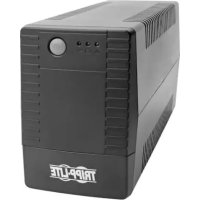
OMNIVSX650D - Inverter Tripp Lite - Free user manual and instructions
Find the device manual for free OMNIVSX650D Tripp Lite in PDF.


| Product Type | UPS (Uninterruptible Power Supply) |
| Brand | Tripp Lite |
| Model | OMNIVSX650D |
| Nominal Input Voltage | 230 V AC, 50/60 Hz |
| Input Fuse | T5AL, 250 V |
| Resettable Circuit Breaker | 5 A, 250 V AC |
| Output Outlets | BATTERY/SURGE PROTECTED outlets |
| Battery | 12 V DC, 7 Ah, sealed lead-acid, 6 cells |
| Output Capacity (Rated) | 650 VA |
| LED Indicators | Green (line mode), Orange (battery), Red (fault) |
| Audible Alarm | Yes (beep for low battery, overload, etc.) |
| Protection | Against surges, voltage drops, power outages |
| Battery Replacement | Possible by qualified personnel |
| Storage | Fully recharge batteries every 3 months |
| Maintenance | Repair via Tripp Lite authorized service (www.tripplite.com/support) |
| Compliance | WEEE (European Union) |
| Included Accessories | Power cord with Schuko plug |
| Operating Temperature | 0 °C to 40 °C |
| Ventilation | Ventilation holes - do not obstruct |
| Overload Protection | Resettable input circuit breaker |
Frequently Asked Questions - OMNIVSX650D Tripp Lite
User questions about OMNIVSX650D Tripp Lite
0 question about this device. Answer the ones you know or ask your own.
Ask a new question about this device
Download the instructions for your Inverter in PDF format for free! Find your manual OMNIVSX650D - Tripp Lite and take your electronic device back in hand. On this page are published all the documents necessary for the use of your device. OMNIVSX650D by Tripp Lite.
USER MANUAL OMNIVSX650D Tripp Lite
(Series Numbers: AG-87DD, AG-02FA, AG-87DF, AG-02FB)
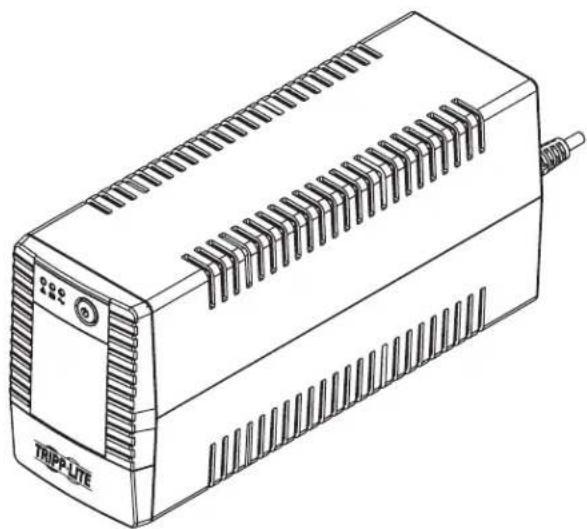
natural_image
Line drawing of a TRIPPLE electronic device with slots and a terminal block (no text or symbols on the device itself)Important Safety Instructions......2
Quick Installation......3
Basic Operation ....4
UPS On/Off....4
LED Indicators 4
Features ....5
UPS Features ....5
Battery Replacement 6
Storage and Service ......6
Regulatory Compliance ....7
Español....8
Français....15
Русский 22
Deutsch 29

text_image
TRIPP·LITE
1111 W. 35th Street, Chicago, IL 60609 USA • www.tripplite.com/support
Copyright © 2018 Tripp Lite. All rights reserved.
Important Safety Instructions
SAVE THESE INSTRUCTIONS
This manual contains instructions and warnings that should be followed during the installation, operation and storage of this product. Failure to heed these warnings may affect the warranty.
UPS Location Warnings
• Install your UPS indoors, away from excess moisture or heat, conductive contaminants, dust or direct sunlight.
- For best performance, keep the indoor temperature between 0^ and 40^ .
- Leave adequate space around all sides of the UPS for proper ventilation.
- Only set the UPS upright on a sturdy flat surface. Do not block fans or ventilation holes, as this will seriously inhibit the unit's internal cooling and cause product damage not covered under warranty.
UPS Connection Warnings
- Connect your UPS directly to a properly grounded AC power outlet. Do not plug the UPS into itself; this will damage the UPS.
- Do not modify the UPS plug, and do not use an adapter that would eliminate the UPS ground connection.
- Do not use extension cords to connect the UPS to an AC outlet.
- If the UPS receives power from a motor-powered AC generator, the generator must provide clean, filtered, computer-grade output.
- The mains socket outlet that supplies the UPS should be easily accessible and located near the UPS.
Equipment Connection Warnings

Short Circuit backup protection and overcurrent protection is provided by the building installation.
To reduce the risk of fire, connect only to a circuit provided branch circuit overcurrent protection. The plug on the power supply cord is intended to serve as the disconnect device. Be sure the socket-outlet is installed near the equipment and is made easily accessible.
- Use of this equipment in life support applications where failure of this equipment can reasonably be expected to cause the failure of the life support equipment or to significantly affect its safety or effectiveness is not recommended.
- Do not connect surge protectors or extension cords to the output of your UPS. This might damage the UPS and may affect the surge protector and UPS warranties.
- Connect the UPS to an outlet that is adequately protected against excess currents, short circuits and earth faults as part of the building installation.
Battery Warnings
- Batteries can present a risk of electrical shock and burn from high short-circuit current. Observe proper precautions. There are no user-serviceable parts inside the UPS. Do not open the UPS except to perform battery replacement. Do not open or mutilate batteries. Do not short or bridge the battery terminals with any object. Do not dispose of batteries in a fire, the batteries may explode. Released electrolyte is harmful to the skin and eyes and may be toxic. Unplug and turn off the UPS before performing battery replacement. Use tools with insulated handles. Battery replacement should be performed only by authorised service personnel using the same number and type of batteries (sealed lead acid). The batteries are recyclable. Refer to your local codes for disposal requirements or visit www.rbrc.com for recycling information. Tripp Lite offers a complete line of UPS System Replacement Battery Cartridges (R.B.C.).Visit Tripp Lite on the Web at www.triplite.com/products/battery-finder to locate the specific replacement battery for your UPS.

CAUTION: A battery can present a risk of electrical shock and high short-circuit current. Contact with any part of a grounded battery can result in electrical shock. The following precautions should be observed when working on batteries:
- Remove watches, rings or other metal objects.
- Use tools with insulated handles.
- Wear rubber gloves and boots.
- Do not lay tools or metal parts on top of batteries.
- Disconnect charging source and load prior to installing or maintaining the battery.
- Remove battery grounds during installation and maintenance to reduce likelihood of shock.
- Remove the connection from ground if any part of the battery is determined to be grounded.
Important Safety Instructions
UPS and Battery Recycling

Please recycle Tripp Lite Products. The batteries used in Tripp Lite products are sealed lead acid batteries. These batteries are highly recyclable. Please refer to local codes for disposal requirements.
Call Tripp Lite for recycling info at +1.773.869.1234.
Go to the Tripp Lite Website for up-to-date information on recycling the batteries or any Tripp Lite product. Please follow this link: http://www.tripplite.com/support/recycling-program/
Quick Installation
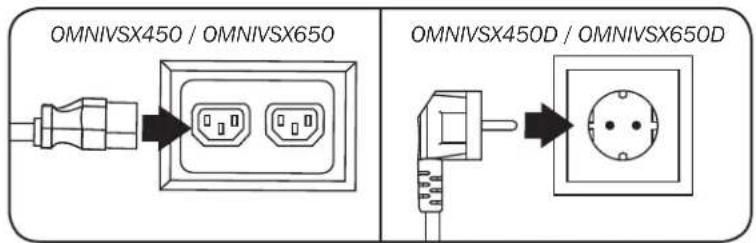
STEP 1: Plug the UPS into a properly grounded outlet.
After plugging the UPS into a wall outlet, press the power button to turn on the UPS (See Basic Operation).
Note: The UPS will not turn on automatically in the presence of live utility power.
STEP 2: Plug your equipment into the UPS.
Outlets marked BATTERY & SURGE offer UPS battery backup support during power failures. Connect your vital computer equipment into these outlets.
Your UPS is designed to support electronic equipment only. You will overload the UPS if the total volt-amp (VA) ratings for all the equipment connected to the BATTERY/SURGE PROTECTED outlets exceed the UPS output capacity. To find your equipment's VA ratings, look on their nameplates. If the equipment is listed in amps (A), multiply the number of amps by 230 to determine VA. For example: 1A × 230 = 230VA . If you suspect you have overloaded the outlets, check Load Meter screens (see Display UPS/Power Conditions in Basic Operation).
If the on-line AC power icon does not illuminate when the UPS is turned ON, try the following:
- Make sure that the UPS is plugged into a live AC outlet.
- Press the power button Ⓜ turn on the UPS. A beep should sound when the UPS starts.
- If the UPS still does not start, contact Tripp Lite Tech Support for assistance.
text_image
OMNIVSX450 / OMNIVSX650 OMNIVSX450D / OMNIVSX650D
text_image
OMNIVSX450 / OMNIVSX650 OMNIVSX450D / OMNIVSX650DBasic Operation
UPS ON/OFF
- Plug the UPS into a live, grounded outlet.
The green LED will illuminate, the battery charger will engage as necessary and the SURGE PROTECTED outlets will begin passing power. - Plug equipment into the UPS: You will overload the UPS if the total volt-amp (VA) ratings for all the equipment connected to the BATTERY/SURGE PROTECTED outlets exceed the UPS output capacity. To find your equipment's VA ratings, look on their nameplates. If the equipment is listed in amps (A), multiply the number of amps by 230 to determine VA. For example: 1A × 230 = 230VA .
- Turn the UPS on: Press the power button ⏻. The UPS alarm will beep for 2 seconds. The BATTERY/SURGE PROTECTED outlets will begin passing AC line power. The UPS will automatically recharge internal batteries as needed. Once turned on, your UPS is ready to protect connected equipment from blackouts, brownouts, overvoltages and transient surges.
- Turn the UPS off: Press the power button
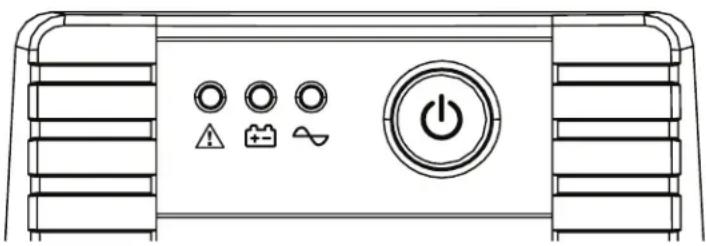
LED Indicators
natural_image
Line drawing of a control panel with buttons and power button (no text or symbols)| Description | Fault LED (Red) | Battery LED (Amber) | Online LED (Green) Alarm |
| Line Mode Off Off On Off | |||
| Battery Mode Off | Flashes Every 10 Seconds | Off Off | |
| Battery Low On Flashes Every 1 Second Off Sounds Every 1 Second | |||
| Overload Alarm - Line Mode Off Off On | |||
| Overload Alarm - Battery Mode | Off | Flashes Every 1 second | Off |
| Overload - Line Mode | On Off Off | Sounds Continuously | |
| Overload - Battery Mode | Off Off Off Off | ||
| Replace Battery | Flashes Every Minute | Off | On |
| Fault Condition | On Off Off | Sounds Continuously | |
Features
UPS Features
Front Panel
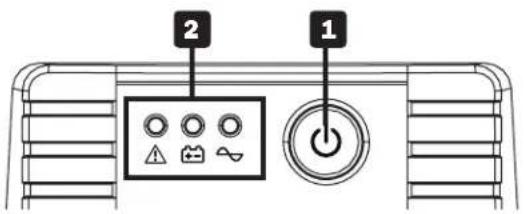
text_image
2 1Rear Panel
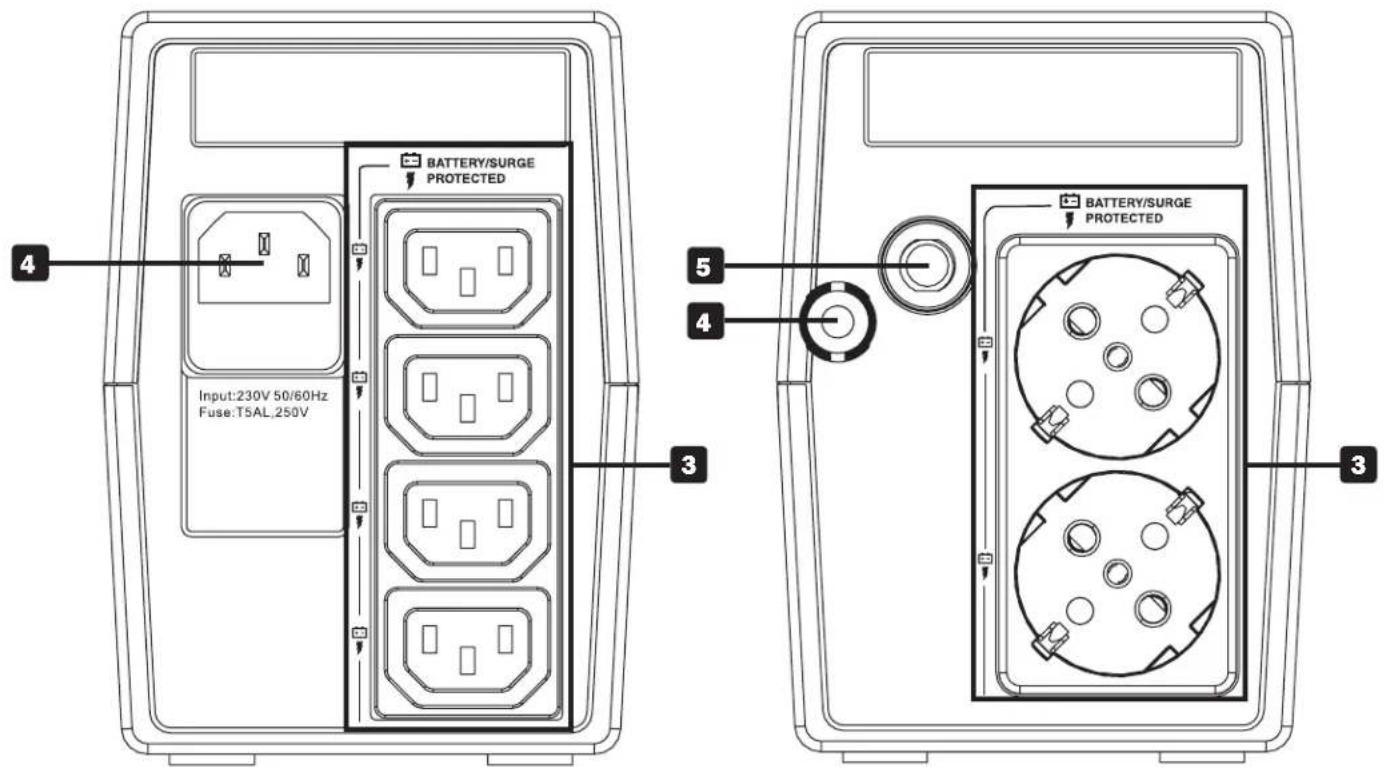
text_image
BATTERY/SURGE PROTECTED Input:230V 50/60Hz Fuse:T5AL,250V 4 5 4 3 BATTERY/SURGE PROTECTED 3OMNIVSX450 / OMNIVSX650 OMNIVSX450D / OMNIVSX650D
1 ON/OFF Button: When the UPS is on, press this button to turn the UPS off.
2 LED Indicators: Provides current status of the UPS. See LED Indicators for detailed description.
3 Battery Backup/Surge Protected Outlets: These outlets offer battery backup support and premium surge suppression for critical devices requiring battery backup support.
4 AC Power Input: Plug in a C14 power cord (OMNIVSX450 and OMNIVSX650 models) or use the included 1.5 m power cord with Schuko plug (OMNIVSX450D and OMNIVSX650D models) to connect the UPS to the mains power source.
5 Resettable Input Circuit Breaker: Protects your electrical circuit from over current draw from the UPS load. If this breaker trips, remove some of the load, then reset by pressing it in. Breaker is rated for 5A, 250V AC.
Battery Replacement
Under normal conditions, the original battery in your UPS will last several years. Battery replacement should only be performed by qualified personnel. Refer to Battery Warnings in for complete battery safety information.
Models OMNIVSX450 and OMNIVSX450D require one 12V DC, 4.5AH replacement battery.
Models OMNIVSX650 and OMNIVSX650D require one 12V DC, 7AH replacement battery.
For further information about replacement compatibility and ordering, visit www.tripplite.com/products/battery-finder.

Battery replacement must be performed using the same battery type and quantity: 12V DC sealed lead acid (SLA), 6 cell, and in compliance with UL 1989.

Risk of energy hazard. Before replacing batteries, remove conductive jewelry such as chains, wrist watches and rings. High energy passing through conductive materials may cause severe burns.
Storage and Service
Storage
To avoid battery drain, all connected equipment should be turned off and disconnected from the UPS. Press and hold the power button ⏻ for one second and disconnect the unit from AC power. Your UPS will be completely turned off (deactivated), and will be ready for storage. If you plan on storing your UPS for an extended period, fully recharge the UPS batteries every three months. Plug the UPS into a live AC outlet, turn it on by pressing and holding the power button ⏻ for one second, and allow the batteries to recharge for 4 to 6 hours. If you leave your UPS batteries discharged for a long period of time, they will suffer a permanent loss of capacity.
Service
A variety of Extended Warranty and On-Site Service Programs are available from Tripp Lite. For more information on service, visit www.tripplite.com/support. Before returning your product for service, follow these steps:
- Review the installation and operation procedures in this manual to insure that the service problem does not originate from a misreading of the instructions.
- If the problem continues, do not contact or return the product to the dealer. Instead, visit www.triplite.com/support.
- If the problem requires service, visit www.triplite.com/support and click the Product Returns link. From here you can request a Returned Material Authorisation (RMA) number, which is required for service. This simple on-line form will ask for your unit's model and serial numbers, along with other general purchaser information. The RMA number, along with shipping instructions will be emailed to you. Any damage (direct, indirect, special or consequential) to the product incurred during shipment to Tripp Lite or an authorised Tripp Lite service center is not covered under warranty. Products shipped to Tripp Lite or an authorised Tripp Lite service center must have transportation charges prepaid. Mark the RMA number on the outside of the package. If the product is within its warranty period, enclose a copy of your sales receipt. Return the product for service using an insured carrier to the address given to you when you request the RMA.
Regulatory Compliance
Regulatory Compliance Identification Numbers
For the purpose of regulatory compliance certifications and identification, your Tripp Lite product has been assigned a unique series number. The series number can be found on the product nameplate label, along with all required approval markings and information. When requesting compliance information for this product, always refer to the series number. The series number should not be confused with the marketing name or model number of the product.
EMC Specifications for Models with EMC Category C2 Approval (Select Models):
WARNING: This is a category C2 UPS product. In a residential environment, this product may cause radio interference, in which case the user may be required to take additional measures.
WEEE Compliance Information for Tripp Lite Customers and Recyclers (European Union)

Under the Waste Electrical and Electronic Equipment (WEEE) Directive and implementing regulations, when customers buy new electrical and electronic equipment from Tripp Lite they are entitled to:
- Send old equipment for recycling on a one-for-one, like-for-like basis (this varies depending on the country)
- Send the new equipment back for recycling when this ultimately becomes waste
Tripp Lite has a policy of continuous improvement. Product specifications are subject to change without notice.
Note on Labeling
Two symbols are used on the label.
V\~ : AC Voltage
V= DC Voltage

text_image
TRIPP·LITE
Manufacturing Excellence.
1111 W. 35th Street, Chicago, IL 60609 USA • www.tripplite.com/support
natural_image
Line drawing of a TRIPPLE industrial device with slots and a terminal block (no text or symbols on the device itself)natural_image
Front view of a control panel with indicator lights and a power button (no text or symbols)natural_image
Line drawing of a TRIPPLE electronic device with slots and a terminal block (no text or symbols on the device itself)natural_image
Front view of a device control panel with buttons and power button (no text or symbols)natural_image
Line drawing of a TRIPPLE electronic device with slots and a terminal block (no text or symbols on the device itself)1111 W. 35th Street, Chicago, IL 60609 USA • www.tripplite.com/support
natural_image
Front view of a control panel with buttons and power button (no text or symbols)1111 W. 35th Street, Chicago, IL 60609 USA • www.tripplite.com/support
Bedienungsanleitung
USV-Systeme
Modelle:
OMNIVSX450D, OMNIVSX450, OMNIVSX650D, OMNIVSX650
(Seriennummern: AG-87DD, AG-02FA, AG-87DF, AG-02FB)
natural_image
Line drawing of a TRIPPLE electronic device with slots and a terminal block (no text or symbols on the device itself)1111 W. 35th Street, Chicago, IL 60609 USA • www.tripplite.com/support
natural_image
Front view of a device control panel with buttons and power button (no text or symbols)1111 W. 35th Street, Chicago, IL 60609 USA • www.tripplite.com/support