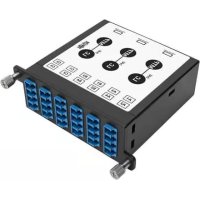
N4843M8L12S - Network adapter Tripp Lite - Free user manual and instructions
Find the device manual for free N4843M8L12S Tripp Lite in PDF.



| Product Type | Fiber Optic Network Cassette |
| Model | N4843M8L12S |
| Brand | Tripp Lite (Eaton) |
| Ports | 12 LC duplex ports (24 fibers) + 3 MPO-8 ports (8 fibers each) |
| Connector Type | LC and MPO-8 |
| Compatible Enclosure | N484 Series (N484-00U, N484-01U, etc.) |
| Dimensions (W x D x H) | Approximately 260 x 110 x 44 mm |
| Weight | Approximately 0.5 kg |
| Power Supply | None (passive) |
| Key Features | Fiber optic distribution and management, conversion between LC and MPO connectors |
| Housing Material | Steel |
| Fiber Type | Multimode or singlemode (depending on version) |
| Maintenance and Cleaning | Clean with a lint-free cloth and isopropyl alcohol. Use protective caps to prevent dust. |
| Safety | Do not look directly at fibers, use eye protection |
| Replacement Parts | No repairable parts. Replace entire cassette if faulty |
| Warranty | Limited lifetime warranty |
| General Information | Manufactured by Eaton. Compliant with WEEE directive. Specifications may change without notice |
Frequently Asked Questions - N4843M8L12S Tripp Lite
User questions about N4843M8L12S Tripp Lite
0 question about this device. Answer the ones you know or ask your own.
Ask a new question about this device
Download the instructions for your Network adapter in PDF format for free! Find your manual N4843M8L12S - Tripp Lite and take your electronic device back in hand. On this page are published all the documents necessary for the use of your device. N4843M8L12S by Tripp Lite.
USER MANUAL N4843M8L12S Tripp Lite
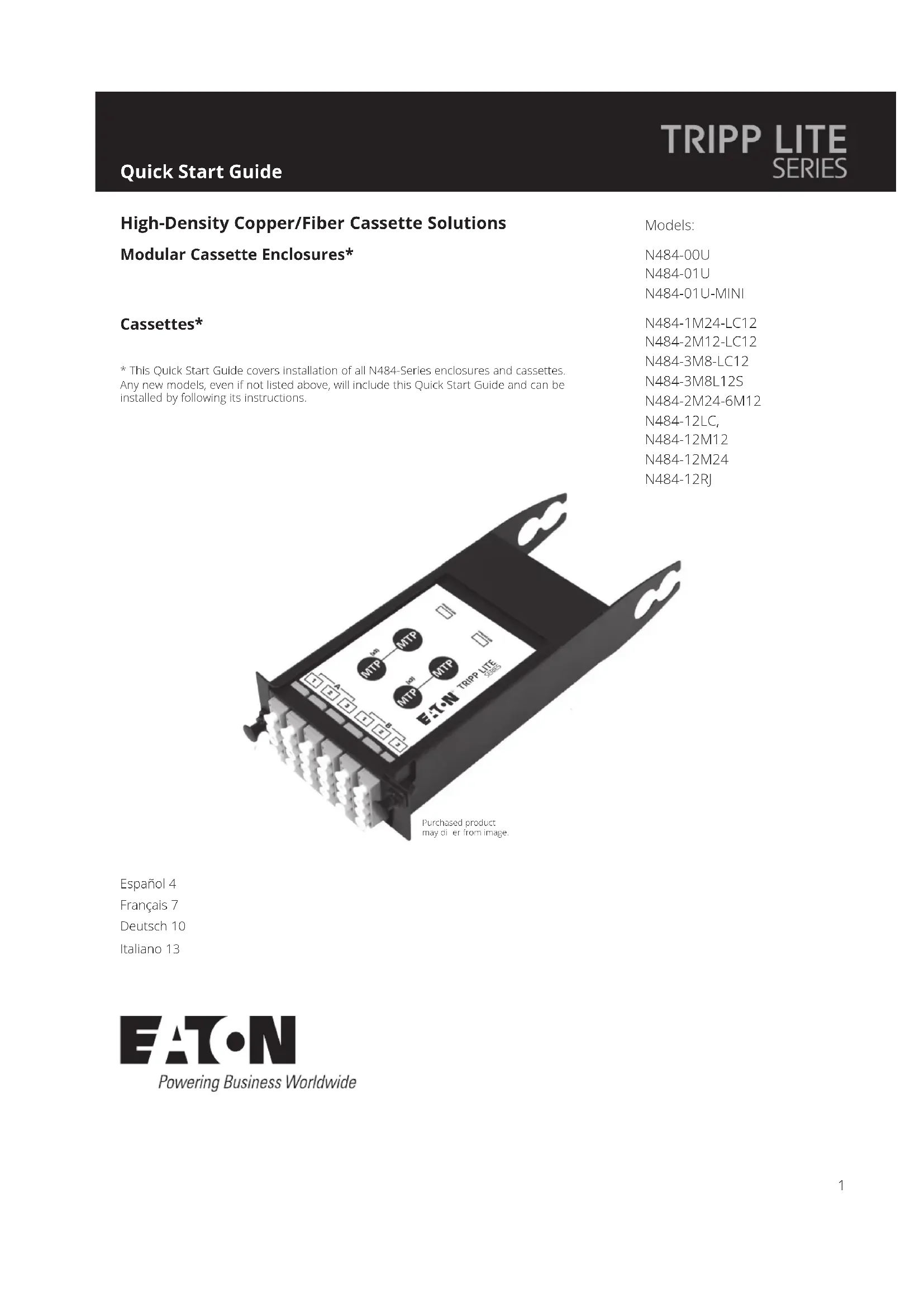
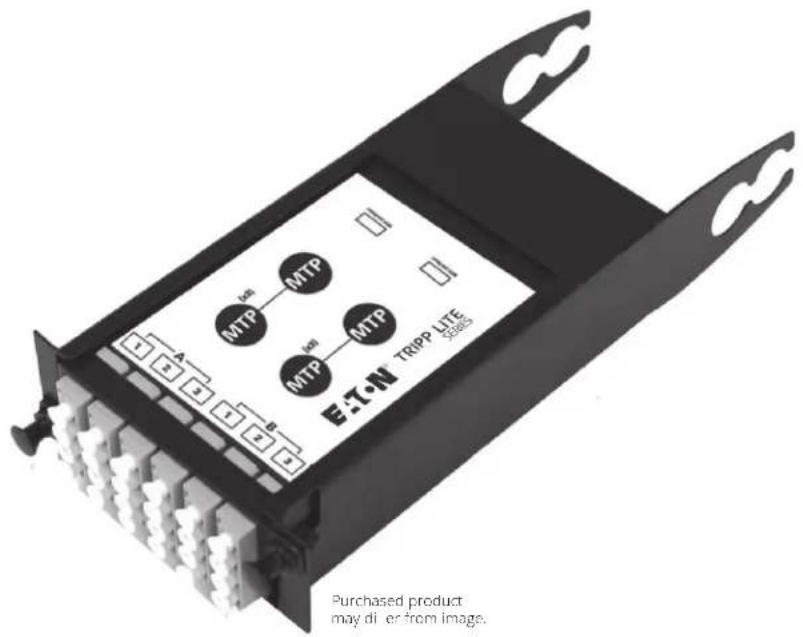
High-Density Copper/Fiber Cassette Solutions
Modular Cassette Enclosures*
Cassettes*
- This Quick Start Guide covers installation of all N484-Series enclosures and cassettes. Any new models, even if not listed above, will include this Quick Start Guide and can be installed by following its instructions.
Models:
N484-00U
N484-01U
N484-01U-MINI
N484-1M24-LC12
N484-2M12-LC12
N484-3M8-LC12
N484-3M8L125
N484-2M24-6M12
N484-12LC
N484-12M12
N484-12M24
N484-12RJ
Espanol 4
Français 7
Deutsch 10
Italiano 13
Installation
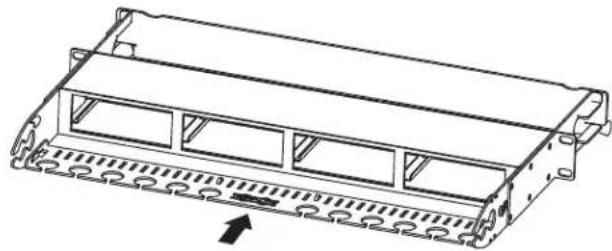
Installing the Cable Management Bracket:
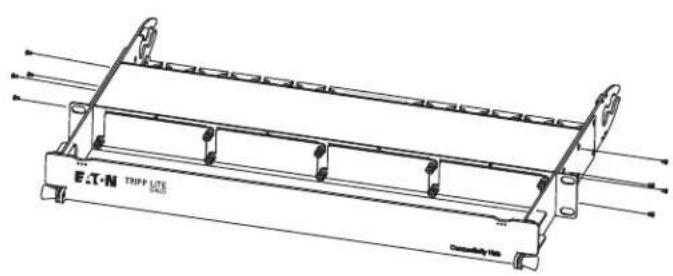
The panel rails on the back of the N484-01U enclosure contain mounting notches that allow the cable management bracket to be installed on the top or bottom of the rails. Choose the top or bottom notches, insert the bracket into the notches, and slide the bracket inward to secure it into place.
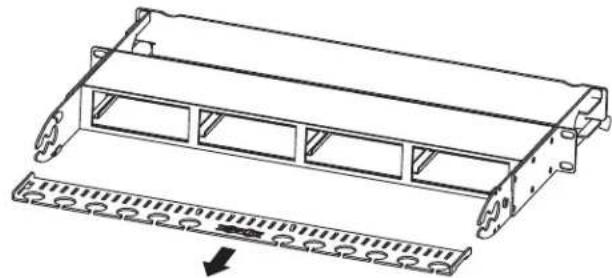
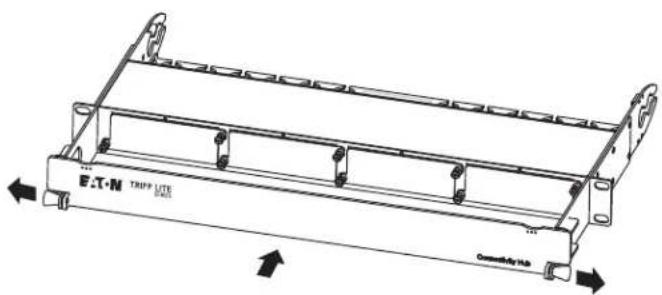
Installing the Panel Shield Bracket:
The N484-01U contains a shield bracket that attaches to the front of the enclosure. Mounting holes are located on the right and left front panel rails for bracket attachment. To attach the bracket, pull on the pull tabs found on each side of the bracket to move the connected pins outward. Then insert the bracket into the enclosure. Once the pins are lined up with the mounting holes on the panel rail sides, release the pull tabs to lock the bracket into place. The bracket slides up and down to allow access to the enclosure or to shield it from contact.
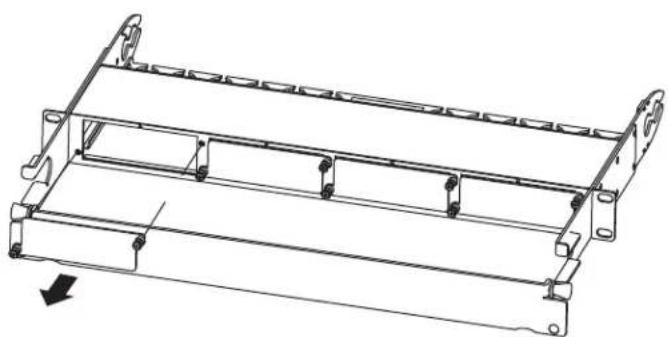
Inserting/Removing Blanking Panels:
The N482-01U comes with pre-installed blanking panels attached to the enclosure's cassette slots. When a slot is needed, remove the blanking panel by unscrewing the thumbscrews located on the opposite side of the blanking panel. To attach a blanking panel to an empty cassette slot, line up the blanking panel with the corresponding holes on the enclosure. Then tighten the thumbscrews to secure the blanking panel into place.
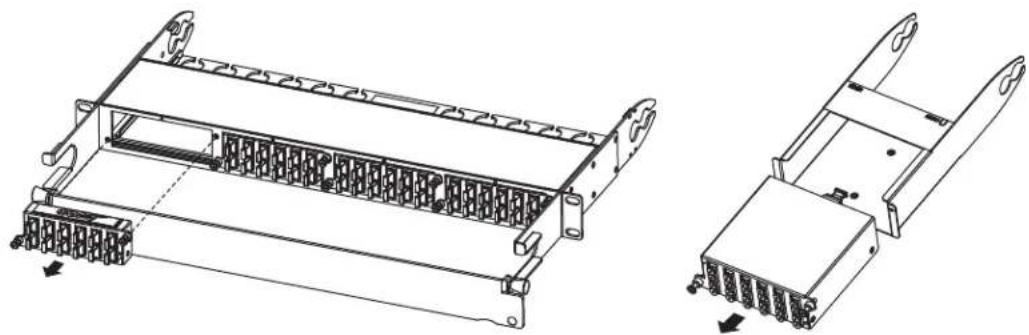
Inserting/Removing Cassettes:
After creating an open slot by removing a blanking panel, line up a cassette with the corresponding slot on the enclosure and insert the cassette into the slot. Then tighten the thumbscrews to secure it into place. To remove a cassette, unscrew the thumbscrews to release it from the enclosure.
Installation
Mounting the Enclosure:
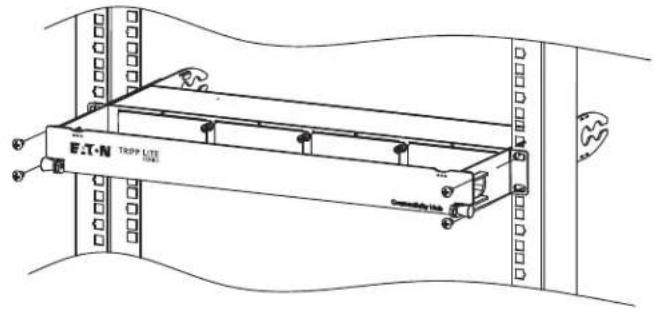
To mount the enclosure, you must rst fasten the included mounting brackets to the sides of the enclosure with the supplied screws. Once attached, secure the enclosure to the rack with appropriate user-supplied mounting hardware.
Note: The N484-00U's magnets are designed for mounting onto the metal surface of a rack enclosure, cable manager or other similar structure. Ideal placement should be away from direct contact with any active equipment (e.g., UPS, server, switch).
Warranty
Limited Lifetime Warranty
Eaton warrants this product, if used in accordance with all applicable instructions, to be free from original defects in material and workmanship for life. If the product should prove defective in material or workmanship within that period, we will, subject to the foregoing terms and limitations, replace the product, in its sole discretion, as your exclusive remedy for our breach of the limited warranty. Visit Tripplite.Eaton.com/support/product-returns before sending any equipment back for repair.
THIS LIMITED WARRANTY DOES NOT APPLY TO NORMAL WEAR OR TO DAMAGE RESULTING FROM ACCIDENT, MISUSE, ABUSE OR NEGLECT. Eaton MAKES NO WARRANTYES OTHER THAN THE LIMITED WARRANTY EXPRESSLY SET FORTH HEREIN. EXCEPT TO THE EXTENT PROHIBITED BY APPLICABLE LAW, ALL IMPLIED WARRANTYES, INCLUDING ALL WARRANTYES OF MERCHANTIBILITY OR FITNESS FOR A PARTICULAR PURPOSE, ARE HEREBY DISCLAIMED; AND THIS WARRANTY EXPRESSLY EXCULES ALL INCIDENTAL AND CONSEQUENTIAL DAMAGES. (Some states do not allow limitations or exclusion of implied warranties, and some states do not allow the exclusion or limitation of incidental or consequential damages, so the above limitations or exclusions may not apply to you. This limited warranty gives you specific legal rights, and you may have other rights which vary from jurisdiction to jurisdiction).
WARNING: The individual user should take care to determine prior to use whether this device is suitable, adequate, or safe for the use intended. Because individual applications are subject to great variation, we make no representation or warranty as to the suitability or fitness of these devices for any specific application.
WEEE Compliance Information for Customers and Recyclers (European Union)
Under the Waste Electrical and Electronic Equipment (WEEE) Directive and implementing regulations, when customers buy new electrical and electronic equipment from Eaton, they are entitled to:
- Send old equipment for recycling on a one-for-one, like-for-like basis (this varies depending on the country)
- Send the new equipment back for recycling when this ultimately becomes waste
Use of this equipment in life support applications where failure of this equipment can reasonably be expected to cause the failure of the life support equipment or to significantly affect its safety or effectiveness is not recommended.
Eaton has a policy of continuous improvement. Specifications are subject to change without notice. Photos and illustrations may differ slightly from actual products.

Powering Business Worldwide
Eaton
1000 Eaton Boulevard
Cleveland, OH 44122
United States
Eaton.com
© 2023 Eaton
All Rights Reserved
Publication No. 23-08-374 / 93-341E_RevF
September 2023
Eaton is a registered trademark.
All trademarks are property of their respective owners.
Powering Business Worldwide
Eaton
1000 Eaton Boulevard
Cleveland, OH 44122
Estados Unidos
Eaton.com
© 2023 Eaton
Powering Business Worldwide
Eaton
1000 Eaton Boulevard
Cleveland, OH 44122
États-Unis
Eaton.com
© 2023 Eaton
Powering Business Worldwide
Eaton
1000 Eaton Boulevard Cleveland, OH 44122
Powering Business Worldwide
Eaton
1000 Eaton Boulevard
Cleveland, OH 44122
Stati Uniti
Eaton.com
© 2023 Eaton

- High-Density Copper/Fiber Cassette Solutions
- Modular Cassette Enclosures*
- Cassettes*
- Installation
- Installing the Cable Management Bracket:
- Installing the Panel Shield Bracket:
- Inserting/Removing Blanking Panels:
- Inserting/Removing Cassettes:
- Mounting the Enclosure:
- Warranty
- Limited Lifetime Warranty
- WEEE Compliance Information for Customers and Recyclers (European Union)
- Eaton
Brand : Tripp Lite
Model : N4843M8L12S
Category : Network adapter