BLOK - Tablet accessories LOGITECH - Free user manual and instructions
Find the device manual for free BLOK LOGITECH in PDF.



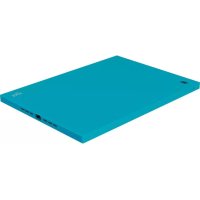
| Product type | Protective case |
| Brand | Logitech |
| Model | BLOK |
| Compatibility | iPad Air 2 |
| Dimensions (approx.) | 24 x 17 x 1 cm |
| Weight (approx.) | 100 g |
| Material | Polycarbonate |
| Main functions | Protection against shocks and scratches, access to all ports and buttons |
| Camera access | Yes |
| Microphone access | Yes |
| Headphone cutout | Yes |
| Charging port cutout | Yes |
| Installation | Snap-fit |
| Maintenance | Clean with a soft, dry cloth |
| Security | None |
| Spare parts | Not available |
| Warranty | 2 years |
| Additional information | Online support at logitech.com/support/blok-shell-ipad-air-2 |
Frequently Asked Questions - BLOK LOGITECH
User questions about BLOK LOGITECH
0 question about this device. Answer the ones you know or ask your own.
Ask a new question about this device
Download the instructions for your Tablet accessories in PDF format for free! Find your manual BLOK - LOGITECH and take your electronic device back in hand. On this page are published all the documents necessary for the use of your device. BLOK by LOGITECH.
USER MANUAL BLOK LOGITECH
natural_image
Blue-tinted tablet device with a digital display showing 2:18, against a starry night sky (no text or symbols on the device itself)Setup Guide
Contents
English. 3
Deutsch 7
Français .....11
Italiano. 15
Español 19
Português ..... 23
Nederlands 27
Svenska 31
Dansk 35
Norsk 39
Suomi 43
Ελληνικά. 47
По-русски. . . . . . . . . . . . . . . . . . 51
Magyar 55
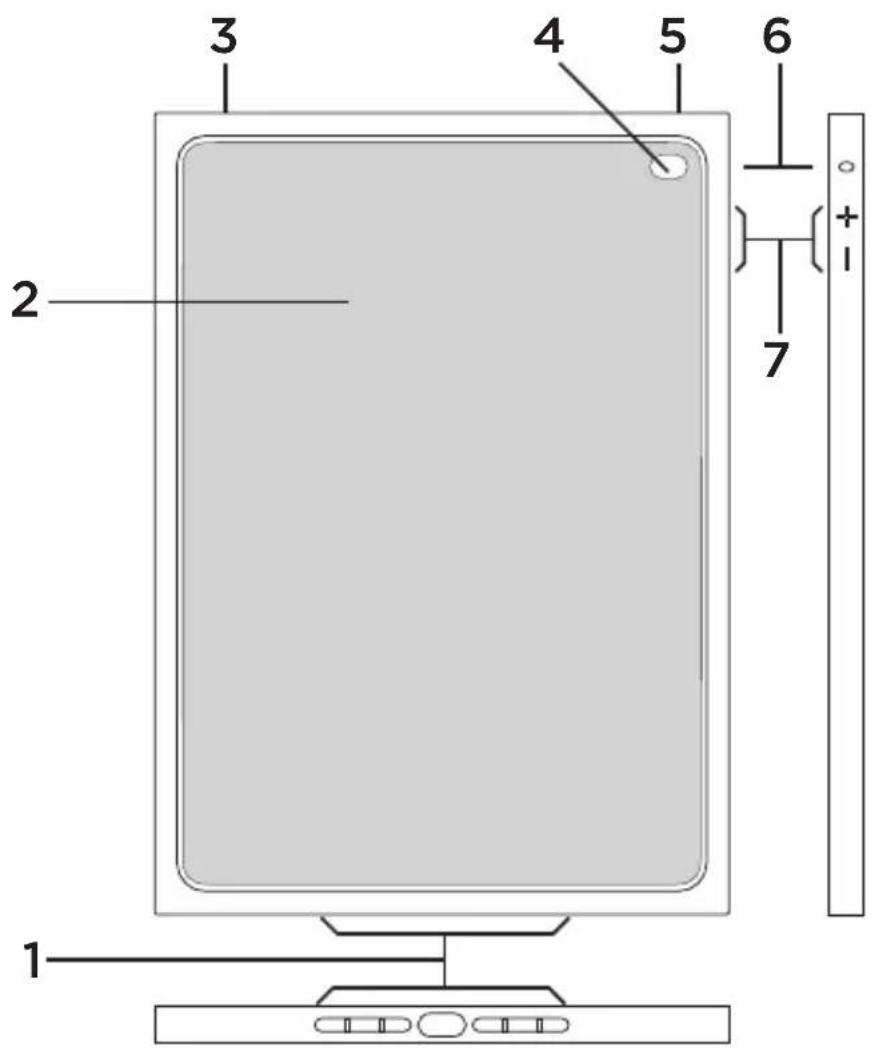
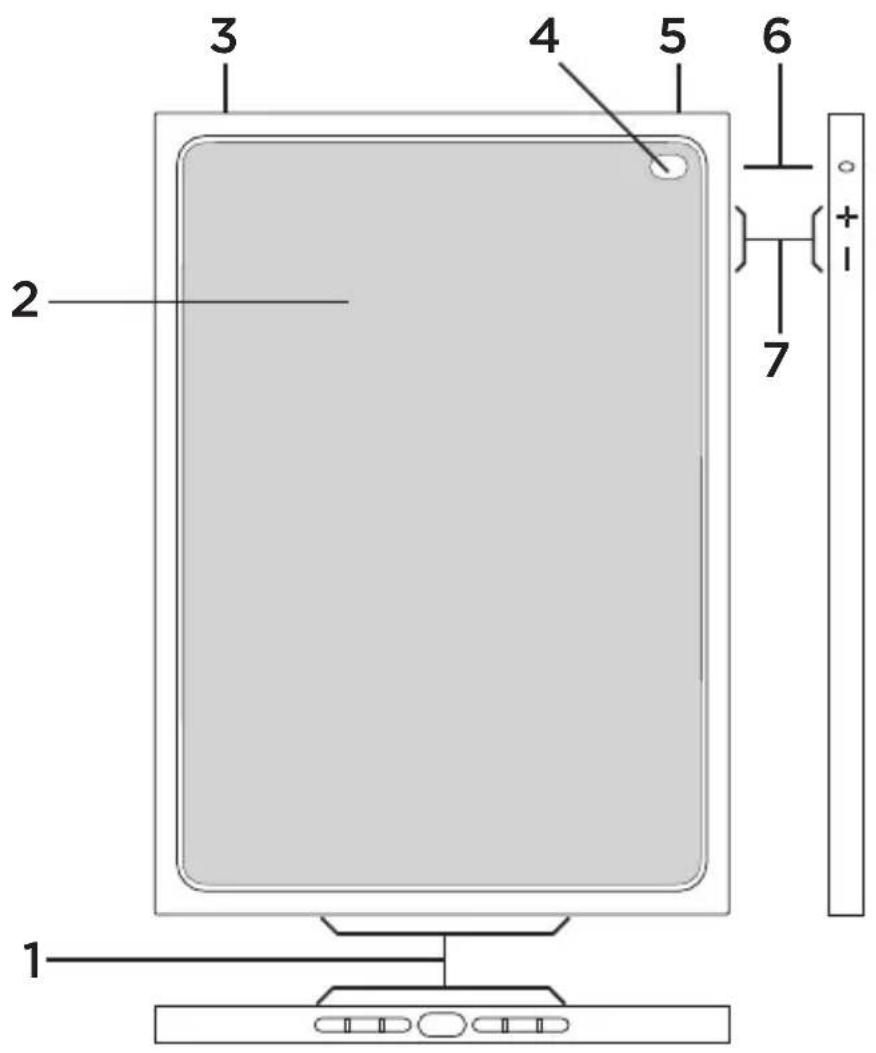
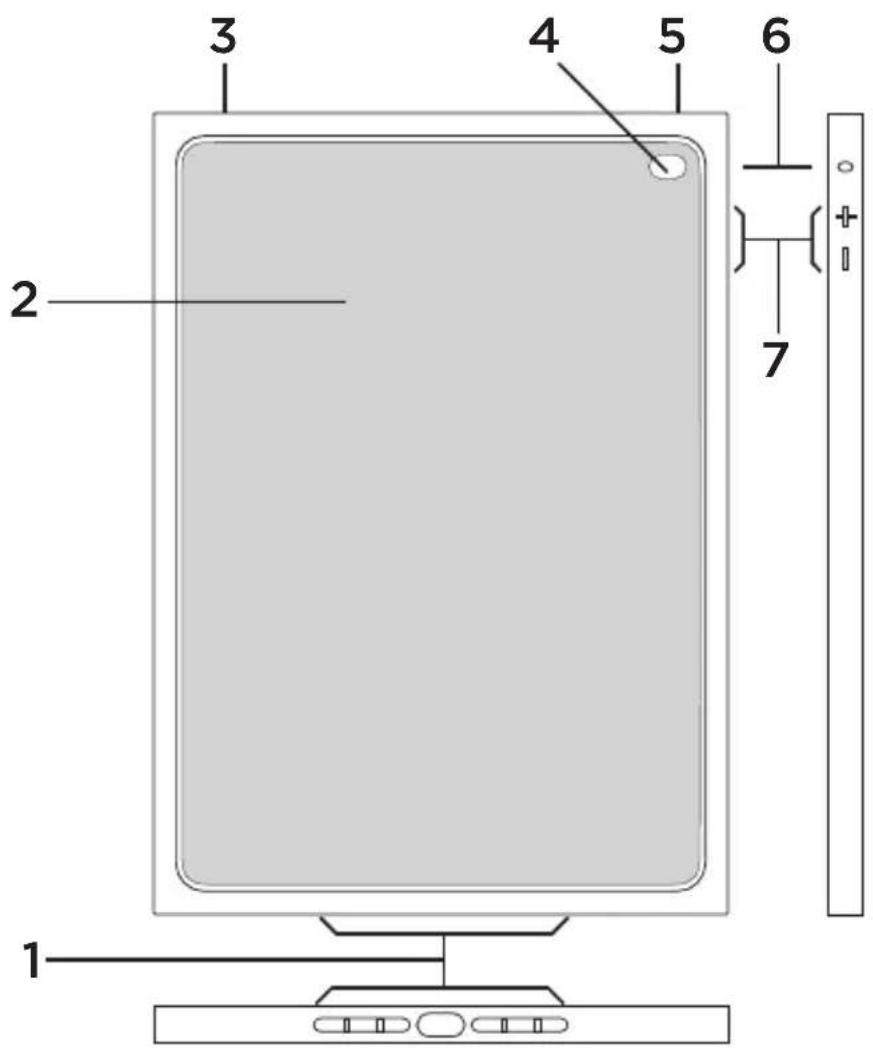
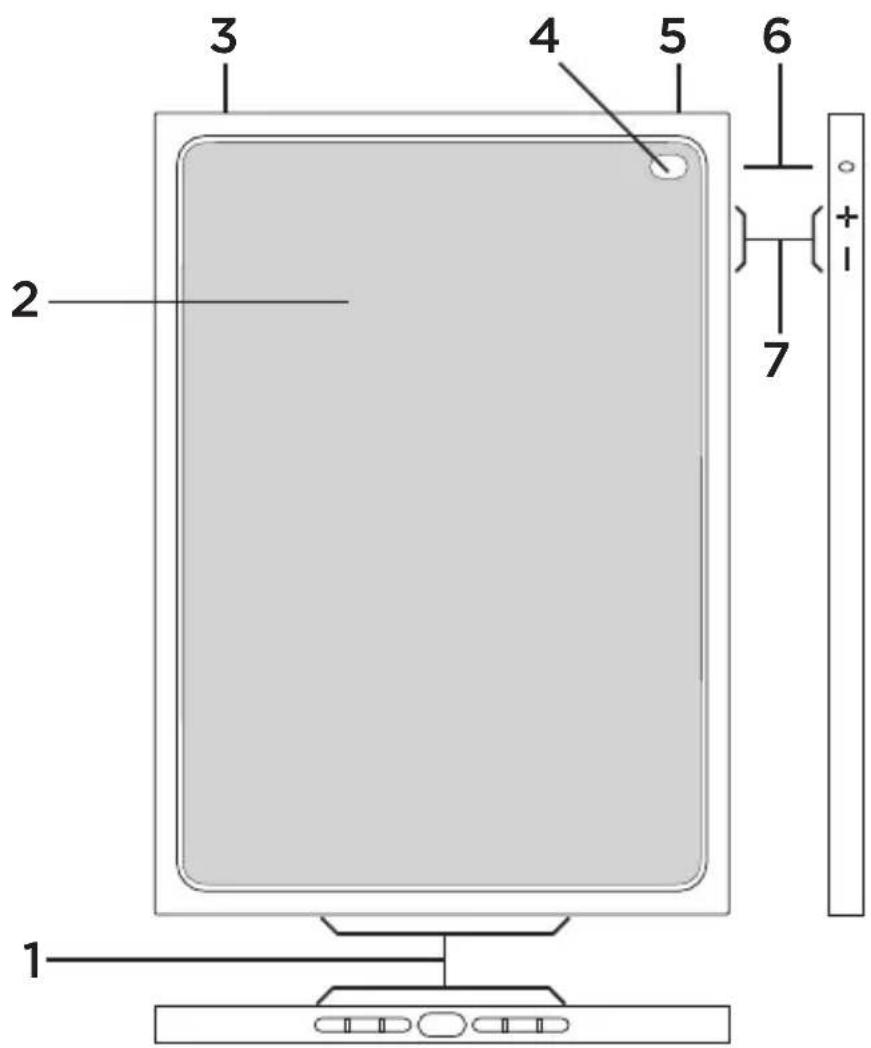
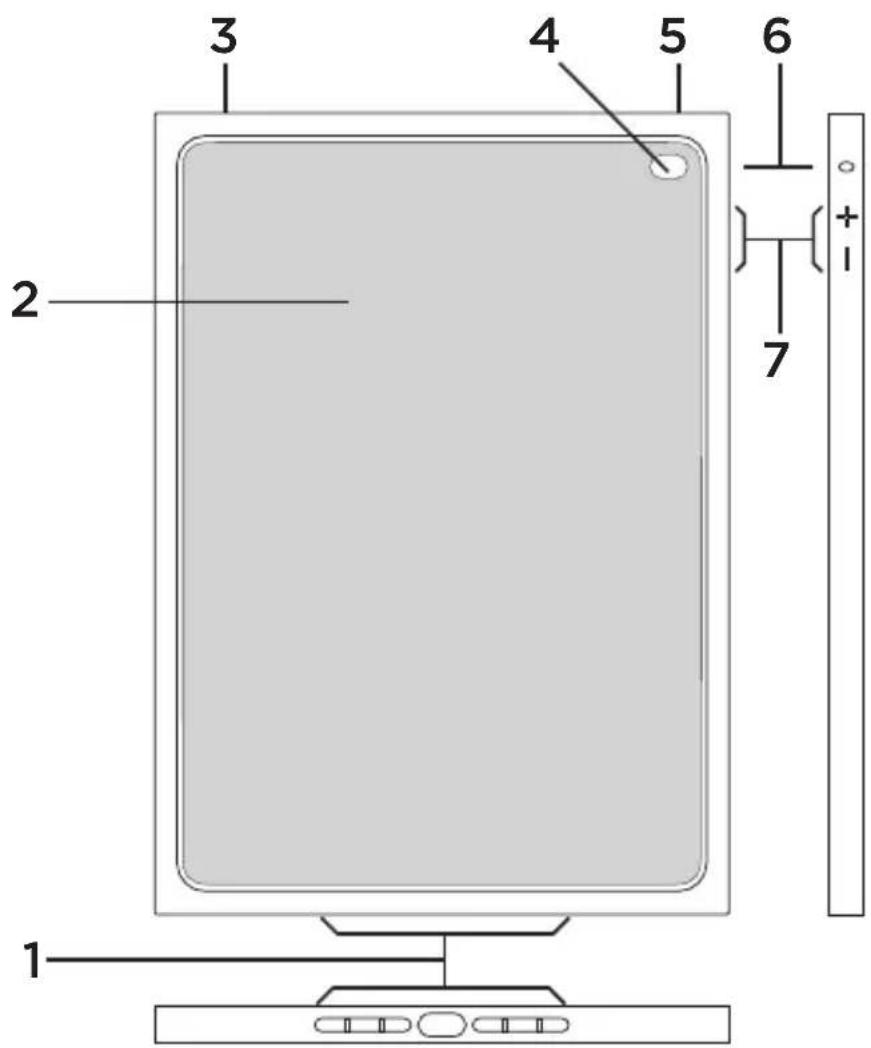
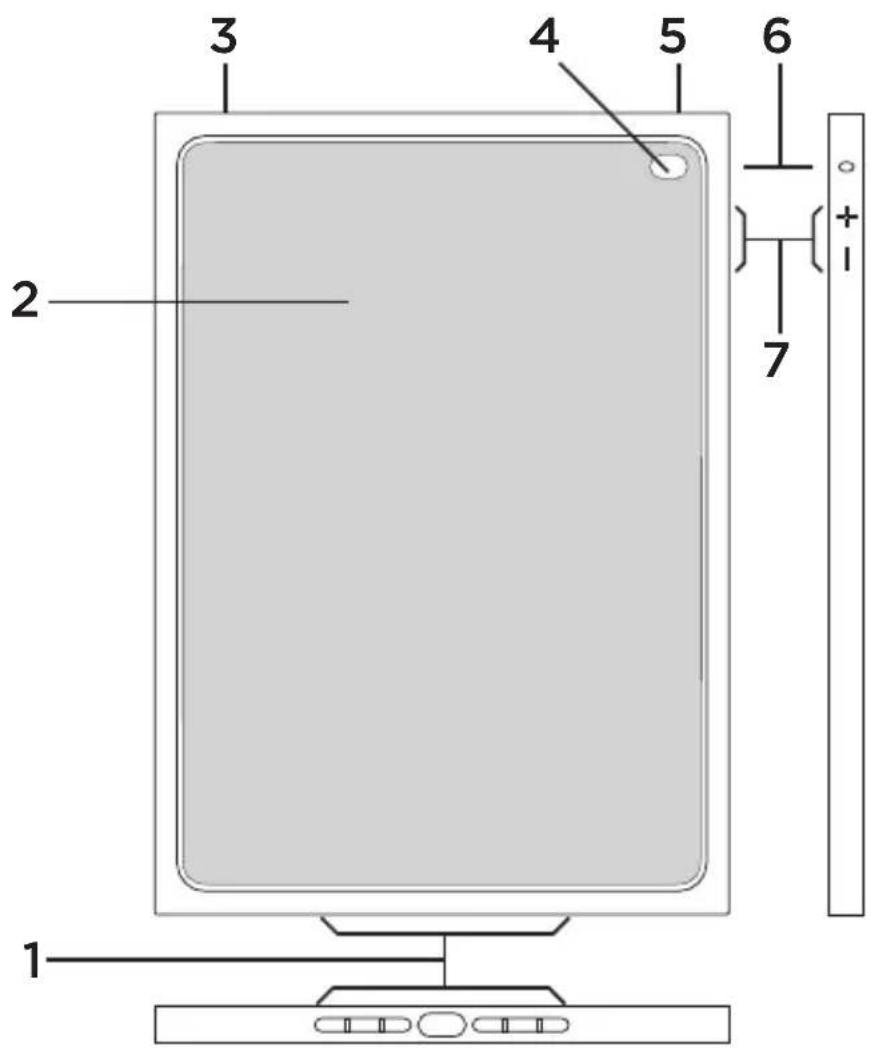
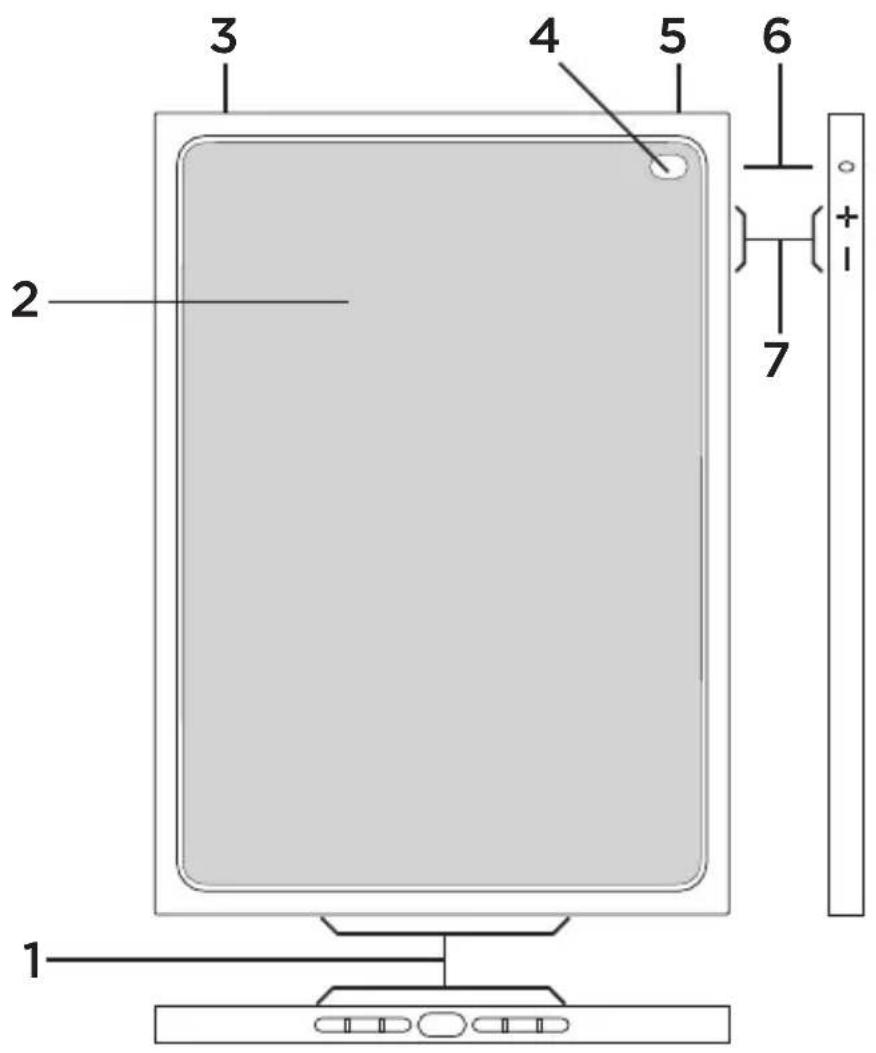
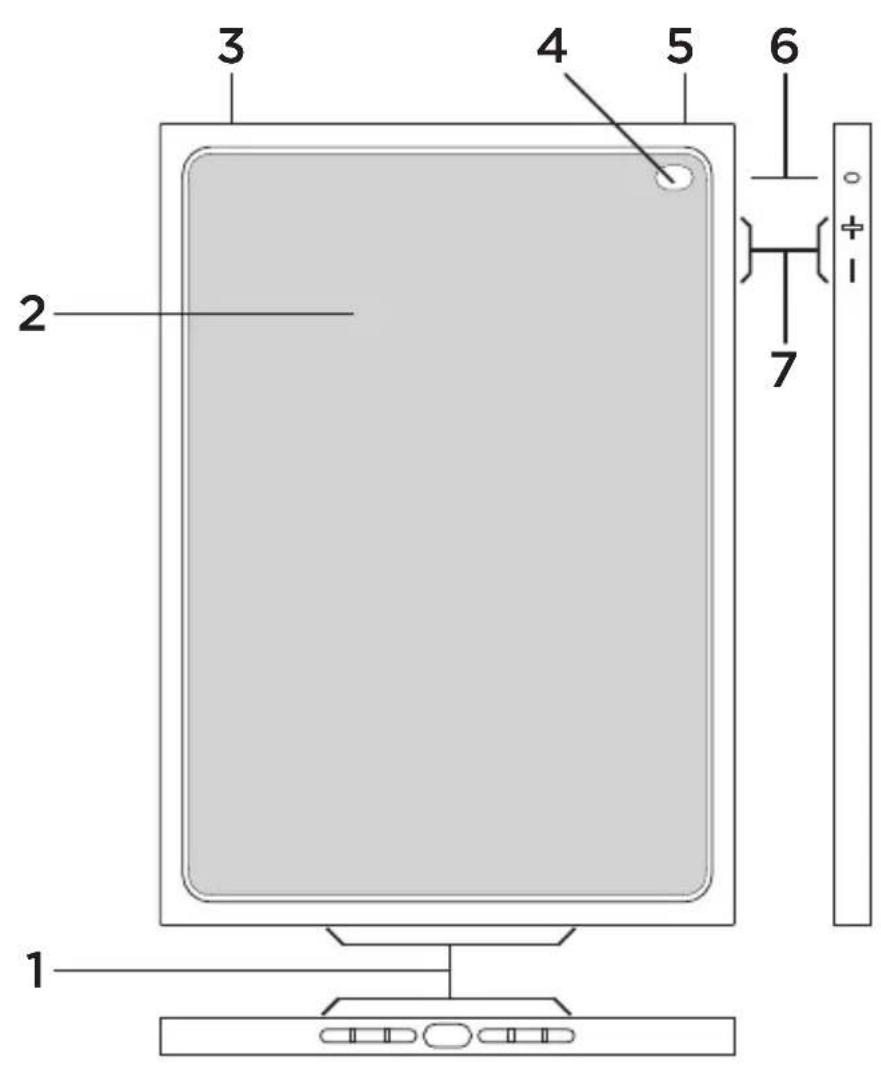
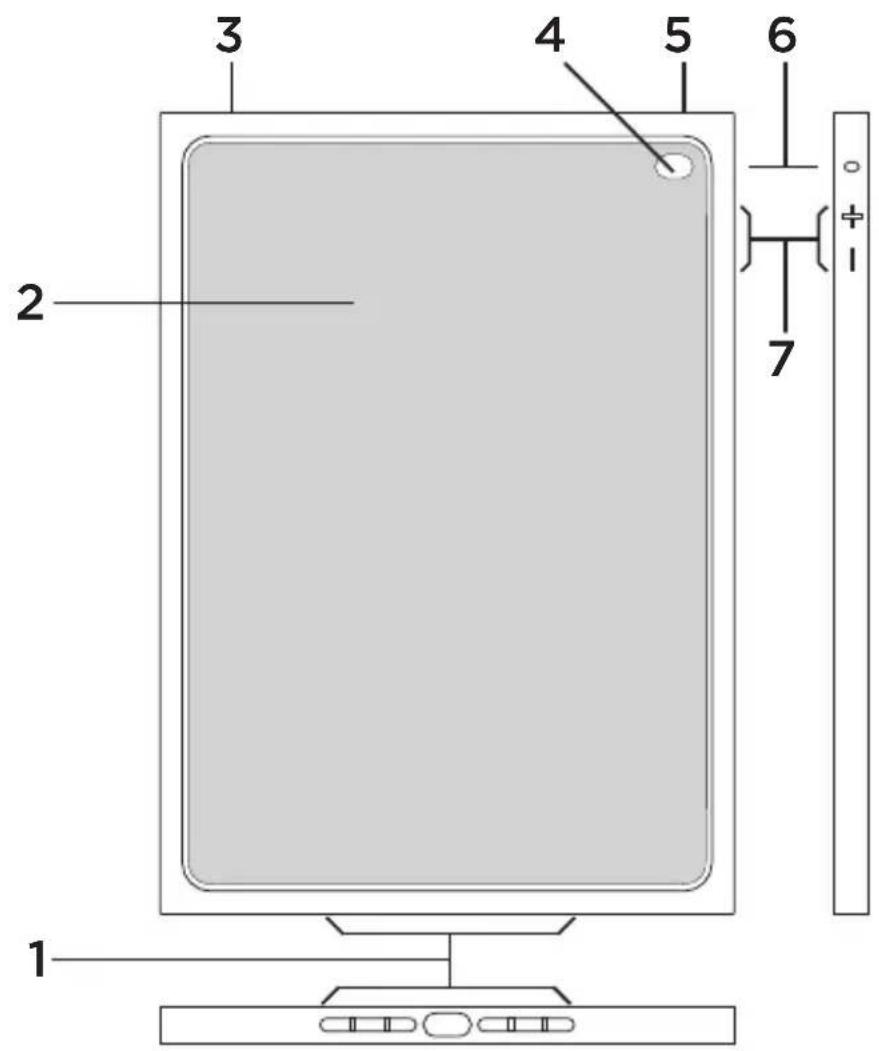
- Holes for access to charging port and speakers
- Protective shell
- Cutout for access to headphone socket
- Hole for access to camera
- Access to on/off button
- Hole for access to microphone
- Access to volume control buttons
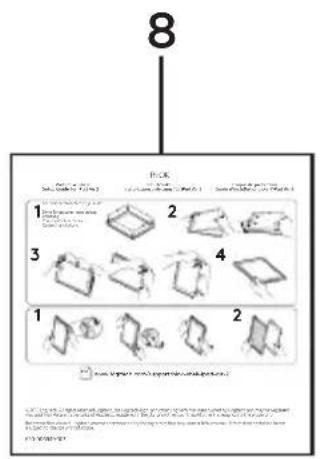
- Product documentation
English 3
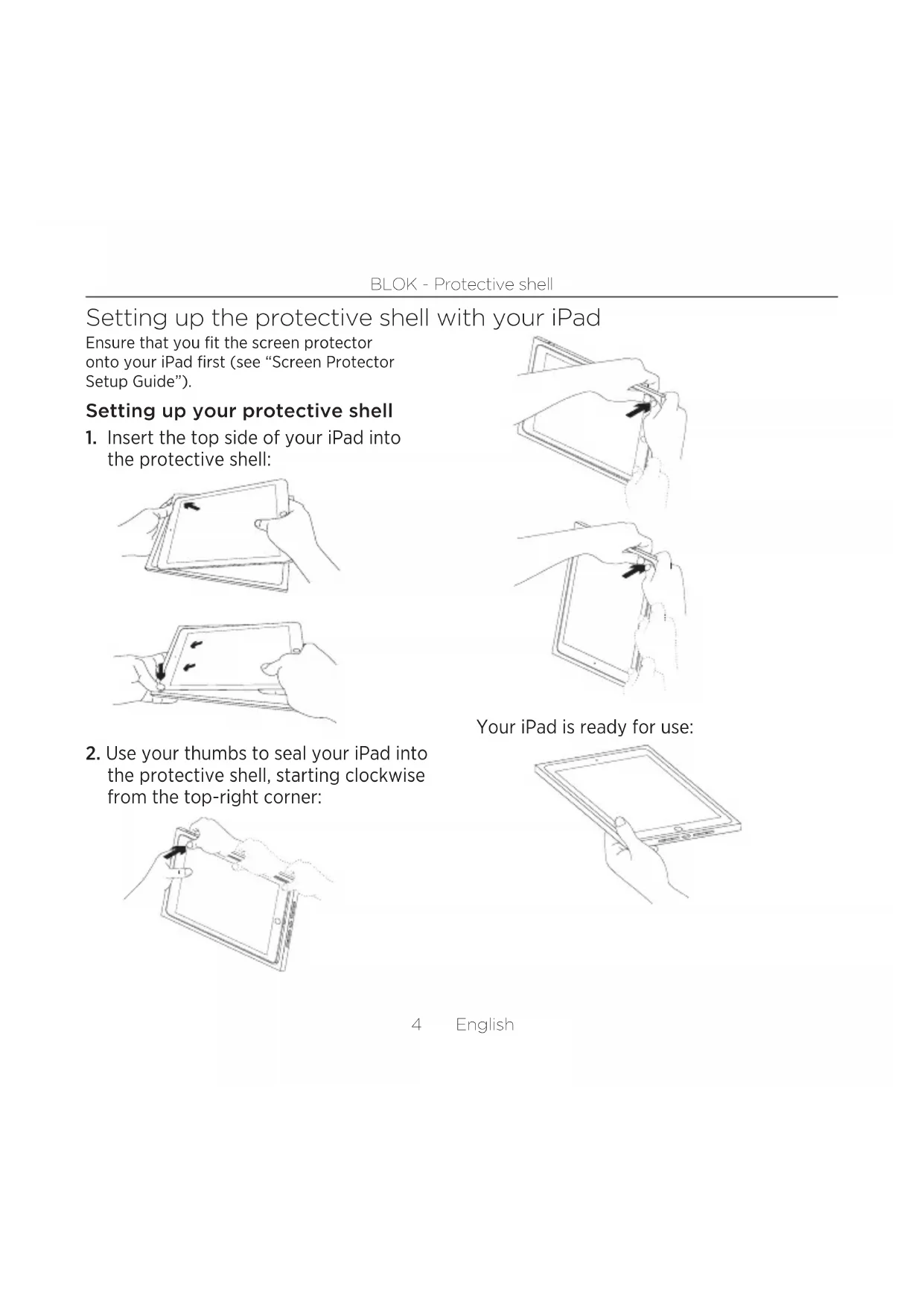
Setting up the protective shell with your iPad
Ensure that you fit the screen protector onto your iPad first (see "Screen Protector Setup Guide").
Setting up your protective shell
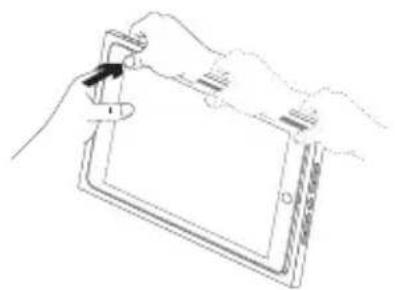
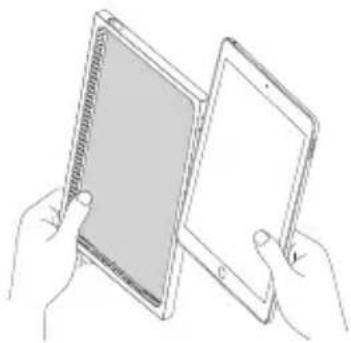
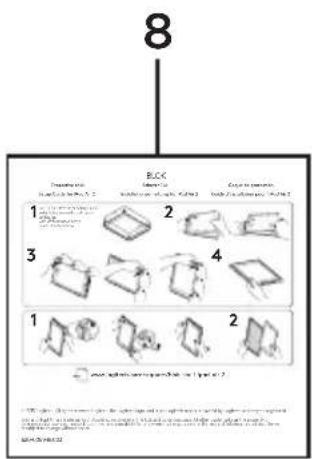
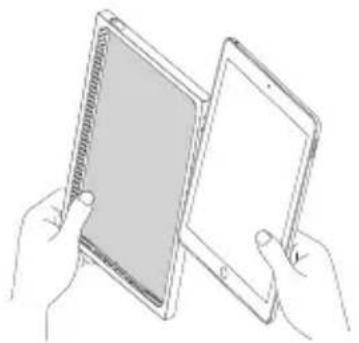
- Insert the top side of your iPad into the protective shell:
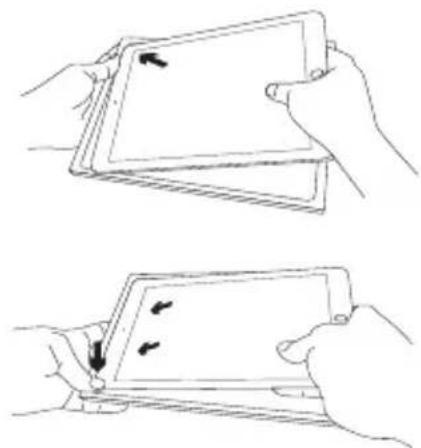
- Use your thumbs to seal your iPad into the protective shell, starting clockwise from the top-right corner:
natural_image
Line drawing of a hand holding a tablet device with a scroll wheel (no text or symbols)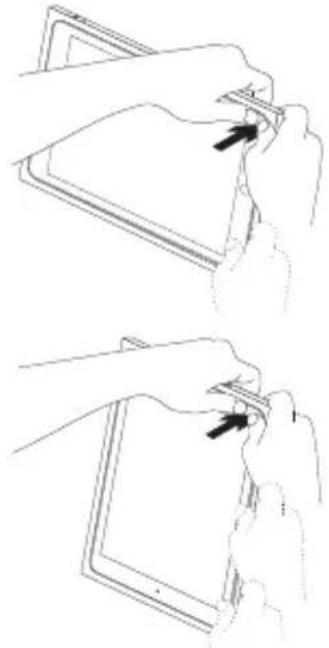
natural_image
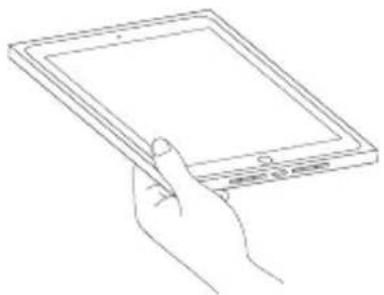
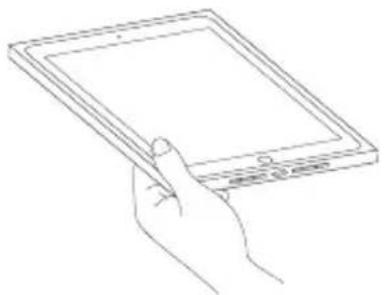
Two-step line drawing showing hand positioning of a tablet device on a stand (no text or symbols)Your iPad is ready for use:
natural_image
Line drawing of a hand holding a tablet device (no text or symbols present)Detaching your iPad from the protective shell
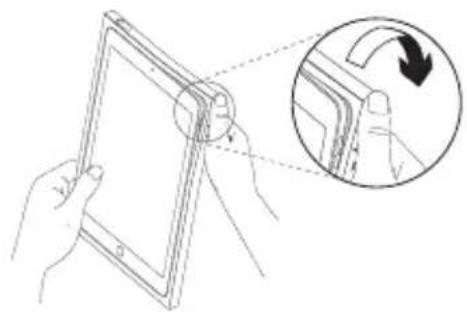
- Bend back the top-right corner of the protective shell:
natural_image
Line drawing of a hand holding a tablet device with an inset showing a finger pressing a curved edge (no text or symbols)- Bend back the bottom-right corner of the protective shell:
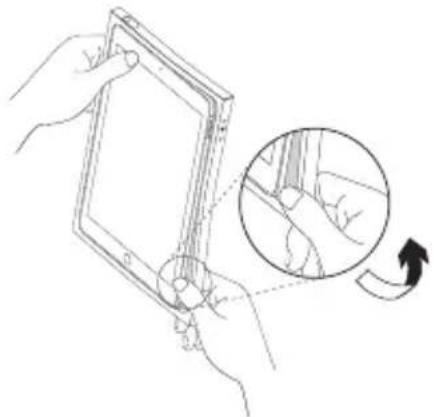
natural_image
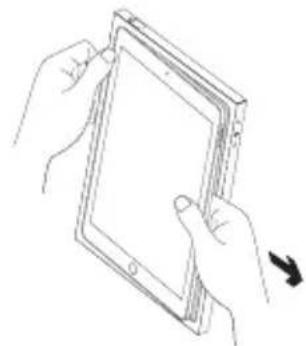
Line drawing of hands holding a tablet device with an inset showing a hand moving a curved arrow (no text or symbols)- Pull your iPad away from the protective shell:

natural_image
Line drawing of two hands holding a tablet device (no text or symbols visible)Your iPad is then released:
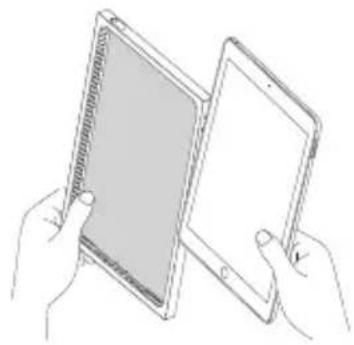
natural_image
Line drawing of two hands holding a tablet device (no text or symbols visible)Visit Product Support
There's more information and support online for your product. Take a moment to visit Product Support to learn more about your new protective case.
Browse online articles for setup help, usage tips, and information about additional features.
Connect with other users in our Community Forums to get advice, ask questions, and share solutions.
At Product Support, you'll find a wide selection of content including:
- Tutorials
- Troubleshooting
- Support community
• Online documentation - Warranty information
- Spare parts (when available)
Go to:
www.logitech.com/support/
blok-shell-ipad-air-2
Troubleshooting
I am having difficulty inserting my iPad into the protective shell.
- Make sure you insert the top side of your iPad into the protective shell first.
- Use your thumbs to seal the protective shell clockwise around your iPad (see “Setting up the protective shell with your iPad”).
The physical buttons on my iPad do not perform as expected, and I cannot connect Lightning cables or headphones to my iPad.
- Make sure your iPad is inserted in the iPad holder the right way.
When your iPad is inserted correctly, the camera on your iPad should line up with the camera and microphone hole on the protective shell (see “Know your product”).
In portrait orientation, the Home button should be on the bottom side.
What do you think?
Please take a minute to tell us.
Thank you for purchasing our product.
www.logitech.com/ithink
natural_image
Line drawing of a hand holding a tablet device with a stylus, no text or symbols present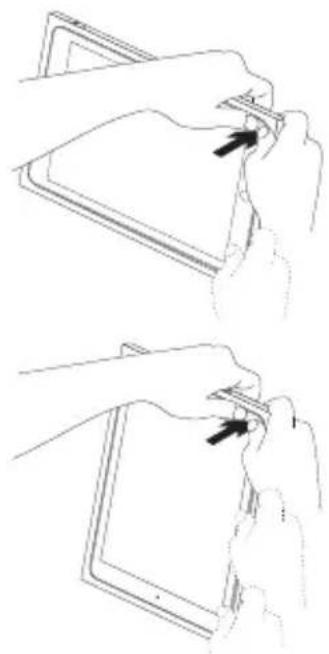
natural_image
Two-step illustration showing hands holding a tablet device with a scroll wheel (no text or symbols)natural_image
Line drawing of a hand holding a tablet device (no text or symbols present)natural_image
Line drawing of a tablet device being held, with an inset showing the fold change of a screen (no text or symbols present)natural_image
Line drawing of hands holding a tablet device with an inset showing a hand moving a cable (no text or symbols)natural_image
Line drawing of two hands holding a tablet device with a scroll wheel (no text or symbols)natural_image
Line drawing of two hands holding a tablet device (no text or symbols visible)www.logitech.com/ithink
natural_image
Illustration of two hands holding a tablet device, showing the screen and fold change (no text or symbols)natural_image
Line drawing of a hand holding a tablet device with a stylus, no text or symbols present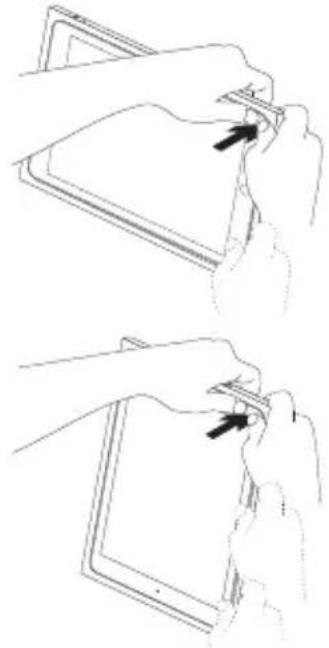
natural_image
Line drawings showing two hand positions on a tablet device, one holding a clip and the other adjusting its clip (no text or symbols)natural_image
Line drawing of a hand holding a tablet device (no text or symbols present)natural_image
Line drawing of a tablet device being held, with an inset showing the fold change (no text or symbols present)natural_image
Line drawing of a hand holding a tablet device with an inset showing a finger manipulation step (no text or symbols)natural_image
Line drawing of two hands holding a tablet device with a scroll arrow indicating rotation (no text or symbols)natural_image
Line drawing of two hands holding a tablet device (no text or symbols visible)Assistance
www.logitech.com/ithink
natural_image
Line drawing of a hand holding a tablet device with a scroll wheel (no text or symbols)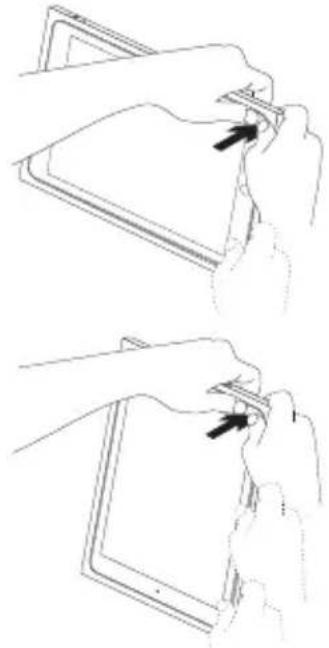
natural_image
Line drawings showing two hand positions on a tablet device, one holding a clip and the other adjusting its clip (no text or symbols)natural_image
Line drawing of a hand holding a tablet device (no text or symbols present)natural_image
Line drawing of a tablet device being held, with an inset showing the fold change of the screen (no text or symbols present)natural_image
Line drawing of hands holding a tablet device with an inset showing a hand turning a cable (no text or symbols)natural_image
Line drawing of two hands holding a tablet device, one with a scroll arrow indicating rotation (no text or symbols)natural_image
Line drawing of two hands holding a tablet device (no text or symbols visible)Consultazione
www.logitech.com/ithink
natural_image
Line drawing of a hand holding a tablet device with a scroll wheel (no text or symbols)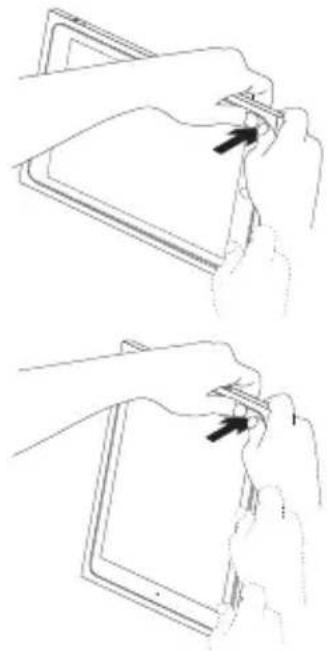
natural_image
Two-step line drawing showing hand positioning of a tablet device on a stand (no text or symbols)natural_image
Line drawing of a hand holding a tablet device (no text or symbols present)natural_image
Line drawing of a tablet device being held, with an inset showing the fold change of the screen (no text or symbols present)natural_image
Line drawing of hands holding a tablet device with an inset showing a hand turning a cable (no text or symbols)natural_image
Line drawing of two hands holding a tablet device, one with a scroll arrow indicating rotation (no text or symbols)natural_image
Line drawing of two hands holding a tablet device (no text or symbols visible)www.logitech.com/ithink
Português 23
natural_image
Line drawing of a hand holding a tablet device with a scroll wheel (no text or symbols)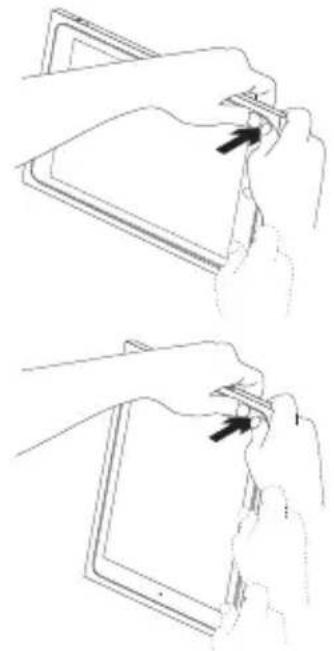
natural_image
Two-step line drawing showing hand positioning of a tablet device on a stand, with arrows indicating movement direction (no text or symbols)O iPad está pronto a ser utilizado:
natural_image
Line drawing of a hand holding a tablet device (no text or symbols present)natural_image
Illustration of a hand holding a tablet with an inset showing a finger pressing a clip (no text or symbols)natural_image
Line drawing of hands holding a tablet device with an inset showing a hand moving a cable (no text or symbols)natural_image
Line drawing of two hands holding a tablet device, one with a scroll arrow indicating rotation (no text or symbols)natural_image
Line drawing of two hands holding a tablet device (no text or symbols visible)www.logitech.com/ithink
Ken uw product
natural_image
Line drawing of a hand holding a tablet device with a stylus, no text or symbols present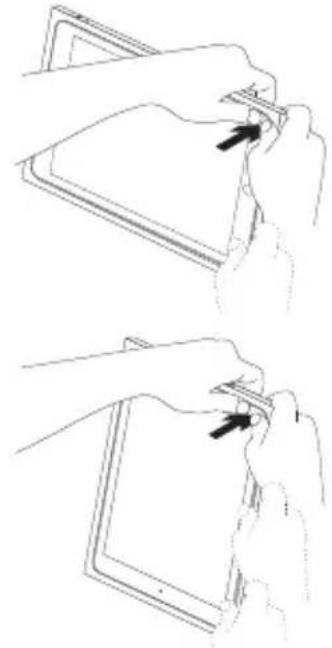
natural_image
Two-step line drawing showing hand positioning of a tablet device (no text or symbols)natural_image
Line drawing of a hand holding a tablet device (no text or symbols present)natural_image
Line drawing of a hand holding a tablet device with an inset showing a curved arrow indicating rotation (no text or symbols)natural_image
Line drawing of hands holding a tablet device with an inset showing a hand turning a button (no text or symbols)natural_image
Line drawing of two hands holding a tablet device (no text or symbols visible)natural_image
Line drawing of two hands holding a tablet device (no text or symbols visible)Bezoek de
www.logitech.com/ithink
Produktöversikt
natural_image
Line drawing of hands holding a tablet device with a scroll wheel (no text or symbols)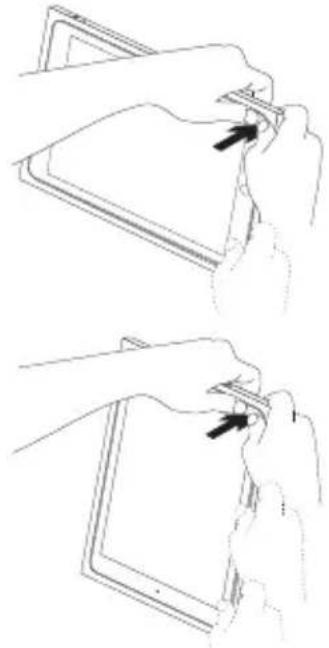
natural_image
Line drawings showing two hand positions on a tablet device, one holding a clip and the other adjusting its edge (no text or symbols)natural_image
Line drawing of a hand holding a tablet device (no text or symbols)natural_image
Illustration of a hand holding a tablet with a magnified inset showing the fold change (no text or symbols)natural_image
Line drawing of a hand holding a tablet device with an inset showing a hand moving a finger (no text or symbols)natural_image
Line drawing of two hands holding a tablet device (no text or symbols visible)natural_image
Line drawing of two hands holding a tablet device (no text or symbols visible)www.logitech.com/ithink
natural_image
Line drawing of a hand holding a tablet device with a scroll wheel (no text or symbols)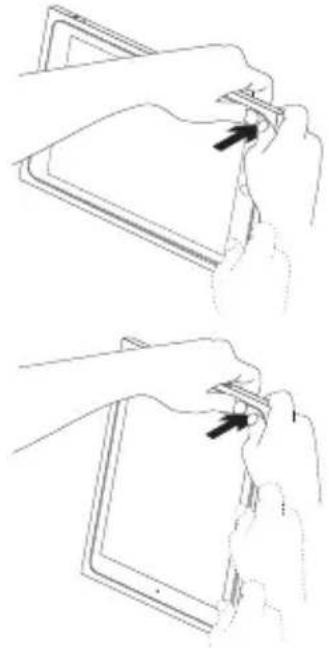
natural_image
Line drawings showing two hand positions on a tablet device, one holding a clip and the other adjusting its edge (no text or symbols)natural_image
Line drawing of a hand holding a tablet device (no text or symbols)natural_image
Line drawing of a hand holding a tablet device with an inset showing a curved arrow indicating rotation (no text or symbols)natural_image
Line drawing of hands holding a tablet device with an inset showing a hand holding a pen, indicating a rotation or adjustment (no text or symbols present)natural_image
Line drawing of two hands holding a tablet device (no text or symbols visible)natural_image
Line drawing of two hands holding a tablet device (no text or symbols visible)www.logitech.com/ithink
natural_image
Line drawing of a hand holding a tablet device with a scroll wheel (no text or symbols)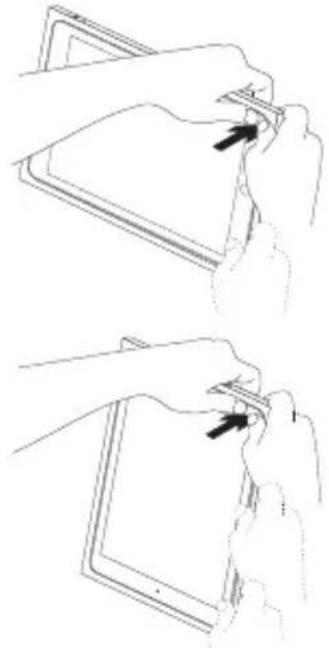
natural_image
Two-step line drawing showing hand positioning of a tablet device on a stand (no text or symbols)natural_image
Line drawing of a hand holding a tablet device (no text or symbols present)natural_image
Line drawing of a hand holding a tablet device, with an inset showing a hand pressing a button (no text or symbols)natural_image
Line drawing of hands holding a tablet device with an inset showing hand positioning and rotation (no text or symbols)natural_image
Line drawing of two hands holding a tablet device (no text or symbols visible)natural_image
Line drawing of two hands holding a tablet device (no text or symbols visible)www.logitech.com/ithink
Tunne tuotteesi
natural_image
Illustration of two hands holding a tablet device, showing the screen and scroll with directional arrows (no text or symbols)natural_image
Line drawing of a hand holding a tablet device with a scroll wheel (no text or symbols)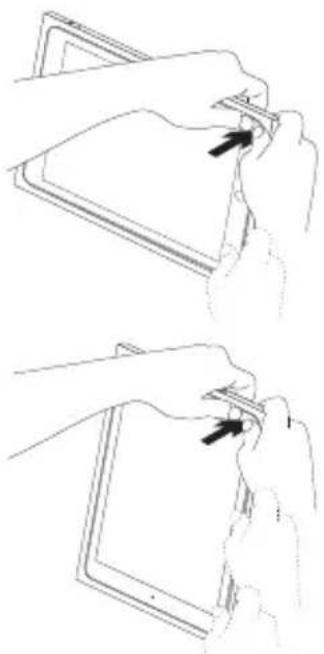
natural_image
Two-step line drawing showing hands holding a tablet device with a clip, no text or symbols presentnatural_image
Line drawing of a hand holding a tablet device (no text or symbols present)natural_image
Illustration of a hand holding a tablet device with an inset showing a hand pressing a curved edge (no text or symbols)natural_image
Line drawing of hands holding a tablet device with an inset showing hand positioning and rotation (no text or symbols)natural_image
Line drawing of two hands holding a tablet device, one with a scroll arrow indicating rotation (no text or symbols)natural_image
Line drawing of two hands holding a tablet device (no text or symbols visible)Tuotetuki
www.logitech.com/ithink
natural_image
Illustration of two hand-drawn panels showing a device being scanned, with arrows indicating rotation or movement (no text or symbols present)natural_image
Line drawing of a hand holding a tablet device with a scroll wheel (no text or symbols)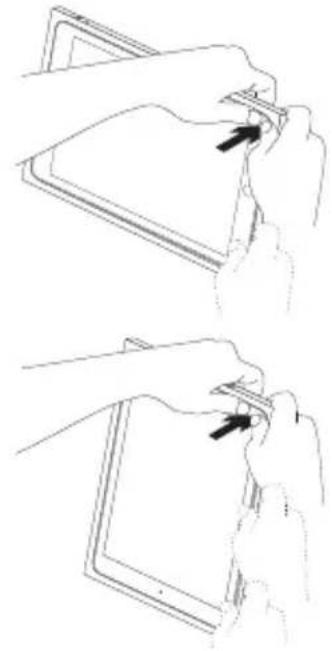
natural_image
Two-step line drawing showing hand positioning of a tablet device on a screen (no text or symbols)natural_image
Line drawing of a hand holding a tablet device (no text or symbols present)natural_image
Line drawing of a hand holding a tablet device with an inset showing a hand moving a slide (no text or symbols)natural_image
Line drawing of hands holding a tablet device with an inset showing a hand holding a device (no text or symbols present)natural_image
Line drawing of two hands holding a tablet device, with a right-pointing arrow indicating the next hand (no text or symbols present)natural_image
Line drawing of two hands holding a tablet device (no text or symbols visible)www.logitech.com/ithink
natural_image
Illustration of two hands holding a tablet device, showing the screen and tray (no text or symbols)natural_image
Line drawing of hands holding a tablet device with a scroll wheel (no text or symbols)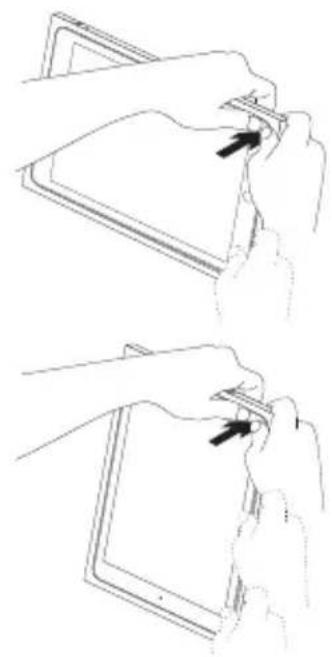
natural_image
Two-step line drawing showing hand positioning of a tablet device (no text or symbols)natural_image
Line drawing of a hand holding a tablet device (no text or symbols)natural_image
Illustration of a hand holding a tablet with an inset showing a curved arrow indicating rotation (no text or symbols present)natural_image
Line drawing of hands holding a tablet device with an inset showing a hand holding a device (no text or symbols present)natural_image
Line drawing of two hands holding a tablet device (no text or symbols visible)natural_image
Line drawing of two hands holding a tablet device (no text or symbols visible)Посетите раздел
www.logitech.com/ithink
natural_image
Illustration of two hands holding a tablet device, showing the screen and fold (no text or symbols present)natural_image
Line drawing of a hand holding a tablet device with a stylus, no text or symbols present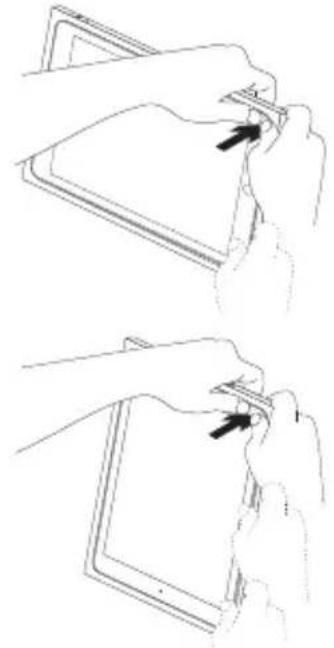
natural_image
Line drawings showing two hand positions on a tablet device, one holding a clip and the other adjusting its clip (no text or symbols)natural_image
Line drawing of a hand holding a tablet device (no text or symbols present)natural_image
Line drawing of a tablet device with an inset showing a hand interacting with a clip (no text or symbols)natural_image
Line drawing of hands holding a tablet device with an inset showing hand positioning and rotation (no text or symbols)natural_image
Line drawing of two hands holding a tablet device, one with a scroll arrow indicating rotation (no text or symbols)natural_image
Line drawing of two hands holding a tablet device (no text or symbols visible)www.logitech.com/ithink
Popis produktu
natural_image
Line drawing of two hands holding a tablet device (no text or symbols visible)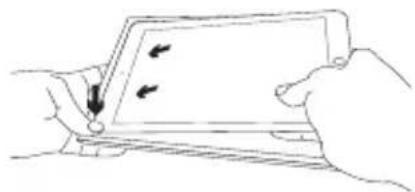
natural_image
Illustration of two hands holding a tablet device with arrows indicating left and right movement (no text or symbols)natural_image
Line drawing of a hand holding a tablet device with a scroll wheel (no text or symbols)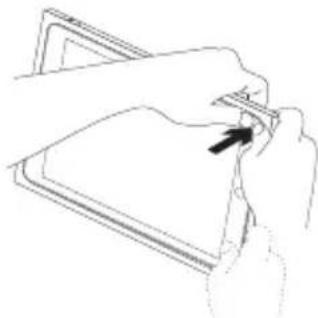
natural_image
Line drawing of a hand holding a folder with a black arrow pointing to it (no text or symbols)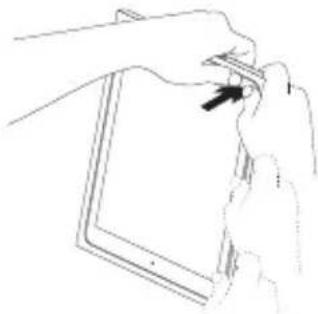
natural_image
Line drawing of hands holding a tablet device (no text or symbols)natural_image
Line drawing of a hand holding a tablet device (no text or symbols)natural_image
Line drawing of a tablet device being held, with an inset showing the fold change of the screen (no text or symbols present)natural_image
Line drawing of hands holding a tablet device with an inset showing a hand turning a cable (no text or symbols)natural_image
Line drawing of two hands holding a tablet device, one with a scroll arrow indicating rotation (no text or symbols)natural_image
Line drawing of two hands holding a tablet device (no text or symbols visible)www.logitech.com/ithink
Poznaj urządzenie
Po polsku 63
natural_image
Line drawing of a hand holding a tablet device with a stylus, no text or symbols present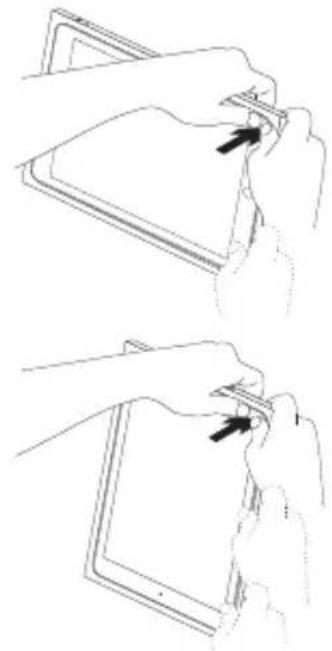
natural_image
Two-step line drawing showing hands holding a tablet device, with arrows indicating the process (no text or symbols present)natural_image
Line drawing of a hand holding a tablet device (no text or symbols present)natural_image
Illustration of a hand holding a tablet with an inset showing a finger pressing a clip (no text or symbols)natural_image
Line drawing of hands holding a tablet device with an inset showing a hand turning a cable (no text or symbols)natural_image
Line drawing of two hands holding a tablet device, one with a scroll arrow indicating rotation (no text or symbols)natural_image
Line drawing of two hands holding a tablet device (no text or symbols visible)www.logitech.com/ithink
Popis produktu
natural_image
Illustration of two hands holding a tablet device, showing the screen and screen with directional arrows (no text or symbols)natural_image
Line drawing of a hand holding a tablet device with a scroll wheel (no text or symbols)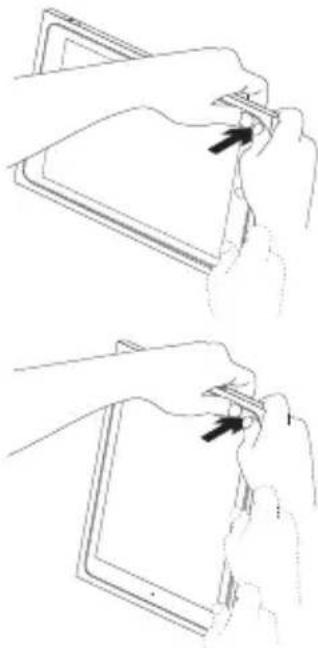
natural_image
Line drawings showing two hand-drawn steps of inserting a device into a tablet (no text or symbols present)natural_image
Line drawing of a hand holding a tablet device (no text or symbols)natural_image
Illustration of a hand holding a tablet with an inset showing a curved arrow indicating rotation (no text or symbols present)natural_image
Line drawing of hands holding a rectangular device with a magnified inset showing a hand interacting with a device (no text or symbols)- Vytiahnite iPad z ochranného puzdra:
natural_image
Line drawing of two hands holding a tablet device, with a black arrow indicating the right side (no text or symbols present)natural_image
Line drawing of two hands holding a tablet device (no text or symbols visible)www.logitech.com/ithink
Ürününüzü tanıyın
natural_image
Line drawing of a hand holding a tablet device with a scroll wheel (no text or symbols)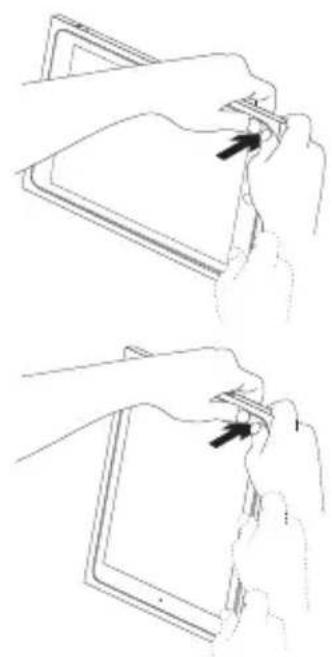
natural_image
Two-step illustration showing hands holding a tablet device, with arrows indicating the process (no text or symbols present)natural_image
Line drawing of a hand holding a tablet device (no text or symbols)natural_image
Line drawing of a tablet device being held, with an inset showing the fold change of the screen (no text or symbols present)natural_image
Line drawing of hands holding a tablet device with an inset showing a hand turning a cable (no text or symbols)natural_image
Line drawing of two hands holding a tablet device, one with a scroll arrow indicating rotation (no text or symbols)natural_image
Line drawing of two hands holding a tablet device (no text or symbols visible)www.logitech.com/ithink
تعرف على المنتج
natural_image
Line drawing of a hand holding a small object over a closed book (no text or symbols visible)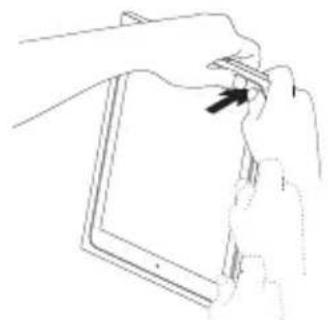
natural_image
Line drawing of hands holding a tablet device with a scroll wheel (no text or symbols)natural_image
Line drawing of a hand holding a tablet device (no text or symbols)natural_image
Illustration of hands holding a tablet device (no text or symbols visible)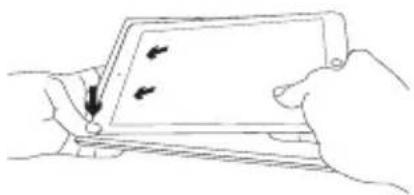
natural_image
Line drawing of hands holding a tablet device with a scroll, no text or symbols presentnatural_image
Line drawing of a hand holding a tablet device with a scroll wheel (no text or symbols)natural_image
Line drawing of two hands holding a tablet device with a scroll arrow indicating rotation (no text or symbols)natural_image
Illustration of a hand holding a tablet device with an inset showing a hand pressing a button (no text or symbols present)للف: 2 اثن
natural_image
Line drawing of two hands holding a tablet device (no text or symbols visible)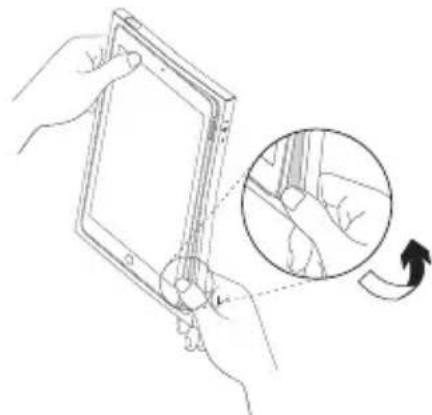
natural_image
Line drawing of hands holding a tablet device with a magnified inset showing hand positioning and rotation (no text or symbols)Product Support Teçsl bziyara
(مركز دعم المنتجات)
www.logitech.com/ithink
תְרָה בַעּוֹם
- כְרִי
תְרַעָה
2.
3.
4.
- נְקָר/ה
6.דִרְשָׁתֹן 9
-
מַרְשָׁ
-
כְרָה

natural_image
Two-step line drawing showing hands holding a tablet device, no text or symbols presentnatural_image
Line drawing of a hand holding a tablet device (no text or symbols present)iPad-7 כר בְבַעָה
natural_image
Illustration of two hands holding a tablet device, showing the screen and fold (no text or symbols present)- iPad
natural_image
Line drawing of a hand holding a tablet device with a scroll wheel (no text or symbols)הכלה כְרָה iPad-ה
natural_image
Line drawing of two hands holding a tablet device with a scroll arrow indicating rotation (no text or symbols)natural_image
Illustration of a hand holding a tablet with an inset showing a curved arrow indicating rotation (no text or symbols present)- 767 n
בְרָהוֹת אַלְאָה
natural_image
Line drawing of two hands holding a tablet device (no text or symbols visible)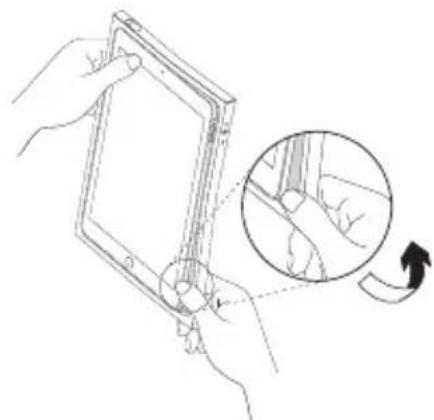
natural_image
Line drawing of hands holding a tablet device with an inset showing a hand moving a device (no text or symbols)www.logitech.com/ithink
logitech
www.logitech.com
www.logitech.com/support/blok-shell-ipad-air-2
© 2015 Logitech. Logitech, Logi and other Logitech marks are owned by Logitech and may be registered. iPad and iPad Air are trademarks of Apple Inc., registered in the U.S. and other countries. All other trademarks are the property of their respective owners. Logitech assumes no responsibility for any errors that may appear in this manual. Information contained herein is subject to change without notice.
621-000502.002

- Contents
- Setting up your protective shell
- Detaching your iPad from the protective shell
- Visit Product Support
- Troubleshooting
- Assistance
- Consultazione
- www.logitech.com/ithink
- Bezoek de
- Tunne tuotteesi
- Tuotetuki
- Посетите раздел
- Product Support Teçsl bziyara
- iPad-7 כר בְבַעָה
- הכלה כְרָה iPad-ה
- logitech
Brand : LOGITECH
Model : BLOK
Category : Tablet accessories