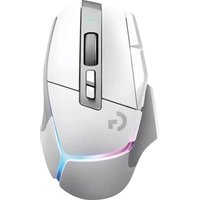
G PRO X Superlight 2 DEX - Mouse LOGITECH - Free user manual and instructions
Find the device manual for free G PRO X Superlight 2 DEX LOGITECH in PDF.


Pick your language and provide your email: we'll send you a specifically translated version.
| Product Type | Wireless Gaming Mouse |
| Brand | Logitech |
| Model | G PRO X Superlight 2 DEX |
| Dimensions (L x W x H) | 125,0 x 63,5 x 40,0 mm |
| Weight | 60 g |
| Power | Built-in rechargeable battery (USB-C) |
| Battery Life | Up to 95 hours |
| Sensor | HERO 2 (optical, 32,000 DPI) |
| Connectivity | LIGHTSPEED wireless (USB-A dongle) |
| Buttons | 5 programmable buttons |
| Key Features | DPI adjustment, RGB lighting, onboard memory, game profile |
| Configuration Software | Logitech G HUB |
| Compatibility | Windows, macOS, Chrome OS |
| Care and Cleaning | Clean with a dry, lint-free cloth |
| Safety | Use only with a standard USB charger |
| Spare Parts and Repairability | Replaceable mouse feet and dongle |
| General Information | 2-year warranty, made in China |
Frequently Asked Questions - G PRO X Superlight 2 DEX LOGITECH
How to connect the G PRO X Superlight 2 DEX mouse to my computer?
Insert the LIGHTSPEED dongle into a USB port on your computer. The mouse connects automatically. If not, press the pairing button under the mouse.
What is the battery life?
Battery life can reach 95 hours of continuous use. Full charge time is about 1 hour with a USB-C cable.
How to adjust sensitivity (DPI)?
Use the Logitech G HUB software to set DPI levels from 100 to 32,000. You can also switch between profiles by pressing the dedicated button.
Can I use this mouse without G HUB software?
Yes, the mouse works in plug-and-play mode with default settings. The software allows advanced customizations.
How to clean the mouse?
Use a soft, dry cloth to wipe the surface. Avoid liquids and abrasive products. The feet can be cleaned with a slightly damp cotton swab.
Is the mouse compatible with consoles?
Compatibility is limited. It works on PC (Windows, macOS) and some Android devices with USB port. Xbox and PlayStation consoles are not officially supported.
What to do if the mouse does not turn on?
Check that the battery is charged. Connect it via USB-C cable to a computer or charger. If the problem persists, contact Logitech support.
How to replace the glide feet?
The feet are adhesive. Gently remove the old ones with a plastic tool, clean the surface, and apply the new official Logitech feet.
What is the warranty period?
The manufacturer's warranty is 2 years from the date of purchase. Keep the original receipt for any claims.
Can I customize the RGB lighting?
Yes, via Logitech G HUB you can choose from 16.8 million colors, animation effects, and synchronize with other Logitech peripherals.
User questions about G PRO X Superlight 2 DEX LOGITECH
0 question about this device. Answer the ones you know or ask your own.
Ask a new question about this device
No questions yet. Be the first to ask one.
Download the instructions for your Mouse in PDF format for free! Find your manual G PRO X Superlight 2 DEX - LOGITECH and take your electronic device back in hand. On this page are published all the documents necessary for the use of your device. G PRO X Superlight 2 DEX by LOGITECH.
USER MANUAL G PRO X Superlight 2 DEX LOGITECH


Manual assistant
Powered by Anthropic
Waiting for your message
Product information
Brand : LOGITECH
Model : G PRO X Superlight 2 DEX
Category : Mouse