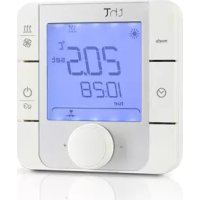
thT - Thermostat Carel - Free user manual and instructions
Find the device manual for free thT Carel in PDF.



| Product Type | Room Thermostat |
| Brand | Carel |
| Model | thT |
| Power Supply | 85-260 VAC, 50/60 Hz |
| Power Consumption | 2 VA |
| Display | White backlit LCD screen |
| Ambient Temperature Range | 0 to +45 °C |
| Temperature Display Range | −10 to +60 °C |
| Temperature Accuracy | ±0.5 °C (0 to 45 °C) |
| Humidity Sensor | Models with, accuracy ±5% RH (20-80% RH) |
| Protection Rating | IP20 |
| Relay Type | SPDT (NO/NC), 5 A resistive / 2 A inductive at 230 VAC |
| Communication | RS485 Modbus RTU |
| Programming | Time schedules, Eco/Party modes, frost protection |
| Mounting | Flush or surface |
| Dimensions (flush) | Suitable for Ø65 mm box |
| Standards | EN60730, REACH, RoHS |
| Warranty | 2 years |
| Maintenance | Clean with dry cloth, avoid chemicals |
| Safety | Disconnect before intervention, avoid moisture and excessive heat |
Frequently Asked Questions - thT Carel
User questions about thT Carel
0 question about this device. Answer the ones you know or ask your own.
Ask a new question about this device
Download the instructions for your Thermostat in PDF format for free! Find your manual thT - Carel and take your electronic device back in hand. On this page are published all the documents necessary for the use of your device. thT by Carel.
USER MANUAL thT Carel
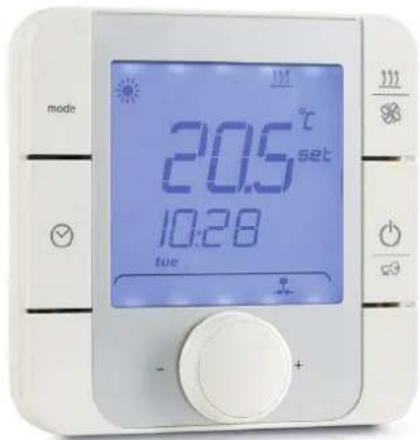
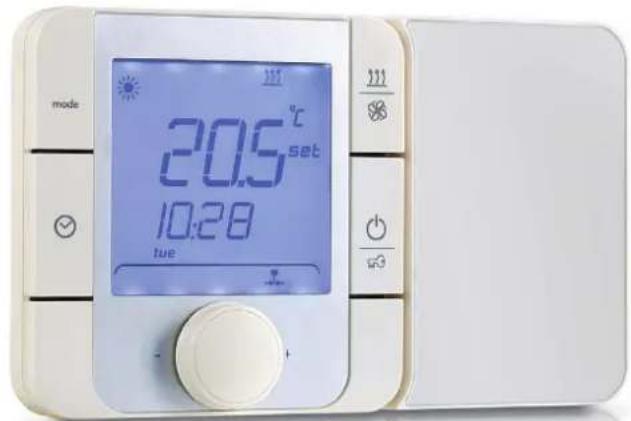
Electronic thermostat for residential applications
ITA Manuale d'uso
ENG User manual
FRE Mode d'emploi
GER Technisches Handbuch
Manual del usuario

AVVERTENZE

- Setpoint cooling:
- Setpoint heating (
CAREL bases the development of its products on decades of experience in HVAC, on the continuous investments in technological innovations to products, procedures and strict quality processes with in-circuit and functional testing on 100% of its products, and on the most innovative production technology available on the market. CAREL and its subsidiaries nonetheless cannot guarantee that all the aspects of the product and the software included with the product respond to the requirements of the final application, despite the product being developed according to start-of-the-art techniques.
The customer (manufacturer, developer or installer of the final equipment) accepts all liability and risk relating to the confl guration of the product in order to reach the expected results in relation to the speci c fi nal installation and/or equipment. CAREL may, based on speci c agreements, act as a consultant for the positive commissioning of the fi nal unit/application, however in no case does it accept liability for the correct operation of the fi nal equipment/system.
The CAREL product is a state of the art product, whose operation is specified in the technical documentation supplied with the product or can be downloaded, even prior to purchase, from the website www.CAREL.com.
Each CAREL product, in relation to its advanced level of technology, requires setup / configuration / programming / commissioning to be able to operate in the best possible way for the specific application. The failure to complete such operations, which are required/indicated in the user manual, may cause the final product to malfunction; CAREL accepts no liability in such cases.
Only qualified personnel may install or carry out technical service on the product. The customer must only use the product in the manner described in the documentation relating to the product.
In addition to observing any further warnings described in this manual, the following warnings must be heeded for all CAREL products:
- Prevent the electronic circuits from getting wet. Rain, humidity and all types of liquids or condensate contain corrosive minerals that may damage the electronic circuits. In any case, the product should be used or stored in environments that comply with the temperature and humidity limits specified in the manual.
- Do not install the device in particularly hot environments. Too high temperatures may reduce the life of electronic devices, damage them and deform or melt the plastic parts. In any case, the product should be used or stored in environments that comply with the temperature and humidity limits specified in the manual.
- Do not attempt to open the device in any way other than described in the manual.
- Do not drop, hit or shake the device, as the internal circuits and mechanisms may be irreparably damaged.
- Do not use corrosive chemicals, solvents or aggressive detergents to clean the device.
- Do not use the product for applications other than those specified in the technical manual.
All of the above suggestions likewise apply to the controllers, serial boards, programming keys or any other accessory in the CAREL product portfolio. CAREL adopts a policy of continual development. Consequently, CAREL reserves the right to make changes and improvements to any product described in this document without prior warning.
The technical specifications shown in the manual may be changed without prior warning.
The liability of CAREL in relation to its products is specified in the CAREL general contract conditions, available on the website www.CAREL.com and/or by specific agreements with customers; specific cally, to the extent where allowed by applicable legislation, in no case will CAREL, its employees or subsidiaries be liable for any lost earnings or sales, losses of data and information, costs of replacement goods or services, damage to things or people, downtime or any direct, indirect, incidental, actual, punitive, exemplary, special or consequential damage of any kind whatsoever, whether contractual, extra-contractual or due to negligence, or any other liabilities deriving from the installation, use or impossibility to use the product, even if CAREL or its subsidiaries are warned of the possibility of such damage.
DISPOSAL

INFORMATION FOR USERS ON THE CORRECT HANDLING OF WASTE ELECTRICAL AND ELECTRONIC EQUIPMENT (WEEE)
In reference to European Union directive 2002/96/EC issued on 27 January 2003 and the related national legislation, please note that:
- WEEE cannot be disposed of as municipal waste and such waste must be collected and disposed of separately;
- the public or private waste collection systems defined by local legislation must be used. In addition, the equipment can be returned to the distributor at the end of its working life when buying new equipment;
the equipment may contain hazardous substances: the improper use or incorrect disposal of such may have negative effects on human health and on the environment;
the symbol (crossed-out wheeled bin) shown on the product or on the packaging and on the instruction sheet indicates that the equipment has been introduced onto the market after 13 August 2005 and that it must be disposed of separately; - in the event of illegal disposal of electrical and electronic waste, the penalties are specified by local waste disposal legislation.
Warranty on the materials: 2 years (from the date of production, excluding consumables).
Approval: the quality and safety of CAREL INDUSTRIES Hqs products are guaranteed by the ISO 9001 certif ed design and production system.
WARNING: separate as much as possible the probe and digital input signal cables from the cables carrying inductive loads and power cables to avoid possible electromagnetic disturbance.
Never run power cables (including the electrical panel wiring) and signal cables in the same conduits.



READ CAREFULLY IN THE TEXT!
Content
1. GENERAL FEATURES 7
1.1 Models 7
1.2 Dimensioni 7
1.3 Technical specifications.. 13
1. GENERAL FEATURES
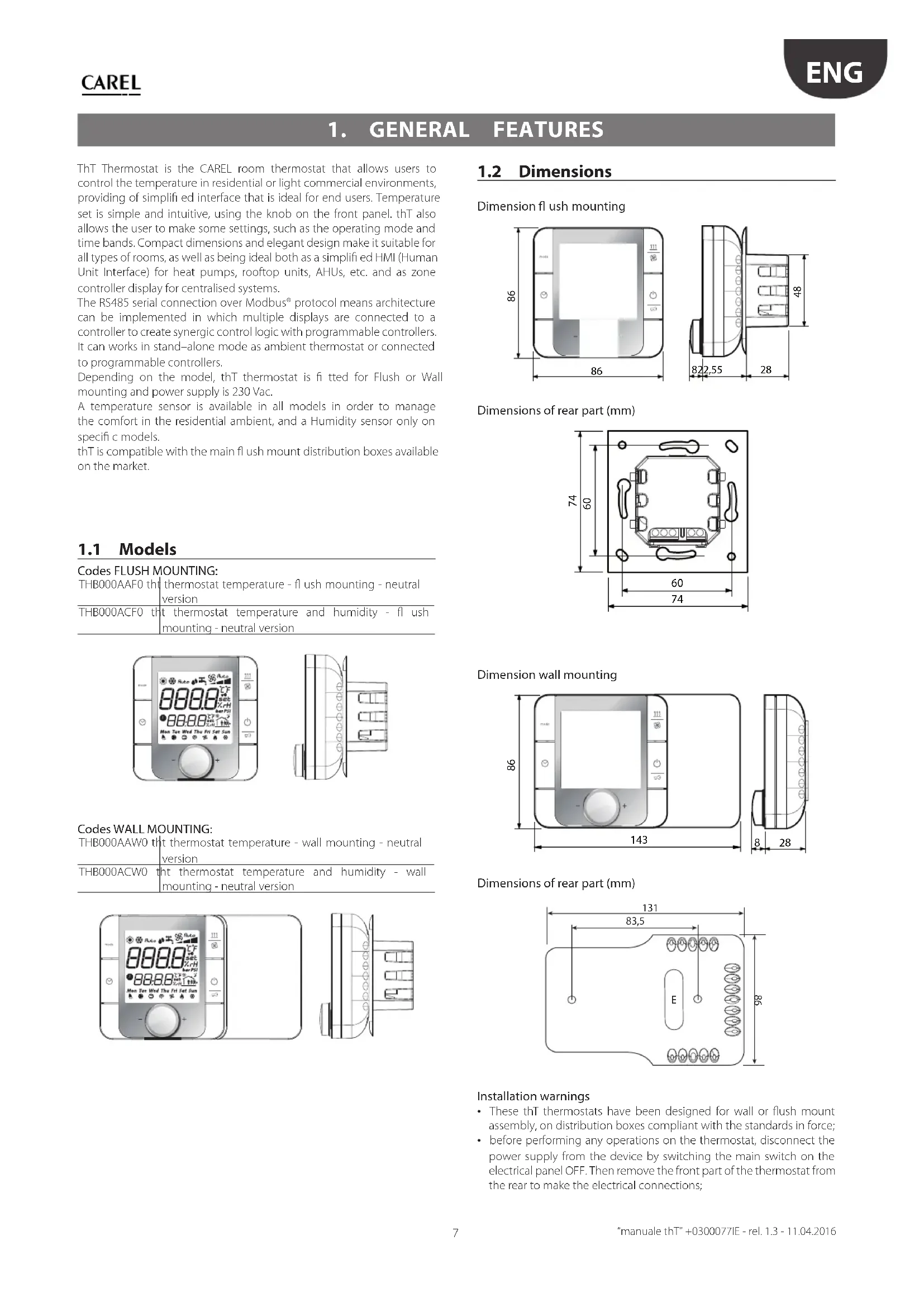
ThT Thermostat is the CAREL room thermostat that allows users to control the temperature in residential or light commercial environments, providing of simplified interface that is ideal for end users. Temperature set is simple and intuitive, using the knob on the front panel. thT also allows the user to make some settings, such as the operating mode and time bands. Compact dimensions and elegant design make it suitable for all types of rooms, as well as being ideal both as a simplified HM1 (Human Unit Interface) for heat pumps, rooftop units, AHUs, etc. and as zone controller display for centralised systems.
The RS485 serial connection over Modbus protocol means architecture can be implemented in which multiple displays are connected to a controller to create synergic control logic with programmable controllers. It can works in stand-alone mode as ambient thermostat or connected to programmable controllers.
Depending on the model, thT thermostat is fitted for Flush or Wall mounting and power supply is 230 Vac.
A temperature sensor is available in all models in order to manage the comfort in the residential ambient, and a Humidity sensor only on specific models.
thT is compatible with the main flush mount distribution boxes available on the market.
1.1 Models
Codes FLUSH MOUNTING:
| THB000AAF0 th | thermostat temperature - flush mounting - neutral version |
| THB000ACF0 th | thermostat temperature and humidity - flush mounting - neutral version |
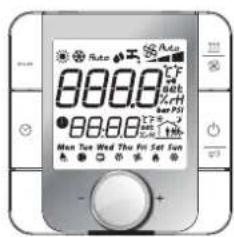
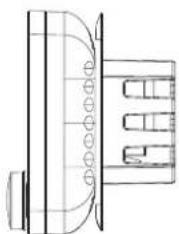
Codes WALL MOUNTING:
| THB000AAW0 | tht thermostat temperature - wall mounting - neutral version |
| THB000ACW0 | tht thermostat temperature and humidity - wall mounting - neutral version |
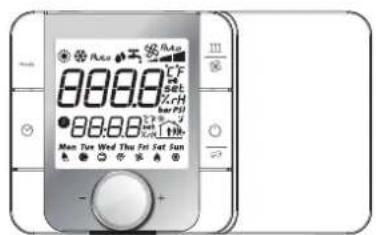
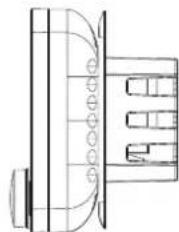
1.2 Dimensions

Dimension flush mounting
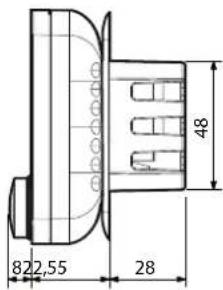
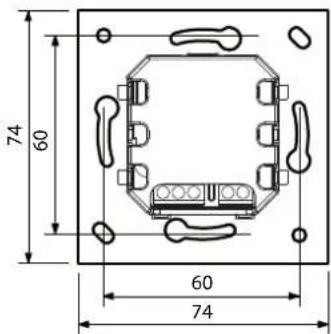
Dimensions of rear part (mm)
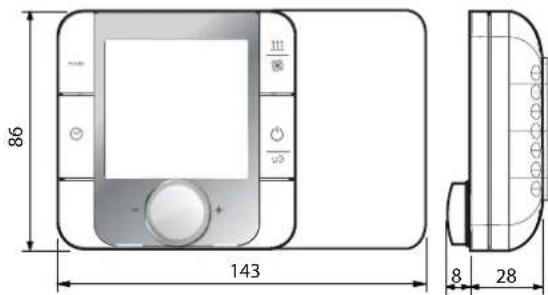
Dimension wall mounting
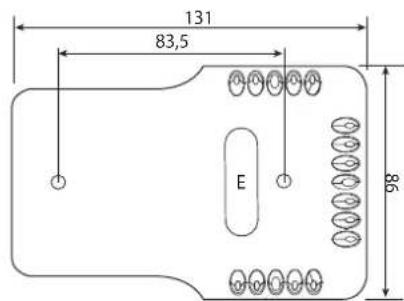
Dimensions of rear part (mm)
Installation warnings
These thT thermostats have been designed for wall or flush mount assembly, on distribution boxes compliant with the standards in force;
- before performing any operations on the thermostat, disconnect the power supply from the device by switching the main switch on the electrical panel OFF. Then remove the front part of the thermostat from the rear to make the electrical connections;
- for the serial connection use three-wire shielded cable, AWG 20-22. The length of the network must not exceed 500m . For extended networks fit a 120 Ohm resistor between RX/TX+ and RX/TX- on the first and last device, to avoid possible communication problems.
Assembly for the flush mounting
To fit the rear part of the terminal use a flush mount box with a min diameter of 65mm and a minimum depth of 31mm .
- Detach the front from the rear of the thT thermostat using a screwdriver;
- Make the electrical connections according with the schematic;
- Fasten the rear to the flush mount box using the 2 screws supplied:
- Finally reposition the thT thermostat the original position and ensure to fix it with clicks into place.
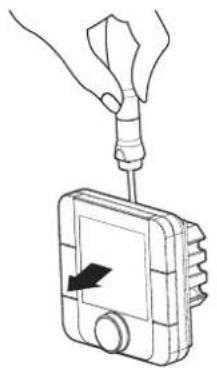
Dismantling
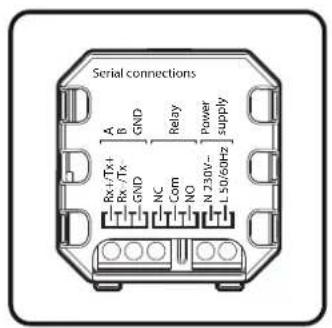
Wiring
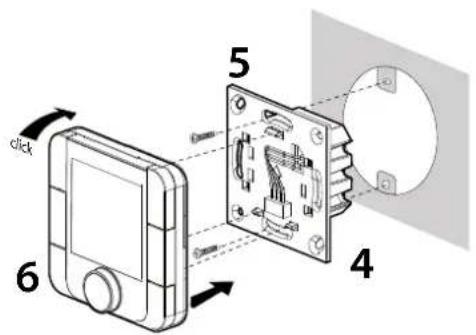
Exploded
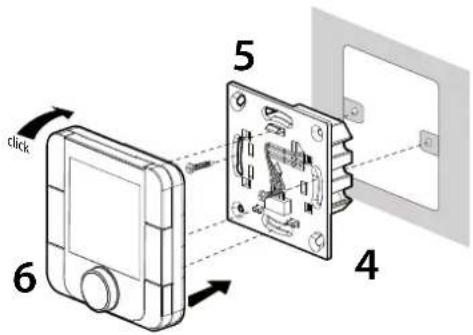
Assembly for the wall mounting
- Separate the front from the rear of the terminal using a screwdriver;
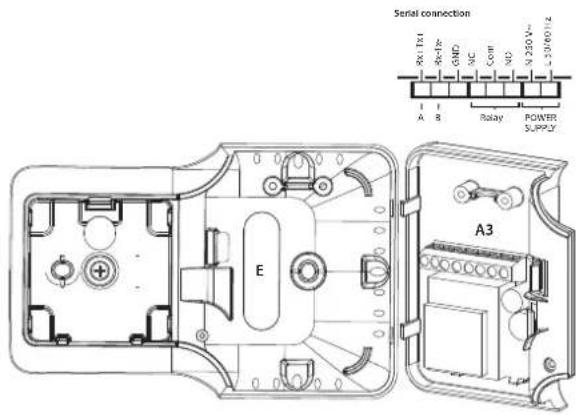
- To remove cover A1, unscrew screw A2 and press the point of attachment; access terminal block A3;
- Drill the holes in the wall (dia. 5 mm); then insert the plugs and screws supplied, making sure that the electrical wires pass through hole E;
- Make the electrical connections according with the schematic;
- Close cover A1, completing the same operations as described above in reverse;
- Finally reposition the thT thermostat the original position and ensure to fix it with clicks into place.
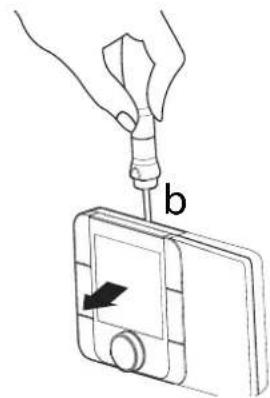
Dismantling
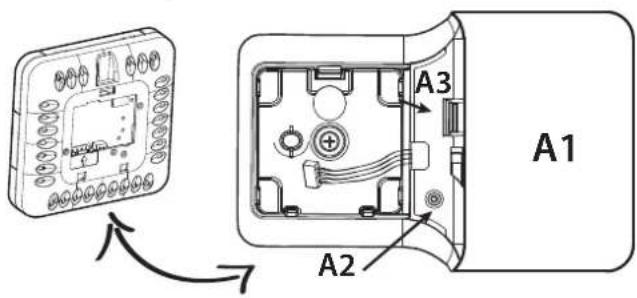
Cover dismantling
Is It Possible to change the rotation of the display moving the base in the other three possible positions:
- remove the screw;
- remove the base;
- turn the base and place it in the right position;
- tighten the screw;
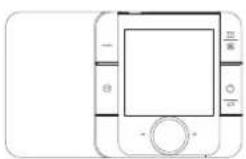
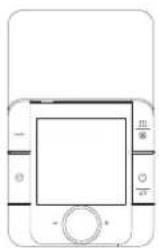
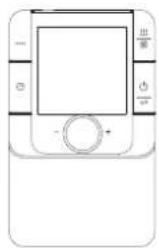
Dismantling
Insert a screwdriver into the clot at the top and press downwards to detach the display.
General notes
Avoid installing the terminal in environments with the following characteristics:
relative humidity greater than the value specified;
- strong vibrations or knocks;
exposure to water sprays;
exposure to aggressive and polluting atmospheres (e.g.: sulphur and ammonia fumes, saline mist, smoke) so as to avoid corrosion and/or oxidation; - strong magnetic and/or radio frequency interference (for example, near transmitting antenna);
exposure to direct sunlight or the elements in general;
large and rapid fluctuations in the room temperature;
environments where explosives or mixes of fl ammable gases are present;
exposure to dust (formation of corrosive patina with possible oxidation and reduction of insulation).
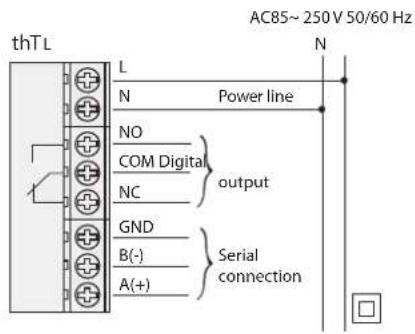
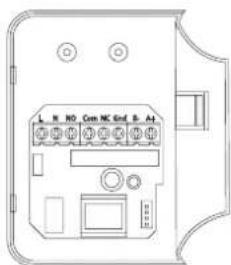
Electrical connections
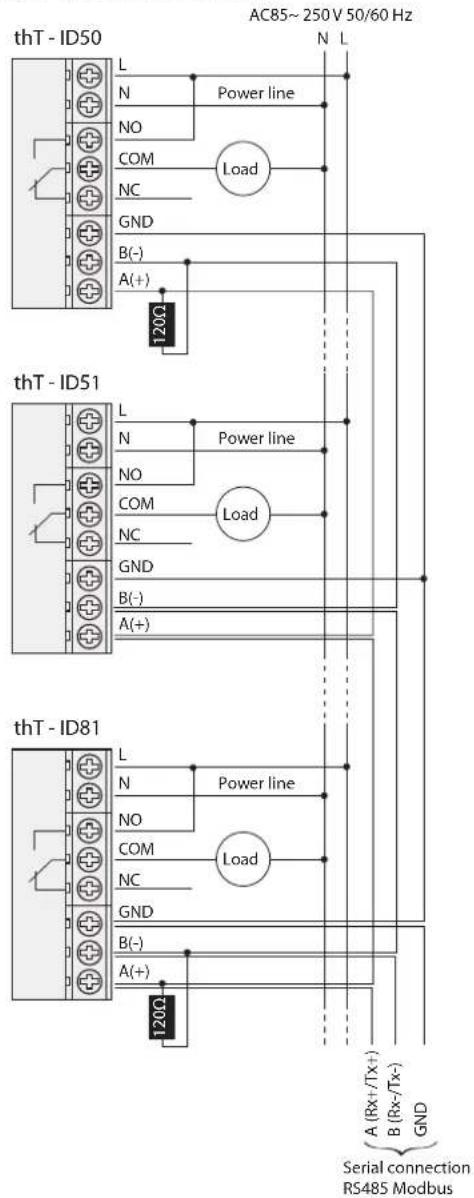
Example of network connections
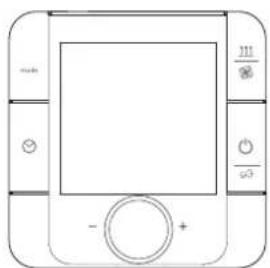
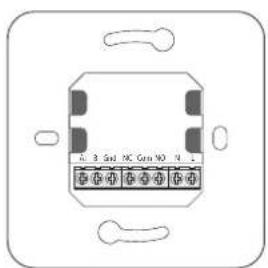
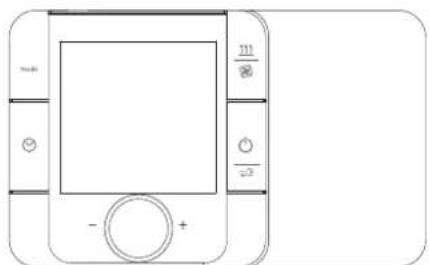
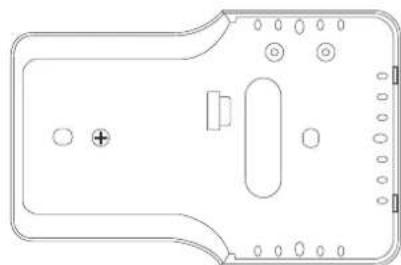

Display
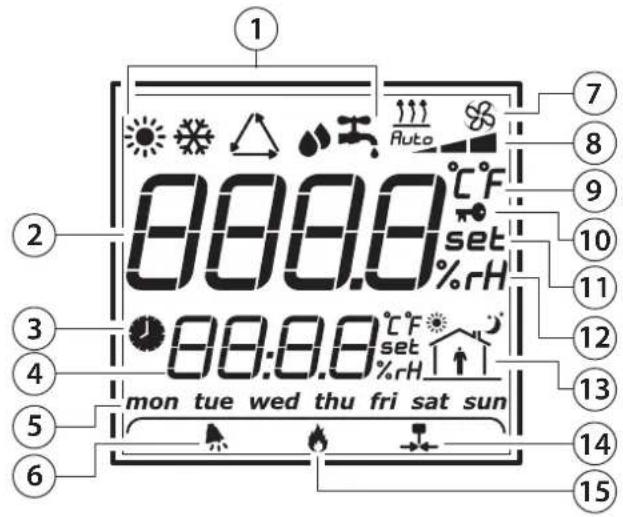
Key:
- Operating mode
- Main feld
- Time Band active
- Secondary fi eld
- Day of week
- Alarm
- Fan/Heating function
- Fan speed/Forced heating time
- Temperature unit
- lcone locked
- Set point setting
- Humidity unit of measure
- Current time band
- Relay active
- Forced heating
Key Function
Key Description Function
| mode | Select mode | Press shortly, you can select different mode you need. |
| Check humidity | Press for 3 seconds, you can check the current humidity with the display "XX%RH", if there is no humidity sensor, the display will show "no H" | |
| Fan If it is Fan | key, you can select different fan speed by pressing it. | |
| Heating If it is | Heating key, you can select force heating time by pressing it. | |
| Clock Press shorty, you can enable time band, Eco or Party, and cancel them. Press for 3 seconds, you can select clock setting, time band setting, Eco set point or Party set point. | ||
| On/Off key | Press shortly, you can turn on/off the thermostat. | |
| Lock key | Press 3 seconds, you can lock/unlock all the keys. | |
| Knob | By rotating the knob, you can adjust the parameter or set point. | |
| Key Description Function | |
| mode + 111 setting | Parameter setting |
| If you want to set parameter, you can operate as followinga. turn off the thermostat by ON/OFF buttonb. press and hold "mode+ 111" for 5 secondsc. rotate the knob, set the password to 22d. select parameter and change its value by rotating and press the knob. | |
| Exit form menu:Waiting 20s without any operation;Confirm with any of the 4 key pressed; | |
Humidity Check
Turn on the thermostat (model with humidity version), press and hold "mode" for 3 seconds, the LCD will display % rH value", if thT is only temperature sensor (no humidity), the display will show no H.
Key Fan/Heating
The key " is configured as Fan ( ) or Heating ( ) mode according with parameter FH (Fan - Heating).
FH=00->Fan
FH=01-Heating
This information is sent by Modbus (Coil 53).
When“FH"=0

Pressing the button 品 we can select the desired speed (min, med, max) or automatic (Auto) and send this information through Modbus (Register 7)




When“FH”=1
The button is configured for managing heating device, pressing it we can select the time where the unit will be forced 100% (20,40 or 60 min). This information is sent by Modbus (Register 8)
Pressing the button, we can set the desired time of heating forced. Every press of the button, increment the time to: 20, 40, 60 min, and on the display will be shown.



When relay is active the icon is shown.
FS: Ventilation/Heating controlled by
FS=00→thT
FS=01→Modbus
| FS | FH | Relay management |
| 0 | - | thT |
| 1 | 0 | Modbus - ventilation |
| 1 | 1 | Modbus - heating |
Tab.1.a
Clock Setting
Turn on the thermostat, press and hold for 5 seconds, the secondary field display "hh:mm", now, press
- hh blinking, rotate the knob to adjust the hour and press it to confirm.
- then the mm blinking, rotate the knob to adjust the minute and press it to confirm.
- then the day of week blinking, rotate the knob to adjust the day and press it to confirm.
Time Band Setting
Turn on the thermostat, press and hold for 5 seconds, rotate the knob, when the secondary field display "F5-2", press it. Now, you can set the time band as following:
- Select workday or weekend by rotating the knob and confirm by pressing it.
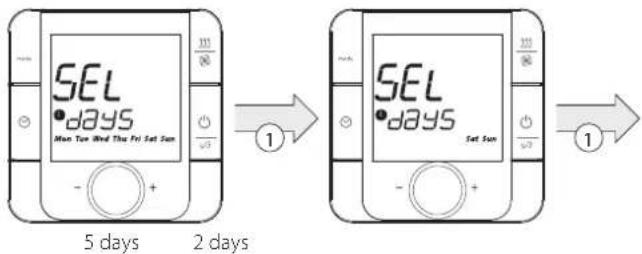
- encoder"rotation
- Select one time band by rotating the knob and confirm by pressing it.
- Adjust the start time by rotating the knob and confirm by pressing it.
- Adjust the set point by rotating the knob and confirm by pressing it.
The default value in the thermostat is following:
| time 1 time | time 2 time | time 3 time | 4 | |
| Start time Set point | Start time Set point | Start time Set point | Start time Set point | |
| Working (mon-friday) | 7:00 | 17:00 | 21:00 | 22:00 |
| 15.0 °C | 22.0 °C | 20.0 °C | 18.0 °C | |
| Weekend (sat-sun) | 7:00 | 09:00 | 17:00 | 22:00 |
| 22.0 °C | 20.0 °C | 22.0 °C | 18.0 °C |

Note: the sequence of time bands is fixed and it is possible to view
and finish it only following this sequence (i.e. to go back it's necessary to keep rotating the encoder to start again and repeat from the beginning.
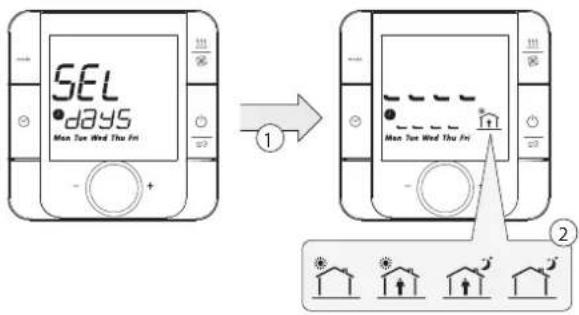
| 1 push the "Encoder" |
| 2 select one of 4 "time bands" or "esc" |
| 3 set point |
| 4 start time of time band selected |
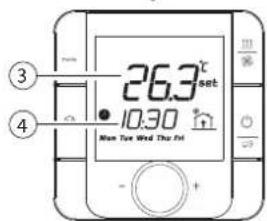

Note: information "hh", "mm" and "week" is sent by Modbus:
- hh-Register 6
- mm-Register 7
day-Register8
Time band / Eco /Party function selection
Turn on the thermostat, press the you can select the function. What functions are available depends on the value of "tE".
Eco Setting
By activating this function, the temperature can be lower than the set point.
Turn on the thermostat, press and hold for 5 seconds, rotate the knob, when the secondary fi el display "F Lo", press it. Now, you can set the Eco set point by rotating the knob and confirm by pressing it.
Eco offset is -3^ in heating and +3^ in cooling
"eco setpoint" information is sent by Modbus (Register 52)
Party Setting
Activating this function it is possible have a different, predefined temperature higher than set point to activate in extraordinary situation.
Turn on the thermostat, press and hold for 5 seconds, rotate the knob, when the secondary field display "F Hi", press it. Now, you can set the Party set point by rotating the knob and confirm by pressing it.
Set point
Turn on the thermostat, turn right the knob, increase the set point, turn left the knob, reduce the set point in step of 0.5^ . The value can also be set via Modbus.
Differential
To impostare il differenziale, enter in the df (differential) menu and select the new value with step 0.5. (0.5 - 1,0 - 1,5 - 2,0^) .
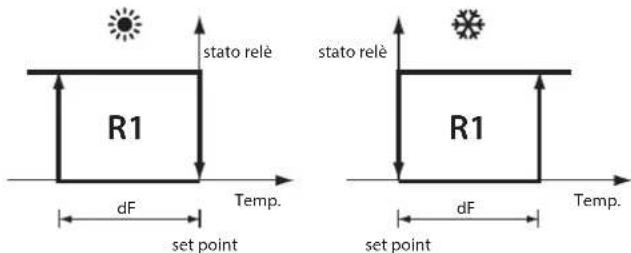
Output Control
The control mode is available in both cooling and heating mode and it is managed by user.
- Set point cooling ("")
- Set point heating ("")
df (differential) is a parameter to set in the parameter set menu and it is a relay differential in cooling/heating mode.
Regulation is based on recognized temperature sensor. The set points need to be defined.
Parameter Setting
Turn off the thermostat using the ON/OFF button, press and hold"mode 111
- 喜 "for 5 seconds, insert the password (22) and press the knob to confirm. The parameter list is following.
| LCD display | Description Default | value | Note |
| PS Password 00 Password is: 22 | |||
| FH FAN/HEATING configuration 00·00:FAN | ·01:HEATING | ||
| Co Confi guration "mode" button 3 see table in the bottom | |||
| tC Temperature sensor calibration | 0.0 °C -5.0 to 5.0 °C | ||
| HC Humidity sensor calibration 0.0% rH | -10.0% to 10.0% rH | ||
| FE | Enable frost protection mode | 01·00:Dis able | ·01:Enable |
| Ft | Frost protection set point | 5.0 °C 5 to 17 °C | |
| Id | BMS address | 50 50 to 8 | |
| br | Baud rate | 00·00:19200·01:9600·02:4800 | |
| bE | Buzzer Enable | 01·00:Dis able | ·01:Enable |
| df | Diff erential | 0.5 °C · 0.5 °C | ·1.0 °C · 1.5 °C · 2.0 °C |
| LE | Key Lock Enable | 0·00:Dis able | ·01:Enable |
| rC Relay management | 00·00:Automayc | ·01:Manual | |
| Ar Auto recovery | 01 fixed | ||
| tE | Confi guration clock button | 07 01 to 07 | |
| tM ON/OFF button by | 00·00:Thermostat | ·01:RS485 | |
| tE | Number of variables to show on display | 00 00 to 05 | |
| dS | Mode button by | 00·00:Thermostat | ·01:Modbus |
| FS | FAN/HEATING button by 00 | ·00:Thermostat | ·01:Modbus |
Keypad Functionalities
Key Mode
To select the sequence of icons to show on display, enter in the Parameters Menu and configure the parameter "Co" and with rotary encoder select the new value turning right or left, then press to confirm. Here below, possible symbols to manage are:

the symbols can be turn on separately or in pairs and the sequence is defined setting to "1" the different bits of configuration parameter.
| Bit number | Symbol |
| 00 | ● |
| 01 | ● |
| 02 | ● |
| 03 | ● |
| 04 | ●+● |
| 05 | ●+● |
| 06 | ●+● |
| 07 | ●+● |
| 08 | ●+● |
| 09 | Not used |
| 10 | Not used |
| 11 | Not used |
| 12 | Not used |
| 13 | Not used |
| 14 | Not used |
| 15 | Not used |
Tab.1.b
Example:
It bit 00, 01, and 07 are set to "1" the configuration variable value = 131 (converted binary code to decimal code) and the sequence pressing "mode" buttos is:

Temperature sensor calibration
To adjust the temperature calibration, enter in the tC (Temperature Calibration) menu, in un range compreso tra -5 e + 5 °C con incrementi di ±0,1 °C.
Humidity sensor calibration
Available only for the models with humidity sensor. To adjust the humidity calibration, enter in the hC (Humidity Calibration) menu, in un range compreso tra-10 a+10 UR % con incrementi di ± 0.1 UR%.
Frost protection
If enabling the frost protection function (FE - Enable frost protection set to: 0 = Disabled; 1 = Enabled), when the thermostat is turned off, and the temperature is lower than "Ft", the output will switch on the relay, and the LCD display "△"; when the temperature is up to "Ft + 2"°C, the output will switch off the relay with the "△" disappear.
Frost protection set point
The set the frost protection set point, enter in the Ft (Frost protection temperature) menu and select the new value from 5,0 to 17,0^
Buzzer enable
To enable this operation, enter in the bE (Buzzer Enable) menu and confirm:
To enable this operation, enter in the LE (Lock Enable) menu and confirm the new value
- 0 = Disable;
- 1 = Enable;
Auto recovery
For internal use. It is fix to 1;
Key Clock
To select the sequence of functions to show on display, enter in the Parameters Menu and configure the parameter "tE" and with rotary encoder select the new value turning right or left, then press "to confirm.
The following functions can be selected:
| Value | Action |
| 0 | disabled |
| 1 | |
| 2 | |
| 3 | → |
| 4 | |
| 5 | → |
| 6 | → |
| 7 | →→→ |
Tab.1.c
The symbols can be turn on separately or in pairs and the sequence is defined setting to "1" the different bits of configuration parameter.
Example:
If the confi guration variable value = 7 ,the sequence pressing "clock" button is:
No time band->
Pressing the button, we can select the desired function.
The logic is to change the different time bands pressing the button and the related cycle can manage 4 different choices:
- No Time Band (no icons shown)
- Time Band (icons activated are " and the icon related to actual time band)
3.Eco (icon activated is "") - Party (icon activated is "11")
ON/OFF the thermostat
The thermostat on-off is managed by thermostat or by Modbus. The choice is decided in parameters menu (parameter "LM").
If "tM" parameter is = 0 (thermostat control)
Press to turn on, press again to turn off thermostat and deactivate the relay.
If "tM" parameter is = 1 Modbus control) -> Coil 58
The thermostat ON/OFF is decided by Modbus (Coil 50).
The ON/OFF status is sent by Modbus (Coil 8).
Alarm
When there is one of the follow alarm, display will show the error code on LCD will buzzer switch on (in accord with the parameter bE - Buzzer enable). And relay output will be closed with "..." appear.
LCD abbreviation Alarm
| E1 Sensor short circuit alarm | |
| E2 Sensor open circuit alarm | |
| EE eeprom fault | |
| HI Temperature higher than 55 °C | |
| LO Temperature lower than 0 °C | |
| AC | Clock |
Cn message on display
After power on, the first 30 s once data traffic is detected, this thermostat will be recognized as network mode. When communication drops off or cable is cut or disconnected and is 30s timeout in the second field of the display it will blink between "Cn" message and clock (10 seconds for clock and 2 seconds for Cn).
1.3 Technical specifications
| Power supply | From 85 to 260 Vac, 50/60 Hz |
| Power consumption | 2 VA |
| Operating Conditions | 0 up to +45 °C |
| 5% up to 90% rH | |
| Storage conditions | -10 up to +55 °C |
| 5% up to 90% rH | |
| Index of protection | IP 20 |
| Display | LCD (white backlight) |
| Temperature value displayed | -10 ± 60 °C -> ± 0,1 K |
| Precision of temperature measurement | 0 up to 45 °C -> ± 0,5 K |
| Precision of humidity measurement | 20 to 80% rH: ±5% rH |
| Current load relay | Max 5 A (Resistive) / 2 A (Inductive) |
| Norm | according to EN60730 - Category II |
| REACH Compliant | |
| RoHS Compliant | |
| Data stored | 3 years |
| Type of relay | SPDT (N.O / N.C.) |
| Voltage relay | 230 Vac |
RS485 Connections
RS485 serial: AWG 20 to 22, shielded cable, Lmax=500 m
Power supply: Cross-section of the wires; 0.5 mm2 to 1.5 mm2
Comunication mode
Protocol type: RTU
Data bit: 8
Stop bit: 2
Parity: None
BMS Baud rate
To enable this operation, enter in the Br (Baud rate) menu and confirm the Baud rate:
0=19200(default)
1 = 9600
2 = 4800
RS485 Address Set
To enable this operation, select the Id (Identify device) parameter to confirm the thermostat RS485 address.
It is possible connect up to 32 thermostats. The serial address defi ned in the range 50 to 81 (Default 50).
Summary table of operating parameters
Coils List
| Address | Type | R or R/W | Variable Description | Data interpretation |
| 1 | Coil | R | Probe - Short circuit | 0 normal; 1 fault |
| 2 | Coil | R | Probe - disconnected | 0 normal; 1 fault |
| 3 | Coil | R | E² Fault | 0 normal; 1 fault |
| 4 | Coil | R | High temperature alarm | 0 normal; 1 fault |
| 5 | Coil | R | Low temperature alarm | 0 normal; 1 fault |
| 6 | Coil | R | Alarm Status | 0: No Alarms 1: Alarm |
| 7 | Coil | R | On/Off relé Status | 0: Off 1: On |
| 8 | Coil | R | Thermostat On/Off Status | 0: Off 1: On |
| 50 | Coil | R / W Thermostat on-off control | 0: Off 1: On | |
| 51 | Coil | R / W Relay management conf guration | 0: automatic (default) 1: manual | |
| 52 | Coil | R / W Relay control in manual mode | 0: Disabled 1: Active | |
| 53 | Coil | R / W Fan / Heating button conf guration | 0: Fan 1: Heating | |
| 54 | Coil | R / W Frost mode enable 0: Off | 1: Enabled | |
| 55 | Coil | R / W Keys lock function enable | 0: Off 1: Enabled | |
| 56 | Coil | R / W Buzzer enable | 0: Off 1: Enabled | |
| 57 | Coil | R / W Time band enable | 0: Off 1: Enabled | |
| 58 | Coil | R / W Thermostat on-off selection | 0: by thermostat 1: by RS485 serial line | |
| 59 | Coil | R / W Mode button selection | 0: by thermostat 1: by RS485 serial line | |
| 60 | Coil | R / W Fan / Heating - button selection | 0: by thermostat 1: by RS485 serial line | |
Holding registers / Input registers Commands
| Address | Type | R or R/W | Variable Description Data interpretation | |
| 1 | Register R | Machine code | Fixed to 314 | |
| 2 | Register R | Hardware revision | 1.021 | |
| 3 | Register R | R | Firmware release | Depends on firmware release (e.g.:10 for firmware 1.0) |
| 4 | Register R | Room Temperature Temperature value (OT60 °C) | ||
| 5 | Register R | Room Humidity | ||
| 6 | Register R | Mode Status | Variable value | |
| 7 | Register R | Fan mode | Low 01 Med 02 High 03 Auto | |
| 8 | Register R | Heating mode | Disabled 01 20 minutes 02 40 minutes 03 60 minutes | |
| 9 | Register | R / W | Hour (setting) | From 0 to 23 |
| 10 | Register | R / W | Minute (setting) | From 00 to 59 |
| Address Type R or R/W | Variable Description Data interpretation | ||
| 11 Register R / W Day of the week (setting) | 0= Sunday ... 6= Saturday | ||
| 51 Register R / W Temperature Set point Temperature value (from 5.0 to 35.0 °C) | |||
| 52 Register R / W Eco set point Temperature value (from 5.0 to 35.0 °C) | |||
| 53 Register R / W Party Set point Temperature value (from 5.0 to 35.0 °C) | |||
| 54 Register R / W Mode button Confi quration | Integer value See Tab. 1.b | ||
| 55 Register R / W Clock button Confi quration | Integer value | ||
| 56 Register R / W Temperature sensor calibration | Temperature value (from -5.0 to +5.0 °C) | ||
| 57 Register R / W Humidity senor calibration | Humidity value (from -10.0 to +10.0 rH%) | ||
| 58 Register R / W Differential 0,5-1,0-1,5-2,0 °C | |||
| 59 Register R / W Frost temperate From 5 to 17 °C | |||
| 60 Register R / W Information menu setting | From 0 to 5 | ||
| 61 Register R / W Information menu – variable 1 value | |||
| 62 Register R / W Information menu – variable 2 value | |||
| 63 Register R / W Information menu – variable 3 value | |||
| 64 Register R / W Information menu – variable 4 value | |||
| 65 Register R / W Information menu – variable 5 value | |||
| 69 Register R / W Mode button setting | |||
| 70 Register R / W Fan button setting 00 Low | 01 Med 02 High 03 Auto | ||
| 71 Register R / W Heating button on setting 00 Disabled | 01 20 minutes 02 40 minutes 03 60 minutes | ||
| 101 Register R / W hh Time 1 Monday-Friday | 00 - 23 | ||
| 102 Register R / W mm Time 1 Monday-Friday | 00 - 59 | ||
| 103 Register R / W Set point T me 1 Monday-Friday | 5,0 - 35,0 | ||
| 104 Register R / W hh Time 2 Monday-Friday | 00 - 23 | ||
| 105 Register R / W mm Time 2 Monday-Friday | 00 - 59 | ||
| 106 Register R / W Set point T me 2 Monday-Friday | 5,0 - 35,0 | ||
| 107 Register R / W hh Time 3 Monday-Friday | 00 - 23 | ||
| 108 Register R / W mm Time 3 Monday-Friday | 00 - 59 | ||
| 109 Register R / W Set point T me 3 Monday-Friday | 5,0 - 35,0 | ||
| 110 Register R / W hh Time 4 Monday-Friday | 00 - 23 | ||
| 111 Register R / W mm Time 4 Monday-Friday | 00 - 59 | ||
| 112 Register R / W Set point T me 4 Monday-Friday | 5,0 - 35,0 | ||
| 113 Register R / W hh Time 1 Saturday-Sunday | 00 - 23 | ||
| 114 Register R / W mm Time 1 Saturday-Sunday | 00 - 59 | ||
| 115 Register R / W Set point T me 1 Saturday-Sunday | 5,0 - 35,0 | ||
| 116 Register R / W hh Time 2 Saturday-Sunday | 00 - 23 | ||
| 117 Register R / W mm Time 2 Saturday-Sunday | 00 - 59 | ||
| 118 Register R / W Set point T me 2 Saturday-Sunday | 5,0 - 35,0 | ||
| 119 Register R / W hh Time 3 Saturday-Sunday | 00 - 23 | ||
| 120 Register R / W mm Time 3 Saturday-Sunday | 00 - 59 |
| Address Type R or | R/W | Variable Description Data interpretation | ||
| 121 Register R / W Set | point Time 3 Saturday- Sunday | 5,0 - 35,0 | ||
| 122 Register R / W hh | Time 4 Saturday- Sunday | 00 - 23 | ||
| 123 Register R / W mm | Time 4 Saturday- Sunday | 00 - 59 | ||
| 124 Register R / W Set | point Time 4 Saturday- Sunday | 5,0 - 35,0 | ||
AVERTISSEMENTS

- AVVERTENZE
- DISPOSAL
- INFORMATION FOR USERS ON THE CORRECT HANDLING OF WASTE ELECTRICAL AND ELECTRONIC EQUIPMENT (WEEE)
- Content
- GENERAL FEATURES 7
- GENERAL FEATURES
- Models
- Dimensions
- Installation warnings
- Assembly for the flush mounting
- Assembly for the wall mounting
- Dismantling
- General notes
- Display
- Key:
- Key Function
- Humidity Check
- Key Fan/Heating
- When“FH”=1
- Clock Setting
- Time Band Setting
- Time band / Eco /Party function selection
- Eco Setting
- Party Setting
- Set point
- Differential
- Output Control
- Parameter Setting
- Keypad Functionalities
- Key Mode
- Example:
- Temperature sensor calibration
- Humidity sensor calibration
- Frost protection
- Frost protection set point
- Buzzer enable
- Auto recovery
- Key Clock
- ON/OFF the thermostat
- Alarm
- Cn message on display
- RS485 Connections
- Comunication mode
- BMS Baud rate
- RS485 Address Set
- Summary table of operating parameters
- AVERTISSEMENTS
Brand : Carel
Model : thT
Category : Thermostat