VH9500DSW - Vacuum Cleaner LG - Free user manual and instructions
Find the device manual for free VH9500DSW LG in PDF.



User questions about VH9500DSW LG
0 question about this device. Answer the ones you know or ask your own.
Ask a new question about this device
Download the instructions for your Vacuum Cleaner in PDF format for free! Find your manual VH9500DSW - LG and take your electronic device back in hand. On this page are published all the documents necessary for the use of your device. VH9500DSW by LG.
USER MANUAL VH9500DSW LG
OWNER'S MANUAL MANUEL D'UTILISATION
VH95**DSW
BEDDING CLEANER
This manual contains important information and instructions for the safe use and maintenance of the bedding cleaner. Please read all of the information on page 4, 5, 6 for your safety. Please keep this manual in an easily accessible place for future reference.
ASPIRATEUR ANTI-ACARIENS
Important safety instructions 4\~6
Sterilizer Station 11
Using the Product 12
Mounting the Cleaner at Sterilization Station 13
Using the Sterilization Station (Sterilization and Charging) 14
Effective cleaning methods according to the cleaning surfaces 15
How to Wash Inlet 16
Cleaning Dust bin 18
Care of Dust Filter 19
Product specifications 22
IMPORTANT SAFETY INSTRUCTIONS
Read and follow all instructions before using your vacuum cleaner to prevent the risk of fire, electrical shock, personal injury, or damage when using the vacuum cleaner. This guide does not cover all possible conditions that may occur. Always contact your service agent or manufacturer about problems that you do not understand. This appliance complies with the following EC Directives :-2006/95/EC Low Voltage Directive -2004/108/EC EMC Directive.

This is the safety alert symbol.
This symbol alerts you to potential hazards that can kill or hurt you and others.
All safety messages will follow the safety alert symbol and either the word "WARNING" or "CAUTION."
These words mean:

This symbol will alert you to hazards or unsafe practices which could cause serious bodily harm or death.

This symbol will alert you to hazards or unsafe practices which could cause bodily injury or property damage.
WARNING
- This appliance is not intended for use by persons (including children) with reduced physical, sensory or mental capabilities, or lack of experience and knowledge, unless they have been given supervision or instruction concerning use of the appliance by a person responsible for their safety.
- Children should be supervised to ensure that they do not play with the appliance.
- If the supply cord is damaged, it must be replaced by LG Electronics Service Agent in order to avoid a hazard.
- This appliance can be used by children aged from 8 years and above and persons with reduced physical, sensory or mental capabilities or lack of experience and knowledge if they have been given supervision or instruction concerning use of the appliance in a safe way and understand the hazards involved. Children shall not play with the appliance. Cleaning and user maintenance shall not be made by children without supervision.
IMPORTANT SAFETY INSTRUCTIONS

WARNING
- Use it only on bedding items such as blankets, mattresses, pillows, or cloth sofas. Do not use this appliance to suck in dust, cement, or any construction debris. Do not use on leather upholstered surfaces. It may cause fire and unrepairable product damage.
- This appliance is designed for normal indoor domestic use only. It is not to be used for any office or commercial application.
- No one other than a repair technician shall disassemble or modify the product. It may cause fire or electrical shock.
- Do not spray combustible materials such as gasoline or solvents, or surfactants such as detergents or bathing goods, or drinks near the cleaner and it's sterilizer station.
It can cause an explosion or fire.
- Do not allow the power cord to be crushed, kinked or cut by heavy objects.
Using a damaged cord or plug could cause fire or electrical shock. When the power cord is damaged, it is dangerous, so please have the cord replaced by an authorised service center.
- Do not let liquid such as water enter the product, and do not use the unit to pick up liquids, sharp pointy objects, or hot embers.
It causes fire or electrical shock. If water accidentally enters the unit, immediately turn off the power switch of the main body, pull out the power plug, and contact LG Electronics Service Agent to avoid hazard.
- If the ELCB, GFCI is triggered when the power is turned on, immediately stop its use and call an Authorised Service Provider.
Failing to do so can cause electric shock. - Do not insert pins or sharp pointy utensils into or around the machine or its sterilizer station. There is a risk of electrical shock.
- Do not use the appliance if gas odors can be detected. Unplug the unit and provide ventilation to avoid possible dangers.
There is a risk of fire or explosion.
- Make sure that the unit is plugged into a wall socket over 10amp and not overloaded.
Overloading of any wall socket can cause fires and product malfunction.
- Do not use the appliance if the power cord or socket is in any way loose or damaged.
It can cause fire or electrical shock. - Do not operate the appliance with the suction inlet or outlet which are blocked.
It causes deformation of main body or fire by overheating. - Do not operate the cleaner while dust bin is taken out. There is a risk of product damage or electrical shock injury.
- Do not place power cord and the product near heating devices.
It can cause deformation of main body, malfunction, or fire.
- Be careful that your fingers do not touch the pins when you pull out the plug from the mains outlet. It can cause electrical shock.
- Do not allow children or pets to play with the product or use the product as a toy. It can cause personal injury and damage to the unit.
- Do not handle the plug with wet hands. It may cause electrical shock.
- Do not clean the inlet with water and use immediately after drying the components first. It may cause electrical shock and malfunction.
- When you clean the exterior, make sure to pull out the power plug, and do not wash with harsh or abrasive solutions. It can cause electrical shock and exterior damage.
- Do not place hands into the intake while the appliance is operating. Allow the unit to stop operating and disconnect from the wall socket to avoid any personal injury.
- Do not wash the exterior of inlet or bottom surface with water or detergent. Use only a damp cleaning cloth. It may damage product or cause electrical shock.
- When the sterilization is in operation, do not attempt to look directly into the UV light.
It may harm your eyes or skin, and may cause skin ailment such as red spots. Should this occur, consult your local physician.
- If the supply cord is damaged, it must be replaced by the manufacturer, its service agent or similarly qualified persons in order to avoid a hazard.
- Do not use the product at a place subject to lots of industrial oil fumes or metal particulates. Doing so can cause fire or product failure.
- Do not use the product at a place subject to leakage or probable leakage of combustible gases. It may result in fire or explosion.
- Do not disassemble the battery. There is a risk of fire or electric shock.
- Do not expose product to heat or fire. Do not expose product direct sunlight. There is a risk of fire and explosion.
- Do not give physical impact to the battery. There is a risk of fire and explosion.
- Charge only as specified charger. Please charge the right way. The battery may be damaged and may cause a fire.
- If any liquid leaks from the batteries, avoid contact with the skin or eyes. If you touched the liquid, wash contact area with plenty of water and get medical attention.
There is a risk of burns and blindness.
IMPORTANT SAFETY INSTRUCTIONS

CAUTION
- Do not use this cleaner on anything other than rated voltage.
It may cause fire and unrepairable product damage. - If the product is not in use for a long period of time, pull out the power plug.
- Static Electricity may be generated at main body during the cleaning.
Cleaner may malfunction due to electrostatic energy, so pull out the power cord and put it back in again. - Big objects such as socks, stocking, tissues, etc., may block the inlet during the cleaning, so please remove them before starting the cleaning.
This appliance must be used to remove dust only. - Do not place anything else on the sterilizer station other than this appliance.
Close proximity of magnets or other active electromechanical appliances to the sterilizer station can cause malfunction. - Do not stop on one spot or use it on the same spot repeatedly for a long time.
The surface may be damaged by the friction and vibration. - Do not touch the bottom surface with hand or foot while the appliance is in operation.
-
Do not operate the appliance without the dust bin and its covers in place. Always ensure the dust bin is cleaned when it reaches its limit or beforehand.
If it is used continuously while dust bin is full, it will cause malfunction and overheating. -
To avoid the risk of fire or electric shock, always grip it from the plug when removing. And never pull on the power cord when removing it from the wall socket.
- If a foreign object is attached to the bottom surface of dust bin, remove it before using the product.
It could compromise the suction motor and cause malfunction and damage. - Make sure to secure the bottom plate during the cleaning of bedding items. Do not use the appliance on a solid surface or flooring. Doing so could cause damage to both the surface and to the appliance.
- Do not store the appliance or the UV station in an outdoor environment.
- Never use the product for removing toxic gases.
The product may fail, and toxic gases are not removed. - Use or place the unit on a level area and do not apply force to the unit.
Doing so can cause fire or product failure. - Dispose the product right way.
There is a risk of fire and explosion.
CONSIGNES DE SÉCURITÉ IMPORTANTES
How to use Bedding Cleaner
The batteries used in cordless bedding cleaner is a consumable.
Battery warranty period is six months.
(Battery replacement after the warranty period is a paid service.)
How to use Sterilizer Station
② While using the product, you can check the battery level through battery level indicator.
- Pressing Touch Power Switch again, stops operation of the product, and turns off the indicator
text_image
Groove Rainure Protrusion Saillie1 Place the product on the station in such a way that the front side of the product is placed first on the station to allow the gap on the vibration plate of the product to be inserted on the sill of the station.
① Posez l'appareil sur la station en commençant par l'avant de l'appareil. Ainsi, l'interstice de l'appareil permet d'insérer la surface vibrante sur la base.
How to use Using the Sterilization Station (Sterilization and Charging)
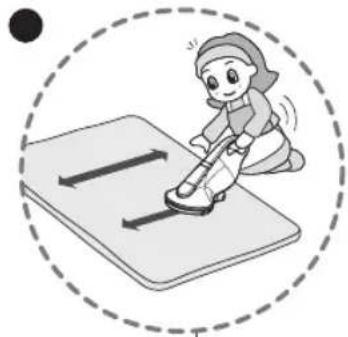
Bed Mattress, Bed Cover Matelas, couvre-lit

natural_image
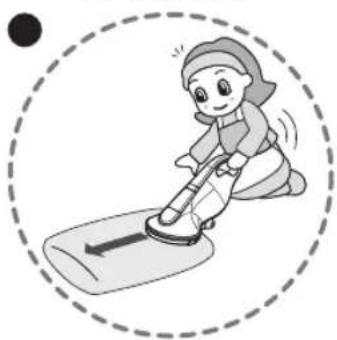
Illustration of a child cleaning a bed with a broom (no text or symbols)Pillows, Cushions, etc. Oreiller, coussin, etc.
natural_image
Illustration of a cartoon character riding a scooter inside a dashed circular frame (no text or symbols)Thin cover Couverture fine
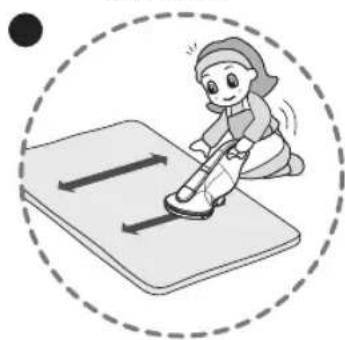
natural_image
Illustration of a child ice skating on a mat, enclosed in a dashed circle (no text or symbols)① Bedding: Mattress, Bed Cover Literie: Matelas, couvre-lit
② Pillows: Large cushion, normal cushion, pillow
Oreillers: Grand coussin, coussin normal, oreiller
- For smaller surfaces apply an even forward and backward motion.
③ Blankets: Thick cover, thin cover, blanket
- Apply an even backward and forward stroke motion.
Unlike general handy type products, this product applies the correct weight onto the surface for the application it is designed for. There is no need for additional downward hand pressure when using. Additional downward pressure can cause damage to bedding.
Conseils
How to use How to Wash Inlet
1 Place a soft cloth on the surface, and flip over the main body on it with the product not connected to the socket outlet.
Make sure that there is no foreign objects, lift the left and the right of the bottom plate by pulling it up. Hold the brush and separate it by lifting it up.
③ Wash the separated bottom plate with water and dry it with a cloth or place it outside in the shade.
Do not wash the main body or roller brush.
How to use Emptying Dust bin
The Dust indicator should be observed regularly. Cleaning must be carried out before or when the fine dust and debris has reached the MAX line by emptying the dust bin and cleaning it (refer to next page) before using the appliance again.
How to use Cleaning Dust bin
① Press the tank separation button. Then lift the dust bin from the main body.
② Hold both ends, open the filter (sponge filter + HEPA filter), and empty the dust.
③ After separating dust bin and filter, wash dust bin thoroughly with running water. Refer to page 19 if sponge filters require cleaning.
④ Completely dry it in a shady place with good ventilation for about a day.
⑤ Insert Filter (Sponge filter + HEPA filter) into dust bin.
⑥ Insert dust bin into main body, and push down. If dust bin is not reassembled correctly, it will impair the suction ability.
Make sure that the filter inserted into the dust bin before reusing. If the filter doesn't inserted into the dust bin it will cause malfunction and possible damage to the unit.

ATTENTION
How to use Care of Dust Filter
① After separating the filter from dust bin, separate sponge filter from HEPA Filter in the above figure.
② Clean the HEPA filter and the gaps around the filter using the brush and a vacuum cleaner.
③ Wash the Sponge Filter in running water, and completely dry it in a shady place with good ventilation for about a day before using it again.
④ Assemble in the reverse order of disassembly.
natural_image
Technical line drawing of a mechanical component with no visible text or symbolsPlace the product on the sterilizer station, and insert the power code in the hole on the rear side of the station.
If there is an abnormality in the product, check the following items first before requesting for a service center or calling the store. A service cost will be charged if the appliance does not have any malfunctions. Following simple actions in the user manual may solve the problem.
| CHECK PLEASE PERFORM THE FOLLOWING ACTIONS | |
| Weak or no suction and vibration noise. | ·Check if inlet or dust bin is blocked by any foreign objects or debris that weaken the suction.·Separate dust bin from the main body, and check if the filters are dirty. |
| Cleaner is not working at all? | ·Check the switch is turned on.·Check if battery level is low.·Check if the operation procedure is correct according to the instructions within this manual. |
| Why does it suddenly stop? | ·This product has an inlet motor overheat prevention device, and it may stop temporarily when the following cases occur.- If it is used when dust and debris in the dust bin is full and filters are clogged.- If it is used with the inlet blocked-If the product is excessively used for a long time·When power switch is accidentally touched. |
| Loud whirring noise coming from the cleaner? | ·It is the sound of the motor's high speed rotating brush and the punching action at the tip of the nozzle. This is normal.·If dust bin is not completely assembled, noise may occur.Assemble dust bin correctly and completely. |
| Odor comes out of the cleaner? | ·It might be that there is some odor coming out of cleaner after purchasing this unit for 3 months. It is normal if the unit is operated.·Odors can also be caused by old dust in the dust bin and filters that has not been cleaned for some time. Empty, clean and wash the dust bin and filters thoroughly before reusing the appliance. |
| Hot air comes out, and main body is hot? | ·The air coming out of the outlet holes is a little hot because it is coming out after cooling the motor. This is normal. |
| UV Sterilization station does not work. | ·Check if the power cord of Sterilization station is connected into the power socket.·Check if the main body is placed correctly on the station. |
| Cleaners can not be charged. | ·Check the switch is turned on. |
| It only vibrates, and there is no suction. | ·Because of the suction motor overheat prevention device, this may occur when 1) dust bin is full, 2) filter or inlet is blocked, or 3) it is used for a long time. Allow the unit to rest and cool for at least 40 minutes before attempting to operate again.- Before using it again, clean the filter and dust bin.- If the inlet is blocked, please remove the foreign object. |
| Mains cord is defective | ·The defective plug should be replaced by a qualification electrician. |
Guide de dépannage
Product specifications
natural_image
Technical line drawing of a mechanical component with no visible text or symbols
| Item/ModelArticle/Modèle | BatteryBatterie |
| Type / Type | Lithium Ion BatteryBatterie lithium ion |
| Rating / Puissance nominale | 18 V / 2000 mAh |
| Number of battery cellNombre de cellules de batterie | 5 |
| Manufacturer / Fabricant Neonix | |
| MerchandiserDétaillant | LG Electronics |
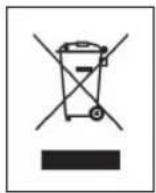
Disposal of your old appliance
-
This crossed-out wheeled bin symbol indicates that waste electrical and electronic products (WEEE) should be disposed of separately from the municipal waste stream.
-
Old electrical products can contain hazardous substances so correct disposal of your old appliance will help prevent potential negative consequences for the environment and human health. Your old appliance may contain reusable parts that could be used to repair other products, and other valuable materials that can be recycled to conserve limited resources.
-
You can take your appliance either to the shop where you purchased the product, or contact your local government waste office for details of your nearest authorised WEEE collection point. For the most up to date information for your country please see www.lg.com/global/recycling
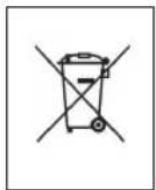
Disposal of waste batteries/accumulators
-
When this crossed-out wheeled bin symbol is attached to batteries/accumulators of Your product it means they are covered by European Directive 2006/66/CE.
-
This symbol may be combined with chemical symbols for mercury(Hg), cadmium(Cd) or lead(Pb) if the battery Contains more that 0.0005% of mercury, 0.002% of cadmium or 0.004% of lead.
-
All batteries/accumulators should be disposed separately from the municipal waste stream via designated collection facilities appointed by the government or the local authorities.
-
The correct disposal of Your old batteries/accumulators will help to prevent potential negative consequences for the environment, animal and human health.
-
For more detailed information about disposal of Your old batteries/accumulators, please contact Your city office, waste disposal service or the shop where You purchased the product.

Removal of waste batteries and accumulators
(Product with embedded battery ONLY)
In case this product contains a battery incorporated within the product which cannot be readily removed by end-users, LG recommends that only qualified professionals remove the battery, either for replacement or for recycling at the end of this product's working life. To prevent damage to the product, and for their own safety, users should not attempt to remove the battery and should contact LG Service Helpline, or other independent service providers for advice.
Removal of the battery will involve dismantling of the product case, disconnection of the electrical cables/contacts, and careful extraction of the battery cell using specialized tools. If you need the instructions for qualified professionals on how to remove the battery safely, please visit http://www.lge.com/global/sustainability/environment/take-back-recycling
Warranty Certificate
For offer a 12-month warranty for this apparatus
During the 12-month warranty period, (Battery : 12month, Inverter motor : 10 years) we will repair your apparatus at no cost to you or make available spare parts to your dealer free, if this apparatus fails due to manufacturing or material defects. Further claims are excluded.
We are not liable for damages due to acts of providence or damages occurring during transport. The buyer assumes shipping and packaging costs.
Type of apparatus:
Serial number:
Name of buyer:
Purchase date:
Dealer's stamp and signature
Warranty conditions for vacuum cleaner
- The warranty period begins on the purchase date and is valid for 12 months. Begin of warranty period is proven if, the buyer submits purchase receipt together with the warranty card, filled in and signed by the seller. The serial number of the product must agree with the number entered onto the warranty card.
- During the warranty period, we will correct any defects at no cost to you, if it can be proven that these are attributed to manufacturing or material defects.
-
Damages due to incorrect handling, non-compliance with instructions for use and normal wear are not covered by this warranty. Also, the warranty does not cover wear parts or easily broken parts (for example, viewing glass, light bulbs). The buyer is responsible for any damages during transport as well as shipping and packaging costs.
-
We decide whether to make repairs, exchange or replace parts. Exchanged or replaced parts are our property. The original warranty period is not prolonged if the product is repaired or certain parts are replaced.
- The warranty is nullified if any person intervenes in the apparatus that are not authorised by LG Electronics, if the apparatus is used for commercial purposes.
- Always keep the original packaging, so that if the apparatus requires servicing, it can be transported without damaging it.
- If a repair is covered by this warranty, always contact your dealer or an authorised service centre.
- Further claims are excluded. If parts of these provisions are invalid, they apply in the sense of the wording. The validity of the other provisions is not effected.
Certificat de garantie
Productspecifications 22
natural_image
Illustration of hands using a vacuum cleaner to lift a surface, enclosed in a dashed circular border (no text or symbols)Druk op de aan/uit-schakelaar om het apparaat in te schakelen. Toccare l'interruttore di alimentazione per accendere l'apparecchiatura.
text_image
Uitstulping, Soggia Opening Fessura
text_image
Groef Scanalatura Uitsteeksel Sporgenzanatural_image
Technical line drawing of a mechanical component with dashed circular outline (no text or symbols)Batterij volledig opgeladen
Batteria completamente carica

text_image
latterij volledig opgeladen a completamente carica① De stekker van het sterilisatiestation moet in het stopcontact zitten om het station te kunnen gebruiken.
① La spina della base di sterilizzazione deve essere inserita nella presa per poter utilizzare la base.
natural_image
Illustration of a child ice skating on a bed, enclosed in a dashed circle (no text or symbols)Kussens
Cuscini, cuscinetti, ecc.

natural_image
Illustration of a cartoon character sliding down a scooter, enclosed in a dashed circle (no text or symbols)Dun beddengoed
Copriletti
natural_image
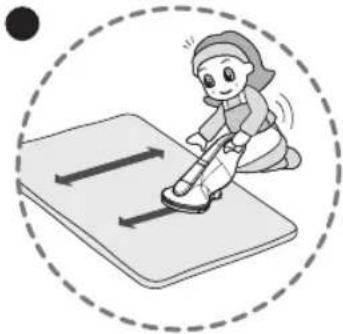
Illustration of a person using a roller skates on a mat, enclosed in a dashed circle (no text or symbols)① Bedden: matras, beddengoed Accessori per il letto: materassi, piumini
natural_image
Technical line drawing of a mechanical clamp or clamp device (no text or symbols)natural_image
Technical line drawing of a mechanical component with mounting base (no text or symbols)
natural_image
Line drawing of a hand using a vacuum cleaner to clean or install a component, enclosed in a dashed circle (no text or symbols)natural_image
Technical line drawing of a mechanical component with dashed circular outline (no text or symbols)
text_image
Diagram showing a battery with a magnified view of its internal structure, including a battery symbol and text labels.Akku voll geladen
natural_image
Illustration of a child cleaning a bed with a tool, enclosed in a dashed circle (no text or symbols)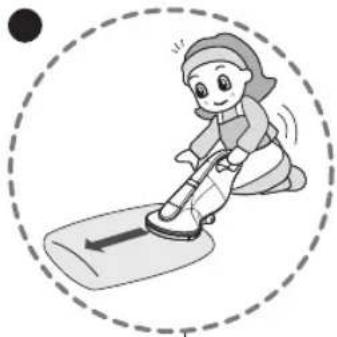
natural_image
Illustration of a child riding a scooter with motion lines (no text or symbols)