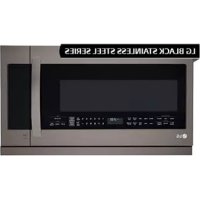
LMV2257BD - Built-in oven LG - Free user manual and instructions
Find the device manual for free LMV2257BD LG in PDF.


| Product Type | Built-in microwave oven with hood |
| Brand | LG |
| Model | LMV2257BD |
| External dimensions (W x H x D) | 75.9 x 45.0 x 40.2 cm (29 7/8 x 17 13/18 x 15 13/16 in) |
| Cavity volume | 2.2 cu. ft. (62 L) |
| Net weight | 27.8 kg (61.2 lb) |
| Power supply | 120 V AC, 60 Hz, 13 A, 1500 W |
| Microwave power | 1000 W (IEC 60705) |
| Power levels | 10 levels (0 to 100%) |
| Main cooking functions | Sensor cooking, quick and timed defrost, reheating, custom cooking, popcorn, kids meals, soften, melt, multi-stage cooking |
| Integrated hood | 4-speed ventilation, sliding hood, grease and carbon filters (replaceable) |
| Lighting | Cooktop lamp (LED) and oven lamp (30 W) |
| Turntable | Glass, with stop function (except in sensor, defrost, etc.) |
| Metal rack | Included, for two-level cooking |
| Safety | Child lock, microwave only with door closed, automatic stop if door opened |
| Display | Clock, timer, function indicators, energy saving mode (screen off after 5 min) |
| Maintenance | Regular cleaning of grease filters (at least once a month), replacement of carbon filter (6-12 months), replaceable oven lamp and cooktop lamp |
| Warranty | 1 year parts and labor, 5 years on magnetron (parts only) |
| Serial number | Located on the front of the oven (see label) |
Frequently Asked Questions - LMV2257BD LG
User questions about LMV2257BD LG
0 question about this device. Answer the ones you know or ask your own.
Ask a new question about this device
Download the instructions for your Built-in oven in PDF format for free! Find your manual LMV2257BD - LG and take your electronic device back in hand. On this page are published all the documents necessary for the use of your device. LMV2257BD by LG.
USER MANUAL LMV2257BD LG
Important Safety Instructions 3
Precautions to Avoid Possible
Exposure to excessive Microwave
Energy 4
UNDERSTANDING YOUR MICROWAVE OVEN ....5-7
Location of Model Number 5
Oven Specifications 5
Electrical Rating 5
Electrical Requirements 5
Grounding Instructions 5
Microwave Oven Features. 6
Control Panel Features 7
Using Glass Touch Controller 7
Learn About Your Microwave Oven 9
Clock 9
Vent ON/OFF 9
Child Lock 9
Audible Signals 10
Interrupting Cooking 10
Slide out Ventilation. 10
Glass touch Controller. 10
Vent 4 Speed. 10
Light Hi/Low/Off 10
Energy Saving. 10
Add 30 Sec. 10
Kids Meal 11
Custom Cook. 11
Custom Set 12
+/- 12
Cooking at High Power Levels 12
Microwave Power Levels 12
Multi Stage Cooking 12
Cooking Guide for Lower Power Levels 13
Turntable On/Off 14
Sensor Operating Instructions 14
Sensor Cooking Guide 14
Sensor Popcorn 14
Sensor Reheat 15
Sensor Cook 15
Cooking Guide for Sensor Reheat. 15
Cooking Guide for Sensor Popcorn. 16
Cooking Guide for Sensor Cook. 16
Timer. 17
Soften 17
Melt 17
Soften Table 18
Melt Table 18
Defrost 19
Quick Defrost 19
Time Defrost 20
Defrost Tips 20
Metal Rack 20
Slide-Out Hood 20
COOKING 21-25
Getting the Best Cooking Results 21
Fish and Shellfish 21
Fish and Shellfish Cooking Table 21
Appetizers /Sauces/Soups 22
Meat 22
Meat Cooking Table 23
Chicken 24
Chicken Cooking Table 24
Pasta and Rice 25
Pasta Cooking Table 25
Rice Cooking Table 25
CARING FOR YOUR MICROWAVE OVEN 26-27
Care and Cleaning 26
Metal Rack 26
Cleaning the Grease Filters 26
Charcoal Filter Replacement 27
Cooktop/Night Light Replacement 27
Oven and Warming Lamp Light Replacement 27
COOKING UTENSILS 28
Microwave Utensil Guide 28
TROUBLESHOOTING 29-30
Before Calling for Service 29
Questions and Answers 30
LIMITED WARRANTY 31
SAFETY
IMPORTANT SAFETY INSTRUCTIONS
The safety instructions below will tell you how to use your oven and avoid harm to yourself or damage to your oven.
WARNING
To reduce the risk
of burns, electric shock, fire, injury to persons, or exposure to excessive microwave energy.
- Read all the instructions before using your oven.
- Do not allow children to use this oven without close supervision.
- Read and follow the specific PRECAUTIONS TO AVOID POSSIBLE EXPOSURE TO EXCESSIVE MICROWAVE ENERGY
found on page 4.
- Do not use corrosive chemicals or vapors, such as sulfide and chloride, in this appliance. This type of oven is specifically designed to heat, cook, or dry food. It is not designed for industrial or laboratory use.
- Do not use or store this appliance outdoors. Do not use this product near water - for example, near a kitchen sink, in a wet basement, or near a swimming pool, and the like.
- Do not use the cavity for storage purposes. Do not leave paper products, cooking utensils, or food in the cavity when not in use.
- Clean the ventilating hood frequently. Do not allow grease to accumulate on the hood or the filters.
- Use care when cleaning the vent hood filters. Corrosive cleaning agents such as lye-based oven cleaners may damage the filters.
- Do not tamper with the built-in safety switches on the oven door. The oven has several built-in safety switches to make sure the power is off when the door is open.
- If food flames under the hood, turn the fan on.
- Suitable for use above both gas and electric cooking equipment 36 inches wide or less.
- Do not use this oven for commercial purposes. It is made for household use only.
- When cleaning the door and the surfaces that touch the door, use only mild, non-abrasive soaps or detergents and a sponge or soft cloth.
If your oven is dropped or damaged have it thoroughly checked by a qualified service technician before using it again.
-
To avoid a fire hazard:
-
Do not severely overcook food. Severely overcooked foods can start a fire in the oven. Watch the oven carefully, especially if you have paper, plastic, or other combustibles in the oven.
- Do not store combustible items (bread, cookies, etc.) in the oven, because if lightning strikes the power lines it may cause the oven to turn on.
- Do not use wire twist-ties in the oven. Be sure to inspect purchased items for wire twist-ties and remove them before placing the item in the oven.
- If materials inside the oven ignite, keep the oven door closed, turn the oven off and disconnect the power cord, or shut off power at the fuse or circuit breaker panel. If the door is opened, the fire may spread.
If a fire should start:
- Keep the oven door closed.
- Turn the oven off.
-
Disconnect the power cord or shut off the power at the fuse or circuit breaker panel.
-
To avoid electric shock:
-
This appliance must be grounded. Connect it only to a properly grounded outlet. See the electrical GROUNDING INSTRUCTIONS on page 5.
- Do not operate this appliance if it has a damaged cord or plug, if it is not working properly or if it has been damaged or dropped.
- Do not immerse the electrical cord or plug in water.
- Keep the cord away from heated surfaces.
Take care when The Door is opened.
There is a possibility of being injured.
NOTE: Turn the microwave's vent fan on whenever you use the oven range cooktop below it. The fan captures smoke, steam, and odors and also prevents the heat from the cooktop from damaging microwave components. If the microwave is cooking, the vent fan turns on automatically if the sensors detect too much heat from the cooktop. This is normal, and is designed to prevent microwave component damage.
SAFETY
-
To avoid improperly cooking some foods.
-
Do not heat any types of baby bottles or baby food. Uneven heating may occur and possibly cause personal injury.
- Do not heat small-necked containers, such as syrup bottles.
- Do not deep-fat fry in your microwave oven.
- Do not attempt home canning in your microwave oven.
-
Do not heat the following items in the microwave oven: whole eggs in the shell, water with oil or fat, sealed containers, or closed glass jars. These items may explode.
-
Do not cover or block any openings in the oven.
- Use your oven only for the operations described in this manual.
- Do not run the microwave empty, without food in it.
-
Do not let cord hang over edge of table or counter.
-
Preserve the oven floor:
-
Do not heat the oven floor excessively.
- Do not allow the gray film on special microwave-cooking packages to touch the oven floor. Put the package on a microwavable dish.
- Do not cook anything directly on the oven floor or turntable. Use a microwavable dish.
- Keep a browning dish at least 3/16 inch above floor. Carefully read and follow the instructions for the browning dish. If you use a browning dish incorrectly, you could damage the oven floor.
-
Install or locate this appliance only in accordance with the provided installation instructions.
-
This appliance should be serviced only by qualified service personnel. Contact the nearest authorized service facility for examination, repair, or adjustment.
- As with any appliance, close supervision is necessary when used by children.
- Liquids, such as water, coffee, or tea can be overheated beyond the boiling point without appearing to be boiling due to surface tension of the liquid. Visible bubbling or boiling when the container is removed from the microwave oven is not always present.
THIS COULD RESULT IN VERY HOT LIQUIDS
SUCDENLY BOILING OVER WHEN THE CONTAINER IS DISTURBED OR A SPOON OR OTHER UTENSIL IS INSERTED INTO THE LIQUID
To reduce the risk of injury to persons; - Do not overheat the liquid.
- Stir the liquid both before and halfway through heating it.
- Do not use straight-sided containers with narrow necks.
- After heating, allow the container to stand in the microwave oven for a short time before removing the container.
- Use extreme care when inserting a spoon or other utensil into the container.
- As with any appliance, close supervision is necessary when the microwave oven is used by children.
- If material inside of the oven should ignite, the oven door should be kept closed, the appliance turned off, the power cord disconnected, or the power shut off at the fuse or circuit breaker panel.
SAVE THESE INSTRUCTIONS
PRECAUTIONS TO AVOID POSSIBLE EXPOSURE TO EXCESSIVE MICROWAVE ENERGY...
(a) Do not attempt to operate this oven with the door open since open-door operation can result in harmful exposure to microwave energy. It is important not to defeat or tamper with the safety interlocks.
(b) Do not place any object between the oven front face and the door or allow soil or cleaner residue to accumulate on sealing surfaces.
(c) Do not operate the oven if it is damaged. It is particularly important that the oven door closes properly and that there is no damage to the:
(1) Door (bent),
(2) Hinges and latches (broken or loosened),
(3) Door seals and sealing surfaces.
(d) The oven should not be adjusted or repaired by anyone except properly qualified service personnel.
Please read this owner's manual. It will tell you how to use all the fine features of this microwave oven.
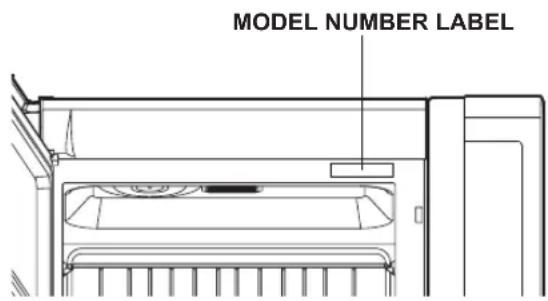
LOCATION OF MODEL NUMBER
To request service information or replacement parts, the service center will require the complete model number of your microwave oven. The number is on the oven front as shown in the illustration below.
OVEN SPECIFICATIONS
Output Power 1,000W (IEC 60705 Standard)
Outer Dimensions 297/8" X 17 13/18" X 15 13/16"
Cavity Volume 2.2 Cu.ft
Net Weight 61.2 lbs.
ELECTRICAL RATING
- Electrical Rating of the Oven:120V AC 60Hz
-
13 Amps / 1500 Watts ( MWO + Cooktop Lamp
-
Ventilation Fan)
ELECTRICAL REQUIREMENTS
The oven is designed to operate on a Standard 120V/60Hz household outlet. Be sure the circuit is at least 15A or 20A and the microwave oven is the only appliance on the circuit. It is not designed for 50Hz or any circuit other than a 120V/60Hz circuit.
GROUNDING INSTRUCTIONS
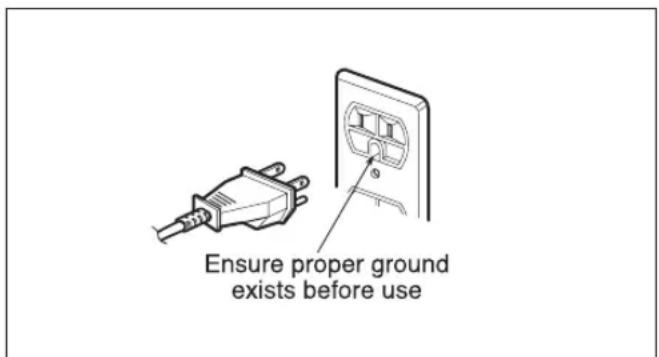
This appliance must be grounded. If an electrical short circuit occurs, grounding reduces the risk of electric shock by providing an escape wire for the electric current. The appliance is equipped with a cord having a grounded wire with a grounded plug. Put the plug into an outlet that is properly installed and grounded.
WARNING -If you use the grounding plug improperly, you risk electric shock.
Ask a qualified electrician if you do not understand the grounding instructions or if you wonder whether the appliance is properly grounded.
Because this appliance fits under the cabinet, it has a short power-supply cord. See the separate Installation Instructions for directions on placing the cord properly. Keep the electrical power cord dry and do not pinch or crush it in any way.
If it is necessary to use an extension cord, use only a 3-wire extension cord that has a 3-blade grounding plug, and a 3-slot receptacle that will accept the plug on the appliance. The marked rating of the extension cord shall be equal to or greater than the electrical rating of the appliance.
For a permanently connected appliance:
This appliance must be connected to a grounded, metallic, permanent wiring system, or an equipment grounding conductor should be run with the circuit conductors and connected to the equipment grounding terminal or lead on the appliance.
Do not operate the oven when empty or without the glass tray. It is best to leave a glass of water in the oven when not in use. The water will safely absorb all microwave energy, if the oven is accidentally started.
Your microwave oven is designed to make your cooking experience as enjoyable and productive as possible. To get you up and running quickly, the following is a list of the oven's basic features:
- Metal Shielded Window. The shield prevents microwaves from escaping. It is designed as a screen to allow you to view food as it cooks.
- Model and Serial Number Plate & Cooking Guide Label
- Charcoal Filter (behind Vent Grille)
- Vent Grille
- Glass Tray. The glass tray moves food as it cooks for more even cooking. It must be in the oven during operation for best cooking results.
- Cooktop/Countertop Light
-
Control Panel. Touch the pads on this panel to perform all functions.
-
Metal Rack. Use for extra space when cooking in more than one container at the same time. Remove cooking rack when you are not using it.
- Grease Filter
- Slide-Out Hood.
Push the Slide-out hood to move the slide-out hood to the Front or Rear.
This will allow you to remove the steam and other vapors more effectively from surface cooking.
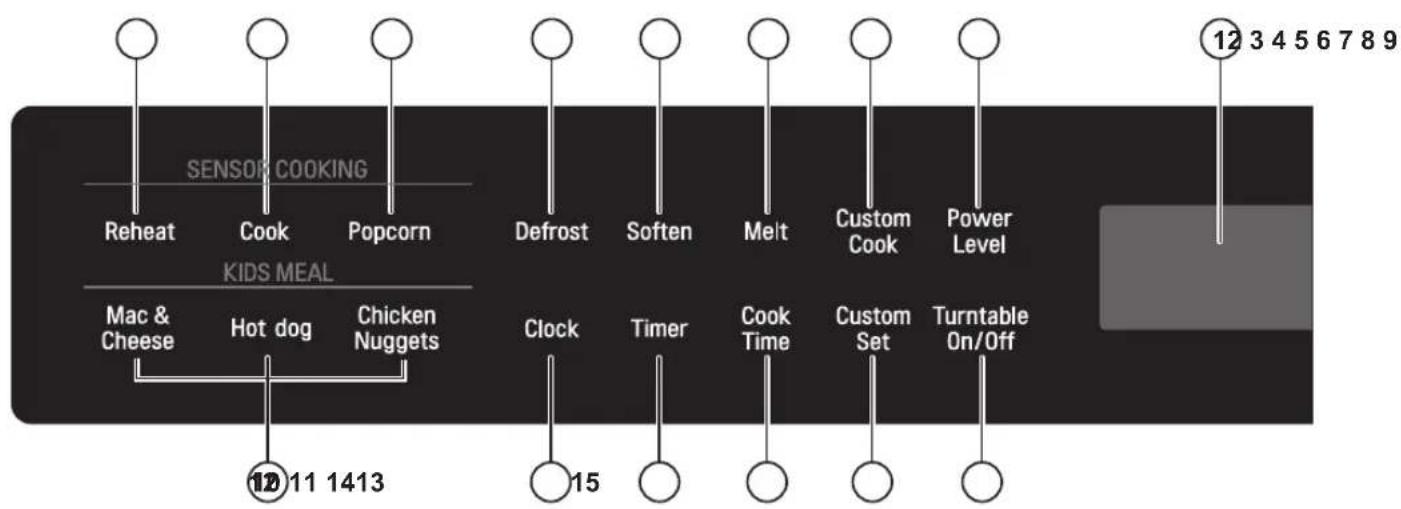
Your microwave oven control panel lets you select the desired cooking function quickly and easily. All you have to do is touch the necessary Command pad. The following is a list of all the Command and Number pads located on the control panel. For more information on these features, see the OPERATION section.

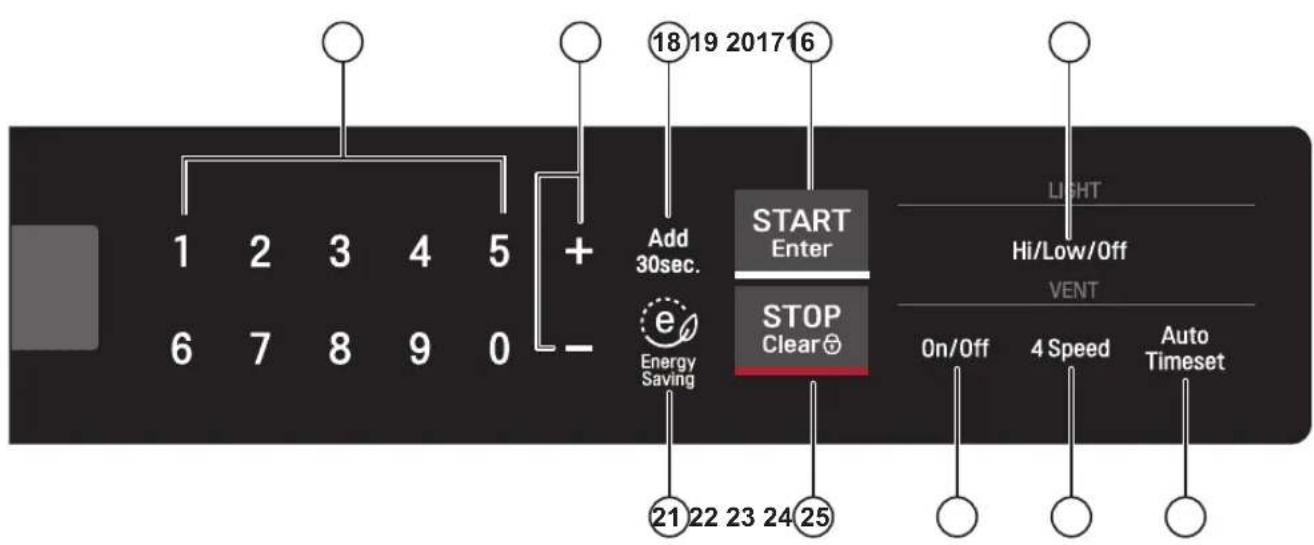
- Touch the middle of letter or number to activate.
- If you touch the button with a fingernail or fingertip, the controller may not sense it is being touched.
- If the controller or your hands are wet it may not sense your touch.
- Remove gloves prior to touching the controller.
NOTE: Styling and features vary by model.
- Display. The Display includes a clock and indicators to tell you time of day, cooking time settings and cooking functions selected.
- Reheat. Reheat has preset Power Levels for 6 categories including a casserole, dinner plate, and soup/sauce. The oven's sensor will tell the oven how long to cook depending on the amount of humidity it detects from the food.
- Cook. Cook has preset Power Levels for 13 categories including frozen lasagna, casseroles, and rice. The oven's sensor will tell the oven how long to cook depending on the amount of humidity it detects from the food.
- Popcorn. Touch this button when popping popcorn in your microwave oven. The oven's sensor will tell the oven how long to cook depending on the amount of humidity it detects from the popcorn.
- Defrost. Touch this button to defrost frozen food.
- Soften. Touch this button to soften butter, ice cream, cream cheese, frozen juice.
- Melt. Touch this button to melt butter or margarine, chocolate, cheese, and marshmallows.
- Custom Cook. Touch this button to make oven remember Cook time and Power level.
- Power Level. Touch this button to select a cooking power level.
- Kids Meal. Select type of dish to reheat Mac & Cheese, Hot dog or Chicken nuggets.
- Clock. Touch this button to enter the time of day.
-
Timer. Touch this button to start the kitchen timer.
-
Cook Time. Touch this button to set a cooking time.
- Custom Set. Touch this pad to change the oven's default setting for sound, clock, display speed, and defrost weight.
- Turntable On/Off. Touch this button to turn on/off the turntable. This option is not available in sensor cook, defrost, soften and melt modes.
- Number. Touch number buttons to enter cooking time, power level, quantities or weights.
- +, -. Touch this button to add or subtract ten seconds of cooking time each time you touch it.
- Add 30Sec. Touch this button to add 30 seconds of cooking time each time you touch it.
- START/Enter. Touch this button to start a function. If you open the door after the oven begins to cook, touch START/Enter again.
- Light High/Low/Off. Touch this button to turn the cooktop/ countertop light on high/low or off.
- Energy Saving. Touch this button to save energy.
- STOP/Clear. Touch this button to stop the oven or clear all entries.
- Vent On/Off. Touch button to turn the vent on slow or off.
- Vent 4 Speed. Touch button to change vent speed.
- Vent Auto Timeset. Touch this button to set ventilation time. (1, 3, 5, 10, and 30 minutes.)
This section discusses the concepts behind microwave cooking and introduces you to the basics you need to know to operate your microwave oven. Please read this information before using your oven.
CAUTION
To avoid risk of personal injury or property damage, do not run the oven empty.
To avoid risk of personal injury or property damage, do not use stoneware, large sheets of aluminum foil, metal utensils, or metal trimmed utensils in the oven. Keep aluminum foil at least 1 inch from the oven wall metal rack and other pieces of foil.
CLOCK
When the oven is first plugged into a power outlet, the "Please Set Time of Day" prompt will flash several time. If a time of day is not set, :, will Show on Disply until you touch "CLOCK".
Example: To set the clock for 8:00 am
CLOCK
- Touch CLOCK.
800
- Enter the time by using the number keys.
START
- Touch START/ENTER
1
- Press 1 for AM, 2 for PM.
START
- Touch START/ENTER.
VENT ON/OFF
The fan moves steam and other vapors from the cooking surface.
On/Off
- Touch Vent On/Off.
Touch once. "FAN SLOW"
will scroll in the display.
Fan will work on slow speed.
On/Off
- Touch Vent On/Off.
Fan will turn off. "FAN OFF" will scroll in display.
NOTE: Turn the microwave's vent fan on whenever you use the oven range cooktop below it. The fan captures smoke, steam, and odors and also prevents the heat from the cooktop from damaging microwave components.
If the microwave is cooking, the vent fan turns on automatically if the sensors detect too much heat from the cooktop. This is normal, and is designed to prevent microwave component damage.
CHILD LOCK
Use this safety feature to lock the control panel when you are cleaning the oven, or so that children cannot use the oven unsupervised.
Example: To set the child lock.
STOP
Clear
- Touch and hold STOP/Clear
until you hear 2 beeps and
"LOCKED" appears
(approximately 4 seconds).
Example: To cancel the child lock.
STOP
Clear
- Touch and hold STOP/Clear
until "LOCKED" disappears
(approximately 4 seconds).
Audible signals are available to guide you when setting and using your oven:
- A beep will sound each time you touch a button.
- 4 beeps signals the end of a cooking cycle.
INTERRUPTING COOKING
You can stop the oven during a cycle by opening the door. The oven stops heating and the fan stops, but the light stays on.
To restart cooking, close the door and touch START/Enter.
If you do not want to continue cooking, open the door and touch STOP/Clear.
SLIDE OUT VENTILATION
Push bottom of unit to extend hood and back side down, Extended hood is more powerful to gather smoke and steam from cooktop.
- Touch the middle of letter or number to activate.
- If you touch the button with a fingernail or fingertip, the controller may not sense it is being touched.
- If the controller or your hands are wet it may not sense your touch.
- Remove gloves prior to touching the controller.
- Use the child lock feature when cleaning the controller to avoid unintended activation.
VENT 4 SPEED
4 Speed
When the fan is on, touch this button to toggle the fan speed. Fan speed will change in sequence from slow, low, high, turbo and back to slow.
LIGHT HI/LOW/OFF
The button on the right of the control panel controls the cooktop light.
Hi/Low/Off
- Touch Light Hi/Low/Off.
To turn on, touch once. "Light" will flash in display, then stay on.
Hi/Low/Off
- Touch Light Hi/Low/Off.
To turn off, touch button again. "Light" will disappear from the display.
ENERGY SAVING
The Energy Saving feature saves energy by turning off the display by pressing the Energy Saving button. The display will automatically turn off after 5 minutes of idleness.
-
Touch Energy Saving to turn the display off.
-
Touch Energy Saving to turn the display on.
ADD 30 SEC
A time-saving button, this simplified control lets you quickly set and start microwave cooking without the need to touch START/Enter.
Add 30sec.
Touch Add 30 Sec. 4 times. The oven begins cooking and the display shows time counting down.
NOTE: If you continue to touch Add 30 Sec., it will add 30 seconds up to 99 min 59 seconds.
Using KIDS MEAL lets you heat common microwave-prepared foods without needing to program times and cook power. MAC & CHEESE, HOT DOG, CHICKEN NUGGETS.
Example: To heat 4 ea Hot Dogs.
HOTDOG
- Touch HOT DOG.
2
- Touch 2.
START Enter
- Touch START/ENTER.
NOTE: When the cook time is over, you will hear four beeps and "COOK END" will disply.
KIDS MEAL TABLE
| Category | Touch Pad number | |
| 1 | 2 | |
| MAC & CHEESE | 6 oz. | 12 oz. |
| HOT DOG | 2 ea | 4 ea |
| CHICKEN NUGGETS | 4 oz. | 8 oz. |
CUSTOM COOK
CUSTOM COOK lets you to recall one cooking instruction previously placed in memory and begin cooking quickly.
Example: To memorize for 2 minutes.
Custom Cook
- Touch Custom Cook.
200
- Enter the cook time.
START Enter
- Touch START/Enter.
Example: To recall the memory.
Custom Cook
- Touch Custom Cook.
START Enter
- Touch START/Enter. When the cook time is over, you will hear four beeps and END will display.
You can change the default values for beep sound, clock, display speed, and defrost weight.
See following chart for more information.
| No. | Function No. Result | ||
| 1 | Sound ON/ 1 Sound ON OFF control 2 Sound OFF | ||
| 2 | Clock ON/ 1 Clock OFF control | ON 2 | Clock OFF |
| 3 | Scroll speed control | 1 Slow speed 2 Normal speed 3 Fast speed | |
| 4 | Defrost weight mode selected | 1 Lbs. 2 Kg. | |
| Example: To change defrost weight mode (from Lbs. to Kg). | |
| CUSTOM SET | 1. Touch CUSTOM SET. |
| 4 | 2. Touch 4. |
| 2 | 3. Touch 2. |
+/-
By using the MORE or LESS keys, TIMED COOK program can be adjusted to cook food for a longer or shorter time. Pressing ^+ will add 10 seconds to the cooking time each time you press it. Pressing - will subtract 10 seconds of cooking time each time you press it.
COOKING AT HIGH POWER LEVELS
| Example: To cook food for 8 minutes 30 seconds at 100% power. | |
| 8 3 0 | 1. Enter the cook time. |
| START Enter | 2. Touch START/ENTER. |
| When the cook time is over, four beeps will sound and COOK END will display. | |
This feature lets you program a specific cook time and power. For best results, there are 10 power level settings in addition to HIGH (100%) power.
Refer to the "Cooking Guide for Lower Power Levels" on page 13 for more information.
NOTE: If you do not select a power level, the oven will automatically cook at HIGH (100%) power.
| Example: To cook food for 7 minutes 30 seconds at 70% power. | |
| 7 3 0 POWER LEVEL 7 START Enter | 1. Enter the cook time. 2. Touch POWER LEVEL. 3. Enter the power level. 4. Touch START/ENTER. When the cook time is over, four beeps will sound and COOK END will display. See cooking guide for Lower Power Levels, page 13. |
MULTI STAGE COOKING
For best results, some recipes call for different cook powers during different stages of a cook cycle. You can program your oven to switch from one power to another for up to 2 stages. 3 stages can be programmed the first stage is the defrost cycle.
| Example: To cook food for 3 minutes at 100% power and then 70% power for 7 minutes 30 seconds. | |
| 3 0 0 | 1. Enter the first cook time. |
| COOK TIME | 2. Touch COOK TIME. |
| 7 3 0 | 3. Enter the second cook time. |
| POWER LEVEL | 4. Touch POWER LEVEL. |
| 7 | 5. Enter the power level. |
| START Enter | 6. Touch START/ENTER. |
| When the cook time is over, four beeps will sound and COOK END will display. | |
The 10 power levels in addition to HIGH allow you to choose the best power level for the food you are cooking. Below are listed all the power levels, examples of foods best cooked at each level, and the amount of microwave power you are using.
| POWER LEVEL | MICROWAVE OUTPUT | USE |
| 10 High 100% | ·Boil water ·Cook ground beef ·Make candy ·Cook fresh fruits and vegetables ·Cook fish and poultry ·Preheat browning dish ·Reheat beverages ·Cook bacon slices | |
| 9 | 90% | ·Reheat meat slices quickly ·Saute onions, celery, and green pepper |
| 8 | 80% | ·All reheating ·Cook scrambled eggs |
| 7 | 70% | ·Cook breads and cereal product ·Cook cheese dishes, veal ·Cook cakes, muffins, brownies, cupcakes |
| 6 | 60% | ·Cook pasta |
| 5 | 50% | ·Cook meats, whole poultry ·Cook custard ·Cook whole chicken, turkey, spare ribs, rib roast, sirloin roast |
| 4 | 40% | ·Cook less tender cuts of meat ·Reheat frozen convenience foods |
| 3 | 30% | ·Thaw meat, poultry, and seafood ·Cook small quantities of food ·Finish cooking casseroles, stews, and some sauces |
| 2 | 20% | ·Soften butter and cream cheese ·Heat small amounts of food |
| 1 | 10% | ·Soften ice cream ·Raise yeast dough |
| 0 | 0 | ·Standing time |
For best cooking results, leave the turntable on.
It can be turned off for large dishes. Touch TURNTABLE ON/OFF pad to turn the turntable on or off.
NOTES:
- This option is not available in sensor cook, defrost, kids meal, soft and melt modes.
- Sometimes the turntable can become hot to touch. Be careful touching the turntable during and after cooking.
- Do not run the oven empty.
SENSOR OPERATING INSTRUCTIONS
Used to cook foods without selecting cooking times and power levels. The display will indicate the sensor category during the initial sensing period. The oven automatically determines the required cooking time for each food item.
When the internal sensor detects a certain amount of humidity coming from the food, it will tell the oven how much longer to heat. The display will show the remaining heating time. For best results for cooking by Sensor, follow these recommendations:
- Food cooked with the sensor system should be at normal storage temperature.
- The glass tray and the outside of the container should be dry to assure best cooking results.
- Foods should always be covered loosely with microwavable plastic wrap, waxed paper, or a lid.
- Do not open the door or touch STOP/CLEAR during the sensing time. When sensing time is over, the oven beeps twice and the remaining cooking time will appear in the display window. At this time you can open the door to stir, turn, or rearrange the food.
SENSOR COOKING GUIDE
Appropriate containers and coverings help assure good Sensor cooking results.
- Always use microwavable containers and cover them with lids or vented plastic wrap.
- Never use tight-sealing plastic covers. They can prevent steam from escaping and cause food to overcook.
- Match the amount to the size of the container. Fill containers at least half full for best results.
-
Be sure the outside of the cooking container and the inside of the microwave oven are dry before placing food in the oven. Beads of moisture turning into steam can mislead the sensor.
-
If the food is not as hot as you would like after using the sensor cook or reheat function, use Cook Time to continue heating. Do not repeat the sensor options in succession on the same food.
SENSOR POPCORN
SENSOR POPCORN lets you pop 2.0,3.0 and 3.5 ounce bags of commercially packaged microwave popcorn. Pop only one package at a time. If you are using a microwave popcorn popper, follow manufacturer's instructions.
Example: To pop popcorn.
POPCORN
- Touch POPCORN.
When the cook time is over, four beeps will sound and COOK END will display.
Recommended amounts: 2.0-3.5 oz.
CAUTION
DO NOT leave microwave oven unattended while popping corn.
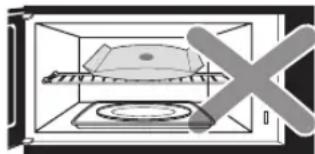
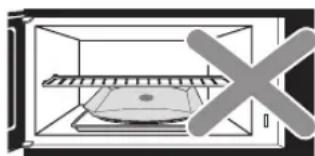
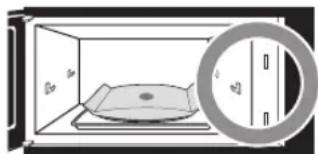
When popping commercially packaged popcorn, remove the rack from the oven. Do not place the bag of microwave popcorn on the rack or under the rack.
Reheat lets you heat foods without needing to program times and Power Levels.
Reheat has preset Power Levels for 6 categories. See the details in the cooking guide table.
Example: To reheat a Casserole.
Reheat 1. Touch Reheat.
3 2. Touch 3 to choose casserole and cooking will start 3 4 second later.
See Cooking Guide for Sensor Reheat table below for info. When the cook time is over, you will hear four beeps and "COOK END" will display.
SENSOR COOK
Using Cook lets you heat common microwave prepared foods without needing to program times and Cook Powers. Sensor Cook has preset Power Levels for 13 food categories. See the details in the cooking guide table.
Example: To cook Rice.
Cook 1. Touch Cook.
6 2. Touch 6 to choose rice and cooking will start 3-4 second later.
See Cooking Guide for Sensor Cook on page 16. When the cook time is over, you will hear four beeps and "COOK END" will display.
COOKING GUIDE FOR SENSOR REHEAT
| CODE (Press times) | CATEGORY | RECOMMENDED AMOUNTS | DIRECTIONS |
| 1 | DINNER PLATE | 1 ~ 2 servings | Place food on a plate. Cover with vented plastic wrap. Let stand 3 minutes after heating. |
| 2 | SOUP/SAUCE | 1 ~ 4 cups | Place in shallow microwavable casserole. Cover with vented plastic wrap. Let stand 3 minutes after heating. |
| 3 | CASSEROLE | 1 ~ 4 cups | Place in a microwaveable bowl or casserole. Cover with vented plastic wrap. Let stand 3 minutes. |
| 4 | PIZZA | 1 ~ 3 slices | This is a reheat function for leftover pizza. Place on paper towel on a microwave safe plate. |
| 5 | BAKED GOODS | 1 ~ 4 ea. | Place on a paper towel. Do not cover. |
| 6 | TEA | 1 ~ 2 cups (240ml per cup) | Use a mug or microwave-safe cup with no cover. Stir after reheating. |
COOKING GUIDE FOR SENSOR POPCORN
| CATEGORY | RECOMMENDED AMOUNTS | DIRECTIONS |
| POPCORN | 2.0 - 3.5 oz. | Sensor Popcorn lets you pop commercially packaged microwave popcorn. Pop only one package at a time. For best results, use a fresh bag of popcorn. Place a bag of prepackaged microwave popcorn on the center of the glass tray. |
COOKING GUIDE FOR SENSOR COOK
| CODE(Press times) | CATEGORY | RECOMMENDED AMOUNTS | DIRECTIONS |
| 1 | FRESHVEGETABLE(Hard) | 1 ~ 4cups | Place in a microwaveable bowl or casserole. Add water according to the quantity* 1-2 cups: add 2 tbsp water.* 3-4 cups: add 4 tbsp water.Cover with vented plastic wrap.Let stand 3 minutes after cooking.Hard vegetables : Carrot, Beet etc.Soft vegetables : Cauliflower, Broccoli, Spinach etc. |
| 2 | FRESHVEGETABLE(Soft) | 1 ~ 4cups | |
| 3 | FROZENVEGETABLE | 1 ~ 4cups | Place in a microwaveable bowl or casserole.* 1-2 cups: add 2 tbsp water.* 3-4 cups: add 4 tbsp water.Cover with vented plastic wrap. Let stand 3 minutes. |
| 4 | CANNEDVEGETABLE | 1 ~ 4cups | Transfer vegetables from the can to a microwaveable bowl or casserole.Cover with vented plastic wrap. Stir thoroughly after cooking. |
| 5 | BAKEDPOTATO | 1 ~ 4 ea(approx.8 - 10oz. each) | Pierce skin with a fork and place on paper towel. Do not cover. Let stand 5 minutes after cooking. |
| 6 RICE | 1/2 ~ 2cups | Add twice as much water as you have rice (add 2 cups water to 1 cup rice). Place in a microwaveable bowl large enough to prevent the water from boiling over.Cover with vented plastic wrap. Let stand 5 minutes after cooking. | |
| 7 | FROZENLASAGNA | 10 ~ 21 oz. | Remove from outer display package. Slit cover. If not in microwave-safe container, place on a microwaveable plate and cover with vented plastic wrap. |
| 8 | FISH FILLET | 4 ~ 16 oz. | Place fish fillets in a single layer and cover with vented plastic wrap. |
| 9 SHRIMP | 4 ~ 16 oz. | Place shrimp in a single layer and cover with vented plastic wrap. | |
| 10 | CHICKEN PIECES | 16 ~ 32 oz. | Place chicken pieces with skin side up and cover with vented plastic wrap. |
| 11 | GROUNDMEAT | 4 ~ 16 oz. | Cover with plastic wrap. Stir thoroughly after cooking. |
| 12 CASSEROLE | 1 ~ 4 cups | Place in a microwaveable bowl or casserole. Cover with vented plastic wrap.Let stand 3 minutes after cooking. | |
| 13 | BOILINGWATER | 1 ~ 2 cups(240ml per cup) | Use a wide-mouth mug. Do not cover.(Be careful! The beverage will be very hot! Sometimes liquids heated in cylindrical containers will splash out unexpectedly when the cup is moved.) |
You can use your microwave oven as a timer. Use the Timer for timing up to 99 minutes, 99 seconds.
Example: To count 3 minutes.
Timer
300
START Enter
- Touch Timer.
- Enter the time by using the number key pad.
- Touch START/ENTER. When the time is over, you will hear seven beeps and END will display.
NOTE: To turn off the Timer while it is still running, touch the Timer button.
SOFTEN
The oven uses low power to soften foods (butter, ice cream, cream cheese, and frozen juice.) See the following table.
MELT
The oven uses low power to melt foods (butter or margarine, chocolate, marshmallows, or processed cheese food.) See the following table.
Example: To melt 8 oz. chocolate.
MELT
- Touch MELT.
2
- Choose food category. Touch 2 for chocolate.
2
- Choose food amount. Touch 2 for 8 oz.
START Enter
- Touch START/ENTER.
MELT TABLE
| Category Amo | Touch Pad Number | |
| Butter / Margarine 1 | 1,2,3 sticks | |
| Chocolate 2 4,8 oz. | ||
| Cheese 3 8,16 oz. | ||
| Marshmallows | 4 5,10 oz. |
Example: To soften quart of ice cream.
SOFTEN
2
-
Touch SOFTEN.
-
Choose food category. Touch 2 for ice cream.
2
- Choose food amount. Touch 2 for quart.
START Enter
- Touch START/ENTER.
SOFTEN TABLE
| Category | Touch Pad Number | Amount |
| Butter 1 1,2,3 sticks | ||
| Ice cream 2 | Pint, Quart, Half gallon | |
| Cream cheese 3 3, 8 oz. | ||
| Frozen juice 4 6,12,16 oz. | ||
| NOITCERID YROGETAC | AMOUNT | |
| Butter | Unwrap and place in a microwave safe dish on the rack over the glass tray. Butter will be at room temperature and ready for use in recipe. | 1, 2, or 3 sticks (4 oz. / 1 stick) |
| Ice Cream | Place in a microwave safe dish on the rack over the glass tray. Ice cream will be soft enough to make scooping easier. | Pint, Quart, Half gallon |
| Cream Cheese | Unwrap and place in a microwave safe dish on the rack over the glass tray. Cream cheese will be at room temperature and ready for use in recipe. | 3 or 8 oz. |
| Frozen Juice | Remove top. Place in oven. Frozen juice will be soft enough to mix easily with water. | 6, 12, or 16 oz. |
MELT TABLE
| NOITCERID YROGETAC AMOUNT | ||
| Butter or Margarine | Unwrap and place in a microwave safe dish on the rack over the glass tray. No need to cover butter. Stir at the end of cooking to complete melting. | 1, 2, or 3 sticks (4 oz. / 1 stick) |
| Chocolate | Chocolate chips or squares of baking chocolate may be used. Unwrap squares and place in a microwave safe dish on the rack over the glass tray. Stir at the end of cycle to complete melting. | 4 or 8 oz. |
| Cheese | Use processed cheese food only. Cut into cubes. Place in a single layer in a microwave safe dish on the rack over the glass tray. Stir at the end of cooking to complete melting. | 8 or 16 oz. |
| Marshmallows | Large or miniature marshmallows may be used. Place in a microwave safe dish on the rack over the glass tray. Stir at the end of cycle to complete melting. | 5 or 10 oz. |
Four defrost choices are preset in the oven. The defrost feature provides you with the best defrosting method for frozen foods, because the oven automatically sets the defrosting times for each food item according to the weight you enter. For added convenience, the DEFROST includes a built-in tone mechanism that reminds you to check, turn over, separate, or rearrange the food during the defrost cycle. Four different defrosting options are provided.
- MEAT
- POULTRY
- FISH
- BREAD
After touching DEFROST once, select the food category. Available weight ranges for Meat, Poultry, and Fish are 0.1 to 6.0 lbs. The available weight range for Bread is 0.1 to 1.0 lb.
Example : To defrost 1.2 lbs of meat
Defrost
- Touch Defrost once to choose the Meat category.
1
- Touch 1 to choose meat.
12
- Enter the weight.
START Enter
- Touch START/Enter.
NOTE: After you touch START/ENTER, the display counts down the defrost time. The oven will beep once during the Defrost cycle. At this time, open the door and turn, separate, or rearrange the food as needed. Remove any portions that have thawed, then return frozen portions to the oven and touch START/ENTER to resume the defrost cycle. The oven will not stop during the BEEP unless the door is opened.
For best results:
- Remove fish, shellfish, meat, and poultry from its original closed paper or plastic package (wrapper). Otherwise, the wrap will hold steam and juice close to the foods, which can cause the outer surface of the foods to cook.
- Form the meat into the shape of a doughnut before freezing. When defrosting, scrape off thawed meat when the beep sounds and continue defrosting.
- Place foods in a shallow glass baking dish or a on a microwave roasting rack to catch drippings.
- Foods should still be somewhat icy in the center when removed from the oven.
DEFROST TABLE
| Category Food | |
| MEAT 0.1 to 6.0 lbs | BEEF Ground beef, Round steak, Cubes for stew, Tenderloin steak, Pot roast, Rib roast, Rump roast, Chuck roast, Hamburger patty. LAMB Chops (1-inch thick), Rolled roast PORK Chops (1/2-inch thick), Hot dogs, Spareribs Country-style ribs. Rolled roast, Sausage. |
| POULTRY 0.1 to 6.0 lbs | POULTRY Whole (under 4 lbs), Cut up, Breasts (boneless) CORNISH HENS Whole TURKEY Breast (under 6 lbs) |
| FISH 0.1 to 6.0 lbs | FISH Fillets, Whole Steaks SHELLFISH Crab meat, Lobster tails, Shrimp, Scallops |
| BREAD 0.1 to 1.0 lb | MUFFINS ROLL CAKE |
QUICK DEFROST
This is a quick defrost feature that allows you to choose a preset 1.0 lbs. defrost cycle.
| Example: To defrost for 1.0 lbs. | |
| Defrost | 1. Touch Defrost twice. |
| START Enter | 2. Touch START/Enter. |
| 3. Halfway through the cycle, the oven will beep. Open the door, turn the meat over, Close the door, and touch START/Enter to resume defrosting until the cycle ends. | |
When the defrost time is over, four beeps will sound and "COOK END" will display.
This feature allows you to choose the time you want to defrost.
Example: To defrost for 2 minutes.
DEFROST
- Touch DEFROST 3 times.
200
- Enter the defrosting time you want.
START
Enter
- Touch START/ENTER.
(Defrost starts)
When the defrost time is over, four beeps will sound and COOK END will display.
DEFROST TIPS
- When using
entered is the net weight in pounds and tenths of pounds (the weight of the food minus the container).
- Before starting, make sure you have removed any of the metal twist-ties which often come with frozen food bags, and replace them with strings or elastic bands.
- Open containers such as cartons before they are placed in the oven.
- Always slit or pierce plastic pouches or packaging.
- If food is foil wrapped, remove foil and place food in a suitable container.
- Slit the skins, if any, of frozen food such as sausage.
- Bend plastic pouches of food to ensure even defrosting.
- Always underestimate defrosting time. If defrosted food is still icy in the center, return it to the microwave oven for more defrosting.
The length of defrosting time varies according to how solidly the food is frozen.
- The shape of the package affects how quickly food will defrost. Shallow packages will defrost more quickly than a deep block.
- As food begins to defrost, separate the pieces. Separated pieces defrost more easily.
- Use small pieces of aluminum foil to shield parts of food such as chicken wings, leg tips, fish tails, or areas that start to get warm. Make sure the foil does not touch the sides, top, or bottom of the oven. The foil can damage the oven lining.
- For better results, let food stand after defrosting. (For more information on standing time, see the "Microwave Cooking Tips" section.)
- Turn food over during defrosting or standing time. Break apart and remove food as rquired.
METAL RACK
CAUTION
To avoid risk of property damage:
Do not use rack to pop popcorn.
Rack must be on the four plastic supports when used.
Use the rack only when cooking food on rack position.
Do not cook with rack on floor of the oven.
The metal rack gives you extra space when cooking in more than one container at the same time.
To use rack:
- Place rack securely in the four plastic supports.
- Rack MUST NOT touch metal walls or back of microwave oven.
- Place equal amounts of food both ABOVE AND BELOW rack.
- Amount of food must be approximately the same to balance out cooking energy.
SLIDE-OUT HOOD
CAUTION
- Do not place any objects on the slide-out hood as they could fall and be damaged.
- Do not pull on slide-out hood or damage may occur.
- Do not spill food or liquid on slide-out hood. Spillage of liquid or food may result in electric shock or oven malfunction.
Make sure the slide-out hood has been moved back to rear before your microwave oven or range cooking start. - Strictly install the microwave oven according to Installation Manual. Install at least 12 inches (30.5cm) above a cooktop.
- Don't leave the cooktop without cookware when cooking, The high temperature of the flame may cause the slide hood melted.
- Close slide hood after finish cooking on cooktop.
SLIDE-OUT VENT HOOD
- Press the slide-out vent hood (marked with "PUSH") to extend it forward. To close it, push the vent hood back until it clicks into place.
- Extension of the slide-out vent hood allows more effective capture of smoke and vapor from range-top cooking.
COOKING
GETTING THE BEST COOKING RESULTS
To get the best results from your microwave oven, read and follow the guidelines below.
- Storage Temperature: Foods taken from the freezer or refrigerator take longer to cook than the same foods at room temperature.
The time for recipes in this book is based on the normal storage temperature of the food. - Size: Small pieces of food cook faster than large ones, pieces similar in size and shape cook more evenly. For even cooking, reduce the power when cooking large pieces of food.
- Natural Moisture: Very moist foods cook more evenly because microwave energy is attracted to water molecules.
- Stir foods such as casseroles and vegetables from the outside to the center to distribute the heat evenly and speed cooking. Constant stirring is not necessary.
- Turn over foods like pork chops, baking potatoes, roasts, or whole cauliflower halfway through the cooking time to expose all sides equally to microwave energy.
- Place delicate areas of foods, such as asparagus tips, toward the center of the dish.
- Arrange unevenly shaped foods, such as chicken pieces or salmon steaks, with the thicker, meatier parts toward the outside of the dish.
-
Shield, with small pieces of aluminum foil, parts of food that may cook quickly, such as wing tips and leg ends of poultry.
-
Let It Stand: After you remove the food from the microwave, cover food with foil or casserole lid and let it stand to finish cooking in the center and avoid overcooking the outer edges. The length of standing time depends on the density and surface area of the food.
- Wrapping in waxed paper or paper towel: Sandwiches and many other foods containing prebaked bread should be wrapped prior to microwaving to prevent drying out.
FISH AND SHELLFISH
Cooking Fish and Shellfish: General Directions
- Prepare the fish for cooking.
- Completely defrost the fish or shellfish.
- Arrange unevenly shaped pieces with thicker parts toward the outside of the dish. Arrange shellfish in a single layer for even cooking.
- The type of cover you use depends on how you cook. Poached fish needs a microwavable lid or vented plastic wrap.
- Baked fish, coated fish, or fish in sauce needs to be covered lightly with waxed paper to keep the coating crisp and sauce from getting watery.
- Always set the shortest cooking time. Fish is done when it turns opaque and the thickest part begins to flake. Shellfish is done when the shell turns from pink to red and the flesh is opaque and firm.
- The Fish and Shellfish Cooking Table below provides specific directions with Power Level and Cooking Time settings for most types of fish and shellfish.
FISH AND SHELLFISH COOKING TABLE
| FISH POWER | R LEVEL COOKING | TIME DIRECTIONS |
| Fish fillets HI 3 | 1/2-41/2 minutes | |
| Fish steaks HI 4 | 1/2-51/2 minutes | |
| Whole fish 7 | 4 | 1/2-6 minutes |
| Scallops HI 3 | 1/2-5 minutes | |
| Shrimp, shelled | HI 3 | 1/2-5 minutes |
COOKING
APPETIZERS/SAUCES/SOUPS
Cooking Appetizers: Tips and Techniques
Recommended
- Crisp crackers, such as melba toast, shredded wheat, and crisp rye crackers are best for microwave use. Wait until party time to add the spreads. Place a paper towel under the crackers while they cook in the microwave oven to absorb extra moisture.
- Arrange individual appetizers in a circle for even cooking.
- Stir dips to distribute heat and shorten cooking time.
Cooking Sauces: Tips and Techniques
- Use a microwavable casserole or glass measuring cup that is at least 2 or 3 times the volume of the sauce.
- Sauces made with cornstarch thicken more rapidly than those made with flour.
Cook sauces made with cornstarch or flour uncovered so you may stir them 2 or 3 times during cooking for a smooth consistency. - To adapt a conventional sauce or gravy recipe, reduce the amount of liquid slightly.
Cooking Soups: Tips and Techniques
Cook soups in a microwavable dish which holds double the volume of the recipe ingredients to prevent boil-over, especially if you use cream or milk in the soup.
- Generally, cover microwaved soups with VENTED plastic wrap or a microwavable lid.
- Cover foods to retain moisture. Uncover foods to retain crispness.
- Avoid overcooking by using the minimum suggested time. Add more time, if necessary, only after checking the food.
- Stirring occasionally will help blend flavors, distribute heat evenly, and may even shorten the cooking time.
- When converting a conventional soup recipe to cook in the microwave, reduce the liquid, salt, and strong seasonings.
Not Recommended
- Appetizers with a crisp coating or puff pastry are best done in a conventional oven with dry heat.
- Breaded products can be warmed in the microwave oven but will not come out crisp.
MEAT
Cooking Meat: General Directions
- Prepare the meat for cooking.
- Defrost completely.
- Trim off excess fat to avoid spattering.
- Place the meat, fat side down, on a microwavable rack in a microwavable dish.
- Use oven cooking bag for less tender cuts of meat.
- Arrange the meat so that thicker portions are toward the outside of the dish.
- Cover the meat with waxed paper to prevent spattering.
Tend the meat as it cooks. - Drain juices as they accumulate to reduce spattering and keep from overcooking the bottom of the meat.
- Shield thin or bony portions with strips of foil to prevent overcooking.
NOTE: Keep the foil at least 1 inch from the oven walls, and do not cover more than one-third of the meat with foil at any one time.
- Let the meat stand covered with foil 10-15 minutes after you remove it from the oven. The internal temperature of the meat may rise from 5 - 10^ during standing time.
The Meat Cooking Table on the next page provides detailed directions, Power Level, and Cooking Time settings for most cuts of meat.
COOKING
MEAT COOKING TABLE
| MEAT | POWER LEVEL | COOKING TIME | DIRECTIONS |
| BEEF Hamburgers, Fresh or defrosted (4 oz. each)1 patty2 patties4 patties | HI | 1-1½ minutes1½-2 minutes2½-2/3½ minutes | Form patties with depression in center of each. Place on microwavable roasting rack. Brush with browning agent, if desired. Cover with waxed paper. Turn over halfway through cooking. Let stand covered 1 minute. |
| Sirloin tip roast (3-4 lbs.) | 5 | 8-10 minutes per poundRARE (135°F)11-13 minutes per poundMEDIUM (155°F) | Place roast fat side down on microwavable roasting rack. Add desired seasonings and cover with waxed paper. Turn meat over halfway through cooking and shield if necessary. Remove roast from microwave oven when desired temperature is reached. Let stand covered with foil 15 minutes. (Temperature may rise about 10°F). |
| LAMB Lamb roast, rolled boneless (3-4 lbs.) | 5 | 11-12 minutes per poundRARE (135°F)12-13 minutes per poundMEDIUM (145°F)13-14 minutes per poundWELL (155°F) | Place roast fat side down on microwavable roasting rack. Brush lamb with marinade or desired seasonings such as rosemary, thyme or marjoram. Cover with waxed paper. Turn roast over after 15 minutes, and again after 30 minutes. Shield if necessary. Remove roast from microwave when desired temperature is reached. Let stand covered with foil 15 minutes. (Temperature may rise about 10°F). |
| PORK Bacon slices2 slices4 slices6 slices10 slices | HI | 1½-2 minutes2-3 minutes4-5 minutes7-8 minutes | Place bacon slices on microwavable roasting rack. Cover with paper towels. After cooking, let stand 1 minute. |
| Chops (5-7 oz. each)2 chops4 chops | 3 | 18-20 minutes per pound15-17 minutes per pound | Place chops in microwavable baking dish. Add desired seasonings and cover with vented plastic wrap. Cook until no longer pink or until internal temperature reaches 170°F. Turn chops over halfway through cooking. Let stand covered 5 minutes. (Temperature may rise about 10°F). |
| Loin Roast, rolled, boneless (3½- 4½lbs.) | 3 | 25-27 minutes per pound(165°F) | Place roast in cooking bag in microwavable dish. Add seasonings and browning agent if desired. Close bag loosely with microwavable closure or string. After cooking, let stand in bag 15 minutes. (Temperature may rise about 10°F.) Internal temperature of pork should reach 170°F before serving. |
| Sausage links, Fresh or Frozen, defrosted (1-2 oz. each)2 links4 links6 links10 links | HI | 45-60 seconds1-1½ minutes1½-2 minutes1¾-2 minutes | Pierce links and place on microwavable roasting rack. Cover with waxed paper or paper towel. Turn over halfway through cooking. After cooking, let stand covered 1 minute. |
COOKING
CHICKEN
Cooking Poultry: General Directions
- Prepare the poultry for cooking.
- Defrost completely.
- Arrange poultry pieces with thicker pieces at the outside edge of the baking dish. When cooking legs, arrange them like the spokes of a wheel.
- Cover the baking dish with waxed paper to reduce spattering.
-
Use a browning agent or cook with a sauce to give a browned appearance.
-
Watch the poultry as it cooks.
- Drain and discard juices as they accumulate.
- Shield thin or bony pieces with small strips of aluminum foil to prevent overcooking. Keep foil at least 1 inch from the oven walls and other pieces of foil.
- Poultry is done when it is no longer pink and the juices run clear. When done, the temperature in the thigh meat should be 180 - 185^ .
- Let the poultry stand after cooking covered with foil for 10 minutes.
The Poultry Cooking Table below provides detailed directions, Power Level, and Cooking Time settings for most cuts and types of poultry.
CHICKEN COOKING TABLE
| CHICKEN | POWER LEVEL | COOKING TIME | DIRECTIONS |
| Chicken pieces (21½-3 lbs.) | HI | 41½-51½ minutes per pound | Before cooking, wash pieces and shake the water off. Place pieces in a single layer in a microwavable baking dish with thicker pieces to the outside. Brush with butter or browning agent and seasonings if desired. Cover with waxed paper. Cook until no longer pink and juices run clear. Let stand covered 5 minutes. |
| Chicken whole (3-31½ lbs.) | HI | 12-13 minutes per pound | Before cooking, wash and shake off water. Place breast side down on a microwavable roasting rack. Brush with butter, or browning agent and seasoning if desired. Cover with waxed paper. Cook 1/3 of estimated time. Turn breast side up, brush with butter, or browning agent. Replace waxed paper. Cook 1/3 of estimated time again. Shield if necessary. Cook remaining 1/3 of estimated time or until no longer pink and juices run clear. Let stand covered with foil 10 minutes. (The temperature may rise about 10°F.) The temperature in the thigh should be 180°F-185°F when the poultry is done. |
| Cornish Hens whole (1-11½ lbs. each) | HI | 6-7 minutes per pound | Before cooking, wash and shake the water off. Tie wings to body of hen and the legs to tail. Place hens breast side down on microwavable rack. Cover with waxed paper. Turn breast side up halfway through cooking. Shield bone ends of drumsticks with foil. Remove and discard drippings. Brush with butter or browning agent and seasonings if desired. Cook until no longer pink and juices run clear. Remove hens from microwave when they reach desired temperature. Let stand covered with foil 5 minutes. (Temperature may rise about 10°F). Temperature in breast should be 170°F before serving. |
COOKING
PASTA AND RICE
Microwave cooking and conventional cooking of pasta, rice, and cereal require about the same amount of time, but the microwave is a more convenient method because you can cook and serve in the same dish. There is no stirring needed and leftover pasta tastes just like fresh cooked when reheated in the microwave oven.
Cooking Pasta and Rice: Tips and Techniques
- If you are planning to use rice or pasta in a casserole, undercook it so it is still firm.
- Allow for standing time with rice, but not for pasta.
- The Pasta and Rice Cooking Tables below provide specific directions, with Power Level and cooking time settings for most common types of pasta and rice.
PASTA COOKING TABLE
| PASTA | POWER LEVEL | COOKING TIME | DIRECTIONS |
| Spaghetti4 cups waterAdd 8 oz.spaghetti | HI5 | 9-10 minutes7 1/2-8 1/2 minutes | Combine hot tap water and salt, if desired.Use a 2-quart microwavable baking dish and cover with vented plastic wrap for spaghetti and lasagna noodles.Use microwavable lid or vented plastic wrap for macaroni and egg noodles.Cook as directed in chart or until water boils.Stir in pasta; cook covered as directed in chart or until tender.Drain in a colander. |
| Macaroni3 cups waterAdd 2 cupsmacaroni | HI5 | 6-7 minutes5 1/2-6 1/2 minutes | |
| Lasagna noodles4 cups waterAdd 8 oz. lasagna noodles | HI5 | 7-8 minutes11-12 1/2 minutes | |
| Egg noodles6 cups waterAdd 4 cups noodles | HI5 | 8-10 minutes5 1/2-6 1/2 minutes |
RICE COOKING TABLE
| RICE | POWER LEVEL | COOKING TIME | DIRECTIONS |
| Long grain2 1/4 cups waterAdd 1 cup rice | HI5 | 4 1/2-5 1/2 minutes14 minutes | Combine hot tap water and salt, if desired, in 2 quartmicrowavable casserole.Cover with microwavable lid or vented plastic wrap.Cook as directed in chart or until water boils.Stir in rice and any seasonings.Cook covered as directed in chart or until water is absorbedand rice is tender.Let stand covered 5 to 10 minutes.Fluff with fork. |
| Brown2 1/2 cups waterAdd 1 cup rice | HI5 | 4 1/2-5 1/2 minutes28 minutes | |
| Long grain andwild rice mix2 1/3 cups waterAdd 6 oz. package | HI5 | 4-5 minutes24 minutes | |
| Quick cooking1 cup waterAdd 1 cup rice | HI | 2-3 minutes | Cook water until it boils.Stir rice into boiling water and let stand, covered 5 to 10minutes or until water is absorbed and rice is tender.Fluff with fork. |
CARING FOR YOUR MICROWAVE OVEN
CARE AND CLEANING
For best performance and safety, keep the oven clean inside and outside. Take special care to keep the inner door panel and the oven front frame free of food or grease build-up. Never use rough powder or pads. Wipe the microwave oven inside and out, including the hood bottom cover, with a soft cloth and a warm (not hot) mild detergent solution. Then rinse and wipe dry. Use a chrome cleaner and polish on chrome, metal and aluminum surfaces. Wipe spatters immediately with a wet paper towel, especially after cooking chicken or bacon. Clean your oven weekly or more often, if needed.
METAL RACK
Wash the metal rack with a mild soap and a soft or nylon scrub brush. Dry completely. Do not use abrasive scrubbers or cleaners to clean rack.
CLEANING THE GREASE FILTERS
The grease filters should be removed and cleaned often, at least once a month.
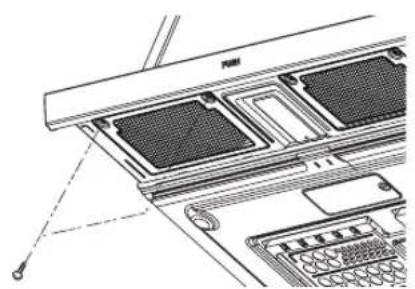
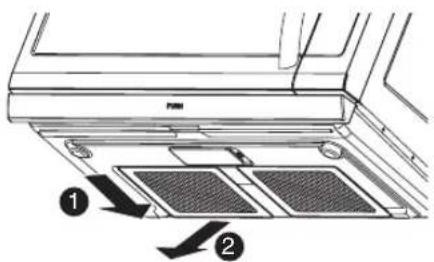
- Front filter
1) Extend slide out.
2) Remove two filter frame screw.
3) Tip the frame forward.
4) Remove filter from frame.
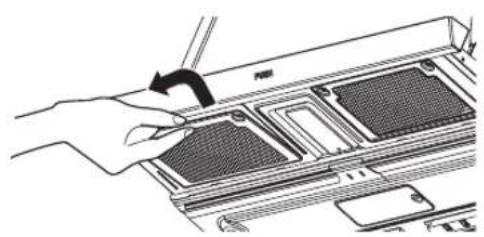
- Back filter Slide each filter to the side, then pull the filters downward. The filters will drop out.
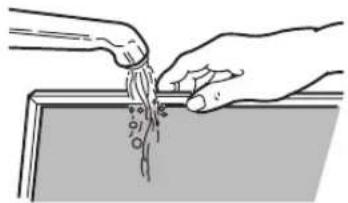
- Soak grease filters in hot water and a mild detergent. Rinse well and shake to dry. Do not use ammonia or place them in a dishwasher. The aluminum will darken.
- To reinstall the filters, reverse order of removing filter.
NOTE: Do not operate the hood without the filters in place.
CHARCOAL FILTER REPLACEMENT
If your oven is vented inside, the charcoal filter should be replaced every 6 to 12 months, and more often if necessary. The charcoal filter cannot be cleaned. To order a new charcoal filter, call 1-800-243-0000 or go to www/lg.com/us/support/ parts-accessories.
- Turn the power off at the main power supply and wear gloves
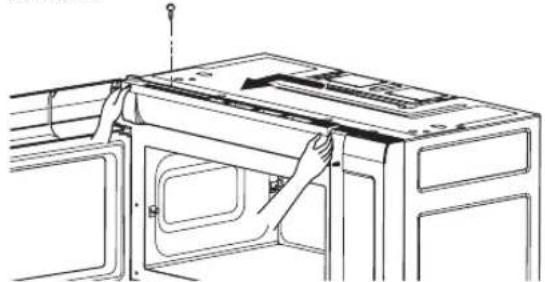
- Remove the one vent grille mounting screw. (1 outside screw)
- After open door. Slide vent grille to left and tip it forward.
CARING FOR YOUR MICROWAVE OVEN
- Remove the old filter.
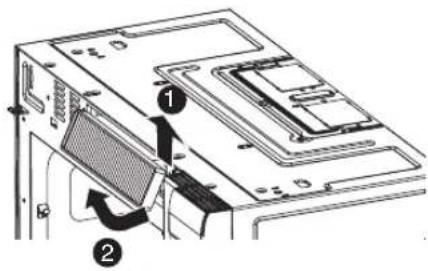
- Slide a new charcoal filter into place.
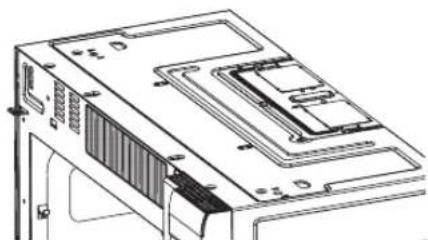
- Slide in vent grille and replace the mounting screw. Turn the power back on at the main power supply and set the clock.
COOKTOP/NIGHT LIGHT REPLACEMENT
- Unplug the oven or turn off power at the main power supply.
- Remove the LED lamp cover mounting screws.
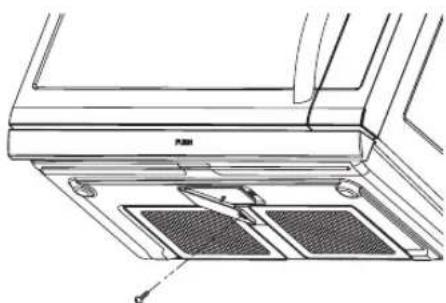
- Replace the LED Lamp board.
- Replace the LED Lamp cover and mounting screws.
- Turn the power back on at the main power supply.
*It is recommended that the cooktop lamp be replaced by a qualified service technician.
OVEN LIGHT REPLACEMENT
- Unplug the oven or turn off power at the main power supply and wear gloves.
- Remove the vent cover mounting screw. (1 outside screws)
- Slide vent grille left, then lift out to remove.
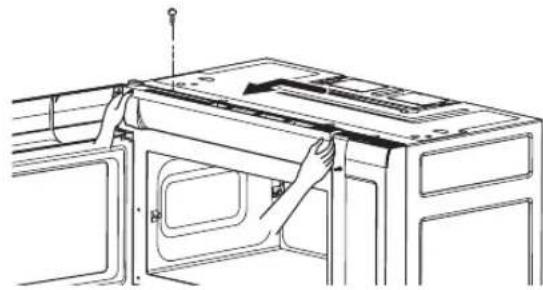
- Remove the cover screw slide the cover to left and then lift up the bulb holder.
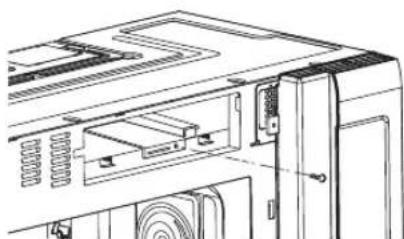
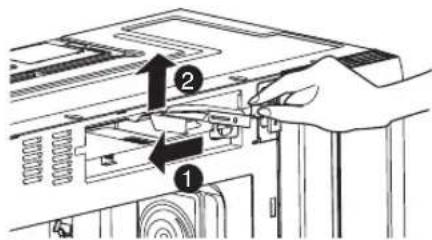
- Replace the bulb with a 30 watt appliance bulb.
- Replace the bulb holder and screw.
- Slide in vent grille and replace the mounting screw. Replace the mounting screws. Turn the power back on at the main power supply.
COOKING UTENSILS
MICROWAVE UTENSIL GUIDE
| USE | DO NOT USE |
| OVENPROOF GLASS(treated for high intensity heat):Utility dishes, loaf dishes, pieplates, cake plates, liquidmeasuring cups, casseroles, andbowls without metallic trim. | METAL UTENSILs:Metal shields the food from microwave energy and producesuneven cooking. Also avoid metal skewers, thermometers, or foiltrays. Metal utensils can cause arcing, which can damage yourmicrowave oven. |
| CHINA:Bowls, cups, serving plates, andplatters without metallic trim. | METAL DECORATION:Metal-trimmed or metal-banded dinnerware, casserole dishes, etc.The metal trim interferes with normal cooking and may damage theoven. |
| PLASTIC:Plastic wrap (as a cover)-- laythe plastic wrap loosely over thedish and press it to the sides.Vent plastic wrap by turning backone edge slightly to allow excesssteam to escape. The dishshould be deep enough so thatthe plastic wrap will not touch thefood. As the food heats it maybe melt the plastic wrap wherever thewrap touches the food.Use plastic dishes, cups,semirigid freezer containers, andplastic bags only for shortcooking times. Use these withcare because the plastic maysoften from the heat of thefood.PAPER:Paper towels, waxed paper,paper napkins, and paper plateswith no metallic trim or design.Look for the manufacturer's labelfor use in the microwave oven. | ALUMINUM FOIL:Avoid large sheets of aluminum foil because they hinder cookingand may cause harmful arcing. Use small pieces of foil to shieldpoultry legs and wings. Keep ALL aluminum foil at least 1 inch fromthe side walls and door of the oven.WOOD:Wooden bowls and boards will dry out and may split or crack whenyou use them in the microwave oven. Baskets react in the same way.TIGHTLY COVERED UTENSILs:Be sure to leave openings for steam to escape from coveredutensils.Pierce plastic pouches of vegetables or other food items beforecooking.Tightly closed pouches could explode.BROWN PAPER:Avoid using brown paper bags.They absorb too much heat and could burn.FLAWED OR CHIPPED UTENSILs:Any utensil that is cracked, flawed, or chipped may break in theoven.METAL TWIST TIES:Remove metal twist ties from plastic or paper bags.They become hot and could cause a fire. |
Do not use recycled paper products in the microwave oven.
They sometimes contain impurities that cause sparks to occur.
TROUBLESHOOTING
BEFORE CALLING FOR SERVICE
Check the following list to be sure a service call is necessary. Reviewing additional information on items to check may prevent an unneeded service call.
| PROBLEM | POSSIBLE CAUSES |
| If nothing on the oven operates | · check for a blown circuit fuse or a tripped main circuit breaker. · check if oven is properly connected to the electric circuit in house. · check that controls are set properly. |
| If the oven interior light does not work | · the light bulb is loose or defective. |
| If oven will not cook | · check that control panel was programmed correctly. · check that door is firmly closed. · check that Start/Enter Pad was touched. · check that timer wasn't started instead of a cook function. |
| If oven takes longer than normal to cook or cooks too rapidly | · be sure the Power Level is programmed properly. |
| If the time of day clock does not always keep correct time | · check that the power cord is fully inserted into the outlet receptacle. · be sure the oven is the only appliance on the electrical circuit. |
| If food cooks unevenly | · be sure food is evenly shaped. · be sure food is completely defrosted before cooking. · check placement of aluminum foil strips used to prevent overcooking. |
| If food is undercooked | · check recipe to be sure all directions (amount, time, and power levels) were correctly followed. · be sure microwave oven is on a separate circuit. · be sure food is completely defrosted before cooking. |
| If food is overcooked | · check recipe to be sure all directions (amount, power level, time, size of dish) were followed. |
| If arcing (sparks) occur | · be sure microwavable dishes were used. · be sure wire twist ties were not used. · be sure oven was not operated when empty. · make sure metal rack (if used) is properly installed on 4 supports. |
| If the display shows a time counting down but the oven is not cooking | · check that door is firmly closed. · check that timer was not started instead of a cooking function. |
| Vent fan starts automatically | · If the temperature gets too hot around the microwave oven, the fan in the vent hood will automatically turn on at the LEVEL 4 setting to cool the oven. It may stay on up to an hour to cool the oven. |
TROUBLESHOOTING
WARNING
To avoid electrical shock which can cause severe personal injury or death, do not remove outer case at any time, only an authorized service technician should remove outer case.
QUESTIONS AND ANSWERS
| QUESTION | ANSWER |
| Can I use a rack in my microwave oven so that I may reheat or cook in two rack positions at a time? | Only use the rack that is supplied with your microwave oven. Use of any other rack can result in poor cooking performance and/or arcing and may damage your oven. |
| Can I use either metal or aluminum pans in my microwave oven? | Usable metal includes aluminum foil for shielding (use small, flat pieces). Never allow metal to touch walls or door. |
| Sometimes the door of my microwave oven appears wavy. Is this normal? | This appearance is normal and does not affect the operation of your oven. |
| What are the humming noises I hear when my microwave oven is operating? | This is the sound of the transformer when the magnetron tube cycles on and off. |
| Why does the dish become hot when I microwave food in it? | As the food becomes hot it will conduct the heat to the dish. Use hot pads to remove food after cooking. Dish may not be microwave safe. |
| What does standing time mean? | Standing time means that food should be taken out of the oven and covered for additional time after cooking. This process allows the cooking to finish, saves energy, and frees the oven for other purposes. |
| Can I pop popcorn in my microwave oven? How do I get the best results? | Yes. Pop packaged microwave popcorn following manufacturer's guidelines or use the preprogrammed Popcorn pad. Do not use regular paper bags. Use the listening test by stopping the oven as soon as the popping slows to a pop every one or two seconds. Do not try to repop unpopped kernels. You can also use special microwave poppers. When using a popper, be sure to follow manufacturer's directions. Do not pop popcorn in glass utensils. |
| Why does steam come out of the air exhaust vent? | Steam is normally produced during cooking. The microwave oven has been designed to vent this steam out the top vent. |
LG ELECTRONICS CANADA, INC. LIMITED WARRANTY - Canada
WARRANTY: Should your LG Microwave ("Product") fail due to a defect in material or workmanship under normal home use during the warranty period set forth below, LG Canada will at its option repair or replace the Product upon receipt of proof of original retail purchase. This warranty is valid only to the original retail purchaser of the product and applies only to a Product distributed in Canada by LG Canada or an authorized Canadian distributor thereof. The warranty only applies to Products located and used within Canada.
| WARRANTY PERIOD: (Note: If the original date of purchase can not be verified, the warranty will begin sixty (60) days from the date of manufacture). | |
| Over-the-Range / All Convection / Microwaves in Built-in application / All other Microwave Oven | Extended Component Warranty (Parts Only) |
| One (1) year from the date of origina retail purchaseretail purchase | Five (5) years from the date of original retail purchase |
| Parts and Labor (In-Home ; OTR & Convection) (internal/functional parts only) | Magnetron Only |
Replacement products and parts are warranted for the remaining portion of the original warranty period or ninety (90) days, whichever is greater. Replacement products and parts may be new or remanufactured.
念 LG Authorized Service Center warranties their repair work for thirty (30) days.
LG CANADA'S SOLE LIABILITY IS LIMITED TO THE WARRANTY SET OUT ABOVE. EXCEPT AS EXPRESSLY PROVIDED ABOVE, LG CANADA MAKES NO AND HEREBY DISCLAIMS ALL OTHER WARRANTYES AND CONDITIONS RESPECTING THE PRODUCT, WHETHER EXPRESS OR IMPLIED, INCLUDING, BUT NOT LIMITED TO, ANY IMPLIED WARRANTY OR CONDITION OF MERCHANTABILITY OR FITNESS FOR A PARTICULAR PURPOSE, AND NO REPRESENTATIONS SHALL BE BINDING ON LG CANADA. LG CANADA DOES NOT AUTHORIZE ANY PERSON TO CREATE OR ASSUME FOR IT ANY OTHER WARRANTY OBLIGATION OR LIABILITY IN CONNECTION WITH THE PRODUCT. TO THE EXTENT THAT ANY WARRANTY OR CONDITION IS IMPLIED BY LAW, IT IS LIMITED TO THE EXPRESS WARRANTY PERIOD ABOVE.
LG CANADA, THE MANUFACTURER OR DISTRIBUTOR SHALL NOT BE LIABLE FOR ANY INCIDENTAL, CONSEQUENTIAL, SPECIAL, DIRECT OR INDIRECT DAMAGES, LOSS OF GOODWILL, LOST PROFITS, PUNITIVE OR EXEMPLARY DAMAGES OR ANY OTHER DAMAGE, WHETHER ARISING DIRECTLY OR INDIRECTLY FROM ANY CONTRACTUAL BREACH, FUNDAMENTAL OR OTHERWISE, OR FROM ANY ACTS OR OMISSIONS, TORT, OR OTHERWISE.
This warranty gives you specific legal rights. You may have other rights which may vary from province to province depending on applicable provincial laws. Any term of this warranty that negates or varies any implied condition or warranty under provincial law is severable where it conflicts with provincial law without affecting the remainder of this warranty's terms.
THIS LIMITED WARRANTY DOES NOT COVER:
- Service trips to deliver, pick up, or install the product; instructing a customer on operation of the product; repair or replacement of fuses or correction of wiring, or correction of unauthorized repairs/installation.
- Failure of the product to perform during power failures and interruptions or inadequate electrical service.
- Damage caused by leaky or broken water pipes, frozen water pipes, restricted drain lines, inadequate or interrupted water supply or inadequate supply of air.
- Damage resulting from operating the Product in a corrosive atmosphere or contrary to the instructions outlined in the Product owner's manual.
- Damage to the Product caused by accidents, pests and vermin, lightning, wind, fire, floods, or acts of God.
- Damage resulting from the misuse, abuse, improper installation, repair, or maintenance of the Product. Improper repair includes use of parts not approved or specified by LG Canada.
- Damage or product failure caused by unauthorized modification or alteration, or use for other than its intended purpose, or resulting from any water leakage due to improper installation.
- Damage or Product failure caused by incorrect electrical current, voltage, commercial or industrial use, or use of accessories, components, or cleaning products that are not approved by LG Canada.
- Damage caused by transportation and handling, including scratches, dents, chips, and/or other damage to the finish of your product, unless such damage results from defects in materials or workmanship and is reported within one (1) week of delivery.
- Damage or missing items to any display, open box, discounted, or refurbished Product.
- Products with original serial numbers that have been removed, altered, or cannot be readily determined. Model and Serial numbers, along with original retail sales receipt, are required for warranty validation.
- Increases in utility costs and additional utility expenses.
- Replacement of light bulbs, filters, or any consumable parts.
- Repairs when your Product is used in other than normal and usual household use (including, without limitation, commercial use, in offices or recreational facilities) or contrary to the instructions outlined in the Product owner's manual.
- Costs associated with removal of the Product from your home for repairs.
- The removal and reinstallation of the Product if it is installed in an inaccessible location or is not installed in accordance with published installation instructions, including the Product owner's and installation manuals.
17.
All costs associated with the above excluded circumstances shall be borne by the consumer.
For complete warranty details and customer assistance, please call or visit our website:
Call 1-888-542-2623 (24 hours a day, 365 days a year) and select the appropriate option from the menu, or visit our website at http://www/lg.com
Write your warranty information below:
Product Registration Information:
Model:
Serial Number:
Date of Purchase:
MANUEL DE L'UTILISATEUR
FOUR À MICRO-ONDES
LISEZ ATTENTIVEMENT CE MANUEL
AVANT DE METTRE L'APPAREIL EN MARCHE.
LMV2257**
TABLE DES MATIÈRES
SECURITE 3-4
Crustaces/Mollusques 21
"Fan Slow" (Ventilateur lent)
L'indication "Fan Off"
REEMPLACEMENT DE LA LAMPE DU FOUR

- SAFETY
- IMPORTANT SAFETY INSTRUCTIONS
- WARNING
- - Read and follow the specific PRECAUTIONS TO AVOID POSSIBLE EXPOSURE TO EXCESSIVE MICROWAVE ENERGY
- SAVE THESE INSTRUCTIONS
- PRECAUTIONS TO AVOID POSSIBLE EXPOSURE TO EXCESSIVE MICROWAVE ENERGY...
- LOCATION OF MODEL NUMBER
- OVEN SPECIFICATIONS
- ELECTRICAL RATING
- ELECTRICAL REQUIREMENTS
- GROUNDING INSTRUCTIONS
- WARNING -If you use the grounding plug improperly, you risk electric shock.
- CAUTION
- CLOCK
- VENT ON/OFF
- CHILD LOCK
- INTERRUPTING COOKING
- SLIDE OUT VENTILATION
- VENT 4 SPEED
- LIGHT HI/LOW/OFF
- ENERGY SAVING
- ADD 30 SEC
- CUSTOM COOK
- +/-
- COOKING AT HIGH POWER LEVELS
- MULTI STAGE COOKING
- NOTES:
- SENSOR OPERATING INSTRUCTIONS
- SENSOR COOKING GUIDE
- SENSOR POPCORN
- SENSOR COOK
- SOFTEN
- MELT
- For best results:
- QUICK DEFROST
- DEFROST TIPS
- - When using
- METAL RACK
- To use rack:
- SLIDE-OUT HOOD
- SLIDE-OUT VENT HOOD
- COOKING
- GETTING THE BEST COOKING RESULTS
- FISH AND SHELLFISH
- Cooking Fish and Shellfish: General Directions
- FISH AND SHELLFISH COOKING TABLE
- APPETIZERS/SAUCES/SOUPS
- Recommended
- MEAT
- CHICKEN
- Cooking Poultry: General Directions
- PASTA AND RICE
- Cooking Pasta and Rice: Tips and Techniques
- PASTA COOKING TABLE
- RICE COOKING TABLE
- CARING FOR YOUR MICROWAVE OVEN
- CARE AND CLEANING
- CLEANING THE GREASE FILTERS
- CHARCOAL FILTER REPLACEMENT
- COOKTOP/NIGHT LIGHT REPLACEMENT
- OVEN LIGHT REPLACEMENT
- COOKING UTENSILS
- MICROWAVE UTENSIL GUIDE
- TROUBLESHOOTING
- BEFORE CALLING FOR SERVICE
- LG ELECTRONICS CANADA, INC. LIMITED WARRANTY - Canada
- THIS LIMITED WARRANTY DOES NOT COVER:
- FOUR À MICRO-ONDES
- TABLE DES MATIÈRES
- SECURITE 3-4
- REEMPLACEMENT DE LA LAMPE DU FOUR
Brand : LG
Model : LMV2257BD
Category : Built-in oven