GMV1540TB - Built-in oven LG - Free user manual and instructions
Find the device manual for free GMV1540TB LG in PDF.


| Product Type | Built-in Microwave Oven |
| Brand | LG |
| Model | GMV1540TB |
| Microwave Power | 900 W (IEC 60705 standard) |
| External Dimensions (W x H x D) | 76.0 x 41.8 x 39.1 cm (29-15/16 x 16-7/16 x 15-3/8 in) |
| Cavity Volume | 42.5 L (1.5 ft³) |
| Net Weight | 23.6 kg (52 lb) |
| Power Supply | 120 V AC, 60 Hz, 13 A / 1500 W (microwave + lamp + fan) |
| Control Type | Touch keypad with LED display |
| Auto Programs | Popcorn, potatoes, cooking, reheating, auto defrost (meat, poultry, fish) |
| Power Levels | 10 (including 9 intermediate settings) |
| Special Functions | Clock, timer, child lock, add minute (Ez On), custom set, ventilation (3 speeds), lighting (3 levels) |
| Ventilation System | Built-in hood with metal grease filter (washable) and optional charcoal filter |
| Lighting | Hood lamp (30 W) and cavity lamp (30 W, appliance type) |
| Turntable | Yes, glass |
| Metal Rack | Included (for two-level cooking if needed) |
| Care and Cleaning | Grease filters washable in hot water (not dishwasher); charcoal filter to replace every 6-12 months; cavity and exterior cleaned with soft cloth and mild detergent |
| Safety | Door lock, child safety system, automatic shut-off, microwave protection (stop if door open) |
| Spare Parts and Repairability | Bulbs (30 W) and filters available; repair by qualified technician; model number on front label |
| General Information | Installation above a range (max 91 cm wide); household use only; grounding required |
Frequently Asked Questions - GMV1540TB LG
User questions about GMV1540TB LG
0 question about this device. Answer the ones you know or ask your own.
Ask a new question about this device
Download the instructions for your Built-in oven in PDF format for free! Find your manual GMV1540TB - LG and take your electronic device back in hand. On this page are published all the documents necessary for the use of your device. GMV1540TB by LG.
USER MANUAL GMV1540TB LG
Important Safety Instructions ....3
Precautions To Avoid Possible Exposure To Excessive Microwave Energy ....4
INFORMATION....5
Location of Model Number 5
Oven Specifications 5
Electrical Rating 5
Electrical Requirements....5
Grounding Instructions....5
Microwave Oven Features 6
Oven Control Panel....7
OPERATION....9
LEARN ABOUT YOUR MICROWAVE OVEN.....9
CLOCK....9
Kitchen Timer....9
FAN Hi/Lo/Off....9
LIGHT Hi/Lo/Off 9
Child Lock 9
Custom Set 10
Ez On....10
Time Cook....10
Cooking at High Cook Power....11
Cooking at Lower Power Levels....11
Cooking Guide for "Lower Power Levels" .....12
Popcorn....13
Potato....13
Cook....14
Cooking Guide for "Cook" 14
Reheat....15
Cooking Guide for "Reheat" 15
Auto Defrost 16
Defrosting Tips....16
Auto Defrost Chart 17
MAINTENANCE....19
CARE AND CLEANING ....19
Cleaning the Grease Filters 19
Charcoal Filter(Optional) Replacement .....19
Cooktop/Night Light Replacement 20
Oven Light Replacement 20
QUESTIONS AND ANSWERS....20
MICROWAVE UTENSIL GUIDE....21
BEFORE CALLING FOR SERVICE....22
SAFETY
IMPORTANT SAFETY INSTRUCTIONS
The safety instructions below will tell you how to use your oven to avoid harm to yourself or damage to your oven.
WARNING-To reduce the risk of burns, electric shock, fire, injury to persons or exposure to excessive microwave energy.
- Read all the instructions before using your oven.
- Do not allow children to use this oven without close supervision.
- Read and follow the specific "PRECAUTIONS TO AVOID POSSIBLE EXPOSURE TO EXCESSIVE MICROWAVE ENERGY" found on page 4.
- Use the microwave oven only for its intended use as described in its manual. Do not use corrosive chemicals or vapors, in the microwave oven. This type of oven is specifically designed to heat, cook or dry food. It is not designed for industrial or laboratory use.
- Do not use or store this appliance outdoors. Do not use this product near water -for example, near a kitchen sink, in a wet basement, or near a swimming pool, and the like.
- Do not use the cavity for storage purposes. Do not leave paper products, cooking utensils, or food in the cavity when not in use.
- Clean the ventilating hood frequently. Do not allow grease to accumulate on the hood or the filters.
- When flaming foods under the hood, turn the fan on.
- Suitable for use above both gas and electric cooking equipment 36 inches wide or less.
- Use care when cleaning the vent hood filters. Corrosive cleaning agents such as lye-based oven cleaners, may damage the filters.
-
When cleaning the door and the surfaces that touch the door, use only mild, non-abrasive soaps or detergents and a sponge or soft cloth.
-
Do not tamper with the built-in safety switches on the oven door. The oven has several built-in safety switches to make sure the power is off when the door is open.
- If your oven is dropped or damaged, have it thoroughly checked by a qualified service technician before using it again.
• To avoid a fire hazard:
- Do not severely overcook food. Severely overcooked foods can start a fire in the oven. Watch the oven carefully, especially if you have paper, plastic, or other combustibles in the oven.
- Do not store combustible items (bread, cookies, etc.) in the oven, because if lightning strikes the power lines, it may cause the oven to turn on.
- Do not use wire twist-ties in the oven. Be sure to remove them before placing the item in the oven.
- If a fire should start:
- Keep the oven door closed.
- Turn the oven off.
- Disconnect the power cord or shut off the power at the fuse or circuit breaker panel.
• To avoid electric shock:
- This appliance must be grounded. Connect it only to a properly grounded outlet. See the electrical grounding instructions on page 5.
- Do not operate this appliance if it has a damaged cord or plug, if it is not working properly or if it has been damaged or dropped.
- Do not immerse the electrical cord or plug in water.
- Keep the cord away from heated surfaces.
- This appliance should be serviced only by qualified service personnel.
• Install or locate the microwave oven only in accordance with the provided installation instructions.
- Do not mount oven a sink.
- Do not let cord hang over edge of table or counter.
SAFETY
• To avoid improperly cooking some foods.
- Do not heat any types of baby bottles or baby food. Uneven heating may occur and possibly cause personal injury.
- Do not heat small-necked containers, such as syrup bottles.
- Do not deep-fat fry in your microwave oven.
- Do not attempt home canning in your microwave oven.
- Do not heat the following items in the microwave oven: whole eggs in the shell; water with oil or fat; sealed containers or closed glass jars. These items may explode.
- Do not use this oven for commercial purposes. It is made for household use only.
- Do not cover or block any openings in the oven.
- Do not run the oven empty, without food in it.
- Do not allow the gray film on special microwave-cooking packages to touch the oven floor. Put the package on a microwavable dish.
- Do not cook anything directly on the oven floor. Use a microwavable dish.
- Keep a browning dish at least 3/16 inch above floor. Carefully read and follow the instructions for the browning dish. If you use a browning dish incorrectly, you could damage the oven floor.
• Preserve the metal rack:
- Remove the metal rack from the oven when you are not using it.
- Do not use the oven empty with the metal rack in it.
- The metal rack may get hot while cooking. Use pot holders to remove it after cooking.
- Do not use foil or metal containers on the metal rack.
- This appliance should be serviced only by qualified service personnel. Contact nearest authorized service facility for examination, repair or adjustment.
SAVE THESE INSTRUCTIONS
PRECAUTIONS TO AVOID POSSIBLE EXPOSURE TO EXCESSIVE MICROWAVE ENERGY ...
- Do not attempt to operate this oven with the door open, since open-door operation can result in harmful exposure to microwave energy. It is important not to defeat or tamper with the safety interlock.
- Do not operate the oven if it is damaged. It is particularly important that the oven door close properly and that there is no damage to the:
- door (bent)
- hinges and latches (broken or loosened)
- door seals and sealing surfaces.
- Do not place any object between the oven front face and the door, or allow soil or cleaner residue to accumulate on sealing surfaces.
- The oven should not be adjusted or repaired by anyone except properly qualified service personnel.
INFORMATION
Please read this owner's manual. It will tell you how to use all the fine features of this microwave oven.
LOCATION OF MODEL NUMBER
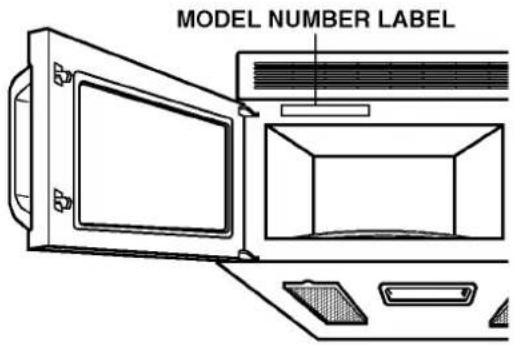
To request service information or replacement parts, the service center will require the complete model number of your microwave oven. The number is on the left side of control panel as shown in the illustration below.
OVEN SPECIFICATIONS
Output Power 900W (IEC 60705 Standard)
Outer Dimensions 29-15/16" x 16-7/16" x 15-3/8"
Cavity Volume 1.5 Cu.ft
Net Weight 52 lbs.
ELECTRICAL RATING
* Electrical Rating of the Oven:120V AC 60Hz
* 13 Amps / 1500 Watts (MWO + Cooktop Lamp + Ventilation Fan)
ELECTRICAL REQUIREMENTS
The oven is designed to operate on a Standard 120V/60Hz household outlet. Be sure the circuit is at least 15A or 20A and the microwave oven is the only appliance on the circuit. It is not designed for 50Hz or any circuit other than a 120V/60Hz circuit.
GROUNDING INSTRUCTIONS
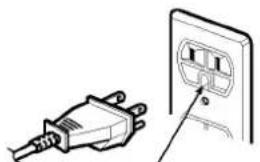
This appliance must be grounded. If an electrical short circuit occurs, grounding reduces the risk of electric shock by providing an escape wire for the electric current. The cord for this appliance has a grounding wire with a grounding plug. Put the plug into an outlet that is properly installed and grounded.
WARNING - If you use the grounding plug improperly, you risk electric shock.
Ask a qualified electrician if you do not understand the grounding instructions or if you wonder whether the appliance is properly grounded.
Because this appliance fits under the cabinet, it has a short power-supply cord. See the separate Installation Instructions for directions on properly placing the cord. Keep the electrical power cord dry and do not pinch or crush it in any way.
If it is necessary to use an extension cord, use only a 3-wire extension cord that has a 3-blade grounding plug, and a 3-slot receptacle that will accept the plug on the appliance. The marked rating of the extension cord shall be equal to or greater than the electrical rating of the appliance.
natural_image
Illustration of a plug inserted into an electrical outlet (no text or symbols)Ensure proper ground exists before use
For a permanently connected appliance: This appliance must be connected to a grounded, metallic, permanent wiring system, or an equipment grounding conductor should be run with the circuit conductors and connected to the equipment grounding terminal or lead on the appliance.
INFORMATION
INFORMATION
OVEN CONTROL PANEL
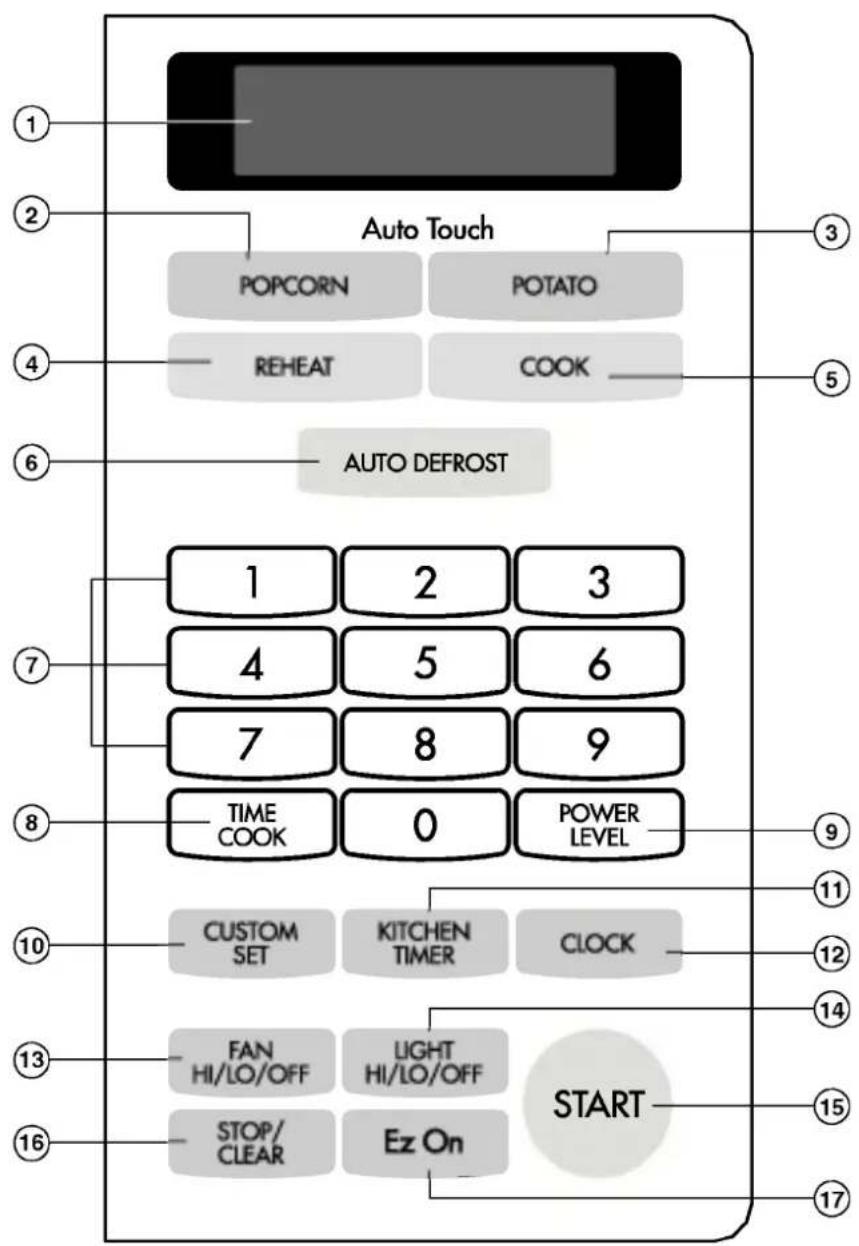
flowchart
graph TD
    A["1"] --> B["2"]
    B --> C["3"]
    C --> D["4"]
    D --> E["5"]
    E --> F["6"]
    F --> G["7"]
    G --> H["8"]
    H --> I["9"]
    I --> J["TIME COOK"]
    J --> K["0"]
    K --> L["POWER LEVEL"]
    L --> M["10"]
    M --> N["CUSTOM SET"]
    N --> O["KITCHEN TIMER"]
    O --> P["CLOCK"]
    P --> Q["11"]
    Q --> R["12"]
    R --> S["13"]
    S --> T["FAN HI/LO/OFF"]
    T --> U["LIGHT HI/LO/OFF"]
    U --> V["START"]
    V --> W["15"]
    W --> X["16"]
    X --> Y["STOP/CLEAR"]
    Y --> Z["Ez On"]
    Z --> AA["17"]
INFORMATION
- DISPLAY: The Display includes a clock and indicators to tell you time of day, cooking time settings and cooking functions selected.
- POPCORN: Touch this pad when popping popcorn in your microwave oven.
- POTATO: Touch this pad to cook potatoes from 1 to 4.
- REHEAT: Touch this pad to reheat dinner plate, soup/sauce, casserole, roll/muffin.
- COOK: Touch this pad to cook vegetables, rice, or casseroles.
- AUTO DEFROST: Meat, poultry, fish. Touch on pad to select food type and defrost food by weight.
- NUMBER: Touch number pads to enter cooking time, power level, quantities or weights.
- TIME COOK: Touch this pad to set a cooking time.
-
POWER LEVEL: Touch this pad to select a cooking power level.
-
CUSTOM SET: Touch this pad to change the oven's default settings for sound, clock, display speed, defrost weight, and demo mode operations.
- KITCHEN TIMER: Touch this pad to set the kitchen timer.
- CLOCK: Touch this pad to enter the time of day.
- FAN HI/LO/OFF: Touch this pad to turn the fan on or off.
- LIGHT HI/LO/OFF: Touch this pad to turn on the cooktop/countertop light.
- START: Touch this pad to start a function. If you open the door after oven begins to cook, retouch START.
- STOP/CLEAR: Touch this pad to stop the oven or clear all entries.
- EZ ON: Touch this pad to set and start quickly at 100% power level.
OPERATION
This section discusses the concepts behind microwave cooking and introduces you to the basics you need to know to operate your microwave oven. Please read this information before use.
CLOCK
Example: To set 8:00 AM.
- Touch STOP/CLEAR.
- Touch CLOCK.

- Enter the time by using the number key pad.
- Touch CLOCK. (or START)
KITCHEN TIMER
You can use your microwave oven as a timer. Use the Timer for timing up to 99 minutes, 99 seconds.
Example: To count 3 minutes.
- Touch STOP/CLEAR.
- Touch KITCHEN TIMER.

- Enter the time by using the number key pad.
- Touch START. When the time is over, you will hear seven beeps and END will display.
FAN HI / LO / OFF
The FAN moves steam and other vapors from the cooking surface. Touch FAN once for High fan speed, twice for Low fan speed, or three times to turn the fan off manually.
NOTE: The vent fan always turns on at low speed when you start microwave cook. You cannot turn the vent fan off during microwave cooking. If the temperature gets too hot around the microwave oven, the fan in the vent hood will automatically turn on at the HIGH speed to cool the oven. It may stay on up to one hour to cool the oven. When this occurs, you cannot turn the vent fan low or off.
LIGHT HI / LO / OFF
Touch LIGHT once for bright light, twice for the night light or three times to turn the light off.
CHILD LOCK
You may lock the control panel to prevent the microwave from being accidentally started or used by children.
Example: To set the child lock.

- Touch STOP/CLEAR.
START
- Touch and hold START more than 4 seconds. LOCKED will appear in the display window with two beeps.
Example: To cancel the child lock.
- Touch and hold START more than 4 seconds. LOCKED will disappear and you hear two beeps. At this time the oven is ready.
OPERATION
CUSTOM SET
You can change the default values for beep sound, clock, display speed, defrost weight, and demo mode operations.
See following chart for more information.
| NUMBER | CUSTOM SET | NUMBER | RESULT |
| 1 | Sound ON/OFF control | 1 | Sound ON |
| 2 | Sound OFF | ||
| 2 | Clock display control | 1 | Clock ON |
| 2 | Clock OFF | ||
| 3 | Display | 1 | Slow speed |
| 2 | Normal speed | ||
| 3 | Fast speed | ||
| 4 | Defrost weight mode select | 1 | Lbs |
| 2 | Kg | ||
| 5 | Demo mode select | 1 | Demo ON |
| 2 | Demo OFF |
Example: To change defrost weight mode. (from lbs to kg)
- Touch STOP/CLEAR.
- Touch CUSTOM SET.

- Touch number 4.

- Touch number 2.
EZ ON
A time-saving pad, this simplified control lets you quickly set and start microwave cooking without the need to touch START.
| Example: To cook for 2 minutes. | |
 | Touch EZ ON2 times.The oven begins cookingand display shows timecounting down. |
NOTE:
It will add 1 minutes up to 99 min 59 seconds.
TIME COOK
| Example: To cook for 2 minutes. | |
 | 1. Touch STOP/CLEAR. |
 | 2. Touch TIME COOK. |
 | 3. Enter the cook time. |
 | 4. Touch START. |
OPERATION
COOKING AT HIGH COOK POWER
Example: To cook food for 8 minutes 30 seconds.

- Touch STOP/CLEAR.
- Enter the cook time.
- Touch START.
When the cook time is over, you will hear four beeps and END will display.
START
HIGH power cooking does not always give you the best results with foods that need slower cooking, such as roasts, baked goods, or custards. Your oven has 9 power settings in addition to "HIGH".
Example: To cook food for 7 minutes 30 seconds at 70% power.
STOP/CLEAR

- Touch STOP/CLEAR.
- Enter the cook time.
- Touch POWER LEVEL.
- Enter the power level.
- Touch START.
When the cook time is over, you will hear four beeps and END will display.
POWER LEVEL

START
OPERATION
COOKING GUIDE FOR "LOWER POWER LEVELS"
The nine power levels in addition to "HIGH" allow you to choose the best power level for the food you are cooking. Below are listed all the power levels,
examples of foods best cooked at each level, and the amount of microwave power you are using.
| POWER LEVEL | MICROWAVE OUTPUT | USE |
| 10“HIGH” | 100% | ·Boil water.·Cook ground beef.·Make candy.·Cook fresh fruits and vegetables.·Cook fish, and poultry.·Preheat browning dish. |
| 9 | 90% | ·Reheat meat slices quickly.·Saute onions, celery, and green pepper. |
| 8 | 80% | ·All reheating.·Cook scrambled eggs. |
| 7 | 70% | ·Cook breads and cereal products.·Cook cheese dishes,veal.·Cook cakes,muffins,brownies,cup cakes. |
| 6 | 60% | ·Cook pasta. |
| 5 | 50% | ·Cook meats,whole poultry.·Cook custard.·Cook whole chicken,turkey,spare ribs,rib roast,sirloin roast. |
| 4 | 40% | ·Cook less tender cuts of meat.·Reheat frozen convenience foods. |
| 3 | 30% | ·Thawing meat,poultry,and seafood.·Cooking small quantities of food.·Finish cooking casserole,stew,and some sauces. |
| 2 | 20% | ·Soften butter and cream cheese.·Heating small amounts of food. |
| 1 | 10% | ·Soften ice cream.·Raise yeast dough. |
| 0 | ·Standing time. |
OPERATION
POPCORN
POPCORN lets you pop 1.75, 3.0, and 3.5 ounce bags of commercially packaged microwave popcorn. Pop only one package at a time. If you are using a microwave popcorn popper, follow manufacturer's instructions.
To correctly set your microwave oven, follow this chart:
| Bag Size-ounces | 1.75 | 3.0 | 3.5 |
| Touch NUMBER | 1 | 2 | 3 |
Example: To pop a 3.0 oz. bag.


- Touch STOP/CLEAR.
- Touch POPCORN.
- Touch number 2. When the cook time is over, you will hear four beeps and END will display.
CAUTION: Do not leave microwave unattended while popping popcorn.
POTATO
The POTATO pad lets you cook potatoes with the preset times and cook powers. You can choose from 1 to 4 potatoes.
NOTE:
• Cooking times based on an average 8 ounce potato.
- Before baking, pierce potato with fork several times.
• After baking, let stand for 5 minutes.
| Example: To cook 2 Potatoes. | |
| 1. Touch STOP/CLEAR. | |
| 2. Touch POTATO. | |
| 3. Touch number 2.When the cook time is over,you will hear four beeps andENDwill display. | |
OPERATION
COOK
COOK provides four preset categories for cooking.
Example: To cook 2 cups of Rice.
| Category | Touch pad number |
| Fresh vegetable | 1 |
| Frozen vegetable | 2 |
| Rice | 3 |
| Casserole | 4 |

- Enter quantity/servings.
| Category | Number of cups |
| Fresh vegetable | 1 - 4 cups |
| Frozen vegetable | 1 - 4 cups |
| Rice | 1 - 2 cups |
| Casserole | 1 - 4 cups |
When the cook time is over, you will hear four beeps and END will display.
COOKING GUIDE FOR "COOK"
| CODE | CATEGORY | QUANTITY | DIRECTIONS |
| 1 | FRESH VEGETABLE | 1 cupVegetables and 2 tbsp water | Place in a microwavable bowl or casserole.Add amount of water according to the quantity. Cover with vented plastic wrap.Let stand 5 minutes. |
| 2 cupsVegetables and 1/4 cup of water | |||
| 3 cupsVegetables and 1/3 cup of water | |||
| 4 cupsVegetables and 1/2 cup of water | |||
| 2 | FROZEN VEGETABLE | 1 cup | Place in a microwavable bowl or casserole.Cover with vented plastic wrap.Let stand 5 minutes. |
| 2 cups | |||
| 3 cups | |||
| 4 cups | |||
| 3 | RICE | 1 cupof Long grain rice and 2^1/_4 cup of water | In large microwavable casserole, combine water, rice, margarine and salt. Cover with microwavable lid or vented plastic wrap.After cooking, let stand covered for 5 minutes. |
| 2 cupsof Long grain rice and 4^1/_4 cup of water | |||
| 4 | CASSEROLE | 1 cup | Place in a microwavable bowl or casserole.Cover with vented plastic wrap. |
| 2 cups | |||
| 3 cups | |||
| 4 cups |
OPERATION
REHEAT
REHEAT provides four preset categories for reheating.
| Example: To reheat 3 cups of Casserole. | |
 | 1. Touch STOP/CLEAR. |
| 2. Touch REHEAT. | |
 | 3. Choose food category. |
 | Category Touch pad number |
| Dinner Plate 1 | |
| Soup/Sauce 2 | |
| Casserole 3 | |
| Roll/Muffin 4 | |

- Enter quantity/servings.
| Category | Number of cups/Items |
| Dinner plate | 1 - 2 servings |
| Soup/sauce | 1 - 4 cups |
| Casserole | 1 - 4 cups |
| Roll/Muffin | 1 - 4 pieces |
When the cook time is over, you will hear four beeps and END will display.
COOKING GUIDE FOR "REHEAT"
| CODE | CATEGORY | SERVING AMOUNT | DIRECTION |
| 1 | DINNER PLATE | 1 serving | Place on a low plate.Cover with vented plastic wrap. |
| 2 servings | |||
| 2 | SOUP/SAUCE | 1 cup | Place in shallow microwavable casserole.Cover with vented plastic wrap. |
| 2 cups | |||
| 3 cups | |||
| 4 cups | |||
| 3 | CASSEROLE | 1 cup | Place in a microwavable bowl or casserole.Cover with plastic wrap. |
| 2 cups | |||
| 3 cups | |||
| 4 cups | |||
| 4 | ROLL/MUFFIN | 1 piece | Place on paper towel.Do not cover. |
| 2 pieces | |||
| 3 pieces | |||
| 4 pieces |
OPERATION
AUTO DEFROST
Your microwave oven is preset with three defrost sequences. Using AUTO DEFROST is the best way to defrost frozen foods. The Auto Defrost Sequence Table below provides some basic guidelines for using the three defrost sequences.
Example: To defrost 1.2 lbs of ground beef.
| STOP/CLEAR |
AUTO DEFROST
| 1 |
-
Touch STOP/CLEAR.
-
Touch AUTO DEFROST.
-
Choose food category.
| Category | Touch pad number |
| Meat | 1 |
| Poultry | 2 |
| Fish | 3 |
1 2
START
-
Enter the weight.
-
Touch START.
-
After 1/3 of the defrost time is over, The display will prompt you to turn over food. Open door, turn over food, and shield any warm portions.
START
-
Close the door and restart.
-
After 2/3 of the defrost time is over, the display will prompt you to turn over food. Repeat steps 6 and 7. When the defrost time is over, you will hear four beeps and END will display.
NOTE: If you do not open the door, the display will resume the countdown.
Weight conversion chart
You are probably used to food weights as being in pounds and ounces that are fractions of a pound (for example 4 ounces equals 1/4 pound).
However, in order to enter food weight in AUTO DEFROST, you must specify pounds and tenths of a pound. If the weight on the food package is in fractions of a pound, you can use the following chart to convert the weight to decimals.
| EQUIVALENT OUNCE WEIGHT | NUMBER AFTER DECIMAL | |
| 1.6 | .10 | |
| 3.2 | .20 | |
| 4.0 | .25 | One-Quarter Pound |
| 4.8 | .30 | |
| 6.4 | .40 | |
| 8.0 | .50 | One- Half Pound |
| 9.6 | .60 | |
| 11.2 | .70 | |
| 12.0 | .75 | Three-Quarters Pound |
| 12.8 | .80 | |
| 14.4 | .90 | |
| 16.0 | 1.00 | One Pound |
DEFROSTING TIPS
- When using AUTO DEFROST, the weight to be entered is the net weight in pounds and tenths of pounds (the weight of the food minus the container).
- Only use AUTO DEFROST for raw food. AUTO DEFROST gives best results when food to be thawed is a minimum of 0°F (taken directly from a "true" freezer). If food has been stored in a refrigerator-freezer that does not maintain a temperature of 5°F or below, always program a lower food weight (for a shorter defrosting time) to prevent cooking the food.
- If the food is stored outside the freezer for up to 20 minutes, enter a lower food weight.
- The shape of the package alters the defrosting time. Shallow rectangular packets defrost more quickly than a deep block.
- Separate pieces as they begin to defrost. Separated pieces defrost more easily.
- You can use small pieces of aluminum foil to shield foods like chicken wings, leg tips, and fish tails, but the foil must not touch the side of the oven. Foil can damage the oven lining.
- Shield areas of food with small pieces of foil if they start to become warm.
- For better results, a preset standing time is included in the defrosting time.
OPERATION
AUTO DEFROST CHART
Meat setting
| FOOD | SETTING | AT BEEP | SPECIAL INSTRUCTIONS |
| BEEF | Meat of irregular shape and large, fatty cuts of meat should have the narrow or fatty areas shielded with foil at the beginning of a defrost sequence. | ||
| Ground beef (bulk) | MEAT | Remove thawed portions with fork. Turn over. Return remainder to oven. | Do not defrost less than 1/4 lb.Freeze in doughnut shape. |
| Ground beef (patties) | MEAT | Separate and rearrange. | Do not defrost less than two oz.patties.Depress center when freezing. |
| Round steak | MEAT | Turn over. Cover warm areas with aluminum foil. | Place on a microwavable roasting rack. |
| Tenderloin steak | MEAT | Turn over. Cover warm areas with aluminum foil. | Place on a microwavable roasting rack. |
| Stew beef | MEAT | Remove thawed portions with fork. Separate remainder.Return remainder to oven. | Place in a microwavable baking dish. |
| Pot roast,chuck roast | MEAT | Turn over. Cover warm areas with aluminum foil. | Place on a microwavable roasting rack. |
| Rib roast | MEAT | Turn over. Cover warm areas with aluminum foil. | Place on a microwavable roasting rack. |
| Rolled rump roast | MEAT | Turn over. Cover warm areas with aluminum foil. | Place on a microwavable roasting rack. |
| LAMB | |||
| Cubes for stew | MEAT | Remove thawed portions with fork. Return remainder to oven. | Place in a microwavable baking dish. |
| Chops(1 inch thick) | MEAT | Separate and rearrange. | Place on a microwavable roasting rack. |
| PORK | |||
| Chops(1 inch thick) | MEAT | Separate and rearrange. | Place on a microwavable roasting rack. |
| Hot dogs | MEAT | Separate and rearrange. | Place on a microwavable roasting rack. |
| SpareribsCountry style ribs | MEAT | Turn over. Cover warm areas with aluminum foil. | Place on a microwavable roasting rack. |
| Sausage, links | MEAT | Separate and rearrange. | Place on a microwavable roasting rack. |
| Sausage,bulk | MEAT | Remove thawed portions with fork. Turn over. Return remainder to oven. | Place in a microwavable baking dish. |
| Loin roast,boneless | MEAT | Turn over. Cover warm areas with aluminum foil. | Place on a microwavable roasting rack. |
OPERATION
AUTO DEFROST CHART (continued)
Poultry setting
| FOOD | SETTING | AT BEEP | SPECIAL INSTRUCTIONS |
| CHICKENWholeCut-up | POULTRY | Turn over (finish defrosting breast-side down). Cover warm areas with aluminum foil.Turn over. Cover warm areas with aluminum foil. Separate pieces and rearrange. | Place chicken breast-side-up on a microwavable roast rack. Finish defrosting by immersing in cold water. Remove giblets when chicken is partially defrosted.Place on a microwavable roasting rack.Finish defrosting by immersing in cold water. |
| CORNISH HENSWhole | POULTRY | Turn over. Cover warm areas with aluminum foil. | Place on a microwavable roasting rack.Finish defrosting by immersing in cold water. |
| TURKEY Breast | POULTRY | Turn over. Cover warm areas with aluminum foil. | Place on a microwavable roasting rack.Finish defrosting by immersing in cold water. |
Fish setting
| FOOD | SETTING | AT BEEP | SPECIAL INSTRUCTIONS |
| FISH Fillets | FISH | Turn over. Separate fillets when partially thawed if possible. | Place in a microwavable baking dish.Carefully separate fillets under cold water. |
| Steaks | FISH | Separate and rearrange. | Place in a microwavable baking dish.Run cold water over to finish defrosting. |
| Whole | FISH | Place in a microwavable baking dish.Cover head and tail with foil; do not let foil touch sides of microwave . Finish defrosting by immersing in cold water. | |
| SHELLFISH | |||
| Crabmeat | FISH | Break apart. | Place in a microwavable baking dish. |
| Lobster tails | FISH | Rearrange. | Place in a microwavable baking dish. |
| Shrimp | FISH | Separate and rearrange. | Place in a microwavable baking dish. |
| Scallops | FISH | Separate and rearrange. | Place in a microwavable baking dish. |
NOTE : Food to be defrosted must be not more than 6.0 lbs. (4.0kg)
* Available weight is 0.1\~6.0 lbs. (0.1\~4.0kg)
MAINTENANCE
CARE AND CLEANING
For best performance and safety, keep the oven clean inside and outside. Take special care to keep the inner door panel and the oven front frame free of food or grease build-up.
Never use rough powder or pads. Wipe the microwave oven inside and out, including the hood bottom cover, with a soft cloth and a warm(not hot) mild detergent solution. Then rinse and wipe dry. Use a chrome cleaner and polish on chrome, metal and aluminum surfaces. Wipe spatters immediately with a wet paper towel, especially after cooking chicken or bacon. Clean your oven weekly or more often, if needed.
CLEANING THE GREASE FILTERS
The grease filters should be removed and cleaned often, at least once a month.
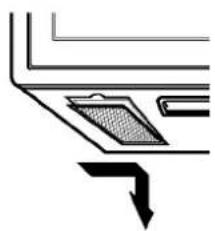
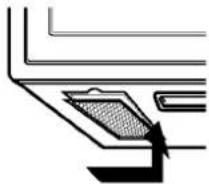
- To remove grease filters, slide each filter to the side. Pull filters downward and push to the other side. The filter will drop out.
natural_image
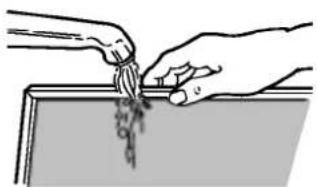
Pure diagram of a laptop keyboard with an arrow pointing to the screen (no text or symbols)- Soak grease filters in hot water and a mild detergent. Rinse well and shake to dry. Do not use ammonia or place in a dishwasher. The aluminum will darken.
natural_image
Illustration of hands pouring liquid from a container into a tray (no text or symbols)- To reinstall the filters, slide it into the side slot, then push up and toward oven center to lock.
natural_image
Pure technical diagram showing a mechanical component with no text or symbolsNOTE: Do not operate the hood without the filters in place.
CHARCOAL FILTER REPLACEMENT
If your oven is vented inside, the charcoal filter should be replaced every 6 to 12 months, and more often if necessary. The charcoal filter cannot be cleaned. To order a new charcoal filter, contact the Service Center.
-
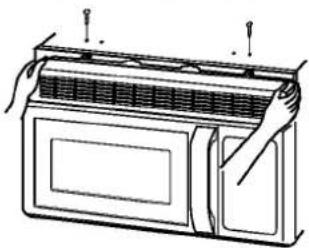
Remove the two vent grille mounting screws. (2 middle screws)
-
Tip the grille forward, then lift it out
natural_image
Line drawing of a door with ventilation grilles and a handle, no text or symbols present-
Open the door.
-
Push the hook and remove old filter.
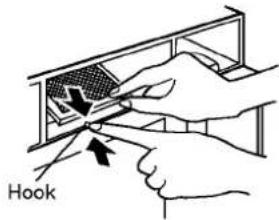
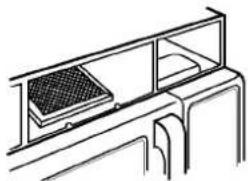
- Slide a new charcoal filter into place and close the door. The filter should rest at the angle shown and set the clock.
natural_image
Line drawing of a mechanical or architectural component with a grid-patterned panel on top, enclosed in a rectangular frame (no text or symbols)- Slide the bottom of the vent cover into place. Push the top until it snaps into place. Replace the mounting screws. Turn the power back on at the main power supply and set the clock.
MAINTENANCE
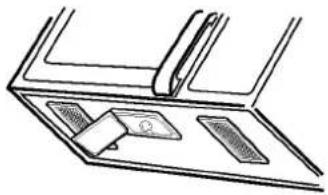
COOKTOP/NIGHT LIGHT REPLACEMENT
1, Unplug oven or turn off power at the main power supply.
2. Remove the bulb cover mounting screws.
natural_image
Line drawing of a mechanical component or bracket with no visible text or symbols- Replace bulb with 30 watt appliance bulb.
- Replace bulb cover, and mount screw.
- Turn the power back on at the main power supply.
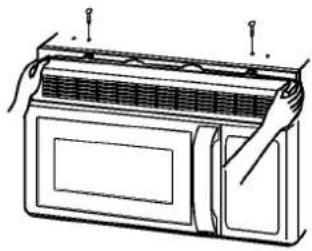
OVEN LIGHT REPLACEMENT
- Unplug oven or turn off power at the main power supply.
- Remove the vent cover mounting screws. (2 middle screws)
- Tip the cover forward, then lift out to remove.
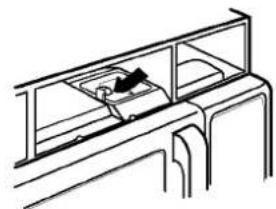
natural_image
Line drawing of a refrigerator with lid and door, showing hand positioning and ventilation slots (no text or symbols)- Lift up the bulb holder.
natural_image
Line drawing of a mechanical assembly or housing with no visible text or symbols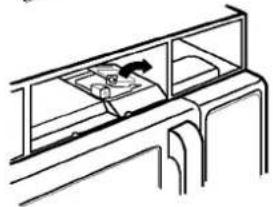
natural_image
Line drawing of a cabinet or storage unit with shelves and compartments (no text or symbols)- Replace bulb with a 30 watt appliance bulb.
- Replace the bulb holder.
- Slide the top of the vent cover into place. Push the bottom until it snaps into place. Replace the mounting screws. Turn the power back on at the main power supply.
QUESTIONS AND ANSWERS
Q. Can I use a rack in my microwave oven so that I may reheat or cook in two levels at a time?
A. Only use the rack that is supplied with your microwave oven. Use of any other rack can result in poor cooking performance and/or arcing and may damage your oven.
Q. Can I use either metal or aluminum pans in my microwave oven?
A. Usable metal includes aluminum foil for shielding (use small, flat pieces), and shallow foil trays (if tray is 3/4 inch deep and filled with food to absorb microwave energy). Never allow metal to touch walls or door.
A. Usable metal includes aluminum foil for shielding (use small, flat pieces), and shallow foil trays (if tray is 3/4 inch deep and filled with food to absorb microwave energy). Never allow metal to touch walls or door.
Q. Sometimes the door of my microwave oven appears wavy. Is this normal?
A. This appearance is normal and does not affect the operation of your oven.
Q. What are the humming noises that I hear when my microwave oven is operating?
A. You hear the sound of the transformer when the magnetron tube cycles on and off.
Q. Why does the dish become hot when I microwave food in it? I thought that this should not happen.
A. As the food becomes hot it will conduct the heat to the dish. Use hot pads to remove food after cooking.
Q. What does "standing time" mean?
A. "Standing time" means that food should be taken out of the oven and covered for additional time after cooking. This process allows the cooking to finish, saves energy and frees the oven for other purpose.
Q. Can I pop popcorn in my microwave oven? How do I get the best results?
A. Yes. Pop packaged microwave popcorn following manufacturer's guidelines or use the preprogrammed Popcorn pad.
Do not use regular paper bags. Use the "listening test" by stopping the oven as soon as the popping slows to a "pop" every one or two seconds. Do not try to repop unpopped kernels. You can also use special microwave poppers. When using a popper, be sure to follow manufacturer's directions. Do not pop popcorn in glass utensils.
Q. Why does steam come out of the air exhaust vent?
A. Steam is normally produced during cooking. The microwave oven has been designed to vent this steam out the top vent.
MAINTENANCE
You may microwave in many more utensils than you can use on the stove or in a conventional oven, because microwaves penetrate them safely still cooking the food.
Below are listed the utensils you can safely cook with and those you must avoid. To test whether you can safely with a utensil not on the lists below, do the following:
- Place the utensil empty in the microwave oven.
- Measure 1 cup of water in a glass measuring cup and place in the oven beside the utensil.
- Microwave on HI Power for 1 minute.
- If the utensil is warm to the touch at the end of this time, you should not use it for microwave cooking.
MICROWAVE UTENSIL GUIDE
| USE | DO NOT USE |
| OVENPROOF GLASS (treated for high intensity heat):utility dishes, loaf dishes, pie plates, cake plates, liquid measuring cups, casseroles and bowls without metallic trim.CHINA:bowls, cups, serving plates and platters without metallic trim.PLASTIC:Plastic wrap (as a cover)-- lay the plastic wrap loosely over the dish and press it to the sides.Vent plastic wrap by turning back one edge slightly to allow excess steam to escape. The dish should be deep enough so that the plastic wrap will not touch the food. As the food heats it may melt the plastic wrap wherever the wrap touches the food.Use plastic dishes, cups, semirigid freezer containers and plastic bags only for short cooking time. Use these with care because the plastic may soften from the heat of the food.PAPER:Paper towels, waxed paper, paper napkins and paper plates with no metallic trim or design. Look for the manufacturer's label for use in the microwave oven. | METAL UTENSILS:Metal shields the food from microwave energy and produces uneven cooking. Also avoid metal skewers, thermometers or foil trays.Metal utensils can cause arcing, which can damage your microwave oven.METAL DECORATION:Metal-trimmed or metal-banded dinnerware, casserole dishes, etc. The metal trim interferes with normal cooking and may damage the oven.ALUMINUM FOIL:Avoid large sheets of aluminum foil because they hinder cooking and may cause harmful arcing. Use small pieces of foil to shield poultry legs and wings. Keep ALL aluminum foil at least 1 inch from the side walls and door of the oven.WOOD:Wooden bowls and boards will dry out and may split or crack when you use them in the microwave oven. Baskets react in the same way.TIGHTLY COVERED UTENSILS:Be sure to leave openings for steam to escape from covered utensils. Pierce plastic pouches of vegetables or other food items before cooking. Tightly closed pouches could explode.BROWN PAPER:Avoid using brown paper bags.They absorb too much heat and could burn.FLAWED OR CHIPPED UTENSILS:Any utensil that is cracked, flawed or chipped may break in the oven.METAL TWIST TIES:Remove metal twist ties from plastic or paper bags.They become hot and could cause a fire. |
BEFORE CALLING FOR SERVICE
Check the following list to be sure a service call is really necessary. A quick reference of this manual as well as reviewing additional information on items to check, may prevent an unneeded service call.
If nothing on the oven operates:
- check for a blown circuit fuse or a tripped main circuit breaker.
- check if oven is properly connected to electric circuit in house.
- check that controls are set properly.
If the oven interior light does not works:
• the light bulb is loose or defective.
If oven will not cook:
- check that control panel was programmed correctly.
- check that door is firmly closed.
- check that Start Pad was touched.
- check that probe was inserted correctly into receptacle.
- check that timer wasn't started instead of a cook function.
If oven takes longer than normal to cook or cooks too rapidly:
- be sure the Power Level is programmed properly.
If the time of day clock does not always keep correct time:
- check that the power cord is fully inserted into the outlet receptacle.
- be sure the oven is the only appliance on the electrical circuit.
If food cooks unevenly:
- be sure food is evenly shaped.
- be sure food is completely defrosted before cooking.
- check placement of aluminum strips used to prevent overcooking.
If food is undercooked:
- check recipe to be sure all directions (amount, time, & power levels) were correctly followed.
- be sure microwave oven is on a separate circuit.
- be sure food is completely defrosted before cooking.
If food is overcooked:
- check recipe to be sure all directions (amount, power level, time, size of dish) were followed.
If arcing (sparks) occur:
- be sure microwavable dishes were used.
- be sure wire twist ties weren't used.
- be sure oven wasn't operated when empty.
- make sure metal rack (if used) is properly, installed on 4 supports.
If the Display shows a time counting down but the oven is not cooking:
- check that door is firmly closed.
- check that Timer wasn't started instead of a cooking function.
BEFORE CALLING FOR SERVICE
You can often correct operating problems yourself. If your microwave oven fails to work properly, locate the operating problem in the chart below and try the solutions marked for each problem.
If the microwave oven still does not work properly, contact the nearest Service center. Service Centers are fully equipped to handle your service requirements.
| PROBLEM | SOLUTION |
| Oven will not start | Is power cord plugged in?Is door closed?Cooking time not set.Temperature not set or probe not plugged in. |
| Arcing or Sparking | Use approved cookware only.Properly position temperature probe.Do not operate with oven empty. |
| Time of day incorrect | Reset time of day. |
| Probe Light Flashes | Is temperature probe properly plugged in? |
| Unevenly Cooked Foods | Use approved cookware only.Turn or stir food.Completely defrost food. |
| Overcooked Foods | Properly position temperature probe.Use correct time. / Power level setting.Use correct temp setting. |
| Undercooked Foods | Use approved cookware only.Properly position temperature probe.Completely defrost food.Use correct time. / Power level setting.Use correct temp setting.Check see that oven ventilation ports are not restricted. |
| Improper Defrosting | Use approved cookware only.Turn or stir food.Use correct time. / Power level setting. |
| Oven Lamp does net Light | Is power cord plugged in?Is door closed?Cooking time not set.Is light bulb burned out? |
FOUR À MICRO-ONDES
MANUEL DE L'UTILISATEUR
LISEZ ATTENTIVEMENT CE MANUEL AVANT DE METTRE L'APPAREIL EN MARCHE.
MV-1500MG/MV-1501MG GMV1540TW/ GMV1540TB
QUESTIONS ET RÉPONSES....20
GUIDE DES PLATS À L'ÉPREUVE
DES MICRO-ONDES....21
AVANT DE PLACER UN APPEL DE SERVICE .....22
MESURES DE PRÉVENTION
MESURES DE PRÉVENTION IMPORTANTES
natural_image
Illustration of a plug and its internal socket connected to a wall socket (no text or symbols)natural_image
Pure diagram of a mechanical component with an arrow indicating direction (no text or symbols)natural_image
Illustration of hands pouring liquid into a container with a tray (no text or symbols)natural_image
Pure technical diagram showing a mechanical component with no text or symbolsREEMPLACEMENT DU FILTRE AU CHARBON
natural_image
Line drawing of a door with handles and ventilation slots (no text or symbols)natural_image
Line drawing of a cabinet or rack with a grid-patterned shelf and metal frame (no text or symbols)natural_image
Line drawing of a mechanical component with a handle and two rectangular parts (no text or symbols)natural_image
Line drawing of a door with ventilation grilles and handlebars, no text or symbols presentnatural_image
Line drawing of a mechanical assembly or housing with no visible text, numbers, or symbols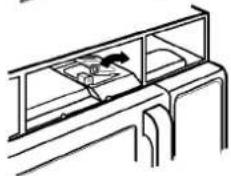
natural_image
Line drawing of a cabinet or rack with shelves and compartments (no text or symbols)
- INFORMATION....5
- OPERATION....9
- LEARN ABOUT YOUR MICROWAVE OVEN.....9
- MAINTENANCE....19
- CARE AND CLEANING ....19
- QUESTIONS AND ANSWERS....20
- MICROWAVE UTENSIL GUIDE....21
- BEFORE CALLING FOR SERVICE....22
- SAFETY
- IMPORTANT SAFETY INSTRUCTIONS
- SAVE THESE INSTRUCTIONS
- PRECAUTIONS TO AVOID POSSIBLE EXPOSURE TO EXCESSIVE MICROWAVE ENERGY ...
- INFORMATION
- LOCATION OF MODEL NUMBER
- OVEN SPECIFICATIONS
- ELECTRICAL RATING
- ELECTRICAL REQUIREMENTS
- GROUNDING INSTRUCTIONS
- WARNING - If you use the grounding plug improperly, you risk electric shock.
- OVEN CONTROL PANEL
- OPERATION
- CLOCK
- KITCHEN TIMER
- FAN HI / LO / OFF
- LIGHT HI / LO / OFF
- CHILD LOCK
- CUSTOM SET
- Example: To change defrost weight mode. (from lbs to kg)
- EZ ON
- TIME COOK
- COOKING AT HIGH COOK POWER
- COOKING GUIDE FOR "LOWER POWER LEVELS"
- POPCORN
- Example: To pop a 3.0 oz. bag.
- POTATO
- NOTE:
- COOK
- REHEAT
- AUTO DEFROST
- 2
- START
- Weight conversion chart
- DEFROSTING TIPS
- AUTO DEFROST CHART
- AUTO DEFROST CHART (continued)
- MAINTENANCE
- CARE AND CLEANING
- CLEANING THE GREASE FILTERS
- CHARCOAL FILTER REPLACEMENT
- COOKTOP/NIGHT LIGHT REPLACEMENT
- OVEN LIGHT REPLACEMENT
- QUESTIONS AND ANSWERS
- BEFORE CALLING FOR SERVICE
- If nothing on the oven operates:
- If the oven interior light does not works:
- If oven will not cook:
- If oven takes longer than normal to cook or cooks too rapidly:
- If the time of day clock does not always keep correct time:
- If food cooks unevenly:
- If food is undercooked:
- If food is overcooked:
- If arcing (sparks) occur:
- If the Display shows a time counting down but the oven is not cooking:
- FOUR À MICRO-ONDES
- MANUEL DE L'UTILISATEUR
- QUESTIONS ET RÉPONSES....20
- GUIDE DES PLATS À L'ÉPREUVE
- DES MICRO-ONDES....21
- AVANT DE PLACER UN APPEL DE SERVICE .....22
- MESURES DE PRÉVENTION
- MESURES DE PRÉVENTION IMPORTANTES
- REEMPLACEMENT DU FILTRE AU CHARBON
Brand : LG
Model : GMV1540TB
Category : Built-in oven