Power Pack 520 - Uninterruptible power supply GYS - Free user manual and instructions
Find the device manual for free Power Pack 520 GYS in PDF.


User questions about Power Pack 520 GYS
0 question about this device. Answer the ones you know or ask your own.
Ask a new question about this device
Download the instructions for your Uninterruptible power supply in PDF format for free! Find your manual Power Pack 520 - GYS and take your electronic device back in hand. On this page are published all the documents necessary for the use of your device. Power Pack 520 by GYS.
USER MANUAL Power Pack 520 GYS
natural_image
Line drawing of a portable electronic device with control panel and buttons (no text or symbols)FR 1-7 / 38-40
EN 8-12 / 38-40
DE 13-17 / 38-40
ES 18-22 / 38-40
RU 23-27 / 38-40
NL 28-32 / 38-40
IT 33-37 / 38-40
POWER PACK
520
1
natural_image
Coiled electrical cable with connector and terminal connector (no text or symbols)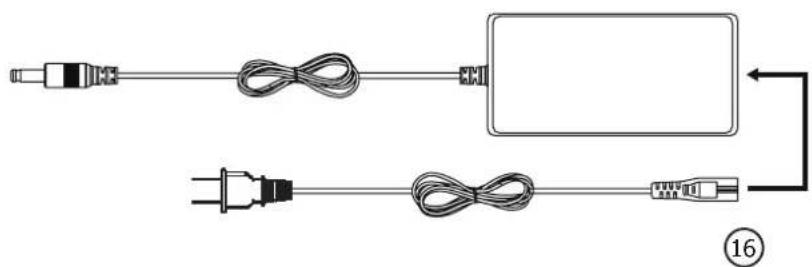
natural_image
Diagram showing two connected cable and plug wires, no text or symbols presentINSTRUCTIONS DE SÉCURITÉ

This manual includes guidelines on the operation of your device and the precautions to follow for your own safety. Ensure it is read carefully before first use and keep it handy for future reference. This device should only be used for charging and / or power supply within the limits indicated on the device and in the manual. The safety instructions must be followed. In case of improper or unsafe use, the manufacturer cannot be held responsible

Device suitable for indoor use only. Do not expose to rain or excessive moisture.
This device may be used by children from age 8 and by persons with reduced physical, sensory or mental capabilities or lack of experience and knowledge, provided that they are under supervision or have been told how to use the device safely and are aware of the potential risks. Children must not use the device as a plaything. Cleaning and servicing tasks may not be carried out by children unless they are supervised.
Do not use for charging non-rechargeable batteries.
Do not operate the device with a damaged power supply cord or a damaged mains plug.
Do not use the device if the charging cable appears to be damaged or assembled incorrectly in order to avoid any risk of short circuiting the battery.
Never charge a frozen or damaged battery.
Do not cover the device.
Do not place the device near a fire or subject it to heat or to longterm temperatures exceeding 50°C
Do not obstruct the cooling vents. Refer to the installation section before operating the machine.
The automatic mode of operation and usage restrictions are explained below in these operating instructions.

Connection:
Class II device (for the charger).
Maintenance:
• Service should be performed by a qualified person
- Warning! Always remove the power plug from the USB input socket before carrying out any work on the device.

- Under no circumstances should solvents or other aggressive cleaning agents be used.
- Clean the device
- Do not attempt to open the product as there is a risk of electrical danger.
Regulations
• The device complies with European Directive.
- The certificate of compliance is available on our website.
• EAC conformity mark (Eurasian Economic Commission)
- Equipment in compliance with British requirements. The British Declaration of Conformity is available on our website (see home page).
• Equipment in conformity with Moroccan standards
- The declaration C_ (CMIM) of conformity is available on our website (see cover page).
Disposal:
- This product should be disposed of at an appropriate recycling facility. Do not dispose of in domestic waste.
- The battery must be removed from the device before the latter is discarded.
- The device must absolutely be disconnected from the power supply network before removing the battery.
PRODUCT DESCRIPTION
The POWER PACK 520 is a portable power station suitable for home emergency power, outdoor travel, emergency interventions or field work. It is equipped with an internal battery (Lithium-Ion Polymer) with a capacity of 518 Wh (20 Ah) allowing to supply all types of devices operating at 5 / 9 / 12 / 15 / 20 Vdc as well as 230 Vac thanks to its internal inverter.
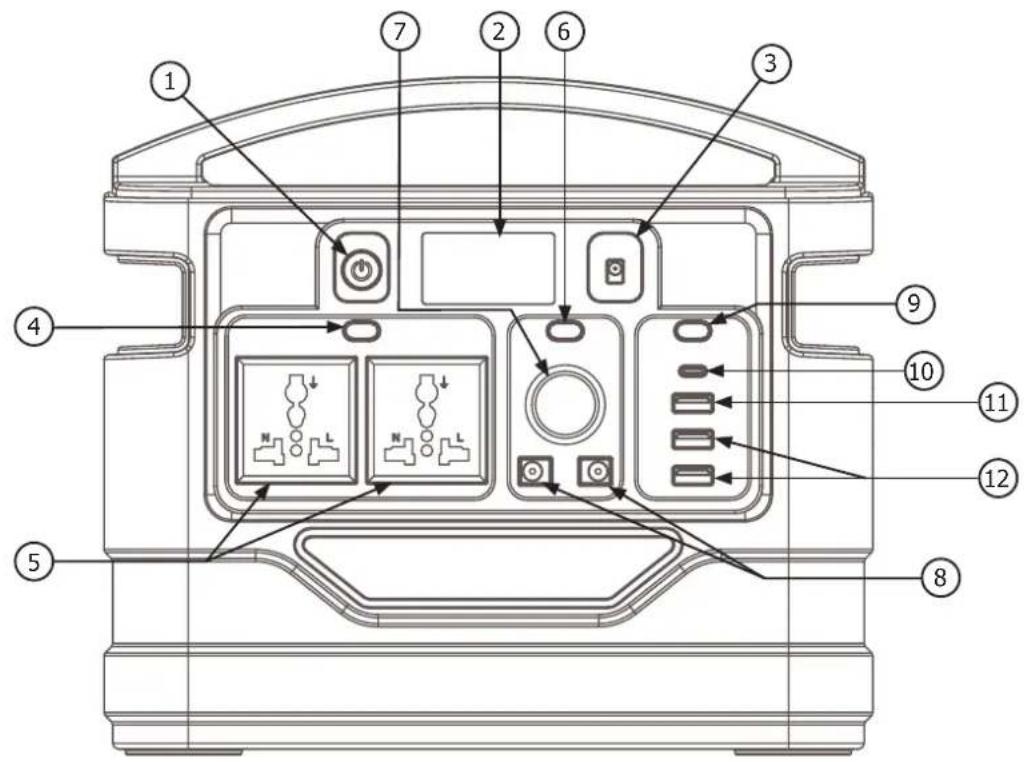
INTERFACE (FIG. 1)
| 1 ON / OFF button |
| 2 LCD display |
| 3 DC input 24 V / 2.5 A |
| 4 AC output activation button |
| 5 Dual output 230 Vac / 50 Hz / 500 W (EU/US/AU compatible) |
| 6 DC output activation button |
| 7 Cigarette lighter output 12 Vdc |
| 8 Dual DC output (Jack socket) |
| 9 USB output activation button |
| 10 USB Type-C input / output |
| 11 USB Quick Charge 3.0 output (5 V / 3 A) |
| 12 USB output (5 V / 3.1 A max) |
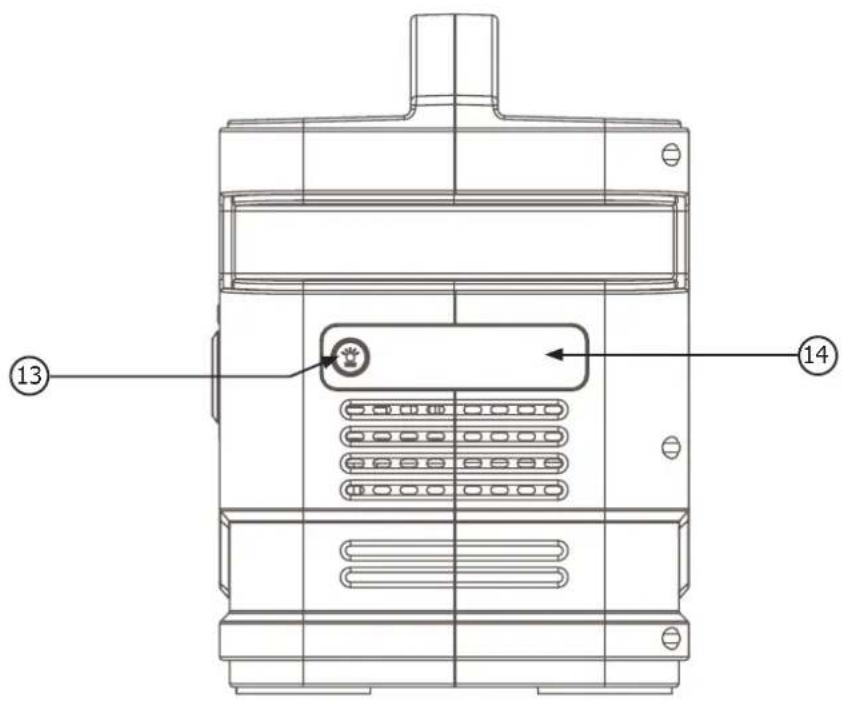
| 13 LED button |
| 14 LED |
ACCESSORIES
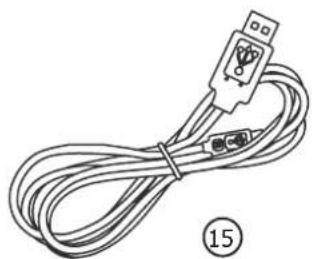
| 15 USB cable |
| 16 Mains charger |
TECHNICAL SPECIFICATIONS
| Capacity 20 Ah / 518 Wh | |
| Size (L x W x H) 264 x 234 x 163 mm | |
| Weight 5.14 kg | |
| Internal battery technology Lithium-Ion Polymer Battery (7 cells) | |
| Input DC input 24 V / 2.5 A - PV / solar panels - car charger 11 V - 30 V | |
| Wall adapter 100 V - 240 V, 50/60 Hz, 1.2 A max | |
| USB Ports 5 V / 3 A, 9 V / 3 A, 12 V / 3 A, 15 V / 3 A, 20 V / 2.25 A | |
| Charging time 9.5 h with 24 V / 2.5 A adapter; 9.5 h with 60 W solar panels | |
| "Output voltage plug Cigarette lighter" | 11.5 V ~ 12.5 V / 12 A total (single port 10 A max) |
| USB Quick Charge 5 V / 3 A, 9 V / 2 A, 12 V / 1.5 A | |
| Dual USB output 5 V / 3.1 A total (single port 2.4 A max) | |
| Dual AC output 230 V / 50 Hz / 500 W (PSW - Pure Sine Wave) | |
| Battery indicator LCD display | |
| Charge temperature | 0°C - 50°C (32°F - 122°F) |
| Discharge temperature | -20°C - 50 °C (-4°F - 122°F) |
| Service life | 1000 charging cycles |
| Protections | Short-circuit protection, overcurrent protection, overvoltage protection, undervoltage protection, overload protection, temperature protection. |
LCD ILLUMINATED DISPLAY
The LED display shows the internal battery capacity as well as the inputs and outputs used on the POWER PACK 520. Press button (1), the LCD display will light up. In case all outputs are inactive: after 10 seconds of inactivity, the backlight will turn off. After 30 seconds of inactivity, the display will turn off. The POWER PACK 520 will automatically switch to standby.
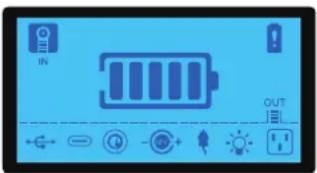
| State of charge of the battery | |
| In charge | |
| Error | |
| Active USB outputs | |
| USB-C output active | |
| Active USB outputs | |
| Active 12 Vdc outputs | |
| LED on | |
| AC output open | |
| The POWER PACK 520 is active. It is discharged because there is a consumer on one of its outlets and cannot go into standby mode. |
OPERATION OF THE DIFFERENT SUPPLY MODES
Switch on the POWER PACK 520 by pressing the On / Off button (1). The display will light up.
1 / Use of 230 Vac outputs
- Press button (4) to activate the AC outputs (5), the icon lights up on the LCD screen.
- Connect the desired device to one of the AC sockets (5).
- Press the button (4) again to deactivate the outputs (5).

The total consumption of all devices connected to the POWER PACK 520 must be less than its maximum capacity of 500 W.
2 / Use of 12 VdC outputs
- Press button (6) to activate the DC outputs, the icon ⚪️ will appear on the LCD screen.
- Connect the desired device to one of the 12V output ports (8) or to the cigarette lighter socket (7).
- Press button (6) again to deactivate the DC outputs.
-
Press button (9) to activate the USB outputs. Icons and Ⓞ will appear on the LCD display.
-
Connect the desired device to the corresponding USB port :
| (10) USB Type-C The icon appears on the screen. | |
| (11) USB Quick Charge 3.0 (5 V / 3 A) | The ⇌ and @cons appears on the screen. |
| (12) USB (5 V / 3.1 A max) | |
- Press button (9) again to deactivate the USB outputs.
To switch off the POWER PACK 520 :
- press and hold down the On / Off button (1) (> 2 s)
- disable all outputs and wait 30 seconds, the POWER PACK 520 will automatically switch to standby.

Interface specifications and voltage standards are not the same in different countries. Before use, carefully check whether the product specifications are in accordance with the specifications for use of electrical equipment, otherwise it may lead to dangerous situations.

The POWER PACK has overload protection. If an AC device requires more power than the nominal power of the POWER PACK 520 (500 W), it will not activate.
USE OF LEDS
- Switch on the device by pressing the button (1).
- Press button (14) for a long press (> 2 s). The LED lights up in standard mode. The icon 🙏 appears on the display.
- Press button (14). The LED lights up in 'SOS' mode.
- Press button (14) again. The LED lights up in 'Flash' mode.
- A further long press (>2 s) switches the LED off.
CHARGING THE POWER PACK 520
When the product is charging normally, the 📄 and 🔍 icons blink on the LCD display.
There are several ways to recharge the POWER PACK 520:
1 / Use the mains charger supplied
- Plug the charger port (3.5 mm) into the DC 24 V input (3) of the POWER PACK 520.
- Connect the other end of the charger to a 230 V mains socket.
- Allow the POWER PACK 520 to recharge and then disconnect it from the power supply by performing the reverse procedure.
2 / Use both DC 24 V / 2.5 A (3) and USB Type-C (10) inputs.
The POWER PACK 520 must only be charged by its charger.
- Plug the charger cable into the corresponding input of the POWER PACK 520 : (3) or (10).
- Connect the other end of the cable to the power source that will perform the charge.
- Allow the POWER PACK 520 to charge and then disconnect it by performing the reverse operation.
For faster charging, both inputs can operate simultaneously with two different power sources.
3 / Using solar panels
The DC 24 V / 2.5 A input (3) can accommodate the energy from a solar panel.
- Place the solar panel in direct sunlight without exposing the POWER PACK 520 to direct sunlight or moisture.
- Connect the 3.5 mm output of the solar panel to the DC 24 V input port.
- Allow the POWER PACK 520 to recharge and then disconnect it from the power supply.
4 / Using a car charger
- Connect the car charger cable to the DC 24 V / 2.5 A input (3).
- Plug the other end of the car charger cable into the car's 12 V cigarette lighter socket.

In case of failure, the icon corresponding to the input or output being used will flash on the LCD display.
WARRANTY
The warranty covers faulty workmanship for 2 years from the date of purchase (parts and labour).
The warranty does not cover:
- Transit damage.
- Normal wear of parts (eg. : cables, clamps, etc..).
- Damages due to misuse (power supply error, dropping of equipment, disassembling).
- Environment related failures (pollution, rust, dust).
In case of failure, return the unit to your distributor together with:
- The proof of purchase (receipt etc ...)
- A description of the fault reported
Нормы и правила:
BESCHRIJVING VAN HET APPARAAT
INTERFACCIA (FIG. 1)