Power Pack 1300 - Uninterruptible power supply GYS - Free user manual and instructions
Find the device manual for free Power Pack 1300 GYS in PDF.


| Product type | Portable power station / Uninterruptible power supply |
| Brand | GYS |
| Model | Power Pack 1300 |
| Battery capacity | 50 Ah / 1280 Wh (Lithium Iron Phosphate) |
| Dimensions (L x W x H) | 360 x 270 x 280 mm |
| Weight | 17.5 kg |
| AC input | 100-240 V, 50/60 Hz, charger 19 V / 9.47 A included |
| DC input | 2 x DC 12-30 V, 200 W max (solar panels or cigarette lighter) |
| AC outputs | 3 x 230 V / 50 Hz / 1000 W (pure sine wave) |
| DC outputs | 2 x 12 V / 10 A jack socket + 1 x 12 V / 10 A cigarette lighter |
| USB outputs | 3 USB-A 5 V / 2.4 A, 1 USB-A Quick Charge 3.0, 2 USB-C (max 20 V / 5 A) |
| Booster function | 12 V starting, starting current 500 A, peak 1000 A |
| LED light | 12 W, 5 modes (low, medium, high, SOS, strobe) |
| Display | LCD: battery level, power, runtime, charging time |
| Protections | Short circuit, overcurrent, overvoltage, undervoltage, overload, overtemperature |
| Operating temperature | Charging: 0 °C to 50 °C; Use: -20 °C to 50 °C |
| Battery life | 2000 charge cycles |
| Maintenance | Clean with a dry cloth, do not use solvents, unplug before maintenance |
| Warranty | 1 year (parts and labor) |
| Included accessories | Jump leads, AC charger |
Frequently Asked Questions - Power Pack 1300 GYS
User questions about Power Pack 1300 GYS
0 question about this device. Answer the ones you know or ask your own.
Ask a new question about this device
Download the instructions for your Uninterruptible power supply in PDF format for free! Find your manual Power Pack 1300 - GYS and take your electronic device back in hand. On this page are published all the documents necessary for the use of your device. Power Pack 1300 by GYS.
USER MANUAL Power Pack 1300 GYS
natural_image
Line drawing of a portable electronic device with control panel and buttons (no text or symbols)FR 2-8 / 45-48
EN 2 / 9-14 / 45-48
DE 2 / 15-20 / 45-48
ES 2 / 21-26 / 45-48
RU 2 / 27-32 / 45-48
NL 2 / 33-38 / 45-48
IT 2 / 39-44 / 45-48
POWER PACK 1300
1

INSTRUCTIONS DE SÉCURITÉ

Réglementation :
ÉCRAN LUMINEUX LCD (FIG.1)
natural_image
Illustration of three electronic devices with no visible text or symbolsThis manual contains safety and operating instructions, to be followed your own personal safety. Please read it carefully before first use and keep it for future reference. These instructions must be read and fully understood before use. Do not undertake any alterations or maintenance work that is not directly specified in this manual. The manufacturer shall not be liable for any damage to persons or property resulting from use not in accordance with the instructions in this manual. If you have any problems or queries, please consult a qualified person to correctly operate the equipment. This device should only be used for recharging, starting and/or powering batteries within the limits indicated on the appliance and in the manual. These safety instructions must be followed. The manufacturer cannot be held responsible in the event of improper or dangerous use.

The device is designed to be used indoors. Do not expose this machine to rain.
This unit can be used by children aged eight or over, by people with reduced physical, sensory or mental capabilities as well as by those with a lack of experience or knowledge. However, these aforementioned persons must be properly monitored and they must have read the equipment's user instructions alongside having been made aware of the risks. Children must not play with the product. Cleaning and maintenance should not be performed by an unsupervised child.
Do not use to charge domestic batteries or non rechargeable batteries.
Do not use the charger if the mains cable or plug is damaged.
In order to avoid short-circuiting the battery, do not use the appliance if the charging cable is damaged or has an assembly defect.
Never charge a frozen or damaged battery.
Do not cover the device.
Do not place the unit near a heat source, direct sunlight or continuously high temperatures (above 50^ C).
Do not obstruct the machine's air intake system. Refer to the set-up instructions before using the appliance.
The automatic operating mode and the relevant usage restrictions are explained later in this manual.

Power supply:
Class II device (for the charger).


Maintenance:
- Maintenance should only be carried out by a qualified person.
- Warning! Always disconnect the plug from the USB input socket before carrying out work on the unit.
- Never use solvents or other aggressive cleaning agents.
- Clean the surfaces of the unit with a dry cloth.
- Do not attempt to open the product due to risk of electrical hazard.



Regulations:
- This device complies with European directives.
- The Declaration of Conformity is available on our website.
• EAEC conformity mark (Eurasian Economic Community). - This equipment conforms to UK requirements.
- The UK Declaration of Conformity is available on our website (see cover page).
- This equipment conforms with Moroccan standards.
- The C _m (CMIM) Declaration of Conformity is available on our website (see cover page).
Disposal:
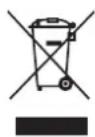
- This machine is subject to selective collection. Do not dispose of it in a domestic-waste bin.
- The battery must be removed from the unit before it is disposedof.
- The appliance must be disconnected from the power supply before removing the battery.
PRODUCT DESCRIPTION
The POWER PACK 1300 is a portable power source ideal as an emergency domestic power supply; it's perfect for outdoor use, emergency responses or outdoor work. Equipped with an internal LFP (Lithium Ferrophosphate) battery, this device can supply 1,280 Wh (50 Ah) of power to all machine-types operating at 5 / 9 / 12 / 15 / 20 V DC, as well as 230 V AC thanks to its internal converter.
It also includes a "Booster" feature for starting 12 V vehicles:
![Booster function [ ] [ ] [ ] [ ] [ ] [ ] [ ]](/content/2026/02/418953/images/103b7b1c564d30ffa454340e50f8858949df668bef3de0076ee278c7a2751d18.jpg)
INTERFACE (FIG. 1)
| 1 LCD display | |
| 2 Jump-lead socket | |
| 3 AC output-activation button | |
| 4 220 VAC - 50 Hz - 1 kW output (x 3) | |
| 5 USB-A 5 V - 2.4 A output (x 3) | |
| 6 USB Quick Charge output | |
| 7 | DC 12 V / 10 A output (jack plug) (x 2) |
| 8 | 12 VDC / 10 A cigarette-lighter socket |
| 9 DC output-activation button | |
| 10 USB output-activation button | |
| 11 | 12-30 V / 200 W DC input (jack plug) |
| 12 USB Type-C output | |
| 13 Possibility of connecting a secondary battery to double the product's capacity (option n ot available). | |
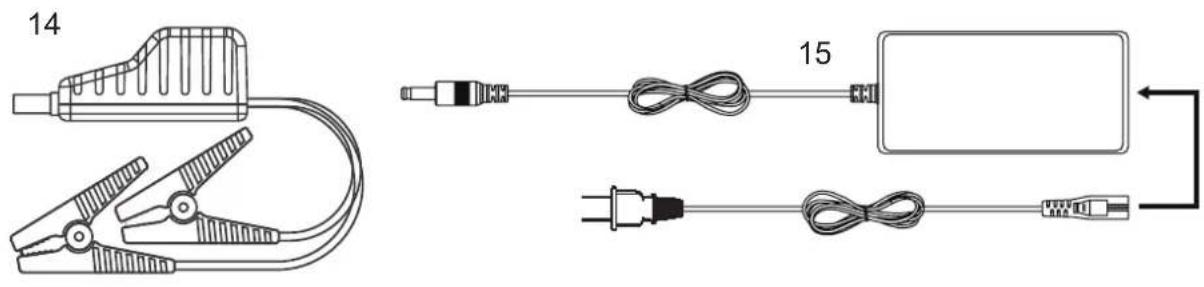
ACCESSORIES
| 14 Jump leads | |
| 15 | Mains charger |
PRODUCT DESCRIPTION
| Capacity 50 Ah / 1,280 Wh | ||
| Size (L x W x H) 360 x 270 x 280 mm | ||
| Weight 17.5 kg | ||
| Battery type Lithium Iron Phosphate battery (8 cells) | ||
| INPUTS | Inputs 12 - 30 V, DC (200 W max.) (x2) | |
| Charging modes 100 - 240 V, 50/60 Hz charger | ||
| AC adapter | 100 - 240 V, 50/60 Hz. Input: 2.5 A Output: 9 VDC / 9.47 A | |
| OUTPUTS | 12 V output Cigarette-lighter socket: 12 V / 10 ADC ports: 12 V / 10 A (x2) | |
| USB ports USB-A (x 3): 5 V, 2.4 AUSB-A Quick Charge 3.0 (x 1): 5 V / 3 A, 9 V / 2 A, 12 V / 1.5 AUSB-C (x 2): 5 V / 3 A, 9 V / 3 A, 12 V / 3 A, 15 V / 3 A, 20 V / 3 A, 20 V / 5 A | ||
| AC outputs 230 V / 50 Hz / 1,000 W (PSW - Pur Sine Wave) ( x 3) | ||
| Booster output | 12 V start-up (starting current: 500 A / peak current: 1,000 A) | |
| Lighting | 12 W LED (5 modes: low / medium / strong lighting, SOS and Stroboscopic) | |
| Battery indicator | LCD display | |
| Charging temperature | 0^ - 50^ ( 32^ - 122^ ) | |
| Working temperature | -20^ - 50^ ( -4^ - 122^ ) | |
| Machine's working lifespan | 2,000 charging cycles | |
| Safeguards | This machine is protected against short circuiting, overcurrents, overvoltages, under-voltages, overloading and overheating. | |
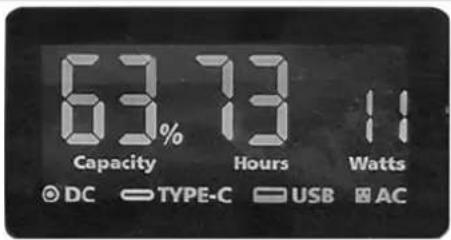
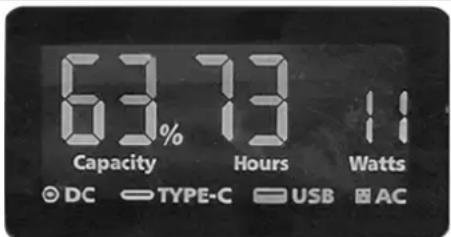
LCD DISPLAY SCREEN (FIG.1)
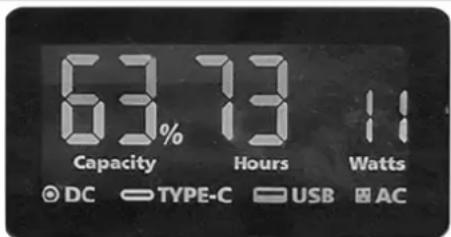
The LED display lights up as soon as one of the output buttons (3, 9 or 10) is pressed.
It will permanently indicate:
- the internal battery's charge percentage.
- the different types of input and output currently being used by the POWER PACK 1300 (USB - Type C, AC, DC).
When the POWER PACK1300 is charging, the display will also show:
- the charging power in Watts (W).
- the remaining recharge time in hours.
When the POWER PACK 1300 is in use, the display will also show:
- the power consumption in Watts (W).
- the machine's battery life in hours (the remaining charge will automatically update according to the device's power consumption).
The LED display remains on continuously as long as the POWER PACK 1300 is active; when it is on charge or in use. When all outputs are inactive, the LED display's backlighting will switch off after 30 seconds. The screen will turn off permanently after one minute of inactivity and the machine will go into standby mode.
OPERATING THE DIFFERENT POWER-SUPPLY MODES
Before using the appliance for the first time, it is recommended to fully charge the battery to prevent a lack of power from reducing the capacity of the POWER PACK 1300.
- Powering up: Press one of the buttons (3, 9 or 10) to activate the required output block(s).
The names of the active output blocks will appear on the display screen. From this moment on, the relevant outputs are live, drawing power from the battery. The display screen will show the power consumption increasing. - Connect the chosen device, either to charge it or to use it. The power consumption will increase on the display screen as well as the appliance's remaining battery life, which will be automatically updated.
- Unplug the unit when you have finished charging or using it.
- Switch off the active output block(s) by pressing the relevant button (3, 9 or 10) again.

The POWER PACK operates up to 1000 W (average power):
- in case the power is exceeded and to allow more equipment to operate normally, the POWER PACK automatically regulates its AC output voltage (AC voltage decrease).
- In case the overload is too high, it goes into safety mode, the outputs are automatically cut off.

Be sure to disable the POWER PACK 1300's output blocks. If they remain active, the POWER PACK 1300 will not go into standby mode immediately and the outputs will continue to consume power.
If no connection to the output block has been made in the six hours following the activation of an output, the output block will automatically switch off and only then will the POWER PACK 1300 to go into standby mode.
USING THE MACHINE IN BOOSTER MODE

RECHARGE THE POWER PACK 1300's battery before its first use and after each use.
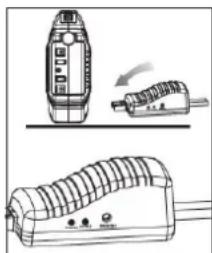
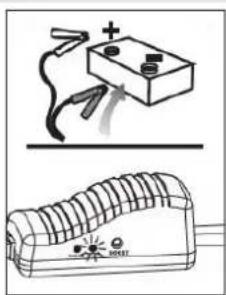
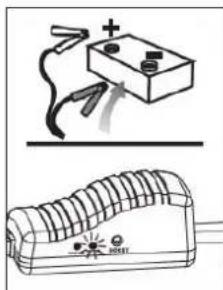
- Connect the jump-lead clamps (14) to the POWER PACK 1300's connector (2), and make sure the cable indicator is off.
- Connect the red clamp to the vehicle's positive (+) battery terminal and the black clamp to the negative (-) terminal.
- To use the cable indicator, follow these instructions:
natural_image
Illustration of three electronic devices: a remote control unit, a plug-in device, and a coiled device (no text or symbols visible)GREEN LIGHT ON:
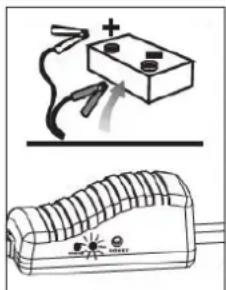
The connection is good and the circuit is working, turn on the vehicle's engine for an immediate start-up.
RED LIGHT ON
with warning buzzer:
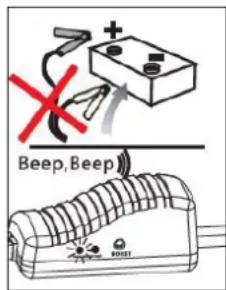
A beeping sound indicates a polarity reversal. Reconnect the clamps as explained in step two. Wait for the green light to come on before starting again.
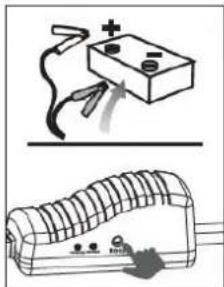
The vehicle's battery is low (between 1 V and 9 V). Press the "BOOST" button, wait for the flashing GREEN indicator light to turn solid, then turn on the cable indicator within 30 seconds.
No lights on, no warning buzzer:
natural_image
Illustration of a battery connected to a circuit board with a switch, showing electrical connections (no text or symbols)The vehicle's battery may be damaged (< 1 V). After making sure that the clips are properly connected, press the "BOOST" button, wait until the GREEN LIGHT is on, then start the vehicle's engine within 30 seconds.
4. Starting a vehicle

Do not attempt to jump start the vehicle more than three times in a row. This could cause damage if the unit overheats. Wait for at least two minutes between each attempt.
The jump lead may overheat. If this occurs, a safeguarding system will cut off the voltage to the jump-lead's clamps.
- After having started the vehicle, remove the jump leads from the vehicle's battery. Leave the vehicle's engine running.

Remove the jump-start clamps from the vehicle's battery within 30 seconds of starting the engine. Otherwise, damage may occur.
1) Use the mains charger supplied with the machine.
- Connect the charger port to one of the POWER PACK 1300's 12 V - 30 V DC inputs.
- Connect the other end of the charger to a 230 V power outlet.
- Let the POWER PACK 1300 recharge (eight hours max.) then disconnect it by working backwards through the aforementioned instructions.
2) Using solar panels (not supplied)
The 12 V / 30 V DC inputs can support the energy of up to two solar panels (200 W max.).
- Place the solar panel(s) in direct sunlight without exposing the POWER PACK 1300 to direct sunlight or moisture.
- Connect the solar panel's output to the 12 V DC input port.
Repeat the operation if a second solar panel has also been used.
- Let the POWER PACK 1300 recharge and then disconnect it.
3) Using a car charger (not supplied)
- Plug the electric-vehicle charger cable into the 12 V - 30 V DC input.
- Plug the other end of the electric-vehicle charger cable into the car's 12 V cigarette-lighter socket.
- Allow the POWER PACK 1300 to recharge (for between 10 - 11 hours), then disconnect the machine.
TROUBLESHOOTING
| Analysis Cause Solutions | ||
| The product is not charging.The charging indicator light has gone out. | The charger is not properly connected to the POWER PACK 1300. | Check the charger's connection. |
| The connection is good but the charging indicator light still remains switched off. | The charger is defective, contact the After-Sales Service. | |
| The indicator light is on but the unit is still not charging. | The device is damaged. | |
| The outputs do not work. The charging | indicator is not properly connected to the POWER PACK 1300. | Check the POWER PACK 1300's connection to the vehicle. |
| The output block is not turned on. Turn on the output block (buttons 3, 9 or 10). | ||
| The POWER PACK 1300 is at limited capacity. | Charge the POWER PACK 1300. | |
| The charging or operating power of the vehicle is greater than that of the POWER PACK 1300. | The vehicle requires a more powerful power source. | |
| The output has turned off while in use. | The charging or operating power of the vehicle is greater than that of the POWER PACK 1300. | The vehicle requires a more powerful power source. |
| The vehicle does not have enough charging power. The POWER PACK 1300 has not detected it. It will turn off automatically. | Turn the POWER PACK 1300 back on. | |
GUARANTEE
The warranty covers all defects or manufacturing faults for one year starting from the date of purchase (parts and labour).
The warranty does not cover:
- Any other damage caused by transport.
- The general wear and tear of parts (i.e. cables, clamps, etc.).
- Incidents caused by misuse (incorrect power supply, dropping or dismantling).
- Environmental faults (i.e. pollution, rust and dust).
In the event of a breakdown, please return the appliance to your distributor, along with:
- a dated proof of purchase (receipt or invoice etc.).
- a note explaining the breakdown.
SICHERHEITSHINWEISE

Vorschriften:
natural_image
Technical line drawing of three electronic devices with no visible text or symbolsnatural_image
Technical line drawing of three electronic devices with no visible text or symbolsНормы и правила:
natural_image
Three technical line drawings of electronic devices with no visible text or symbolsГорит ЗЕЛЕНЫЙ СВЕТ:
natural_image
Illustration of a battery connected to a fuse and its circuit board (no text or symbols)natural_image
Illustration of a battery connected to a circuit board with a switch (no text or symbols present)Regelgeving :
BESCHRIJVING VAN HET APPARAAT
BESCHRIJVING VAN HET APPARAAT
natural_image
Illustration of three electronic devices with no visible text or symbolsGROENE LAMPJE brandt :
natural_image
Simple line drawing of a battery and its circuit board (no text or symbols)natural_image
Illustration of a battery connected to a circuit board with a plug, showing electrical connections (no text or symbols)INTERFACCIA (FIG. 1)
DISPLAY LUMINOSO LCD (FIG.1)