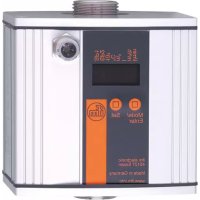
SU7200 - Flow sensor IFM - Free user manual and instructions
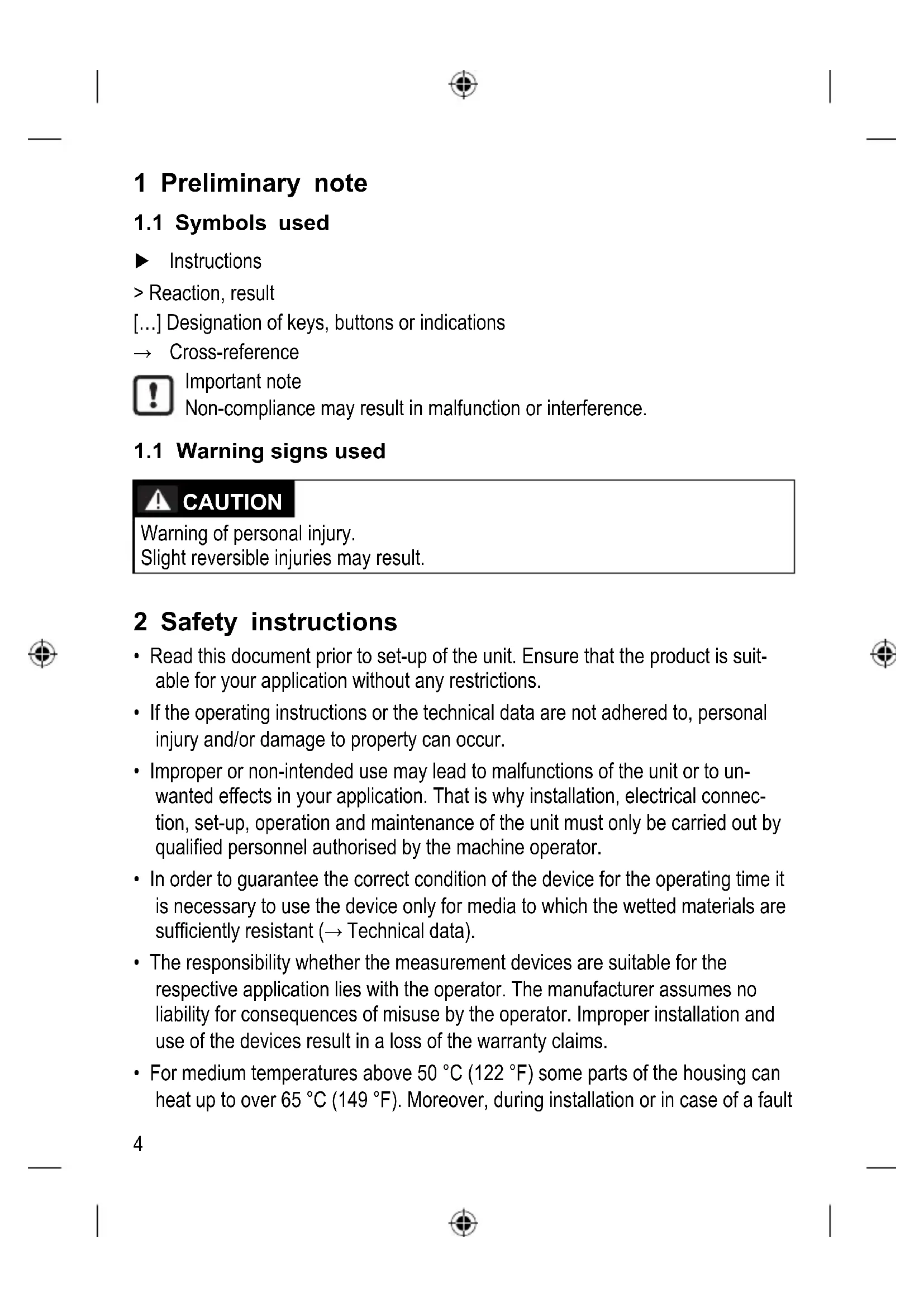
Find the device manual for free SU7200 IFM in PDF.



| Product Type | Ultrasonic Flow Sensor |
| Brand | IFM |
| Model | SU7200 |
| Main Functions | Flow and temperature monitoring, 2 programmable switching outputs (hysteresis or window, NO/NC), 4-digit LED display, customer calibration, start-up delay, damping |
| Power Supply | SELV/PELV according to EN 50178, pin 1 L+, pin 3 L- |
| Electrical Connection | M12 connector, 4-pin (BN, WH, BU, BK) according to DIN EN 60947-5-2 |
| Compatible Fluids | Water, glycol solutions, low-viscosity oils (7-40 mm²/s at 40°C), high-viscosity oils (30-68 mm²/s at 40°C) |
| Fluid Temperature | Not directly specified, but measurement range -10°C to >120% VEM (see error messages) |
| Operating Pressure | Observe PED guidelines (fluid group 2, not superheated) |
| LED Indicators | 6 LEDs for measurement unit (l/min, m³/h, gpm, gph, °C, °F) and 2 LEDs for output status |
| Display | Alphanumeric 4-digit, adjustable refresh (500 ms, 1000 ms, 2000 ms) and 180° orientation |
| Outputs | OUT1: switching signal for flow; OUT2: switching signal for flow OR temperature (selectable) |
| Protection | Electronic lock against unintentional changes |
| Mounting | In the pipe using adapters (accessories), observe recommended positions (full fill, suction/discharge distances) |
| Maintenance and Cleaning | Clean exterior with a soft, dry cloth; avoid aggressive products. Rinse system after installation to remove air bubbles. |
| Safety | Use by qualified personnel; observe housing temperatures (>50°C -> risk of burns); do not operate buttons by hand; depressurize before mounting. |
| Spare Parts and Repairability | Mounting adapters available at www.ifm.com. No user-serviceable parts; contact customer service in case of defect. |
| General Information | Manual available in French, German, English. Complete technical data at www.ifm.com. Factory settings: SP1=10.0, rP1=5.0, etc. |
Frequently Asked Questions - SU7200 IFM
User questions about SU7200 IFM
0 question about this device. Answer the ones you know or ask your own.
Ask a new question about this device
Download the instructions for your Flow sensor in PDF format for free! Find your manual SU7200 - IFM and take your electronic device back in hand. On this page are published all the documents necessary for the use of your device. SU7200 by IFM.
USER MANUAL SU7200 IFM
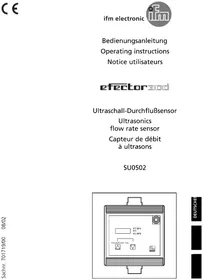
Operating instructions Ultrasonic flow rate sensor
natural_image
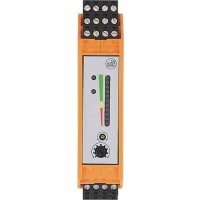
Front view diagram of a device casing with buttons and a central panel (no text or symbols)
Inhalt
Schließer: [OUx] = [Hno]
Öffner: [OUx] = [Hnc]
Schließer: [OUx] = [Fno]
Öffner: [OUx] = [Fnc]
line
| t | SP | rP | |---|------|------| | ① | ~0.5%| 0.5% | | ② | ~0.75| 0.5% | | ③ | ~1.0 | 0.5% | | ④ | ~0.9 | 0.5% | | ⑤ | ~0.6 | 0.5% | | ⑥ | ~0.3 | 0.5% | | ⑦ | ~0.6 | 0.5% | | ⑧ | ~0.8 | 0.5% |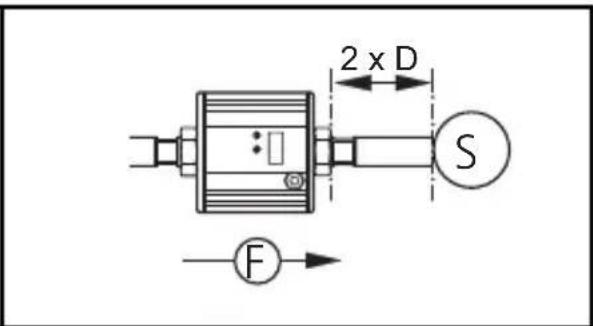
natural_image
Pure electrical circuit lines without any symbols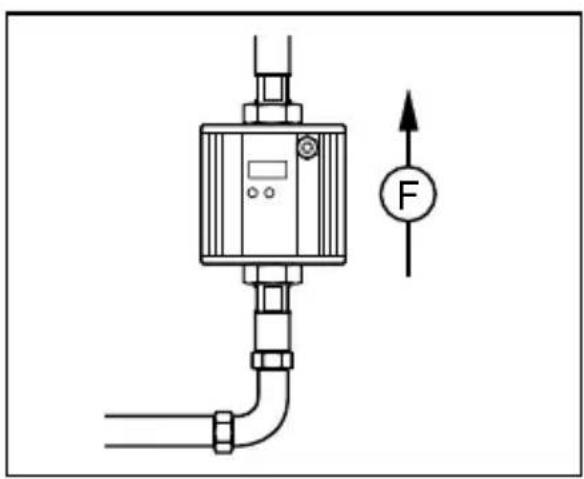
natural_image
Technical diagram of a pressure regulator with pipe and valve, showing force direction indicator (no text labels)natural_image
Pure electrical circuit lines without any symbolsnatural_image
Pure mechanical diagram of a pressure regulator with pipe and force indicator (no text or symbols)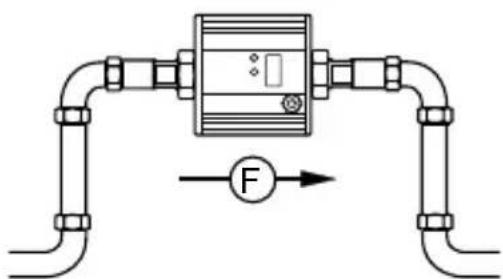
natural_image
Pure electrical circuit lines without any symbolsnatural_image
Pure electrical circuit lines without any symbolsnatural_image
Technical diagram of a mechanical device with force gauge and side view (no text or symbols)1 Preliminary note ....4
1.1 Symbols used ....4
1.1 Warning signs used ....4
2 Safety instructions ....4
3 Functions and features ....5
4 Function....6
4.1 Process measured signals 6
4.2 Volumetric flow monitoring ....6
4.3 Temperature monitoring 6
4.4 Switching function 7
4.4.1 Hysteresis function 7
4.4.2 Window function 7
4.5 Start-up delay 8
4.6 Customer-specific calibration (CGA) 10
5 Installation....11
5.1 Recommended mounting position 11
5.2 Non recommended installation position 12
5.3 Installation in pipes 13
6 Electrical connection ....14
7 Operating and display elements ....15
8 Menu....16
8.1 Menu structure ....16
8.2 Explanation of the menu ....17
9 Set-up....18
10 Parameter setting ....18
10.1 Parameter setting in general .....19
10.1.1 Change from menu level 1 to menu level 2 ......19
10.1.2 Locking / unlocking 20
10.1.3 Timeout 20
10.2 Settings for consumed quantity monitoring ....21
10.2.1 Configure limit value monitoring with OUT1 21
10.2.2 Configure limit value monitoring with OUT2 21
2
10.3 Settings for temperature monitoring ....21
10.3.1 Configure limit value monitoring with OUT2 21
10.4 User settings (optional) 21
10.4.1 Set standard unit of measurement for volumetric flow .....21
10.4.2 Setting of the standard unit of measurement for temperature .....22
10.4.3 Set the display mode .....22
10.4.4 Calibrate curve of measured values ......22
10.4.5 Reset calibration data 22
10.4.6 Set the start-up delay 22
10.4.7 Set measured value damping 22
10.4.8 Set output status in fault condition 22
10.4.9 Select the medium to be monitored 23
10.5 Service functions ......23
10.5.1 Read min/max values for volumetric flow 23
10.5.2 Reset all parameters to factory setting 23
11 Operation ....23
11.1 Read the process value ......23
11.2 Change the display unit in the Run mode 23
11.3 Read the set parameters 24
11.4 Fault indications ....24
12 Technical data 24
13 Factory setting 25
1 Preliminary note
1.1 Symbols used
▶ Instructions
Reaction, result
[...] Designation of keys, buttons or indications
→ Cross-reference

Important note
Non-compliance may result in malfunction or interference.
1.1 Warning signs used

CAUTION
Warning of personal injury.
Slight reversible injuries may result.
2 Safety instructions
- Read this document prior to set-up of the unit. Ensure that the product is suitable for your application without any restrictions.
- If the operating instructions or the technical data are not adhered to, personal injury and/or damage to property can occur.
- Improper or non-intended use may lead to malfunctions of the unit or to unwanted effects in your application. That is why installation, electrical connection, set-up, operation and maintenance of the unit must only be carried out by qualified personnel authorised by the machine operator.
- In order to guarantee the correct condition of the device for the operating time it is necessary to use the device only for media to which the wetted materials are sufficiently resistant ( → Technical data).
- The responsibility whether the measurement devices are suitable for the respective application lies with the operator. The manufacturer assumes no liability for consequences of misuse by the operator. Improper installation and use of the devices result in a loss of the warranty claims.
- For medium temperatures above 50 °C (122 °F) some parts of the housing can heat up to over 65 °C (149 °F). Moreover, during installation or in case of a fault
(e.g. housing damage) media under high pressure or hot media can leak from the system. To avoid personal injury, take the following measures:
▶ Install the unit according to the applicable rules and regulations.
▶ Ensure that the system is free of pressure during installation.
▶ Protect the housing against contact with flammable substances and unintentional contact. To do so, equip the unit with suitable protection (e.g. protective cover).
▶ Do not press the pushbuttons manually; instead use another object (e.g. ballpoint pen).
3 Functions and features
UK
Pressure Equipment Directive (PED): The units comply with section 3, article 3 of the Directive 97/23/EC and must be designed and manufactured for non-superheated liquids of group 2 fluids in accordance with the sound engineering practice.
The unit monitors liquid media.
It detects the two process categories volumetric flow and medium temperature.
Application area
- Water
- Glycol solutions
- Low viscosity oils (viscosity: 7...40 mm 2 /s at 40 °C / 7...40 cSt at 104 °F)
• High viscosity oils (viscosity: 30...68 mm²/s at 40 °C / 30...68 cSt at 104 °F)
Selection of the medium to be monitored → 10.4.9.
4 Function
4.1 Process measured signals
The unit displays the current process values.
It generates 2 output signals according to the parameter setting.
OUT1:
Parameter
- Switching signal for volumetric flow quantity limit value ( → 10.2.1)
OUT2: 2 selection options Parameter setting
- Switching signal for volumetric flow quantity limit value ( → 10.2.2)
- or switching signal for temperature limit value ( → 10.3.1)
4.2 Volumetric flow monitoring
The volumetric flow is monitored by an ultrasonic measuring system, the measured signals are evaluated by the electronics.
2 switching signals for volumetric flow limit values can be provided (output 1 and output 2). On the switching functions → 4.4.
4.3 Temperature monitoring
A switching signal for temperature limit values can be provided on output 2. On the switching functions → 4.4.
4.4 Switching function
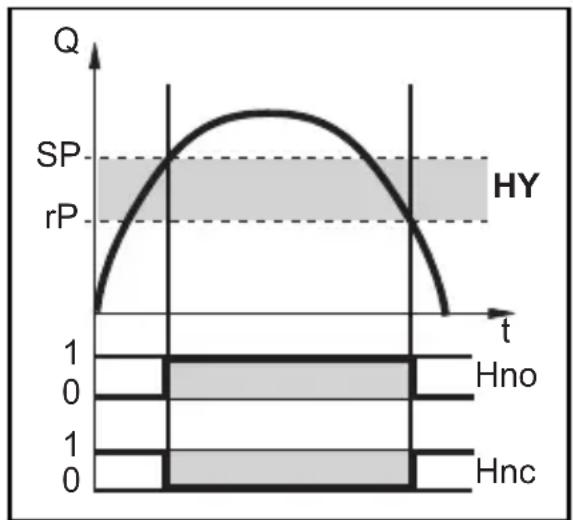
OUTx changes its switching status if it is above or below the set switching limits (SPx, rPx). The following switching functions can be selected:
4.4.1 Hysteresis function
line
| t | Q | | ---- | ----- | | 0 | 0 | | 1 | SP | | 2 | rP | | 3 | 0 |Example of volumetric flow monitoring HY = hysteresis
Normally open: [OUx] = [Hno]
Normally closed: [OUx] = [Hnc]
First the set point (SPx) is set, then the reset point (rPx) with the requested difference.

When SPx is adjusted, rPx is changed automatically; the difference remains constant.
UK
4.4.2 Window function
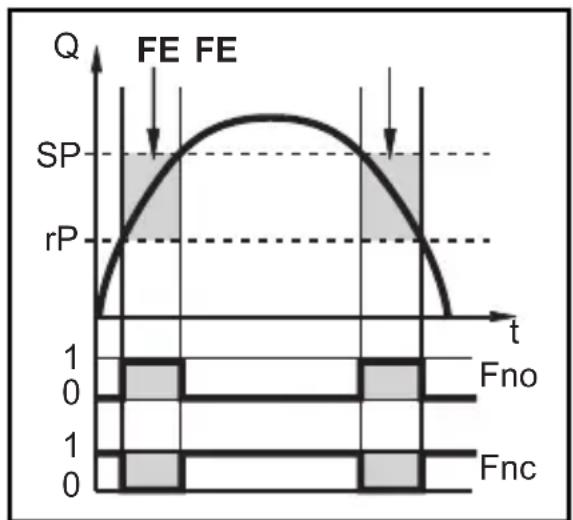
Example of volumetric flow monitoring FE = window
Normally open: [OUx] = [Fno]
Normally closed: [OUx] = [Fnc]
The width of the window can be set by means of the difference between SPx and rPx.
SPx = upper value
rPx = lower value.

When set to the window function the set and reset points have a fixed hysteresis of 0.25 % of the final value of the measuring range. This keeps the switching status of the output stable if the volumetric flow varies slightly.
4.5 Start-up delay

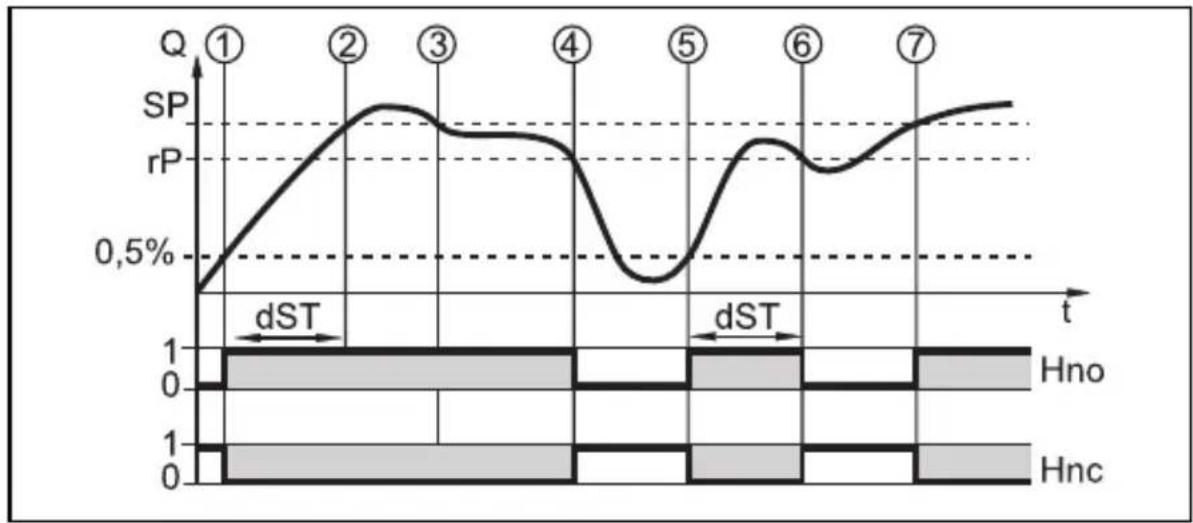
The start-up delay dST influences the switching outputs of the volumetric flow monitoring.
If the start-up delay is active (dST > 0), note: as soon as the volumetric flow exceeds 0.5 % of the final value of the measuring range, the following processes are carried out:
The start-up delay is activated.
The outputs switch as programmed:
ON for NO function, OFF for NC function.
After the start of the start-up delay there are 3 options:
- The volumetric flow increases quickly and reaches the set point / good range within dSt.
Outputs remain active.
- The volumetric flow increases slowly and does not reach the set point /good range within dST.
Outputs are reset.
- Volumetric flow quantity falls below 0.5 % of the final value of the measuring range within [dSt].
Outputs are reset at once; dST is stopped.
Example: dSt for hysteresis function
line
| t | SP | rP | |---|------|------| | ① | 0.5% | | | ② | | | | ③ | | | | ④ | | | | ⑤ | | | | ⑥ | | | | ⑦ | | || Condition Reaction | ||
| 1 | Volumetric flow quantity Q reaches 0.5 % of VMR | dST starts, output becomes active |
| 2 d | ST elapsed, Q reached SP Output remains active | |
| 3 Q | below SP but above rP Output remains active | |
| 4 Q | below rP Output is reset | |
| 5 Q | reaches again 0.5 % of VMR dST starts, output becomes active | |
| 6 d | ST elapsed, Q has not reached SP Output is reset | |
| 7 Q | reaches SP Output becomes active | |
UK
Example: dSt for window function
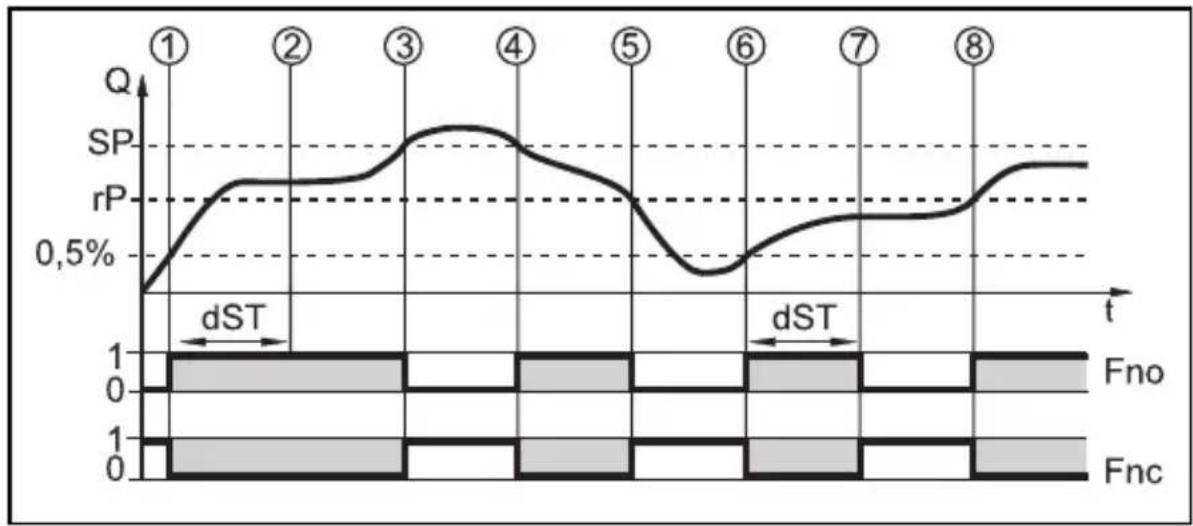
line
| t | SP | rP | |---|------|------| | ① | ~0.5%| 0.5% | | ② | ~0.75%| 0.5% | | ③ | ~1.0%| 0.5% | | ④ | ~0.8%| 0.5% | | ⑤ | ~0.6%| 0.5% | | ⑥ | ~0.4%| 0.5% | | ⑦ | ~0.6%| 0.5% | | ⑧ | ~0.8%| 0.5% || Condition Reaction | ||
| 1 | Volumetric flow quantity Q reaches 0.5 % of VMR | dST starts, output becomes active. |
| 2 | dST elapsed, Q reached good range Output remains active | |
| 3 | Q above SP (leaves good range) Output is reset | |
| 4 | Q again below SP Output becomes active again | |
| 5 | Q below rP (leaves good range) Output is reset again | |
| 6 | Q reaches again 0.5 % of VMR dST starts, output becomes active | |
| 7 | dST elapsed, Q has not reached good range | Output is reset |
| 8 | Q reaches good range Output becomes active | |
4.6 Customer-specific calibration (CGA)
The customer-specific calibration allows changing the gradient of the curve of measured values ( → 10.4.4). It influences the display and the outputs.
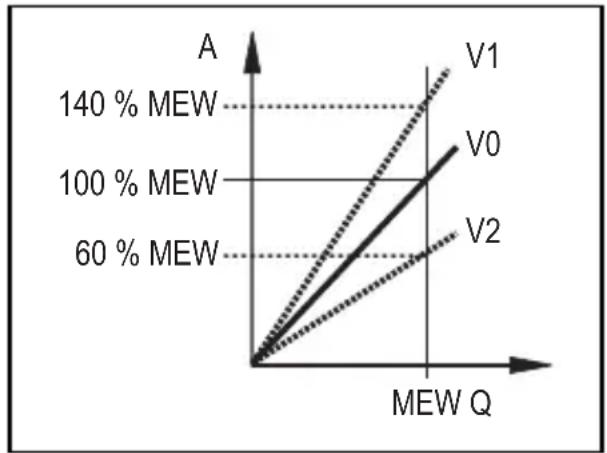
line
| MEW Q | V0 (%) | V1 (%) | V2 (%) | |---|---|---|---| | 0 | 0 | 0 | 0 | | 140 | 60 | 140 | 60 | | 100 | 100 | 100 | 100 | | 60 | 140 | 60 | 60 |A = operating value for display and output signals
Q = flow
MEW = final value of the measuring range
V0 = curve of measured values with factory setting
V1, V2 = curve of measured values after calibration
The change in the gradient is indicated in per cent. Factory setting = 100 %. After a change the calibration can be reset to factory setting ( → 10.4.5).
5 Installation

▶ Avoid deposits, accumulated gas and air in the pipe system.
5.1 Recommended mounting position
▶ Install the unit in that section of the plant where the medium flows under pressure. This avoids disturbance by air bubbles.
▶ Install the unit so that the measuring pipe is completely filled.
▶ Arrange for inlet and outlet pipe lengths. Disturbances caused by bends, valves, reductions, etc. are compensated for.
It applies in particular: No shut-off and control devices are allowed directly in front of the unit.
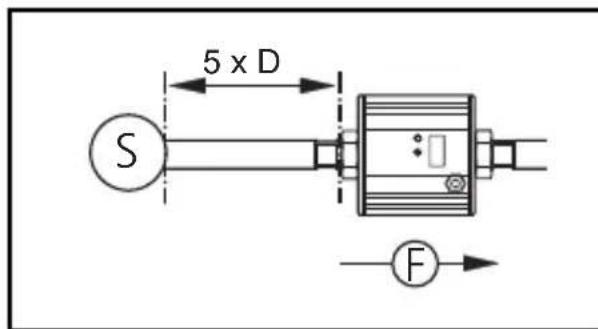
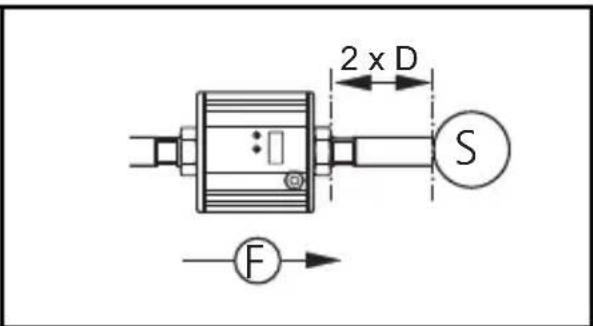
S = disturbance
D = pipe diameter
F = flow direction
▶ Install in front of or in a rising pipe.
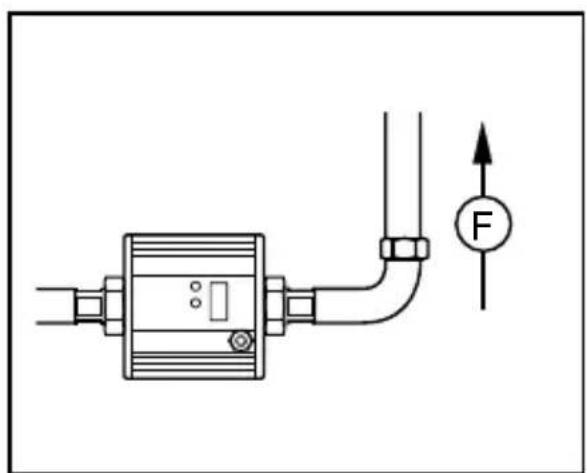
natural_image
Pure electrical circuit lines without any symbols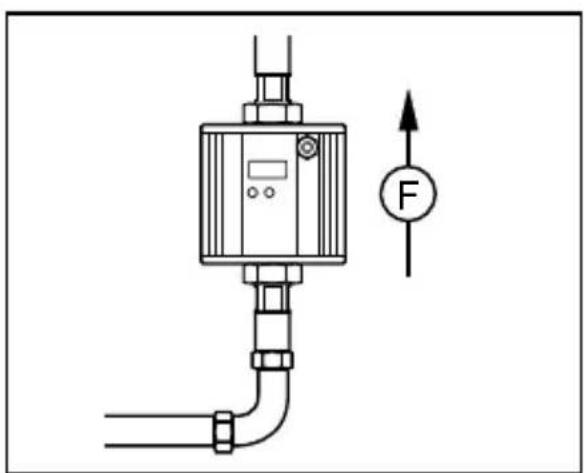
natural_image
Technical diagram of a pressure regulator with pipe connection and force indicator (no text labels)5.2 Non recommended installation position
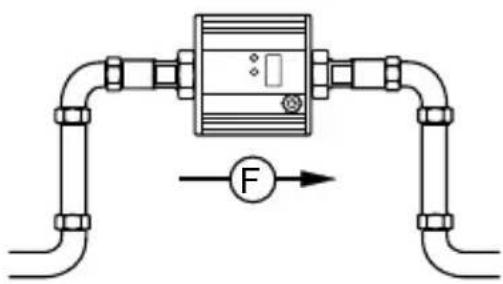
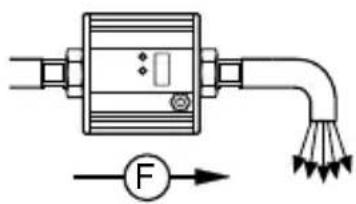
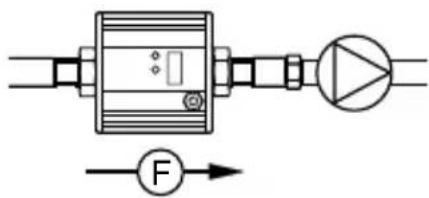
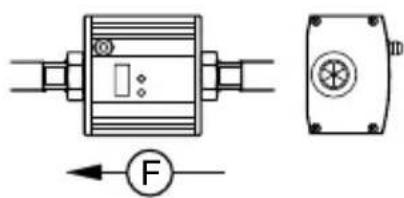
▶ Avoid the following installation positions:
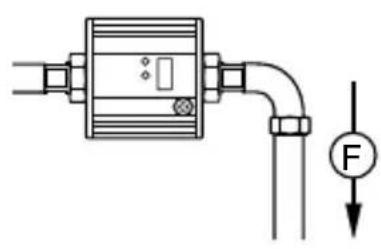
natural_image
Pure electrical circuit lines without any symbolsDirectly in front of a falling pipe. In a
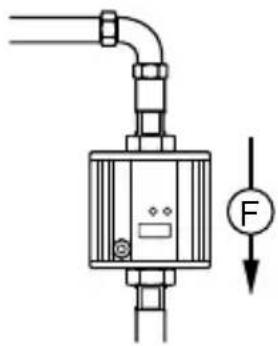
natural_image
Pure mechanical diagram of a pressure regulator with pipe and valve, no text or symbols presentfalling pipe.
natural_image
Pure electrical circuit lines without any symbolsAt the highest point of the pipe system.
natural_image
Pure electrical circuit lines without any symbolsDirectly in front of the spout of the pipe.
natural_image
Pure electrical circuit lines without any symbolsOn the suction side of a pump.
natural_image
Technical diagram of a mechanical device with force gauge and housing (no text or symbols)Flow rate direction horizontal, unit vertical, connector upwards.
F = flow direction
5.3 Installation in pipes
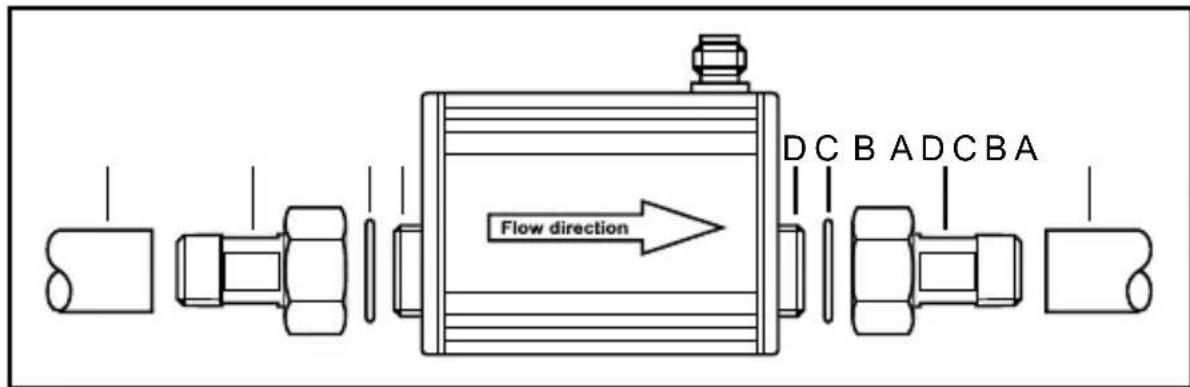
The unit can be installed in pipes using adapters.

Information about the available adapters at www.ifm.com.
UK
- Screw the adapter (B) into the pipe (A).
- Place the seals (C) and install the unit according to the marked flow direction.

▶ To mount the adapters on the process connection of the sensor use suitable lubricants.
-
Screw the adapter (B) with the threads (D) until it is hand-tight.
-
Tighten the two adapters in opposite direction (tightening torque: 30 Nm).
After installation air bubbles in the system can affect the measurement.
Corrective measures:
▶ Rinse the system after installation for ventilation (rinsing quantity > 4 l/min; > 1 gpm).
6 Electrical connection

The unit must be connected by a qualified electrician.
The national and international regulations for the installation of electrical equipment must be adhered to.
Voltage supply according to EN 50178, SELV, PELV.
▶ Disconnect power.
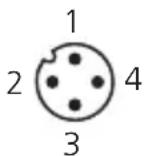
▶ Connect the unit as follows:
BK: black
BN: brown
BU: blue
WH: white

flowchart
graph TD
    A["1: BN"] --> B["2: WH"]
    A --> C["3: BU"]
    A --> D["4: BK"]
    A --> E["5: 2: OUT2"]
    A --> F["6: OUT1"]
    G["L+"] --> H["Ground"]
    I["L-"] --> J["Ground"]
Colours to DIN EN 60947-5-2
| Pin 1 L+ | |
| Pin 3 L- | |
| Pin 4 (OUT1) | • Switching signal: limit values for volumetric flow |
| Pin 2 (OUT2) | • Switching signal: limit values for volumetric flow• Switching signal: limit values for temperature |
7 Operating and display elements
UK
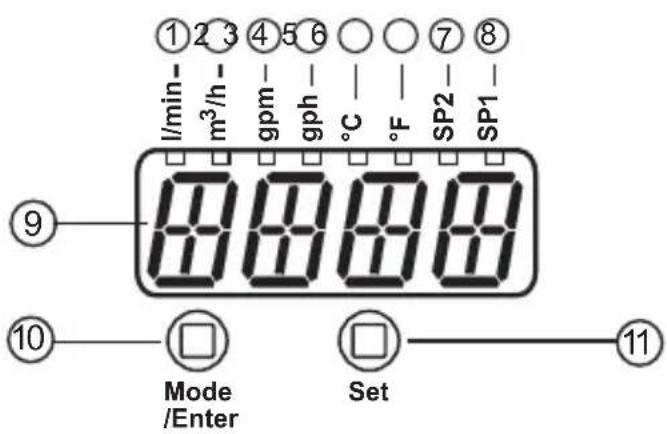
1 to 8: indicator LEDs
-LED 1 = current volumetric flow in litres / minute.
-LED 2 = current volumetric flow in cubic metres / hour.
-LED 3 = current volumetric flow in gallons / minute (gpm).
-LED 4 = current volumetric flow in gallons / hour (gph).
-LED 5 = current medium temperature in °C.
-LED 6 = current medium temperature in °F.
-LED 7, LED 8 = switching status of the corresponding output.
9: Alphanumeric display, 4 digits
-Indication of the current volumetric flow (can temporarily be changed to temperature indication → 11.2).
-Indication of the parameters and parameter values.
10: Mode/Enter button
-Selection of the parameters and acknowledgement of the parameter values.
11: Set button
-Setting of the parameter values (scrolling by holding pressed; incrementally by pressing once).
-Change of the display unit in the normal operating mode (Run mode).
8 Menu
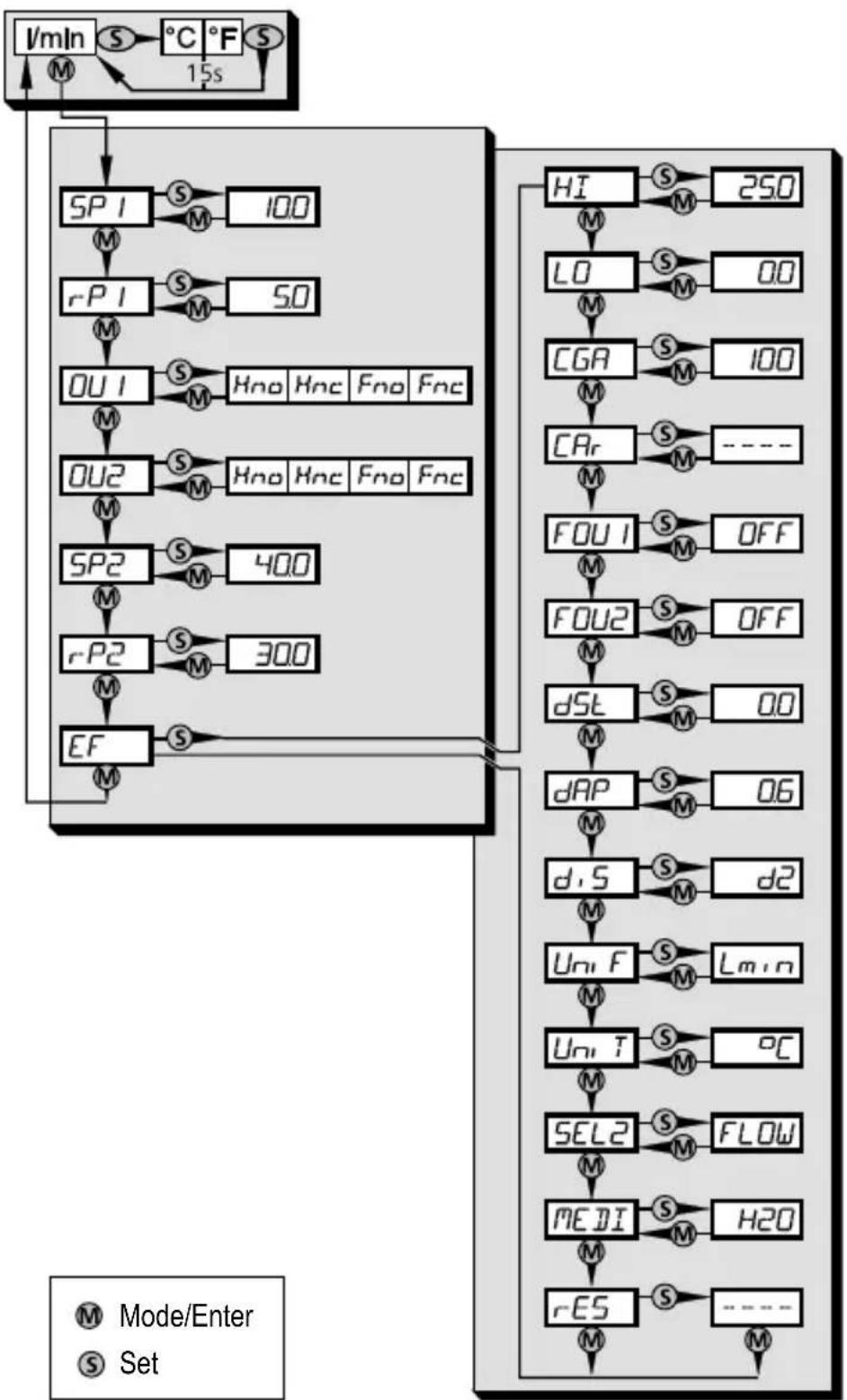
8.1 Menu structure
flowchart
graph TD
    A["lmIn"] --> B["SP I"]
    B --> C["rP I"]
    C --> D["OU I"]
    D --> E["OU2"]
    E --> F["SP2"]
    F --> G["rP2"]
    G --> H["EF"]
    H --> I["HI"]
    I --> J["LO"]
    J --> K["CGA"]
    K --> L["CAr"]
    L --> M["FOU I"]
    M --> N["FOU2"]
    N --> O["dST"]
    O --> P["dAP"]
    P --> Q["d,S"]
    Q --> R["Uni F"]
    R --> S["Uni T"]
    S --> T["SEL2"]
    T --> U["MEDI"]
    U --> V["rES"]
    V --> W["Mode/Enter"]
    V --> X["Set"]
    style A fill:#f9f,stroke:#333
    style W fill:#f9f,stroke:#333
8.2 Explanation of the menu
| SP1 / rP1 Upper / lower limit value for volumetric flow. | |
| OU1 | Output function for OUT1 (volumetric flow):- Switching signal for the limit values: hysteresis function or window function, either normally open or normally closed. |
| OU2 | Output function for OUT2 (volumetric flow or temperature):- Switching signal for the limit values: hysteresis function or window function, either normally open or normally closed. |
| SP2/rP2 Upper / lower limit value for volumetric flow or temperature. | |
| EF Extended functions / opening of menu level 2. | |
| HI / LO Maximum / minimum value memory for volumetric flow. | |
| CGA Customer-specific calibration of the curve of measured values. | |
| CAr Reset calibration data. | |
| FOU1 Status of output 1 in case of a device fault. | |
| FOU2 Status of output 2 in case of a device fault. | |
| dSt Start-up delay. | |
| dAP Measured value damping / damping constant in seconds. | |
| diS Update rate and orientation of the display. | |
| UniF Standard unit of measurement for volumetric flow: litres/minute, cubic metres/hour, gal/min or gal/hour. | |
| UniT Standard unit of measurement for temperature: °C or °F. | |
| SEL2 Standard measured variable for evaluation by OUT2:- Limit value signal for volumetric flow.- Limit value signal for temperature. | |
| MEDI Selection of the medium to be monitored. | |
| rES Restore factory setting. | |
UK
9 Set-up
After power on and expiry of the power-on delay time of approx. 10 s the unit is in the Run mode (= normal operating mode). It carries out its measurement and evaluation functions and generates output signals according to the set parameters.
- During the power-on delay time the outputs are switched as programmed:
- ON with normally open function (Hno / Fno)
- OFF with normally closed function (Hnc / Fnc).
10 Parameter setting
Parameters can be set before installation and set-up of the unit or during operation.

If you change parameters during operation, this will influence the function of the plant.
▶ Ensure that there will be no malfunctions in your plant.
During parameter setting the unit remains in the operating mode (Run mode). It continues to monitor with the existing parameter until the parameter setting has been completed.

CAUTION
For medium temperatures above 50\ °C ( 122\ °F ) some parts of the housing can heat up to over 65\ °C ( 149\ °F ).
▶ Do not press the pushbuttons manually; instead use another object (e.g. ballpoint pen).
10.1 Parameter setting in general
3 steps must be taken for each parameter setting:
| 1 | Select parameter► Press [Mode/Enter] until the requested parameter is displayed. | 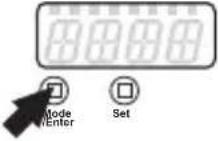 ➔ ➔ 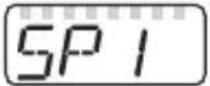 |
| 2 | Set parameter value► Press and hold [Set].> Current setting value of the parameter flashes for 5 s.> After 5 s: setting value is changed: incrementally by pressing the button once or continuously by keeping the button pressed. | 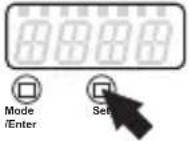 ➔ ➔ 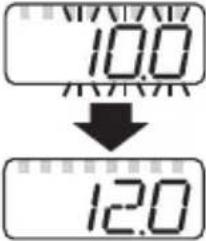 |
| Numerical values are incremented continuously. For reducing the value:► Let the display move to the maximum setting value.> Then the cycle starts again at the minimum setting value. | ||
| 3 | Acknowledge parameter value► Briefly press [Mode/Enter].> The parameter is displayed again.The new setting value is saved. | |
| Set other parameters► Start again with step 1. | ||
| Finish parameter setting and change to the process value display:► wait fors15or► press [Mode/Enter] several times until the current measured value is displayed.> The unit returns to the operating mode. | ||
10.1.1 Change from menu level 1 to menu level 2
| ▶ Press [Mode/Enter] until [EF] is displayed. | 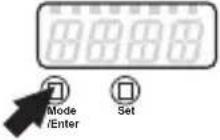 ➡ ➡ 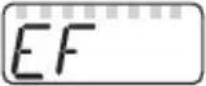 |
| ▶ Briefly press [Set].> The first parameter of the submenu is displayed (here: [HI]). | 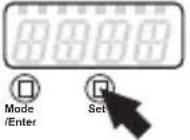 ➡ ➡ 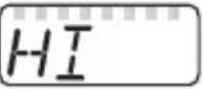 |
10.1.2 Locking / unlocking
The unit can be locked electronically to prevent unintentional settings.
| Locking:► Make sure that the unit is in the normal operating mode.► Press [Mode/Enter] + [Set] for 10 s.> [Loc] is displayed. | 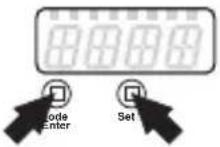 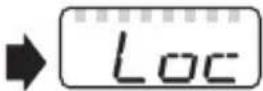 |
| During operation: [LOC] is briefly displayed if you try to change parameter values. | |
| Unlocking:► Press [Mode/Enter] + [Set] for 10 s.> [uLoc] is displayed. | |
On delivery: not locked.
10.1.3 Timeout
If no button is pressed for 15 s during parameter setting, the unit returns to the operating mode with unchanged parameter.
10.2 Settings for consumed quantity monitoring
10.2.1 Configure limit value monitoring with OUT1
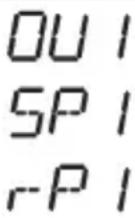
▶ Select [OU1] and set the switching function:
- [Hno] = hysteresis function/normally open,
- [Hnc] = hysteresis function/normally closed,
- [Fno] = window function/normally open,
- [Fnc] = window function/normally closed.
▶ Select [SP1] and set the value at which the output is set.
▶ Select [rP1] and set the value at which the output is reset.
10.2.2 Configure limit value monitoring with OUT2
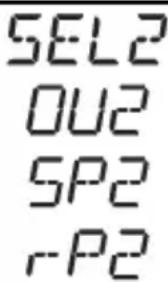
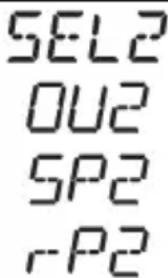
▶ Select [SEL2] and set [FLOW].
▶ Select [OU2] and set the switching function:
- [Hno] = hysteresis function/normally open,
- [Hnc] = hysteresis function/normally closed,
- [Fno] = window function/normally open,
- [Fnc] = window function/normally closed.
▶ Select [SP2] and set the value at which the output switches.
▶ Select [rP2] and set the value at which the output resets.
10.3 Settings for temperature monitoring
10.3.1 Configure limit value monitoring with OUT2
▶ Select [SEL2] and set [TEMP].
▶ Select [OU2] and set the switching function:
- [Hno] = hysteresis function/normally open,
- [Hnc] = hysteresis function/normally closed,
- [Fno] = window function/normally open,
- [Fnc] = window function/normally closed.
▶ Select [SP2] and set the value at which the output switches.
▶ Select [rP2] and set the value at which the output resets.
10.4 User settings (optional)
10.4.1 Set standard unit of measurement for volumetric flow
▶ Select [UniF] and set the unit of measurement: [Lmin], [m3h], [GPm] or [GPh].
10.4.2 Setting of the standard unit of measurement for temperature
▶ Select [UniT] and set the unit of measurement: [ircC] or [ircF] .
Uni T
10.4.3 Set the display mode
▶ Select [diS] and set the update rate and orientation of the display:
- [d1] = update of the measured values every 500 ms.
- [d2] = update of the measured values every 1000 ms.
- [d3] = update of the measured values every 2000 ms.
- [rd1], [rd2], [rd3] = display as for d1, d2, d3; rotated by 180irc .
- [OFF] = the display is switched off in the operating mode.
d, 5
10.4.4 Calibrate curve of measured values
▶ Select [CGA] and set a percentage between 60 and 140 (100 = factory calibration).
CGA
10.4.5 Reset calibration data
▶ Select [CAr].
▶ Press and hold [Set] until [----] is displayed.
▶ Briefly press [Mode/Enter].
The values are reset to the factory setting (CGA = 100).
CAr
10.4.6 Set the start-up delay
▶ Select [dSt] and set the numerical value in seconds.
dST
10.4.7 Set measured value damping
▶ Select [dAP] and set the damping constant in seconds ( τ value 63 %).
dAP
10.4.8 Set output status in fault condition
▶ Select [FOU1] / [FOU2] and set the value:
- [On] = output 1 / 2 switches ON in case of an error.
- [OFF] = output 1 / 2 switches OFF in case of an error.
FOU1 FOU2
10.4.9 Select the medium to be monitored
▶ Select [MEDI] and set the requested medium:
- [H2O] = water
- [GLYC] = glycol solutions
- [OIL.1] = high viscosity oil3(0...68 mm²/s at 40°C; 30...68 cSt at 104°F)
- [OIL.2] = low viscosity oil (7...40 mm²/s at 40°C; 7...40 cSt at 104°F)
MEDI
10.5 Service functions
10.5.1 Read min/max values for volumetric flow
▶ Select [HI] or [Lo], briefly press [Set].
[HI] = maximum value, [Lo] = minimum value.
Delete memory:
▶ Select [HI] or [LO].
▶ Press and hold [Set] until [----] is displayed.
▶ Briefly press [Mode/Enter].
It makes sense to delete the memories as soon as the unit operates under normal operating conditions for the first time.
HI LO
UK
10.5.2 Reset all parameters to factory setting
▶ Select [rES].
▶ Press and hold [Set] until [----] is displayed.
▶ Briefly press [Mode/Enter].
For the factory settings please refer to the end of these instructions → 13. We recommend taking down your own settings in that table before carrying out a reset.
rES
11 Operation
11.1 Read the process value
The LEDs 1-6 signal which process value is currently displayed.
The unit of measurement for volumetric flow and temperature is set via the menu ( → 10.4.1 and → 10.4.2).
11.2 Change the display unit in the Run mode
▶ Briefly press [Set] in the Run mode. Press the button to move to the next display unit.
The unit displays the current process value in the selected display unit for approx. 15 s, the corresponding LED is lit.
11.3 Read the set parameters
▶ Briefly press [Mode/Enter] to scroll the parameters.
▶ Briefly press [Set] when the requested parameter is displayed.
The unit displays the corresponding parameter value. After about 15 s it again displays the parameter, then it returns to the Run mode.
11.4 Fault indications
| [SC1] Short circuit in OUT1. | |
| [SC2] Short circuit in OUT2. | |
| [SC] Short circuit in both outputs. | |
| [OL] Detection zone of volumetric flow or temperature exceeded.Measured value between 120 % and 130 % of the final value of the measuring range. | |
| [UL] Below the temperature detection zone: measured value below -10°C (14 °F). | |
| [Err] • Unit faulty / malfunction.• Measured value greater than 130 % of the final value of the measuring range. | |
| [SEnS] Sensor indicates incorrect measurement. Possible cause: accumulated gas and air in the medium or unit.For more detailed diagnostics / fault assessment:► Briefly press [Set].> The latest measured values are displayed. | |
| [IOE] | Flow sensor faulty |
| [Loc] | Setting pushbuttons locked, parameter change rejected. |
12 Technical data
Technical data and scale drawing at www.ifm.com.
13 Factory setting
| Factory setting User setting | ||
| SU7200 SU8200 | ||
| SP1 | 10.0 20.0 | |
| rP1 | 5.0 10.0 | |
| OU1 | Hno Hno | |
| OU2 | Hno Hno | |
| SP2 (FLOW) | 40.0 80.0 | |
| rP2 (FLOW) | 30.0 60.0 | |
| SP2 (TEMP) | 62.0 62.0 | |
| rP2 (TEMP) | 44.0 44.0 | |
| CGA | 100 100 | |
| FOU1 | OFF OFF | |
| FOU2 | OFF OFF | |
| dSt | 0.0 0.0 | |
| dAP | 0.6 0.6 | |
| diS | d2 d2 | |
| UniF | Lmin Lmin | |
| UniT | °C °C | |
| SEL2 | FLOW FLOW | |
| MEDI | H2O H2O | |
More information at www.ifm.com
Contenu
line
| t | SP | rP | |---|------|------| | 1 | 0.5% | 0.5% | | 2 | 0.5% | 0.5% | | 3 | 0.5% | 0.5% | | 4 | 0.5% | 0.5% | | 5 | 0.5% | 0.5% | | 6 | 0.5% | 0.5% | | 7 | 0.5% | 0.5% | | 8 | 0.5% | 0.5% |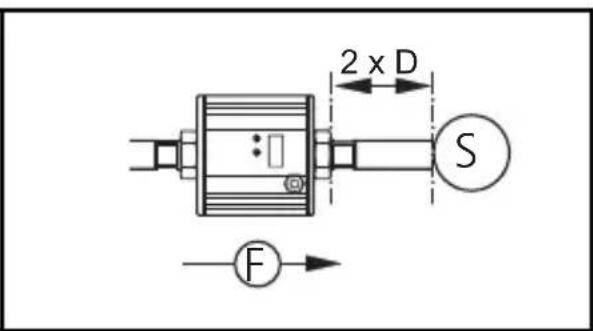
S = perturbation
natural_image
Pure electrical circuit lines without any symbols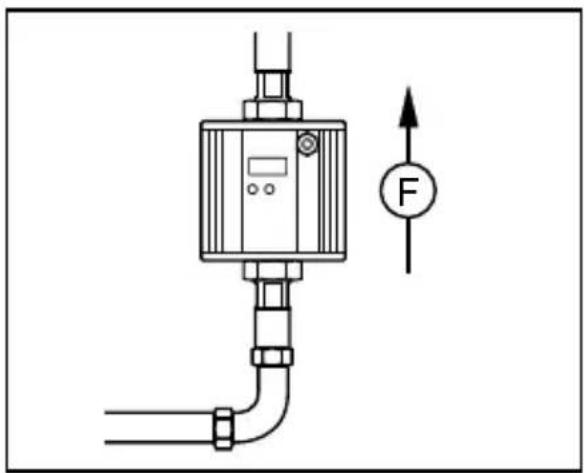
natural_image
Technical diagram of a pressure regulator with pipe connection and force indicator (no text labels)natural_image
Pure electrical circuit lines without any symbolsnatural_image
Pure mechanical diagram showing a valve or actuator with a force indicator (no text or symbols)natural_image
Pure electrical circuit lines without any symbolsnatural_image
Pure electrical circuit lines without any symbolsnatural_image
Pure electrical circuit lines without any symbolsnatural_image
Pure electrical circuit lines without any symbols
- Inhalt
- Preliminary note
- Symbols used
- Warning signs used
- CAUTION
- Safety instructions
- Functions and features
- Application area
- Function
- Process measured signals
- OUT1:
- Volumetric flow monitoring
- Temperature monitoring
- Switching function
- Hysteresis function
- Window function
- Start-up delay
- Customer-specific calibration (CGA)
- Installation
- Recommended mounting position
- Non recommended installation position
- Installation in pipes
- Electrical connection
- Operating and display elements
- to 8: indicator LEDs
- 9: Alphanumeric display, 4 digits
- 10: Mode/Enter button
- 11: Set button
- Menu
- Menu structure
- Explanation of the menu
- Set-up
- Parameter setting
- Parameter setting in general
- Change from menu level 1 to menu level 2
- Locking / unlocking
- Timeout
- Settings for consumed quantity monitoring
- Configure limit value monitoring with OUT1
- Configure limit value monitoring with OUT2
- Settings for temperature monitoring
- Configure limit value monitoring with OUT2
- User settings (optional)
- Set standard unit of measurement for volumetric flow
- Setting of the standard unit of measurement for temperature
- Set the display mode
- Calibrate curve of measured values
- Reset calibration data
- Set the start-up delay
- Set measured value damping
- Set output status in fault condition
- Select the medium to be monitored
- Service functions
- Read min/max values for volumetric flow
- Reset all parameters to factory setting
- Operation
- Read the process value
- Change the display unit in the Run mode
- Read the set parameters
- Fault indications
- Technical data
- Contenu
Brand : IFM
Model : SU7200
Category : Flow sensor