Spark V2 - FM Transmitter NGS - Free user manual and instructions
Find the device manual for free Spark V2 NGS in PDF.



| Product Type | FM Transmitter for Car |
| Brand | NGS |
| Model | Spark V2 |
| Power Supply | 12-24 V DC via cigarette lighter |
| FM Frequency Range | 87.5 - 108.0 MHz (206 stations) |
| Supported Audio Formats | MP3, WMA |
| Equalization Modes | Normal, Rock, Pop, Classic, Soft, Jazz |
| Repeat Modes | Repeat All (ALL), Random (RAN), Repeat One (ONE), Repeat Folder (FOL) |
| Audio Inputs | Auxiliary input (Aux in), USB, SD/MMC card |
| Maximum SD / USB Capacity | 16 GB each |
| Remote Control | Infrared, included |
| Box Contents | FM transmitter, remote control, audio jack-jack cable, user manual, warranty card |
| Dimensions (estimated) | Approximately 12 x 5 x 3 cm |
| Weight (estimated) | Approximately 50 g |
| Maintenance and Cleaning | Unplug before cleaning; use a soft dry cloth; avoid solvents |
| Safety | Use only 12-24 V cigarette lighter; do not expose to moisture; keep out of reach of children |
| Repairability | Spare parts not provided; contact NGS support in case of failure |
| Warranty | According to general conditions (warranty card included) |
| Customer Support | support@ngs.eu |
Frequently Asked Questions - Spark V2 NGS
- On the transmitter: long press + (increase) or - (decrease).
- On the remote: press VOL+ (increase) or VOL- (decrease).
User questions about Spark V2 NGS
0 question about this device. Answer the ones you know or ask your own.
Ask a new question about this device
Download the instructions for your FM Transmitter in PDF format for free! Find your manual Spark V2 - NGS and take your electronic device back in hand. On this page are published all the documents necessary for the use of your device. Spark V2 by NGS.
USER MANUAL Spark V2 NGS
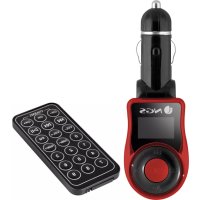
FM transmitter
Remote control
- Aux in, jack to jack cable
- User's manual
Warranty card
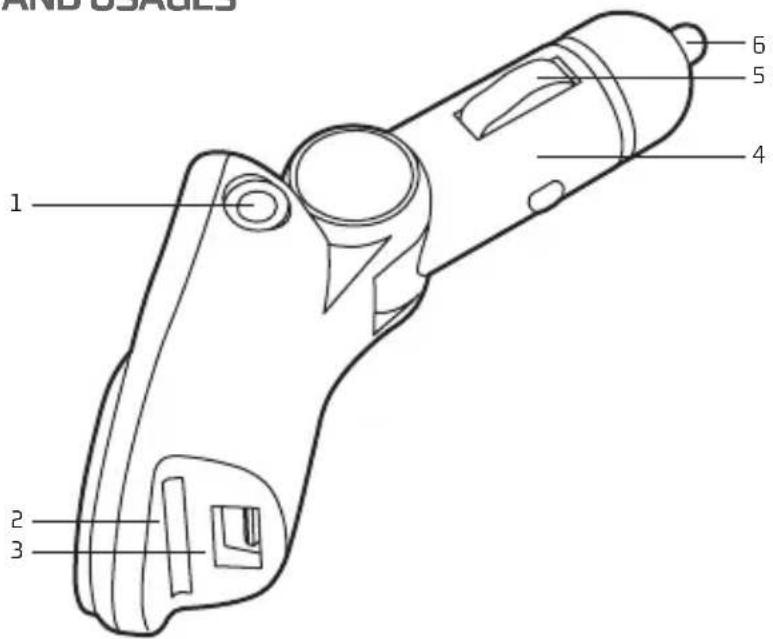
BUTTONS LOCATION AND USAGES
1 Auxiliary audio input
2 SD card slot
3 USB flash drive slot
4 Cigar plug
5 Negative pole
6 Positive pole
USER'S MANUAL
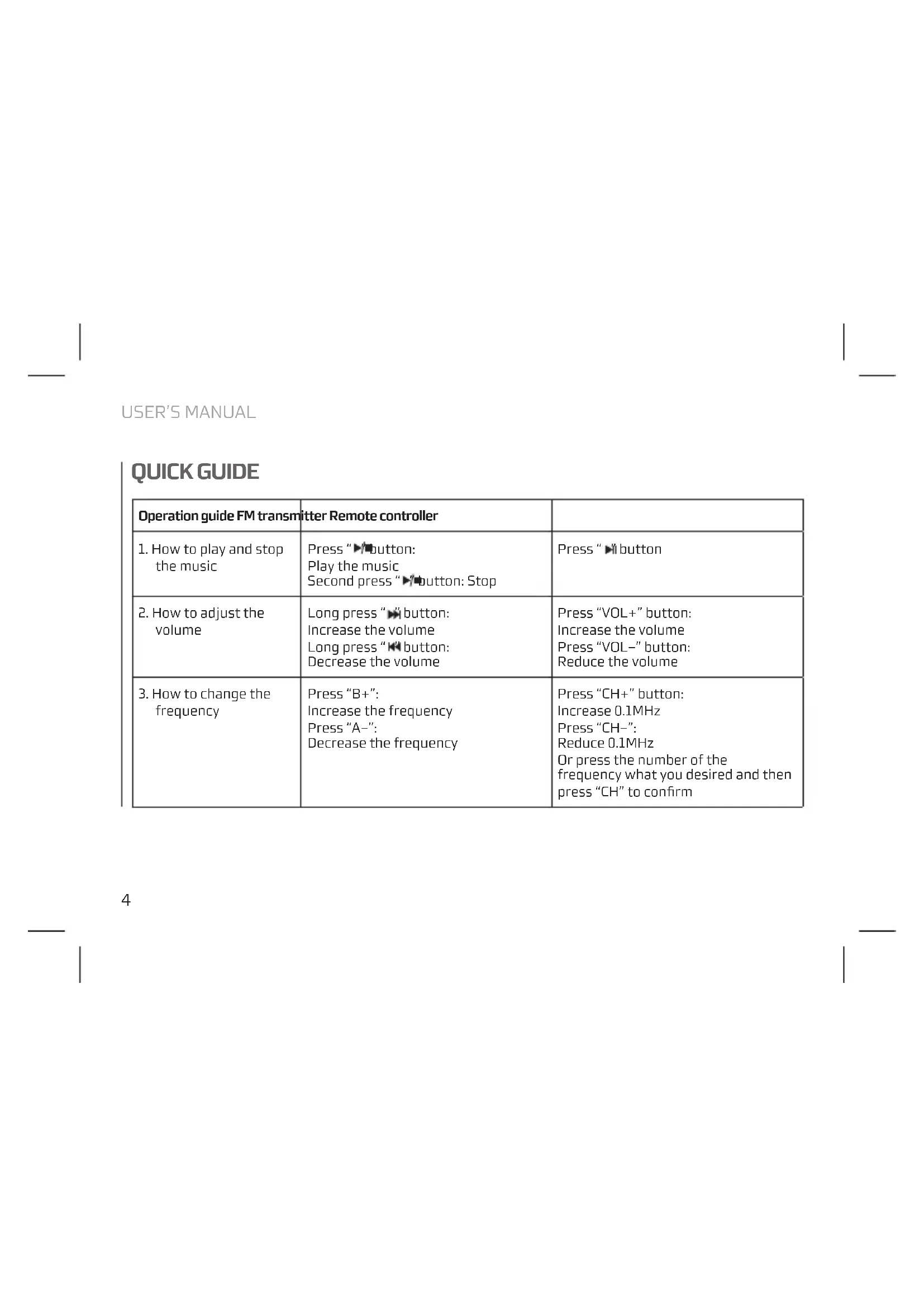
QUICK GUIDE
| Operation guide FM transmitter Remote controller | ||
| 1. How to play and stop the music | Press “▶ button:Play the musicSecond press “▶ button: Stop | Press “▶ button |
| 2. How to adjust the volume | Long press “▶ button:Increase the volumeLong press “▶ button:Decrease the volume | Press “VOL+” button:Increase the volumePress “VOL-” button:Reduce the volume |
| 3. How to change the frequency | Press “B+”:Increase the frequencyPress “A-”:Decrease the frequency | Press “CH+” button:Increase 0.1MHzPress “CH-”: Reduce 0.1MHzOr press the number of the frequency what you desired and then press “CH” to confirm |
| Operation guide FM transmitter Remote controller | ||
| 4. How to choose music Shor press " " button: Play the next song Short press " " button: Play the previous song | Press " " button: Play the next song Press " " button: Play the previous song Or press the serial number of the song directly | |
| 5. How to set EQ Cannot be controlled by the transmitter, only from the remote | Press "EQ" button to switch your favorite EQ | |
| 6. How to change loop mode | Long press " " button: Four loop modes optional Folder (FOL) / Single (ONE) / Random (RAN) / All (ALL) | Cannot be controlled by the remote, only from the transmitter |
| 7. How to switch folder Cannot be controlled by the transmitter, only from the remote | Press "Folder+" or "Folder-" | |
USER'S MANUAL
KEY FEATURES
- Play & transmit music or audio files (MP3/WMA format) into your car FM radio or other FM radios.
- Support playback of MP3/WMA format files directly from your SD card (Max 16 Gb, not included), USB flash drive (Max 16 Gb, not included) or any other compatible audio device (via the audio cable, included).
- 206 preset FM channel stations can be set within the frequency range from 87.5 MHz to 108.0 MHz.
- Support folder function (you can save your music files in different folders on your memory card/stick). 4 loop modes (folder, single, random, all). The songs can be played under the specified mode.
- Suppor 6 kinds of EQ: Natural, Rock, Pop, Classic, Soft, Jazz.
- With SD card reader function, you can download or delete files via computer after connected this device to computer by universal USB cable (Not included).
- Powered by 12-24V DC power supply from your car cigarette lighter socket.
- Fully adjustable joint for flexible use.
- With infrared remote control.
ENGLISH

NGS
INSTRUCTIONS ON HOW TO USE YOUR FM TRANSMITTER
- Insert this FM transmitter into your vehicle's cigarette lighter or power port.
- Tune to your radio to a desired FM frequency, then match that same frequency on to the FM transmitter by using the buttons on the unit or on the remote control.
- Plug your compatible SD card (Max 16 Gb, not included) into the SD port or USB flash drive (Max 16 Gb, not included) into the USB port of your FM transmitter, or connect your other compatible devices using the audio cable (included).
- For other compatible music devices or your MP3/MP4 players, use the supplied audio line cable to connect from the other device's "Line out" to the FM transmitter "Line in". When using an external device, all functions will be controlled by the external device, neither the transmitter nor its remote control.
Remarks: When you using this function, please press " stop playing the music from USB or SD card if you have plugged SD or USB into this transmitter already.
For any troubleshooting please contact support@ngs.eu
HEREBY, LURBE GRUP S.A., DECLARES THAT THIS FM TRANSMITTER IS IN COMPLIANCE WITH THE ESSENTIAL REQUIREMENTS AND OTHER RELEVANT PROVISIONS OF DIRECTIVE 1999/5/EC.


SPARK V2
FM TRANSMITTER
CONTENU DE L'EMBALLAGE
DIRECTIVE 1999/5/CE.


SPARK V2
TRANSMISOR FM