ASH Dual - Mouse NGS - Free user manual and instructions
Find the device manual for free ASH Dual NGS in PDF.


Pick your language and provide your email: we'll send you a specifically translated version.
| Product Type | Wireless Mouse |
| Brand | NGS |
| Model | ASH Dual |
| Connectivity | 2.4 GHz USB receiver and Bluetooth 5.0 |
| Wireless Range | Up to 10 m |
| Sensor | Optical |
| DPI Switchable | 800 / 1200 / 1600 / 2400 DPI |
| Number of Buttons | 5 |
| Scroll Wheel | Yes, with middle button |
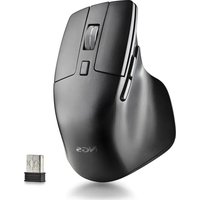
| Ergonomic Design | For right-handed users |
| Dimensions (W x D x H) | 112 x 62 x 38 mm |
| Weight | 80 g (without battery) |
| Power Source | 1 x AA battery (not included) |
| Battery Life | Up to 12 months |
| Compatibility | Windows, macOS, Linux, Chrome OS |
| Surface Compatibility | Works on most surfaces |
| Model Color | Black |
| Surface Finish | Matte |
| Included Accessories | USB receiver, user manual |
| Cleaning | Wipe with a dry, soft cloth |
| Safety | Class 1 laser product |
| Spare Parts | Available via NGS official support |
| Warranty | 2 years |
Frequently Asked Questions - ASH Dual NGS
How do I connect the ASH Dual to my computer using the 2.4 GHz receiver?
Plug the USB receiver into a USB port. Turn on the mouse with the power switch. The mouse should automatically pair. If it does not, press the connect button on the bottom and try again.
How do I switch between 2.4 GHz and Bluetooth mode?
The ASH Dual has a mode switch button on the bottom. Slide it to select either 2.4 GHz (USB) or Bluetooth. Ensure the corresponding connection is active on your device.
How can I adjust the DPI sensitivity?
Briefly press the DPI button above the scroll wheel to cycle through the preset sensitivity levels: 800, 1200, 1600, and 2400 DPI. The indicator light will blink according to the selected level.
How do I replace the battery in the ASH Dual?
Pull the battery compartment cover toward the back of the mouse. Insert a new AA battery with correct polarity. Replace the cover and turn on the mouse.
The mouse is not responding. What should I do?
Check that the power switch is on. For 2.4 GHz, reseat the receiver and press the pairing button. For Bluetooth, remove and re-add the device in your system settings. Also replace the battery if the low-battery indicator lights up.
Is the ASH Dual compatible with macOS?
Yes, it works with macOS and also with Windows, Linux, and Chrome OS. For Bluetooth, use the standard pairing procedure.
Can I use this mouse with a tablet or smartphone?
Yes, in Bluetooth mode it can pair with Android or iOS tablets and smartphones as a standard HID mouse. Some gestures may not be supported.
How should I clean the ASH Dual?
Use a soft, slightly damp cloth to wipe the exterior. Do not use harsh chemicals or immerse the mouse. Clean the sensor gently with a cotton swab if dusty.
What does the red indicator light on the mouse mean?
A red light often indicates low battery or that Bluetooth pairing mode is active. Consult the manual for the exact blinking patterns.
Where can I get spare parts or repair services?
Contact NGS support or the authorized reseller. The mouse is not user-serviceable beyond battery replacement, so avoid disassembling it.
User questions about ASH Dual NGS
0 question about this device. Answer the ones you know or ask your own.
Ask a new question about this device
No questions yet. Be the first to ask one.
Download the instructions for your Mouse in PDF format for free! Find your manual ASH Dual - NGS and take your electronic device back in hand. On this page are published all the documents necessary for the use of your device. ASH Dual by NGS.
USER MANUAL ASH Dual NGS

Manual assistant
Powered by Anthropic
Waiting for your message
Product information
Brand : NGS
Model : ASH Dual
Category : Mouse