
GMX105 - Mouse NGS - Free user manual and instructions
Find the device manual for free GMX105 NGS in PDF.



| Product Type | Wired Gaming Mouse |
| Brand | NGS |
| Model | GMX105 |
| Connectivity | Wired USB 2.0 |
| Sensor | Optical |
| DPI Resolution | Adjustable (up to 3200 DPI) |
| Number of Buttons | 8 Programmable Buttons |
| Scroll Wheel | Yes, with middle click |
| Forward/Back Buttons | Navigation |
| DPI Button | Yes, resolution change |
| Mode Button | Yes, 3 modes (game, DPI, music) |
| Fire Button | Yes, triple click by default |
| LED Lighting | Customizable 16 million colors |
| Software | Driver included on CD |
| Compatibility | Windows |
| Cable Length | 1.8 meters (estimated) |
| Weight | 130 grams (estimated) |
| Dimensions (LxWxH) | 125 x 70 x 40 mm (estimated) |
| Maintenance | Clean with a soft, dry cloth |
| Safety | Compliant with directive 1999/5/EC |
| Recycling | Do not dispose of with household waste (WEEE) |
Frequently Asked Questions - GMX105 NGS
User questions about GMX105 NGS
0 question about this device. Answer the ones you know or ask your own.
Ask a new question about this device
Download the instructions for your Mouse in PDF format for free! Find your manual GMX105 - NGS and take your electronic device back in hand. On this page are published all the documents necessary for the use of your device. GMX105 by NGS.
USER MANUAL GMX105 NGS
Wired Optical Gaming Mouse
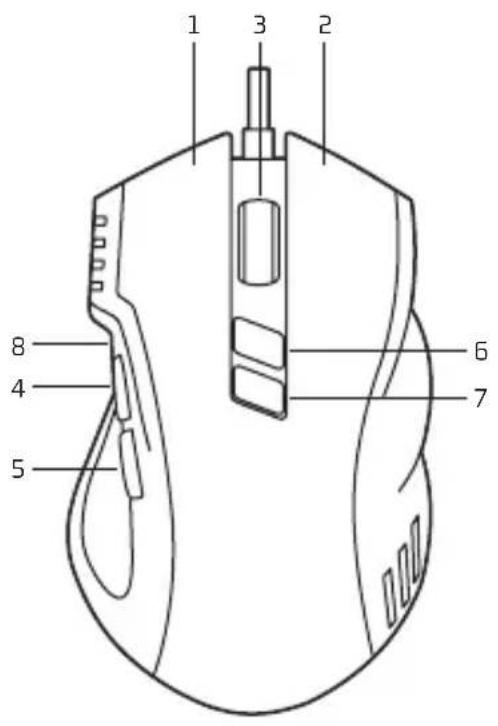
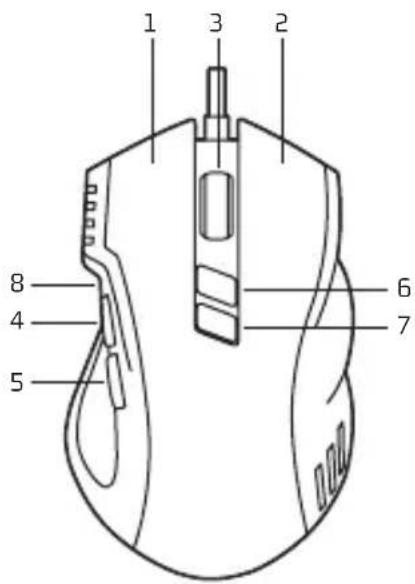
OVERVIEW FOR BUTTONS (DEFAULT MODE 1)
1 Left button
2 Right button
3 Scroll wheel & Middle button
4 Forward
5 Back
6 DPI switch button
7 Mode switch button
8 Fire button
INSTALLATION
Connect the mouse cable to a USB port.
INSTALL DRIVER
To customize the gaming mouse for each operation, please put the CD into the CD Room of your computer and install it accordingly.
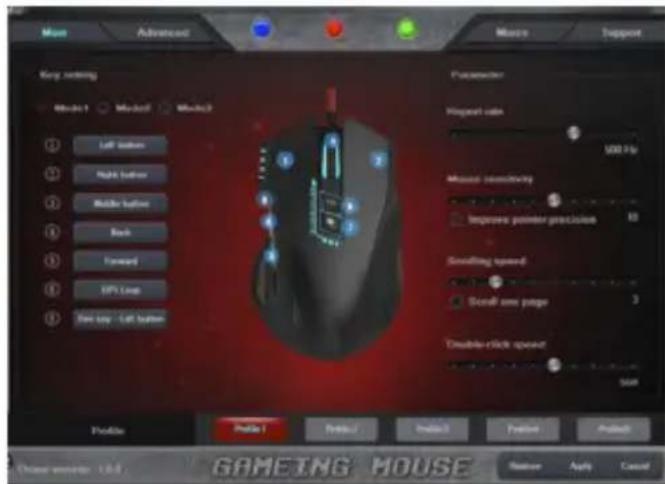
CONFIGURING YOUR MOUSE
Customize the functions of your mouse according to your specific requirements in each game.
USER'S MANUAL
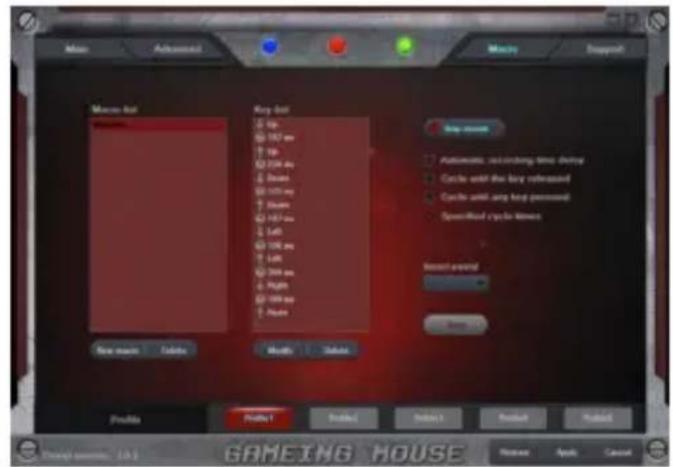
BUTTON ASSIGNMENT MACRO EXPLORER
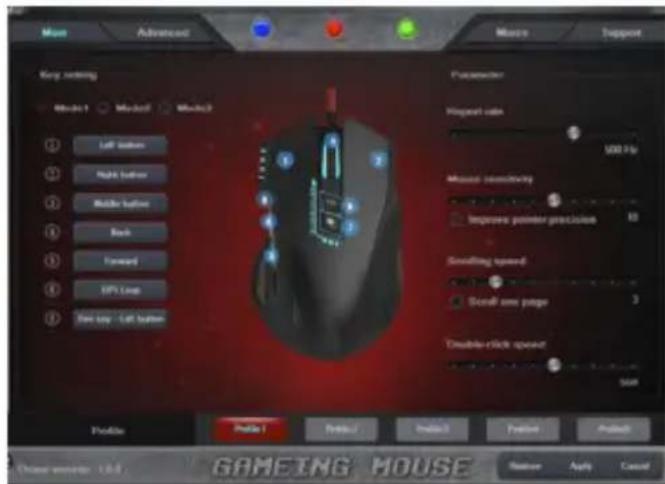
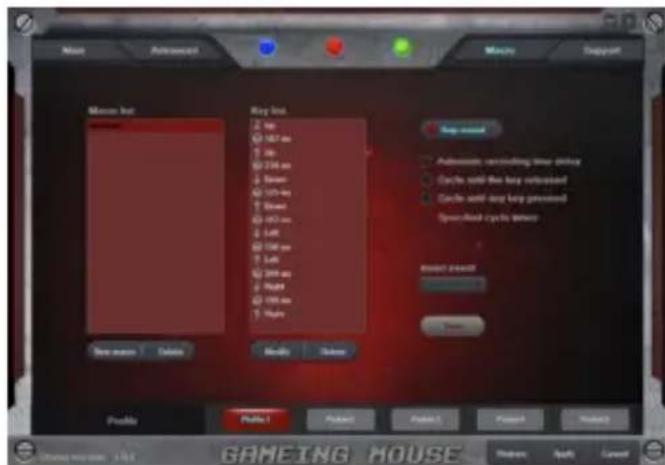
You can assign different functions to your mouse buttons, to get better and faster control. Program single and combined key commands, screen-shot function, shortcut operation, multimedia functions, etc.
Assign a command or a series of commands to your mouse buttons for faster operations in each game you play. You can add a delay between commands to match your operation well.
MODE CHOICE
Press "7" to change different modes. When press, different color identify different modes, details as below:
- Blue breathing light flash once, enter into Mode 1
Red breathing light flash twice, enter into Mode 2
·Green breathing light flash three times, enter into Mode 3
Mode 1 (default): "8" is fire button (triple click)
Mode 2: "8" is DPI lock button (lock 500 DPI)
Mode 3: Music mode, button function as below,
1 Left button
5 Next button
2 Right button
6 DPI switch button
3 Mute button
7 Mode switch button
4 Previous button
8 Play/Pause button
USER'S MANUAL
LED LIGHT CONTROL
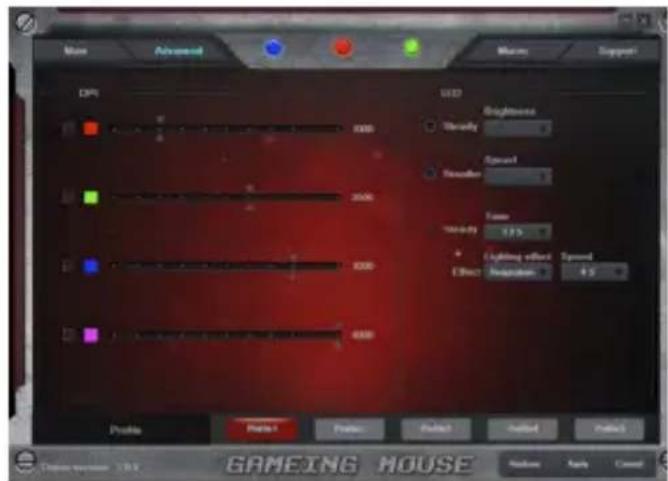
The color and lighting mode of the customizable 16-millioncolor breathing light can be adjusted through the drive.
On/Off: Press button "7" in 5 seconds to open or close LED breathing function.
Battery warranty: The battery is a consumer product, and as such it is under warranty for 12 months.

If at any time in the future you should need to dispose of this product please note that: Waste electrical products should not be disposed of with household waste. Please recycle where facilities exist.
Check with your Local Authority or retailer for recycling advice.
(Waste Electrical and Electronic Equipment Directive)

HEREBY, LURBE GRUP S.A, DECLARS THAT THIS MOUSE IS IN COMPLIANCE WITH THE ESSENTIAL REQUIREMENTS AND OTHER RELEVANT PROVISIONS OF DIRECTIVE 1999/5/EC.

GMX-105
SOURIS DE JEU OPTIQUE FILAIRE
VUE D'ENSEMBLE DES BOUTONS (MODE 1 PAR DÉFAUT)
RATON DE GAMING OPTICO CON CABLE
DESCRIPICN DE LOS BOTONES (MODO 1 POR DEFECTO)
ORAZ POZOSTALYMI STOSOWNYMI
POSTANOWIENIAM DYREKTYWY 1999/5/EC

GMX-105
ENΣYPMATO ONTIKO NONTIKI
TIA PAIXNIA
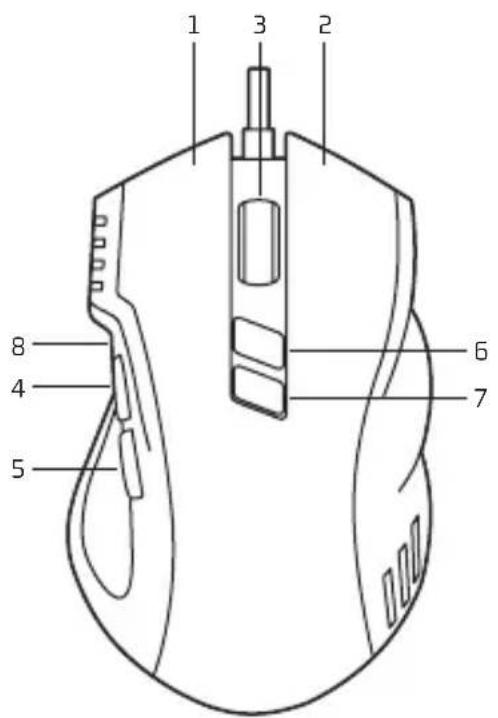
ENIISKONHSH KOYMNIQN (NPOENIIAErMENH AEITOYPTIA 1)
1 ApoKoupi
2 _i koupi
3 Tpoxoc kuaiionc & Meoao koupi
4 Eμπρος
5Piow
6 Koumi εvaλaync avauaonc DPI
7 Koumi evaalayn cieioupyiac
8 Kouπi Fire
ERKATAA2TA2H
Uv6eTe To KaWio Tou Novtkiou o iua USB.
EIGATAZTHETOTIPOPGAMMOADHGH
Tia va diauoppwote To novtki naixviwv yia kαθe λειοργia, tooθetnto CD otn μovδa CD tou unoloyiotn oac kalipoxwnote oyn avaloyn eykataotaon.
IAMOPΦΩΣH TOY NONTIKIOY ΣAΣ
Aiooppoote Tc Aetoupyie Tou Novtkiou Oac ouipwva tic ouykepiévec anaitnoeic oac yia kthe naivdi.
O△HΓIEΣ XPHΣHΣ
EKXΩPHΣH ΛΕΙΤΟΥΡΙΩΝ ΣΤΑ KOYMΠΙA
Mtopeite va ekxwphote diapopetikec, aeitoupyie ota koupiia tou novtkiou oac, wote va exete kautepo kal taxutepo eleyxo. Poypaumatiote evtolec evoc nntpou n ouvuaouo nnktpow, aeitoupyia anync otiyuotunw obovn, ouvtoueoeic aeitoupyiw, aeitoupyie noaueow, kA.
MACRO EXPLORER
EkxwpnoTe mla evtoH n mia oepa ano evtoLe cta koumu taovtkiou oac yia taoutepec evpveiec oe kaote naixviotou naiTe. Mnpoeite va npooeote mkaquoetepnon metau twv evtoaw, wote va taipiaouv ka aie tic evpveiec oac.
ENIΛΟΓΗ ΑΕΙΤΟΥΡΙΑΣ
Pntote to "7" ia evaalayn metauTwv diaoppw npow aeoupyiac, Otaiv natae to nktpo, ta diaopoptika xpuata unoekvuov diaopoptikouc tponouc aeoupyiac wEic:
MnAe ooc nou avaooohrvei ia opa, eoos ot Anetoupyia 1
Kokkivo pucnou avaBoaBrnv duo oopc, eoooc ot Aetoupyia 2
Ipaioo pwc nou aaboBrive tpeic opec, eaooc otN Aetoupyia 3
Aeroupyia 1 (npoeiayn):to"8"Evai to koupi fire (ptinlo kAIK)
Aeroupyia 2: to "8" evai to nktpo kεiδμαoc avαuanc DPI (kεiδμα στa 500 DPI)
Aeroupyia 3: Aetoupyia Mousiknc, n Aetoupyia Tou Nktpou Exe Wc E
1 ApioTepo koupi
5 Kouπi Eπóμενo
2 _1 koupi




- OVERVIEW FOR BUTTONS (DEFAULT MODE 1)
- INSTALLATION
- INSTALL DRIVER
- CONFIGURING YOUR MOUSE
- BUTTON ASSIGNMENT MACRO EXPLORER
- MODE CHOICE
- USER'S MANUAL
- LED LIGHT CONTROL
- GMX-105
- VUE D'ENSEMBLE DES BOUTONS (MODE 1 PAR DÉFAUT)
- RATON DE GAMING OPTICO CON CABLE
- DESCRIPICN DE LOS BOTONES (MODO 1 POR DEFECTO)
- ENIISKONHSH KOYMNIQN (NPOENIIAErMENH AEITOYPTIA 1)
- ERKATAA2TA2H
- EIGATAZTHETOTIPOPGAMMOADHGH
- IAMOPΦΩΣH TOY NONTIKIOY ΣAΣ
- O△HΓIEΣ XPHΣHΣ
- EKXΩPHΣH ΛΕΙΤΟΥΡΙΩΝ ΣΤΑ KOYMΠΙA
- MACRO EXPLORER
- ENIΛΟΓΗ ΑΕΙΤΟΥΡΙΑΣ
Brand : NGS
Model : GMX105
Category : Mouse