880LMW - Garage door LIFT-MASTER - Free user manual and instructions
Find the device manual for free 880LMW LIFT-MASTER in PDF.


| Product Type | Wall-mounted control panel for garage door opener |
| Brand | LIFT-MASTER |
| Model | 880LMW |
| Power Supply | Low voltage 12V (via garage door opener) |
| Voltage | 12V DC |
| Main Functions | Open/close control, lighting, motion detector, lock, timer-to-close, maintenance alert, Wi-Fi setup |
| Display | Digital screen displaying time, temperature, status messages, and diagnostic codes |
| Motion Detector | Yes, automatically turns on lighting when motion is detected |
| Lock (LOCK) | Yes, disables remote controls while allowing use of wall control and telelock |
| Timer-to-Close (TTC) | Yes, for sectional doors, intervals of 1, 5, 10 minutes or custom up to 99 minutes |
| Maintenance Alert (MAS) | Yes, displays a message when the opener needs maintenance |
| Wi-Fi | Yes, Wi-Fi compatible for setup |
| Programming | Adding and reprogramming remote controls and keypads via menu |
| Available Languages | French, English, Spanish |
| Installation | Wall mounting at least 1.5 m high, low voltage 12V wiring |
| Safety | Obstruction detection via safety reversing sensors (not included), automatic stop |
| Warranty | One year limited warranty |
| Compliance | Compliant with Canada NMB-003, FCC Part 15 |
| Backup Battery | Compatible with backup battery (not included) |
Frequently Asked Questions - 880LMW LIFT-MASTER
User questions about 880LMW LIFT-MASTER
0 question about this device. Answer the ones you know or ask your own.
Ask a new question about this device
Download the instructions for your Garage door in PDF format for free! Find your manual 880LMW - LIFT-MASTER and take your electronic device back in hand. On this page are published all the documents necessary for the use of your device. 880LMW by LIFT-MASTER.
USER MANUAL 880LMW LIFT-MASTER
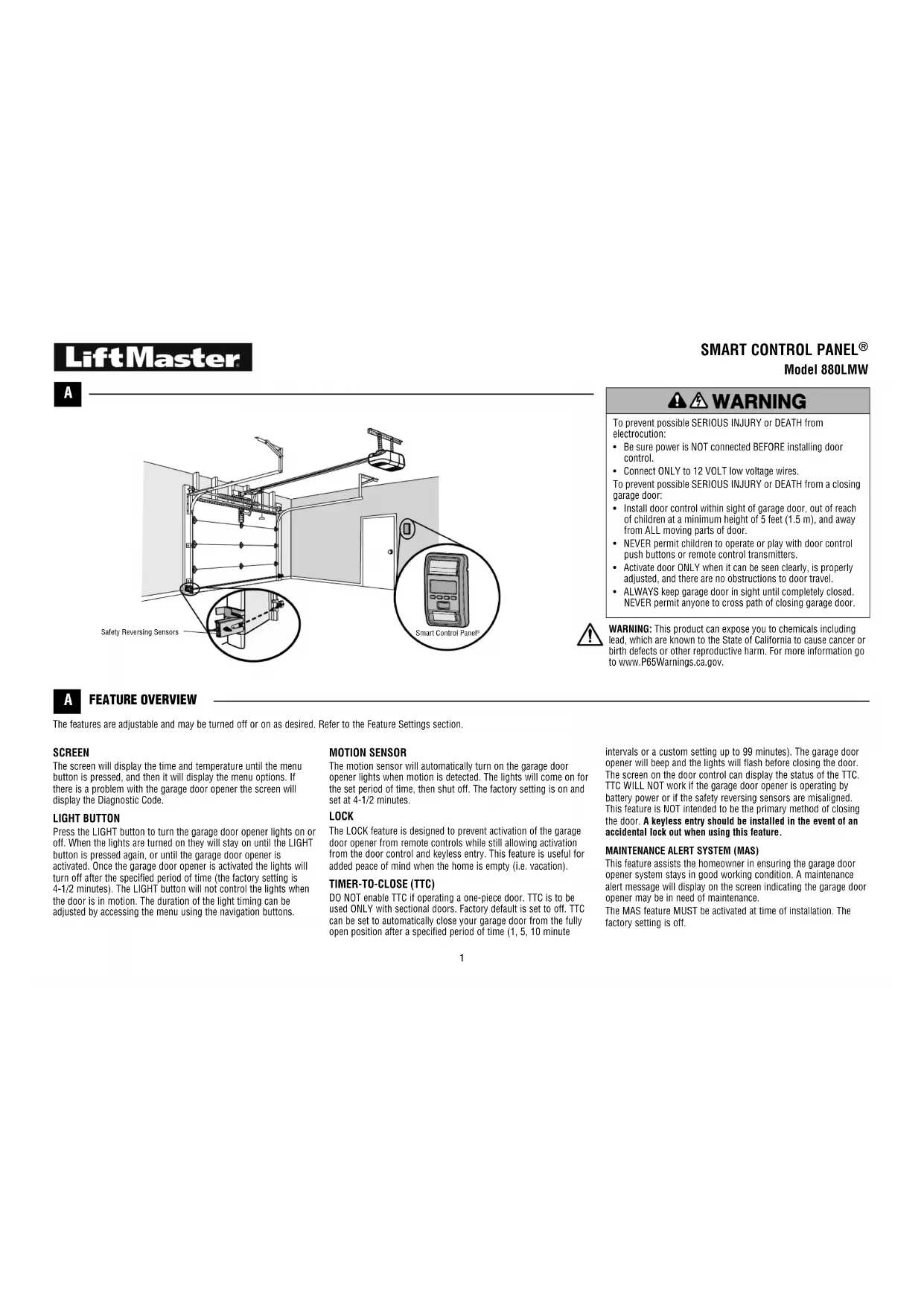
To prevent possible SERIOUS INJURY or DEATH from electrocution:
- Be sure power is NOT connected BEFORE installing door control.
- Connect ONLY to 12 VOLT low voltage wires.
-
To prevent possible SERIOUS INJURY or DEATH from a closing garage door:
-
Install door control within sight of garage door, out of reach of children at a minimum height of 5 feet (1.5 m), and away from ALL moving parts of door.
- NEVER permit children to operate or play with door control push buttons or remote control transmitters.
- Activate door ONLY when it can be seen clearly, is properly adjusted, and there are no obstructions to door travel.
- ALWAYS keep garage door in sight until completely closed.
NEVER permit anyone to cross path of closing garage door.
A
FEATURE OVERVIEW
The features are adjustable and may be turned off or on as desired. Refer to the Feature Settings section.
SCREEN
The screen will display the time and temperature until the menu button is pressed, and then it will display the menu options. If there is a problem with the garage door opener the screen will display the Diagnostic Code.
LIGHT BUTTON
Press the LIGHT button to turn the garage door opener lights on or off. When the lights are turned on they will stay on until the LIGHT button is pressed again, or until the garage door opener is activated. Once the garage door opener is activated the lights will turn off after the specified period of time (the factory setting is 4-1/2 minutes). The LIGHT button will not control the lights when the door is in motion. The duration of the light timing can be adjusted by accessing the menu using the navigation buttons.
MOTION SENSOR
The motion sensor will automatically turn on the garage door opener lights when motion is detected. The lights will come on for the set period of time, then shut off. The factory setting is on and set at 4-1/2 minutes.
LOCK
The LOCK feature is designed to prevent activation of the garage door opener from remote controls while still allowing activation from the door control and keyless entry. This feature is useful for added peace of mind when the home is empty (i.e. vacation).
TIMER-TO-CLOSE (TTC)
DO NOT enable TTC if operating a one-piece door. TTC is to be used ONLY with sectional doors. Factory default is set to off. TTC can be set to automatically close your garage door from the fully open position after a specified period of time (1, 5, 10 minute
WARNING: This product can expose you to chemicals including lead, which are known to the State of California to cause cancer or birth defects or other reproductive harm. For more information go to www.P65Warnings.ca.gov.
intervals or a custom setting up to 99 minutes). The garage door opener will beep and the lights will flash before closing the door. The screen on the door control can display the status of the TTC. TTC WILL NOT work if the garage door opener is operating by battery power or if the safety reversing sensors are misaligned. This feature is NOT intended to be the primary method of closing the door. A keyless entry should be installed in the event of an accidental lock out when using this feature.
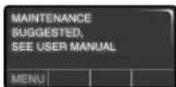
This feature assists the homeowner in ensuring the garage door opener system stays in good working condition. A maintenance alert message will display on the screen indicating the garage door opener may be in need of maintenance.
The MAS feature MUST be activated at time of installation. The factory setting is off.
INSTALLATION
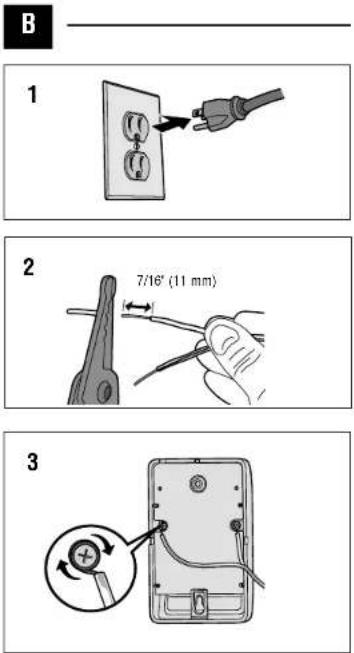
B WIRE THE DOOR CONTROL
Install the door control within sight of the door at a minimum height of 5 feet (1.5 m) where small children cannot reach, and away from the moving parts of the door. For gang box installations it is not necessary to drill holes or install the drywall anchors. Use the existing holes in the gang box.
NOTE: Pre-wiring means that your garage already has wires installed for the door control.
1 Unplug the garage door opener to prevent the garage door opener from activating during wiring.
2 Strip 7/16 inch (11 mm) of insulation from one end of the wire and separate the wires.
3 Connect one wire to each of the two screws on the back of the door control. The wires can be connected to either screw.
PRE-WIRED INSTALLATIONS: Choose any two wires to connect, but make note of which wires are used.
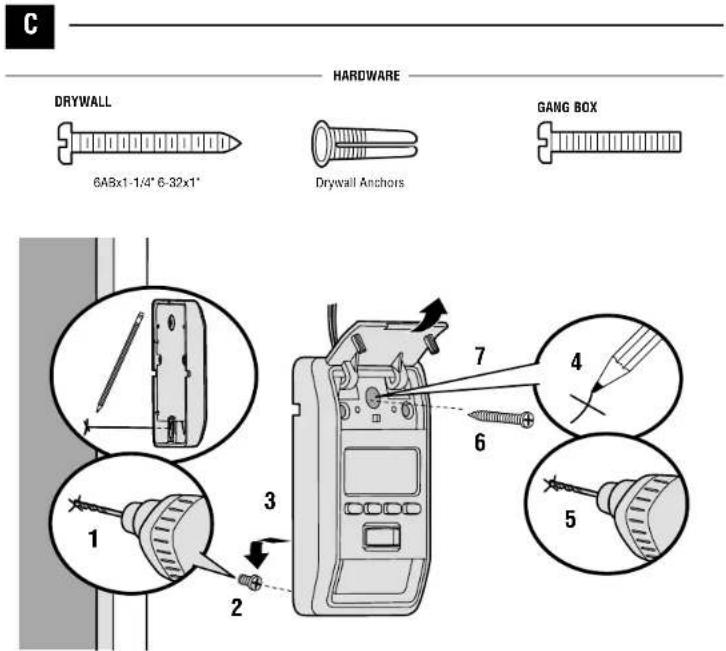
C MOUNT THE DOOR CONTROL
1 Mark the location of the bottom mounting hole and drill a 5/32 inch (4 mm) hole.
2 Install the bottom screw, allowing 1/8 inch (3 mm) to protrude from the wall.
3 Position the bottom hole of the door control over the screw and slide down into place.
4 Lift the push bar up and mark the top hole.
5 Remove the door control from the wall and drill a 5/32 inch (4 mm) hole for the top screw.
6 Position the bottom hole of the door control over the screw and slide down into place. Attach the top screw.
7 Close the push bar.
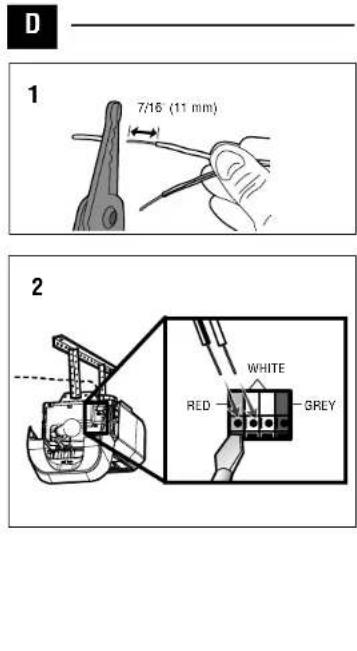
D WIRE TO GARAGE DOOR OPENER
1 Strip 7/16 inch (11 mm) of insulation from the end of the wire near the garage door opener.
2 Connect the wire to the red and white terminals on the garage door opener. The wires can be connected to either terminal. To insert or release wire, push in tab with screwdriver tip.
3 Reconnect power to the garage door opener. If the door control has been installed and wired correctly, a message will display on the screen. To synchronize the garage door opener and the door control, press the push bar up to 3 times, until the garage door opener activates. The time and temperature will display on the door control when the door control and the garage door opener are synchronized.
PRE-WIRED INSTALLATIONS: Connect the same wires to the garage door opener that were previously connected to the door control.
E
E
OPERATION
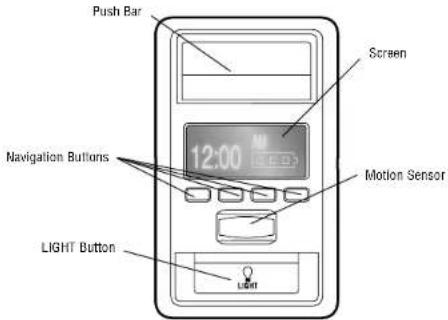
PUSH BAR
Press the push bar to open or close the door.
NAVIGATION BUTTONS
Use the navigation buttons to make selections and program features.
GARAGE DOOR OPENER LIGHTS
Press the LIGHT button to turn the garage door opener lights on or off. When the lights are turned on they will stay on until the LIGHT button is pressed again, or until the garage door opener is activated. Once the garage door opener is activated the lights will turn off after the specified period of time (the factory setting is 4-1/2 minutes). The LIGHT button will not control the lights when the door is in motion.
MOTION SENSOR
This feature will automatically turn on the garage door opener lights when motion is sensed. The lights will come on for the set period of time, then shut off.
LIGHT FEATURE
The lights will turn on when someone enters through the open garage door and the safety reversing sensor infrared beam is broken.
If using the garage door opener light as a work light, turn the light on using the light button on the wall control or the light will turn off if you are beyond the range of the sensor.
TIMER-TO-CLOSE (TTC)
DO NOT enable TTC if operating a one-piece door. TTC is to be used ONLY with sectional doors.
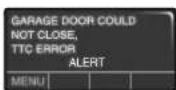
Once the TTC has been set and the door is open, the selected close interval will be displayed on the screen and toggle between the time and TTC message. The garage door opener will beep and the lights will flash before closing the door.
When the TTC is on the following message will display on the door control:
To temporarily suspend the TTC feature press and release the HOLD button. Press REL button to resume normal TTC operation.
The TTC feature will deactivate if the garage door encounters two sequential obstructions; or the safety reversing sensors are incorrectly installed. The garage door will reverse open and WILL NOT close until the obstructions are removed or the safety reversing sensors are replaced with the original installation.
When the obstruction has been cleared or the safety reversing sensors have been aligned, the door will close when the garage door opener is activated.
LOCK
When the Lock feature is on, your remote controls have been disabled and the following message will display on the door control:
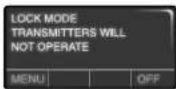
BATTERY BACKUP ONLY
If your garage door opener has a battery backup the following message will display on the door control if there is a problem with the battery:
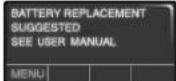
MAINTENANCE ALERT (MAS)
When the maintenance alert is on and the garage door opener needs maintenance the following message will display on the screen:
F
G
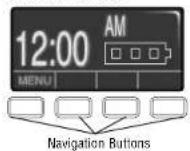
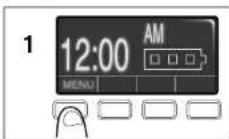
FIGURE 1 FIGURE 2
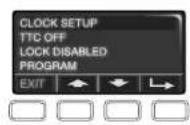
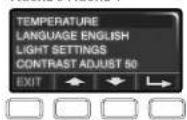
FIGURE 3 FIGURE 4
PROGRAM
F
TO ADD, REPROGRAM, OR CHANGE A REMOTE CONTROL/KEYLESS ENTRY PIN
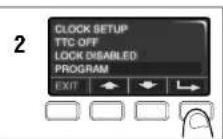
1 Press the navigation button below "MENU" to view the Features menu.
2 Use the navigation buttons to scroll to "PROGRAM" and press the navigation button under to continue.
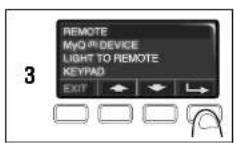
3 Select "REMOTE" or "KEYPAD" to program from the program menu. Press to continue.
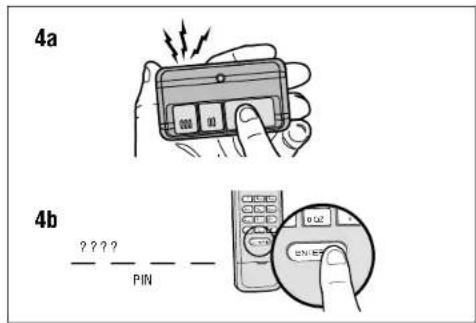
4a Press the button on the remote control that you wish to operate your garage door.
4b Enter a 4-digit personal identification number (PIN) of your choice on the keyless entry keypad. Then press the ENTER button.
The garage door opener lights will flash (or two clicks will be heard) when the code has been programmed. Repeat the steps above for programming additional remote controls or keyless entry devices. If programming is unsuccessful, refer to the remote control instructions.
G
MENUNAVIGATION
The features on the door control can be programmed through a series of menus on the screen and the navigation buttons. Refer to the descriptions below.
SCREEN
The main screen displays the time, temperature, and current battery charge (if applicable) (Figure 1).
Wi-Fi® SETUP
NOTE: If Wi-Fi option is not listed, your garage door opener is not Wi-Fi compatible.
Select "MENU". Select "PROGRAM". Select "Wi-Fi SETUP". When "ON" is displayed, you may begin Wi-Fi setup.
FEATURES
Press the navigation button below 'MENU' to view the Features menu (Figure 2).
CLOCK SETUP: Set the time, choose 12 or 24 hour clock and show/hide clock.
TTC SETTINGS: Set the Timer-to-Close feature off/on and set the time interval before door closes. NOTE:DO NOT enable TTC if operating a one-piece door. TTC is to be used ONLY with sectional doors.
LOCK: Enable/disable lock.
PROGRAM: Add remote controls, MyQ devices, an extra remote button to control your garage door opener lights, a keyless entry, and enable Wi-Fi. NOTE: If Wi-Fi option is not listed, your garage door opener is not Wi-Fi compatible.
SETTINGS
Press the navigation button below the down arrow till you see TEMPERATURE to view the Settings menu (Figure 3).
TEMPERATURE: Display the temperature in Fahrenheit or Celsius and show/hide the temperature.
LANGUAGE: Select a language (English, French, or Spanish).
LIGHT SETTINGS: Set duration for garage door opener light to stay on after operation, selectable range of 1-1/2 to 4-1/2 minutes. Turn the Motion sensor off/on, and turn the entry light feature off/on.
CONTRAST: Adjust the contrast of the screen.
SERVICE
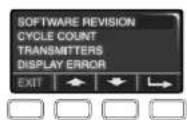
Press and hold the LIGHT button, then press the second navigation button to view the Service menu (Figure 4).
SOFTWARE REVISION: Displays software version information.
CYCLE COUNT ON/OFF: Turn the Maintenance Alert (MAS) on/off.
TRANSMITTERS: Displays the number of remote controls, MyQ devices, door controls and keyless entries currently programmed to operate the garage door opener.
DISPLAY ERROR: Displays any errors that have occurred.
WARRANTY
ONE YEAR LIMITED WARRANTY
LiftMaster warrants to the first consumer purchaser of this product that is free from defect in materials and/or workmanship for a period of 1 year from the date of purchase.
NOTICE: To comply with FCC and/or Industry Canada rules (IC), adjustment or modifications of this receiver and/or transmitter are prohibited, except for changing the code setting or replacing the battery. THERE ARE NO OTHER USER SERVICEABLE PARTS.
Tested to Comply with FCC Standards for Home or office use. Operation is subject to the following two conditions: (1) this device may not cause harmful interference, and (2) this device must accept any interference received, including interference that may cause undesired operation.
This Class II digital apparatus complies with Canadian ICES-10G.
Wi-Fi® is a registered trademark of Wi-Fi Alliance.