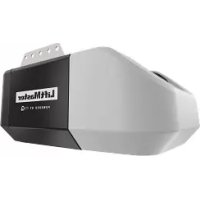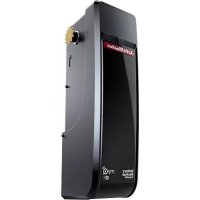
LJ8950W - Garage door LIFT-MASTER - Free user manual and instructions
Find the device manual for free LJ8950W LIFT-MASTER in PDF.

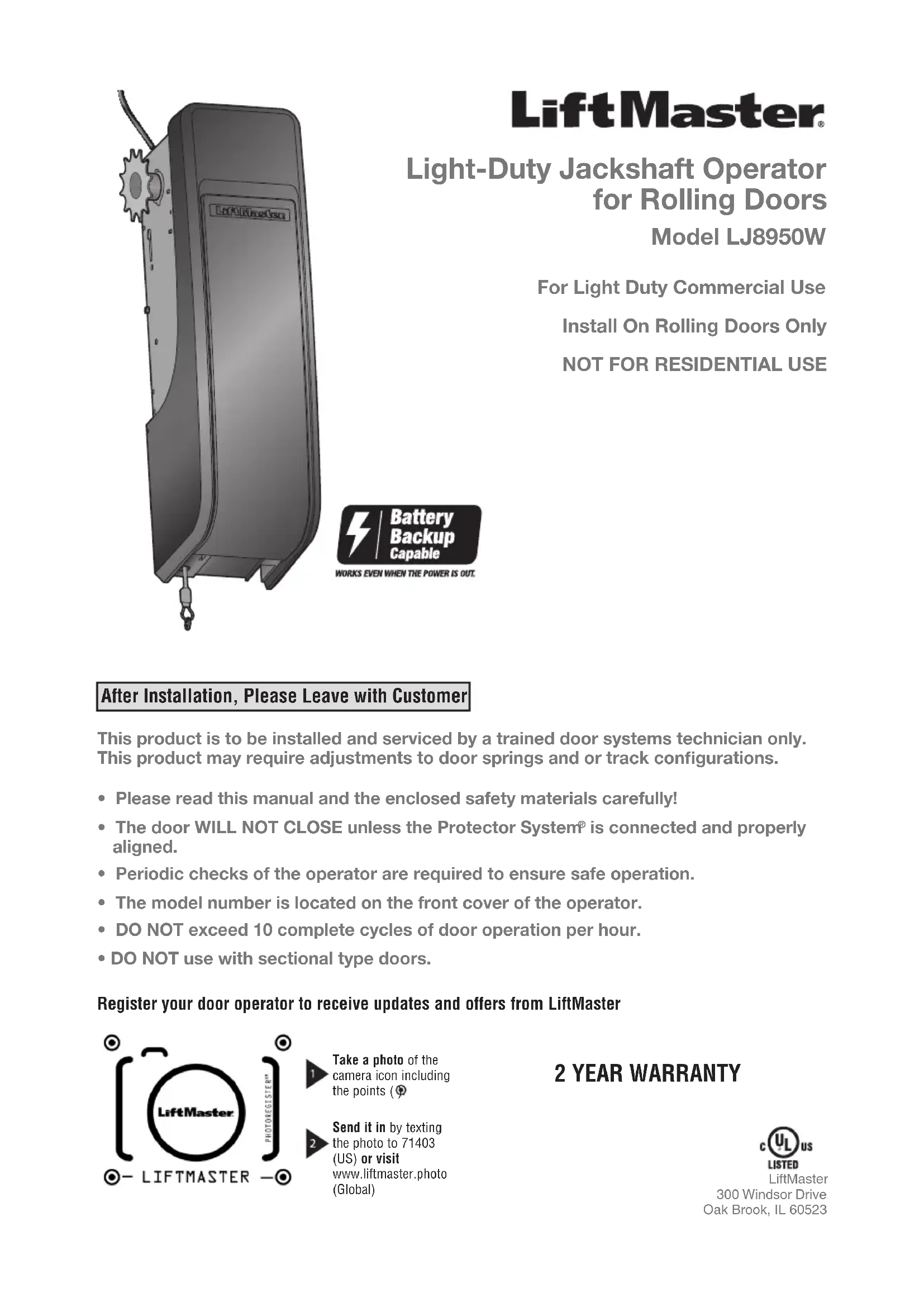

| Product Type | Jackshaft operator for rolling doors, light commercial use |
| Power Supply | 120 VAC, 60 Hz, 1.5 A |
| Maximum Door Height | 3.66 m (12 ft) |
| Maximum Door Area | 14 ft x 12 ft (168 ft² max.) |
| Rated Load | 385 lb·in/s (approx. 43.5 Nm/s) |
| Max Operating Cycles | 10 complete cycles per hour |
| Main Functions | Built-in myQ (remote control), Protector System (safety reversing sensors), limit programming, automatic force detection, optional backup battery |
| Safety | Mandatory safety reversing sensors, optional light curtain, emergency release, monthly tested reversal system |
| Maintenance | Monthly door balance check, reversal system test, no lubrication required |
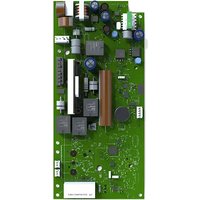
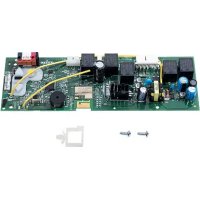
| Spare Parts and Repairability | Drive sprocket, door sprocket, chain, sensors, logic board, motor, transformer, etc. |
| Warranty | 2 years |
| Installation | Reserved for a qualified technician; requires a balanced door and properly aligned sensors |
Frequently Asked Questions - LJ8950W LIFT-MASTER
User questions about LJ8950W LIFT-MASTER
0 question about this device. Answer the ones you know or ask your own.
Ask a new question about this device
Download the instructions for your Garage door in PDF format for free! Find your manual LJ8950W - LIFT-MASTER and take your electronic device back in hand. On this page are published all the documents necessary for the use of your device. LJ8950W by LIFT-MASTER.
USER MANUAL LJ8950W LIFT-MASTER
natural_image
Illustration of a mechanical device with a gear and hanging weights (no text or symbols)LiftMaster®
Light-Duty Jackshaft Operator for Rolling Doors
Model LJ8950W
For Light Duty Commercial Use
Install On Rolling Doors Only
NOT FOR RESIDENTIAL USE

After Installation, Please Leave with Customer
This product is to be installed and serviced by a trained door systems technician only. This product may require adjustments to door springs and or track configurations.
- Please read this manual and the enclosed safety materials carefully!
- The door WILL NOT CLOSE unless the Protector System® is connected and properly aligned.
• Periodic checks of the operator are required to ensure safe operation. - The model number is located on the front cover of the operator.
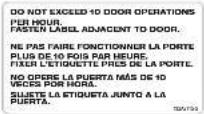
- DO NOT exceed 10 complete cycles of door operation per hour.
• DO NOT use with sectional type doors.
Register your door operator to receive updates and offers from LiftMaster

text_image
LiftMaster PHOTOREGISTER* LIFTMASTERTake a photo of the camera icon including the points (
Send it in by texting the photo to 71403 (US) or visit www.liftmaster.photo (Global)
2 YEAR WARRANTY

LiftMaster 300 Windsor Drive Oak Brook, IL 60523
Table of Contents
Introduction 2
Safety Symbol and Signal Word Review ...2
Preparing Your Door....3
Carton Inventory 5
Hardware 5
Additional Items You May Need 5
Assembly 5
Attach the Drive Sprocket ....5
Attach Mounting Brackets....5
Installation 6
Introduction 6
Live Shaft Door Requirements ....7
Dead Shaft Door Requirements......8
Install the Door Sprocket 9
Mount the Door Operator....10
Attach the Emergency Release Rope and Handle....12
Install the Single Button Control Station ....12
Install The Protector System......13
Install the Light Curtain (Not Provided)......16
Connect Power....17
Install the Battery Backup (Not Provided)....19
Adjustments 20
Program the Travel Limits....20
Automatic Force Setup....20
Test the Safety Reversal System......21
Test the Protector System....21
To Open the Door Manually .....22
Operation 23
Using Your Door Operator 24
Programming 25
Remote Control (Not Provided)......25
To Erase the Memory 25
Maintenance 26
Care of Your Door Operator 26
Troubleshooting 27
Diagnostic Chart 27
Additional Troubleshooting 28
Repair Parts 29
Installation Parts 29
Door Operator Parts....29
Accessories 30
Contact Information 30
Introduction
Safety Symbol and Signal Word Review
This door operator has been designed and tested to offer safe service provided it is installed, operated, maintained and tested in strict accordance with the instructions and warnings contained in this manual.
When you see these Safety Symbols and Signal Words on the following pages, they will alert you to the possibility of serious injury or death if you do not comply with the warnings that accompany them. The hazard may come from something mechanical or from electric shock. Read the warnings carefully.
When you see this Signal Word on the following pages, it will alert you to the possibility of damage to your door and/or the door operator if you do not comply with the cautionary statements that accompany it. Read them carefully.
WARNING
Mechanical
WARNING
Electrical
CAUTION

WARNING: This product can expose you to chemicals including lead, which are known to the State of California to cause cancer or birth defects or other reproductive harm. For more information go to www.P65Warnings.ca.gov.
Preparing Your Door
BEFORE YOU BEGIN:
- Remove any ropes connected to door.
- Raise and lower the door to ensure the door does not bind or stick and is properly balanced. If your door binds, sticks or is out of balance refer to the door manufacturer for more information. Doors heavier than 650 lbs. should NOT open or fall rapidly.
For live shaft type doors the drive shaft needs to extend 1-1/2" beyond the door mount bracket.
- If the operator is mounted below 8 ft. (2.5 m), a chain guard must be installed to protect against possible injury. See accessories page.

WARNING
To prevent possible SERIOUS INJURY or DEATH:
- ALWAYS call a trained door systems technician if door binds, sticks or is out of balance. An unbalanced door may NOT reverse when required.
- NEVER try to loosen, move or adjust door, door springs, cables, pulleys, brackets or their hardware, ALL of which are under EXTREME tension.
- Disable ALL locks and remove ALL ropes connected to door BEFORE installing and operating door operator to avoid entanglement.
- DO NOT install operator below 6 feet (1.83 m).

CAUTION
To prevent damage to door and operator:
- ALWAYS disable locks BEFORE installing and operating the operator.
- ONLY operate door operator at 120V, 60 Hz to avoid malfunction and damage.
- DO NOT exceed 10 complete cycles of door operation per hour.
- DO NOT run operator if the door is locked.
- Chain guard to be installed where the drive chain is exposed lower than 8 feet (2.5 m).
SPECIFICATIONS
Volts .120 Vac - 60 Hz, ONLY
Current 1.5 AMP
Rated Load . . . . . . . . . . . . . . . . . . . . . . . . . . . . . . . . . . . . . . . . . . . . . . . . . . . . . . . . . 385 in. lb./sec. 10 Cycles per Hour
Maximum Door Height 12 ft.
Maximum Door Size ....14 ft. x 12 ft. (not to exceed 168 sq./ft.)
Introduction
Carton Inventory
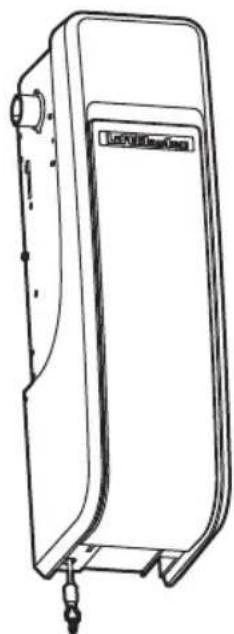
Your door operator is packaged in one carton which contains the motor unit and the parts illustrated below. If anything is missing, carefully check the packing material.
2-Conductor Bell Wire
White and White/Red
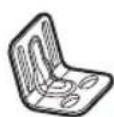
Mounting Bracket (4)
natural_image
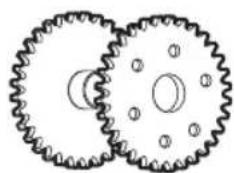
Two interlocking gears with central hub and mounting holes (no text or symbols)Door Sprockets
natural_image
Line drawing of a portable electronic device with ports and cables (no text or symbols)Door Operator
Safety Labels and Literature
natural_image
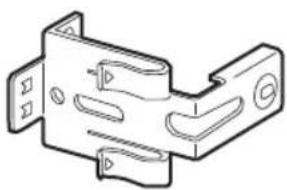
Technical line drawing of a mechanical bracket or mounting plate (no text or symbols)Safety Reversing Sensor Bracket (2)
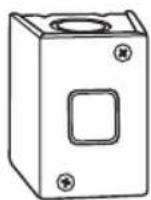
Single Button Control Station
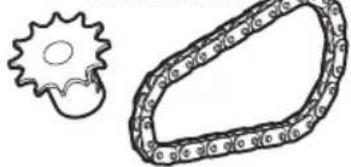
12 Tooth Drive Sprocket with Drive Chain
natural_image
Simple line drawing of a gear and chain link (no text or symbols)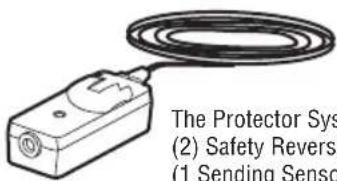
text_image
The Protector Sys (2) Safety Reversi (1) Sending SensorThe Protector System®
(2) Safety Reversing Sensors
(1 Sending Sensor and 1 Receiving Sensor)
with 2-Conductor White and White/Black
Bell Wire attached
Hardware
Tubular Spacer 1/2" (6)
Tubular Spacer 2" (3)
Cap Screw 1/4"-20 x 2" (1)
Nylock Lock Nut 1/4"-20 (1)
Hex Head Bolt 3/8"-16 x 4" (3)
Flat Washer 3/8" (3)
Serrated Flange Nut 5/16"-18 (3)
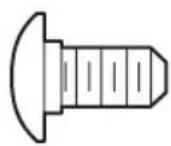
Carriage Bolt 1/4"-20 x 1/2" (2)
Self-Threading Screw #10-32 (8)
Rope (1)
Handle (1)
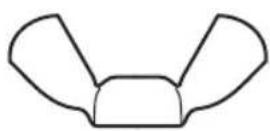
Wing Nut 1/4"-20 (2)
Hex Drive Round Head Bolt 1/4"-20 x 1/2" (2)
Warning Tag for Release Handle (1)
Additional Items You May Need
Extension brackets (Model 041A5281-1) or wood blocks: Depending upon building construction, extension brackets or wood blocks may be needed to install the safety reversing sensor.
Fastening hardware: Alternate floor mounting of the safety reversing sensor will require hardware not provided.
90° connector for cable conduit or flex cable adapter: Required for permanent wiring.
Battery Backup (Model 485LM): Provides backup power to the door operator.
Assembly
1 Attach the Drive Sprocket
The door operator can be installed on either side of the door.
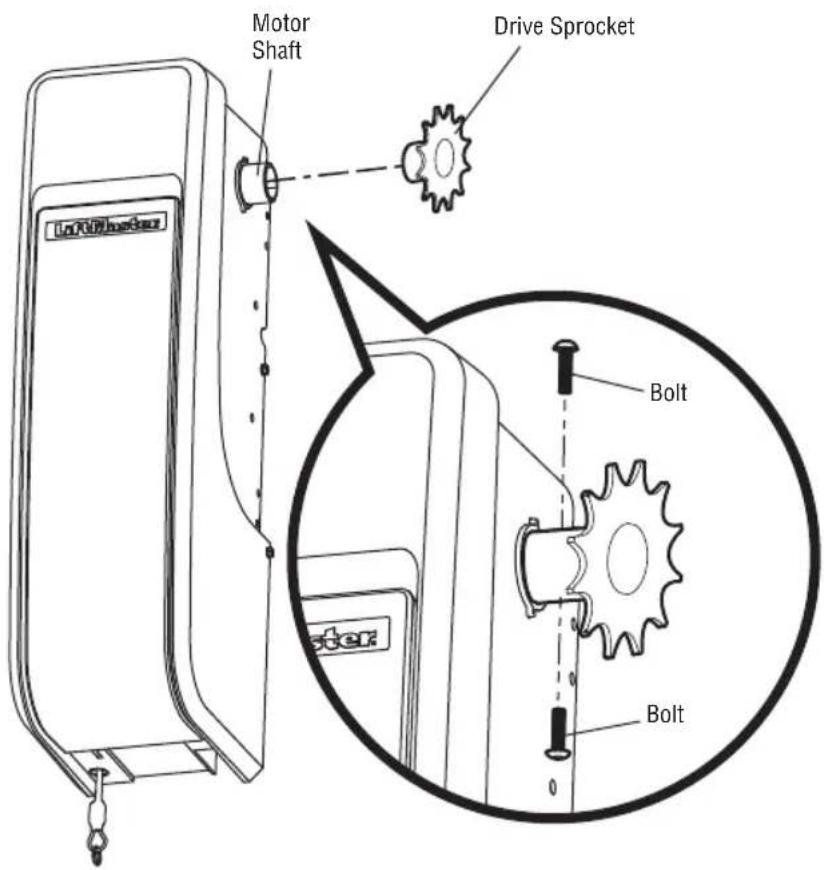
The drive sprocket can be installed on the right or left side of the operator depending on your installation. The drive sprocket can be mounted in one of three positions to aid in the alignment of the drive sprocket with the door sprocket.
- Insert the drive sprocket into the motor shaft.
- Align the center holes in the drive sprocket with the hole in the motor shaft.
- Insert bolts into the motor shaft and the drive sprocket.
- Hand tighten the bolts.
text_image
Motor Shaft Drive Sprocket Bolt Bolt2 Attach Mounting Brackets
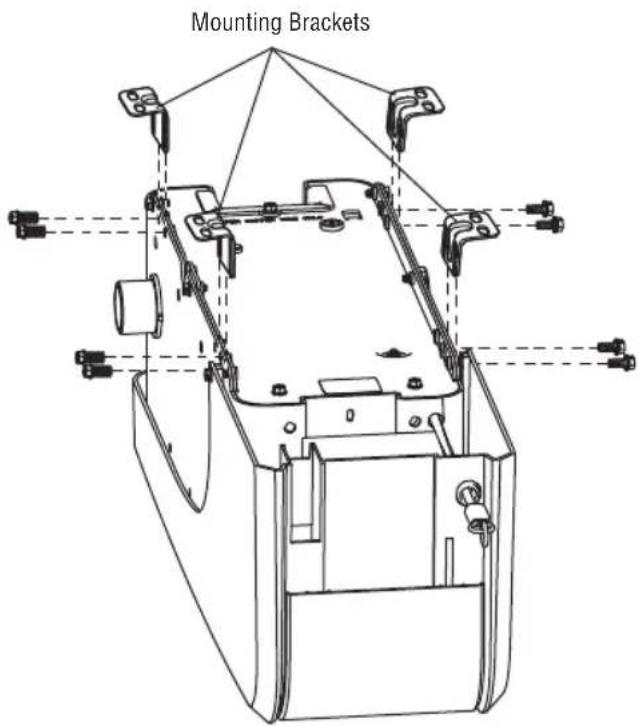
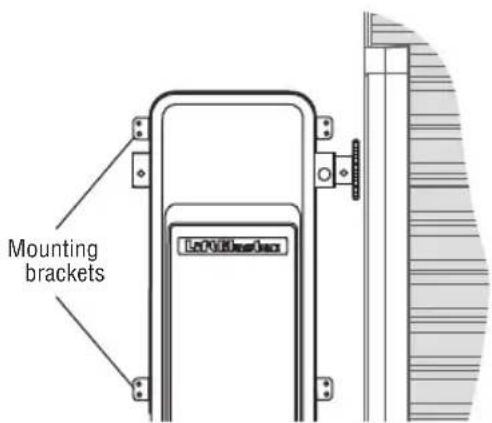
The operator can be mounted to the wall with the mounting brackets provided. An optional mounting bracket Model 3950MB is available for purchase, see Accessories page 30.
- Position two mounting brackets on each side of the operator.
- Fasten the mounting brackets to the operator using the self-threading screws provided.
text_image
Mounting BracketsIMPORTANT INSTALLATION INSTRUCTIONS


WARNING
To reduce the risk of SEVERE INJURY or DEATH:
- READ AND FOLLOW ALL INSTALLATION WARNINGS AND INSTRUCTIONS.
- Install door operator ONLY on properly balanced and lubricated door. An improperly balanced door may NOT reverse when required and could result in SEVERE INJURY or DEATH.
- ALL repairs to cables, spring assemblies and other hardware MUST be made by a trained door systems technician BEFORE installing operator.
- Disable ALL locks and remove ALL ropes connected to door BEFORE installing operator to avoid entanglement.
- If the operator must be installed less than 2.44m (8 ft.) above the floor, then exposed moving parts must be protected by covers or guarding, provided by the operator manufacturer.
- Mount the emergency release within reach, but at least 6 feet (1.83 m) above the floor and avoiding contact with vehicles to avoid accidental release.
- NEVER connect door operator to power source until
instructed to do so.
- NEVER wear watches, rings or loose clothing while installing or servicing operator. They could be caught in door or operator mechanisms.
- Install wall-mounted door control:
• within sight of the door.
- out of reach of children at a minimum height of 5 feet (1.5 m) above floors, landings, steps or any other adjacent walking surface.
- away from ALL moving parts of the door.
- Install the Emergency Release Marking. Attach the marking on or next to the emergency release. Install the Entrapment Warning Placard next to the door control in a prominent location.
- Place emergency release/safety reverse test label in plain view on inside of door.
- Upon completion of installation, test safety reversal system. Door MUST reverse on contact with a 1-1/2" (3.8 cm) high object (or a 2x4 laid flat) on the floor.
Introduction
Identify the door type for your installation and review the requirements before beginning installation.
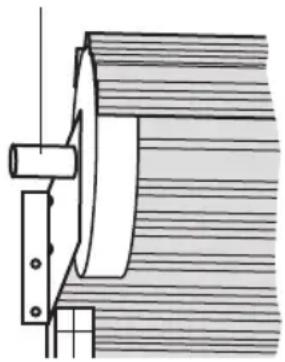
LIVE SHAFT DOOR
The axle rotates with the drum and door assembly when the door is opened or closed.
DEAD SHAFT DOOR
The axle is locked in place while the door opens and closes.
Rotating Shaft Fixed Shaft
natural_image
Technical line drawing of a mechanical assembly with no visible text or symbols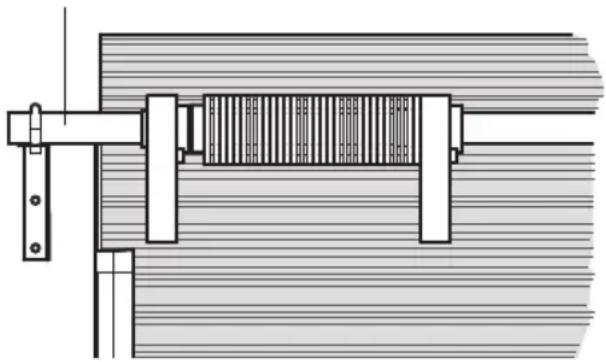
natural_image
Technical line drawing of a mechanical assembly with no visible text or symbolsLIVE SHAFT DOOR DEAD SHAFT DOOR
Live Shaft Door Requirements
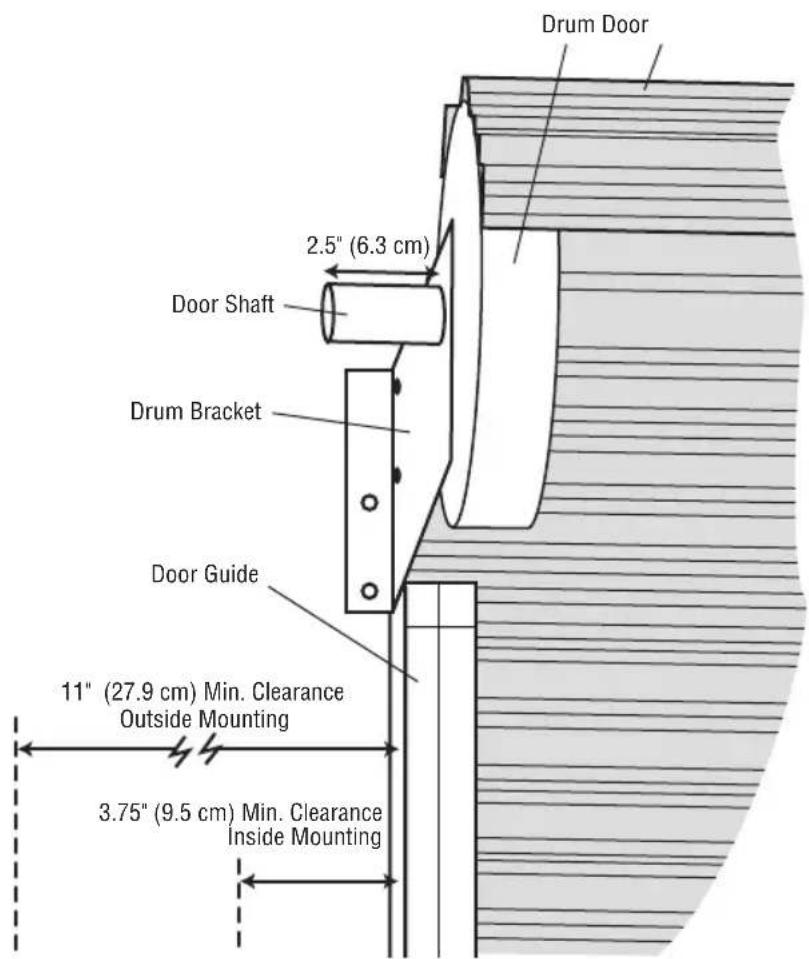
For live shaft door installations the door sprocket is attached to the door axle which spins the drums and rolls the door curtain.
A minimum of 11" (27.9 cm) clearance on the outside of the door opening is required for standard wall mounting or outside mounting using the optional mounting bracket Model 3950MB.
A minimum of 3.75" (9.5 cm) clearance on the outside of the door opening is required for inside mounting using the optional mounting bracket Model 3950MB.
MINIMUM SHAFT LENGTH
The door shaft must extend past the drum bracket a minimum of 1.5" (3.8 cm) (2.5" [6.3 cm] recommended) for installing the door sprocket.
text_image
Drum Door 2.5" (6.3 cm) Door Shaft Drum Bracket Door Guide 11" (27.9 cm) Min. Clearance Outside Mounting 3.75" (9.5 cm) Min. Clearance Inside MountingDead Shaft Door Requirements
For dead shaft door installations the door sprocket is attached to the door drum which spins to move the door.
DRUM CONDITION
The door drum must not be bent or damaged. If bent, the drive chain may not align to the sprocket and could derail the chain.
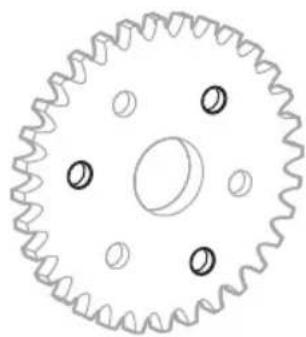
If the drum does not have mounting holes which align to the door sprocket, use the door sprocket as a template to drill holes in the proper location.
SPRING CLEARANCE
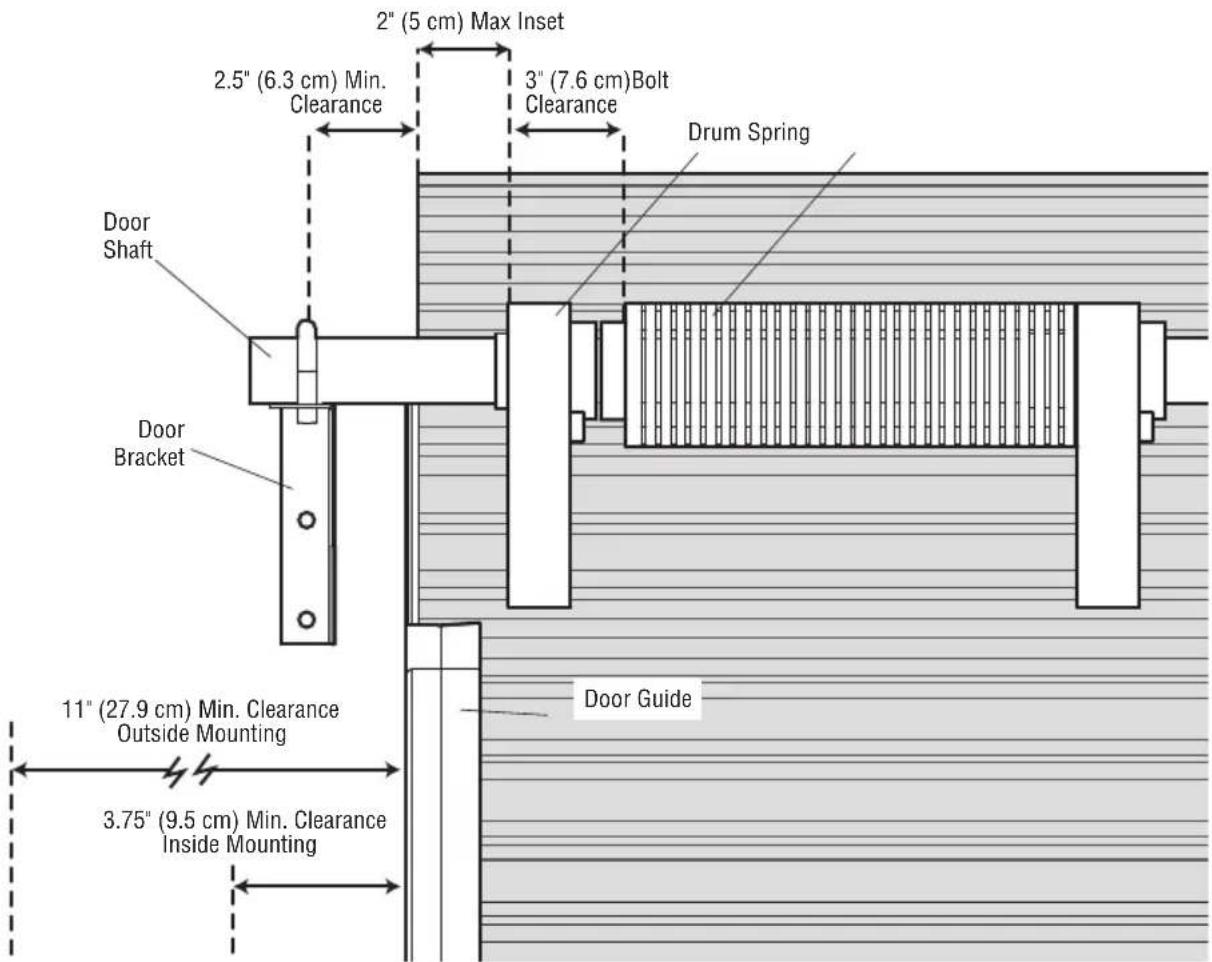
The internal door springs must not interfere with the door sprocket installation. Inspect for interference by sliding the door sprocket on the door shaft to the drum and aligning the mounting holes. Sprocket mounting holes should not be obstructed by the door spring for a minimum depth of 3" (7.6 cm). Some door manufacturers require the door to be modified with an extra drum on the end of the door barrel to provide an unobstructed platform for door sprocket installation.
DOOR CLEARANCE
The dead shaft door must not have more than a 2" (5 cm) space from the curtain edge to the drum. The door operator comes with a selection of spacers that can be used together to provide a maximum 3" (7.6 cm) of spacing.
A minimum of 11" (27.9 cm) clearance on the outside of the door guide is required for outside mounting. A minimum of 3.75" (9.5 cm) clearance is required for inside mounting. If the door brackets interfere with door operator installation, move the door brackets away from the door assembly to provide room in the desired location.
Remove existing door sprocket. You MUST use the door sprocket provided in order for the door operator to function correctly.
natural_image
Technical line drawing of a gear with evenly spaced teeth and central bore (no text or symbols)Door Sprocket Mounting Pattern Use 3 holes 120° Apart
text_image
2" (5 cm) Max Inset 2.5" (6.3 cm) Min. Clearance 3" (7.6 cm) Bolt Clearance Drum Spring Door Shaft Door Bracket 11" (27.9 cm) Min. Clearance Outside Mounting 3.75" (9.5 cm) Min. Clearance Inside Mounting Door Guide1 Install the Door Sprocket
Remove existing door sprocket. You MUST use the door sprocket provided in order for the door operator to function correctly.
The instructions below describe the general installation procedure. Refer to the door manufacturer for specific instructions regarding your door.
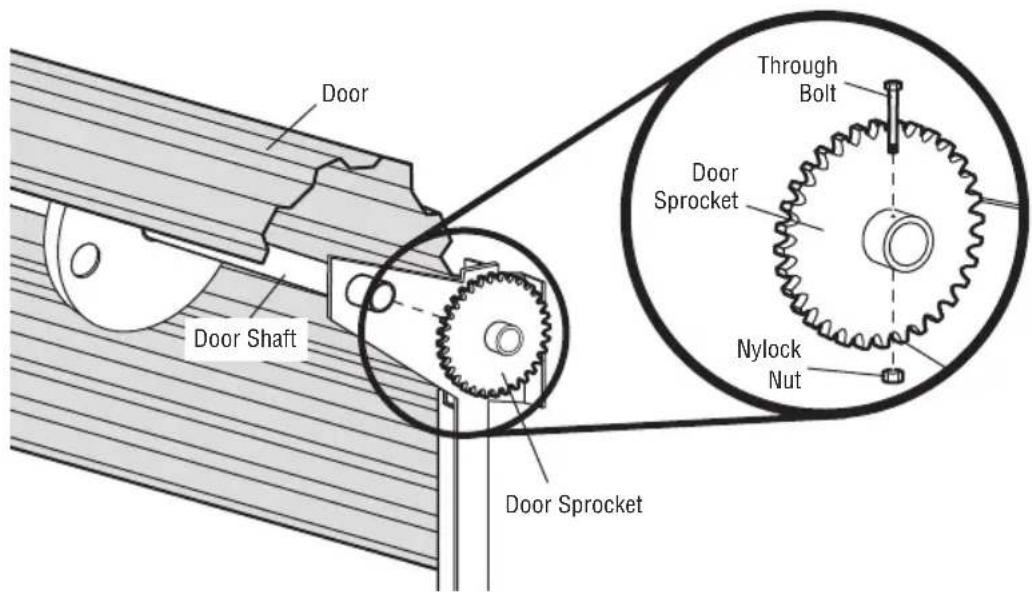
LIVE SHAFT
- Slide the door sprocket onto the end of the door shaft.
- Mark and drill a hole through the door shaft.
- Attach the door sprocket to the door shaft with the through bolt and nylock nut.
text_image
Door Door Shaft Door Sprocket Through Bolt Door Sprocket Nylock Nut Door SprocketDEAD SHAFT
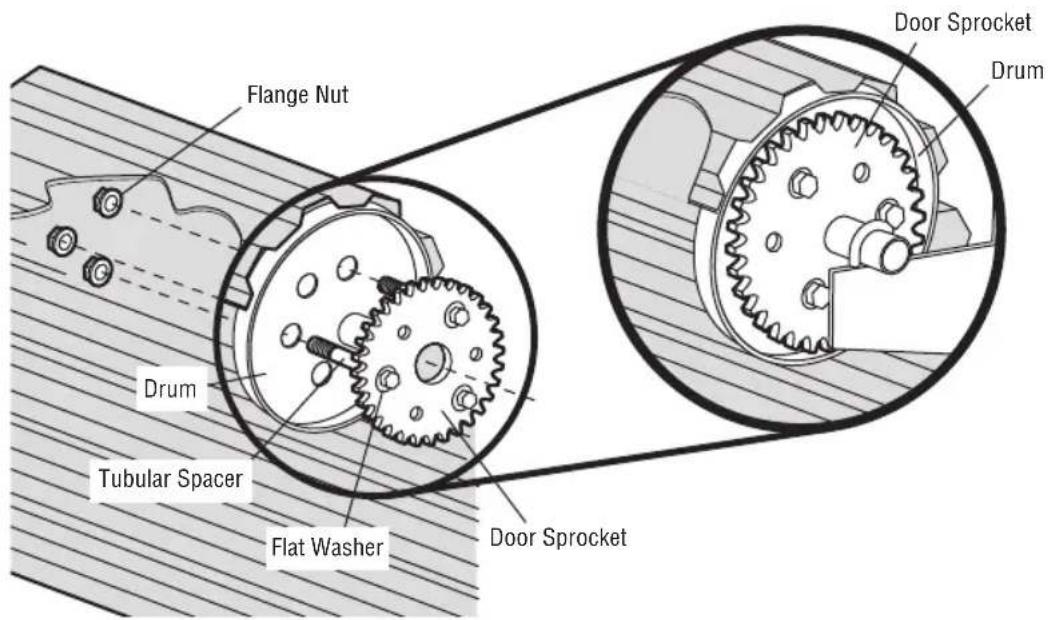
- Slide the door sprocket onto the end of the door shaft.
- Attach the door sprocket to the door drum with the through bolts, flat washers, tubular spacers, and flange nuts.
text_image
Flange Nut Drum Tubular Spacer Flat Washer Door Sprocket Door Sprocket Drum2 Mount the Door Operator
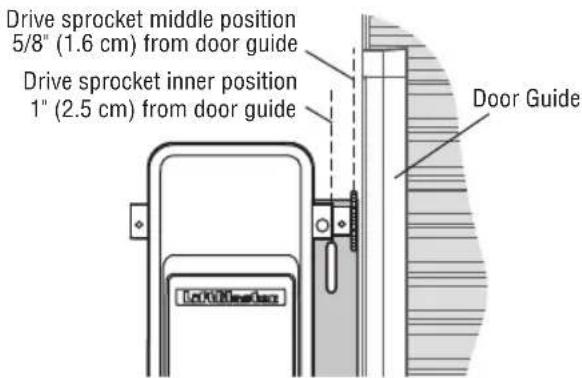
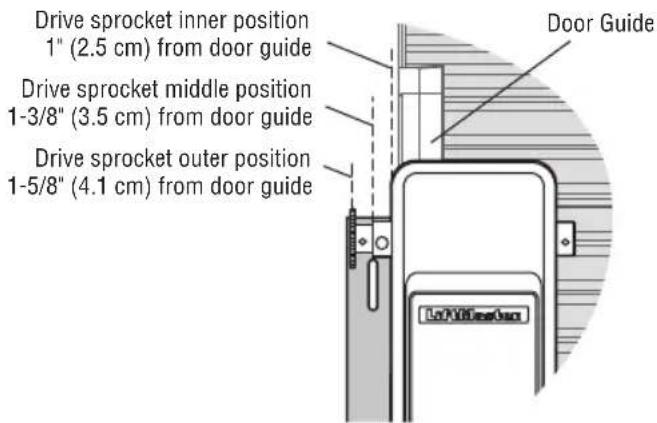
MOUNTING OPTIONS
There are three options for mounting the door operator:
- Standard wall mount using the brackets included with the door operator.
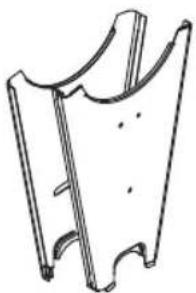
- Outside bracket mount using the optional mounting bracket Model 3950MB.
- Inside bracket mount using the optional mounting bracket Model 3950MB.
Anchors must be fastened to structural members only. Use concrete anchors for masonry construction.
NOTE: Mounting the operator to drywall is not recommended.
text_image
Mounting brackets LTO100000000STANDARD MOUNTING WITH BRACKETS PROVIDED
text_image
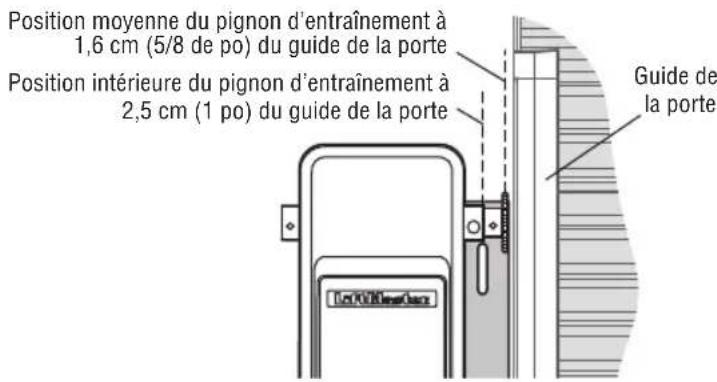
Drive sprocket middle position 5/8" (1.6 cm) from door guide Drive sprocket inner position 1" (2.5 cm) from door guide Door GuideOUTSIDE MOUNT WITH OPTIONAL 3950MB MOUNTING BRACKET
text_image
Drive sprocket inner position 1" (2.5 cm) from door guide Drive sprocket middle position 1-3/8" (3.5 cm) from door guide Drive sprocket outer position 1-5/8" (4.1 cm) from door guide Door GuideINSIDE MOUNT WITH OPTIONAL 3950MB MOUNTING BRACKET

WARNING
To prevent possible SERIOUS INJURY or DEATH:
- Concrete anchors MUST be used if mounting bracket into masonry.
- NEVER try to loosen, move or adjust door, springs, cables, pulleys, brackets or their hardware, ALL of which are under EXTREME tension.
- ALWAYS call an authorized service technician if door binds, sticks or is out of balance. An unbalanced door might NOT reverse when required.
- Operator MUST be mounted at a right angle to the door shaft.
Installation
2 Mount the Door Operator (continued)
MOUNT THE DOOR OPERATOR AND ATTACH THE CHAIN
- Raise the door operator to approximate mounting position. Align the drive sprocket with the door sprocket.
NOTE: The drive sprocket can be mounted in one of three positions to aid in the alignment of the drive sprocket with the door sprocket.
- Wrap the chain around the door sprocket and drive sprocket.
- Connect the ends of the chain using the master link.
- Raise or lower the door operator until the chain is taut but not tight. Make sure the door operator motor shaft is parallel to the door shaft.
- Fasten the operator to the mounting surface with the appropriate hardware (not provided).
- Tighten the drive sprocket bolts using a 5/32" Allen wrench.
If the operator is mounted below 8 ft. (2.5 m), chain guard model 3950CGJ must be installed to protect against possible injury, see accessories page 30.
natural_image
Pure technical line drawing of a mechanical component without any text, numbers, or symbols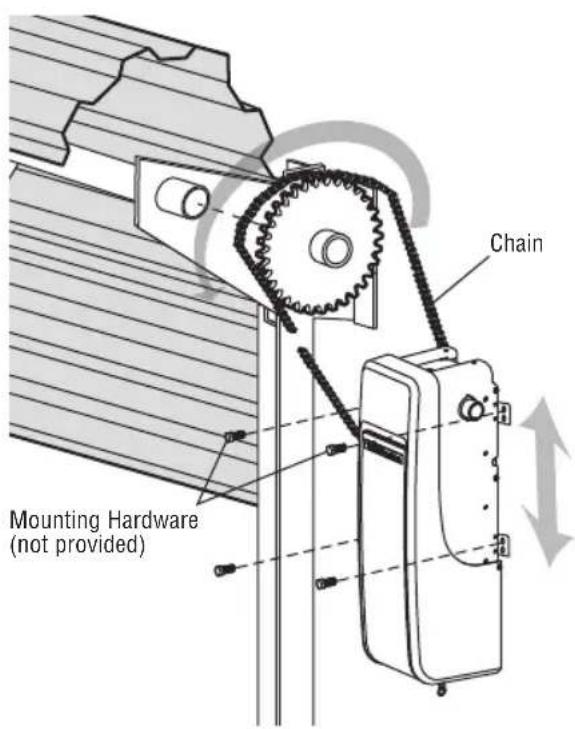
text_image
Chain Mounting Hardware (not provided)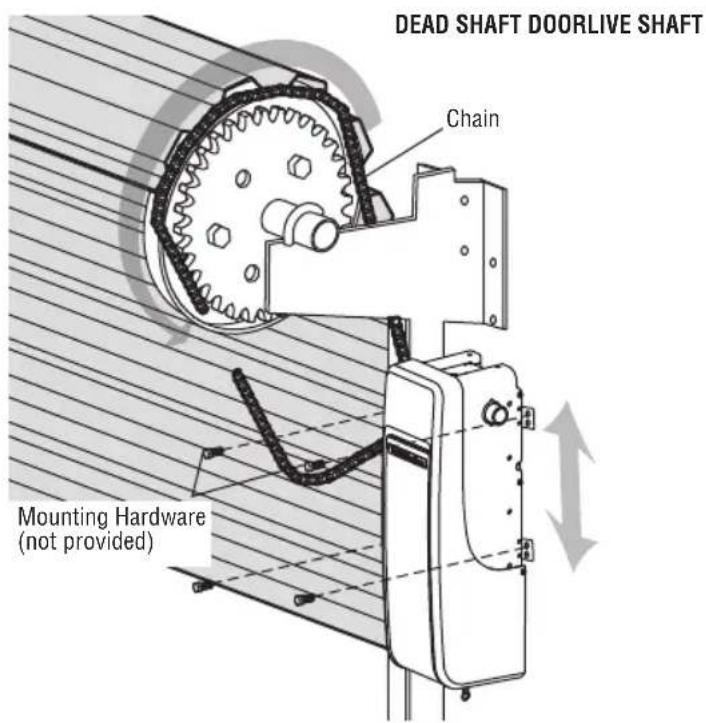
text_image
DEAD SHAFT DOORLIVE SHAFT Chain Mounting Hardware (not provided)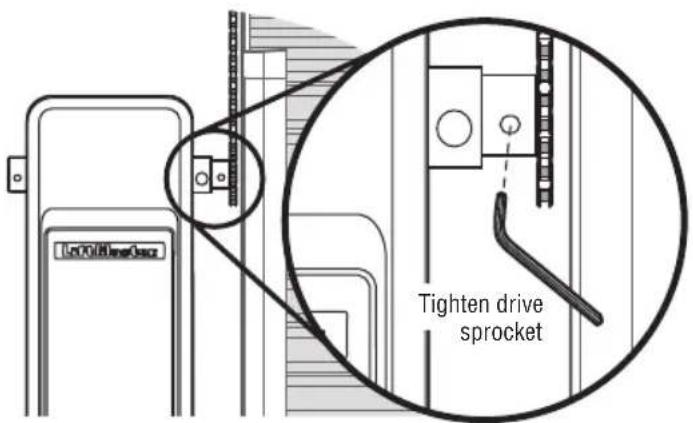
text_image
LoY0186e32 Tighten drive sprocket3 Attach the Emergency Release Rope and Handle
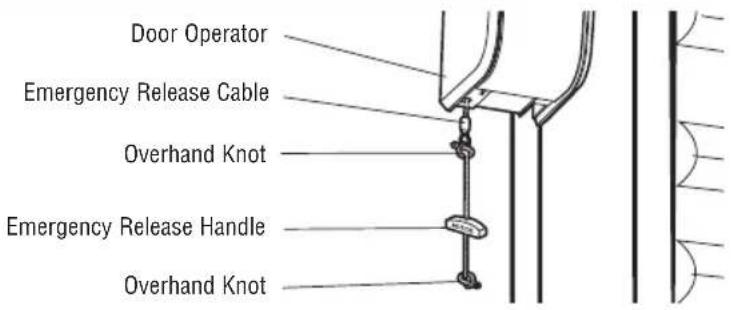
- Insert one end of the emergency release rope through the handle. Make sure that "NOTICE" is right side up. Secure with an overhand knot at least 1" (2.5 cm) from the end of the rope to prevent slipping.
- Insert the other end of the emergency release rope through the hole in the trolley release arm. Mount the emergency release within reach, but at least 6 feet (1.83 m) above floor, avoiding contact with vehicles to prevent accidental release and secure with an overhand knot.
NOTE: If it is necessary to cut the rope, heat seal the cut end with a match or lighter to prevent unraveling.
4 Install the Single Button Control Station
Install the door control within sight of the door, out of reach of children at a minimum height of 5 ft. (1.5 m) above floors, landings, steps or any other adjacent walking surface, and away from the moving parts of the door.
- Remove the control station cover.
- Fasten the control station to the wall at least 5' (1.5 m) above floors, landings, steps or any other adjacent walking surface. The installation surface must be smooth and flat.
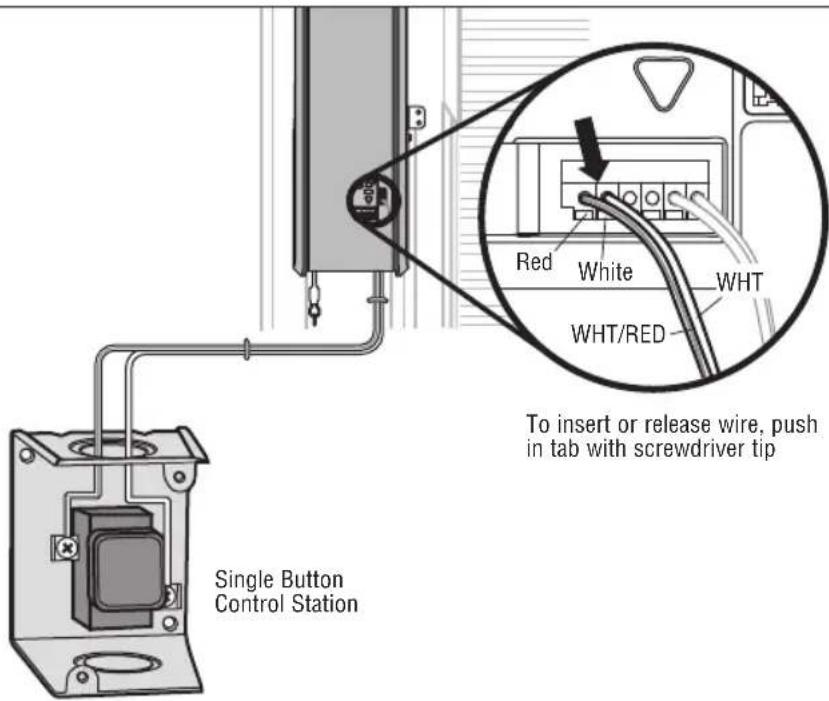
- Select appropriate knockout and run the wires to the operator.
- Connect wires to the control station and replace the control station cover.
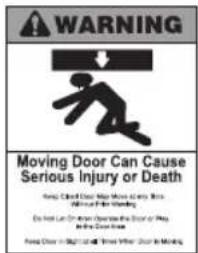
- Fasten the warning placards to the wall next to the single button control station.
NOTE: DO NOT connect the power and operate the door operator at this time. The door will travel to the full open position but will not return to the close position until the safety reversing sensors are connected and properly aligned. See page 13.
text_image
WARNING Moving Door Can Cause Serious Injury or Death Free Child Door May Move to Stents Ade and Bate Stunting Ex And Can Or More Ansepture the Door of Play Ade's Door Use Free Door in Stunting and Tines Whirr Door Is Moving! WARNING
To prevent possible SERIOUS INJURY or DEATH from a falling door:
- If possible, use emergency release handle to disengage door ONLY when door is CLOSED. Weak or broken springs or unbalanced door could result in an open door falling rapidly and/or unexpectedly.
- NEVER use emergency release handle unless doorway is clear of persons and obstructions.
text_image
Door Operator Emergency Release Cable Overhand Knot Emergency Release Handle Overhand KnotWARNING
To prevent possible SERIOUS INJURY or DEATH from electrocution:
- Be sure power is NOT connected BEFORE installing door control.
- Connect ONLY to 24 VOLT low voltage wires.
To prevent possible SERIOUS INJURY or DEATH from a closing door: - Install door control within sight of commercial door, out of reach of children at a minimum height of 5 feet (1.5 m) above floors, landings, steps or any other adjacent walking surface, and away from ALL moving parts of door.
- NEVER permit children to operate or play with door control push buttons or remote controls.
- Activate door ONLY when it can be seen clearly, is properly adjusted and there are no obstructions to door travel.
- ALWAYS keep door in sight until completely closed. NEVER permit anyone to cross path of closing door.
text_image
Single Button Control Station Red White WHT WHT/RED To insert or release wire, push in tab with screwdriver tipInstallation
5 Install The Protector System
The safety reversing sensor must be connected and aligned correctly before the door operator will move in the down direction. This is a required safety device and cannot be disabled. The LiftMaster Light Curtain LC36A may be installed as an optional secondary safety device, see page 16.
IMPORTANT INFORMATION ABOUT THE SAFETY REVERSING SENSORS
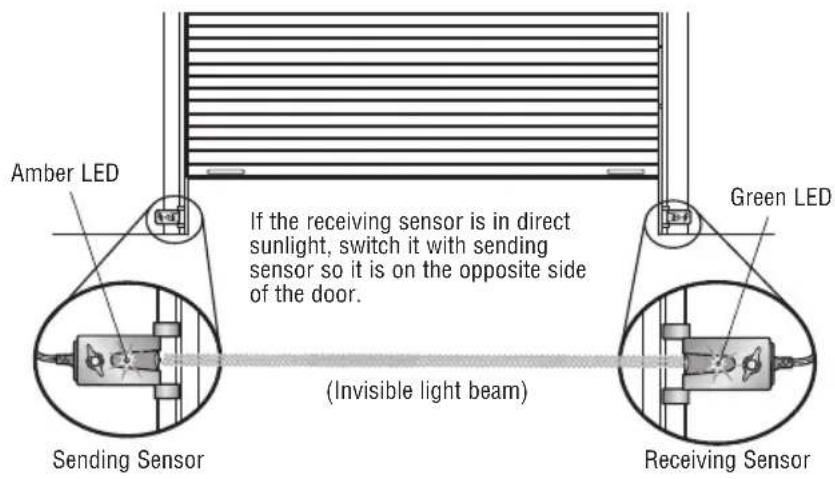
When properly connected and aligned, the safety reversing sensor will detect an obstacle in the path of its electronic beam. The sending sensor (with an amber indicator light) transmits an invisible light beam to the receiving sensor (with a green indicator light). If an obstruction breaks the light beam while the door is closing, the door will stop and reverse to full open position.
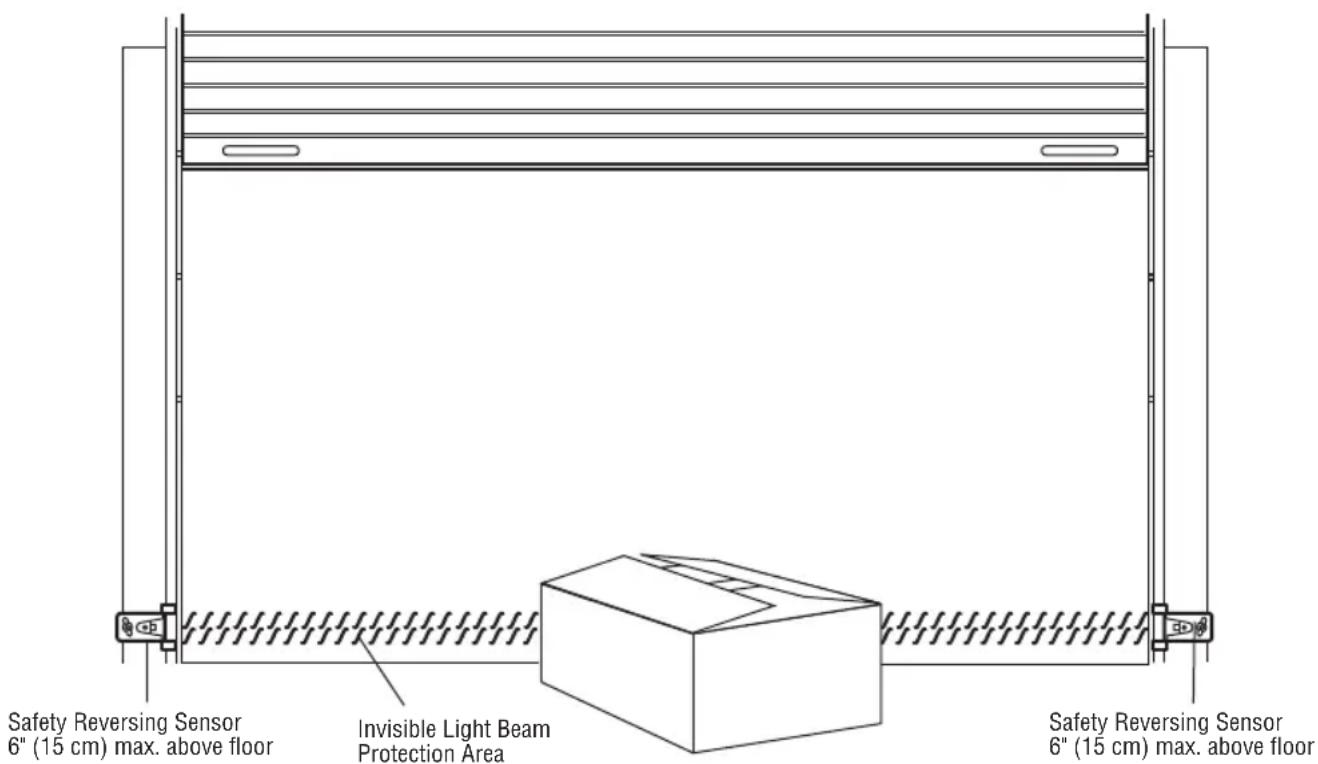
The sensors must be installed inside the building so that the sending and receiving eyes face each other across the door, no more than 6" (15 cm) above the floor. Either can be installed on the left or right of the door as long as the sun never shines directly into the receiving sensor lens.
If it is necessary to mount the units on the wall, the brackets must be securely fastened to a solid surface such as the wall framing. Extension brackets (see accessories) are available if needed. If installing in masonry construction, add a piece of wood at each location to avoid drilling extra holes in masonry if repositioning is necessary.
The invisible light beam path must be unobstructed. No part of the door (door tracks, springs, hinges, rollers or other hardware) may interrupt the beam while the door is closing.
WARNING
Be sure power is NOT connected to the door operator BEFORE installing the safety reversing sensor.
To prevent SERIOUS INJURY or DEATH from a closing door:
- Correctly connect and align the safety reversing sensor. This required safety device MUST NOT be disabled.
• Install the safety reversing sensor so beam is NO HIGHER than 6" (15 cm) above floor.
text_image
Safety Reversing Sensor 6" (15 cm) max. above floor Invisible Light Beam Protection Area Safety Reversing Sensor 6" (15 cm) max. above floorFacing the door from inside the building.
NOTE: If the LC36M/LC36M41 Monitored Light Curtain is used in place of Protector System Safety Reversing Sensors, please use the Installation Instructions that are provided with the LC36M/LC36M41.
INSTALLING THE BRACKETS
Be sure power to the operator is disconnected. Install and align the brackets so the safety reversing sensors will face each other across the door, with the beam no higher than 6" (15 cm) above the floor. They may be installed in one of three ways, as follows.
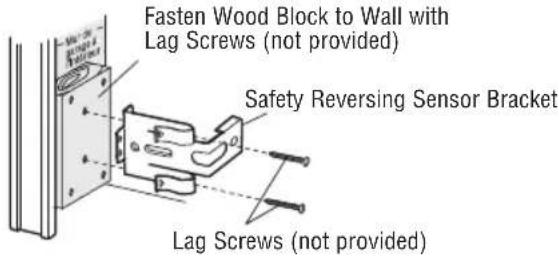
OPTION A: WALL INSTALLATION
- Place the bracket against the wall with curved arms facing the door. Be sure there is enough clearance for the sensor beam to be unobstructed.
- If additional depth is needed, an extension bracket (see Accessories) or wood blocks can be used.
- Use bracket mounting holes as a template to locate and drill (2) 3/16" diameter pilot holes on the wall at each side of the door, no higher than 6" (15 cm) above the floor.
- Attach brackets to wall with lag screws (not provided).
If using extension brackets or wood blocks, adjust right and left assemblies to the same distance out from the mounting surface.
Make sure all door hardware obstructions are cleared.
text_image
Fasten Wood Block to Wall with Lag Screws (not provided) Safety Reversing Sensor Bracket Lag Screws (not provided)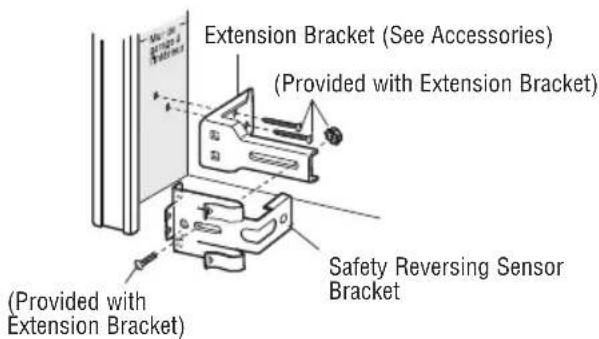
text_image
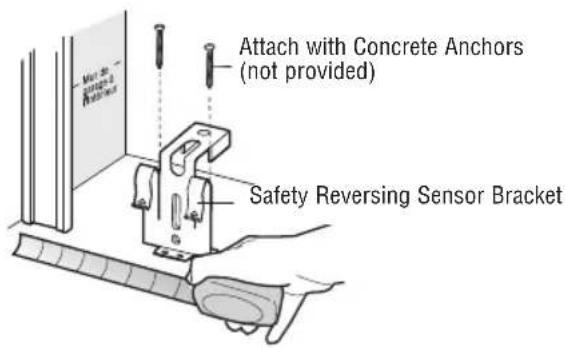
Extension Bracket (See Accessories) (Provided with Extension Bracket) Safety Reversing Sensor Bracket (Provided with Extension Bracket)OPTION B: FLOOR INSTALLATION
- Use wood blocks or extension brackets (see Accessories) to elevate sensor brackets so the lenses will be no higher than 6" (15 cm) above the floor.
- Carefully measure and place right and left assemblies at the same distance out from the wall. Be sure all door hardware obstructions are cleared.
- Fasten to the floor with concrete anchors as shown.
text_image
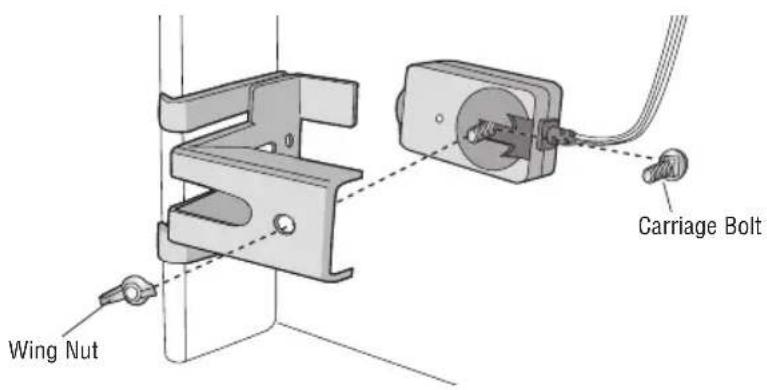
Attach with Concrete Anchors (not provided) Safety Reversing Sensor BracketMOUNTING THE SAFETY REVERSING SENSORS
- Slide a 1/4"-20x1/2" carriage bolt head into the slot on each sensor.
- Use wing nuts to fasten safety reversing sensors to brackets, with lenses pointing toward each other across the door. Be sure the lens is not obstructed by a bracket extension.
- Finger tighten the wing nuts.
text_image
Wing Nut Carriage BoltHARDWARE
Carriage Bolt 1/4"-20x1/2" (2)
Wing Nut 1/4"-20 (2)
WIRE THE SAFETY REVERSING SENSORS
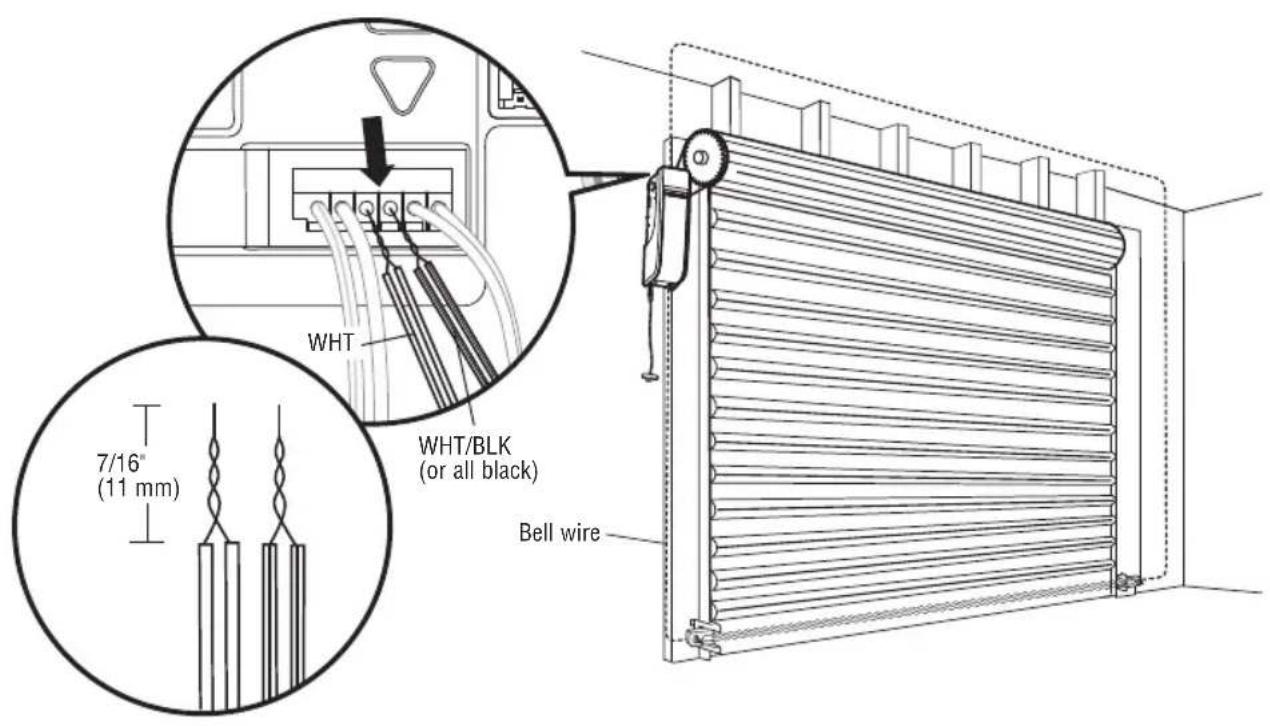
- Run the wire from both sensors to the door operator. Attach the wire to the wall and ceiling with the staples.
- Strip 7/16" (11 mm) of insulation from each set of wires. Separate the wires. Twist the white wires together. Twist the white/black (or all black) wires together.
- Insert the white wires into the white terminal on the door operator. Insert the white/black wires into the grey terminal on the door operator. To insert or remove the wires from the terminal, push in the tab with a screwdriver tip.
text_image
WHT WHT/BLK (or all black) Bell wire 7/16" (11 mm)6 Install the Light Curtain (Not Provided)
The following are general instructions for a typical installation, refer to the complete instructions included with the Light Curtain.
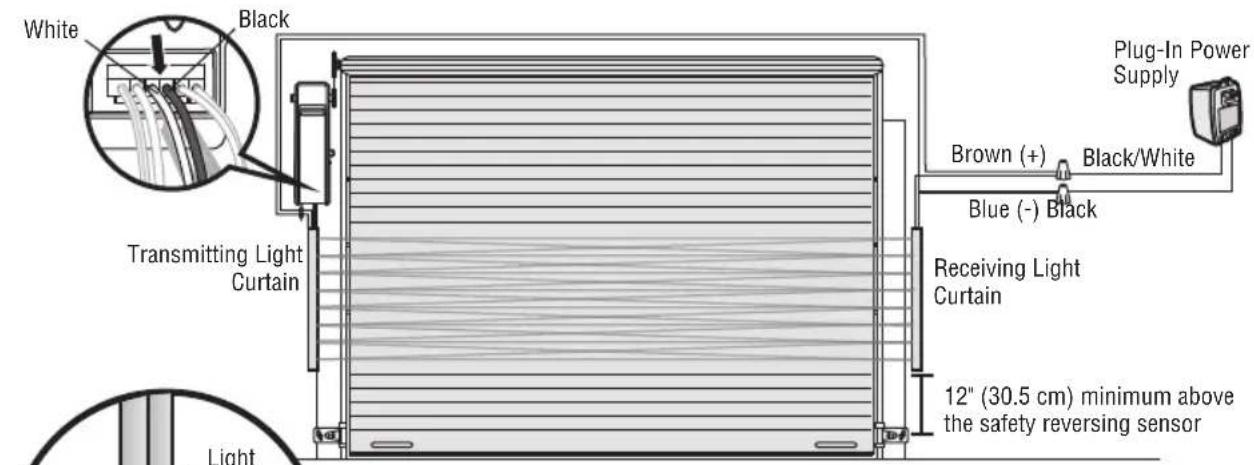
The plug-in power supply accessory (model 100MAPS) is required to power the Light Curtain. LiftMaster Light Curtain (Model LC-36A) is an ancillary entrapment protection device designed with 8 optical sensors that form 22 total invisible light beams which create a cross-pattern or netting effect for maximum protection against entrapment. If an obstruction breaks any light beam while the door is closing, the operator will stop and reverse to the full open position. The Light Curtain Transmitter must be installed facing the Light Curtain Receiver across the entrapment zone, 12" (30.5 cm) above the primary monitored entrapment protection device. The minimum installation width is 3 ft. (.91 m) and the maximum width is 33 ft. (10 m).
NOTE: Ensure that no part of the door, door tracks, springs, hinges, rollers, cords or other hardware interrupts the light beam while the door is closing.
INSTALLATION
- Fasten the mounting brackets loosely to both Light Curtains with the screws provided.
- Measure a minimum of 12" (30.5 cm) above the safety reversing sensors. Mark this location. The Light Curtain must be installed above this point.
- Hold the Light Curtain up to the desired mounting location with the cable end pointing upward. Secure the bottom mounting bracket to the mounting surface. The mounting brackets must be securely fastened to a solid surface such as a wall framing.
- Make sure the Light Curtain is level and secure the upper mounting bracket to the mounting surface.
- Tighten the screws to secure the Light Curtain to the mounting bracket.
- Secure the other Light Curtain to the opposite side of the door following steps 2 - 5, making sure they are aligned.
WIRING
Transmitting Light Curtain:
- White Wire to white terminal on door operator
- Black Wire to grey terminal on door operator
Transmitting and Receiving Light Curtains:
- Brown Wire (+) to White/Black on power supply
• Blue Wire (-) to Black on power supply


WARNING
To prevent possible SERIOUS INJURY or DEATH from a closing door:
- Be sure to DISCONNECT POWER to the operator BEFORE installing the Light Curtain.
- The door MUST be in the fully opened or closed position BEFORE installing the Light Curtain.
- Correctly connect and align the Light Curtain transmitter and receiver.
- The Light Curtain is for use with LiftMaster Commercial Doors. Use with ANY other product voids the warranty.
- DO NOT use this product for the protection of dangerous machinery or in explosive atmospheres or radioactive environments. Use ONLY specific and approved types of devices for such applications.
- The Light Curtain MUST be installed ONLY by authorized and fully trained personnel.
- LiftMaster Monitored Entrapment Protection devices are required in addition to the Light Curtain. The Light Curtain may NOT be used as the sole entrapment protection device for ANY entrapment zone.
text_image
White Black Transmitting Light Curtain Light 12" (30.5 cm) minimum above the safety reversing sensor Receiving Light Curtain Blue (-) Black Brown (+) Black/White Plug-In Power Supply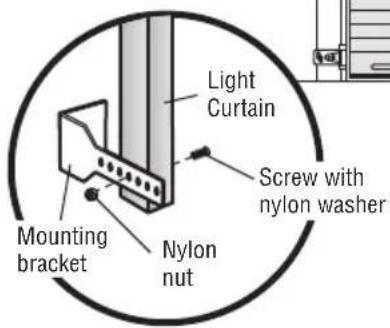
text_image
Light Curtain Screw with nylon washer Mounting bracket Nylon nutNOTE: Aside from height above floor the LC36M/LC36M41 Monitored Light Curtain mounting is identical to the LC-36A mounting. Please use the Installation Instructions that are provided with the LC36M/LC36M41.
Installation
7 Connect Power
To avoid installation difficulties, do not run the door operator at this time.
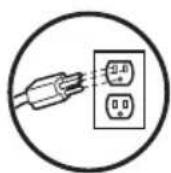
To reduce the risk of electric shock, your door operator has a grounding type plug with a third grounding pin. This plug will only fit into a grounding type outlet. If the plug doesn't fit into the outlet you have, contact a qualified electrician to install the proper outlet.
There are two options for connecting power:
WARNING
To prevent possible SERIOUS INJURY or DEATH from electrocution or fire:
- Be sure power is NOT connected to the operator, and disconnect power to circuit BEFORE removing cover to establish permanent wiring connection.
- Door installation and wiring MUST be in compliance with ALL local electrical and building codes.
- NEVER use an extension cord, 2-wire adapter or change plug in ANY way to make it fit outlet. Be sure the operator is grounded.
OPTION A: TYPICAL WIRING
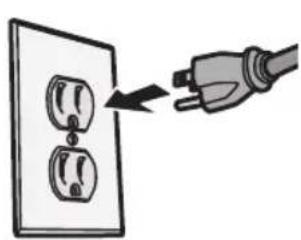
- Plug in the door operator into a grounded outlet.
- DO NOT run door operator at this time.
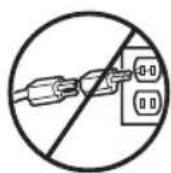
WRONGRIGHT
OPTION B: PERMANENT WIRING CONNECTION
If permanent wiring is required by your local code, refer to the following procedure.
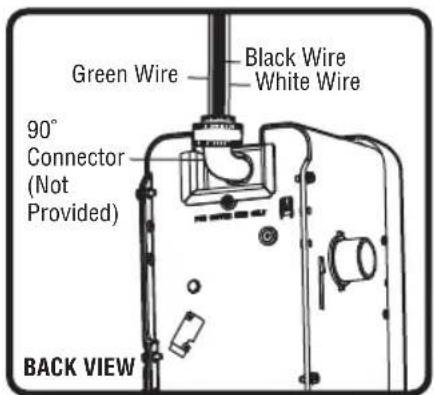
To make a permanent connection through the 7/8" hole in the back of the door operator (according to local code):
- Be sure power is NOT connected to the door operator, and disconnect power to circuit.
- Remove the door operator from the torsion bar, remove cover screws and set the cover aside.
- Cut the line cord 6" (15.2 cm) above the strain relief.
- Squeeze the strain relief and push into motor unit, then remove the strain relief from the line cord.
- Install a 90° conduit (not provided) or flex cable adapter (not provided) to the 7/8" hole. Reinstall door operator to torsion bar.
- Run wires through conduit, cut to proper length and strip insulation.
- Strip 1/2" (1.3 cm) of insulation from the existing black, white and green wires.
- Connect the line to the black wire and neutral to the white wire with wire nuts (not provided). Connect ground wire to the green ground screw.
-
Properly secure wires under plastic ties so that they do not come into contact with moving parts.
-
Reinstall cover.
text_image
Green Wire Black Wire White Wire 90° Connector (Not Provided) BACK VIEW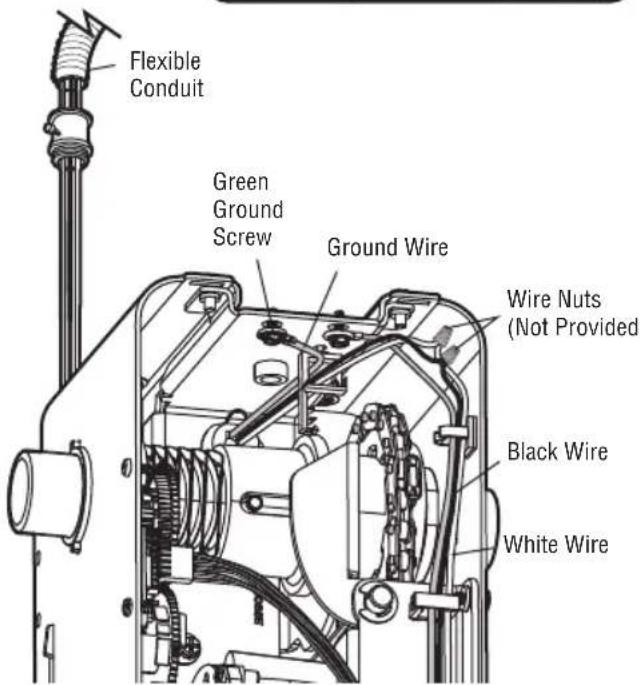
text_image
Flexible Conduit Green Ground Screw Ground Wire Wire Nuts (Not Provided) Black Wire White WireENSURE THE SAFETY REVERSING SENSORS (OR LIGHT CURTAIN) ARE ALIGNED
The door will not close if the sensors have not been installed and aligned correctly.
When the light beam is obstructed or misaligned while the door is closing, the door will reverse. If the door is already open, it will not close. The sensors can be aligned by loosening the wing nuts, aligning the sensors, and tightening the wing nuts.
- Check to make sure the LEDs in both sensors are glowing steadily. The LEDs in both sensors will glow steadily if they are aligned and wired correctly.
text_image
Amber LED Green LED If the receiving sensor is in direct sunlight, switch it with sending sensor so it is on the opposite side of the door. Sending Sensor (Invisible light beam) Receiving SensorIF THE AMBER LED ON THE SENDING SENSOR IS NOT GLOWING:
- Make sure there is power to the door operator. For LC36M/LC36M41, 100MAPS Power Supply is required. See LC36M/LC36M41 Installation Manual.
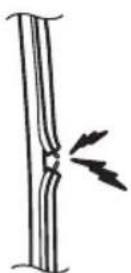
- Make sure the sensor wire is not shorted/broken.
- Make sure that the sensor has been wired correctly. White wires to white terminal and white/black (or full black) wires to grey terminal.
natural_image
Illustration of a hand inserting a plug into an electrical outlet (no text or symbols)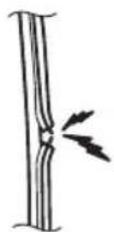
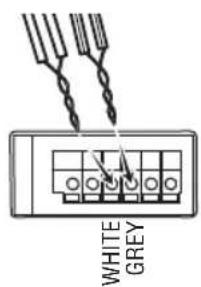
text_image
WHITE GREYIF THE GREEN LED ON THE RECEIVING SENSOR IS NOT GLOWING:
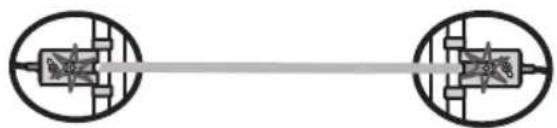
- Make sure the sensor wire is not shorted/broken.
• Make sure the sensors are aligned.
natural_image
Pure electrical circuit lines without any symbols8 Install the Battery Backup (Not Provided)
When in Battery Backup mode, myQ Smartphone Control and wireless myQ devices will be disabled.
- Unplug the door operator.
- Use a Phillips head screwdriver to remove the battery cover on the door operator.
- Partially insert the battery into the battery compartment with the terminals facing out.
- Connect red (+) and black (-) wires from the door operator to the corresponding terminals on the battery.
- Replace the battery cover.
- Plug in the door operator.
BATTERY STATUS LED
Green LED:
All systems are normal.
- A solid green LED light indicates the battery is fully charged.
- A flashing green LED indicates the battery is being charged.
Orange LED:
The door operator has lost power and is in battery backup mode.
- A solid orange LED with beep, sounding approximately every 2 seconds, indicates the door operator is operating on battery power.
- A flashing orange LED with beep, sounding every 30 seconds, indicates the battery is low.
Red LED:
The door operator's 12V battery needs to be replaced.
- A solid red LED with beep, sounding every 30 seconds, indicates the 12V battery will no longer hold a charge and needs to be replaced. Replace the battery back up to maintain the battery backup feature.
NOTE: Battery does not have to be fully charged to activate the door operator.
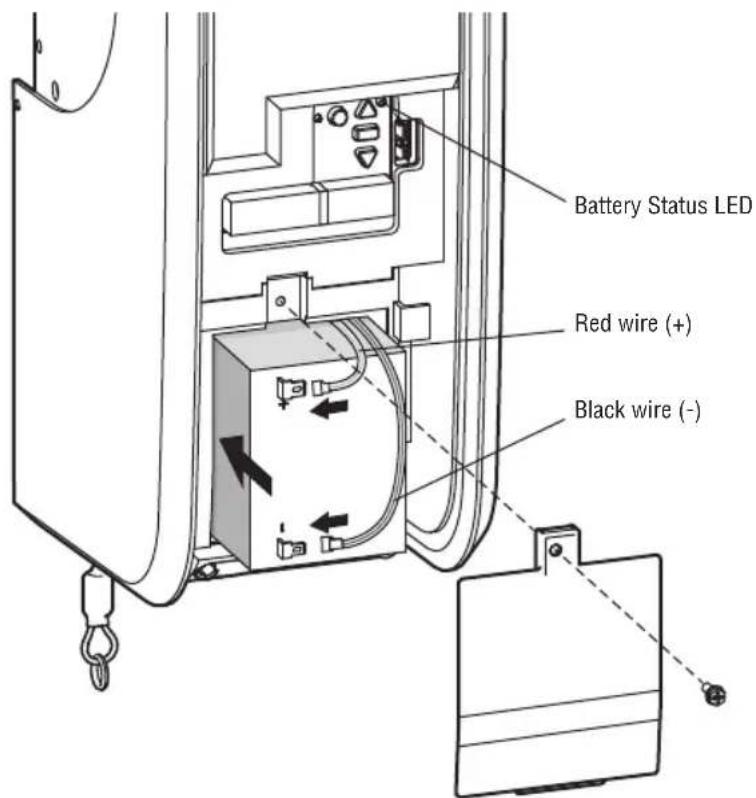
text_image
Battery Status LED Red wire (+) Black wire (-)
WARNING
To reduce the risk of FIRE or INJURY to persons:
- Disconnect ALL electric and battery power BEFORE performing ANY service or maintenance.
- Use ONLY LiftMaster part # 485LM for replacement battery.
- DO NOT dispose of battery in fire. Battery may explode. Check with local codes for disposal instructions.

CAUTION
ALWAYS wear protective gloves and eye protection when changing the battery or working around the battery compartment.
Adjustments
1 Program the Travel
Travel limits regulate the points at which the door will stop when moving up or down.
Note: While programming, the UP and DOWN buttons can be used to move the door as needed. During the Automatic Force Setup, the door will automatically open and close.
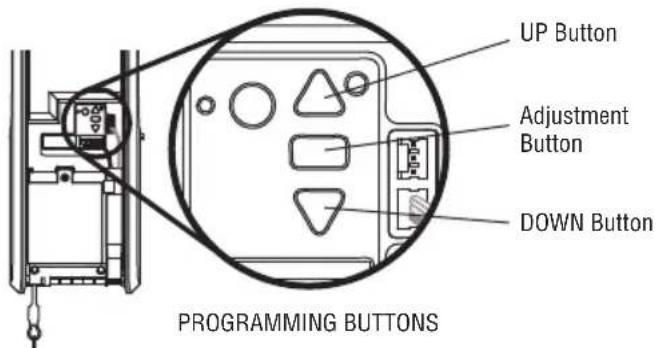
- Press and hold the Adjustment Button until the UP Button begins to flash and/or a beep is heard. The Safety Reversing Sensors will be disconnected during the Program the Travel process.
- Press and hold the UP Button until the door is in the desired UP position.
- Once the door is in the desired UP position press and release the Adjustment Button. The door operator will beep and the DOWN button will flash.
- Press and hold the DOWN Button until the door is in the desired DOWN position.
- Once the door is in the desired DOWN position press and release the Adjustment Button. The door operator will beep and the UP button will flash. Program the Travel is now complete. If the door operator beeps one long beep and the audible alert for the automatic force setup does not begin, the programming has timed out and travel limits have not been set. Please go back to Step 1 and Program the Limits.
WARNING
Without a properly installed safety reversal system, persons (particularly small children) could be SERIOUSLY INJURED or KILLED by a closing door.
- Incorrect adjustment of door travel limits will interfere with proper operation of safety reversal system.
- After ANY adjustments are made, the safety reversal system MUST be tested. Door MUST reverse on contact with 1-1/2" high (3.8 cm) object (or 2x4 laid flat) on floor.
CAUTION
To prevent damage to vehicles, be sure fully open door provides adequate clearance.
2 Automatic Force Setup
- Once both the up and down positions have been manually set, the Safety Reversing Sensors will reconnect and become operational. Then, the door operator will enter a force-sensing operation by automatically moving the door open and close. The door operator will sound an audible alert before automatically opening and closing the door. The door operator will beep three times, confirming that the Automatic Force Setup completed successfully. Adjustment is complete.
- If you hear one long beep after the door attempts to move, then the Automatic Force Set Up has not completed successfully. Please start over at step 1 of Program the Travel.
If you are unable to program the travel:
- Ensure the cable tension monitor is correctly installed (see page 10).
- Check to see if the safety reversing sensors are misaligned or obstructed (refer to page 17). When the sensors are aligned and unobstructed, cycle the door through a complete up and down cycle using the remote control or the UP and DOWN buttons. If you are unable to operate the door up and down, repeat the steps above.
text_image
UP Button Adjustment Button DOWN Button PROGRAMMING BUTTONS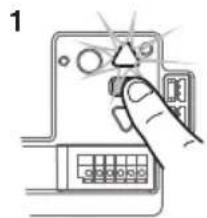
text_image
1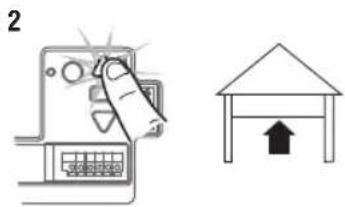
text_image
2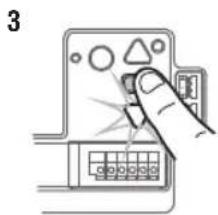
natural_image
Illustration of a hand inserting a device into a control panel (no text or symbols visible)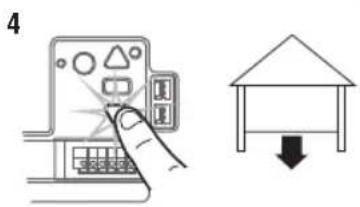
text_image
4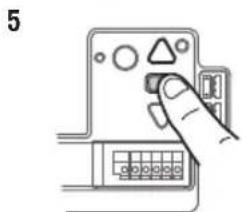
natural_image
Hand inserting a component into a device panel (no text or symbols visible)Adjustments
3 Test the Safety Reversal System
TEST
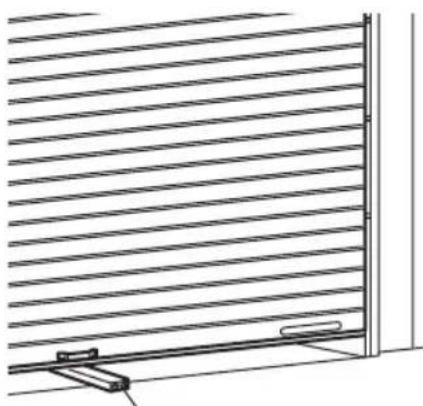
- With the door fully open, place a 1-1/2" (3.8 cm) board (or a 2x4 laid flat) on the floor, centered under the door.
- Operate the door in the down direction. The door MUST reverse when it makes contact with the board.
ADJUST
If the door stops but does not reverse:
- Review the installation instructions provided to insure all steps were followed;
- Repeat Program the Travel (see Adjustment Step 1);
- Repeat the Safety Reversal test. If the test continues to fail, call a trained door systems technician.
IMPORTANT SAFETY CHECK:
Test the Safety Reverse System after:
• Each adjustment of limits.
- Any repair to or adjustment of the door (including springs and hardware).
- Any repair to or buckling of the floor.
- Any repair to or adjustment of the operator.
WARNING
Without a properly installed safety reversal system, persons (particularly small children) could be SERIOUSLY INJURED or KILLED by a closing door.
- Safety reversal system MUST be tested every month.
- After ANY adjustments are made, the safety reversal system MUST be tested. Door MUST reverse on contact with 1-1/2" (3.8 cm) high object (or 2x4 laid flat) on the floor.
natural_image
Diagram of a window frame with horizontal slats and a small bracket, no text or symbols present1-1/2" (3.8 cm) board (or a 2x4 laid flat)
4 Test the Protector System
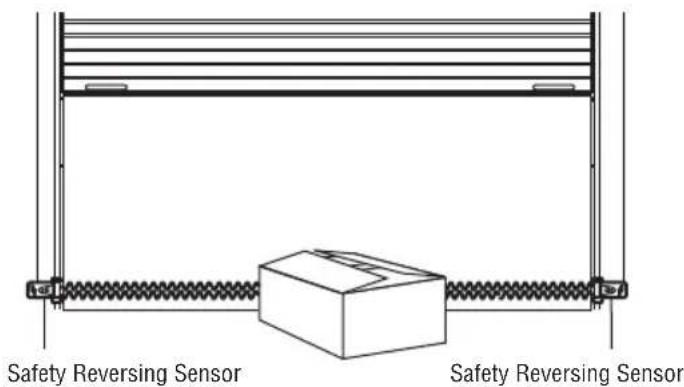
- Press the control station button to open the door.
- Place the operator carton in the path of the door.
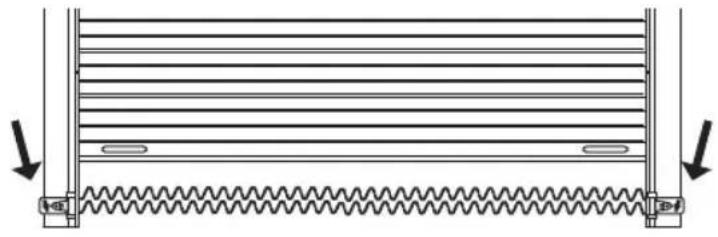
- Press the control station button to close the door. The door will not move more than an inch (2.5 cm).
The door operator will not close from a control station if the indicator light in either sensor is off (alerting you to the fact that the sensor is misaligned or obstructed).
If the door operator closes the door when the safety reversing sensor is obstructed, do not operate the door. Call for a trained door systems technician.
WARNING
Without a properly installed safety reversing sensor, persons (particularly small children) could be SERIOUSLY INJURED or KILLED by a closing door.
text_image
Safety Reversing Sensor Safety Reversing SensorAdjustments
5 To Open the Door Manually
Disengage any door locks before proceeding. The door should be fully closed if possible. Pull down on the emergency release handle until a click noise is heard from the door operator and lift the door manually.
To reconnect the door to the door operator, pull the emergency release handle straight down a second time until a click noise is heard from the door operator. The door will reconnect on the next UP or DOWN operation.
TEST THE EMERGENCY RELEASE:
- Make sure the door is closed.
- Pull the emergency release handle. The door should then be able to be opened manually.
- Return the door to the closed position.
- Pull the emergency handle a second time.
- Reconnect the door to the door operator.
WARNING
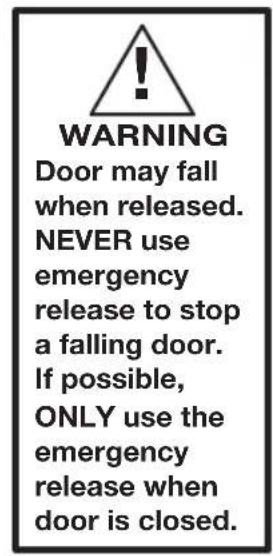
To prevent possible SERIOUS INJURY or DEATH from a falling door:
- If possible, use emergency release handle to disengage door ONLY when door is CLOSED. Weak or broken springs or unbalanced door could result in an open door falling rapidly and/or unexpectedly.
- NEVER use emergency release handle unless doorway is clear of persons and obstructions.
text_image
WARNING Door may fall when released. NEVER use emergency release to stop a falling door. If possible, ONLY use the emergency release when door is closed.
text_image
Emergency Release Handle NOTICEIMPORTANT SAFETY INSTRUCTIONS
WARNING
To reduce the risk of SEVERE INJURY or DEATH:
- READ AND FOLLOW ALL WARNINGS AND INSTRUCTIONS.
- ALWAYS keep remote controls out of reach of children. NEVER permit children to operate or play with door control push buttons or remote controls.
- ONLY activate door when it can be seen clearly, it is properly adjusted and there are no obstructions to door travel.
- ALWAYS keep door in sight and away from people and objects until completely closed. NO ONE SHOULD CROSS THE PATH OF THE MOVING DOOR.
- NO ONE SHOULD GO UNDER A STOPPED, PARTIALLY OPENED DOOR.
- If possible, use emergency release handle to disengage door ONLY when door is CLOSED. Use caution when using this release with the door open. Weak or broken springs or unbalanced door could result in an open door falling rapidly and/or unexpectedly and increasing the risk of SEVERE INJURY or DEATH.
- NEVER use emergency release handle unless doorway is clear of persons and obstructions.
- After ANY adjustments are made, the safety reversal system MUST be tested. Failure to adjust the door operator properly
may cause SEVERE INJURY or DEATH.
- Safety reversal system MUST be tested every month. Door MUST reverse on contact with 1-1/2" (3.8 cm) high object (or a 2x4 laid flat) on the floor. Failure to adjust the door operator properly may cause SEVERE INJURY or DEATH.
- ALWAYS KEEP DOOR PROPERLY BALANCED (see page 4). An improperly balanced door may NOT reverse when required and could result in SEVERE INJURY or DEATH.
- ALL repairs to cables, spring assemblies and other hardware, ALL of which are under EXTREME tension, MUST be made by a trained door systems technician.
- To avoid SERIOUS PERSONAL INJURY or DEATH from electrocution, disconnect ALL electric and battery power BEFORE performing ANY service or maintenance.
- This door operator system is equipped with an unattended operation feature. The door could move unexpectedly. NO ONE SHOULD CROSS THE PATH OF THE MOVING DOOR.
- SAVE THESE INSTRUCTIONS.
Operation
Using Your Door Operator
FEATURES
Your door operator is equipped with features to provide you with greater control over your door operation.
myQ
myQ allows you to control your door operator from your mobile device or computer from anywhere. myQ technology uses a 900Mhz signal to provide two way communication between the door operator and myQ enabled accessories. The door operator has an internal gateway that allows the door operator to communicate directly with a home Wi-Fi network and access your myQ account.
THE PROTECTOR SYSTEM (SAFETY REVERSING SENSORS)
When properly connected and aligned, the safety reversing sensors will detect an obstruction in the path of the infrared beam. If an obstruction breaks the infrared beam while the door is closing, the door will stop and reverse to full open position. If the door is fully open, and the safety reversing sensors are not installed, or are misaligned, the door will not close from a remote control. However, you can close the door if you hold the button on the door control or keyless entry until the door is fully closed. The safety reversing sensors do not affect the opening cycle. For more information see page 13.
The door operator can be activated through a wall-mounted door control, remote control, wireless keyless entry or myQ accessory. When the door is closed and the door operator is activated the door will open. If the door senses an obstruction or is interrupted while opening the door will stop. When the door is in any position other than closed and the door operator is activated the door will close. If the door operator senses an obstruction while closing, the door will reverse. However, you can close the door if you hold the button on the door control or keyless entry until the door is fully closed. The safety reversing sensors do not affect the opening cycle. The safety reversing sensor must be connected and aligned correctly before the door operator will move in the down direction.
BATTERY BACKUP (OPTIONAL)
The battery backup system allows access in and out of your building, even when the power is out. When the door operator is operating on battery power, the door operator will run slower, the Battery Status LED will glow solid orange, and a beep will sound approximately every 2 seconds.
MEMORY CAPACITY
| SECURITY+ 2.0® ACCESSORIES MEMORY CAPACITY | |
| Remote Controls Up to 40 | |
| Keyless Entries Up to 4 | |
| myQ Accessories Up to 16 | |
Programming
Remote Control (Not Provided)
Up to 40 Security+ 2.0 remote controls can be programmed to the door operator. Older LiftMaster remote controls are NOT compatible, see page 30 for compatible accessories. To program additional accessories refer to the instructions provided with the accessory or visit LiftMaster.com. If your vehicle is equipped with a Homelink®, you may require an external adapter depending on the make, model, and year of your vehicle. Visit www.homelink.com for additional information.
To Erase the Memory
ERASE ALL REMOTE CONTROLS AND KEYLESS ENTRIES
- Press and hold the LEARN button on door operator until the learn LED goes out (approximately 6 seconds). All remote control and keyless entry codes are now erased.
Reprogram any accessory you wish to use.
ERASE ALL DEVICES (INCLUDING myQ ENABLED ACCESSORIES)
- Press and hold the LEARN button on door operator until the learn LED goes out (approximately 6 seconds).
- Immediately press and hold the LEARN button again until the learn LED goes out. All codes are now erased.
Reprogram any accessory you wish to use.
ERASE THE Wi-Fi NETWORK FROM THE DOOR OPERATOR
Press and hold the black adjustment button until 3 beeps are heard (approximately 6 seconds).
ERASE A myQ ACCOUNT
Go to myLiftMaster.com to delete your myQ account.
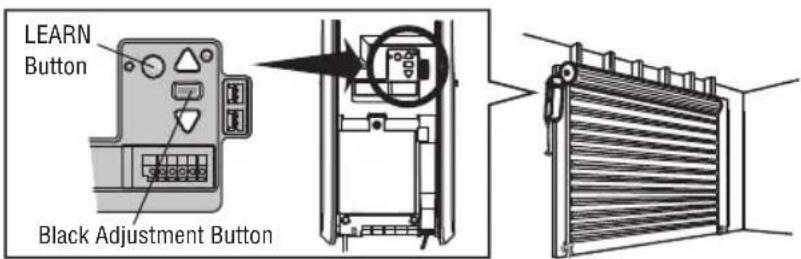
text_image
LEARN Button Black Adjustment ButtonCare of Your Door Operator
MAINTENANCE SCHEDULE
Once a Month
- Manually operate door. If it is unbalanced or binding, call a trained door systems technician.
- Check to be sure door opens and closes fully. Adjust limits if necessary (see Adjustment Step 1).
- Test the Safety Reversal system. Make any necessary adjustments (see Adjustment Step 1).
- The operator does not require additional lubrication. Do not grease the door tracks.
NOTICE: This device complies with Part 15 of the FCC rules and Industry Canada's license-exempt RSSs. Operation is subject to the following two conditions: (1) this device may not cause harmful interference, and (2) this device must accept any interference received, including interference that may cause undesired operation.
Any changes or modifications not expressly approved by the party responsible for compliance could void the user's authority to operate the equipment.
This device must be installed to ensure a minimum 20 cm (8 in.) distance is maintained between users/bystanders and device.
This device has been tested and found to comply with the limits for a Class B digital device, pursuant to part 15 of the FCC rules and Industry Canada ICES standard. These limits are designed to provide reasonable protection against harmful interference in a residential installation. This equipment generates, uses and can radiate radio frequency energy and, if not installed and used in accordance with the instructions, may cause harmful interference to radio communications. However, there is no guarantee that interference will not occur in a particular installation. If this equipment does cause harmful interference to radio or television reception, which can be determined by turning the equipment off and on, the user is encouraged to try to correct the interference by one or more of the following measures:
- Reorient or relocate the receiving antenna.
- Increase the separation between the equipment and receiver.
- Connect the equipment into an outlet on a circuit different from that to which the receiver is connected.
- Consult the dealer or an experienced radio/TV technician for help.
Troubleshooting
Diagnostic Chart
Your door operator is programmed with self-diagnostic capabilities. The UP and DOWN arrows on the door operator flash the diagnostic codes.
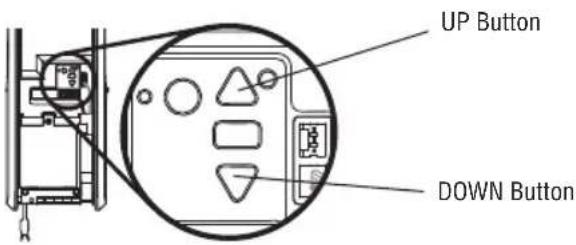
text_image
UP Button DOWN Button| DIAGNOSTIC CODE SYMPTOM SOLUTION | ||
| Up Arrow Flash(es) | Down Arrow Flash(es) | |
| 1 1 The door operator will not close. | Safety reversing sensors are not installed, connected or wires may be cut. Inspect sensor wires for a disconnected or cut wire. | |
| 1 2 The door operator will not close. | There is a short or reversed wire for the safety reversing sensors. Inspect sensor wire at all staple points and connection points and replace wire or correct as needed. | |
| 1 3 The door control will not function. | The wires for the door control are shorted or the door control is faulty. Inspect sensor wire at all staple points and connection points and replace wire or correct as needed. | |
| 1 4 The door operator will not close. | Safety reversing sensors are misaligned or were momentarily obstructed. Realign both sensors to ensure both LEDs are steady and not flickering. Make sure nothing is hanging or mounted on the door that would interrupt the sensors path while closing. | |
| 1 5 Door moves 6-8* | (15-20 cm) stops or reverses. | Manually open and close the door. Check for binding or obstructions, such as a broken spring or door lock, correct as needed. Check wiring connections at travel module and at the logic board. Replace travel module if necessary. |
| No movement, only a single click. | Manually open and close the door. Check for binding or obstructions, such as a broken spring or door lock, correct as needed. Replace logic board if necessary. | |
| Door operator hums for 1-2 seconds no movement. | Manually open and close the door. Check for binding or obstructions, such as a broken spring or door lock, correct as needed. Replace motor if necessary. | |
| 1 6 Door coast after it has come to a complete stop. | Program travel to coasting position or have door balanced by a trained technician. | |
| 2 1-5 No movement or sound. Replace logic board. | ||
| 3 1 The door operator moves slightly, then stops | Activate the operator again. If problem persists, replace logic board. | |
| 3 3 The battery status LED is constantly flashing green. | Battery backup charging circuit error, replace logic board. | |
| 3 5 Door operator will not set travel, close, or door reverses during travel. | Remove the resistor from the green terminal of the operator's logic board and cycle power 3 times leaving the unit unplugged for 10 seconds, re-install resistor to operator. If the error code is still present, replace the resistor or logic board. | |
| 4 1-4 Door is moving stops and or reverses. | Manually open and close the door. Check for binding or obstructions, such as a broken spring or door lock, correct as needed. If the door is binding or sticking contact a trained door systems technician. If door is not binding or sticking attempt to reprogram travel (refer to page <OV>). | |
| 4 5 Door operator runs approximately 6-8" (15-20 cm), stops and reverses. | Communication error to travel module. Check travel module connections, replace module if necessary. | |
| 4 6 The door operator will not close. | Safety reversing sensors are misaligned or were momentarily obstructed. Realign both sensors to ensure both LEDs are steady and not flickering. Make sure nothing is hanging or mounted on the door that would interrupt the sensor's path while closing. | |
| 5 5 Door will not close when using timer-to-close or myQ Smartphone control. | Replace logic board. | |
Additional Troubleshooting
The door operator doesn't operate from the single button control station:
- Does the door operator have power? Plug a lamp into the outlet. If it doesn't light, check the fuse box or the circuit breaker. (Some outlets are controlled by a wall switch.)
- Are the wiring connections correct? Review Installation Step 4.
- Is there a build-up of ice or snow under the door? The door may be frozen to the ground. Remove any restriction.
- The door spring may be broken. Have it replaced.
The door operator operates from the single button control station, but not from a remote control:
- Reprogram the remote control and replace the battery if necessary. Repeat with all remote controls.
The door opens and closes by itself:
- Be sure that all remote control push buttons are off.
- Remove the bell wire from the single button control station terminals and operate from the remote only. If this solves the problem, the single button control station is faulty (replace), or there is an intermittent short in the wire.
- Erase the memory and reprogram all remote controls.
The door doesn't open completely:
- Disable any door locks.
- Is something obstructing the door? Is it out of balance, or are the springs broken? Remove the obstruction or repair the door.
The door opens but won't close:
- The safety reversing sensor must be connected and aligned correctly before the door operator will move in the down direction. If you are able to close the door using constant pressure, verify the safety reversing sensors are properly installed, aligned and free of any obstructions (see page
Repeat the safety reverse test after the adjustment is complete.
The door reverses for no apparent reason:
- Is something obstructing the door? Pull the emergency release handle. Operate the door manually. If it is unbalanced or binding, call a trained door systems technician.
- Clear any ice or snow from the floor area where the door closes.
Repeat safety reverse test after adjustments.
The door operator strains to operate door:
- The door may be out of balance or the springs may be broken. Close the door and use the emergency release handle to disconnect the door. Open and close the door manually. A properly balanced door will stay in any point of travel while being supported entirely by its springs. If it does not, disconnect the door operator and call a trained door systems technician.
The door operator motor hums briefly, then won't work:
• The door springs may be broken. See above.
- If the problem occurs on the first operation of the door operator, door may be locked. Disable any door locks.
The door operator won't operate due to power failure:
- Disable any door locks. Use the emergency release handle to disconnect the door. The door can be opened and closed manually. When power is restored, pull manual release a second time.
- When in Battery Backup mode, battery power will last for 30 hours or up to 20 cycles over a 24 hour period.
Door loses limits:
• Reprogram limits see Adjustment Step 1.
The door operator moves when the door is in operation:
- Minor movement for this operator is normal as long as it is not excessive.
- Check all mounting hardware to the door operator and/or operator mounting brackets. Verify the operator is mounted at a right angle to the door shaft, sprocket and chain are aligned.
The door operator is beeping:
- Indicates unattended closure. The operator has been activated by the myQ App or the Garage and Gate Monitor.
- A solid orange LED with beep, sounding approximately every 2 seconds, indicates the door operator is operating on battery power.
- A flashing orange LED with beep, sounding every 30 seconds, indicates the battery is low.
- A solid red LED with beep, sounding every 30 seconds, indicates the 12V battery will no longer hold a charge and needs to be replaced.
Repair Parts
Installation Parts
text_image
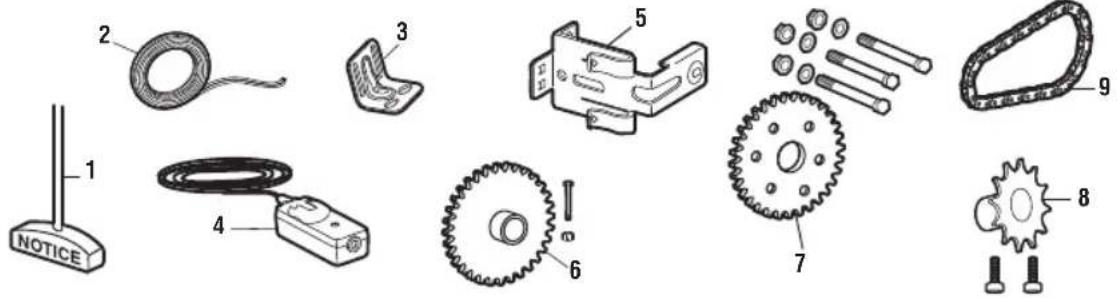
1 2 3 4 5 6 7 8 9 NOTICE| KEYNO. | PART NO. DESCRIPTION KEY | PART NO. DESCRIPTIONNO. |
| 1 041A4582 | Emergency release rope and handle assembly | 5 041A5266-3 Safety reversing sensor brackets (2) |
| 6 041A7279 Live shaft sprocket kit | ||
| 2 041B4494-1 | 2-Conductor bell wire - white and white/red | 7 041A7280 Dead shaft sprocket kit |
| 8 041A7278 Drive sprocket kit | ||
| 3 041B6228 | Mounting brackets (4) | 9 041A7314 Drive chain (#48) |
| 4 041A5034 | Safety Reversing Sensor kit (receiving and sending sensors) with 2-conductor bell wire attached | NOT SHOWN114A5003 Owner's manual |
Door Operator Parts
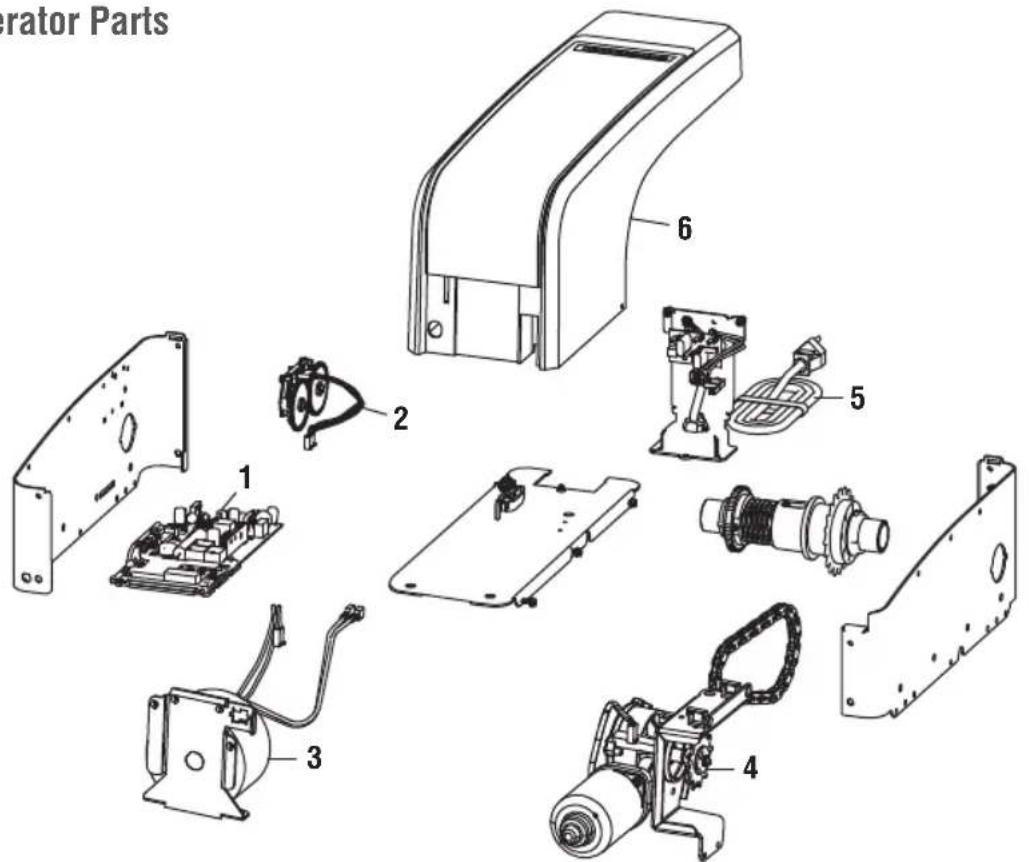
text_image
Operator Parts 1 2 3 4 5 6| KEY PART NO. DESCRIPTION KEYNO. | PART NO. DESCRIPTIONNO. | |||
| 1 | 050DCJCWFRD Logic Board | 5 | 041D0190 Power cord | |
| 2 | 041B8861 Travel Module with Wire Harness | 6 | 041D9042 Cover | |
| 3 | 041C0296 Transformer | NOT SHOWN | ||
| 4 | 041D1624-2 Motor | 041D9044 Battery Cover and Logic Board Cover | ||
Accessories
MAX ACCESSORIES
Compatible with LiftMaster door operators manufactured since 1997.
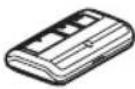
G893MAX
3-Button MAX Remote Control:
Includes visor clip.
myQ ACCESSORIES
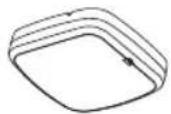
827LM
myQ LED Remote Light:
Wireless light that can program to the door operator or a remote control.
Included Accessories
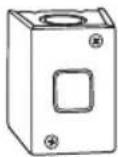
02-101
Single button control station
STANDARD ACCESSORIES
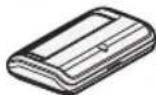
G891LM
Single Button Remote Control:
Includes visor clip.
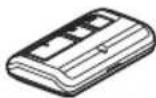
G893LM
3-Button Remote Control:
Includes visor clip.
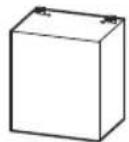
G485LM
Battery Backup:
Provides backup power to the door operator. The battery has enough power for 30 hours of standby power or up to 20 cycles over a 24 hour period.
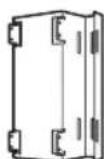
3950MB
Mounting Bracket:
The bracket can be mounted in several different configurations with the motor location outside or inside the door guides.
3950CGJ
Chain Guard with Mounting Clip:
The chain guard is required to comply with UL requirements for applications where the drive chain is exposed lower than 8 ft. (2.5 m).
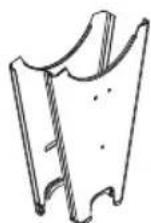
3950-41DS
Dead Shaft Sprocket Kit for #41 Chain
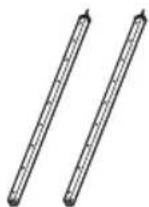
LC36M/LC36M41
Monitored Light Curtain:
Monitored, primary entrapment protection device that forms a 3-foot cross pattern of invisible light beams for maximum personnel and property protection. (See also 100MAPS.)
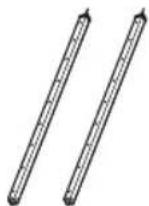
LC-36A
Ancillary Light Curtain:
An entrapment protection device that forms a cross-pattern of invisible light beams for maximum entrapment protection. (See also 100MAPS.)
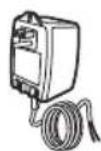
100MAPS
Plug-In Power Supply:
Required for the LC-36A and LC36M/LC36M41 light curtains.
STOP!
This door operator WILL NOT work until the safety reversing sensors are properly installed and aligned.
natural_image
Pure diagram of a mechanical spring system without any text, numbers, or symbolsAddress repair parts order to:
LiftMaster
2850 E. Drexel Rd., Suite #180
Tucson, AZ 85706
For installation and service information call:
1-800-528-9131
Or visit us online at:
LiftMaster.com
Before calling, please have the model number of the door operator. If you are calling about a troubleshooting issue, it is recommended that you have access to your door operator while calling. If you are ordering a repair part please have the following information: part number, part name, and model number.
natural_image
Illustration of a mechanical device with a gear and hanging hook (no text or symbols)LiftMaster®
natural_image
Two interlocking gears with central hub and mounting holes (no text or symbols)Pignons de la porte
natural_image
Line drawing of a portable electronic device with ports and cables (no text or symbols)natural_image
Technical line drawing of a mechanical bracket or bracket (no text or symbols)text_image
Supports de montageINSTRUCTIONS D'INSTALLATION IMPORTANTES


WARNING
natural_image
Technical line drawing of a mechanical assembly with no visible text or symbols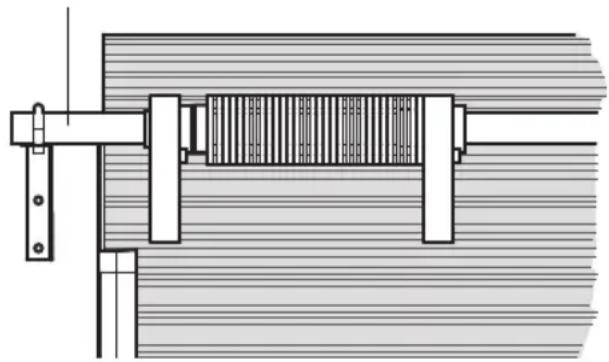
natural_image
Technical line drawing of a mechanical assembly with no visible text or symbolsPORTE À ARBRE MOBILE PORTE À ARBRE FIXE
natural_image
Technical line drawing of a gear with evenly spaced teeth and central bore (no text or symbols)text_image
Supports de montageMONTAGE STANDARD AVEC SUPPORTS FOURNIS
natural_image
Technical line drawing of a mechanical component with curved and straight sections (no text or symbols)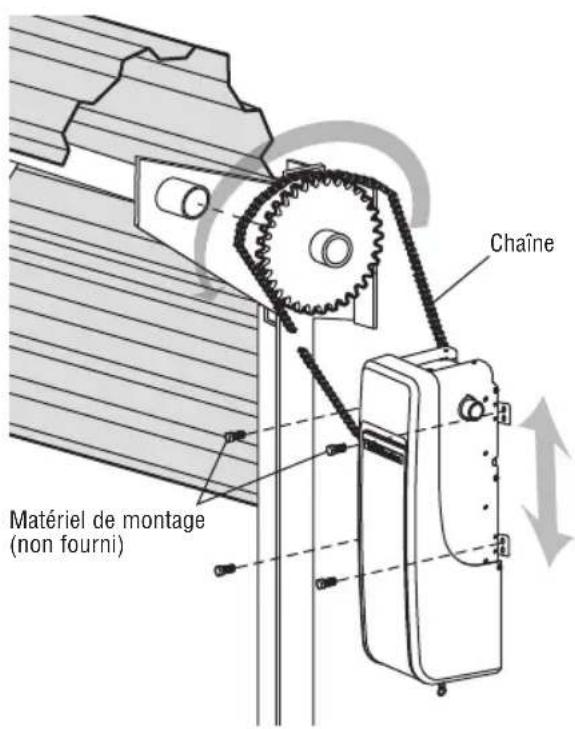
text_image
WARNING Moving Door Can Cause Serious Injury or Death Keep Clean: Drop Now More of any Time Unsure: Push Breathing On Our End Of Consider: Causes the Poison or Play on the Door Area Keep Door to Fight at or Touch Active Door Is Moving! AVERTISSEMENT
natural_image
Technical diagram of a mechanical or electrical component with no visible text, numbers, or symbols.5 Installer le Protector System
text_image
Diagram illustrating three electrical installation methods: plug-in, fuse, and color-coded panel with white/grey labels.natural_image
Pure electrical circuit lines without any symbolsnatural_image
Technical line drawing of a window frame with horizontal slats and a small bracket at the base (no text or symbols)1-1/2" (3.8 cm) board (or a 2x4 laid flat)
4 Tester le Protector System
natural_image
Simple line drawing of a mechanical assembly with a box and spring, no text or symbols present.natural_image
Pure diagram of a mechanical spring system without any text, numbers, or symbols2850 E. Drexel Rd., Suite #180
Tucson, AZ 85706