888LM - Remote trigger LIFT-MASTER - Free user manual and instructions
Find the device manual for free 888LM LIFT-MASTER in PDF.


User questions about 888LM LIFT-MASTER
0 question about this device. Answer the ones you know or ask your own.
Ask a new question about this device
Download the instructions for your Remote trigger in PDF format for free! Find your manual 888LM - LIFT-MASTER and take your electronic device back in hand. On this page are published all the documents necessary for the use of your device. 888LM by LIFT-MASTER.
USER MANUAL 888LM LIFT-MASTER
The MyQ® Control Panel is intended to be installed with Security+™ Garage Door Openers manufactured between 1998 and present. The MyQ® Control Panel is NOT compatible with Security+ 2.0™ Garage Door Openers. DO NOT install this door control on garage door opener systems controlling one-piece or swing doors.
OVERVIEW
The MyQ® Control Panel offers a quick and convenient way to add Security+ 2.0™ and MyQ® technology to your existing garage door opener. MyQ® technology uses a 900MHz signal to provide two-way communication between the garage door opener and MyQ® enabled accessories. When programmed to the Liftmaster® Internet Gateway you can monitor and control your garage door from any internet enabled computer or smartphone. You may program up to 12 Security+ 2.0™ remote controls, 2 Security+ 2.0™ keyless entries and a combination of 16 MyQ® accessories to the MyQ® control panel.
COMPATIBLE ACCESSORIES
| Security+ 2.0TM Accessories: MyQ | ® Accessories: |
| Model 891LM1- Button Remote Control | Model 823LMRemote Light Switch |
| Model 893LM3-Button Remote Control | Model 825LMRemote Light Control |
| Model 890MAX3-Button Mini MAX Remote Control | Model 828LMLiftMaster® Internet Gateway |
| Model 893MAX3-Button MAX Remote Control | Model 829LMGarage Door and Gate Monitor |
| Model 895MAX3-Button Premium MAX Remote Control | |
| Model 877LMWireless Keyless Entry | |
| Model 877MAXWireless MAX Keyless Entry |
INSTALLATION
Install the MyQ ^® Control Panel in place of the existing door control. Due to power consumption the MyQ ^® Control Panel cannot be used in conjunction with another wired door control connected to your garage door opener. If an additional door control is needed, the wireless door control model 885LM can be programmed to the MyQ ^® Control Panel. To program the 885LM to the MyQ ^® Control Panel, follow the remote control programming steps. When in battery back-up mode, any feature using unattended operation such as Timer-to-Close, closure from a garage door and gate monitor or remote operation utilizing the LiftMaster ^® Internet Gateway will be disabled.
- Disconnect all electrical and battery power (if applicable) to the garage door opener.
- Remove the existing door control from the wall.
-
Note the polarity of the wires connected to the existing door control.
-
Label the wire connected to the RED terminal.
- Label the wire connected to the WHITE terminal.
Disconnect the wires from the existing door control.
WARNING
To prevent possible SERIOUS INJURY or DEATH from electrocution:
- Be sure power is NOT connected BEFORE installing door control.
- Connect ONLY to 7-28 VOLT low voltage wires.
To prevent possible SERIOUS INJURY or DEATH from a closing garage door:
- Install door control within sight of garage door, out of reach of children at a minimum height of 5 feet (1.5 m), and away from ALL moving parts of door.
- NEVER permit children to operate or play with door control push buttons or remote control transmitters.
- Activate door ONLY when it can be seen clearly, is properly adjusted, and there are no obstructions to door travel.
- ALWAYS keep garage door in sight until completely closed. NEVER permit anyone to cross path of closing garage door.
- DO NOT install this door control on garage door opener systems controlling one-piece or swing doors.
To provide an adequate visual alert, the garage door opener light bulb(s) MUST be a minimum of 40 Watt (or equivalent).

WARNING: This product can expose you to chemicals including lead, which are known to the State of California to cause cancer or birth defects or other reproductive harm. For more information go to www.P65Warnings.ca.gov
-
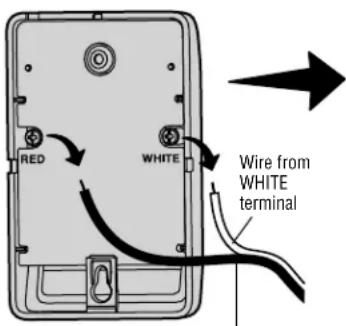
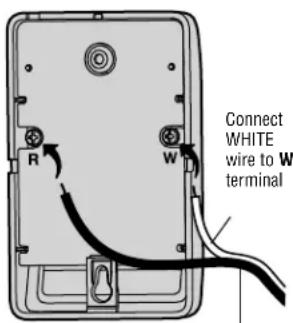
Connect the wires to the new MyQ ^ Control Panel. Make sure the polarity is correct.
-
Red wire to the R terminal.
-
White wire to the W terminal.
-
Mount the MyQ ^® Control Panel to the wall.
- Reconnect power. The yellow command LED and the red learn LED will blink quickly for up to 5 minutes as the control panel recharges. When the control panel is operational, the yellow command LED will glow steadily.
- To test the control panel, press the push bar to activate the garage door opener.
Existing Door Control
text_image
RED WHITE Wire from WHITE terminalWire from RED terminal
MyQ® Control Panel
text_image
R W Connect WHITE wire to W terminalConnect RED wire to R terminal
Discard, donate or recycle
REMOTE CONTROL
text_image
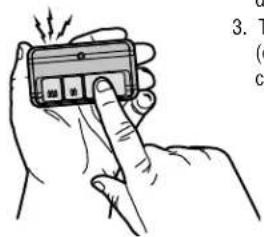
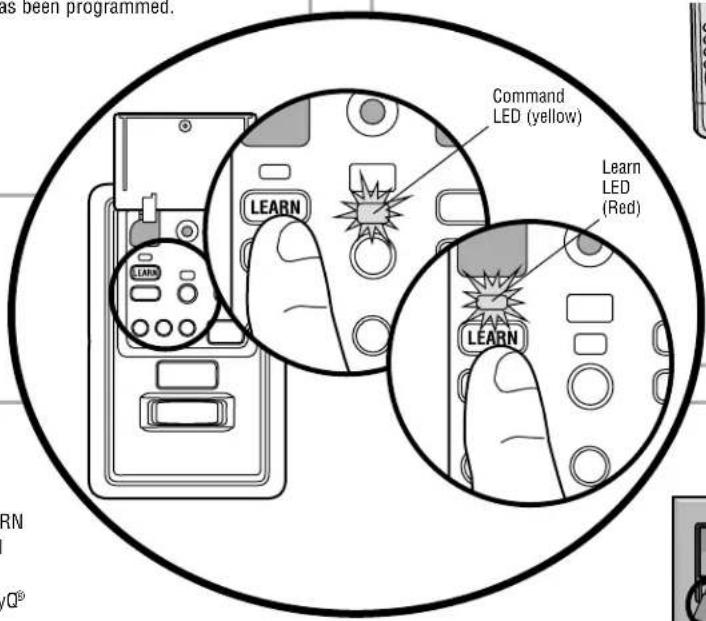
3. T ( c ) c )- Press the MyQ® Control Panel LEARN button twice, the red learn LED will turn on.
- Press the button on the remote control that you wish to operate your garage door.
- The garage door opener lights will flash (or two clicks will be heard) when the code has been programmed.
KEYLESS ENTRY
- Press the MyQ ^® Control Panel LEARN button twice, the red learn LED will turn on.
- Enter a 4-digit personal identification number (PIN) of your choice on the keyless entry keypad. Then press the ENTER button.
- The garage door opener lights will flash (or two clicks will be heard) when the code has been programmed.
text_image
as been programmed. Command LED (yellow) Learn LED (Red) LEARN LEARN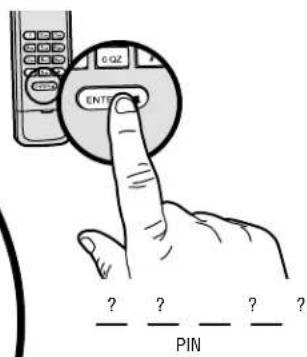
text_image
GQZ ENTP ? ? ? ? — PINMyQ® ENABLED ACCESSORIES
- Press the MyQ Control Panel LEARN button twice, the red learn LED will turn on.
- Press the LEARN button on the MyQ® device.*
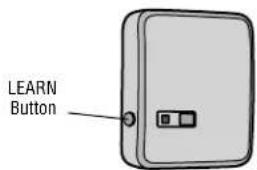
text_image
LEARN ButtonModel 825LM - Remote Light Control
Light module can be synchronized with the garage door opener light bulbs.
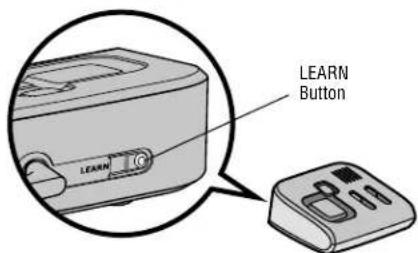
text_image
LEARN ButtonModel 829LM - Garage Door and Gate Monitor
Indicates the status of your garage door from inside the home and allows you to close an open garage door from inside the house.
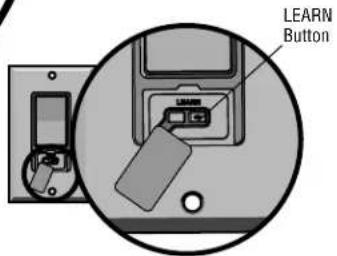
text_image
LEARN ButtonModel 823LM - Remote Light Switch
Light module can be synchronized with the garage door opener light bulbs.
*MyQ® accessories may be programmed to the LiftMaster® Internet Gateway (Model 828LM) or the MyQ® control panel. For instructions on programming to the internet gateway refer to the manual.
INTERNET GATEWAY
The LiftMaster® Internet Gateway gives you control of your garage door from your internet connected computer or mobile device. You must have your internet gateway registered to your customer account at myliftmaster.com in order to use it with the MyQ® Control Panel. Go to myliftmaster.com and follow the instructions to create an account and register your device if you have not already.
To program your control panel to the LiftMaster® Internet Gateway:
- Go to myliftmaster.com from a computer or mobile device.
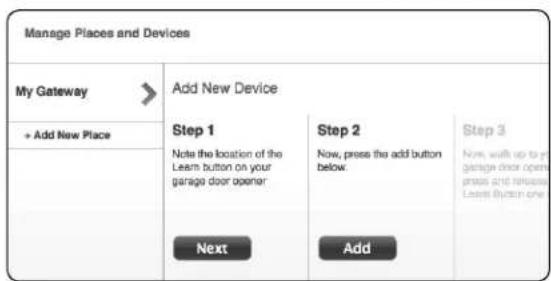
- Click on "Manage Places>Add New Device>Garage Door Opener" and follow the directions.
- Once you click ADD you have 3 minutes to press the LEARN button two times on the MyQ ^® control panel. The red learn LED will turn on.
- The red learn LED will turn off when programming is complete. Once the control panel is learned, it will appear on your screen. You can then name the device (e.g., My Control Panel, etc.).
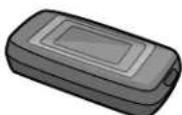
Model 828LM
LiftMaster® Internet Gateway
myliftmaster.com
text_image
Manage Places and Devices My Gateway + Add New Place Add New Device Step 1 Note the location of the Leam button on your garage door opener Next Step 2 Now, press the add button below. Add Step 3 Now, walk up to in garage door open press and release Leam button one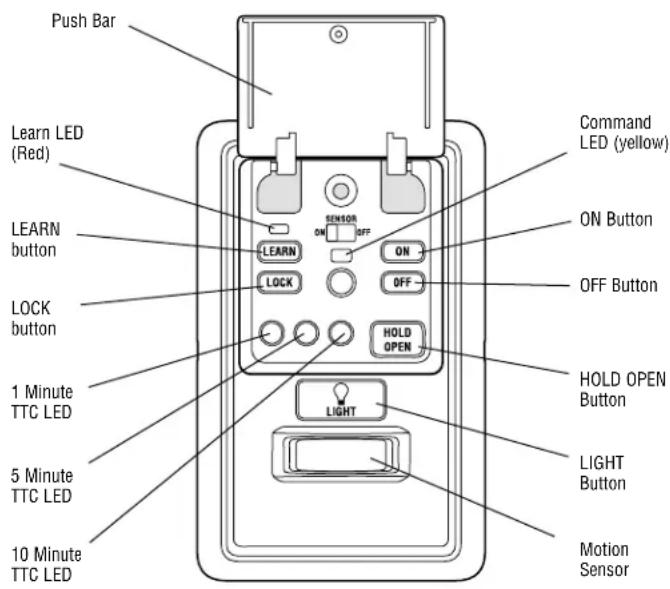
text_image
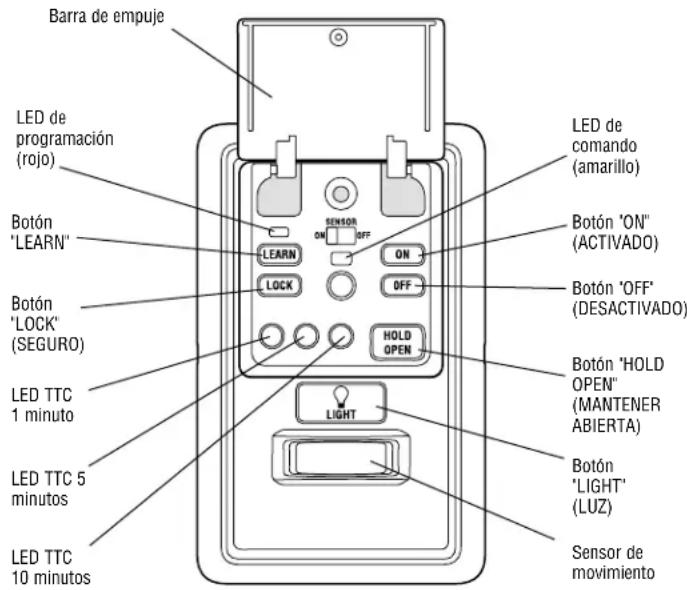
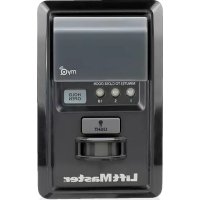
Push Bar Learn LED (Red) LEARN button LOCK button 1 Minute TTC LED 5 Minute TTC LED 10 Minute TTC LED SENSOR ON OFF ON OFF HOLD OPEN LIGHT Command LED (yellow) ON Button OFF Button HOLD OPEN Button LIGHT Button Motion SensorPUSH BAR
Press the push bar to open/close the door.
LIGHTS
Press the LIGHT button to turn the garage door opener lights on or off. When the lights are turned on they will stay on until the LIGHT button is pressed again, or until the garage door opener is activated. Once the garage door opener is activated the lights will turn off after the specified period of time (the factory setting is 4-1/2 minutes). The LIGHT button will not control the lights when the door is in motion.
To change the amount of time the garage door opener lights will stay on: Press and hold the LOCK button until the garage door opener lights flash. The time interval is indicated by the number of flashes.
| NUMBER OF TIMES GARAGEDOOR OPENER LIGHTS FLASH | 1 | 2 | 3 | 4 |
| TIME THE GARAGE DOOROPENER LIGHT STAYS ON | 1 12 Minutes | 2 12 Minutes | 3 12 Minutes | 4 12 Minutes |
Light Feature
The lights will turn on when someone enters through the open garage door and the safety reversing sensor infrared beam is broken.
Activate:
Start with the garage door opener lights on. Press and hold the LIGHT button until the garage door opener lights turn off, then on again.*
Deactivate:
Press and hold the LIGHT button until the garage door opener lights turn on, then off again.*
* Approximately 10 seconds
MOTION SENSOR
This feature will automatically turn on the garage door opener lights when motion is sensed. The lights will come on for the set period of time, then shut off.
Activate/Deactivate:
Slide the motion sensor switch ON or OFF.
TIMER-TO-CLOSE (TTC)
NOTE: DO NOT install this door control on garage door opener systems controlling one-piece or swing doors.
The TTC feature automatically closes the door after a specified time period (1, 5, or 10 minutes). Once the TTC has been set and the door is open, the LED for the selected close interval will blink and begin to count down to close the door. The control panel will beep and the garage door opener lights will flash before closing the door.
The TTC feature will deactivate if the garage door encounters an obstruction twice; or the safety reversing sensors are incorrectly installed. The garage door will reverse open and WILL NOT close until the obstructions are clear or the safety reversing sensors are correctly installed. When the obstruction has been cleared or the safety reversing sensors have been aligned, the door will close when the garage door opener is activated.
Activate:
Press and hold the ON button until one of the TTC LEDs light up. Then press the ON button again to cycle through the time interval options (the corresponding TTC LED will light for each time interval). The garage door opener light bulbs will blink as confirmation.
Deactivate:
Press and hold the OFF button until all TTC LEDs turn off and a beep is heard from the control panel.
Temporarily hold door open (suspend TTC):
Press and release the HOLD OPEN button. The HOLD OPEN button will begin to flash. Press the HOLD OPEN button again to resume normal TTC operation.
LOCK
Activate\*:
Press and hold the LOCK button for 2 seconds. The command LED will flash as long as the lock feature is activated and your handheld remote control will not operate your door at this time.
Deactivate:
Press and hold the LOCK button again for 2 seconds. The command LED will stop flashing and normal operation will resume.
* Your LiftMaster® keypad will continue to work when the LOCK has been activated.
ERASE DEVICES FROM MEMORY
Erase all remote controls and keyless entries:
- Press and hold the LEARN button on the control panel until the red learn LED goes out (approximately 6 seconds). All remote control and keyless entry codes are now erased. Reprogram any compatible accessory you wish to use.
NOTE: Erasing remote controls and keyless entries from the control panel does not erase them from the garage door opener, you need to erase the memory of the garage door opener separately.
Erase all devices (including MyQ® enabled accessories):
-
Press and hold the LEARN button on the control panel until the red learn LED goes out (approximately 6 seconds).
-
Immediately press and hold the LEARN button again until the red learn LED goes out. All codes are now erased. Reprogram any compatible accessory you wish to use.
TROUBLESHOOTING
- If the yellow command LED does not turn on, reverse the wires connected to the R and W terminals of the control panel. Replace wire if necessary.
- If yellow and red LEDs are blinking slowly, the control panel is not compatible with your garage door opener.
- If the yellow and red LEDs are blinking quickly, the control panel is charging, and may take up to 5 minutes to become operational.
WARRANTY
ONE YEAR LIMITED WARRANTY
LiftMaster warrants to the first consumer purchaser of this product that is free from defect in materials and/or workmanship for a period of 1 year from the date of purchase.
FOR SERVICE DIAL OUR TOLL FREE NUMBER:
1-800-528-9131
LiftMaster.com
NOTICE: To comply with FCC and/or Industry Canada (IC) rules, adjustment or modifications of this transceiver are prohibited. THERE ARE NO USER SERVICEABLE PARTS. Any changes or modifications not expressly approved by the party responsible for compliance could void the user's authority to operate the equipment. This device complies with Part 15 of the FCC rules and IC RSS-210. Operation is subject to the following two conditions: (1) this device may not cause harmful interference, and (2) this device must accept any interference received, Including interference that may cause undesired operation. This Class B digital apparatus complies with Canadian ICES-003.
text_image
Hand-drawn illustration showing a hand holding a device with visible control buttons and a pointer, accompanied by partial text fragments.natural_image
Diagram showing a device with a USB flash drive and a separate monitor, enclosed in a circle (no text or symbols)text_image
Manage Places and Devices My Gateway + Add New Place Add New Device Step 1 Note the location of the Leam button on your garage door opener Next Step 2 Now, press the add button below. Add Step 3 Now, walk up to in garage door open press and release Leam button one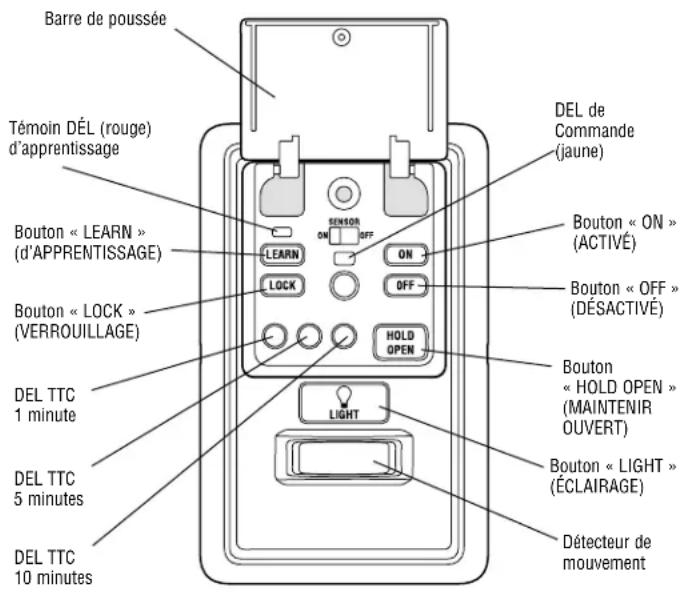
Activer/Désactiver :
GARANTIE LIMITÉE D'UN AN
text_image
Manage Places and Devices My Gateway + Add New Place Add New Device Step 1 Note the location of the Leam button on your garage door opener Next Step 2 Now, press the add button below. Add Step 3 Now, walk up to in garage door open press and release Leam button one