Zi200 - Earphones SAMSON - Free user manual and instructions
Find the device manual for free Zi200 SAMSON in PDF.



| Product Type | Professional Reference Earphones |
| Brand | Samson |
| Model | Zi200 |
| Transducer | Dual micro balanced armature (woofer + tweeter) with passive crossover and acoustic filter |
| Frequency Response | 20 Hz – 20 kHz |
| Impedance | 39 Ω ±15% |
| Sensitivity | 105 dB/W at 1 kHz |
| Noise Isolation | 15–18 dB (silicon tips), 20 dB (Comply tips) |
| Cable Length | 3.75 ft (1.14 m) braided wire |
| Connector | Right angle 1/8" (3.5 mm) gold-plated stereo mini jack |
| Included Ear Tips | 3 pairs silicon (S, M, L), 2 pairs Comply T-100 foam (S, M) |
| Additional Accessories | 1/4" adapter, hard zippered carry case |
| Weight | 0.05 lb (22.6 g) |
| Ear Hook Material | Memory wire (moldable for custom fit) |
| Housing Finish | Sleek black |
| Application | Onstage monitoring, personal listening, studio |
| Safety Features | Hearing protection guidelines (OSHA), ear tip attachment check |
| Cleaning | Wash outside with mild detergent; do not immerse |
| Warranty | Contact Samson Technologies |
Frequently Asked Questions - Zi200 SAMSON
User questions about Zi200 SAMSON
0 question about this device. Answer the ones you know or ask your own.
Ask a new question about this device
Download the instructions for your Earphones in PDF format for free! Find your manual Zi200 - SAMSON and take your electronic device back in hand. On this page are published all the documents necessary for the use of your device. Zi200 by SAMSON.
USER MANUAL Zi200 SAMSON
natural_image
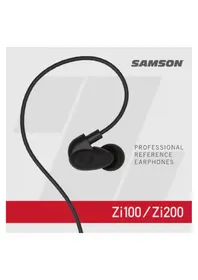
Close-up of a black HiC200 audio ear with a curved black cord, displayed against a white background with red and white horizontal bands (no text or symbols on the ear itself)SAMSON
PROFESSIONAL
REFERENCE
EARPHONES
Zi100 / Zi200
If you want to dispose this product, do not mix it with general household waste. There is a separate collection system for used electronic products in accordance with legislation that requires proper treatment, recovery and recycling.
Private household in the 28 member states of the EU, in Switzerland and Norway may return their used electronic products free of charge to designated collection
facilities or to a retailer (if you purchase a similar new one).
For Countries not mentioned above, please contact your local authorities for a correct method of disposal.
By doing so you will ensure that your disposed product undergoes the necessary treatment, recovery and recycling and thus prevent potential negative effects on the environment and human health.
Copyright 2019, V2
Samson Technologies Corp.
278-B Duffy Ave
Hicksville, New York 11801
www.samsontech.com
Other trademarks and trade names are those of their respective owners.
IMPORTANT SAFETY INSTRUCTIONS

WARNING!
This product is capable of causing permanent damage to your hearing if used at excessive volumes!
To protect your hearing, the Samson SR550 headphones should always be used at as low a volume as possible. We recommend that you stringently follow the guidelines established by the U.S. Occupational Safety Health Administration (OSHA) regarding maximum time exposure at various sound pressure levels:
- Don't use this product for more than 8 hours at 90 dB SPL
- Don't use this product for more than 4 hours at 95 dB SPL
- Don't use this product for more than 2 hours at 100 dB SPL
- Don't use this product for more than 1 hour at 105 dB SPL
- Don't use this product for more than 1/2 hour at 110 dB SPL
- Don't use this product for more than 15 minutes at 115 dB SPL
- Don't operate at listening levels of greater than 120 dB SPL!
Pay attention to what your ears are telling you! Ringing is a sign that you have set the gain levels too high and that damage may result. We recommend that you consult with a qualified audiologist if you exhibit ringing or any other symptoms.
IMPORTANT SAFETY INSTRUCTIONS
- Read, follow, and keep these instructions. Heed all warnings.
- Do not use in or near dangerous environments. This includes driving, cycling, walking, jogging and other areas where traffic is present and accidents could occur.
- Keep this product and its accessories out of reach of children. Handling or use by children may pose a risk of death or serious injury. Contains small parts and cords that may pose a risk of choking or strangulation.
- Set the volume level of the audio device to a minimum, and then, after connecting the earphones, adjust the volume gradually. Sudden exposure to loud noises could cause hearing damage.
- Install the earbuds firmly. If an ear tip accidentally detaches and is left in your ear, it may cause injury.
- Failure to use, clean, or maintain ear tips may increase the risk of the ear tips detaching from the nozzle and becoming lodged in your ear.
- Prior to inserting the earphone, always recheck the ear tip to make sure it is firmly attached to the nozzle.
- If an ear tip becomes lodged in your ear, seek skilled medical assistance to remove it. Damage to the ear may be caused by non-professionals attempting to remove the ear tip.
- Keep earbuds clean. To clean the earbuds, wash outside with a mild detergent solution.
- Do not attempt to modify this product. Doing so could result in personal injury and/or product failure.
- Do not immerse in water, such as while taking a shower, bath, or washing your face. Otherwise, sound deterioration or failures may result.
- Do not use while sleeping as accidents may result.
- Use a slow twisting motion to remove the earphones. Never pull on the earphone cord.
- Stop using the earphones immediately if they are causing great discomfort, irritation, rash, discharge, or any other uncomfortable reaction.
- If you are currently receiving ear treatment, consult your physician before using this device.
Introduction

Congratulations on purchasing your new Samson Zi Professional Reference Earphones! The Samson Zi100 and Zi200 Professional Reference Earphones with micro balanced armature drivers are superior upgrades to conventional in-ear monitors for onstage performance and personal listening. Both the Zi100 and Zi200 deliver detailed, full-range sound via a contoured design that provides maximum sound isolation and a comfortable fit, all for a truly high-performance audio experience. The lightweight Zi100 and Zi200 earbuds feature a sleek black finish, and contour to your ears with moldable ear hooks constructed of memory wire for a secure, customized fit. In addition, each set includes two pairs of Comply™ Premium Foam Tips and three pairs of silicon tips to provide exceptional sound isolation, as well in-ear fit options. A 1/4" adapter and hard, zippered carry case are also included.
Serial number: ____
Date of purchase: ____
If you have any questions or comments regarding the Zi Professional Reference Earphones or any other products from Samson, do not hesitate to contact us at
support@samsontech.com.
With proper care and maintenance, your Zi Professional Reference Earphones will operate trouble-free for many years. Should your Zi Professional Reference Earphones ever require servicing, a Return Authorization (RA) number must be obtained before shipping your unit to Samson. Without this number, the unit will not be accepted. Please visit
www.samsontech.com/ra for an RA number prior to shipping your unit. Please retain the original packing materials and, if possible, return the unit in its original carton. If your Zi Professional Reference Earphones was purchased outside of the United States, contact your local distributor.
Wearing the earphones
natural_image
Illustration of a hand inserting a small ear into a device (no text or symbols visible)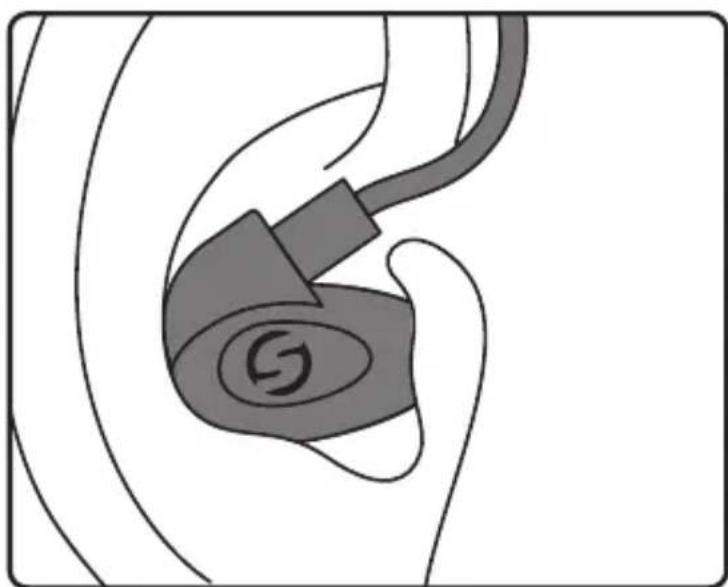
natural_image
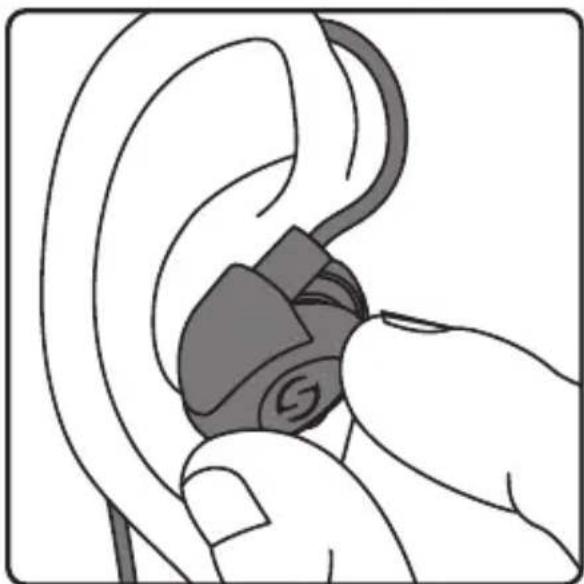
Diagram of an ear with a stylized S logo on the ear (no text or symbols present)Before inserting the earphones, turn down the volume on your audio device.
Each earphone is marked with an L or R on the inside of the earphone. Take note of the correct side before inserting into your ear.
If using the Comply™ foam tips, compress the foam before inserting into your ear.
With the cable towards the front of your ear, insert the earphone into your ear canal.
Wearing the earphones

natural_image
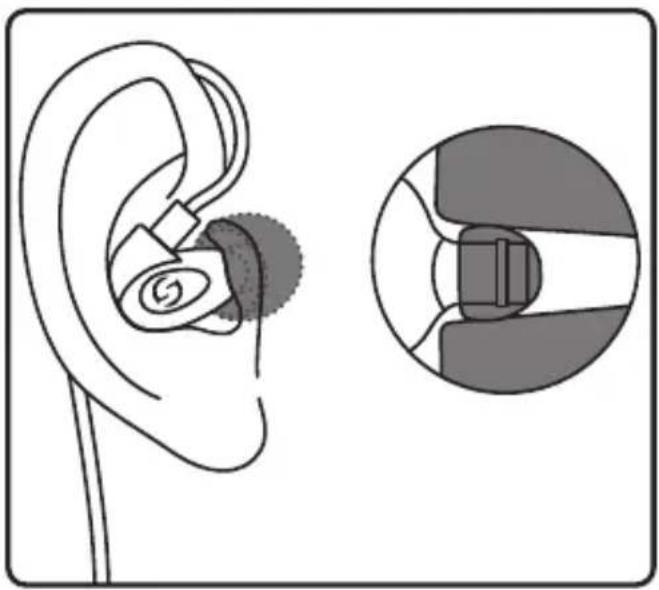
Diagram of an ear with a medical device and its corresponding cross-sectional view (no text or labels)For optimal bass performance, the ear tip should form a tight seal in the ear canal. If you feel the bass response is low, gently press the earphone into the ear or try a different sized ear tip.
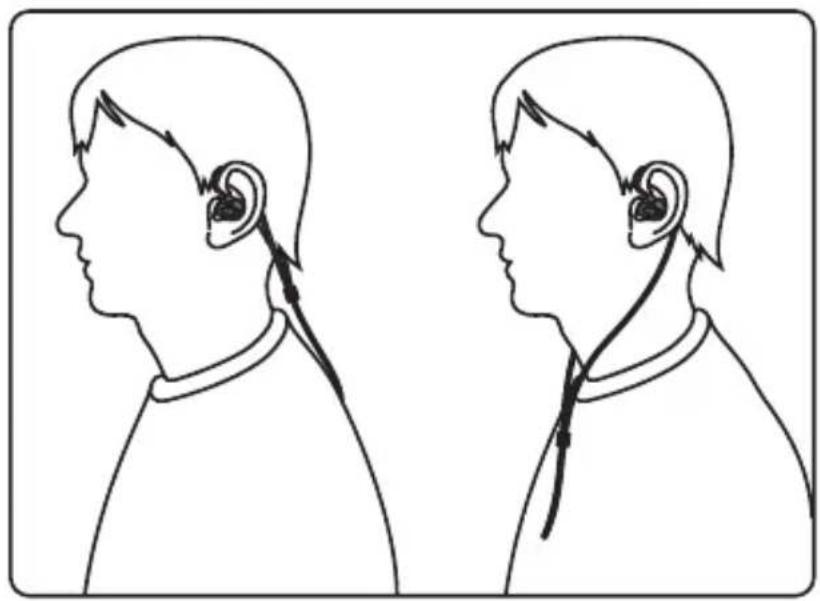
The cable for the Zi Earphones can be worn either in front of your body or along your back. For live or active performers it is recommended to wear the earphones behind your head, along your back.
natural_image
Side-by-side line drawings of a person's head in profile view, showing ear and ear signals (no text or symbols)Removing the Earphones
natural_image
Illustration of a hand holding a device with a curved arrow indicating rotation (no text or symbols present)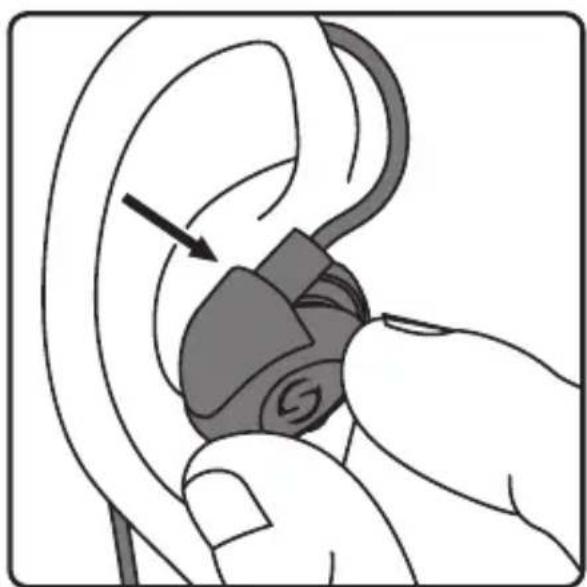
natural_image
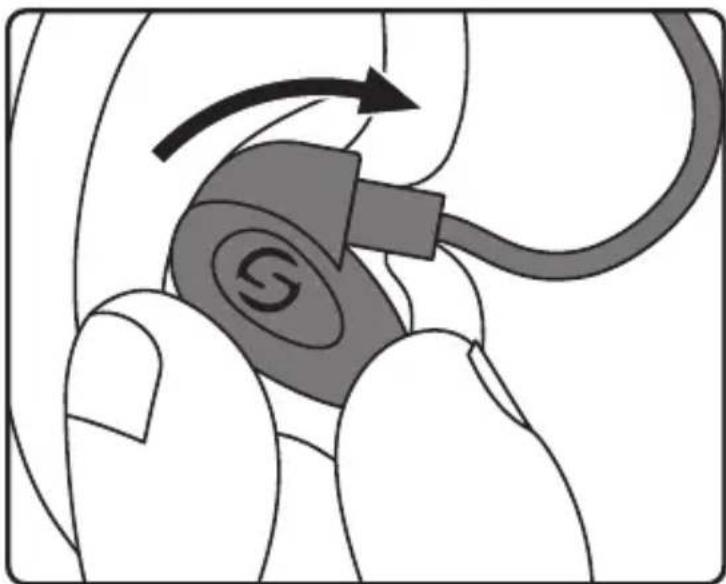
Illustration of a hand inserting a small electronic device into an ear (no text or symbols)To remove the Zi earphones, firmly grip the earphones and twist forward while pulling the earphone out of your ear.
Do not use the cable to remove the earphones from your ears. This may damage the cable and result in poor performance.
Attaching the ear tip

natural_image
Illustration of a hand inserting a medical device into an ear (no text or symbols present)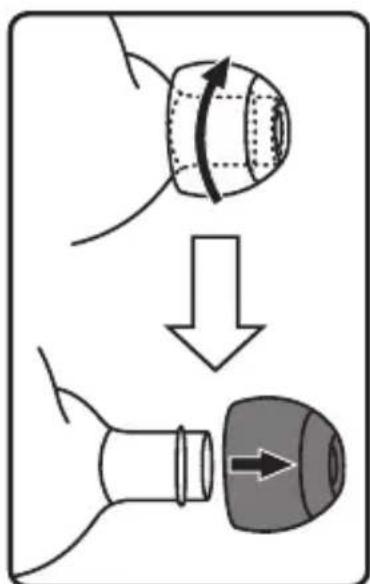
fig 1 fig 2
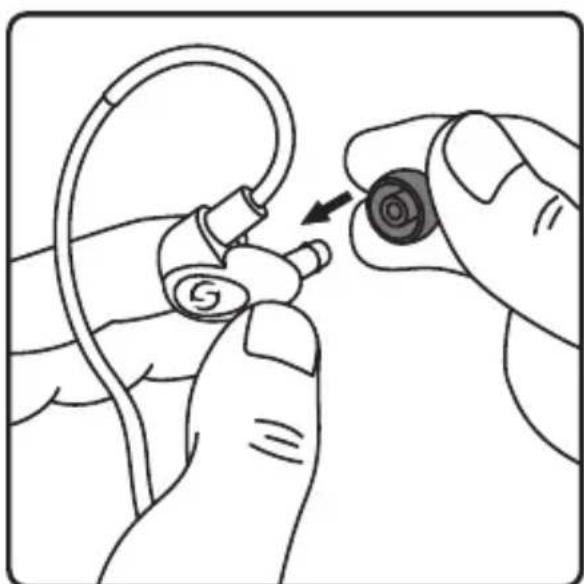
The Zi Earphones comes with 3 silicon ear tips (small, medium and large) and 2 Comply™ Isolation T-100 Premium Earphone Tips (small, medium).
Select the appropriate sized silicon or Comply™ fom tips.
Carefully slide one ear tip onto each ear bud ensuring the ear tip is securely seated on the earphone (fig 1).
If using the Comply™ Isolation T-100 Premium Earphone Tips, it is recommended to compress the tips before attaching to the earphone.
If you feel some resistance, rotate the ear tip as you install it.
To remove the ear tip, rotate a pull the tip from the earphone (fig 2).
Specifications
Zi100
Sensitivity 107dB/W at 1kHz
Transducer Single micro balanced armature w/ acoustic filter
Frequency Response 20Hz–20kHz
Impedance 46Ω ±15%
Isolation Level 15–18dB (with silicon tips),
20dB (with Comply™ tips)
Cable 3.75' braided wire cable w/ gold-plated,
Input Connector Right angle 1/8" (3.5mm) connector
Accessories2xComply™ Isolation T-100 Premium Earphone
Tips,
3x silicon tip pairs, 1/4" adapter, carry case
Weight 0.05lb / 22.6g
Specifications
Zi200
Sensitivity 105dB/W at 1kHz
Transducer Dual micro balanced armature (woofer + tweeter)
w/passive crossover and acoustic filter
Frequency Response 20Hz–20kHz
Impedance 39Ω ±15%
Isolation Level 15–18dB (with silicon tips),
20dB (with Comply™ tips)
Cable 3.75' braided wire cable w/ gold-plated,
Input Connector Right angle 1/8" (3.5mm) connector
Accessories2xComply™ Isolation T-100 Premium Earphone
Tips,
3x silicon tip pairs, 1/4" adapter, carry case
Weight 0.05lb / 22.6g
natural_image
Illustration of ear ear components being held, showing a hand adjusting the ear with a S5 logo (no text or symbols present)natural_image
Diagram of an ear with a device and magnified view of the ear structure (no text or labels)natural_image
Side-by-side line drawings of a person's head in profile view, showing ear and ear signals (no text or symbols)natural_image
Illustration of a hand holding a device with a curved arrow indicating rotation (no text or symbols present)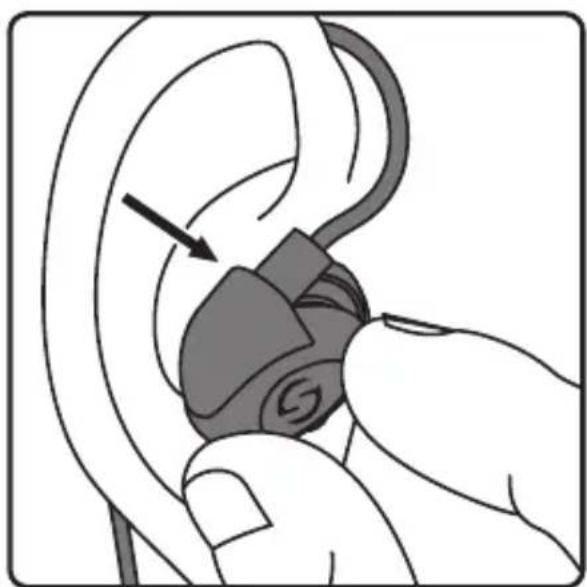
natural_image
Illustration of a hand inserting a small electronic device into an ear (no text or symbols)natural_image
Illustration of a hand inserting a medical device into an ear (no text or symbols present)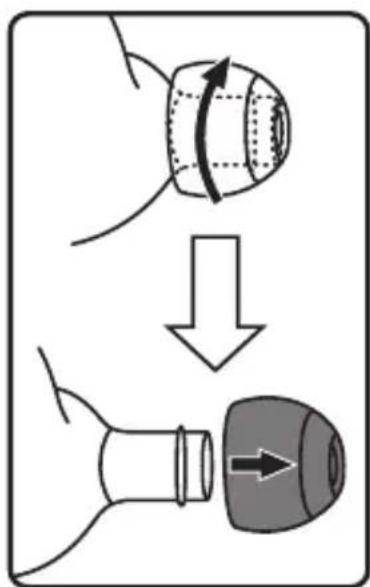
fig 1 fig 2
natural_image
Illustration of a hand inserting a small ear into a device (no text or symbols visible)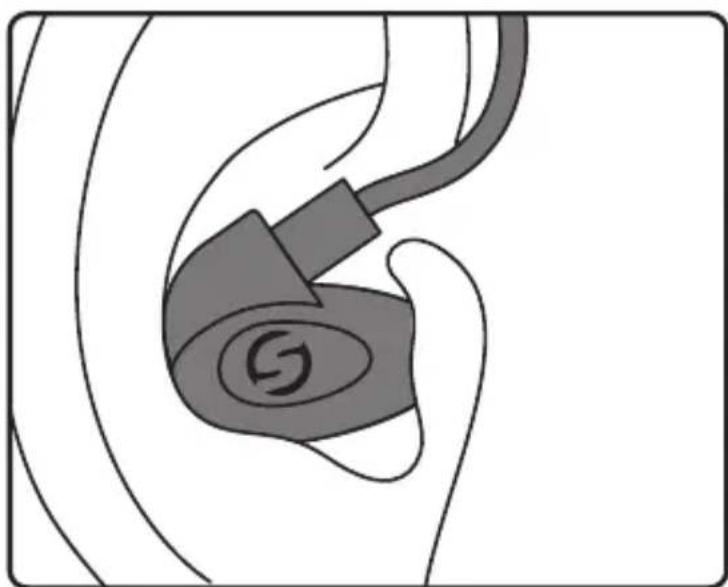
natural_image
Diagram of an ear with a stylized S logo on the ear (no text or symbols present)natural_image
Diagram of an ear with a device and its magnified view showing internal components (no text or labels)natural_image
Side-by-side line drawings of a person's head profile showing ear and ear anatomy (no text or symbols)natural_image
Illustration of a hand holding a device with a curved arrow indicating rotation (no text or symbols present)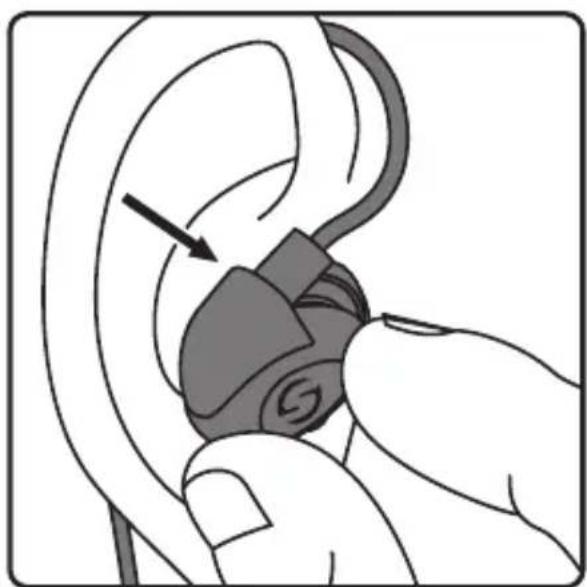
natural_image
Illustration of a hand inserting a small electronic device into an ear (no text or symbols)natural_image
Illustration of a hand inserting a medical device into an ear (no text or symbols present)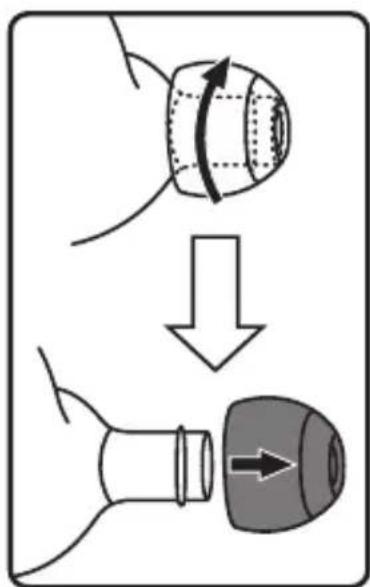
Abb. 1 Abb. 2
natural_image
Illustration of a hand inserting a small ear into a device (no text or symbols visible)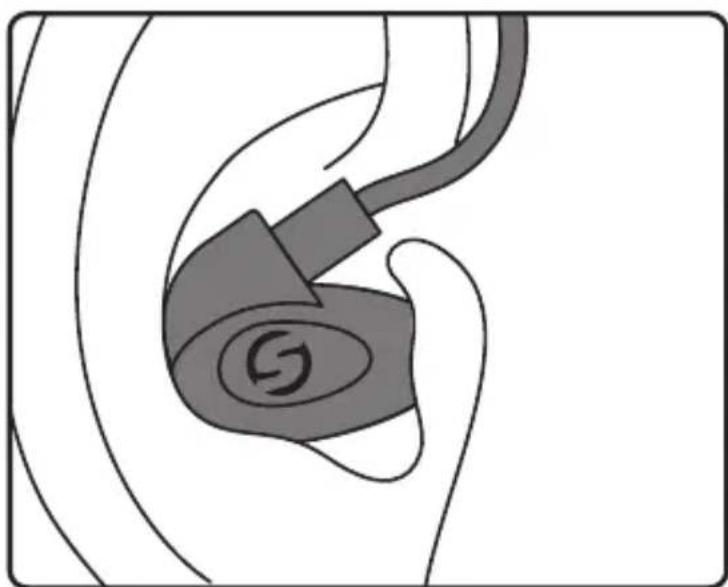
natural_image
Diagram of an ear with a stylized S logo on the ear, showing no text or symbolsnatural_image
Diagram of an ear with a device and magnified view of the ear structure (no text or labels)natural_image
Side-by-side line drawings of a person's head profile showing ear and ear anatomy (no text or symbols)natural_image
Illustration of a hand holding a device with a curved arrow indicating rotation (no text or symbols)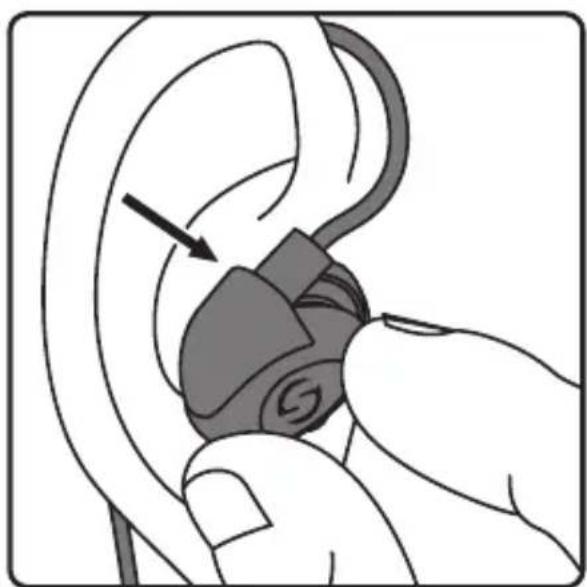
natural_image
Illustration of a hand inserting a small electronic device into an ear (no text or symbols)natural_image
Illustration of a hand inserting a medical device into an ear (no text or symbols present)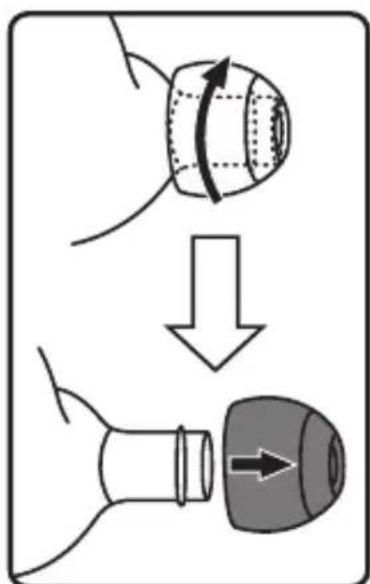
Figura 1 Figura 2
natural_image
Diagram of an ear with a device and its magnified view showing internal components (no text or labels)natural_image
Side-by-side line drawings of a person's head profile showing ear and ear anatomy (no text or symbols)natural_image
Illustration of a hand holding a device with a curved arrow indicating rotation (no text or symbols)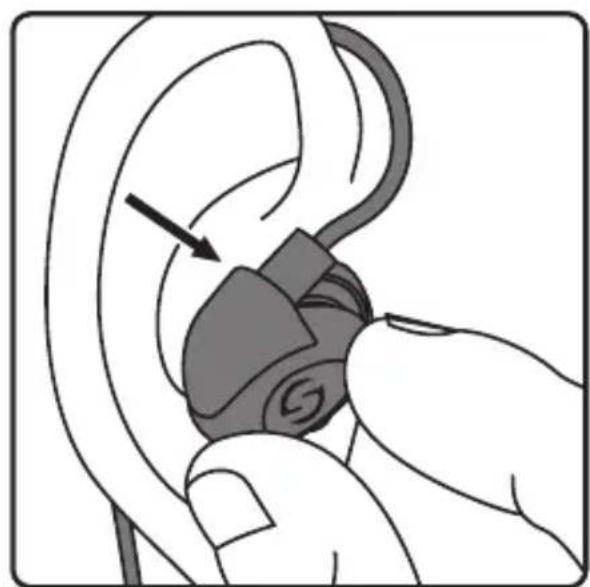
natural_image
Illustration of a hand inserting a device into an ear (no text or symbols present)natural_image
Illustration of a hand inserting a medical device into an ear (no text or symbols present)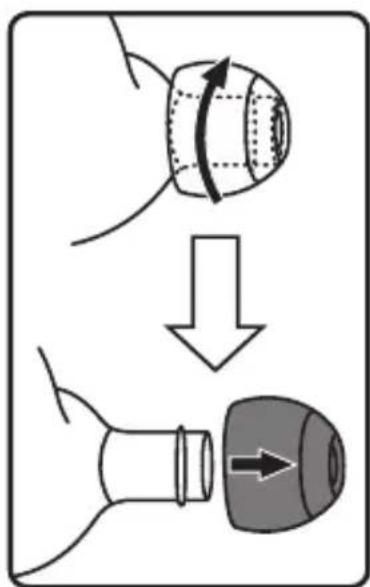
Figura 1 Figura 2


Brand : SAMSON
Model : Zi200
Category : Earphones