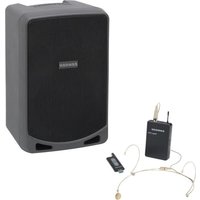
Expedition XP510i - Audio System SAMSON - Free user manual and instructions
Find the device manual for free Expedition XP510i SAMSON in PDF.


Pick your language and provide your email: we'll send you a specifically translated version.
| Product Type | Portable PA System |
| Brand | Samson |
| Model | Expedition XP510i |
| Dimensions (H x W x D) | 24.5 x 12.2 x 10.6 inches |
| Weight | 21.5 lbs |
| Power Supply | AC 100-240V, 50/60Hz or rechargeable battery (6.8Ah) |
| Battery Life | Up to 8 hours (music playback at moderate volume) |
| Bluetooth | Yes, v5.0 with A2DP support |
| USB Playback | Yes, supports MP3/WMA files |
| SD Card Slot | Yes, max 32GB |
| FM Radio | Yes, with digital tuning |
| Speaker Configuration | 10-inch woofer + 1-inch compression tweeter |
| Amplifier Power | 250W peak (Class-D) |
| Microphone Inputs | Two XLR/TRS combo jacks (with independent volume and reverb) |
| Auxiliary Input | 3.5mm stereo line input |
| Wireless Microphone | Includes one VHF wireless microphone |
| Voice Effects | Reverb, echo, pitch shift |
| Remote Control | Yes, handheld IR remote included |
| Wheels and Handle | Built-in telescopic handle and two wheels for portability |
| Charging Time | Approximately 4 hours for full charge |
| Recommended Use | Karaoke, public announcements, small events |
| Cleaning | Wipe with a dry, soft cloth; avoid solvents |
| Safety | Keep away from moisture, heat sources, and direct sunlight |
| Spare Parts | Contact Samson support or authorized service centers |
Frequently Asked Questions - Expedition XP510i SAMSON
How do I connect my phone via Bluetooth?
Press the Bluetooth button on the panel until the LED flashes. On your phone, search for 'XP510i' and select it. Once paired, the LED stays solid.
Can I use the wireless microphone without the system plugged in?
Yes, the wireless microphone operates on battery power and works with the system even when the XP510i is running on its internal battery.
How long does the battery last?
Battery life is up to 8 hours at moderate volume. Actual time depends on usage, volume level, and music content.
What file formats are supported via USB?
The USB port supports MP3 and WMA audio files. The USB must be formatted as FAT32.
How do I reset the system if it freezes?
Turn off the main power switch, wait 10 seconds, then turn it back on. Alternatively, you can unplug the AC cord for 30 seconds.
Can I connect an external subwoofer?
The XP510i does not have a dedicated subwoofer output. The built-in 10-inch woofer provides ample bass for most applications.
Is the system splash-proof?
No, the system is not waterproof. Keep it away from liquids and moisture to avoid damage.
How do I adjust the echo effect on the microphone?
Use the Reverb/Effect knob on the panel for the respective channel. Turn clockwise to increase the effect.
What is the range of the wireless microphone?
The VHF wireless microphone has a range of approximately 30 meters (100 feet) line of sight.
Can I play music from an SD card and a USB stick simultaneously?
No, the system can only play from one source at a time. Select the source using the Mode button.
User questions about Expedition XP510i SAMSON
0 question about this device. Answer the ones you know or ask your own.
Ask a new question about this device
No questions yet. Be the first to ask one.
Download the instructions for your Audio System in PDF format for free! Find your manual Expedition XP510i - SAMSON and take your electronic device back in hand. On this page are published all the documents necessary for the use of your device. Expedition XP510i by SAMSON.
USER MANUAL Expedition XP510i SAMSON
Manual assistant
Powered by Anthropic
Waiting for your message
Product information
Brand : SAMSON
Model : Expedition XP510i
Category : Audio System