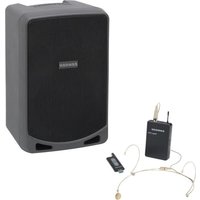
Expedition XP106wDE - Hi-Fi System SAMSON - Free user manual and instructions
Find the device manual for free Expedition XP106wDE SAMSON in PDF.


Pick your language and provide your email: we'll send you a specifically translated version.
| Product Type | Portable Hi-Fi system with built-in amplifier |
| Brand | Samson |
| Model | Expedition XP106wDE |
| Output Power | 200 W RMS (estimated) |
| Speakers | 1 x 10-inch woofer + 1 compression tweeter |
| Power Supply | Mains 100-240 V AC 50/60 Hz or rechargeable lithium-ion battery |
| Battery Life | Up to 6 hours depending on volume level |
| Dimensions (W x H x D) | Approximately 350 x 500 x 300 mm |
| Weight | Approximately 12.5 kg |
| Frequency Response | 45 Hz – 20 kHz |
| Connectivity | Bluetooth 5.0, line input (3.5mm jack), microphone input (XLR/Jack combo), USB, SD |
| Built-in Functions | USB and SD player, FM tuner, reverb effects |
| Care and Cleaning | Wipe with a soft, dry cloth. Do not use abrasive products. |
| Safety | Do not expose to water, excessive heat, or violent shocks. |
| Spare Parts and Repairability | Parts available through Samson after-sales service. Repairable by a qualified technician. |
| Warranty | 2 years |
| Included Accessories | Power adapter, remote control, quick start guide |
Frequently Asked Questions - Expedition XP106wDE SAMSON
How to connect a device via Bluetooth?
Enable Bluetooth on your device, then press the Bluetooth button on the speaker. Select 'Expedition XP106wDE' from the list of detected devices.
What is the battery life?
Battery life is approximately 6 hours at moderate volume. It may vary depending on volume and usage.
Can I connect a microphone?
Yes, the speaker has a combined XLR/Jack microphone input. Use the Mic Volume button to adjust the level.
How to put into standby mode?
Press and hold the Power button for 2 seconds to activate standby mode. To wake it up, press briefly.
Does the speaker have a screen?
Yes, it is equipped with an LED screen that displays playback information and settings.
Can I use an AUX input?
Yes, plug your audio source via a 3.5mm jack cable into the Line In input located at the back.
Is the remote control included?
Yes, an infrared remote control is included to control volume, playback, and inputs.
How to charge the battery?
Use the included power adapter and plug it into the DC In socket. The charging indicator shows the status.
How to clean the speaker?
Use a soft, dry cloth to wipe the surface. Avoid solvents and standing water on the grilles.
Can I connect multiple speakers?
No, the XP106wDE model does not support pairing additional speakers. Use it as a standalone unit.
User questions about Expedition XP106wDE SAMSON
0 question about this device. Answer the ones you know or ask your own.
Ask a new question about this device
No questions yet. Be the first to ask one.
Download the instructions for your Hi-Fi System in PDF format for free! Find your manual Expedition XP106wDE - SAMSON and take your electronic device back in hand. On this page are published all the documents necessary for the use of your device. Expedition XP106wDE by SAMSON.
USER MANUAL Expedition XP106wDE SAMSON

Manual assistant
Powered by Anthropic
Waiting for your message
Product information
Brand : SAMSON
Model : Expedition XP106wDE
Category : Hi-Fi System