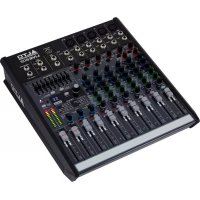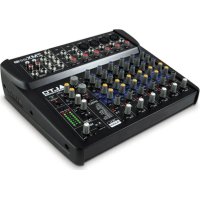
ZMX122FX - Mixer ALTO - Free user manual and instructions
Find the device manual for free ZMX122FX ALTO in PDF.



User questions about ZMX122FX ALTO
0 question about this device. Answer the ones you know or ask your own.
Ask a new question about this device
Download the instructions for your Mixer in PDF format for free! Find your manual ZMX122FX - ALTO and take your electronic device back in hand. On this page are published all the documents necessary for the use of your device. ZMX122FX by ALTO.
USER MANUAL ZMX122FX ALTO
text_image
ALTO PROFESSIONALZMX122FX
QUICKSTART GUIDE
ENGLISH (2-4)
MANUAL DE INICIO RÁPIDO
ESPANOL (5 - 7)
GUIDE D'UTILISATION RAPIDE
FRANÇAIS (8 - 10)
GUIDA RAPIDA
ITALIANO (11 - 13)
- ZEPHYR mixer
- Power adapter
- Quickstart Guide
• Safety Instructions & Warranty Information booklet
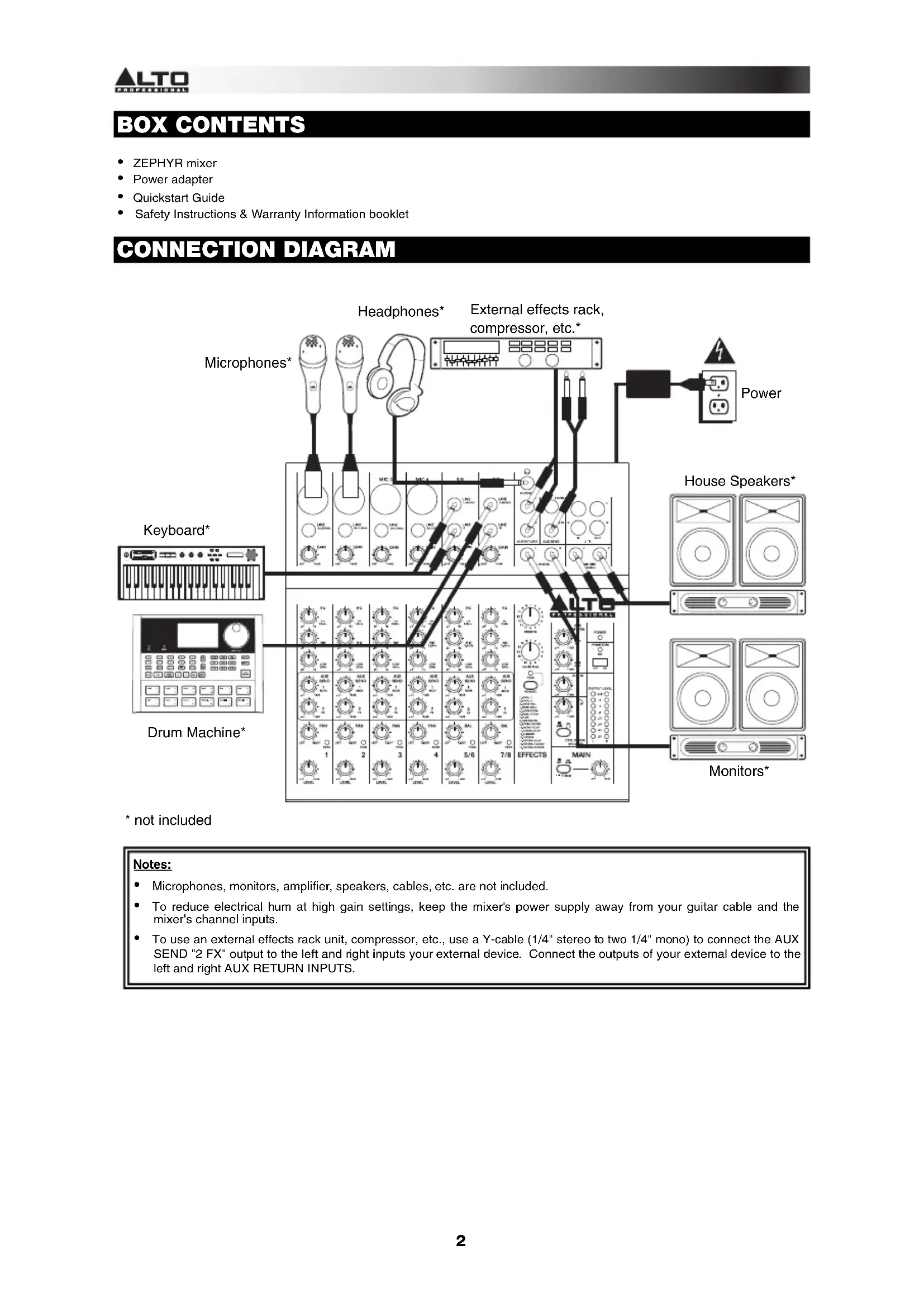
CONNECTION DIAGRAM
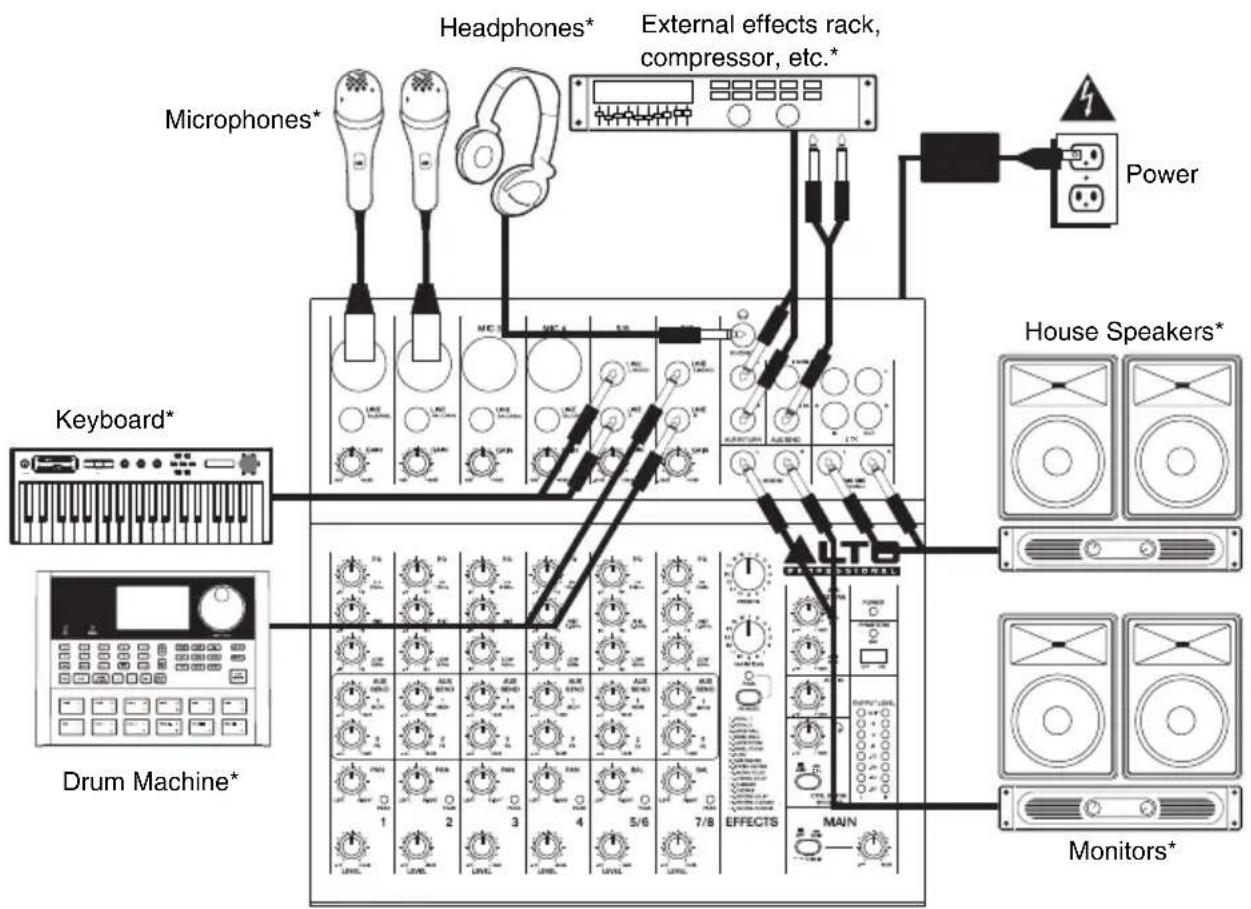
flowchart
graph TD
    A["Microphones*"] --> B["Headphones*"]
    C["Drum Machine*"] --> D["Keyboard*"]
    E["House Speakers*"] --> F["Monitors*"]
    G["External effects rack, compressor, etc.*"] --> H["Power"]
    I["Effects"] --> J["Main"]
    K["Albumin Tank"] --> L["Control Panel"]
    M["Radio Station"] --> N["Control Panel"]
    O["Radio Station"] --> P["Control Panel"]
    Q["Radio Station"] --> R["Control Panel"]
    S["Radio Station"] --> T["Control Panel"]
    U["Radio Station"] --> V["Control Panel"]
    W["Radio Station"] --> X["Control Panel"]
    Y["Radio Station"] --> Z["Control Panel"]
    AA["Radio Station"] --> AB["Control Panel"]
    AC["Radio Station"] --> AD["Control Panel"]
    AE["Radio Station"] --> AF["Control Panel"]
    AG["Radio Station"] --> AH["Control Panel"]
    AI["Radio Station"] --> AJ["Control Panel"]
    AK["Radio Station"] --> AL["Control Panel"]
* not included
Notes:
- Microphones, monitors, amplifier, speakers, cables, etc. are not included.
- To reduce electrical hum at high gain settings, keep the mixer's power supply away from your guitar cable and the mixer's channel inputs.
- To use an external effects rack unit, compressor, etc., use a Y-cable (1/4" stereo to two 1/4" mono) to connect the AUX SEND "2 FX" output to the left and right inputs your external device. Connect the outputs of your external device to the left and right AUX RETURN INPUTS.
FEATURES
-
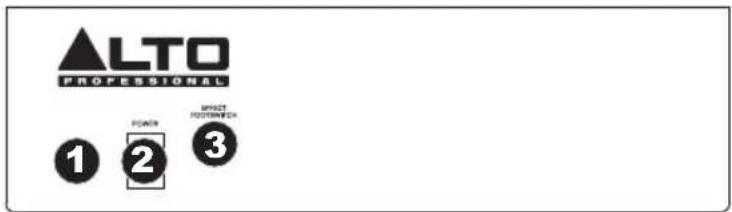
POWER IN - Use the included power adapter to connect the mixer to a power outlet. While the power is switched off, plug the power supply into the mixer first, then plug the power supply into a power outlet.
-
POWER SWITCH – Turns the mixer on and off. Turn on the mixer after all input devices have been connected and before you turn on amplifiers. Turn off amplifiers before you turn off the mixer.
-
FOOTSWITCH – When a latching-style footswitch is connected to this jack with a 1/4" TRS cable, it can be pressed to allow all channels to bypass the mixer's internal effects processor.
-
MIC INPUT – Connect a microphone to these inputs with an XLR cable.
-
LINE INPUT * - Connect line-level devices to these inputs with 1/4" cables.
-
GAIN – Adjusts the channel audio level (pre-fader and pre-EQ gain). Adjust this so that the PEAK LED just barely lights up during the loudest parts of the song.
-
HI EQ (TREBLE) - Adjusts the high (treble) frequencies of the channel.
-
MID EQ - Adjusts the mid-range frequencies of the channel.
-
LOW EQ (BASS) - Adjusts the low (bass) frequencies of the channel.
-
AUX SEND 1 MON - Adjusts the channel audio (pre-EQ) level that is sent to the AUX SEND output labeled "1 MON." You can use this to create a custom monitor mix for yourself or your
-
AUX SEND 2 FX – Adjusts the channel audio (post-EQ) level that is sent to the mixer's internal effects processor. Turn this up for the channels that you want internal effects applied to. You can use this to apply external effects to individual channels.
-
CHANNEL PAN - Adjusts the (mono) channel's position in the stereo field.
-
BALANCE (CH 5/6 & 7/8) – Adjusts the balance between Channels 5 and 6 and Channels 7 and 8.
-
PEAK LED – The LED will flash if the signal is clipping. If this happens, decrease the setting of the GAIN knob or CHANNEL VOLUME knob.
-
CHANNEL VOLUME – Adjusts the audio level on the channel.
-
AUX RETURN INPUTS ** - You can connect the outputs of an external device to these inputs with 1/4" mono cables. This is usually used for outboard effects devices but can also be used like an extra input channel for synthesizers, drum machines, etc. If your source is mono, plug it into the left jack and it will be heard on both the left and right sides.
-
AUX SEND OUTPUTS ** – You can use a 1/4" TRS cable to connect the AUX 1 MON output to the input of an external amplifier or active monitor to create a custom monitor mix for onstage musicians. You can adjust this level with the AUX RETURN LEVEL knob labeled "TO AUX 1 MON." To use an external effects rack unit, compressor, etc. with the mixer, you can use a Y-cable to connect the AUX 2 FX output to the input of your external device, then connect the outputs of the device to the AUX RETURN INPUTS of the mixer.
-
2-TRACK INPUTS - You may connect these inputs to the outputs of an external sound source using a standard stereo RCA cable (sold separately). You can send this channel to the monitor mix (using the MAIN/2-TRACK switch) and/or the main mix (using the 2-TRACK TO MAIN switch).
-
2-TRACK OUTPUTS – You may connect these outputs to the inputs of an external recording device using a standard stereo RCA cable (sold separately).
-
CTRL ROOM OUTPUTS – Use standard 1/4" cables to connect these outputs to your monitor or amplifier system. The level of these outputs is controlled by the CTRL ROOM / PHONES knob.
-
MAIN MIX OUTPUTS – Use standard 1/4" cables to connect these outputs to the house speaker or amplifier system. The level of these outputs is controlled by the MAIN VOLUME knob.
-
PHONES - Connect your 1/4" stereo headphones to this output. The CTRL ROOM / PHONES knob controls the volume.
text_image
ALTO PROFESSIONAL 1 POACH 2 PRESS POSTER/WEALTH 3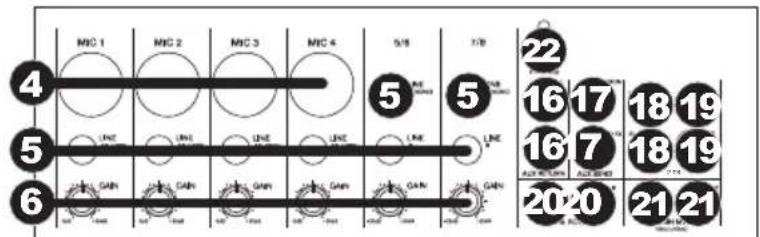
text_image
MIC 1 MIC 2 MIC 3 MIC 4 5/8 7/8 22 16 17 18 19 5 LINE LINE LINE LINE LINE LINE GAIN GAIN GAIN GAIN GAIN GAIN 20-20 21 21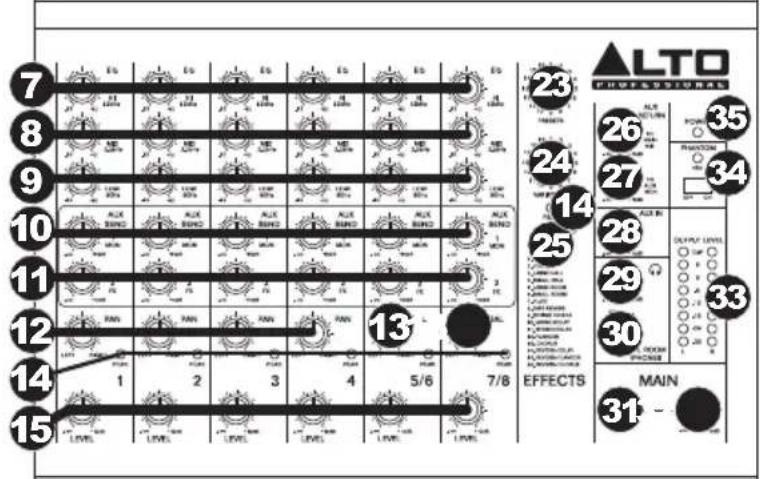
* When using LINE INPUTS 5/6, 7/8, and the AUX RETURNS:
- If only the left channel is used, the signal will be heard in both left and right channels and the balance will not be adjustable.
- If only the right channel is used, the signal will be heard in the right channel only.
** To use an external effects rack unit, compressor, etc., use a Y-cable (1/4" stereo to two 1/4" mono) to connect the AUX SEND "2 FX" output to the left and right inputs your external device. Connect the outputs of your external device to the left and right AUX RETURN INPUTS.
- EFFECTS SELECTOR – Selects the effect that the mixer's internal effects processor will apply to the various channels. Each channel can send different levels of audio to the processor by adjusting their FX POST SEND knobs. See the EFFECTS section for an explanation of the available effects.
- VARIATIONS SELECTOR – Selects the amount of the effect applied to the various channels.
- FX MUTE - Press this button to mute/unmute the effects.
- AUX RETURN TO MAIN MIX – Adjusts the volume of the signal being sent into the AUX RETURN INPUTS and routed to the MAIN MIX OUTPUTS.
- AUX RETURN TO AUX 1 MON – Adjusts the volume of the signal being sent into the AUX RETURN INPUTS and routed to the CTRL ROOM OUTPUTS.
- 2-TRACK LEVEL – Adjusts the input signal level of the 2-TRACK INPUTS.
- CTRL ROOM / PHONES – Adjusts the volume of the CTRL ROOM OUTPUTS and your headphones.
- MAIN / 2-TRACK – Press this button to select which signal is routed to the CTRL ROOM OUTPUTS and your headphones – the main mix or the signal from the 2-TRACK INPUTS.
- 2-TRACK TO MAIN - Press this button to select which signal is routed to the MAIN MIX OUTPUTS - the main mix or the signal from the 2-TRACK INPUTS.
- MAIN VOLUME – Adjusts the volume of the MAIN OUT.
- LED METERS – Shows the audio level of the main mix. Turn the volume down if the CLIP LED lights up excessively.
- PHANTOM POWER – This switch activates and deactivates phantom power. When activated, phantom power supplies +48V to the XLR mic inputs and the LED above the switch will be lit. Please note that most dynamic microphones do not require phantom power, while most condenser microphones do. Consult your microphone's documentation to find out whether it needs phantom power.
- POWER LED - Illuminates when the mixer is on.
EFFECTS
TO HEAR THE EFFECTS ON A CHANNEL: Use the EFFECTS SELECTOR to choose one of the effects below, adjust the parameter with the VARIATIONS SELECTOR, then turn up the FX POST SEND for that channel.
| # | PRESET | DESCRIPTION | PARAMETER | RANGE |
| 1 | VOCAL 1 Reverb, simulating a room with a small delay time. | Decay timePre-delay | 0.8~1.1s0~79ms | |
| 2 | VOCAL | Reverb, simulating a small space with a slight decay time. | Decay timePre-delay | 0.8~2.5s0~79ms |
| 3 | LARGE HALL Reverb, simulating a large acoustic space. | Decay timePre-delay | 3.6~5.4s23~55ms | |
| 4 | SMALL HALL Reverb, simulating the acoustics of a stage space. | Decay timePre-delay | 1.0~2.9s20~45ms | |
| 5 | LARGE ROOM Reverb, simulating a studio with many early reflections. | Decay timePre-delay | 2.9~4.5s23~55ms | |
| 6 | SMALL ROOM | Reverb, simulating a bright studio room. | Decay timePre-delay | 0.7~2.1s20~45ms |
| 7 | PLATE Simulates bright plate reverb. | Decay timePre-delay | 0.6~6.1s10ms | |
| 8 | TAPE REVERB | Simulates classic tape delay created by multiple playback heads. | Decay timePre-delay | 1.3~5.40~84ms |
| 9 | SPRING REVERB | Simulates the lightly stretched sound of spring reverb from analog transducers. | Decay timePre-delay | 1.3~5.4s0~84ms |
| 10 | MONO DELAY | Reproduces the signal after a small period of time. | Delay period | 60~650ms |
| 11 | STEREO DELAY | Reproduces the signal after a small period of time with a slight difference between the two stereo channels. | Delay periodFeedback | 210~400ms37~73% |
| 12 | FLANGER | Classic stereo flanging effect, similar to a jet plane taking off. | Rate | 0.16~2.79Hz |
| 13 | CHORUS | Simulates the full, complex, watery sound of several instruments playing the same thing. | Rate | 0.5~5Hz |
| 14 | REVERB+DELAY | Delay effect with room reverb. | Delay periodReverse decay time | 211~375ms1.0~2.9s |
| 15 | REVERB+FLANGER | Stereo flanger effect with room reverb. | Flanger rateReverse decay time | 0.16~2.52Hz |
| 16 | REVERB+CHORUS | Stereo chorus effect with room reverb. | Chorus rateReverse decay time | 0.5~4.74Hz1.5~2.9s |
CONTENIDO DE LA CAJA
flowchart
graph TD
    A["Microphones"] --> B["Clavier"]
    C["Casque d'écoute*"] --> D["Appareils d'effet externes, compresseur, etc.*"]
    E["Alimentation"] --> F["Haut-parleurs*"]
    G["Module de percussion*"] --> H["* non inclus"]
    I["LEA"] --> J["LEA"]
    K["LTR"] --> L["LTR"]
    M["LEA"] --> N["LTR"]
    O["LEA"] --> P["LTR"]
    Q["LEA"] --> R["LTR"]
    S["LEA"] --> T["LTR"]
    U["LEA"] --> V["LTR"]
    W["LEA"] --> X["LTR"]
    Y["LEA"] --> Z["LTR"]
    AA["LEA"] --> AB["LTR"]
    AC["LEA"] --> AD["LTR"]
    AE["LEA"] --> AF["LTR"]
    AG["LEA"] --> AH["LTR"]
    AI["LEA"] --> AJ["LTR"]
    AK["LEA"] --> AL["LTR"]
    AM["LEA"] --> AN["LTR"]
    AO["LEA"] --> AP["LTR"]
    AQ["LEA"] --> AR["LTR"]
    AS["LEA"] --> AT["LTR"]
    AU["LEA"] --> AV["LTR"]
    AW["LEA"] --> AX["LTR"]
    AY["Lea"] --> AZ["LEA"]
    BA["LEA"] --> BB["LEA"]
    BC["LEA"] --> BD["LEA"]
    BE["LEA"] --> BF["LEA"]
    BG["LEA"] --> BH["LEA"]
    BI["LEA"] --> BJ["LEA"]
    BK["LEA"] --> BL["LEA"]
    BM["LEA"] --> BN["LEA"]
    BO["LEA"] --> BP["LEA"]
    BQ["LEA"] --> BR["LEA"]
    BS["LEA"] --> BT["LEA"]
    BU["LEA"] --> BV["LEA"]
    BW["LEA"] --> BX["LEA"]
    BY["LEA"] --> BZ["LEA"]
    CA["LEA"] --> CB["LEA"]
    CC["LEA"] --> CD["LEA"]
    CE["LEA"] --> CF["LEA"]
    CG["LEA"] --> CH["LEA"]
    CI["LEA"] --> CJ["LEA"]
    CK["LEA"] --> CL["LEA"]
    CM["LEA"] --> CN["LEA"]
    CO["LEA"] --> CP["LEA"]
    CS["LEA"] --> CT["LEA"]
    CU["LEA"] --> CV["LEA"]
    CW["LEA"] --> CX["LEA"]
    CY["LEA"] --> CZ["LEA"]
    DA["LEA"] --> DB["LEA"]
    DC["LEA"] --> DD["LEA"]
    DJ["LEA"] --> DE["LEA"]
    FD["LEA"] --> DG["LEA"]
    DH["LEA"] --> DI["LEA"]
    DJ --> DJ
    DK["LEA"] --> DL["LEA"]
    DV["LEA"] --> DW["LEA"]
Remarques :
All 0.005% (@in4pdBu, 1 kHz) <
GAIN RANGE: Mic inputs (Channels 1-4): 0 – 50 dB
Line inputs (Channels 1-4): 15 - 35 dBu
Line inputs (channels 5-8): 15 dBu - 35 dBu
MAX VOLTAGE GAIN: Mic inputs / Line inputs (Channels 1-4): 70 dB (MIC/LINE INPUT to MAIN MIX OUTPUT)
80 dB (MIC/LINE INPUT to CTRL ROOM / PHONES OUPTUT)
60 dB (MIC/LINE INPUT to AUX SEND)
Line inputs (Channels 5-8): 60 dB (LINE INPUT to MAIN MIX OUTPUT)
20 dB (FX RETURN to MAIN MIX OUTPUT)
20 dB (AUX INPUT to MAIN MIX OUTPUT)
SNR:
All inputs:1>10 dBu
PHANTOM POWER: +45 \~ +49V with switch control (Mic Pin2/Pin3 and Pin1)
IMPEDANCE: Mic inputs: 3.9 kΩ
All othe0 kΩ inputs: > Aux output: 1 kΩ All outputs: 120 Ω
EQUALIZATION: High: ±15 dB @ 12 kHz
Mid: ±15 dB @ 2.5 kHz
Low: ±15 dB @ 80 Hz
DSP: A/D and D/A converters: 24-bit
DSP Resolution: 24-bit
Effects:
Reverbs: Hall, Room, Vocal, Plate
Delays: Mono, Stereo (max delay time: 650 ms)
Modulations: Chorus, Flanger, Reverb
Combinations: Reverb + Delay, Reverb + Chorus, Reverb + Flanger
Presets: 256
Controls: 256-position preset selector, clip LED, mute switch, foot switch, LED
CROSSTALK: Adjacent inputs: <
-80 dB @ 1 kHz
Inputs _to75 dB @ 1 kHz/pstereo L/R, Channels 1-4, panned hard left or right)
MAIN MIX: AUX OUTPUT, PHONES OUTPUT: 0 dBu, unbalanced, 1/4" jacks
Max output: +22 dBu, unbalanced, 1/4" jacks
B _ 90 dB @ 20 Hz \~ 22 kHz (Channel and Main Mix levels at 0 dB, i others at minimum, DSP muted)
POWER SUPPLY: 18 V, 1000mA
POWER CONSUMPTION: 18 W
DIMENSIONS (W x D x H): 10.1" x 9.8" x 2.9" (256 mm x 250 mm x 72 mm)
WEIGHT: 5.1 lbs (2.3 kg)
* Specifications are subject to change without notice.
Under rare circumstances, if this product is exposed to electromagnetic interference during use, there may be a slight drop in signal-to-noise ratio.
This unit is well designed to prevent any inrush current.