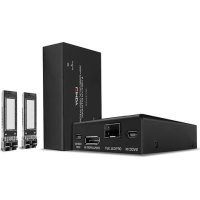
39376 - KVM Extender Lindy - Free user manual and instructions
Find the device manual for free 39376 Lindy in PDF.



| Product Type | DisplayPort 1.2 KVM Extender over Fiber Optic |
| Brand | Lindy |
| Model | 39376 |
| Maximum Resolution | 3840x2160 @60Hz (4:4:4 8bit) ; 2560x1440 @144Hz RGB |
| Transmission Distance | Up to 300m (984.24 ft) with OM3 Duplex LC fiber |
| Transmitter Ports | 1x DisplayPort IN (Female), 1x USB Mini-B (Female), 1x SFP Duplex |
| Receiver Ports | 1x DisplayPort OUT (Female), 3x USB Type A (Female), 1x SFP Duplex |
| KVM Function | Yes, supports keyboard, mouse, and USB HID devices |
| Audio Support | Digital up to 7.1 channels, PCM 2 channels 16/20/24bit @48kHz |
| Video Standards | DisplayPort 1.2a, HDCP 1.3, HBR2 |
| USB | USB 2.0 |
| EDID Management | Automatic |
| Power Supply | 5VDC 2A via multi-country power adapter (EU, UK, US, AUS) + Mini-USB cable |
| Operating Temperature | 0°C to 50°C |
| Storage Temperature | -20°C to 80°C |
| Humidity | 0% to 90% (non-condensing) |
| Laser Class | Class 1 (safe) |
| Fiber Type | Duplex LC multimode 50/125μm (OM3) |
| Wavelength | 850 nm |
| Housing Material | Metal |
| Color | Black |
| Box Contents | Transmitter, receiver, 2x SFP modules, 3x USB A to Mini-B cables (1.5m), 8x rubber feet, power supply, manual |
| Maintenance | Clean with a dry cloth; do not use liquids. No user-serviceable parts. |
| Warranty | 2 years, free lifetime technical support |
Frequently Asked Questions - 39376 Lindy
User questions about 39376 Lindy
0 question about this device. Answer the ones you know or ask your own.
Ask a new question about this device
Download the instructions for your KVM Extender in PDF format for free! Find your manual 39376 - Lindy and take your electronic device back in hand. On this page are published all the documents necessary for the use of your device. 39376 by Lindy.
USER MANUAL 39376 Lindy
Tested to comply with FCC Standards For Office Use!
Safety Instructions
!WARNING !
Please read the following safety information carefully and always keep this document with the product.
Failure to follow these precautions can result in serious injuries or death from electric shock, fire or damage to the product.
Touching the internal components or a damaged cable may cause electric shock, which may result in death.
This device is a switching type power supply and can work with supply voltages in the range 100 - 240 VAC For worldwide usability four different AC adapters are enclosed: Euro type, UK type, US/Japan type and Australia/New Zealand type. Use the appropriate AC adapter as shown in the picture and ensure it is firmly secured in place and does not detach by pulling before installing into a power socket. To reduce risk of fire, electric shocks or damage:
- Do not open the product nor its power supply. There are no user serviceable parts inside.
- Only qualified servicing personnel may carry out any repairs or maintenance.
- Never use damaged cables.
- Do not expose the product to water or places of moisture.
- Do not use this product outdoors it is intended for indoor use only.
- Do not place the product near direct heat sources. Always place it in a well-ventilated place.
- Do not place heavy items on the product or the cables.
- Please ensure any adapters are firmly secured and locked in place before inserting into a wall socket
Instructions for Use of Power Supply
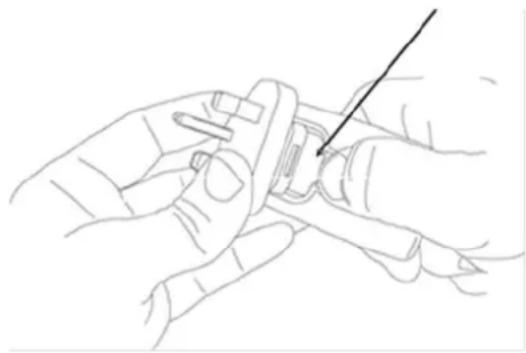
To release the country-specific adapter, push down on the release button as shown and release the adapter.

ELECTRIC SHOCK RISK
Introduction
Thank you for purchasing the 300m Fibre Optic DisplayPort 1.2 & USB KVM Extender. This product has been designed to provide trouble free, reliable operation. It benefits from both a LINDY 2-year warranty and free lifetime technical support. To ensure correct use, please read this manual carefully and retain it for future reference.
The Fibre Optic DisplayPort 1.2 KVM Extender is an effective, reliable solution for extending high quality 4K DisplayPort signals over distances up to 300m with standard LC fibre cable. Support for DisplayPort 1.2 allows for the transmission of highly detailed 3840x2160@60Hz resolutions, perfect for eye catching digital signage or detailed content in medical setups.
Package Contents
- DisplayPort KVM Extender, Transmitter
DisplayPort KVM Extender, Receiver - 2 x SFP Multi-Mode Duplex OM3 Modules
- 3 x USB Type A to Mini-B Cable, 1.5m
- 8 x Rubber Feet
5VDC 2A Multi-Country Power Supply (UK, EU, US & AUS) with Mini-USB Cable
Lindy Manual
Features
- Extends 4K DisplayPort 1.2 & KVM signals up to 300m (984.24ft) distances with Duplex LC fibre optic OM3 cable (50 / 125 m)
- Extends digital audio signals up to 7.1CH
- Utilises smart methods of compression for visually lossless transmission
Control a single DisplayPort PC, keyboard and mouse via KVM functionality - 3 USB Type A Ports (Receiver) for connection of USB HIDs
Automatic EDID management for seamless compatibility
Specification
Supports DisplayPort 1.2a (21.6Gbps), HDCP 1.3, HBR2
Supports USB 2.0
Supports resolutions up to 3840x2160@60Hz 4:4:4 8bit, 2560x1440@144Hz RGB
Supported audio formats:2CH PCM 16/20/24bit up to 48KHz, 8CH digital audio up to 48KHz
- Operating Temperature: 0^ - 50^ (32°F - 122°F)
Storage Temperature: -20^ - 80^ (-4°F - 176°F)
Humidity: 0 - 90% RH (non-condensing)
- Black, metal housing
Transmission Protocol: TMDS
Transmission Medium: 1 x Duplex LC (50/125μm)
Laser Class: Class 1
Wavelength: 850nm
Connections
Transmitter KVM Interfaces
DisplayPort (Female)
USB Type Mini-B (Female)
Transmitter Extension Port
SFP Multi-Mode Duplex
Receiver Console Interface
DisplayPort (Female)
- 3 × USB Type A (Female)
Receiver Extension Port
SFP Multi-Mode Duplex
Installation & Operation
- Connect a DisplayPort cable from the display to the DP Output port of the receiver.
- Connect USB HID devices including keyboards and mice to the USB Type A ports of the receiver.
- Connect a DisplayPort cable from the source device to the DP Input port of the transmitter.
- Connect the source device to the Mini-USB port of the transmitter.
- Once the modules are fitted, carefully connect a duplex LC OM3 multi-mode fibre optic cable to the ports on the TX and RX units, ensuring that the fibre connection is crossed over.
- Connect the power supply to either side of the installation and power on.
- Turn on the display and then power on the source device.
Please ensure when the video source is powered on, the display is connected to the installation for EDID communication. If this is not correctly connected, there may be no video content displayed.
Please note: USB webcams, USB Mass storage and wireless USB devices are not supported
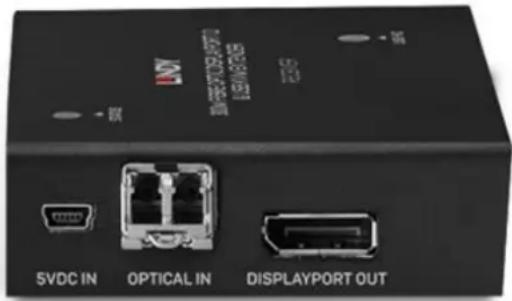
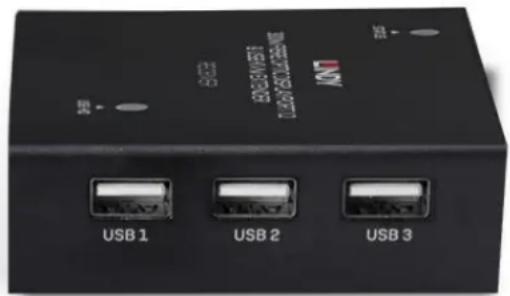
Transmitter Unit
- Power / Connection LED: Please see below for the different LED Indication definitions.
- Mini-USB PSU Jack: Connect the included power supply.
- Optical Out: Connect the SFP Module and Duplex Fibre Cable.
- DisplayPort In: Connect the DisplayPort source device via DP cable.
- USB In: Connect to the USB Host PC.
- USB Status LED: Once USB HID has been connected, this LED will emit Orange. This will flash 1-3 times to indicate the connected device number.
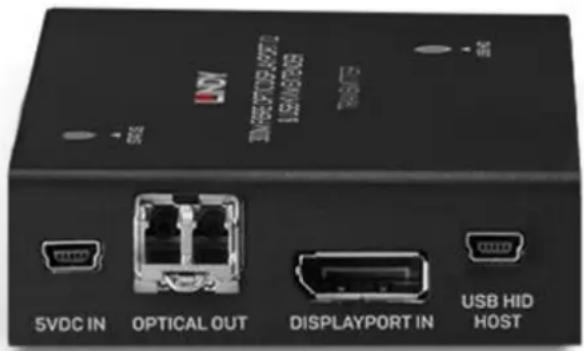
Receiver Unit
- Power / Connection LED: Please see below for the different LED Indication definitions.
- Mini-USB PSU Jack: Connect the included power supply.
- Optical In: Connect the SFP Module and Duplex Fibre Cable.
- DisplayPort Out: Connect DP display using DP cable.
- USB Out: Connect to the USB HIDs.
- USB Status LED: Once USB HID has been connected, this LED will emit Orange. This will flash 1-3 times to indicate the connected device number.
Troubleshooting
There is no display on the screen.
It has been found that there are significant differences in the cable lengths/types and even input ports which can be used on different brands of display using DisplayPort resolutions. If problems are experienced, please apply the following steps:
Try a different input port on the display.
- Please ensure the display's input source is set to DP.
- Reduce the cable length on the Input and Output to 1m .
Try a different type of 1m DisplayPort Cable.
- Check that the Micro-USB and plug used by the external power supply is firmly connected.
- Check that the fibre optic cable and modules are connected correctly.
Power off all the devices, then power on in this order: first, the extender, then the display and finally the source.
- Check the PC BIOS configuration for the video output settings
- Try to connect the PC and display with a direct connection to ensure the video signal is present. Lindy regularly checks and tests our product range to ensure maximum compatibility and performance. For the most up to date version of this manual, please refer to your local Lindy website, search for the relevant part number and find the manual under Downloads.
Sicherheitshinweise
! GEFAHR!
LINDY declares that this equipment complies with the European CE requirements relating to EMC, LVD, ErP and RoHS.
This equipment has been tested and found to comply with the limits for a Class A digital device, pursuant to part 15 of the FCC Rules. These limits are designed to provide reasonable protection against harmful interference in a residential installation.
You are cautioned that changes or modification not expressly approved by the party responsible for compliance could void your authority to operate the equipment.
This device complies with part 15 of the FCC Rules.
Operation is subject to the following two conditions:
- This device may not cause harmful interference, and
- This device must accept any interference received, including interference that may cause undesired operation.
The enclosed power supply has passed Safety test requirements, conforming to the US American versions of the international Standard IEC 60950-1 or 60065 or 62368-1.
WEEE (Waste of Electrical and Electronic Equipment), Recycling of Electronic Products
Europe, United Kingdom
In 2006 the European Union introduced regulations (WEEE) for the collection and recycling of all waste electrical and electronic equipment. It is no longer allowable to simply throw away electrical and electronic equipment. Instead, these products must enter the recycling process.
Each individual EU member state has implemented the WEEE regulations into national law in slightly different ways. Please follow your national law when you want to dispose of any electrical or electronic products. More details can be obtained from your national WEEE recycling agency.
Tested to comply with
FCC Standards
For Office Use!
No. 39376
st Edition, May 2020
lindy.com