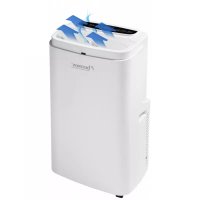
Cool & Clean AAC12000 - Air Conditioning BESTRON - Free user manual and instructions
Find the device manual for free Cool & Clean AAC12000 BESTRON in PDF.



| Brand | Bestron |
| Model | Cool & Clean AAC12000 |
| Category | Mobile air conditioner |
| Refrigerant type | R290 (flammable) |
| Cooling power | 12000 BTU/h (approx. 3.5 kW) |
| Maximum recommended area | Up to 30 m² |
| Power supply | 230 V ~ 50 Hz, 16 A |
| Power consumption | Approx. 1500 W (depending on mode) |
| Dimensions (L x W x H) | Approx. 45 x 38 x 75 cm |
| Net weight | Approx. 28 kg |
| Operating modes | Cooling, ventilation, dehumidification |
| Fan speed | Low, medium, high |
| Adjustable thermostat | 16°C - 31°C |
| Sleep function | Yes (Cool mode only) |
| Timer | Delayed start and stop (1-24 h) |
| Remote control | Yes (AAA batteries not included) |
| Swivel casters | Yes |
| Exhaust hose length | 150 cm max |
| Water tank capacity | Approx. 1.5 L (estimated) |
| Washable filters | 2 filters: top and bottom grille |
| Noise level | Approx. 50-55 dB (estimated) |
| Warranty | 60 months (5 years) |
| Standards | Compliant with EU directives |
Frequently Asked Questions - Cool & Clean AAC12000 BESTRON
User questions about Cool & Clean AAC12000 BESTRON
0 question about this device. Answer the ones you know or ask your own.
Ask a new question about this device
Download the instructions for your Air Conditioning in PDF format for free! Find your manual Cool & Clean AAC12000 - BESTRON and take your electronic device back in hand. On this page are published all the documents necessary for the use of your device. Cool & Clean AAC12000 by BESTRON.
USER MANUAL Cool & Clean AAC12000 BESTRON

AAC12000
INSTRUCTION MANUAL
DE
Bedienungsanleitung
EN
Instruction manual
SE
Instruktionsmanual
FR
Mode d'emploi
IT
R. Neyman Quality control
- Bedienfeld:
A. LED-Display
ACHTUNG:
Attention, risque d'incendie!
R290

DÉCLARATION DE CONFORMITÉ CE
R. Neyman
Contrôle qualité
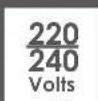
| TENSION SECTEUR 220-240 V | |
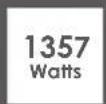
| CONSOMMATION D'ÉNERGIE 1357 W | |
| QUANTITÉ DE RÉFRIGÉRANT CA. 230 G | |
| TYPE DE RÉFRIGÉRANT R 290 | |
| DISJONCTEUR DIFFÉRENTIEL RECOMMANDÉ 30 MA | |
| PROTECTION SUR SITE 16 A |
Appuyer 1x = swing continu
ATTENTION :
WAT U MOET WETEN OVER DIT APPARAAT
Let op, brandgevaar! R290

R. Neyman
Quality control
| NETSPANNING 220-240 V | |
| ENERGIEVERBRUIK 1357 W | |
| HOEVEELHEID KOELMIDDEL CA. 230 G | |
| TYPE KOELMIDDEL R 290 | |
| AANBEVOLEN AARDLEKSCHAKELAAR 30 MA | |
| BESCHERMING TER PLAATSE 16 A |
WERKING - Algemeen

- Bedieningspaneel:
A. LED-display
LET OP:
REINIGING EN ONDERHOUD - Filter reinigen
Congratulations with the purchase of this Bestron product. These instructions tell you how the product works and how to use it. Read the instructions carefully before you start using the appliance. Only use the appliance in the manner described in the instructions. Keep these instructions in a safe place for future reference.
Defects:
If the appliance is defective, do not try to repair it yourself. Always have a qualified mechanic carry out any repairs.
Children:
- This appliance may be used by children over the age of 8 years old and persons with reduced physical, sensory or mental capabilities or lack of experience and know-how, but only if supervised or if they have been instructed on how to use the appliance safely and are aware of its potential dangers.
• Children are not allowed to clean and maintain the appliance, except if they are over the age of 8 years old and supervised. - Keep the appliance and the cable out of reach of children under the age of 8 years old.
- Keep an eye on children to ensure that they do not play with the appliance and the remote control.
SAFETY INSTRUCTIONS FOR THIS DEVICE WITH FLAMMABLE REFRIGERANT
- Do not use means to accelerate the defrosting process or to clean, other than those recommended by the manufacturer.
- The appliance shall be stored in a room without continuously operating ignition sources (for example: open flames, an operating gas appliance or an operating electric heater).
- Do not damage the refrigeration circuit.
- If you notice a smell, the cooling circuit may be defective. Switch off the device, open the window and door and contact customer service.
- Appliance shall be installed, operated and stored in a room with a floor area larger than 12m2 .
- Keep any required ventilation openings clear of obstruction:
• Servicing shall be performed only as recommended by the manufacturer. -
The appliance shall be stored in a well-ventilated area where the room size corresponds to the room area as specified for operation.
-
Any person who is involved with working on or breaking into a refrigerant circuit should hold a current valid certificate from an industry-accredited assessment authority, which authorizes their competence to handle refrigerants safely in accordance with an industry recognized assessment specification.
- Servicing shall only be performed as recommended by the equipment manufacturer.
- If you pass this device on to someone else, you must include these operating instructions with the device.
- Do not switch the device on and off in quick succession. After switching off, wait a short time before switching the device on again.
WHAT YOU SHOULD KNOW ABOUT THIS APPLIANCE
Notes:
- The air conditioning is only suitable for indoor use and is not suitable for other applications.
- Follow local grid interconnection rules while installing the air conditioning and ensure that it is properly grounded. If you have any question on electrical installation, follow the instructions of the manufacturer, and if necessary, ask a professional electrician to install it.
- Place the machine in a flat and dry place and keep a distance of above 30cm between the machine and the surrounding objects or walls.
• After the air conditioning is installed, ensure that the power plug is intact and firmly plugged into the power outlet, and place the power cord orderly to prevent someone from being tripped or pulling out the plug.
- Do not put any object into the air inlet and outlet of the air conditioning. Keep the air inlet and outlet free from obstructions.
- Do not use force to adjust the upper and lower air ducts to avoid damage.
- While adjusting the upper and lower wind-guide strips of the air outlet, pluck it with hands gently to avoid damaging wind-guide strips.
- When moving the machine, make sure that it is in an upright position.
- The machine should stay away from gasoline, flammable gas, stoves and other heat sources.
- Don't disassemble, overhaul and modify the machine arbitrarily, otherwise it will cause a
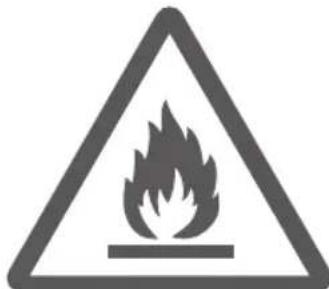
Caution, risk of fire! R290

machine malfunction or even bring harm to persons and properties.
To avoid danger, if a machine failure occurs, ask the manufacturer or professionals to repair it.
- Do not install and use the air conditioning in the bathroom or other humid environments.
• Always switch off the device before removing the power plug. Do not pull on the power cord when doing this.
- Do not place cups or other objects on the body to prevent water or other liquids from spilling into the air conditioning.
- Do not use insecticide sprays or other flammable substances near the air conditioning.
- Do not wipe or wash the air conditioning with chemical solvents such as gasoline and alcohol. When you need to clean the air conditioning, you must disconnect the power supply, and clean it with a half-wet soft cloth. If the machine is really dirty, scrub with a mild detergent.
- The appliance can be used by children aged from 8 years and above and persons with reduced physical, sensory or mental capabilities if they have been given supervision or instruction concerning use of the appliance in a safe way and understand the hazards involved. Children shall not play with the appliance. Cleaning and maintenance shall not be made by children without supervision.
- If the supply cord is damaged, it must be replaced by the manufacturer, its service agent or similarly qualified persons in order to avoid a hazard.
- The appliance shall be installed in accordance with national wiring regulations.
- Do not operate your air conditioner in a wet room such as a bathroom or laundry room.
- The installation of pipe-work shall be kept to a minimum x 12m 2
- Spaces where refrigerant pipes shall be compliance with national gas regulations. Transport of equipment containing flammable refrigerants.
- When disposing of the device, observe the national regulations for the disposal of devices with flammable refrigerants. Ask your responsible waste disposal company.
- When the device is not in use, only store it in dry and frost-free rooms. The device must not be damaged during storage.
ENVIRONMENT
- Dispose of packaging material such as plastic and cardboard boxes in the designated containers.
Do not dispose of this product as normal domestic waste at the end of its life, but hand it in at a collection point for the reuse of electric and electronic equipment. Look for the symbol on the product, the user instructions or the packaging showing the type of waste.
- The materials can be used as indicated. By helping us reuse and process the materials or otherwise recycle the old equipment, you will be making an important contribution towards the protection of the environment.

Your municipality can tell you where to find the designated waste collection point in your neighbourhood.
- Dispose of the batteries of the remote control only at the designated collection points.
CE DECLARATION OF CONFORMITY
This product meets the requirements of European guidelines.
R. Neyman Quality control
| MAINS VOLTAGE 220-240 V | |
| POWER CONSUMPTION 1357 W | |
| AMOUNT OF REFRIGERANT CA. 230 G | |
| TYPE OF REFRIGERANT R 290 | |
| RECOMMENDED RESIDUAL CURRENT CIRCUIT BREAKER 30 MA | |
| PROTECTION ON SITE 16 A |
OPERATION - General
The appliance is only intended for household use, not for professional use.
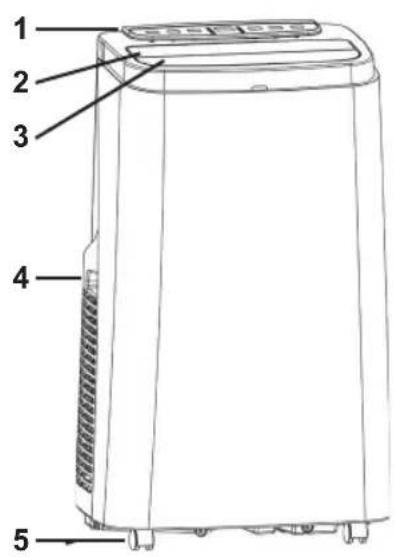
![graph TD A["TIMER"] --> B["FAN"] B --> C["UP"] C --> D["DOWN"] D --> E["MODE"] E --> F["POWER"] style A fill:#f9f,stroke:#333 style B fill:#ccf,stroke:#333 style C fill:#cfc,stroke:#333 style D fill:#fcc,stroke:#333 style E fill:#cff,stroke:#333 style F fill:#ffc,stroke:#333](/content/2026/03/573158/images/93cb6d4a2c96549bdf54109ecf7cf7b0856dbbc392b8695ca15cbae79a862759.jpg)
- Control panel:
A. LED-display
B. Timer function button "TIMER"
C. Ventilator function button "FAN"
D. Temperature up button "UP"
E. Temperature down button "DOWN"
F. Set mode button "MODE"
G. Power on/off button "POWER"
-
Air outlet
-
Blonds/shutters
-
Handles
-
Castors
-
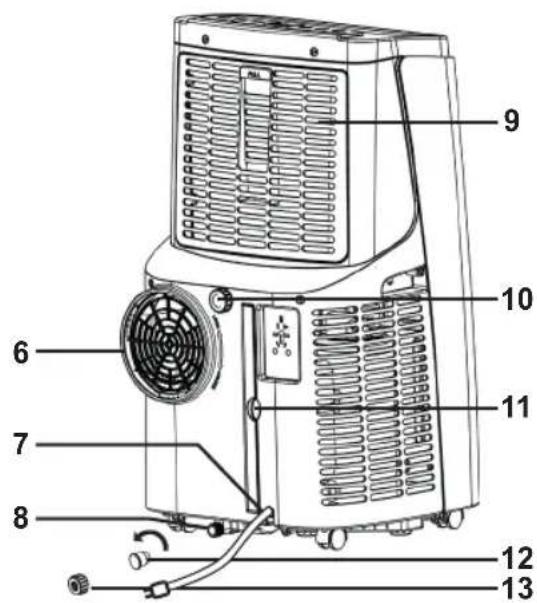
Warm air outlet
-
Cord with plug
-
Drain collection tray for condensation water
-
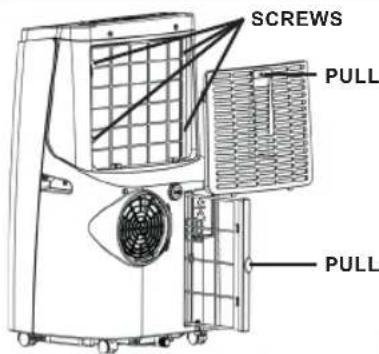
Top grill with removable washable filter
-
Continuous drainage of condensation water
-
Bottom removable washable filter
-
Rubber cap
-
Screw cap
-
Drain hose
-
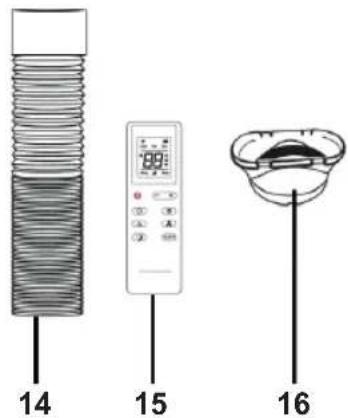
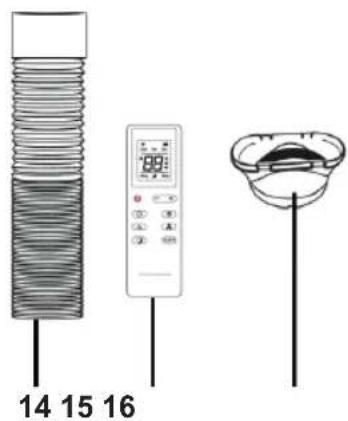
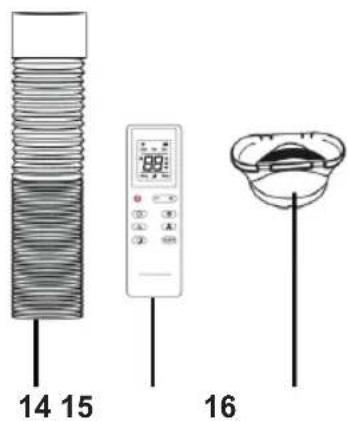
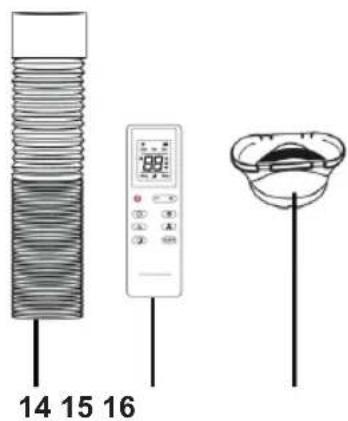
Remote control
(2 x AAA battery, not included)
- Adapter
INSTALLATION
This air conditioner must be connected to an electrical circuit with a 16 A circuit breaker. It must be kept away from easily flammable materials and a free space of 30 cm around the device. In addition, a 30 mA residual current device is recommended. Only use an approved extension cable with a capacity of 16 A. The air conditioner must be placed on a level surface with sufficient load capacity.
INSTALLATION - Install heat dissipation
- Choose a location near a window and an electrical outlet to place the device.
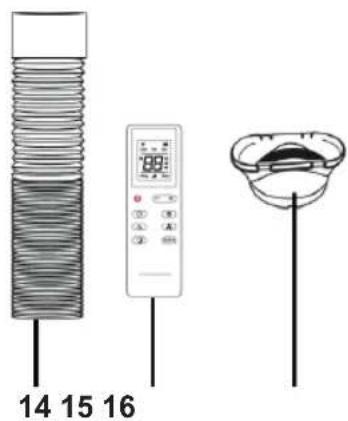
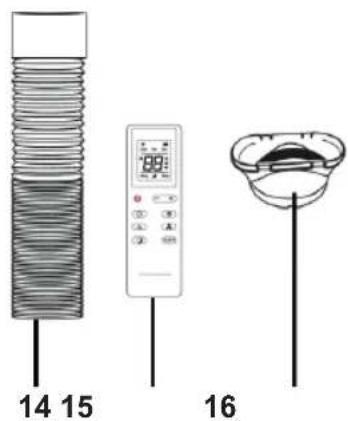
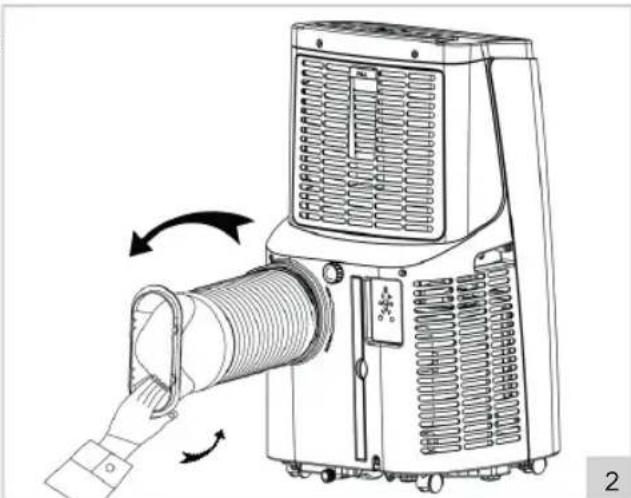
- Screw the adapter (figure 1-16) onto the drain hose (figure 1-14) see also figure 2.
- Mount the drain hose on the warm air outlet (6) at the back of the appliance (see figure 2).
ATTENTION:
- To avoid damage, the drain hose should not be deformed or twisted excessively.
- The maximum length of the drain hose is 150 cm. Do not use extensions or other drain hoses as this can cause serious malfunctions.
• To prevent overheating, do not block the air outlet on the device. - If you have a tilt window instead of a sliding window, purchase a window sealing set to be able to seal your entire window airtight.
USE - Power on/off
- Insert the plug in the wall socket. The appliance will beep, this is normal. The displays (Figure 1-A) indicate the current room temperature.
- Press the "POWER" button (Figure 1-G). The device will start operating in the last mode used. When you turn on the device for the first time, it is in cooling mode. The appropriate indicator light above the button "MODE" comes on.
- Set the preferred air flow direction. Direct the air flow straight up or slightly forward by setting the horizontal blinds/shutters (figure 1-3) with the "SWING" button (see figure 1-B), using the supplied remote control or via the app. Easily rotate or move the unit thanks to the sturdy castors to direct the airflow into the room.
- Press the "POWER" button again to switch off the appliance.
- Remove the plug from the wall socket after use.
USE - Set mode
The device is equipped with three working modes, with which you can ventilate, dehumidify and cool the room.
Ventilate
- Press the "MODE" button (Figure 1-F) once or multiple times, until the indicator light "FAN" Lights up. The device will operate as a ventilator.
- Press the "FAN" button (Figure 1-C) to switch between low or high speed for the discharged air.
Dehumidify
- Press the "MODE" button (Figure 1-F) one or more times, until the indicator "DRY" lights up. The device switches to the lowest speed and will now extract moisture from the air.
Cooling
- Press the "MODE" button (Figure 1-F) once or more times, until the indicator light "COOL" lights up. The device will now function as an air cooler and will cool the air by means of a cooling element.
- Use the "UP" (Figure 1-D) "DOWN" (Figure 1-E) buttons to set the cooling temperature between 16 °C and 31 °C.
- Press on the "FAN" (Figure 1-C) button to switch between low or high speed for discharged air.
ATTENTION:
- When the internal water collector is full, the appliance stops operating and the indicator light on the control panel lights up "FULL". You must empty the water collector before you can use the appliance again (see 'CLEANING AND MAINTENANCE - Water drainage').
- If you frequently use the appliance to dehumidify or cool air, you can also use the continuous discharge (see 'CLEANING AND MAINTENANCE - Water drainage').
USE - Sleep mode
The device is equipped with a sleep mode. Enabling this function will allow the appliance to operate at its quietest and most energy efficient setting
ATTENTION:
The sleep mode only works in the "COOL" mode.
- Press the buttons "FAN" and "UP" (Figure 1-C and D) to enable the sleep function. The device switches to the lowest and most energy-efficient setting.
- Press the "FAN" and "UP" buttons again to disable the sleep function.
ATTENTION:
After switching off the sleep function, the device will remain in "COOL" mode.
USE - Timer mode
The device is equipped with a timer that allows you to switch the device on or off automatically.
Automatic power-on
When the appliance is switched off:
- Press the "TIMER" button (Figure 1-B). The display starts to flash.
- Use the button UP/DOWN to set the switch-on time between 1 and 24 hours.
- Wait for the display (figure 1-A) to stop flashing. The switch-on timer is set.
- Press the button again "TIMER" to adjust the switch-on time if necessary.
- When the displays flash, press the button "TIMER" to turn off the timer.
Automatic power-off
When the appliance is switched on:
- Press the "TIMER" button (figure 1-B). The display starts to flash.
- Use the UP/DOWN button to set the power-off time between 1 and 24 hours.
- Wait for the display (figure 1-A) to stop flashing. The power-off timer is set.
- Press the "TIMER" button again to adjust the power-off time if necessary.
- When the displays flash, press the "TIMER" button to turn off the timer.
USE - Remote control
The device can also be operated using the remote control included. The remote control works on two AAA batteries (not included). Open the battery compartment on the bottom, insert the batteries and close the lid. The buttons on the remote control function the same as the buttons on the control panel.
For optimal use:
• Make sure the distance between the device and the remote control does not exceed 6 metres.
- Point the remote control at the device and ensure the direction angle is less than 30 degrees.
- The remote control has an extra button "SWING" to engage swing mode and move the airflow from top to bottom. In addition, the slats can be adjusted to a desired position.
- Explanation remote control:
A. Button on/off "POWER"
B. Timer function button "TIMER"
C. Adjust slat position button "SWING"
Press 1x = continued swing
Press 2x = set new position
D. Set sleep mode button
E. Set temperature/time button
F. Set mode button "MODE"
G. Set ventilator speed button
H. Set temperature unit button:
CLEANING AND MAINTENANCE - General
Over time, dust can accumulate in the grids and between the fins in the appliance.
- Switch off the appliance and unplug it.
- Remove the dust from the grids and louvers with a hand brush and/or vacuum cleaner.
- Clean the casing with a soft, damp cloth. Then dry it thoroughly with a dry cloth. Never immerse the appliance in water! Make sure that no moisture gets into the electrical connections.
CLEANING AND MAINTENANCE - Water drainage
The device is equipped with an internal water collector. When it is full, the appliance stops working and the indicator light on the control panel lights up to "FULL".
- Switch off the appliance and unplug it.
- Place the appliance on a raised platform and place a bucket or other type of container under the drainage hole of the water collector.
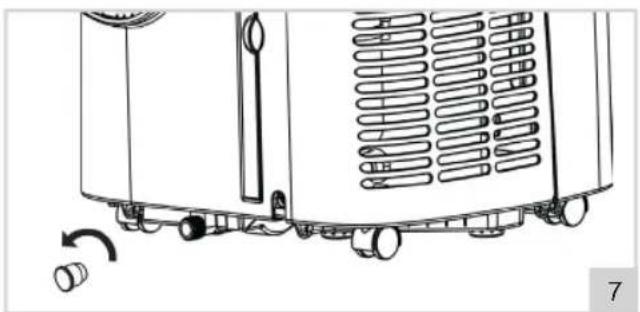
- Unscrew the rubber cap from the drainage hole (figure 1-8), see also figure 7. The water flows from the water collector into the bucket.
- When the water collector is empty, put the rubber cap and screw cap back into the drain hole and make sure it is tightly closed.
ATTENTION:
- Move the appliance carefully and always vertically to prevent water from leaking over the edge of the internal water collector. When emptying, you can tilt the appliance slightly to get the last water out of the water collector.
- If the bucket or other type of container cannot collect all the water at once, replace the rubber cap of the drainage hole in the meantime. Empty the bucket and repeat the steps.
Continuous drainage
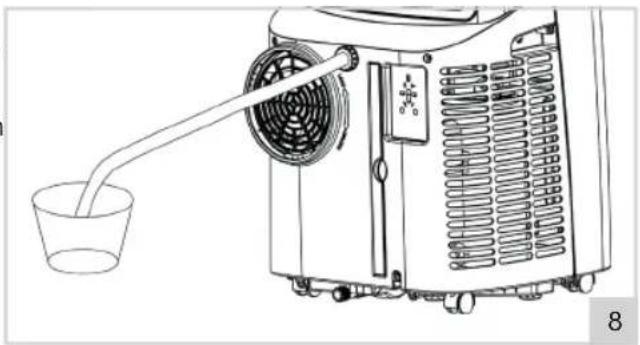
If you frequently use the device to dehumidify or cool air, you can also use the continuous discharge.
- Switch off the appliance and unplug it.
- Unscrew the screw cap and rubber cap from the continuous drain hole (figure 1-10), see also figure 7.
- Connect a 21 mm (1/2") connector with drain hose (not included) to the drain hole (19 mm, see figure 8) and make sure that the end of the hose ends in a drain, bucket or other type of receptacle.
- Use the device as indicated in this manual.
CLEANING AND MAINTENANCE – Clean the filter
For optimal results, you should clean the 2 filters every two weeks and replace them at least once a year, or more often if the filter is visibly closed. Also, clean the filter before storing the appliance for extended periods of non-use or when returning it to use after a longer period of time.
- Switch off the appliance and unplug it.
- Remove the filters at the top and bottom rear of the appliance (figure 9).
- Rinse the filters with lukewarm water or soak in warm soapy water.
- Let the filters dry thoroughly.
- Place the cleaned (or new) filters back into the device.
ATTENTION:
- If the filters are not properly dried, water can get into the device. This can cause (electrical) damage.
PROBLEM SOLVING
| Problem Possible | cause Advised solution | |
| The air-conditioning is not functioning | There is no electricityThe room temperature is lower than the set cooling temperatureIn the cooling mode: the room temperature is too low or too highIn the dehumidifying mode: the room temperature is too lowThe device is standing in sunlight | Check whether the socket the device is connected to, has electricityChange the set cooling temperatureThe device optimally functions at a room temperature between 7°C and 35°CThe device optimally functions at a room temperature of 17°C and higherMove the device into the shade |
| Cooling is not functioning properly | Doors or windows are openCentral heating or other sources of heatThe filter is dirty or cloggedThe inlets or outlets are blocked | Close open doors and windowsTurn off the heatingClean the filterRemove obstructions |
| The device makes a lot of noise | The device is not placed on a stable and flat surface | Place the device on a stable and flat surface |
| Compressor does not function | The device is overheated Wait | a couple of minutes until the temperature has lowered and restart the device |
| Remote control does not work | The batteries are emptyThe distance between device and remote control is too bigThe remote control is not aimed at the device | Replace the batteriesStand closer to the deviceAim the remote control at the device |
| Display indicates ‘E1’ | The outlet temperature sensor does not function properly | Have the outlet temperature sensor checked by a professional |
| Display indicates ‘E2’ | The room temperature sensor does not function properly | Have the room temperature sensor and switches checked by a professional |
WARRANTY CONDITIONS
Bestron offers a 60-month warranty on this equipment against defects resulting from manufacturing and/or material errors, subject to the following conditions.
-
No labour or material costs will be charged during this warranty period.
-
Any repairs carried out under the warranty will not extend the warranty period.
-
Faulty parts, or in the event of exchange, the faulty equipment itself, will automatically become the property of Bestron.
-
The warranty is valid for the first buyer only and is non-transferable.
-
The warranty is not valid for damage caused by:
- Accidents
- Improper use
- Wear and tear
- Neglect
- Faulty installation
- Connection to a different mains voltage than indicated on the type plate
• Unauthorised changes
• Repairs carried out by unqualified third parties
- Use in violation with the applicable statutory, technical or safety standards
- Careless transport without suitable packaging or other protection
- Warranty cannot be claimed:
- For damage during transport
- If the serial number of the appliance is removed or changed
- Items excluded from warranty are:
- Cords
- Lamps
- Glass parts
- Filters
- Batteries
-
The warranty does not entitle the purchaser to compensation for any damage other than replacement or repair of the faulty parts. Bestron cannot in any event be held liable for any indirect or consequential losses caused by or in relation to the equipment it has provided.
-
Claims under a warranty may only be submitted to your (online) retailer or directly to the Bestron Service Department. Never send items without being asked to. We may refuse the parcel and you will be liable for the costs. Contact us first and we tell you how the appliance should be packaged and sent. Each claim under a warranty must be accompanied by the relevant receipt.
SERVICE
If an unexpected problem occurs, please contact the BESTRON service department: www.bestron.com/service
COMPLIMENTI!
R. Neyman
Controllo qualità
| TENSIONE DI RETE 220-240 V | |
| CONSUMO DI ENERGIA 1357 W | |
| QUANTITÀ DI REFRIGERANTE CA. 230 G | |
| TIPO DI REFRIGERANTE R 290 | |
| INTERRUTTORE DIFFERENZIALE CONSIGLIATO 30 MA | |
| PROTEZIONE IN LOCO 16 A |
ATTENZIONE:
R. Neyman
Control de calidad
- Panel de control:
ATENCIÓN:
Let op, brandgevaar!
R290

R. Neyman Kvalitetskontroll
| STRÖM 220-240 V | |
| ENERGIFÖRBRUKNING 1357 W | |
| MÄNGD KÖLDMEDIUM CA. 230 G | |
| TYP AV KÖLDMEDIUM R 290 | |
| REKOMMENDERAD JORDFELSBRYTARE (RCD-BRYTARE) 30 MA | |
| SKYDD PÅ PLATS 16 A |
PROBLEMLÖSNING
- Kontrollpanel:
A. LED-display
B. Timerfunktionsknapp "TIMER"
C. Ventilatorfunktionsknapp "FLÄKT"
D. Temperatur upp-knapp "UPP"
E. Temperatur ner-knapp "NER"
F. Ställ in läge-knapp "LÄGE"
G. Ström på/av-knapp "STRÖM"
WARNING:
RENGÖRING OCH UNDERHÅLL - Rengör filtret
• Felaktig installation
NEED HELP? CHAT WITH US! WHATSAPP CUSTOMER SERVICE

BESTRON.COM/WHATSAPP
- ACHTUNG
- DÉCLARATION DE CONFORMITÉ CE
- ATTENTION
- WAT U MOET WETEN OVER DIT APPARAAT
- WERKING - ALGEMEEN
- LET OP
- REINIGING EN ONDERHOUD - FILTER REINIGEN
- DEFECTS
- CHILDREN
- SAFETY INSTRUCTIONS FOR THIS DEVICE WITH FLAMMABLE REFRIGERANT
- WHAT YOU SHOULD KNOW ABOUT THIS APPLIANCE
- NOTES
- ENVIRONMENT
- CE DECLARATION OF CONFORMITY
- NEYMAN QUALITY CONTROL
- OPERATION - GENERAL
- INSTALLATION
- INSTALLATION - INSTALL HEAT DISSIPATION
- USE - POWER ON/OFF
- USE - SET MODE
- VENTILATE
- DEHUMIDIFY
- COOLING
- USE - SLEEP MODE
- USE - TIMER MODE
- AUTOMATIC POWER-ON
- AUTOMATIC POWER-OFF
- USE - REMOTE CONTROL
- FOR OPTIMAL USE
- CLEANING AND MAINTENANCE - GENERAL
- CLEANING AND MAINTENANCE - WATER DRAINAGE
- CONTINUOUS DRAINAGE
- CLEANING AND MAINTENANCE – CLEAN THE FILTER
- WARRANTY CONDITIONS
- SERVICE
- COMPLIMENTI
- ATTENZIONE
- ATENCIÓN
- WARNING
- RENGÖRING OCH UNDERHÅLL - RENGÖR FILTRET
Brand : BESTRON
Model : Cool & Clean AAC12000
Category : Air Conditioning