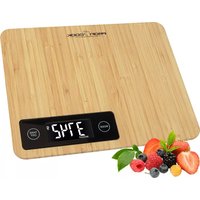
PCKW 1158 BT - Kitchen scales PROFICOOK - Free user manual and instructions
Find the device manual for free PCKW 1158 BT PROFICOOK in PDF.



| Product type | Connected kitchen scale |
| Brand | ProfiCook |
| Model | PCKW 1158 BT |
| Power supply | 2 AAA batteries (1.5 V) not included |
| Maximum load | 5 kg (11 lb) |
| Net weight | Approximately 0.38 kg |
| Bluetooth technology | Bluetooth 4.0 |
| Bluetooth range | Approximately 10 meters |
| Transmission frequency | 2.402 - 2.480 GHz |
| Maximum RF power | 3.16 mW |
| Units of measurement | g, kg, lb, oz |
| Tare function | Yes, with reset to zero |
| Auto-off | After approximately 60 seconds |
| Backlight | Turns off after approximately 10 seconds |
| App connection | OKOK Nutrition (iOS/Android) |
| Cleaning | Slightly damp cloth, do not immerse |
| Safety | Do not exceed 5 kg, private use |
| App compatibility | iOS 7.0+ / Android 4.3+ with Bluetooth 4.0+ |
Frequently Asked Questions - PCKW 1158 BT PROFICOOK
User questions about PCKW 1158 BT PROFICOOK
0 question about this device. Answer the ones you know or ask your own.
Ask a new question about this device
Download the instructions for your Kitchen scales in PDF format for free! Find your manual PCKW 1158 BT - PROFICOOK and take your electronic device back in hand. On this page are published all the documents necessary for the use of your device. PCKW 1158 BT by PROFICOOK.
USER MANUAL PCKW 1158 BT PROFICOOK
natural_image
Modern digital kitchen appliance with a digital display showing 0.00 g and 9 units (no text or symbols on the device itself)Bluetooth-Küchenwaage PC-KW 1158 BT
Kitchen scale with Bluetooth • Waga kuchenna z Bluetooth
Konyhai mérleg Bluetooth funkcióval • Кухонные весы с Bluetooth
Thank you for buying our product. We wish you a great experience with this appliance.
Symbols in these Instruction Manual
Important information for your safety is specially marked. It is essential to comply with these instructions in order to avoid accidents and prevent damage to the appliance:

WARNING:
This warns you of dangers to your health and indicates possible injury risks.

CAUTION:
This refers to possible hazards to the appliance or other objects.

NOTE: This highlights tips and information.
Contents
Safety Information....19
Inserting the Batteries....19
Using the Scales....19
Information about Bluetooth....20
Information on the App "OKOK Nutrition" 20
Cleaning....21
Storage....21
Technical Data....21
Notice of Directive Conformity 21
Disposal....21
Safety Information
Read the operating instructions carefully before putting the appliance into operation and keep the instructions including the warranty, the receipt and, if possible, the box with the internal packing. If you give this appliance to other people, please also pass on the operating instructions.
- The appliance is intended exclusively for private and not for commercial use.
- Do not apply pressure or drop the appliance, as the sensitive electronic circuit could be damaged.
- Do not use the appliance if it is damaged.
- Do not repair the appliance yourself, but rather consult an authorised expert.
- Use the appliance only for the intended purpose.
- The kitchen scales are designed for a maximum weight of 5 kg.
- Protect this measuring appliance against direct sunlight, high temperatures, humidity and dust.
• Children should be supervised at all times in order to ensure that they do not play with the appliance.
- In order to ensure your children's safety, please keep all packaging (plastic bags, boxes, polystyrene etc.) out of their reach.

WARNING:
Do not allow small children to play with the foil. There is a danger of suffocation!
Handling of Batteries

Do not charge!

Do not disassemble!

Insert correctly!

Do not short circuit!

Danger of explosion! Do not expose batteries to intense heat, such as sunlight, fire or similar.
Inserting the Batteries
(Batteries not included)
- Open the battery compartment on the underside.
- Insert 2 batteries of type AAA / R03. Please ensure that the polarity is correct (see the loor of the battery compartment)!
- Close the battery compartment again.
- If the message "to" appears on the display, replace the batteries.
Using the Scales
The kitchen balance was developed to display the weight of food and ingredients.
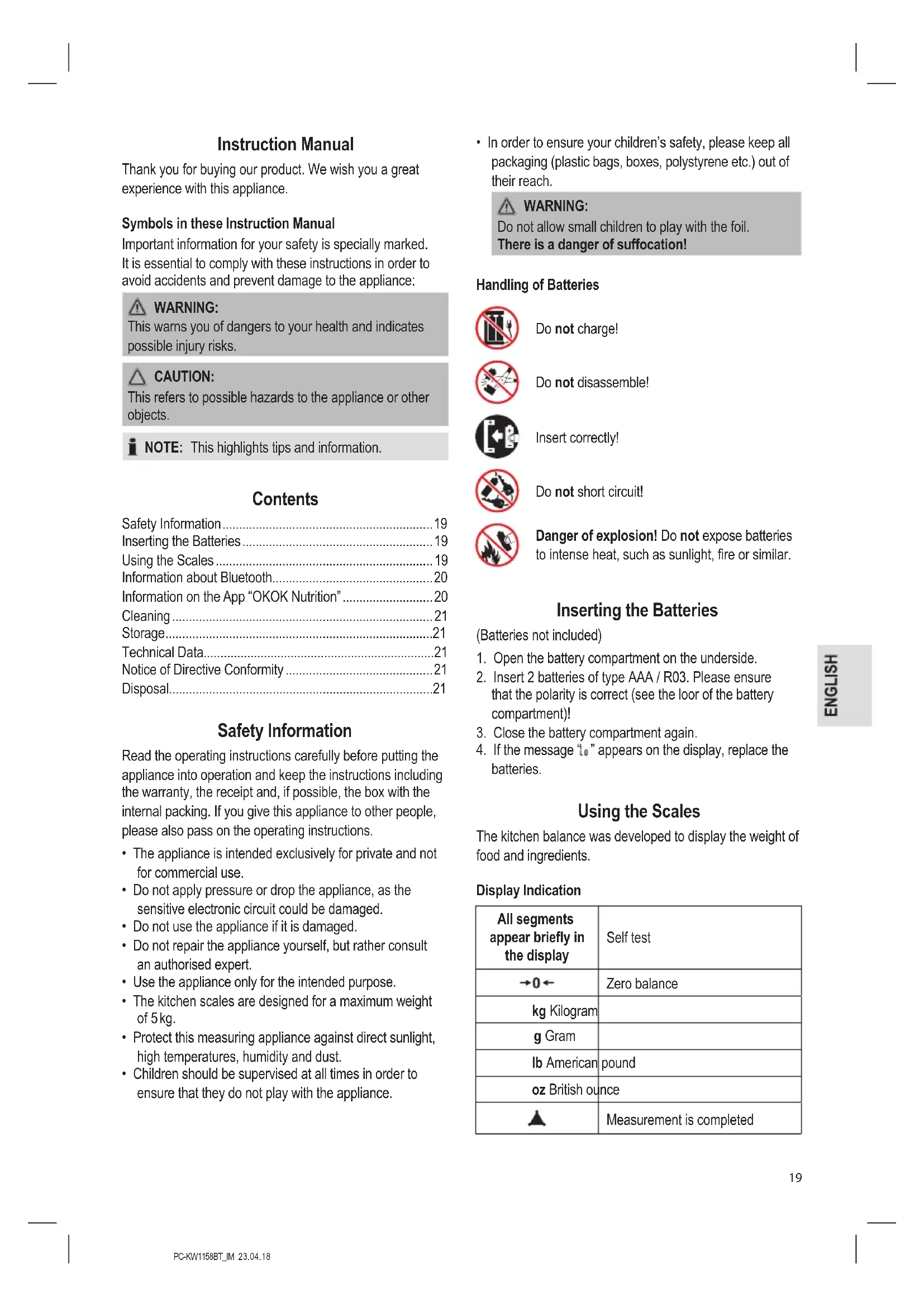
Display Indication
| All segments appear briefly in the display | Self test |
| →0← | Zero balance |
| kg Kilogram | |
| g Gram | |
| lb American pound | |
| oz British ounce | |
| Measurement is completed | |
 | This symbol appears after pressing the ⬤TARE button when having ingredients greater than 750 g |
| ### | Minus sign |
| ### | Bluetooth connection with app successful |
| ### | Battery low |
| ### | Overload |
| ### | Not standing on a stable surface |
Switching On
- Place the scales on a flat, smooth surface.
- Press the ⏻ / TARE button. All segments are briefly illuminated in the display followed by “→0←”.
Weighing
- Use the UNIT button to select the desired unit of measurement: "g", "kg", "lb" or "oz".
- Place the goods on the scale plate centred as far as possible.
- When the ▲ symbol appears, the measurement has been completed.
- You may then read off the measurement.
Tare Function
If you would like to add a further ingredient to the first ingredient and then weigh it:
- Press the ⏻ / TARE button briefly.
- The scale is reset to "0.
- If the ingredient which has been weighed first weighs more than 750 g, the icon will appear in the display.
- If you now place further ingredients on the scales their weight is displayed.
Switching Off
i NOTE:
- To preserve the batteries, the backlight will turn off after approx. 10 seconds.
- With the automatic switch-off the scales turn off automatically after approximately 60 seconds.
If you want to turn off the scale earlier, press and hold the ⏻ / TARE button for approx. 2 seconds.
Periods of Non-usage
If you do not use the appliance for a longer period of time, remove the batteries in order to prevent "leakage" of battery acid.
Information about Bluetooth
Bluetooth is a technology for remote wireless connection of appliances over a short distance. Appliances with Bluetooth Standard transmit in the ISM-Band (Industrial, Scientific and Medical) between 2.402 and 2.480 GHz. Interference may be caused e.g. by WLAN networks, DAB radios, cordless phones, or microwave ovens that operate in the same frequency range.
These scales offer you the possibility of sending the calculated data via Bluetooth to your smartphone or tablet PC. More information can be found in the next section (Information on the App "OKOK Nutrition").
Due to the many different appliance manufacturers, models, and software versions, full functionality cannot be guaranteed.
Information on the App "OKOK Nutrition"
The appliance can be connected to the "OKOK Nutrition" app. This app is analysing the composition of the food. This includes: Calories, fat, protein, carbohydrates, dietary fibre, cholesterol, calcium and iron.
i NOTE:
- The composition of the food which is stated in the app is being displayed in average values only. These depend on quality, nature, degree of ripeness, origin and storage. However, there may be deviations.
• Always consult a doctor first when facing possible deficiency symptoms. This scale is not suitable for supporting you in the treatment of deficiency symptoms without medical supervision.
• We do not assume liability for misapplications.
The “OKOK Nutrition” app is available for android and iOS. Scan the corresponding QR code to get directly to the download.
i NOTE:
Depending on the provider, there may be costs involved in downloading the app.
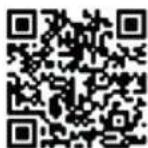
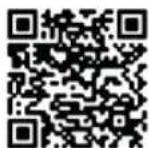
Google Play App Store
System Requirement for Use of the App
• iOS 7.0 or higher + Bluetooth 4.0 or higher
• Android 4.3 or higher + Bluetooth 4.0 or higher
Initial Use with the App
- Install the app "OKOK Nutrition" from the corresponding App Store / Google Play.
- Switch the appliance on by using the ⏻ / TARE button.
- Then select the "Setting" menu in the app.
- Next, click on "My device".
- Click "Bound OKOK Nutrition scale" to establish a Bluetooth connection. Confirm by clicking "Sure".
- The *symbol will light up once the appliance is connected to the smartphone.
Cleaning

CAUTION:
- Do not immerse the appliance in water: the electronic components can be damaged.
- Do not use a wire brush or any abrasive items.
- Do not use any acidic or abrasive detergents.
- Clean the appliance with a slightly moist cloth. Make sure that no humidity or waters seeps into the appliance!
- Dry the appliance well after cleaning with a dry and soft cloth.
Storage
Keep the appliance in a clean, dry place.
Technical Data
Model: PC-KW 1158 BT
Power supply:....2 batteries 1.5 V, Type AAA / R03
Max. weight load: 5 kg (11 lb)
Net weight: .... approx. 0.38 kg
Bluetooth
Bluetooth support: V4.0
Maximum radio-frequency power transmitted: ....3.16 mW
Range: approx. 10 metres
Transmission frequency: 2.402 - 2.480 GHz
The right to make technical and design modifications in the course of continuous product development remains reserved.
Notice of Directive Conformity
Hereby, Clatronic International GmbH declares that the radio equipment type PC-KW 1158 BT is in compliance with Directive 2014 / 53 / EU.
Furthermore, the appliance is in compliance with the requirements of the RoHS directive 2011 / 65 / EC.
The full text of the EU declaration of conformity is available at the following internet address: www.sli24.de
In the "Download" area, please enter the model name PC-KW 1158 BT.
Tested for operation in Great Britain.
Disposal
Meaning of the "Dustbin" Symbol
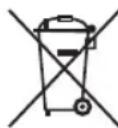
Protect our environment: do not dispose of electrical equipment in the domestic waste.
Please return any electrical equipment that you will no longer use to the collection points provided for their disposal.
This helps avoid the potential effects of incorrect disposal on the environment and human health.
This will contribute to the recycling and other forms of re-utilisation of electrical and electronic equipment.
Information concerning where the equipment can be disposed of can be obtained from your local authority.
Instrukcja obsługi
CTC Clatronic Sp. zo.o.
Ul. Brzeska 1
45-960 Opole