HDTX140EK3CA - External hard drive TOSHIBA - Free user manual and instructions
Find the device manual for free HDTX140EK3CA TOSHIBA in PDF.

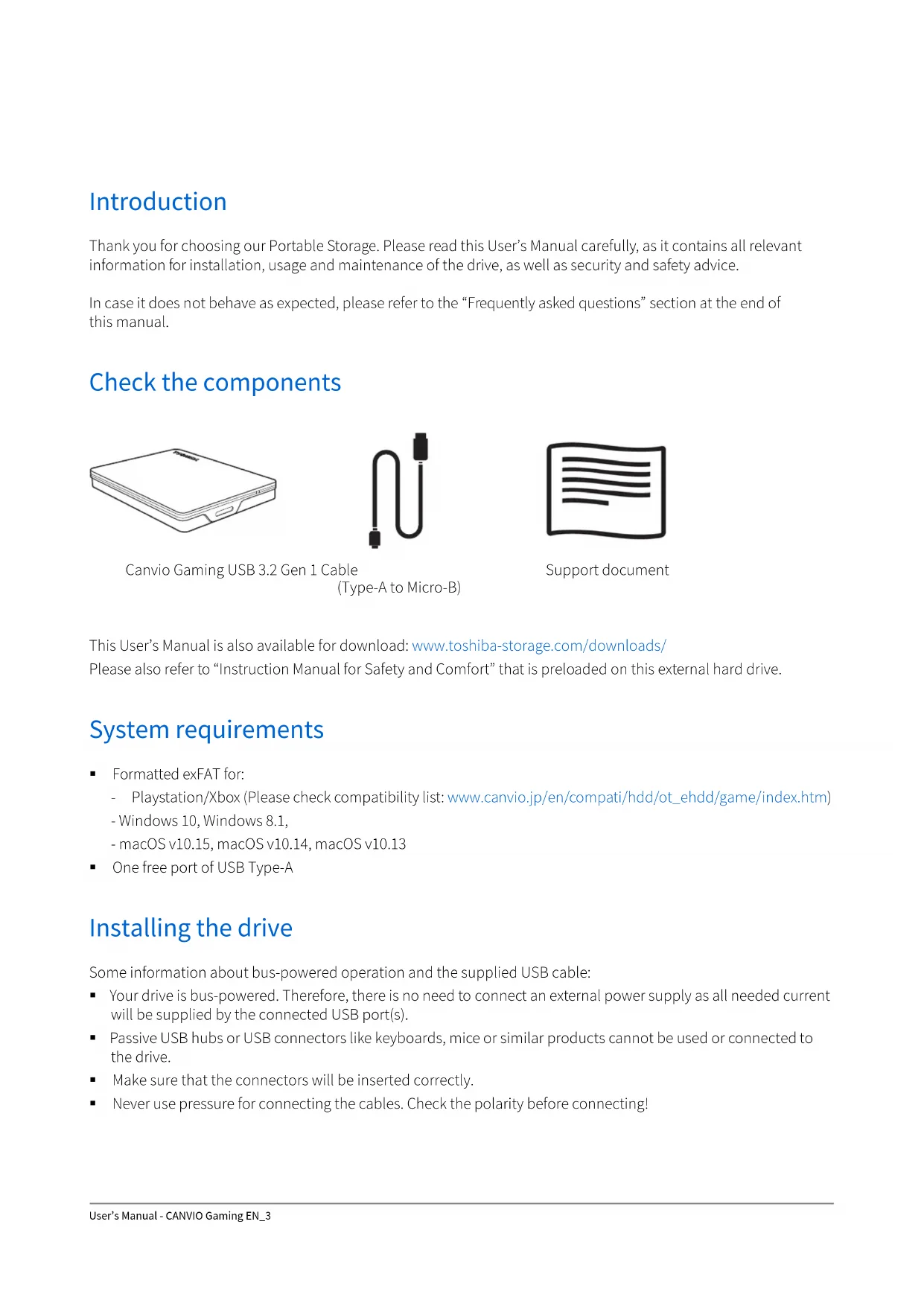


| Product type | External hard drive |
| Brand | Toshiba |
| Model | HDTX140EK3CA |
| Capacity | 1 TB (terabyte) |
| Dimensions (approx.) | 78 x 109 x 14 mm |
| Weight (approx.) | 149 g |
| Interface | USB 3.2 Gen 1 (compatible USB 2.0) |
| Power supply | Via USB bus (no external power required) |
| Pre-installed file system | exFAT |
| Compatible operating systems | Windows 10, Windows 8.1, Playstation, Xbox |
| Main functions | Portable storage, backup, data transfer |
| Maintenance and cleaning | Disconnect before cleaning; use a soft, dry cloth |
| Safety instructions | Do not disconnect during write; avoid moisture and shocks |
| Spare parts / repairability | USB cable included; no spare parts available |
| Operating temperature | Not specified; normal heating during use |
| Warranty | See Toshiba website for details |
Frequently Asked Questions - HDTX140EK3CA TOSHIBA
User questions about HDTX140EK3CA TOSHIBA
0 question about this device. Answer the ones you know or ask your own.
Ask a new question about this device
Download the instructions for your External hard drive in PDF format for free! Find your manual HDTX140EK3CA - TOSHIBA and take your electronic device back in hand. On this page are published all the documents necessary for the use of your device. HDTX140EK3CA by TOSHIBA.
USER MANUAL HDTX140EK3CA TOSHIBA
Table of Contents
Introduction 3
Check the components 3
System requirements.... 3
Installing the drive.... 3
Connecting the drive to your compatible device.... 4
Dismount and disconnect the drive.... 4
Cleaning the drive case / enclosure 5
Further advise.... 5
Frequently asked questions 5
Troubleshooting 6
TOSHIBA Support 6
Regulatory statements.... 7
Introduction
Thank you for choosing our Portable Storage. Please read this User's Manual carefully, as it contains all relevant information for installation, usage and maintenance of the drive, as well as security and safety advice.
In case it does not behave as expected, please refer to the “Frequently asked questions” section at the end of this manual.
Check the components

This User's Manual is also available for download: www.toshiba-storage.com/downloads/
Please also refer to "Instruction Manual for Safety and Comfort" that is preloaded on this external hard drive.
System requirements
- Formatted exFAT for:
- Playstation/Xbox (Please check compatibility list: www.canvio.jp/en/compati/hdd/ot_ehdd/game/index.htm)
- Windows 10, Windows 8.1,
Installing the drive
Some information about bus-powered operation and the supplied USB cable:
- Your drive is bus-powered. Therefore, there is no need to connect an external power supply as all needed current will be supplied by the connected USB port(s).
■ Passive USB hubs or USB connectors like keyboards, mice or similar products cannot be used or connected to the drive.
■ Make sure that the connectors will be inserted correctly.
■ Never use pressure for connecting the cables. Check the polarity before connecting!
Connecting the drive to your compatible device
Please check device compatibility and connecting instructions by reviewing the applicable user manuals for such device.
![graph LR A["TOSHIBA"] <--> B["Game Controller"] B --> C["Next Switch"]](/content/2026/03/571091/images/34da49dbcb92dbd6b984dea78111b945df245dde2a91ba83116a643afb894138.jpg)
- Plug the USB 3.2 Gen 1 micro-B connector into the corresponding port of the drive itself.
-
With your compatible device powered on and fully booted up, plug the USB Type-A connector into a USB Type-A port of your compatible device.
-
Use the supplied USB Type-A cable to connect the portable drive directly to a compatible USB port.
- Please note that reformatting the portable drive will remove all previously stored user content.
- To disconnect the portable drive from a connected device, follow the procedure specified for the relevant device.
- Do not disconnect the portable drive or turn off the connected device while the portable drive is in operation (while Power/Access lamp is blinking) as this may cause portable drive failure or data loss.
Dismount and disconnect the drive
It is strongly recommended not to unplug the drive by just unplugging the cable connection as it may be that data is written to the drive at that time. Such data will be lost and the drive may be damaged physically!
Please follow the steps below for a safe dismount of the drive.
- Please follow the on-screen instructions of your device to complete the dismount process.
- Click the "Hardware and Eject Media" icon.
A pop-up message box will appear listing the external devices connected to your computer.
- Select the TOSHIBA drive to eject.
After a few seconds, you will get the notification that it is now safe to remove the device.
- Click "OK" and you can unplug the drive now.
- Ctrl-click on the hard disk icon and choose "Eject".
OR
- Drag the hard disk icon to the trashcan. You can unplug the drive now.
Cleaning the drive case / enclosure
Before cleaning the drive, make sure that it's physically disconnected from the computer. We suggest to use standard products for cleaning it and to make sure that possible remaining liquid on the surface will be wiped off.
Further advise
For any further action of normal operation such as renaming the drive, backup data, or file management, we suggest to read your operation system user's manual.
Also for maintenance tasks such as defragmenting and optimisation we suggest to refer to the operating system user's manual.
We also strongly suggest having anti-virus software installed to protect your data against intended damage caused by virus or trojan programs.
Frequently asked questions
Q: Do I need USB drivers for Windows?
A: No, they are already available with your operating system.
Q: Can I boot my system from the drive?
A: No, because Windows does not support booting from external hard drives.
Q: Why doesn't the drive need a fan?
A: The drives are designed to have optimal heat dissipation, and therefore no fan is required. This results in a near silent operation.
Q: Why is the capacity of my drive (as shown in Windows) lower than the drives actual stated capacity?
A: This difference can be explained because of the different methods of calculating the capacity. Hard drive manufacturers calculate on the decimal system, while the operating system calculates in the binary system.
Example decimal:
1TB = 1,000GB
1GB = 1,000MB = 1,000,000KB = 1,000,000,000 bytes
Example binary:
1GB = 1,024MB = 1,048,576KB = 1,073,741,824 bytes
As a result, a 1TB (decimal) hard disk appears in Windows to have just 931GB (binary).
Q: Can I use my drive to copy an operating system from one computer to another?
A: No, you must follow the operating system supplier instructions for installation. A simple copy does not work.
Troubleshooting
My computer does not recognize the disk drive at all.
■ Make sure all of your connections are secure.
■ If your drive is connected via a USB hub, make sure that it has its own power supply.
- If using an add-on card, make sure it is working properly and update the software/firmware.
Is it dangerous if the drive feels warm whilst in operation?
A: This is normal, and therefore not dangerous.
The drive gives me a "Device cannot start."
A: Two possible reasons. It is either a power problem and you should check the connections, or the drive has a malfunction and requires service.
I cannot see my drive in “My Computer/This PC”, but it does appear in the Device Manager.
A: Follow these instructions:
1. Right-click "My Computer/This PC".
2. Select "Manage" in the pop-up menu.
3. Select "Disk Management".
You should see a list of available storage devices.
4. Check whether your drive is listed.
5. Right-click the right hand box and select "Delete Partition" in the pop-up menu.
6. Right-click the box and select "Create New Partition" in the pop-up menu.
7. Then select "Primary Partition" in the partition wizard window. Click next.
8. A drive letter will be displayed, which you can change. Click next.
NOTE When you format the drive all the data on your drive will be deleted.
- Confirm to format the drive.
As I try to format the drive, I receive the message “Could not complete format”.
A: This can be caused by formatting the drive with FAT file system. Try "NTFS" file system. This should solve the problem.
TOSHIBA Support
Need help?
Please contact TOSHIBA's hard drive and storage products support page:
www.toshiba-storage.com/support
For warranty claims, please check:
www.toshiba-storage.com/warranty-claims
Regulatory statements
CE Compliance

This product is CE marked in accordance with the requirements of the applicable EU Directives. Responsible for CE marking is Toshiba Electronics Europe GmbH, Hansaallee 181, 40549 Düsseldorf, Germany.
Working Environment
The Electromagnetic Compliance (EMC) of this product has been verified typically for this product category for a so called Residential, Commercial & Light Industry Environment. Any other working environment has not been verified by Toshiba and the use of this product in these working environments is maybe restricted or cannot be recommended. Possible consequences of the use of this product in non-verified working environments can be: Disturbances of other products or of this product in the nearby surrounding area with temporarily malfunction or data loss/ corruption as result. Example of non-verified working environments and related advices:
- Industrial environment (e.g. where 3-phase 380V mains is being used mainly): Danger of disturbances of this product due to possible strong electromagnetic fields especially near to big machinery or power units.
■ Medical environment: The compliance to the Medical Product Directive has not been verified by Toshiba, therefore this product cannot be used as a medical product without further verification. The use in usual office environments e.g. in hospitals should be no problem if there is no restriction by the responsible administration.
■ Automotive environment: Please search the owner instructions of the related vehicle for advices regarding the use of this product (category).
■ Aviation environment: Please follow the instructions of the flight personnel regarding restrictions of use.
Additional Environments not Related to EMC
- Outdoor use: As a typical home/office equipment this product has no special resistance against ingress of moisture and is not strong shock proofed.
- Explosive atmosphere: The use of this product in such special working environment (Ex) is not allowed.
Following information is only valid for EU-member States:
REACH - Compliance Statement
Toshiba will meet all REACH (Registration, Evaluation, Authorization and Restriction of Chemicals) requirements and is committed to provide customers with information about the chemical substances in our products according to REACH regulation.
Disposal of products

The use of the symbol indicates that this product may not be treated as household waste. By ensuring this product is disposed of correctly, you will help prevent potential negative consequences for the environment and human health, which could otherwise be caused by inappropriate waste handling of this product. For more detailed information about recycling of this product, please contact your local city office, your household waste disposal service or the shop where you purchased the product.
The following information is valid only for Turkey:
Compliant with AEEE Regulation.
Notices
©2020 TOSHIBA Electronics Europe GmbH. All rights reserved.
TOSHIBA reserves the right to make technical changes. TOSHIBA assumes no liability for damages incurred directly or indirectly from errors, omissions or discrepancies between this product and the documentation. The Toshiba name and its logos are registered trademarks of Toshiba.
macOS is a trademark of Apple Inc.
Other company names, product names, and service names may be trademarks of their respective companies.
Product specifications, configurations, colors, components and service are subject to change without notice.
One Gigabyte (GB) means one billion bytes and one Terabyte (TB) means one trillion bytes. Total available capacity will vary based on operating environment, and your results and storage capacity will vary accordingly. A computer operating system, however, reports storage capacity using powers of 2 for the definition of 1TB = 2A0 = 1\ 099\ 511\ 627\ 776 bytes and therefore shows less storage capacity.
NOTE
- When using this product, use the provided USB cable to connect it directly to the USB port.
■ If sufficient power is not supplied via the USB port, the product will not function. - Depending on the specifications of the device you are connecting to, the transfer speed may be that of USB 2.0. For details, refer to the manual of the device you are connecting to.
- As a precaution against losing data stored on this product, be sure to regularly back up as much of your data as possible on another storage device.
Obsah
Úvod 2
Kontrola součástí 2
www.toshiba-storage.com/support
www.toshiba-storage.com/warranty-claims
Regulační opatření
Splnění CE

1 GB = 1.024 MB = 1.048.576 KB = 1.073.741.824 Byte
www.toshiba-storage.com/support
www.toshiba-storage.com/warranty-claims
1 GB = 1.024 MB = 1.048.576 KB = 1.073.741.824 byte
Dette betyder, at en harddisk på 1 TB (i 10-talssystemet) i Windows ser ud til kun at være på 931 GB (i det binære talsystem).
www.toshiba-storage.com/support
www.toshiba-storage.com/warranty-claims
Regelerklæeringer
CE-overensstemmelse

Canvio Gaming Cable USB 3.2 Gen 1

(Type-A a Micro-B)

1 GB = 1.024 MB = 1.048.576 KB = 1.073.741.824 bytes
www.toshiba-storage.com/warranty-claims
Canvio Gaming USB 3.2 Gen 1 -johto

(Type-A - Micro-B)

Tukiasiakirja
www.toshiba-storage.com/support
www.toshiba-storage.com/warranty-claims
www.toshiba-storage.com/support
www.toshiba-storage.com/warranty-claims
Règlements
Homologation CE

1GB = 1.024MB = 1.048.576KB = 1.073.741.824 bytes
www.toshiba-storage.com/warranty-claims
www.toshiba-storage.com/support
U vezi popravaka u jamstvenom roku potražite:
www.toshiba-storage.com/warranty-claims
Regulativne izjave
CE sukladnost

Ovaj proizvod nosi CE oznaku sukladno zahtjevima važećih direktiva EZ. Toshiba Electronics Europe GmbH, Hansaallee 181, 40549 Düsseldorf, Njemačka odgovorna je za CE oznake.
Radno okruženje
Elektromagnetska sukladnost (EMC) ovog proizvoda se obično verificira za kategoriju ovog proizvoda i vrijedi za takozvana stambena, komercijalna i lakoindustrijska okruženja. Sva druga okruženja u Toshibi nisu verificirana i upotreba ovog proizvoda u tim radnim okruženjima može biti ograničena ili se ne preporučuje. Moguće posljedice korištenja ovog proizvoda u neverificiranim okruženjima mogu biti: ometanje rada drugih uređaja ili ovog uređaja u bližem okolnom području, posljedica čega je povremeni neispravan rad ili gubitak/oštećenje podataka. Primjeri neverificiranih radnih okruženja i odgovarajući savjeti:
- Industrijsko okruženje (npr. gdje se pretežno koristi trofazna mreža od 380 V): opasnost od smetnji na ovom uređaju zbog mogućih snažnih elektromagnetskih polja osobito u blizini velikih strojeva ili jedinica za napajanje.
- Medicinska okruženja: sukladnost s direktivom o medicinskim proizvodima nije verificirana u Toshibi, te se stoga ovaj proizvod bez daljnjih verifikacija ne smije koristiti kao medicinski proizvod. Upotreba u uobičajenim uredskim okruženjima, npr. u bolnicama ne predstavlja problem ako odgovarajuća administracija nije nametnula odgovarajuća ograničenja.
- Automobilska oprema: molimo vas potražite savjete o upotrebi ovog proizvoda (kategorije) u vlasničkim uputama svakog pojedinog vozila.
- Zrakoplovna oprema: držite se uputa koje ćete dobiti od zrakoplovnog osoblja u vezi ograničenja uporabe.
www.toshiba-storage.com/support
www.toshiba-storage.com/warranty-claims
1 GB = 1.024 MB = 1.048.576 KB = 1.073.741.824 byte
www.toshiba-storage.com/support
www.toshiba-storage.com/warranty-claims
1 GB = 1.024 MB = 1.048.576 KB = 1.073.741.824 bytes
www.toshiba-storage.com/support
www.toshiba-storage.com/warranty-claims
Voorschriften
www.toshiba-storage.com/support
For garantikrav, se
www.toshiba-storage.com/warranty-claims
www.toshiba-storage.com/support
1GB = 1.024MB = 1.048.576KB = 1.073.741.824 bytes
www.toshiba-storage.com/support
www.toshiba-storage.com/warranty-claims
Canvio Gaming USB 3.2 Gen 1 kabl

(Type-A na Micro-B)

Dokument za podršku
Ovaj Korisnički priručnik može da se preuzme sa stranice: www.toshiba-storage.com/downloads/
1 GB = 1.024 MB = 1.048,576 KB = 1.073,741,824 bajtova
Kao rezultat, čvrsti disk od 1 TB (decimalni sistem) na Windows sistemu čini se da ima samo 931 GB (binarni sistem).
P: Da li mogu da upotrebim disk jedinicu za kopiranje operativnog sistema sa jednog računara na drugi?
O: Ne, za instalaciju se morate pridržavati uputstava dobavljača operativnog sistema. Jednostavan postupak kopiranja neće funkcionisati.
Rešavanje problema
www.toshiba-storage.com/support
www.toshiba-storage.com/warranty-claims
Regulativne izjave
Usaglašenost sa oznakom CE

Ovaj proizvod nosi oznaku CE u skladu sa zahtevima primenljivih Direktiva EU. Odgovorna za oznaku CE je kompanija Toshiba Electronics Europe GmbH, Hansaallee 181, 40549 Düsseldorf, Nemačka.
Radno okruženje
Elektromagnetna usaglašenost (EMC) ovog proizvoda odobrena je tipično za ovu kategoriju uređaja, za takozvano stambeno, komercijalno i neintezivno industrijsko okruženje. Svako drugo radno okruženje kompanija Toshiba ne odobrava, a upotreba ovog proizvoda u takvim radnim okruženjima može biti ograničena ili se ne može preporučiti. Moguće posledice upotrebe ovog proizvoda u neodobrenim radnim okruženjima mogu biti ometanja drugih proizvoda ili ovog proizvoda u okolnoj oblasti uz privremeni otkaz ili gubitak/oštećenje podataka kao rezultat.
Primer neodobrenih radnih okruženja i saveta vezanih za njih:
- Industrijsko okruženje (npr. gde se uglavnom koristi trofazno napajanje od 380 V): opasnost od smetnji kod ovog proizvoda usled mogućih snažnih elektromagnetnih polja, posebno u blizini velikih mašina ili strujnih uređaja.
- Medicinsko okruženje: usaglašenost sa Direktivom za medicinske proizvode nije potvrđena od strane kompanije Toshiba, stoga se ovaj proizvod ne može koristiti u medicinske svrhe bez dodatne potvrde. Upotreba u uobičajenim kancelarijskim okruženjima, npr. u bolnicama, ne bi trebalo da predstavlja problem, ukoliko ne postoje ograničenja od strane odgovorne administracije.
- Automobilsko okruženje: pogledajte korisnička uputstva za dotično vozilo za savete koji se odnose na upotrebu ovog proizvoda (kategorija).
Vazdušno okruženje: sledite savete letačkog osoblja koji se odnose na ograničenja upotrebe.
www.toshiba-storage.com/support
www.toshiba-storage.com/warranty-claims
www.toshiba-storage.com/support
www.toshiba-storage.com/warranty-claims
Bestämmelser
CE-märkning

Canvio Gaming Kábel USB 3.2 Gen 1

(Type-A na Micro-B)

www.toshiba-storage.com/support
www.toshiba-storage.com/warranty-claims
www.toshiba-storage.com/support
www.toshiba-storage.com/warranty-claims
Canvio Gaming USB 3.2 Gen 1 Kablosu

(Tip-A - Mikro-B)

Destek belgesi
www.toshiba-storage.com/support
www.toshiba-storage.com/warranty-claims
مستند الدعم
Canvio Gaming
www.toshiba-storage.com/support
www.toshiba-storage.com/warranty-claims
www.toshiba-storage.com/support
www.toshiba-storage.com/warranty-claims


- TABLE OF CONTENTS
- INTRODUCTION
- CHECK THE COMPONENTS
- SYSTEM REQUIREMENTS
- INSTALLING THE DRIVE
- CONNECTING THE DRIVE TO YOUR COMPATIBLE DEVICE
- DISMOUNT AND DISCONNECT THE DRIVE
- CLEANING THE DRIVE CASE / ENCLOSURE
- FURTHER ADVISE
- FREQUENTLY ASKED QUESTIONS
- TROUBLESHOOTING
- TOSHIBA SUPPORT
- REGULATORY STATEMENTS
- CE COMPLIANCE
- WORKING ENVIRONMENT
- ADDITIONAL ENVIRONMENTS NOT RELATED TO EMC
- REACH - COMPLIANCE STATEMENT
- DISPOSAL OF PRODUCTS
- NOTICES
- NOTE
- OBSAH
- REGULAČNÍ OPATŘENÍ
- SPLNĚNÍ CE
- REGELERKLÆERINGER
- CE-OVERENSSTEMMELSE
- RÈGLEMENTS
- HOMOLOGATION CE
- REGULATIVNE IZJAVE
- CE SUKLADNOST
- RADNO OKRUŽENJE
- VOORSCHRIFTEN
- REŠAVANJE PROBLEMA
- USAGLAŠENOST SA OZNAKOM CE
- BESTÄMMELSER
- CE-MÄRKNING
Brand : TOSHIBA
Model : HDTX140EK3CA
Category : External hard drive