QH4 - Headphone amplifier SAMSON - Free user manual and instructions
Find the device manual for free QH4 SAMSON in PDF.



| Product Type | 4-Channel Headphone Amplifier |
| Brand | Samson |
| Model | QH4 |
| Dimensions (L x W x H) | 124 x 124 x 40 mm (4.88 x 4.88 x 1.57 in) |
| Weight | 0.4 kg (0.88 lb) |
| Power Supply | External adapter 15 V DC, 800 mA, center positive |
| Maximum Output Power | 282 mW per channel (0.5% THD at 32 Ω) |
| Minimum Load Impedance | 16 Ω |
| Inputs | 2 x 1/4" TRS balanced (L/Mono, R), 1 x 1/8" TRS stereo unbalanced (AUX IN) |
| Outputs | 4 x 1/4" TRS stereo (headphone), 1 x 1/8" TRS stereo unbalanced (AUX OUT) |
| Switches and Controls | MASTER volume with power switch, MUTE, MONO, 4 channel volume knobs |
| Frequency Response | 20 Hz to 20 kHz ±0.5 dB (inputs), 20 Hz to 20 kHz -1 dB at 32 Ω (headphone outputs) |
| Signal-to-Noise Ratio | 96 dB (re 1 mW at 32 Ω load) |
| Dynamic Range | 122 dB (22k BW) |
| Power Indicator | White LED on top panel |
| Maintenance and Cleaning | Disconnect device before cleaning; use a dry cloth. No user-serviceable parts. |
| Safety | Do not open the enclosure; risk of electric shock. Protect your hearing by avoiding excessive sound levels. Follow recommended exposure durations (OSHA). |
| Spare Parts and Repairability | No user-replaceable parts. For repairs, contact a qualified technician or Samson customer service. |
| General Information | Compliant with FCC Part 15 and EU Directive 2014/30/EU. Manufacturer: Samson Technologies Corp. |
| Warranty | Limited warranty included; keep warranty card. For service, request an RA number before returning. |
Frequently Asked Questions - QH4 SAMSON
User questions about QH4 SAMSON
0 question about this device. Answer the ones you know or ask your own.
Ask a new question about this device
Download the instructions for your Headphone amplifier in PDF format for free! Find your manual QH4 - SAMSON and take your electronic device back in hand. On this page are published all the documents necessary for the use of your device. QH4 by SAMSON.
USER MANUAL QH4 SAMSON
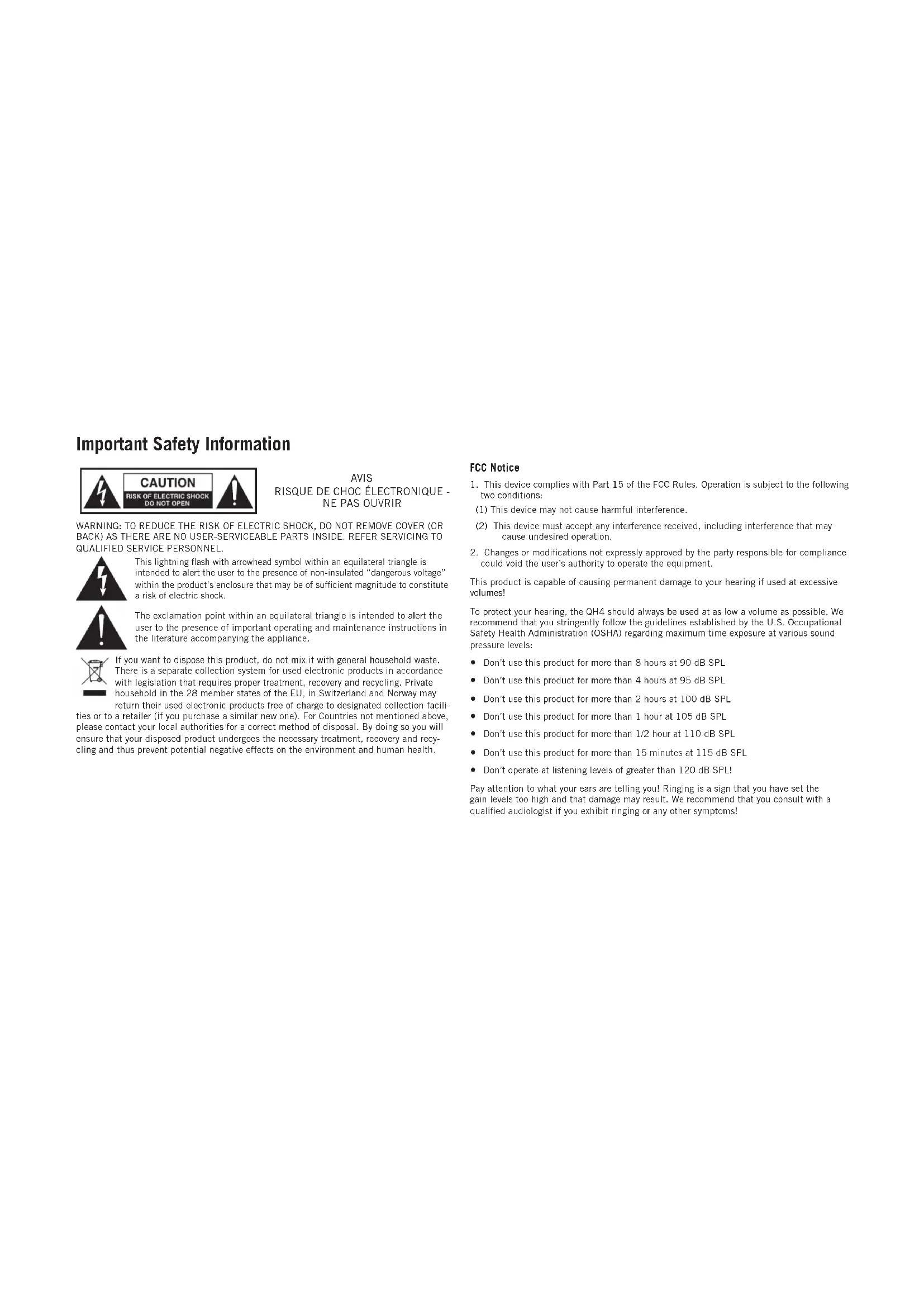
This lightning flash with arrowhead symbol within an equilateral triangle is intended to alert the user to the presence of non-insulated "dangerous voltage" within the product's enclosure that may be of sufficient magnitude to constitute a risk of electric shock.

The exclamation point within an equilateral triangle is intended to alert the user to the presence of important operating and maintenance instructions in the literature accompanying the appliance.

If you want to dispose this product, do not mix it with general household waste. There is a separate collection system for used electronic products in accordance with legislation that requires proper treatment, recovery and recycling. Private household in the 28 member states of the EU, in Switzerland and Norway may
return their used electronic products free of charge to designated collection facilities or to a retailer (if you purchase a similar new one). For Countries not mentioned above, please contact your local authorities for a correct method of disposal. By doing so you will ensure that your disposed product undergoes the necessary treatment, recovery and recycling and thus prevent potential negative effects on the environment and human health.
AVIS
RISQUE DE CHOC ÉLECTRONIQUE - NE PAS OUVRIR
FCC Notice
- This device complies with Part 15 of the FCC Rules. Operation is subject to the following two conditions:
(1) This device may not cause harmful interference.
(2) This device must accept any interference received, including interference that may cause undesired operation.
- Changes or modifications not expressly approved by the party responsible for compliance could void the user's authority to operate the equipment.
This product is capable of causing permanent damage to your hearing if used at excessive volumes!
To protect your hearing, the QH4 should always be used at as low a volume as possible. We recommend that you stringently follow the guidelines established by the U.S. Occupational Safety Health Administration (OSHA) regarding maximum time exposure at various sound pressure levels:
- Don't use this product for more than 8 hours at 90 dB SPL
- Don't use this product for more than 4 hours at 95 dB SPL
- Don't use this product for more than 2 hours at 100 dB SPL
- Don't use this product for more than 1 hour at 105 dB SPL
- Don't use this product for more than 1/2 hour at 110 dB SPL
- Don't use this product for more than 15 minutes at 115 dB SPL
- Don't operate at listening levels of greater than 120 dB SPL!
Pay attention to what your ears are telling you! Ringing is a sign that you have set the gain levels too high and that damage may result. We recommend that you consult with a qualified audiologist if you exhibit ringing or any other symptoms!
Important Safety Information
- Read these instructions.
- Keep these instructions.
- Heed all warnings.
- Follow all instructions.
- Do not use this apparatus near water.
- Clean only with dry cloth.
- Do not block any ventilation openings. Install in accordance with the manufacturer's instructions.
- Do not install near any heat sources such as radiators, heat registers, stoves, or other apparatus (including amplifiers) that produce heat.
- Do not defeat the safety purpose of the polarized or grounding type plug. A polarized plug has two blades with one wider than the other. A grounding type plug has two blades and a third grounding prong. The wide blade or the third prong are provided for your safety. If the provided plug does not fit into your outlet, consult an electrician for replacement of the obsolete outlet.
- Protect the power cord from being walked on or pinched particularly at the plugs, convenience receptacles, and at the point where they exit from the apparatus.
- Only use attachments/accessories specified by the manufacturer.
- Use only with the cart, stand, tripod, bracket, or table specified by the manufacturer, or sold with the apparatus. When a cart is used, use caution when moving the cart/ apparatus combination to avoid injury from tip-over.
- Unplug the apparatus during lightening storms or when unused for long periods of time.
- Refer all servicing to qualified personnel. Service is required when the apparatus has been damaged in any way, such as power supply cord or plug is damaged, liquid has been spilled or objects have fallen into the apparatus has been exposed to rain or moisture, does not operate normally, or has been dropped.
- This appliance shall not be exposed to dripping or splashing water and that no object filled with liquid such as vases shall be placed on the apparatus.
- Caution-to prevent electrical shock, match wide blade plug wide slot fully insert.
- Please keep a good ventilation environment around the entire unit.
- To prevent injury, this apparatus must be securely attached to the stand in accordance with the installation instructions.

Disconnection from the MAINS: The direct plug-in adapter is used as disconnect device, the disconnect device shall remain readily operable.
Hereby, Samson Technologies Corp., declares that this QH4 is in compliance with the essential requirements and other relevant provisions of Directive 2014/30/EU. The declaration of conformity may be consulted at: http://www.samsontech.com/site_media/support/manuals/QH4_DOC.pdf

Introduction
Thank you for purchasing the Samson QH4 4-channel headphone monitoring system. The QH4 provides an elegant solution for headphone monitoring, either on stage or in the studio. The perfect addition to your home recording studio, podcasting setup or just kicking back listening to music, the QH4 delivers super clean, loud, audio fidelity. The QH4 is a specially designed headphone distribution amplifier that allows you to control the level balance between four individual sets of headphones. Providing over 280mW of power to each headphone channel, the QH4 is compatible with virtually all popular headphone models. And its compact, elegant design, fits into any desktop or mobile application.
In the box, you'll find a registration card enclosed—please don't forget to follow the instructions so that you can receive online technical support and so we can send you updated information about this and other Samson products in the future. If you have any questions or comments regarding the QH4 or any other products from Samson, do no hesitate to contact us at support@samsontech.com.
With proper care and maintenance, your QH4 will operate trouble-free for many years. Should your QH4 ever require servicing, a Return Authorization (RA) number must be obtained before shipping your unit to Samson. Without this number, the unit will not be accepted. Please visit www.samsontech.com/ra for an RA number prior to shipping your unit. Please retain the original packing materials and, if possible, return the unit in its original carton. If your QH4 was purchased outside of the United States, contact your local distributor for warranty details and service information.
Quick Start
Follow this basic procedure for setting up and using your QH4 4-Channel Headphone Amplifier.
NOTE: Before you connect any headphones to the QH4, be sure to double check that the signal source and QH4 amplifier level controls are turned all the all the way down to their fully counter clockwise positions. The QH4 can generate loud signal levels into the connected headphone. We recommend that you exercise extreme caution and care for your ears. Always start with the level controls all the way off and slowly raise the signal to a comfortable listening level.
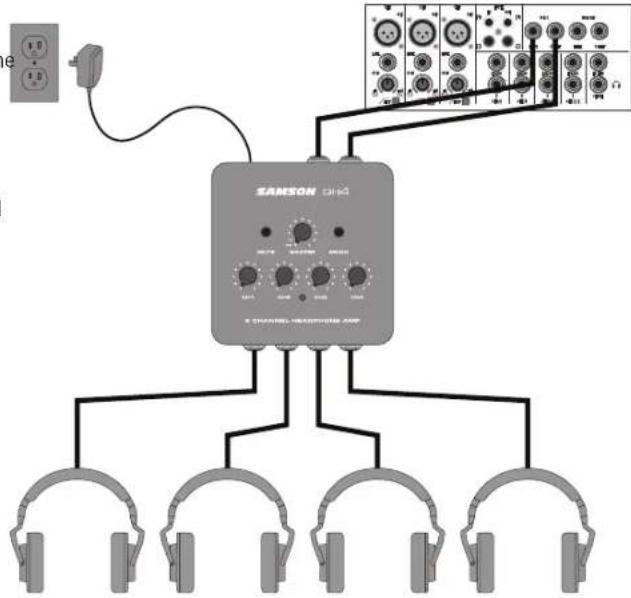
- Turn the MASTER Volume knob all the way down until it is in the off-position (rotate counterclockwise until it clicks), and turn all four headphone channel volume knobs to their minimum (fully counterclockwise) setting.
- Connect the included power supply to the QH4, and plug it into an AC wall socket, but leave its power off for the moment.
- Connect the outputs from the device you want monitored to the Left and Right INPUTS on the QH4 rear panel. The QH4 accepts both balanced and unbalanced signals. It is recommended to use balanced 1/4" TRS cables because it minimizes extraneous noise from entering the signal path.
- Connect headphones to the 1/4" headphone output jacks.
- Play an audio signal into the QH4 inputs.
- Raise the MASTER volume half way (to the 12 o'clock position).
- Slowly turn the channel's level knob clockwise until you hear the desired level.
- Repeat the previous step for all Channels that have headphones connected, making sure to start with the Headphone Volume knob completely counterclockwise and then slowly raising it until the desired level is achieved.
flowchart
graph TD
    A["Headphones"] --> B["Central Amplifier"]
    B --> C["Output Channels 1-10"]
    B --> D["Output Channels 11-12"]
    B --> E["Output Channels 13-14"]
    B --> F["Output Channels 15-16"]
    B --> G["Output Channels 17-18"]
    B --> H["Output Channels 19-20"]
    B --> I["Output Channels 21-22"]
    B --> J["Output Channels 23-24"]
    B --> K["Output Channels 25-26"]
    B --> L["Output Channels 27-28"]
    B --> M["Output Channels 29-30"]
    B --> N["Output Channels 31-32"]
    B --> O["Output Channels 33-34"]
    B --> P["Output Channels 35-36"]
    B --> Q["Output Channels 37-38"]
    B --> R["Output Channels 39-40"]
    B --> S["Output Channels 41-42"]
Quick Start
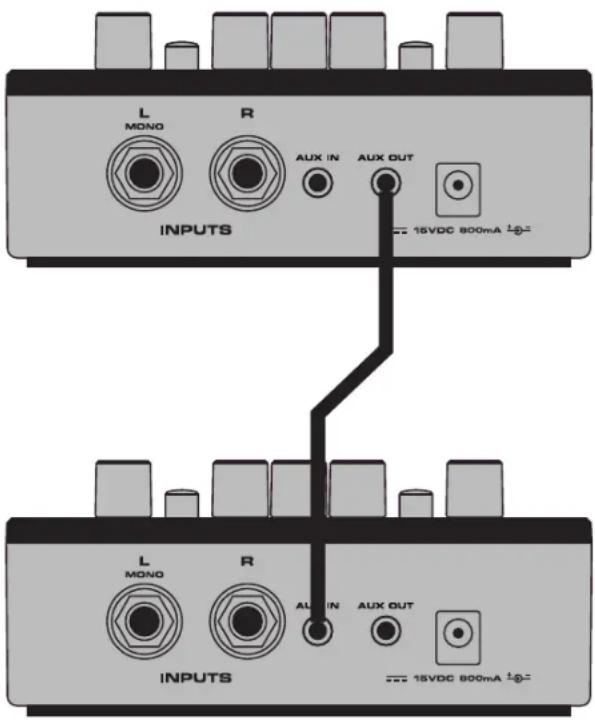
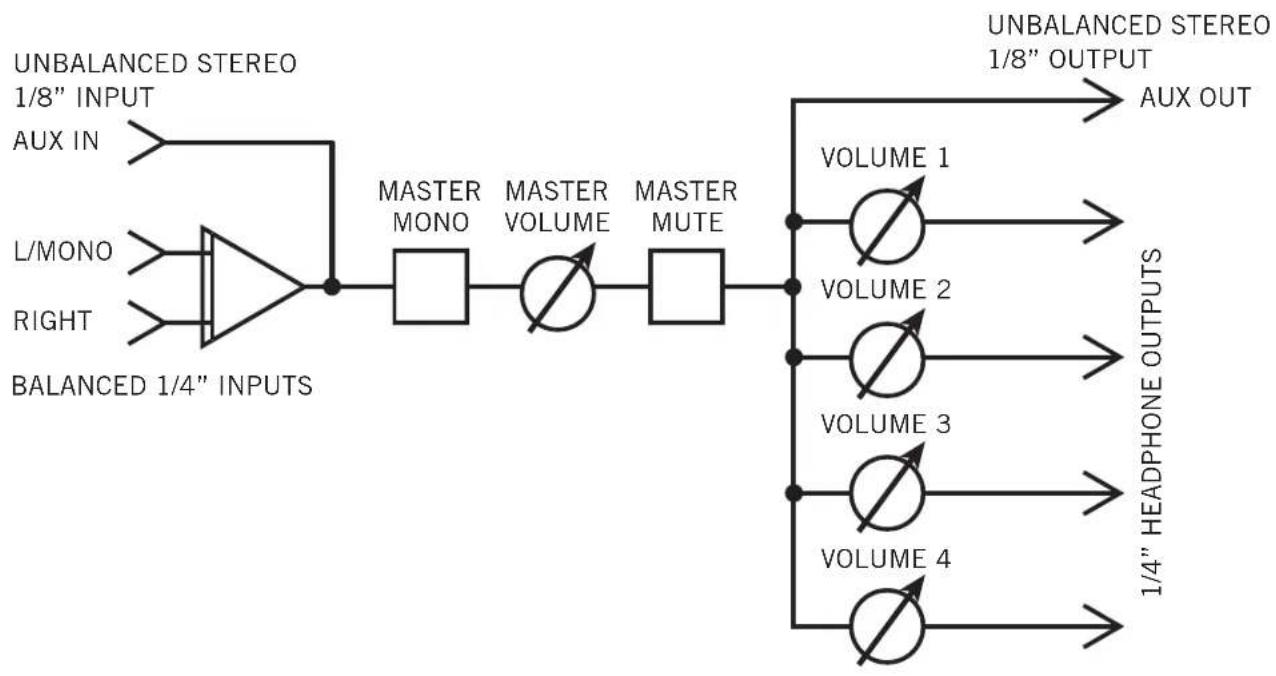
- To expand the QH4 to allow for more than four individual headphone outputs, you can connect multiple QH4 amplifiers together by plugging a 1/8" stereo cable into the Aux Output of the first QH4 amplifier and the Aux Input of another QH4 amplifier. You can repeat this step to add as many headphone amplifiers as necessary. The Aux Output jack is after the MASTER Volume/Power control, Mute and Mono switches, so all adjustments to these controls will affect units further down the chain.
If you have connected different models of headphones to the QH4, you may find that some require more gain than others to achieve the same volume. This kind of disparity occurs if the headphones have different sensitivities or different impedances. The lower the impedance, the louder the headphone will sound compared to another, higher impedance headphone at the same volume setting. Sensitivity is measured by determining the decibel (dB) level generated by 1 mW of power input. The higher the dB rating, the louder the headphone
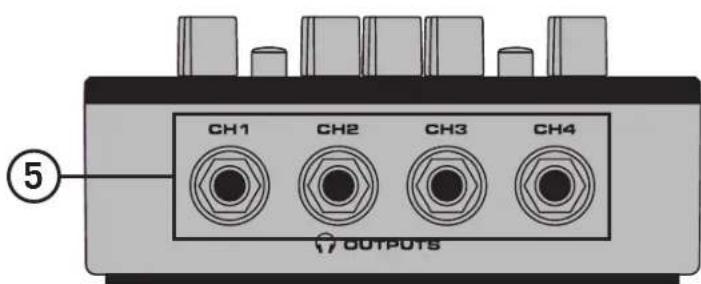
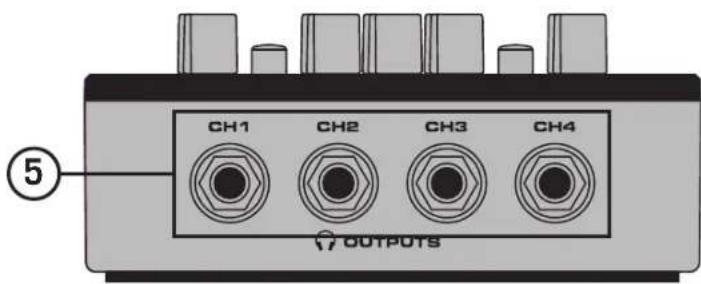
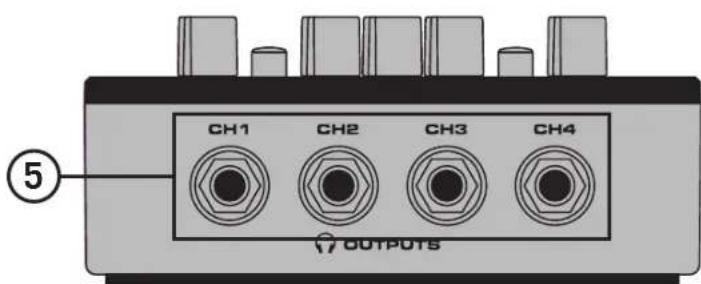
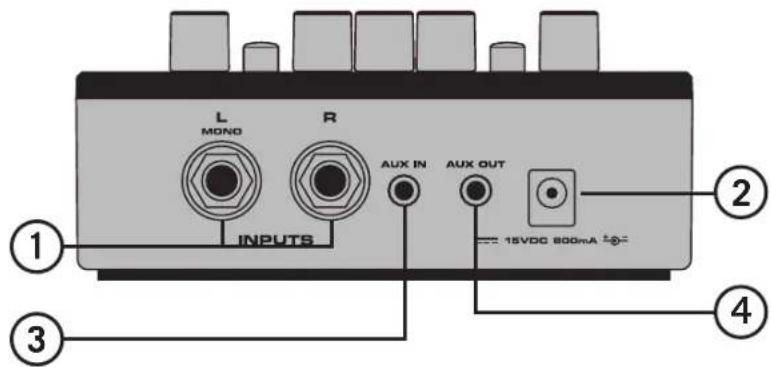
Front and Rear Panel Call-Outs
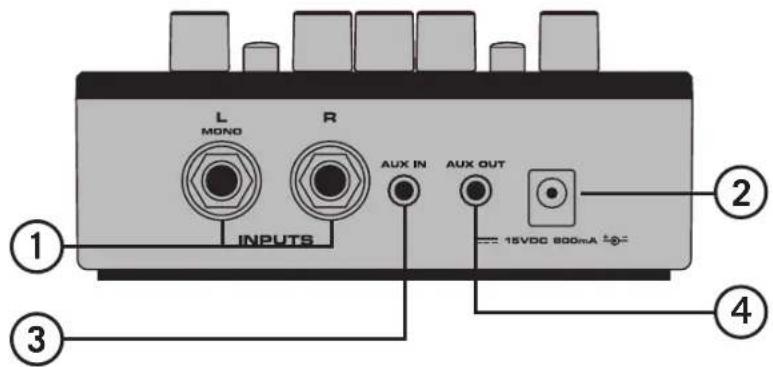
- Line INPUTS - Balanced 1/4" (TRS) left and right inputs. These line level inputs are the main signal inputs to the headphone amp. Plugging into only the L/MONO jack sends the signal to both the left and right.
- DC Power Input - Connect the supplied power adapter here.
- AUX IN - Stereo 1/8" inputs for connecting an auxiliary line level input, like that from a smart phone or computer output.
- AUX OUT - Stereo 1/8" outputs that are tied to the main 1/4" and AUX inputs for linking to another headphone amp, studio monitors or other device that accepts line level signals.
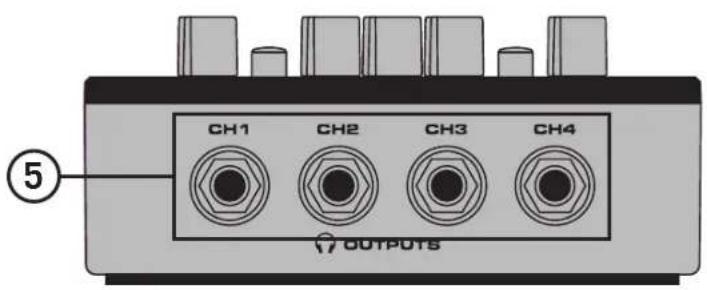
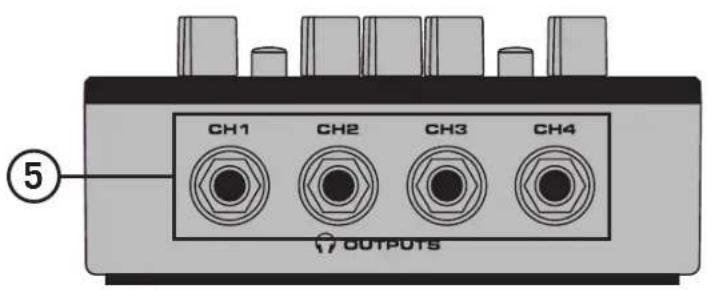
- Headphone OUTPUTS (CH1–CH4) - Stereo 1/4" headphone outputs. Note: Do not connect headphones with a minimum impedance less than 16Ω.
Top Panel Call-Outs
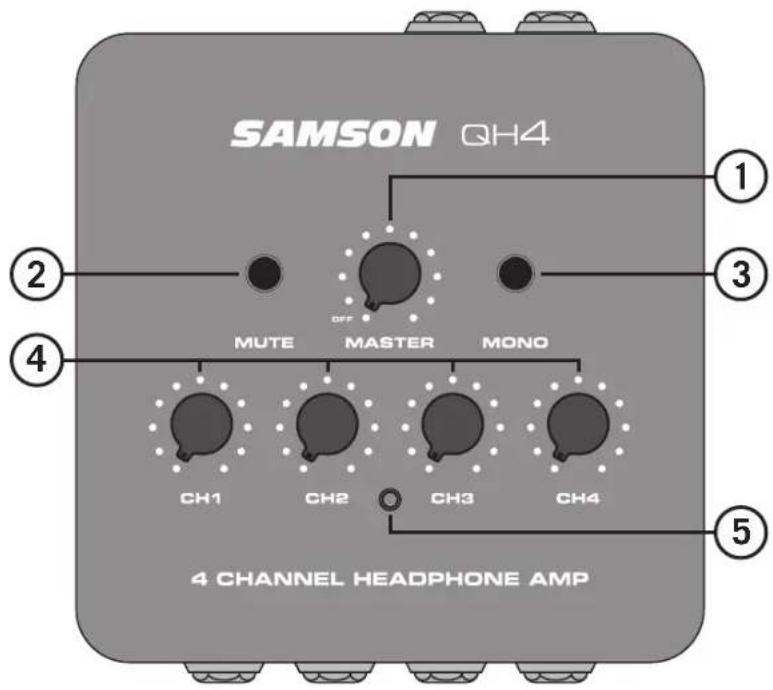
- MASTER Volume/Power - This rotary knob controls the level sent to the individual headphone output channels and powers the QH4 on and off. Turn the control clockwise to turn the system on. Turn the knob counterclockwise until it clicks to turn the system off.
- MUTE Switch - This switch mutes all of the headphone outputs.
- MONO Switch - When pressed, the left and right inputs will be summed together into a single mono signal.
- Headphone Volume (CH1–CH4) - Control knobs used to adjust the level of the headphone outputs.
- Power Indicator - This white LED will illuminate when power is on indicating the QH4 is ready for operation.
Specifications
Input Connectors 2 x 1/4" balanced TRS, 1/8" stereo unbalanced TRS
Max Input Level +21dBu, 1% THD
Input Impedance 20kΩ
Frequency Response 20Hz to 20kHz ±0.5dB
Noise floor -114dBu, 22k BW unweighted
Dynamic range 122dB, 22k BW
Signal to noise ratio 96dB, re 1mW at 32Ω load
Aux Outputs 1/8" stereo unbalanced TRS
Max Aux Output Level +14dBu, 1% THD
Aux Output Impedance 100Ω
Headphone Outputs 4 x 1/4" stereo TRS
Max Output Power 282mW per channel, 0.5% THD at 32Ω
Headphone Frequency Response 20Hz to 20kHz -1dB @ 32Ω
Controls MASTER Volume knob, Master MUTE switch, Master MONO switch, 4 x Channel Volume knobs
External Adapter 15VDC, 800 mA, pin positive
Weight 0.88lb / 0.4kg
Dims (LxWxH) 4.88" x 4.88" x 1.57" / 124mm x 124mm x 40mm
At Samson, we are continually improving our products, therefore specifications and images are subject to change without notice.
Block Diagram
flowchart
graph LR
    A["UNBALANCED STEREO 1/8" INPUT"] --> B["AUX IN"]
    C["L/MONO"] --> D["BALANCED 1/4" INPUTS"]
    E["RIGHT"] --> D
    B --> F["MASTER MONO"]
    F --> G["MASTER VOLUME"]
    G --> H["MASTER MUTE"]
    H --> I["VOLUME 1"]
    H --> J["VOLUME 2"]
    H --> K["VOLUME 3"]
    H --> L["VOLUME 4"]
    I --> M["UNBALANCED STEREO 1/8" OUTPUT AUX OUT"]
    J --> M
    K --> M
    L --> M
    M --> N["1/4" HEADPHONE OUTPUTS"]
Troubleshooting
| Issue Solution | |
| No Power (power indicator is not lit) | Make sure that the included power supply is connected to the QH4 amplifier. |
| Make sure that the QH4 power supply is plugged into an AC outlet. | |
| Turn the MASTER Volume/Power knob clockwise until it clicks into the On position. | |
| No Audio | Make sure the QH4 is turned on. |
| Make sure the audio cable is plugged into both the audio source output and the QH4 audio input jacks (either the two 1/4” INPUT jacks or the 1/8” AUX jack located on the rear of the QH4). | |
| Check that the audio source volume level is set to a level that can properly send a signal to the QH4. Also verify that the MASTER Volume and Headphone Volume knobs on the QH4 are turned up. | |
| Check your headphones on another audio device to ensure the headphones are not at fault. | |
| Distorted or bad audio | Ensure that all audio connections are securely attached. |
| Reduce the output volume of the source audio device. | |
| Reduce the volume of the QH4 headphone channels. |
If these suggestions do not solve your problem, contact your nearest Samson dealer or Samson distributor. If you have any questions or comments regarding the QH4 or any other products from Samson, do no hesitate to contact us at support@samsontech.com.
Callout del pannello anteriore e posteriore
Hicksville, NY 11801
www.samsontech.com
V2 ©2022
Brand : SAMSON
Model : QH4
Category : Headphone amplifier