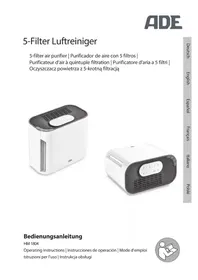
HM 1804 - Air purifier ADE - Free user manual and instructions
Find the device manual for free HM 1804 ADE in PDF.



| Product type | Air purifier with quintuple filtration |
| Brand | ADE |
| Model | HM 1804 |
| Filtration | Pre-filter, activated carbon filter, EPA filter, UV-C lamp, ionizer |
| Maximum area | 12 m² / 30 m³ |
| Power supply | Input 100-240 V~, 50/60 Hz, 0.5 A; Output 12 V==, 1 A |
| Power | 12 W |
| Power levels | 3 (I, II, III) |
| Timer | 2, 4, 8 hours |
| UV-C lamp | Yes |
| Ionizer | Yes |
| Dimensions (L x H x D) | approx. 191 x 250 x 135 mm |
| Operating temperature | +5 °C to +40 °C |
| Air humidity | ≤ 90% RH |
| Warranty | 2 years |
| Filter lifespan | Approximately 6 months |
| Filter cleaning | Every month (vacuum cleaner or brush) |
| Filter indicator reset | Press the button for 5 seconds |
| Installation | Vertical or horizontal, free space of at least 30 cm |
| Usage | Enclosed rooms up to 12 m² / 30 m³ |
| Compliance | Directives 2014/30/EU, 2014/35/EU, 2011/65/EU |
Frequently Asked Questions - HM 1804 ADE
User questions about HM 1804 ADE
0 question about this device. Answer the ones you know or ask your own.
Ask a new question about this device
Download the instructions for your Air purifier in PDF format for free! Find your manual HM 1804 - ADE and take your electronic device back in hand. On this page are published all the documents necessary for the use of your device. HM 1804 by ADE.
USER MANUAL HM 1804 ADE
natural_image
White FDE air conditioner unit with black ventilation grille and control panel (no visible text or symbols)
natural_image
White portable air conditioner with black ventilation grille and control panel (no visible text or symbols)Bedienungsanleitung
HM 1804
Operating instructions | Instrucciones de operación | Mode d'emploi
natural_image
Icon of a person using a laptop inside a circle (no text or symbols)Taste Funktion

natural_image
Line drawing of a cable connector with a plug inserted into a housing (no text or symbols)natural_image
Technical line drawing of a device interior showing internal components and airflow direction (no text or symbols)natural_image
Technical line drawing of a device with a door and panel, showing internal components without any text or symbols.natural_image
Line drawing of a rectangular box with a side panel and lid, no text or symbols present22089 Hamburg, Germany
You have chosen to purchase a high-quality ADE brand product, which combines intelligent functions with an exceptional design. The many years of experience of the ADE brand ensure a high technical standard and proven quality.
We wish you much pleasure!
Your ADE Team
General information
About this operating manual

This operating manual describes how to operate and maintain your product safely. Keep this operating manual in a safe place for future reference. If you pass this product on to someone else, pass on this operating manual as well.
Failure to observe this operating manual may result in injuries or damage to your product.
Explanation of symbols

This symbol combined with the word DANGER warns of serious injuries.

This symbol combined with the word WARNING warns of moderate and mild injuries.

This symbol combined with the word NOTE warns of material damage.

This symbol indicates additional information and general notes.
Table of Contents
General information....16
Intended use....18
Safety 18
Scope of delivery 20
Air purifier at a glance....20
Overview 21
Device overview....21
Control buttons and functions (control panel)....22
Control LEDs (control panel) 22
Unpacking and checking....23
Setting up the air purifier 23
Use 24
Turning on the air purifier and selecting the power level......24
Using the timer....24
Turning on the UVC lamp/ioniser....24
Turning off the air purifier....24
Cleaning....25
Storage 25
Changing the filter 26
Fault/Remedy....27
Technical data....27
Warranty 28
Declaration of Conformity....28
Disposal....28
Intended use
This air purifier is intended exclusively for cleaning the air in enclosed spaces up to 12 m^2/30 m^3 and is not suitable for commercial use.
Use the air purifier only as described in this operating manual. Any other use is considered improper and may result in damage to property or even personal injury.
The manufacturer or dealer assumes no liability for damage caused by improper or incorrect use.
Safety
- This product may be used by children aged 8 and above, as well as by persons with reduced physical, sensory, or mental capacities or lacking experience and knowledge if they are supervised or have been instructed in the safe use of the product and understand the risks that may arise.
- The device and the mains adaptor must be kept away from children younger than 8 years.
- The air purifier and mains adaptor must not be immersed in water or other liquids. Risk of electric shock! Therefore, do not use the air purifier in the vicinity of damp sources such as a washbasin.
- Only use the supplied mains adaptor and replace it only with one of the same type. The mains adaptor may only be used in dry indoor spaces and must be protected from moisture.
- Cleaning and user maintenance must not be carried out by children, unless they are 8 years of age or older and are being supervised.
- Children must not play with the device.
- Keep wrapping and packaging material away from children. There is a choking hazard! Also pay attention that children do not pull the packaging material over their heads.
- Make sure that children do not insert any objects into the device openings.
DANGER from electricity
- Connect the device to a correctly installed socket that has a voltage corresponding to that described under "Technical Data".
- Ensure that the socket is easily accessible, so that the mains adaptor can be pulled out quickly if necessary.
- Do not use the air purifier if the mains adaptor or mains adaptor cable is damaged.
- Do not cover the mains adaptor with curtains, newspapers, etc., and ensure sufficient ventilation. The mains adaptor can become hot.
- Completely uncoil the mains adaptor cable before connecting it. In doing so, take care to keep the cable from being damaged by sharp corners or hot objects.
- Pull the mains adaptor out of the socket:
-if you do not use the device,
-after each use,
-before cleaning or putting away the device,
-if, during operation, there appears to be interference,
-during a storm.
-When doing so, always pull on the mains adapter, not on the cable.
WARNING against fire hazard
- Never operate the air purifier when it is covered, for example, with a blanket.
- Do not operate the device near flammable or explosive gas mixtures.
BEWARE of material damage
- Protect the air purifier from strong impacts, shocks, direct sunlight, dirt and high humidity.
- Do not make any changes to the item. Only allow repairs to be carried out by a specialist workshop. Repairs carried out improperly can considerably endanger the user.
- Never place the air purifier on or near hot surfaces (for example, hot plates, etc.).
- Never expose the air purifier to a high temperature (heating, etc.) or adverse weather conditions (rain, etc.).
- Do not place any objects on the air purifier.
- The device has feet. Since surfaces are made from various materials and are treated with diverse care products, it cannot be completely excluded that some of these substances contain ingredients that attack and soften the feet of the device. If necessary, place a non-slip pad underneath the device.
- Use only original accessories.
- Do not use aggressive chemical cleaning agents, abrasives, hard sponges, etc. for cleaning.
Consult your doctor
- If you have a severe respiratory or lung disease, consult your doctor before using the air purifier.
Scope of delivery
- Air purifier with mains adaptor
- Operating Manual
Air purifier at a glance
Most people spend a lot of time indoors. However, the indoor air is often contaminated with dust particles, pollen, pet hair, odours, gases or even bacteria and viruses. This air purifier can remove up to 95% of these pollutants in a room up to 12 m^2 / 30 m^3 .
The air purifier functions as follows:
- The fan sucks in the air.
- The prefilter filters out larger particles such as dust, dirt and hair.
- After that, the activated carbon filter filters out substances such as formaldehyde, benzene and unpleasant odours from the air.
- The EPA-filter further filters out small particles such as pollen or bacteria from the indoor air.
- The ioniser releases negatively charged ions into the air. These, in turn, bind the finest particles due to their electrical charge.
- The purified air is released again via the air outlet.
Device overview

1 Air outlet
2 Control panel (see next page)
3 3-in-1 filter (prefilter, activated carbon filter and EPA filter)
4 Front cover
5 UVC lamp
Not depicted: Mains adaptor
Control buttons and functions (control panel)

Button Function

Turn air purifier on and off

Use timer function

Select power level

Enable UVC lamp/ioniser
Control LEDs (control panel)
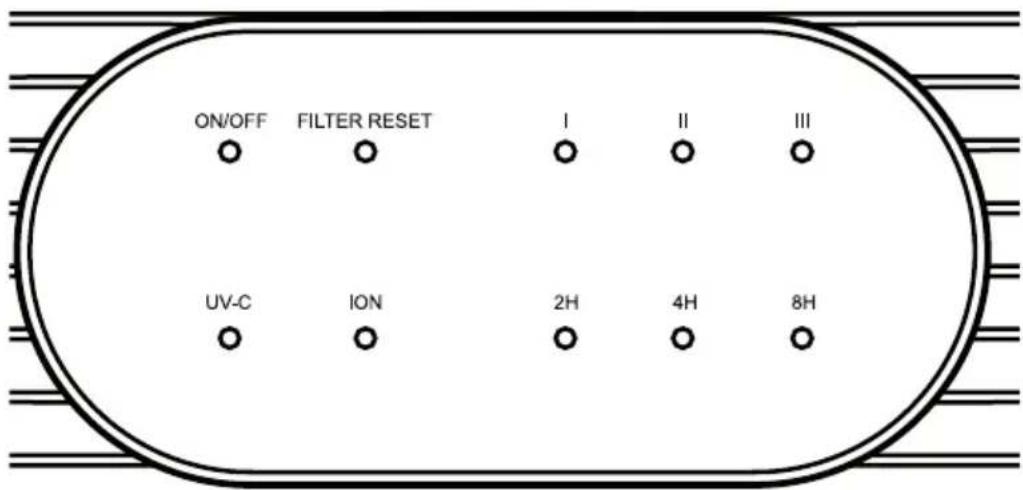
- The control LEDs indicate the enabled functions.
- Exception: FILTER RESET LED (see chapter "Cleaning the filter").
Unpacking and checking
-
Carefully unpack the air purifier and remove all packaging material.
-
Check that the delivery is complete.
-
Check whether the air purifier or its individual parts have any damage. If this is the case, do not use the air purifier. In this case, contact the dealer where you bought the device.
Setting up the air purifier
- Place the air purifier on a level and firm surface to avoid vibration and noise.
-The air purifier can be positioned vertically or horizontally.
- The device has the corresponding feet on the underside or rear side for a firm stand.
- Position the air purifier so that there is at least 30 cm free space on all sides around the device. Also make sure that the air inlet and outlet are always unobstructed.
natural_image
Pure electrical circuit lines without any symbols-
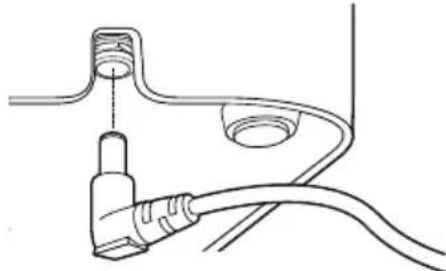
Insert the end with the angle plug into the connection socket on the underside of the air purifier. Make sure that the angle plug and the cable are correctly positioned in the recess on the back.
-
Plug the power cord into the mains outlet.
As soon as the device is powered, a beep will sound. The air purifier is now ready for use.

- Operate the air purifier only if the air filter is inserted and fully functional.
- You will hear a beep every time a button is pressed.
Turning on the air purifier and selecting the power level
- Press the ⏻ button to switch on the device.
The ON/OFF LED and the power level II LED will go on.
| I minimum power level | |
| II medium power level | |
| III maximum power level |
- Press the ⏻ button repeatedly to select a different power level (I, II or III). Note the LED indicator.
Using the timer
The timer allows you to select a period of time. Once the selected period of time has elapsed, the device will turn off automatically.
-Press the Ⓐ button repeatedly to set the desired period of time (2, 4 or 8 hours) while the device is on.
Note the LED indicator.
Pay attention to the following:
- To disable the timer, press the Ⓐ button repeatedly until the timer LED goes out.
- To turn off the device before the set time has elapsed, press the button.
Turning on the UVC lamp/ioniser
The UVC lamp and the ioniser eliminate microorganisms such as viruses, bacteria and fungi, as well as unpleasant odours. When the ioniser is in operation, negatively charged ions are released and the air appears fresher.
-Press the ^4 button repeatedly to turn the UVC lamp or the ioniser on and off in succession. Note the LED indicator.
Turning off the air purifier
-Press the ⏻ button to switch off the device.

Electrical shock HAZARD
- Do not immerse the device or mains adaptor in water or other liquids. - Unplug the mains adaptor from the mains outlet before cleaning the device.

NOTE on material damage
- Do not use aggressive chemical cleaning agents, abrasives, hard sponges, etc. for cleaning.
- Make sure that no moisture gets inside the device.
The air purifier should be cleaned at least once a month. More frequent cleaning may also be required depending on the ambient conditions.
- Turn off the air purifier.
- Disconnect the device from the power supply.
Cleaning the housing
- Clean the outside of the housing with a slightly damp cloth and a mild detergent.
- Remove the filter (see "Changing the filter") and also clean the area behind and around the filter.
- Remove dust from the device openings with a soft brush or brush attachment of a vacuum cleaner.
Cleaning the filter
- Remove the inserted triple filter (see "Changing the filter").
- Clean both sides of the filter with the brush attachment of a vacuum cleaner. You will thus remove lint and dirt.
- Replace the filter.
Storage
- In case the device will not be used for a long time, you can store the clean device well in its original packaging.
- The environment must be dry and frost-free.
Changing the filter
The inserted triple filter has a shelf life of approx. 6 months depending on the frequency of use and the operating time. When the FILTER RESET light is on, you must change the filter.
You do not need any tool for this purpose.

- Replacement filters can be ordered for a fee via the following e-mail address: service@ade-germany.de.
- Dispose of the old filter with the household waste.
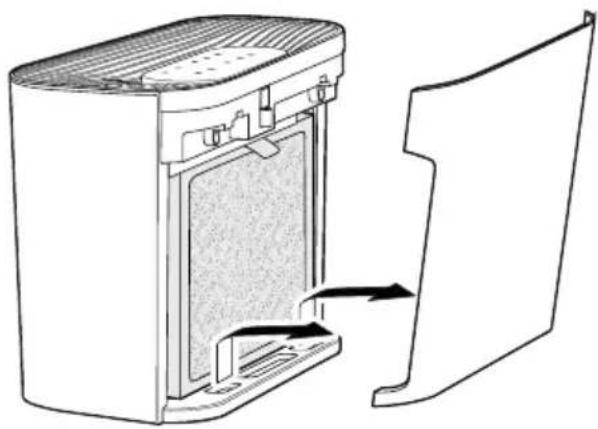
natural_image
Technical line drawing of a device interior showing internal components and a separate panel (no text or symbols)When FILTER RESET is lit:
-
Turn off the air purifier and disconnect it from the power supply.
-
Open the front cover and remove it.

natural_image
Technical line drawing of a mechanical device with a door and housing, showing internal components and a directional arrow (no text or symbols)- Remove the air filter and insert a new one. Note the correct orientation.

natural_image
Line drawing of a rectangular electronic device with a side panel and top cover (no text or symbols)-
Replace the front cover.
-
Press and hold down the ⏻ button for approx. 5 seconds to reset the FILTER RESET filter change indicator. The internal operating hours counter will be reset to "0". Then you can use the air purifier as usual.
Fault/Remedy
| Fault Possible cause | |
| No function. • Is the device powered? | • Is the front cover replaced? |
| Poor air passage. | • Is the inserted filter dirty? (see “Cleaning the filter”) |
| The air purifier is very noisy. | • Are there any foreign objects in the air inlet?• Is the device placed on a stable, flat and vibration-free surface? |
Technical data
Model: HM 1804 5-filter air purifier
Power supply: Input: 100 – 240 V/AC, 50/60 Hz, 0.5 A
Output: 12 V = /1 A
Power: 12 W
Protection class:

Ambient conditions:
Temperature: +5°C to +40°C
Humidity: ≤90% RH
Dimensions:
approx. 191 x 250 x 135 mm
Distributor (no service address):
Waagen-Schmitt GmbH
Hammer Steindamm 27-29
22089 Hamburg, Germany
Our products are constantly being developed and improved.
For this reason, design and technical modifications are possible at any time.
Warranty
Waagen-Schmitt GmbH warrants for 2 years from the purchase date the cost-free rectification of defects in material and workmanship through repair or exchange.
In the event of a warranty claim, please return the product with the proof of purchase (specifying the reason for claim) to your dealer.
Declaration of Conformity
Waagen-Schmitt GmbH hereby declares that the HM 1804 air purifier complies with EU directives 2014/30/EU, 2014/35/EU and 2011/65/EU.
The declaration will lose its validity if any modification is made to the device without our consent.
Hamburg, October 2018
Waagen-Schmitt GmbH

Disposal
Disposing of the packaging

Dispose of the packaging with similar materials. Dispose of cardboard with waste paper and of films with recyclable materials.
Disposing of the product
Dispose of the product in accordance with the regulations that apply in your country.

Devices must not be disposed of in normal household waste
At the end of its life, the product must be disposed of in an appropriate way. In this way, valuable materials contained in the device will be recycled and the burden on the environment avoided. Bring the old device to a collection point for electronic waste or to a recycling depot.
For more information, contact your local waste disposal firm or your local administrative body.
Botón Función

natural_image
Line drawing of a cable connector with a plug inserted into a housing (no text or symbols)natural_image
Technical line drawing of a device interior showing internal components and a separate panel (no text or symbols)Cuando se ilumine FILTER RESET:
natural_image
Technical line drawing of a mechanical device with a door and housing, showing internal components and a directional arrow (no text or symbols)natural_image
Line drawing of a rectangular electronic device with a vertical slot and top panel (no text or symbols)Touche Fonction

natural_image
Pure electrical circuit lines without any symbolsnatural_image
Technical line drawing of a device interior showing internal components and a separate panel (no text or symbols)natural_image
Technical line drawing of a mechanical device with a door and housing, showing internal components without any text or symbols.natural_image
Line drawing of a rectangular electronic device with a vertical slot and top panel (no text or symbols)Tasto Funzione

natural_image
Line drawing of a cable connector with a plug inserted into a socket (no text or symbols)natural_image
Technical line drawing of a device interior showing internal components and a separate panel (no text or symbols)Quando FILTER RESET si illumina:
natural_image
Technical line drawing of a mechanical device with a door and housing, showing internal components and a directional arrow (no text or symbols)natural_image
Line drawing of a rectangular electronic device with a side panel and top cover (no text or symbols)Przycisk Funkcja

natural_image
Pure electrical circuit lines without any symbolsnatural_image
Technical line drawing of a device interior showing internal components and a separate panel (no text or symbols)natural_image
Technical line drawing of a device with a door and panel, showing internal components without any text or symbols.natural_image
Line drawing of a rectangular electronic device with a side panel and top cover (no text or symbols)- Bedienungsanleitung
- Taste Funktion
- General information
- About this operating manual
- Explanation of symbols
- Table of Contents
- Intended use
- Safety
- DANGER from electricity
- WARNING against fire hazard
- BEWARE of material damage
- Consult your doctor
- Scope of delivery
- Air purifier at a glance
- Device overview
- Control buttons and functions (control panel)
- Button Function
- Control LEDs (control panel)
- Unpacking and checking
- Setting up the air purifier
- Turning on the air purifier and selecting the power level
- Using the timer
- Turning on the UVC lamp/ioniser
- Turning off the air purifier
- Electrical shock HAZARD
- NOTE on material damage
- Cleaning the housing
- Cleaning the filter
- Storage
- Changing the filter
- Technical data
- Warranty
- Declaration of Conformity
- Disposal
- Disposing of the packaging
- Disposing of the product
- Devices must not be disposed of in normal household waste
- Botón Función
- Touche Fonction
- Tasto Funzione
- Przycisk Funkcja
Brand : ADE
Model : HM 1804
Category : Air purifier