KX-TWA51EX - Cordless phone PANASONIC - Free user manual and instructions
Find the device manual for free KX-TWA51EX PANASONIC in PDF.


| Product type | Additional digital cordless handset |
| Brand | Panasonic |
| Model | KX-TWA51EX |
| Compatibility | Panasonic GSM bases: KX-TW500, KX-TW501, KX-TW502 |
| Charger power supply | Panasonic AC adaptor PQLV219CE (supplied) |
| Battery type | Rechargeable Ni-MH AAA size (R03) |
| Number of batteries | 2 (supplied) |
| Initial charging time | Approximately 7 hours |
| Display | Monochrome display with backlight |
| Available languages | German, French, Greek, Spanish, Italian, Polish |
| Main functions | Calling, phonebook, call list, messaging (depends on base) |
| Registration to the base | Required before first use |
| Range | Up to 50 meters indoors, 300 meters outdoors (typical) |
| Safety | Compliant with R&TTE directive 1999/5/EC, SAR value below limit |
| Maintenance | Clean with a soft damp cloth; do not use solvents |
| Operating temperature | 5°C to 40°C |
| Humidity | 20% to 80% RH (non-condensing) |
| Weight | Approximately 130 g (handset with batteries) |
| Dimensions (handset) | Approximately 170 x 50 x 30 mm |
| Included accessories | Charger, AC adaptor, batteries, handset cover |
| Recycling | Compliant with WEEE and battery directives; do not dispose of with household waste |
Frequently Asked Questions - KX-TWA51EX PANASONIC
User questions about KX-TWA51EX PANASONIC
0 question about this device. Answer the ones you know or ask your own.
Ask a new question about this device
Download the instructions for your Cordless phone in PDF format for free! Find your manual KX-TWA51EX - PANASONIC and take your electronic device back in hand. On this page are published all the documents necessary for the use of your device. KX-TWA51EX by PANASONIC.
USER MANUAL KX-TWA51EX PANASONIC
TWA51EX(ex).book Page 1 Thursday, February 12, 2009 11:42 AM
Panasonic
KX-TWA51EX
Installation Manual
Bedienungsanleitung
Manuel installateur
Odyiec Eykataaons
Additional Digital Cordless Handset
(for GSM Fixed Wireless Phone)
TWA51EX(ex).book Page 3 Thursday, February 12, 2009 11:42 AM
Contents/Inhalt/Table des matieres/περιεχόμενα/Contenido/Indice/Spis tresci
English 4
Deutsch 8
Francais 13
EaIyiká 18
Espanol 23
Italiano 28
Polski 33
English
PLEASE READ BEFORE USE AND SAVE
This unit is an additional handset only for use with Panasonic GSM Fixed Wireless Phone: KX-TW500/KX-TW501/KX-TW502
You must register this handset with your base unit before it can be used. This installation manual describes only the steps needed to register and begin using the handset. Please read the base unit's operating instructions for further details.
Accessory information
Supplied accessories
Charger. 1 Rechargeable batteries*1 2 AC adaptor (PQLV219CE) 1 (HHR-55AAAB)
Handset cover*2 1
1 Please read the base unit's operating instructions for replacement battery information.
2 The handset cover comes attached to the handset.
Note:
- Please read the base unit's operating instructions for additional/replacement accessories.
- This equipment is designed for use in Germany, France, Greece, Spain, Italy, and Poland.
- In the event of problems, you should contact your equipment supplier in the first instance.
- For use in other countries, please contact your equipment supplier.
Setting up
Connection
- Use only the supplied Panasonic AC adaptor PQLV219CE.
- The AC adaptor must remain connected at all times. (It is normal for the adaptor to feel warm during use.)
Battery installation/Battery charge
Important:
- Use the supplied rechargeable batteries. For replacement, we recommend using the Panasonic rechargeable batteries noted in the base unit's operating instructions.
- Wipe the battery ends ( ,) with a dry cloth.
- Avoid touching the battery ends ( ,) or the unit contacts.
- Confirm correct polarities ( ,)
- USE ONLY Ni-MH batteries AAA (R03) size.
- Do NOT use Alkaline/Manganese/Ni-Cd batteries.
Place the handset on the charger for about 7 hours before initial use.
Note:
- If the batteries are fully charged, but the operating time seems to be shorter, clean the battery ends ( ,) and the charge contacts with a dry cloth and charge again.
Registering the handset to the base unit
Ensure that the handset is switched on. If it is not on, press and hold [70] for few seconds to turn the handset on.
1 Handset: [国/OK]
2 [ ] / [ ] :“Settings”→[▶]
3 [ ] / [ ] :“Registration”→[▶]
4 [ ] / [ ] :“Register H.set”→[▶]
5 Base unit:
Press and hold [ ] for about 5 seconds. (No registration tone)
- The GSM network indicator on the base unit starts flashing green.
- If all registered handsets start ringing, press the same button to stop. Then repeat this step.
6 Handset:
When the handset has been registered successfully, you hear a confirmation tone (long beep) and Y stops flashing.
For your safety
To prevent severe injury and loss of life/property, read this section carefully before using the product to ensure proper and safe operation of your product.
WARNING
Power connection
- Completely insert the AC adaptor/power plug into the power outlet. Failure to do so may cause electric shock and/or excessive heat resulting in a fire.
- Regularly remove any dust, etc. from the AC adaptor/power plug by pulling it from the power outlet, then wiping with a dry cloth. Accumulated dust may cause an insulation defect from moisture, etc. resulting in a fire.
- Unplug the product from power outlets if it emits smoke, an abnormal smell, or makes an unusual noise. These conditions can cause fire or electric shock. Confirm that smoke has stopped emitting and contact an authorised service centre.
Installation
- To prevent the risk of fire or electrical shock, do not expose the product to rain or any type of moisture.
- Do not place or use this product near automatically controlled devices such as automatic doors and fire alarms. Radio waves emitted from this product may cause such devices to malfunction resulting in an accident.
SAR
- The product is under the SAR limit. Please read the base unit's operating instructions for SAR information.
CAUTION
Installation and relocation
- The AC adaptor is used as the main disconnect device. Ensure that the AC outlet is installed near the product and is easily accessible.
Battery
- We recommend using the supplied batteries or additional/replacement batteries noted in the base unit's operating instructions for replacement battery information. USE ONLY rechargeable Ni-MH batteries AAA (R03) size.
- Do not mix old and new batteries.
- Do not open or mutilate the batteries. Released electrolyte from the batteries is corrosive and may cause burns or injury to the eyes or skin. The electrolyte is toxic and may be harmful if swallowed.
- Exercise care when handling the batteries. Do not allow conductive materials such as rings, brackets, or keys to touch the batteries, otherwise a short circuit may cause the batteries and/or the conductive material to overheat and cause burns.
- Charge the batteries provided with or identified for use with this product only, in accordance with the instructions and limitations specified in this manual.
- Only use a compatible charger to charge the batteries. Do not tamper with the charger. Failure to follow these instructions may cause the batteries to swell or explode.
Other information
- Operating the product near electrical appliances may cause interference. Move away from the electrical appliances.
6
TWA51EX(ex).book Page 7 Thursday, February 12, 2009 11:42 AM
- Use only the power cord and batteries indicated in this manual. Do not dispose of batteries in a fire. They may explode. Check with local codes for possible special disposal instructions.
Routine care
- Wipe the outer surface of the product with a soft moist cloth.
- Do not use benzine, thinner, or any abrasive powder.
Notice for product disposal, transfer, or return
- This product can store your private/confidential information. To protect your privacy/ confidentiality, we recommend that you erase information such as phonebook or caller list entries from the memory before you dispose of, transfer, or return the product.
Information for Users on Collection and Disposal of Old Equipment and used Batteries
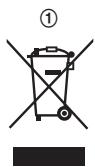
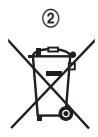
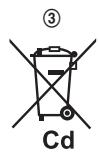
These symbols (1, 2, 3) on the products, packaging, and/or accompanying documents mean that used electrical and electronic products and batteries should not be mixed with general household waste. For proper treatment, recovery and recycling of old products and used batteries, please take them to applicable collection points, in
accordance with your national legislation and the Directives 2002/96/EC and 2006/66/EC. By disposing of these products and batteries correctly, you will help to save valuable resources and prevent any potential negative effects on human health and the environment which could otherwise arise from inappropriate waste handling.
For more information about collection and recycling of old products and batteries, please contact your local municipality, your waste disposal service or the point of sale where you purchased the items.
Penalties may be applicable for incorrect disposal of this waste, in accordance with national legislation.
For business users in the European Union
If you wish to discard electrical and electronic equipment, please contact your dealer or supplier for further information.
Information on Disposal in other Countries outside the European Union
These symbols (①,②,③) are only valid in the European Union. If you wish to discard these items, please contact your local authorities or dealer and ask for the correct method of disposal.
Note for the battery symbol
This symbol (②) might be used in combination with a chemical symbol (③). In this case it complies with the requirement set by the Directive for the chemical involved.

Deutsch
TWA51EX(ex).book Page 10 Thursday, February 12, 2009 11:42 AM
5 Basisstation:
TWA51EX(ex).book Page 12 Thursday, February 12, 2009 11:42 AM
Piles rechargeables*1 2
(HHR-55AAAB)
TWA51EX(ex).book Page 16 Thursday, February 12, 2009 11:42 AM
TWA51EX(ex).book Page 17 Thursday, February 12, 2009 11:42 AM
TWA51EX(ex).book Page 26 Thursday, February 12, 2009 11:42 AM
TWA51EX(ex).book Page 27 Thursday, February 12, 2009 11:42 AM
TWA51EX(ex).book Page 32 Thursday, February 12, 2009 11:42 AM
TWA51EX(ex).book Page 38 Thursday, February 12, 2009 11:42 AM
Declaration of Conformity:
- Panasonic Communications Co., Ltd. declares that this equipment is in compliance with the essential requirements and other relevant provisions of Radio & Telecommunications Terminal Equipment (R&TTE) Directive 1999/5/EC.
Declarations of Conformity for the relevant Panasonic products described in this manual are available for download by visiting:
http://www.doc.panasonic.de
TWA51EX(ex).book Page 39 Thursday, February 12, 2009 11:42 AM
TWA51EX(ex).book Page 40 Thursday, February 12, 2009 11:42 AM
Sales department/Vertrieb/Service des ventes/Tuŋμα Πωλησεων/Departamento de ventas/Ufficio Vendite/Dzial sprezazy
Eaδαs
INTERTECHS.A
IE VE^i T X V OV
Intertech S.A.
AVITPPOsOwTOc KevTPIKa Γραφειa
Aappo0iinc 24,16777 EAHNIKO
Panafax: 210.9648.588
e-mail: info@intertech.gr
YtokataoTma Bopeiae Elambdaos
K. Kapαμανλή 11, 54638 ΘΕΣΑΛΟΝΙΚΗ
Panafax: 2310.968.083
e-mail: intertech-th@intertech.gr
www.panasonic.gr
■ Polska
TWA51EX(ex).book Page 41 Thursday, February 12, 2009 11:42 AM
Espana
Panasonic ESPANA, S.A.
TWA51EX(ex).book Page 42 Thursday, February 12, 2009 11:42 AM
Notes
TWA51EX(ex).book Page 43 Thursday, February 12, 2009 11:42 AM
Notes
43
TWA51EX(ex).book Page 44 Thursday, February 12, 2009 11:42 AM
€0470
Panasonic Communications Co., Ltd.
1-62, 4-chome, Minoshima, Hakata-ku, Fukuoka 812-8531, Japan
© Panasonic Communications Co., Ltd. 2009
PNQX1876ZA DM0209DE0