
ABVL200X - TV Mount LG - Free user manual and instructions
Find the device manual for free ABVL200X LG in PDF.



| Product type | MultiVision mounting frame (TV mount) |
| Compatible models | AB-VL200X (landscape), AB-VP200X (portrait) |
| Width | 1426 mm |
| Height | 210 mm |
| Depth | 1006 mm |
| Weight (AB-VL200X) | 23 kg |
| Weight (AB-VP200X) | 22.2 kg |
| Maximum supported weight | 50 kg (total screen + frame) |
| Material | Steel |
| Color | Black |
| Wall mounting | On vertical concrete or stud wall (by professional) |
| Screen configuration | Up to 3x3 (9 screens) with adjustable alignment |
| Adjustments | Horizontal and vertical alignment via adjustment screws |
| Included accessories | 4 spacing guides, 4 M8x32 mm screws, 3 frame screws M8x100 mm, 3 nuts, wrench, manual |
| Tools required for installation | Phillips screwdriver, 8 mm wrench, drill, level |
| Installation | By a qualified installer mandatory |
| Required ventilation | 20 cm minimum on sides, 15 cm at rear |
| Power supply | None (mechanical mount) |
| Maintenance and cleaning | Clean with a dry cloth, do not use a damp cloth |
| Safety | Do not hang, do not subject to shocks, use gloves, disconnect before installation |
| Spare parts and repairability | Spacing guides, screws and nuts – contact dealer for replacements |
Frequently Asked Questions - ABVL200X LG
User questions about ABVL200X LG
0 question about this device. Answer the ones you know or ask your own.
Ask a new question about this device
Download the instructions for your TV Mount in PDF format for free! Find your manual ABVL200X - LG and take your electronic device back in hand. On this page are published all the documents necessary for the use of your device. ABVL200X by LG.
USER MANUAL ABVL200X LG
MultiVision Mounting Bracket
Please read the safety information carefully before using the product.
AB-VL200X
AB-VP200X

MultiVision Mounting Bracket
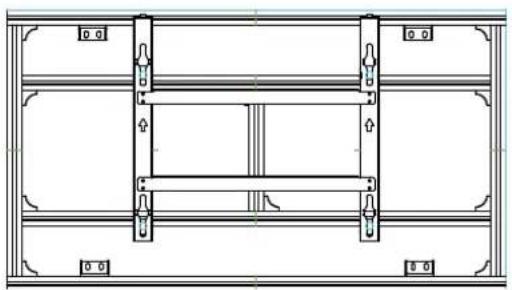
natural_image
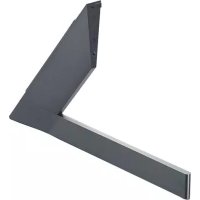
Technical line drawing of a structural frame with supports and internal components (no text or symbols)MultiVision Mounting Bracket-Landscape AB-VL200X
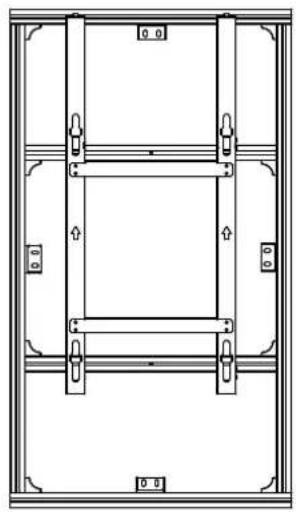
natural_image
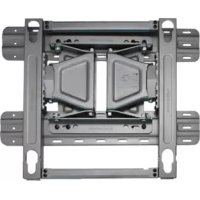
Technical line drawing of a structural frame with vertical supports and mounting holes (no text or symbols)MultiVision Mounting Bracket-Portrait AB-VP200X

Accessories
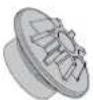
4 Guide Spacer
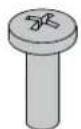
4 Guide Spacer Fixing Screws (M8X32mm)
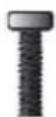
3 Bracket
Fixing Screws
(M8X100mm)

3 Nuts
Owner's Manual
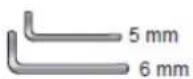
Wrench

Safety Precautions

- If you are a professional installer, please read this manual carefully before installing the product.
- After installing the product according to the manual, ensure that the user also reads the manual carefully.
After reading the manual, please keep it handy for future reference.

Warning
The product should be installed by a qualified professional specified by the retail store.
Installing the product without a qualified professional is dangerous and may cause injury.
When moving or replacing the product after installation, contact a qualified installer specified by the retail store.
Installation or movement of the product must be carried out by a skilled professional. If an unqualified person moves and installs the product, this may cause safety issues.
Prior to installing the product, arrange the power cable and signal cable to prevent damage during installation.
Damaged cables may result in a fire, electric shock or damage to the product.
The product should be installed where its weight can be supported.
If the product is installed on a weak surface, the product may fall and cause injury.
Do not hang on the product or apply shock to the product.
The product may fall and cause injury.
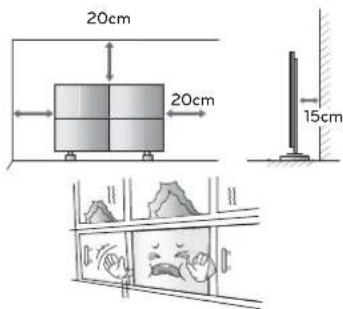
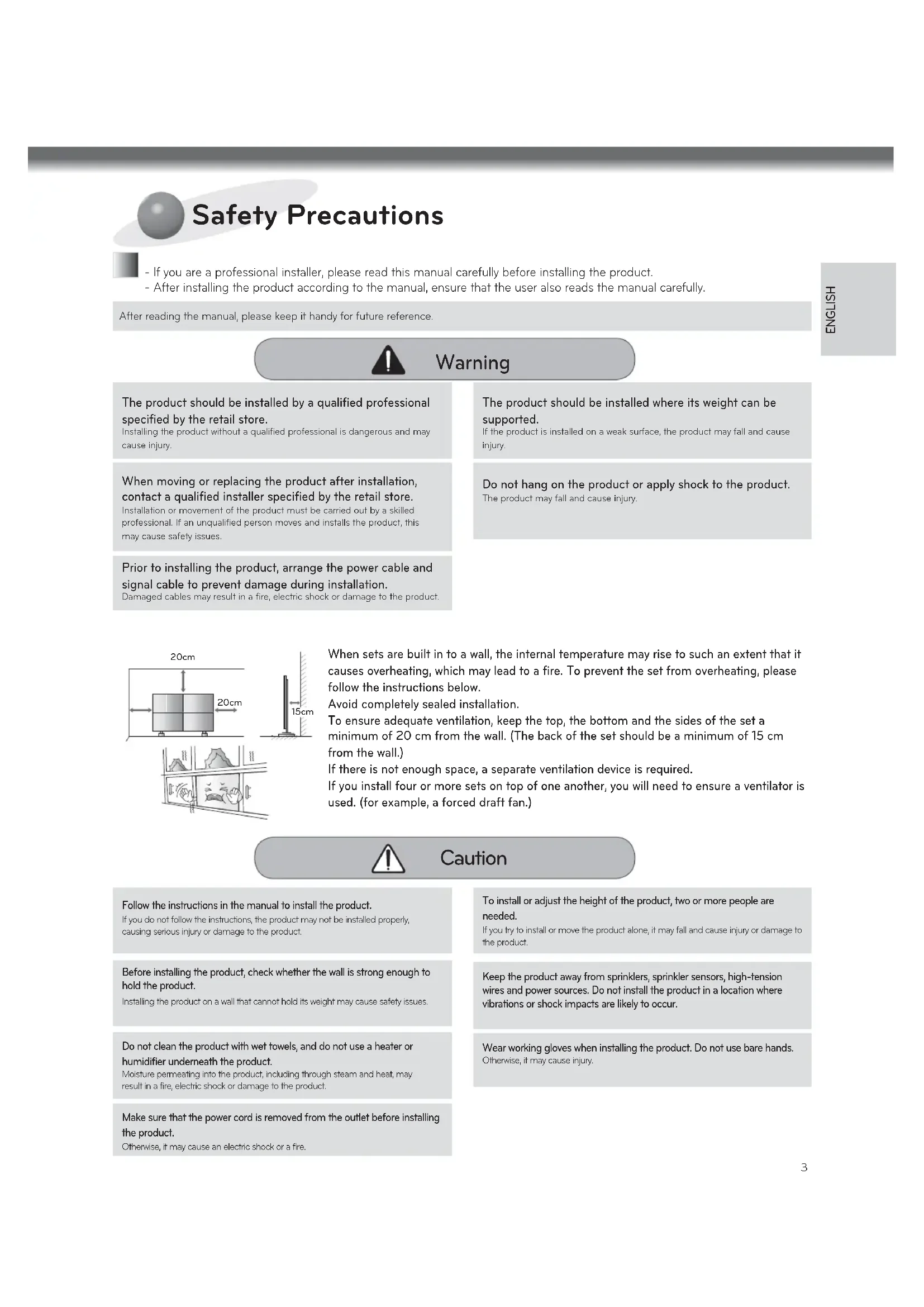
When sets are built in to a wall, the internal temperature may rise to such an extent that it causes overheating, which may lead to a fire. To prevent the set from overheating, please follow the instructions below.
Avoid completely sealed installation.
To ensure adequate ventilation, keep the top, the bottom and the sides of the set a minimum of 20 cm from the wall. (The back of the set should be a minimum of 15 cm from the wall.)
If there is not enough space, a separate ventilation device is required.
If you install four or more sets on top of one another, you will need to ensure a ventilator is used. (for example, a forced draft fan.)

Caution
Follow the instructions in the manual to install the product.
If you do not follow the instructions, the product may not be installed properly, causing serious injury or damage to the product.
Before installing the product, check whether the wall is strong enough to hold the product.
Installing the product on a wall that cannot hold its weight may cause safety issues.
Do not clean the product with wet towels, and do not use a heater or humidifier underneath the product.
Moisture permeating into the product, including through steam and heat, may result in a fire, electric shock or damage to the product.
Make sure that the power cord is removed from the outlet before installing the product.
Otherwise, it may cause an electric shock or a fire.
To install or adjust the height of the product, two or more people are needed.
If you try to install or move the product alone, it may fall and cause injury or damage to the product.
Keep the product away from sprinklers, sprinkler sensors, high-tension wires and power sources. Do not install the product in a location where vibrations or shock impacts are likely to occur.
Wear working gloves when installing the product. Do not use bare hands.
Otherwise, it may cause injury.
Transportation method for panel protection
When moving or lifting the monitor, read the following to prevent the monitor from being scratched or damaged and for safe transportation regardless of its type and size.

CAUTION
- Avoid touching the screen at all times, as this may result in damage on the screen.
- It is recommended to move the monitor in the box or packing Cover that the monitor originally came in.
- Before moving or lifting the monitor, disconnect the power cord and all cables.
- Hold the top and bottom of the monitor frame firmly. Make sure not to hold the transparent part, speaker, or speaker grill area.
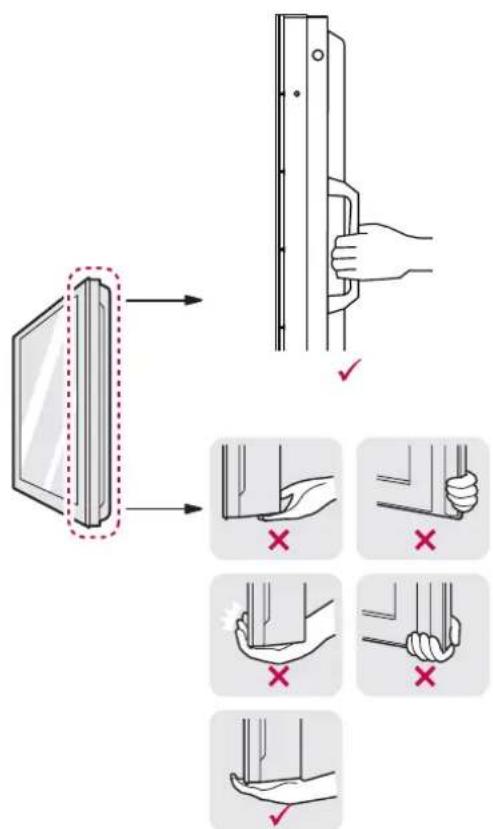
- When transporting the monitor, do not expose the monitor to jolts or excessive vibration.
- When transporting the monitor, keep the monitor upright, never turn the monitor on its side or tilt towards the left or right.
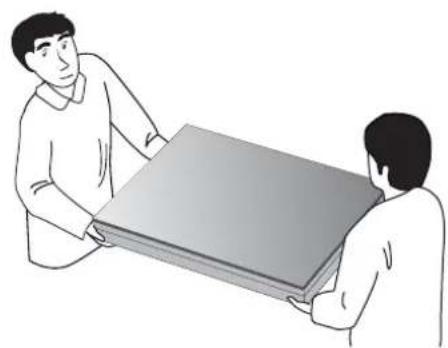
- When transporting the monitor by hand, hold the monitor as shown in the following illustration.
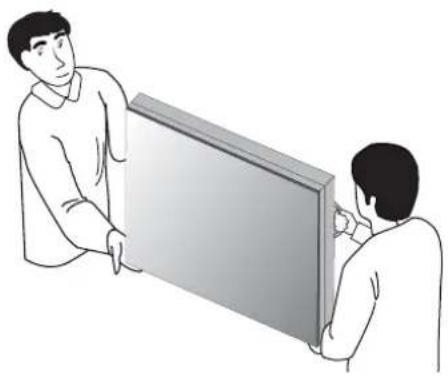
- When the product is carried upright, 2 persons carry by holding the bottom and top of the front, and when it is being put down, put down carefully for the panel not to be touched.
natural_image
Illustration of two people interacting with a large rectangular panel (no text or symbols visible)- When the product is carried laid down, 2 persons carry by holding the bottom of the back, and when it is being put down, put down carefully for the panel not to be touched.
natural_image
Two people handling a large rectangular object, possibly a tablet or case (no text or symbols visible)
Storage method for panel protection
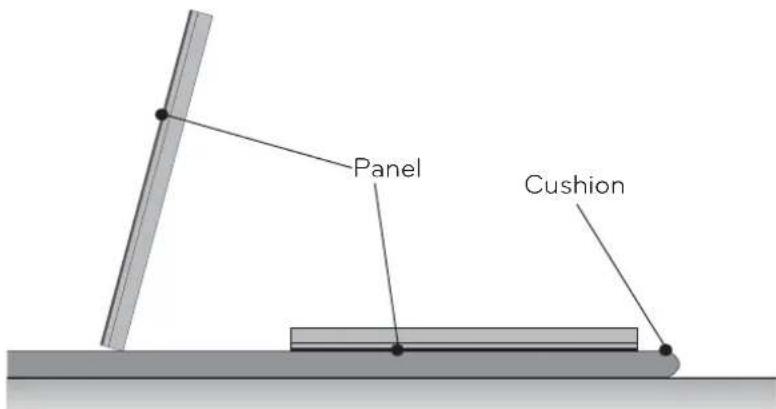
If the product needs to be set upright, hold both sides of the product, and tilt backward carefully for the panel not to touch the floor. (The setting upright of the set is possible with the outer frame)
When laying down the product, lay a cushion on a flat floor, and put the product on it with the panel of the product facing down.
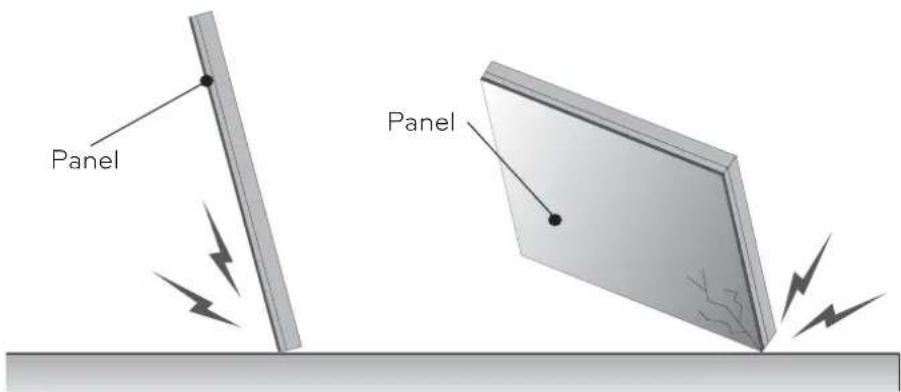
If the product is tilted to the side of the panel, the bottom of the panel may be damaged.
If the product is tilted to the edge of the panel, the edge of the panel may be damaged.

NOTE
- Handle the product with care. The product may be damaged by shocks.
The illustration depicts a landscape installation, but the procedure is identical to that of a portrait installation.)

Before Installation
* Do not use this product for purposes other than to attach the monitor to the wall.
* Be careful when installing and using the bracket to prevent product damage and safety hazards.
* If the instructions in the manual are unclear, stop the installation and contact the service center.
If you are still having problems understanding the instructions after contacting the center, seek a professional to install the product.
* An individual with experience in mechanical and architectural fields may not have any difficulty understanding this manual or installing the product, even if they are not a professional.
* When installing the bracket on a concrete wall or on any other walls capable of holding the strength specified in the manual, you may detach the standard gap bracket for stud wall mounting then follow the instructions for attaching the bracket to make the installation easier.
* Only install the bracket on vertical walls. Do not install the bracket on a wall inclined at an angle, exceeding the standard range or on the ceiling. LG Electronics is not liable for problems that occur due to the installation of the product on a slanted wall or on the ceiling.
* Check the accessories provided with the product before installing. LG Electronics is not liable for any damage to or loss of the accessories after the package has been opened.
* Make sure that the accessories are kept out of reach of children to prevent safety accidents, such as choking due to swallowing small parts.
* Make sure that the screws are fixed tightly. Applying excessive force to screws may impair the performance or reduce the strength of the product, or cause it to become damaged.
* Make sure that the monitor to be installed does not exceed the specified tension load and that no external force is applied.
* In order to prevent accidents, take care when handling tools during installation of the product.
Philips screwdriver (manual or electric)/8 mm spanner/drill/level meter

How to Install
1
Assembling the MultiVision Bracket
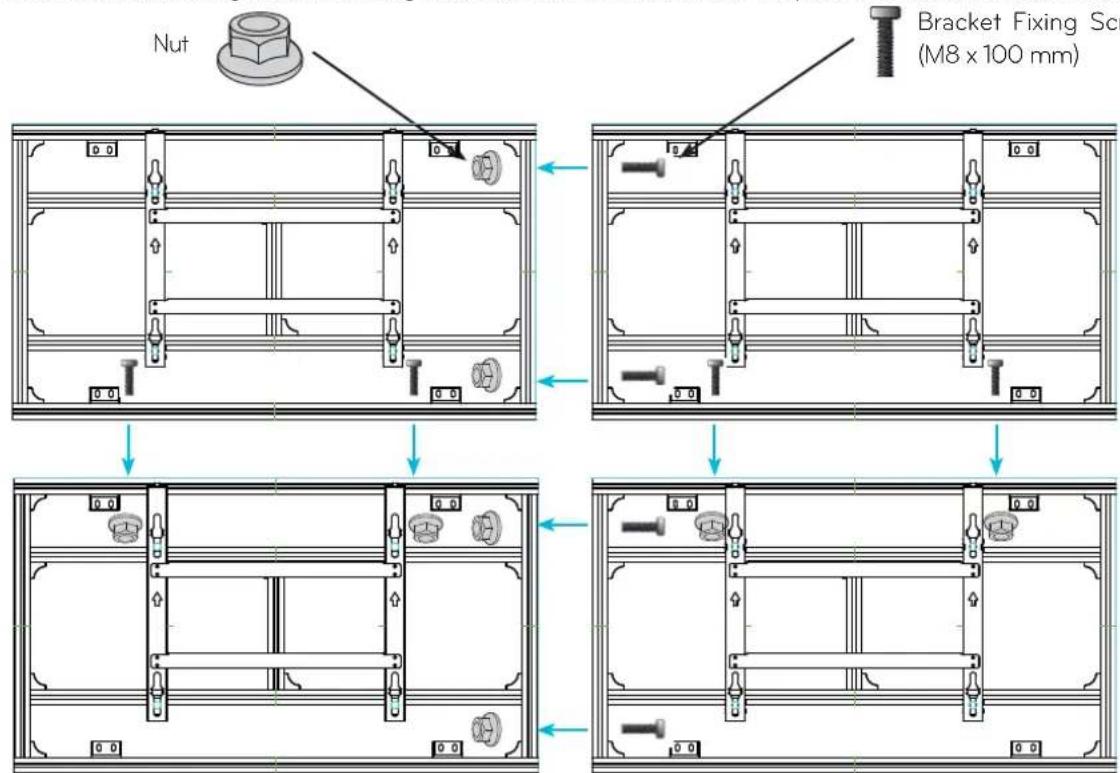
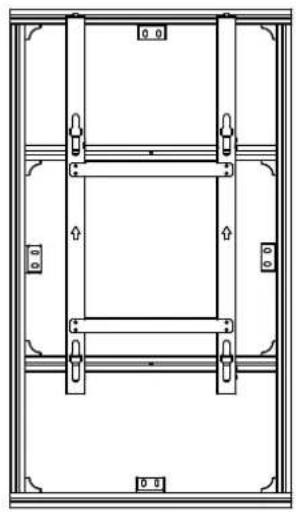
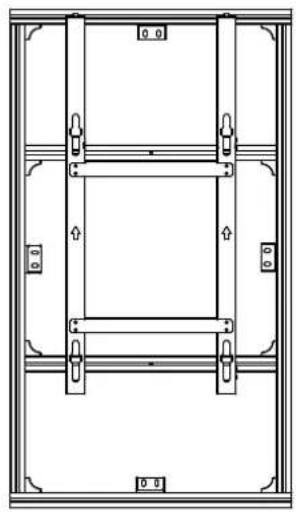
Attach the brackets using two bracket fixing screws (M8 x 100 mm) and nuts. The procedure is based on 2X2 installation.

CAUTION
- Check the direction of the arrows shown in the figure above to avoid placing the bracket upside down.
2
Verifying Where the Brackets Are Fixed
Refer to the following illustration to fix the brackets according to the type.
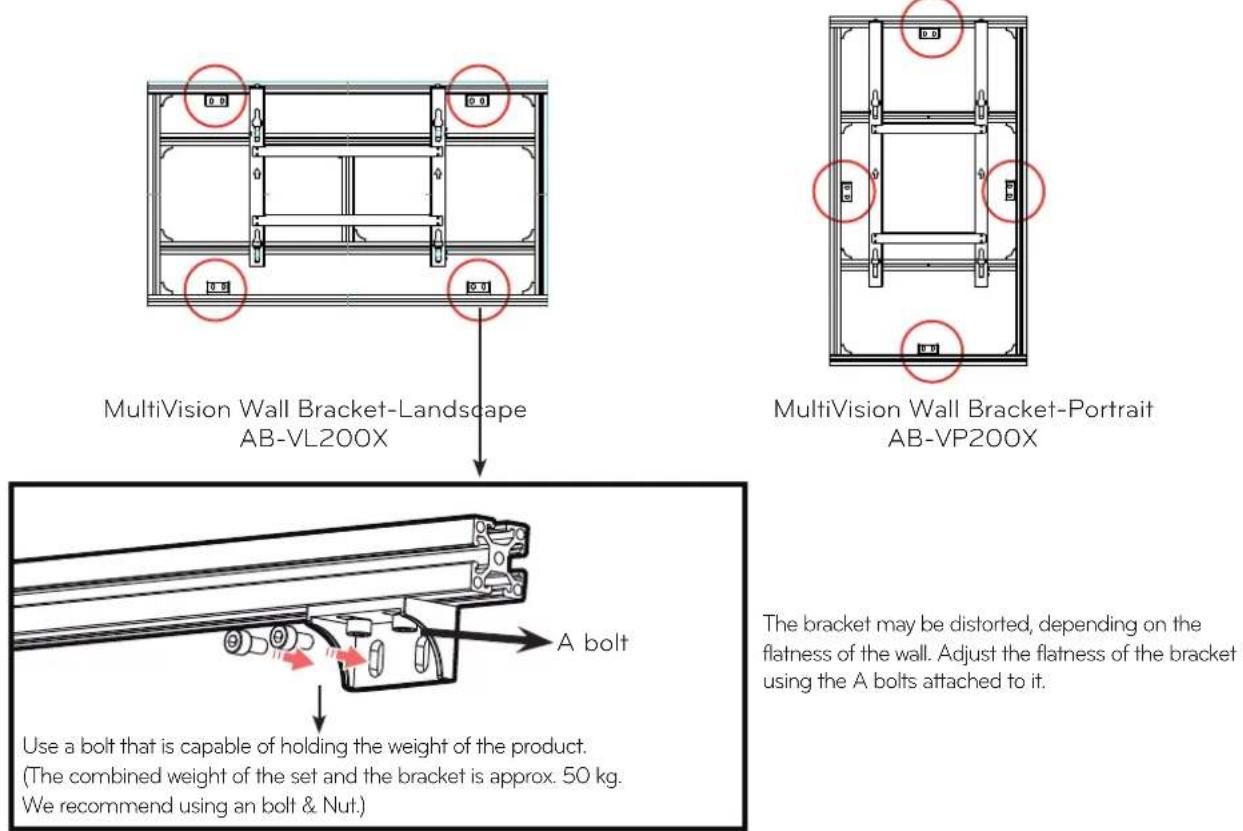
The bracket may be distorted, depending on the flatness of the wall. Adjust the flatness of the bracket using the A bolts attached to it.
3
Attaching the Guide Spacers
If the screws are not fully tightened when you fix the guide spacers, check the length of the screws and refer to the technical service manual.
natural_image
Technical line drawing of a mechanical assembly with multiple components and a red circular annotation (no text or symbols)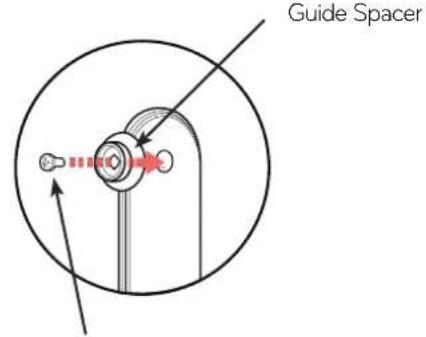
4 Guide Spacer Fixing Screws (M8X32mm)
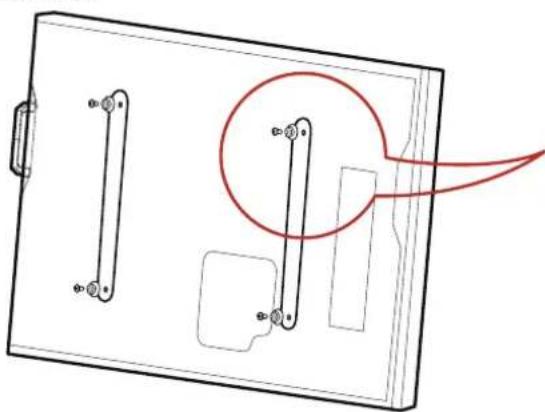
Fix the guide spacers and the guide spacer fixing screws in the order shown in the picture.
Lay the set down and fix the guide spacers to the set using the screws.
- Place the product on a table with its screen facing downward. Make sure that you place it on soft clothing or a cushion on the flat surface to protect the screen.
- Tighten the screw until the set, the guide spacer and the screw are joined together securely.
- Use a Philips driver (manual or electric) to tighten the screws.
4
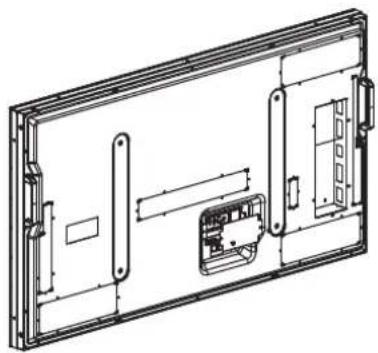
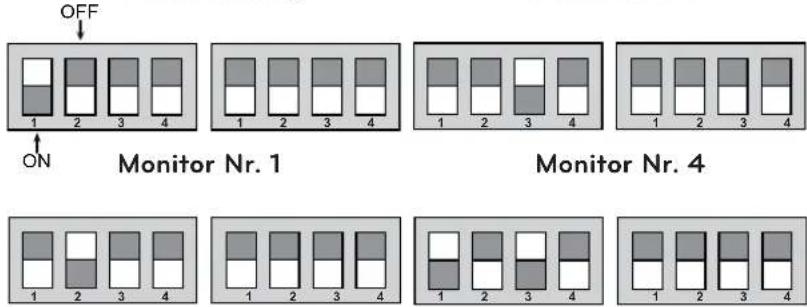
Dip switch setting
natural_image
Technical line drawing of a rectangular electronic device with internal components and mounting brackets (no text or symbols)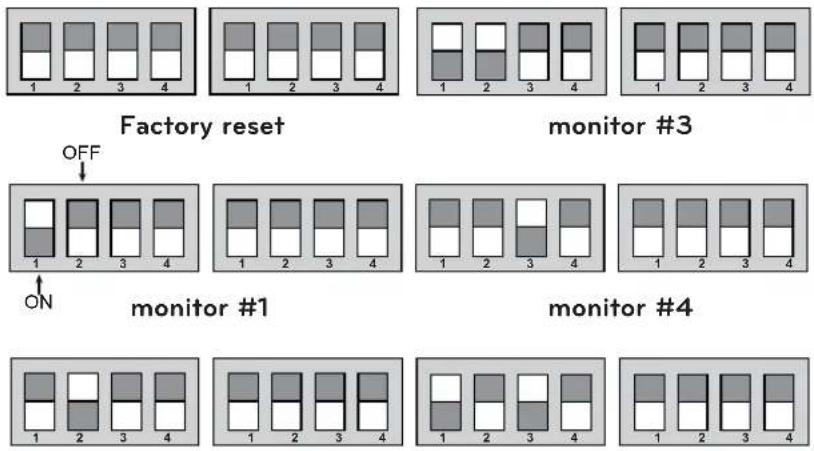
monitor #2
monitor #5
5
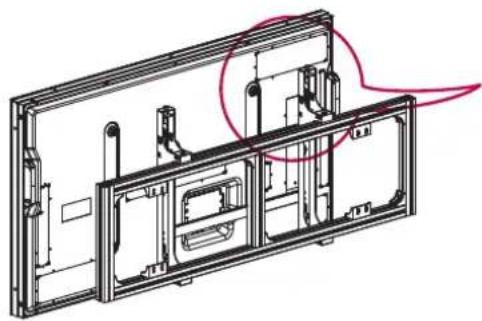
How to Attach the Product and Bracket
- Two or more people are needed to install the product.
natural_image
Technical line drawing of a mechanical assembly with no visible text or symbols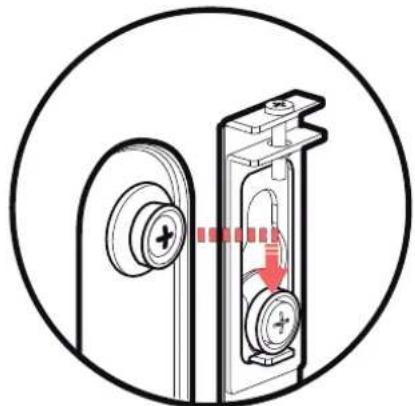
natural_image
Diagram of a door lock mechanism inside a circular frame, showing keyhole and handle assembly (no text or symbols)Place the product assembled with the guide spacers, as illustrated with the arrow.
- Make sure that the product is fixed securely by checking attachment.
6
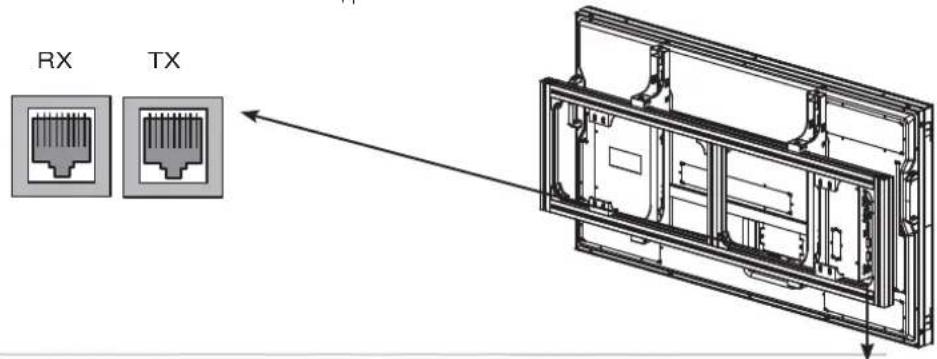
Connecting Cables
- It is recommended to arrange cables using the bracket firat to install the set.
- For information on how to connect cables, please refer to the set's owner's manual.

7
Set Arrangement
The procedure is based on 3X3 installation.
Set Arrangement step: 8 5 2 , 7 4 1 , 9 6 3
| 3 | 2 | 1 |
| 6 | 5 | 4 |
| 9 | 8 | 7 |
- Mount set 8, then loosen the horizontal alignment screws to lower the set by approximately 30 mm.
(Caution: Otherwise, when set 5 is mounted the sets may collide and cause damage.)
Once the set is lowered, use the horizontal alignment screws to align the set horizontally. Tighten the right/left screws.
Loosen the screw to lower the set.
(Loosen the right and left screws gently in turn.)
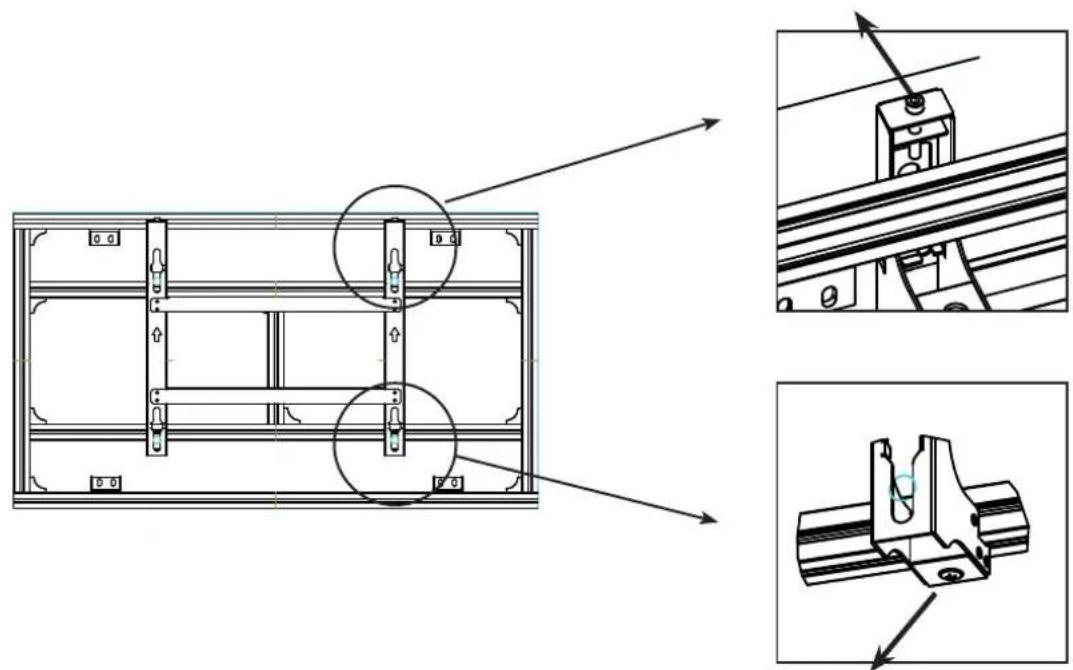
natural_image
Technical line drawing of a mechanical assembly with multiple orthographic views (no text or symbols)
Tighten the screws to fix the left and right slides.
- Mount set 5, then remove the module-protecting Cover on sets 8 and 5.
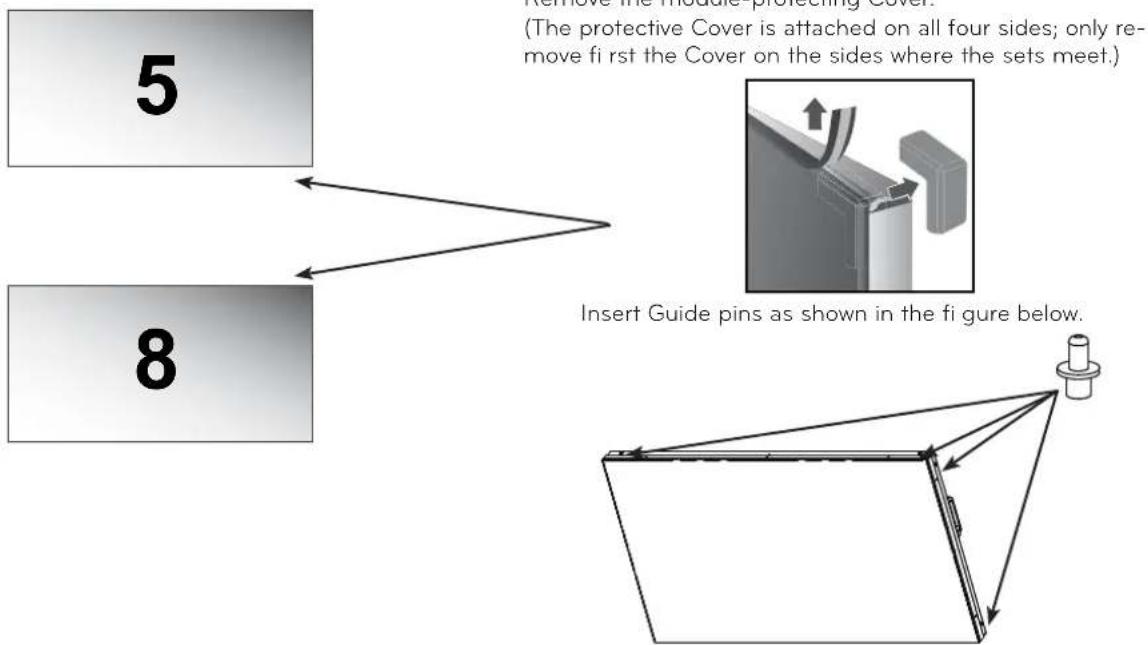
- Loosen the horizontal alignment screws on bracket 5, then attach set 5 to set 8.
(Caution: Loosen the right and left horizontal alignment screws gently in turn to prevent the set from tilting and causing damage.)
Fasten the right and left slides of set 5 using the right/left fixing screws.
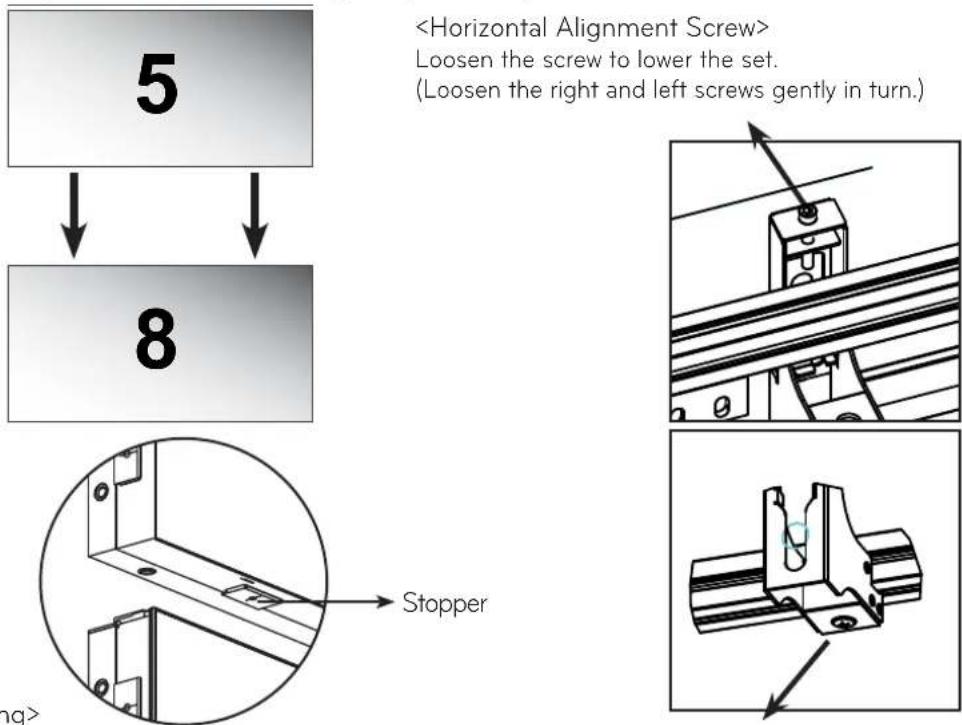
Push the top set to the bottom set until the stopper slightly touches the bottom set. Pushing the product with force may cause damage to the product.
Tighten the screws to fix the left and right slides.
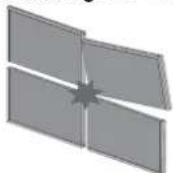
CAUTION
- Loosen the left and right leveling screws slowly in turns. Otherwise, this may make the set tilted, which may cause damage to the set.
- Mount set 2 in the same way as set 5 is mounted.
- Mount set 2, then remove the module-protecting Cover attached between set 5 and 2.
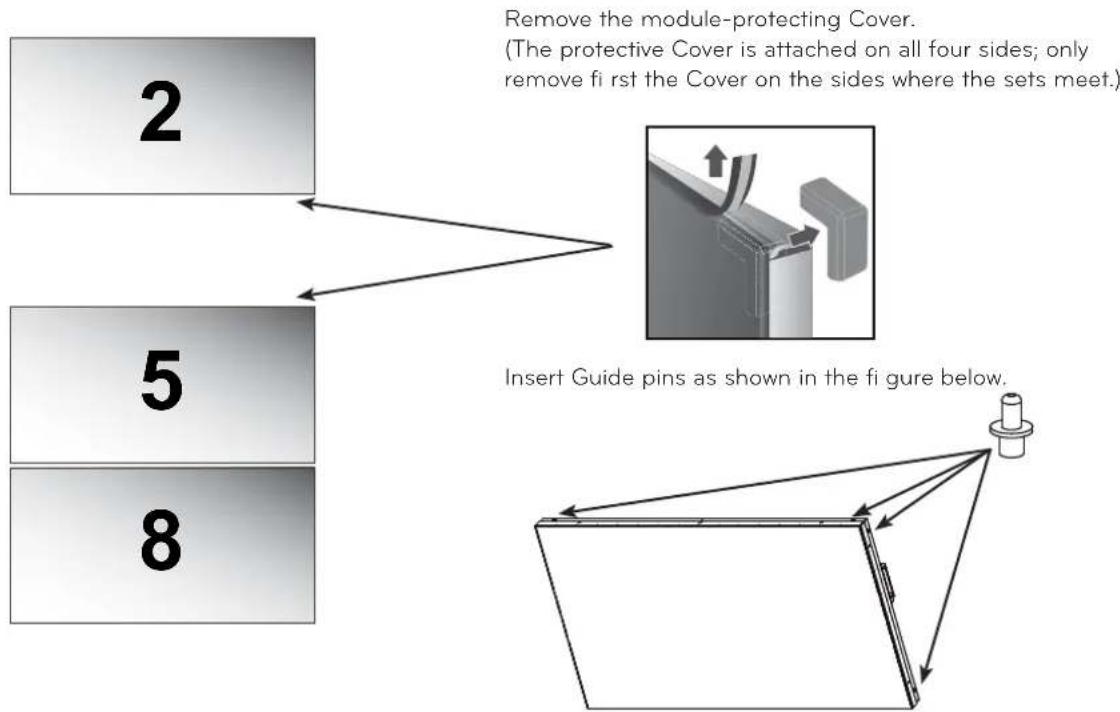
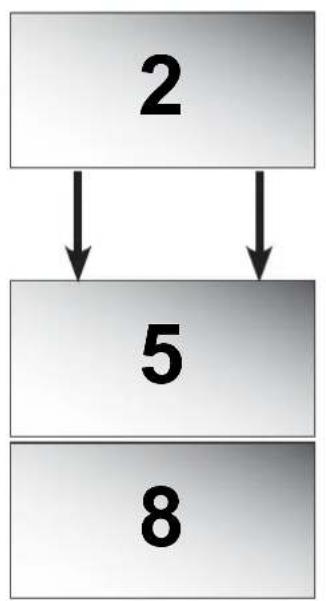
- Loosen the horizontal alignment screws on bracket 2, then attach set 2 to set 5.
(Caution: Loosen the right and left horizontal alignment screws gently in turn to prevent the set from tilting and causing damage.)
Fix the right and left slides of set 2 using the right/left fixing screws.
flowchart
graph TD
    A["2"] --> B["5"]
    B --> C["8"]
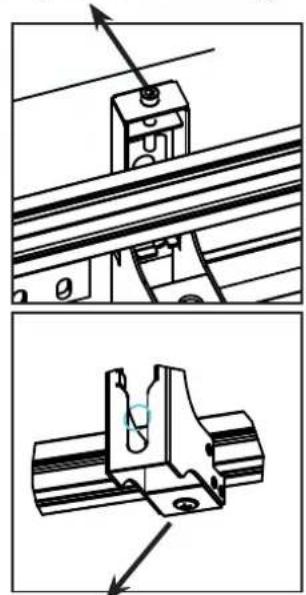
Loosen the screw to lower the set.
(Loosen the right and left screws gently in turn.)
natural_image
Technical illustration showing mechanical assembly steps with no visible text or symbolsTighten the screws to fix the left and right slides.
- Use the guide fixers provided to attach sets 2, 5 and 8 as shown below and align them side by side so that no set sticks out at the front or back.
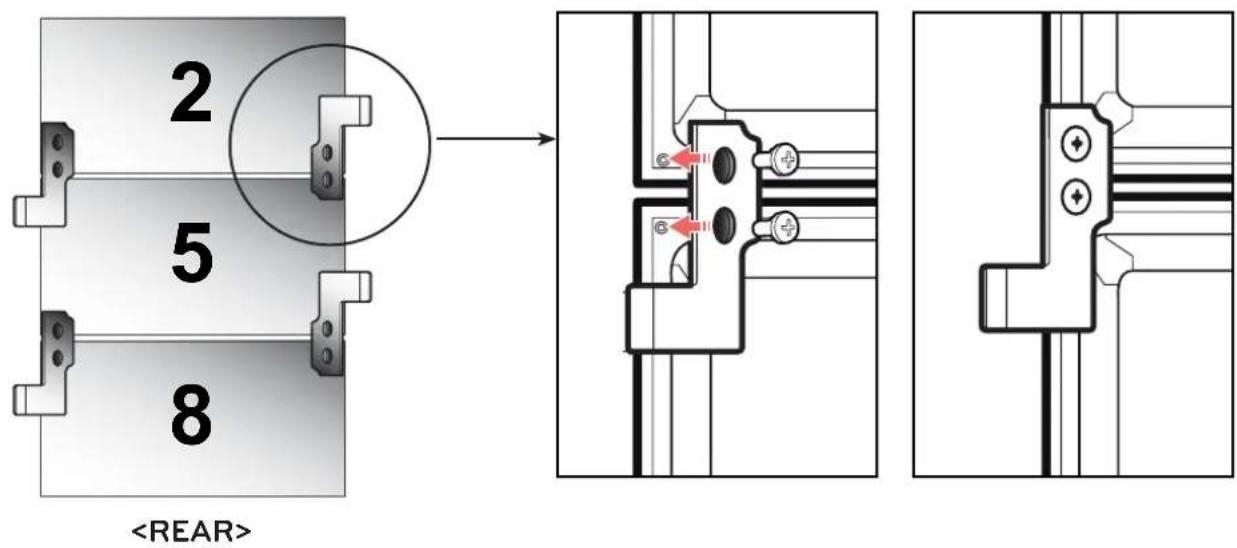
- Mount set 9 then adjust its height using the horizontal alignment screws so that set 9 and set 8 are at the same height.
(Caution: Before mounting the set, push bracket 7 to the left end to ensure there is enough space for set 8.)
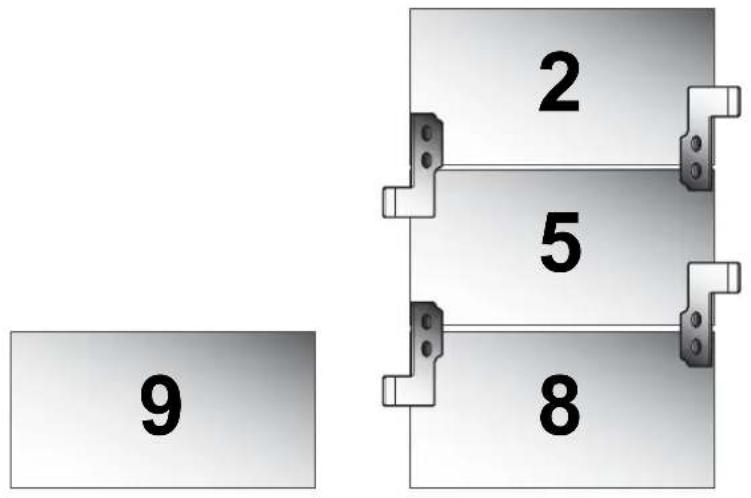
- Mount set 6, then remove the module-protecting Cover from sets 9 and 6.
Remove the module-protecting Cover.
(The protective Cover is attached on all four sides; only remove first the Cover on the sides where the sets meet.)
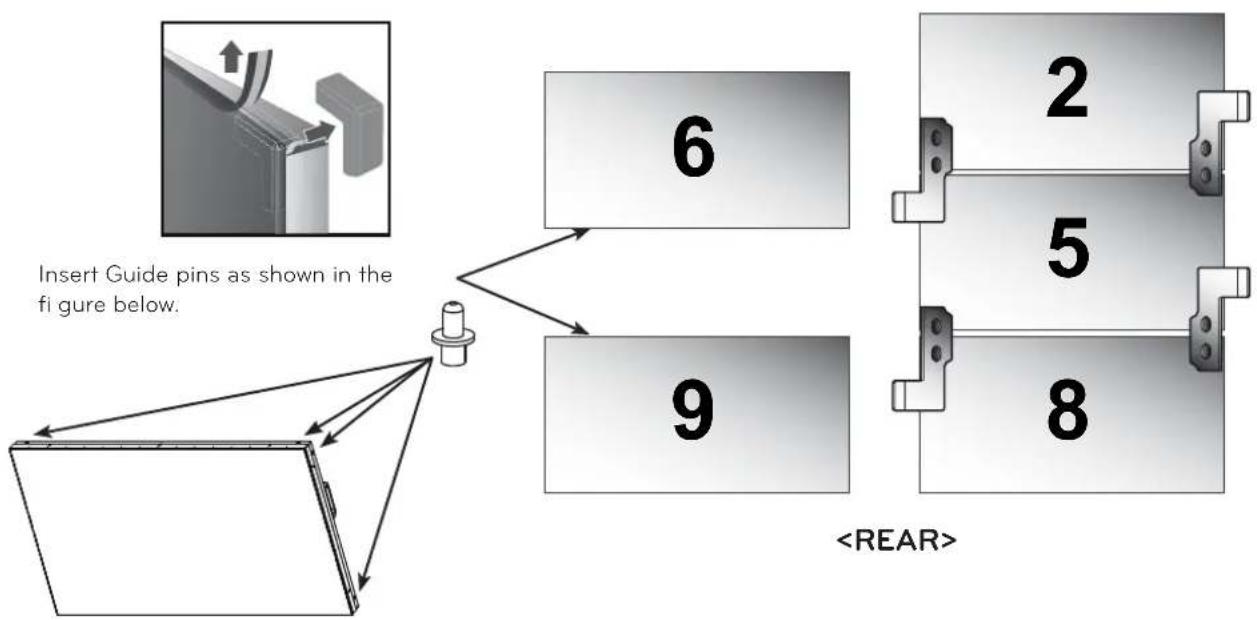
flowchart
graph TD
    A["Insert Guide pins as shown in the figure below."] --> B["6"]
    A --> C["9"]
    B --> D["2"]
    B --> E["5"]
    B --> F["8"]
    C --> G["<REAR>"]
ENGLISH
- Loosen the horizontal alignment screws on bracket 6, then attach set 6 to set 9.
(Caution: Loosen the right and left horizontal alignment screws gently in turn to prevent the set from tilting and causing damage.)
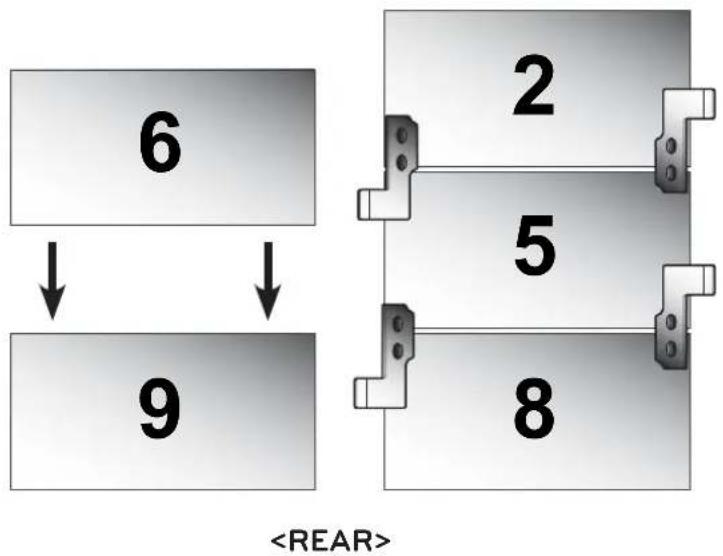
flowchart
graph TD
    A["6"] --> B["9"]
    C["2"] --> D["5"]
    E["8"] --> F["8"]
    style A fill:#f9f,stroke:#333
    style B fill:#f9f,stroke:#333
    style C fill:#f9f,stroke:#333
    style D fill:#f9f,stroke:#333
    style E fill:#f9f,stroke:#333
    style F fill:#f9f,stroke:#333
- Mount set 3, then remove the module-protecting Cover in the same way.
Loosen the horizontal alignment screws on bracket 3, then attach set 3 to set 6.
(Caution: Loosen the right and left horizontal alignment screws gently in turn to prevent the set from tilting and causing damage.)
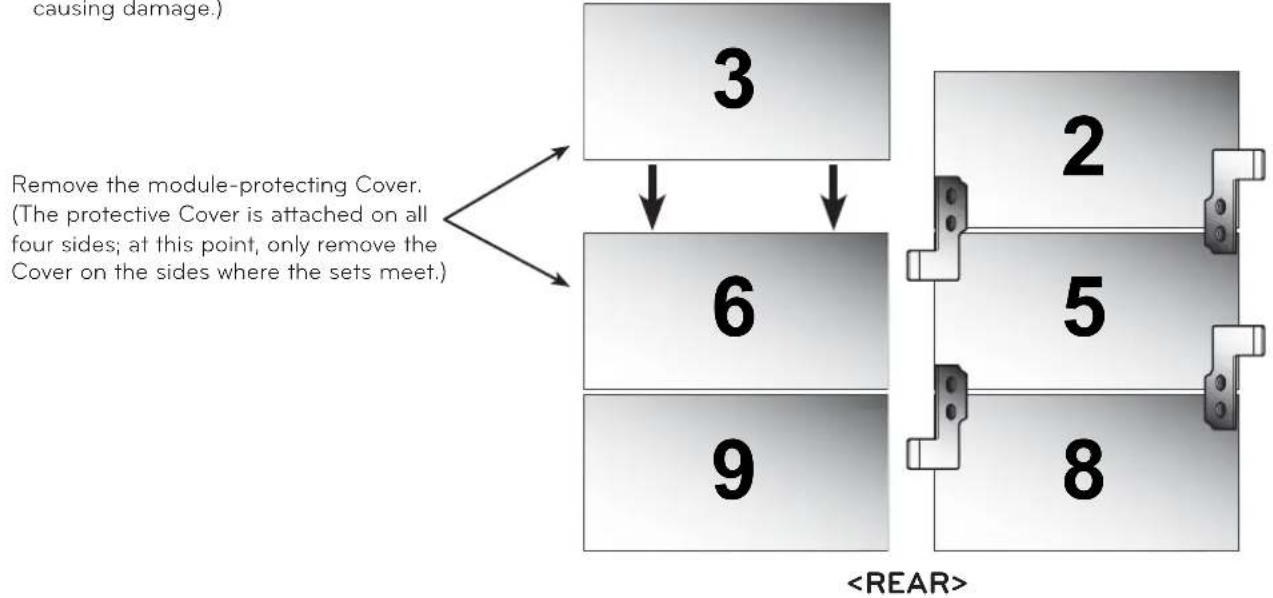
flowchart
graph TD
    A["3"] --> B["6"]
    B --> C["9"]
    D["2"] --> E["5"]
    E --> F["8"]
    style A fill:#f9f,stroke:#333
    style B fill:#ccf,stroke:#333
    style C fill:#cfc,stroke:#333
    style D fill:#fcc,stroke:#333
    style E fill:#cff,stroke:#333
    style F fill:#ffc,stroke:#333
- Use the guide fixers provided to attach sets 3, 6 and 9 as shown below so that the sets are aligned in a perfectly straight line.
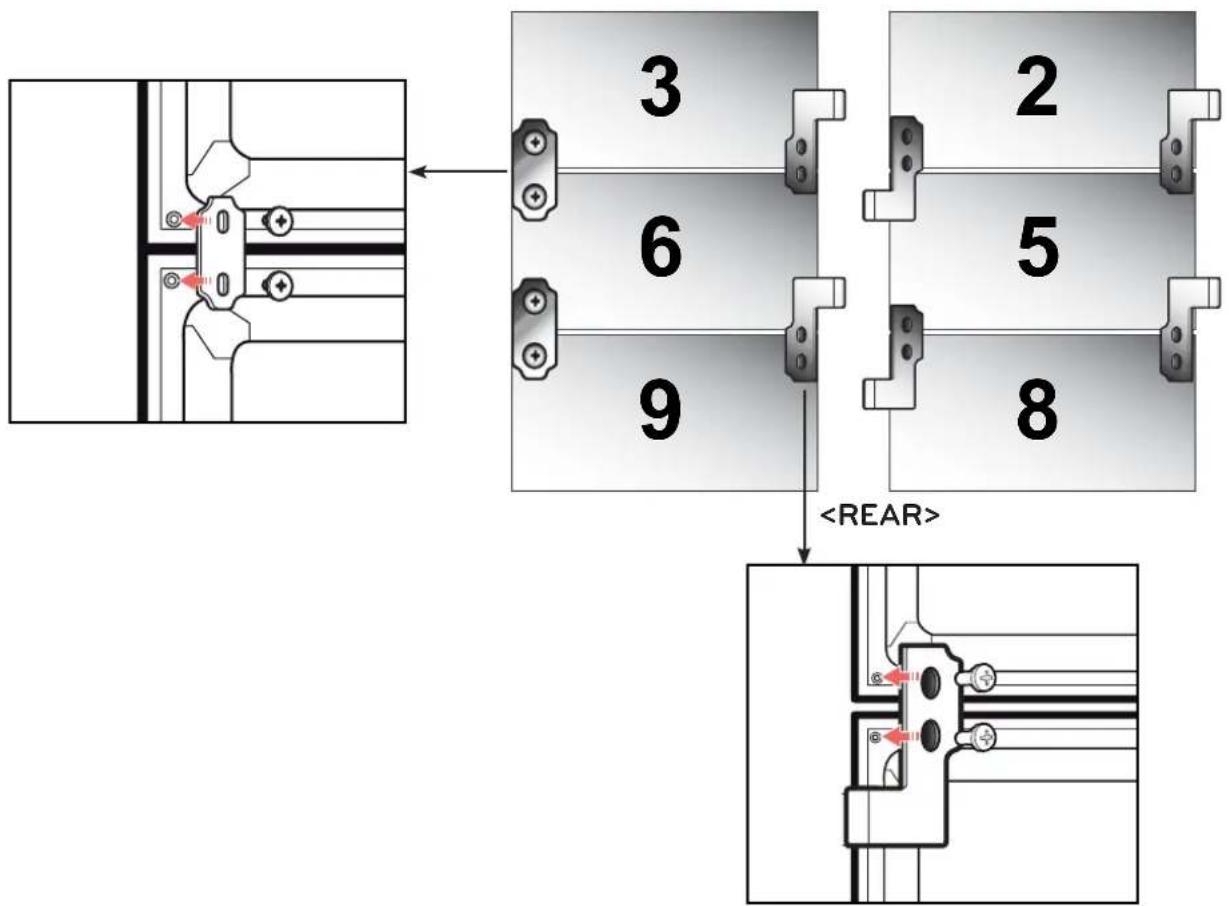
- Mount sets 1, 4 and 7 in the same way as sets 3, 6 and 9 are mounted.
- Sets 2, 5 and 8 are fixed with the right/left fixing screws; sets 1, 4 and 7 and 3, 6 and 9 are not fixed with the right/left fixing screws and can slide to the right or left.
- Remove the module-protecting Cover before aligning the sets.
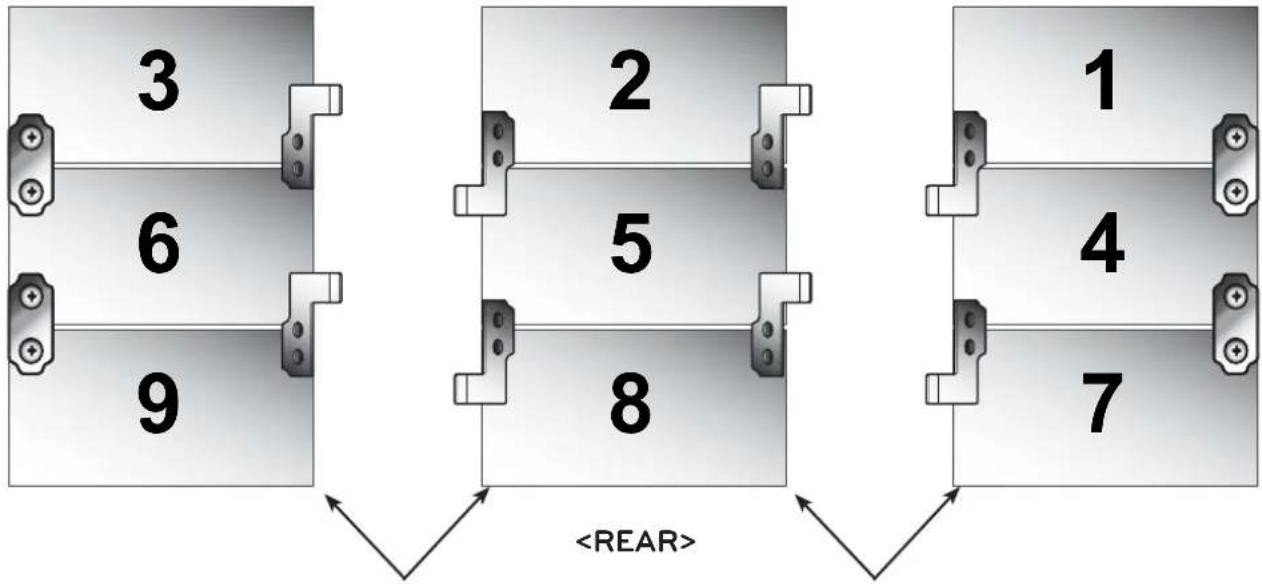
ENGLISH
Remove the module-protecting Cover. Remove the module-protecting Cover.
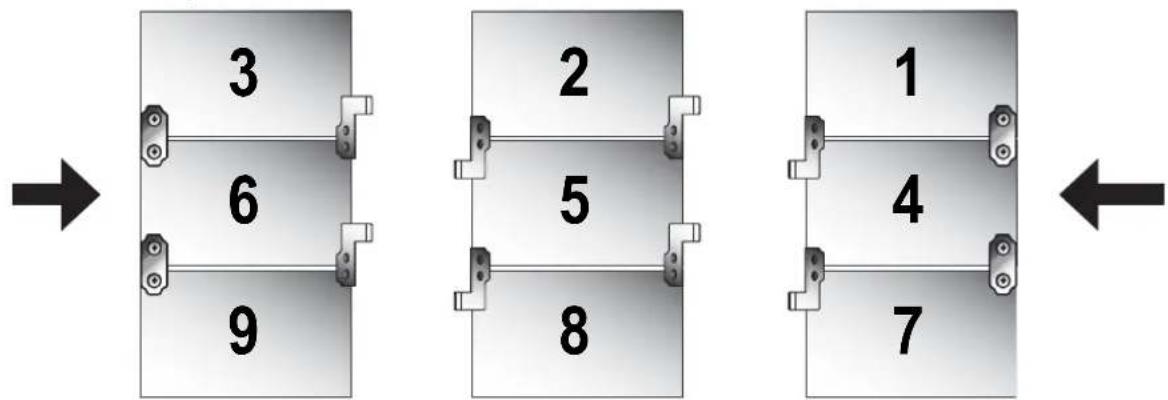
- Push sets 3, 6 and 9 to the right to meet sets 2, 5 and 8.
Similarly, push sets 1, 4 and 7 to the left to meet sets 2, 5 and 8.
(Caution: Push gently and slowly to avoid damage due to a collision.) - Once the sets meet, tighten the right and left fixing screws for sets 1, 4 and 7 and sets 3, 6 and 9 to prevent them from sliding.
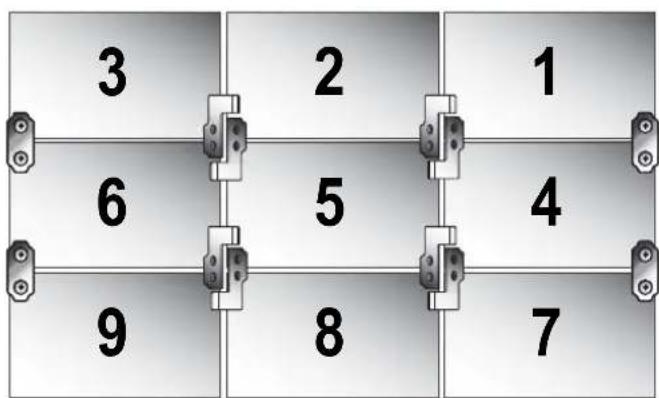
- Attach additional fixers to the marked areas to make sure that sets do not stick out at the front or back.
- Finally, remove all the module-protecting Cover on the outside of the sets.
Remove the module-protecting Cover.
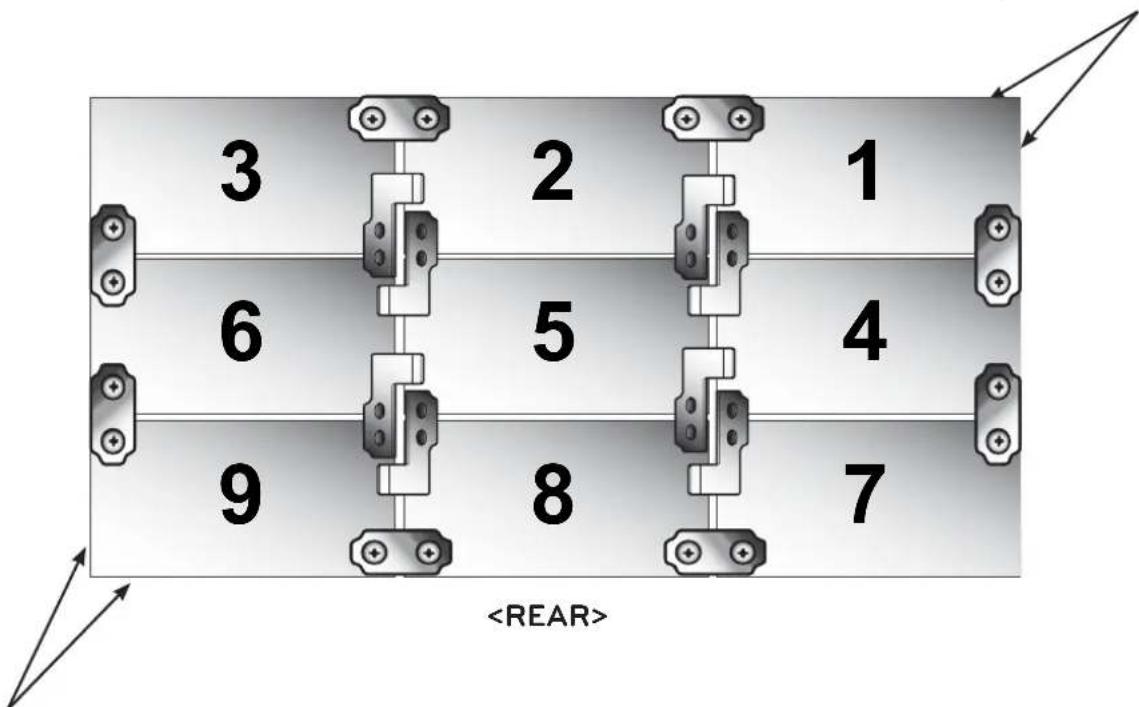
Remove the module-protecting Cover.
Product Specifications
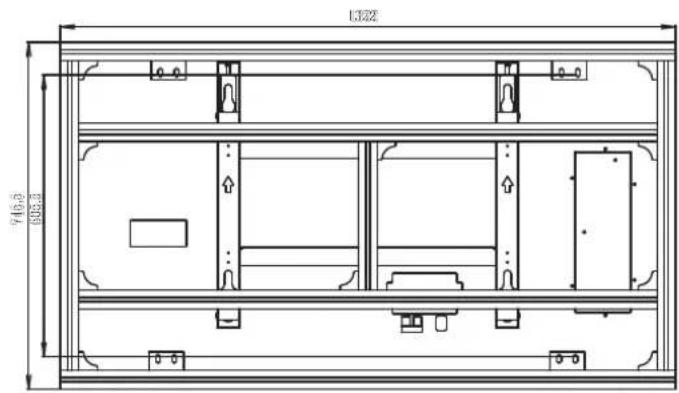
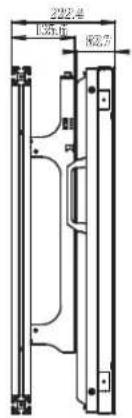
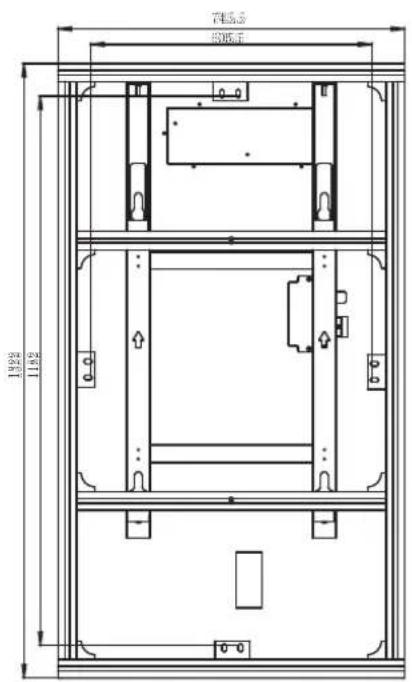

| Model Name | AB-VL200X AB-VP200X |
| Width (mm) | 1426 1426 |
| Height (mm) | 210 210 |
| Depth (mm) | 1006 1006 |
| Weight (kg) | 23 22.2 |
The model name and serial number are located on the back and side of the product.
Please make a note of these below.
Model Name
Serial Number
The Ground Truth image displays a single, solid horizontal line. According to Rule 2 (UNDERSCORE & LINE RULES), if the GT contains lines used for stylistic emphasis or as background (like ruled paper), the OCR result must ignore them. The line in the GT is clearly a stylistic or background line, not a placeholder for text. Therefore, the OCR should not have output any underscores. Outputting `____` constitutes an error under Rule 2, as it hallucinates placeholder symbols where none are semantically intended. Hence, the OCR result is inconsistent with the Ground Truth.
natural_image
Technical line drawing of a structural frame with supports and internal components (no text or symbols)natural_image
Technical line drawing of a structural frame with vertical supports and mounting holes (no text or symbols)natural_image
Illustration of two people interacting with a large rectangular panel (no text or symbols visible)natural_image
Two people handling a large rectangular object, possibly a tablet or case (no text or symbols visible)
natural_image
Technical line drawing of a rectangular electronic device with internal components and mounting brackets (no text or symbols)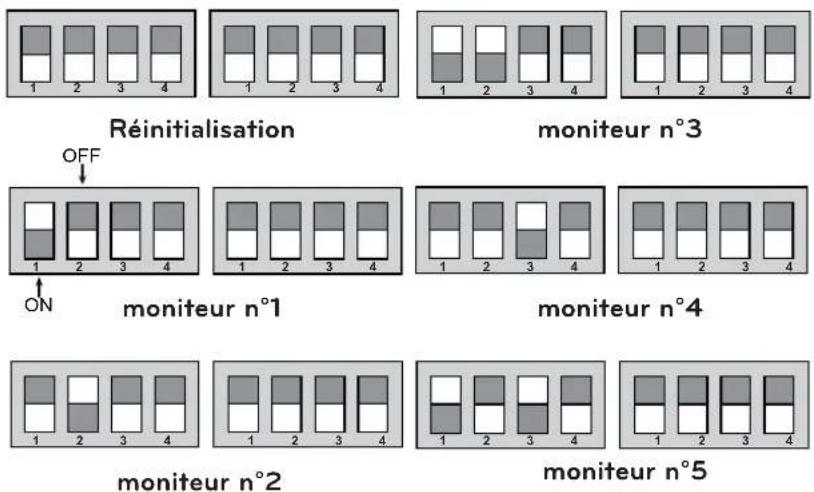
5
natural_image
Technical line drawing of a mechanical assembly with no visible text or symbols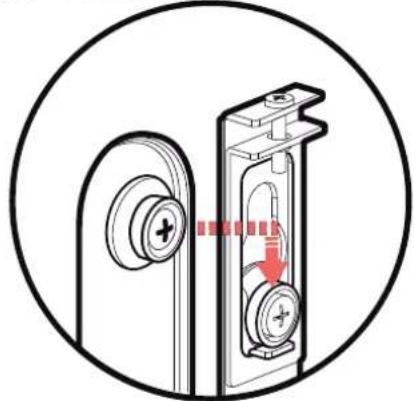
natural_image
Diagram of a door handle mechanism with a red arrow indicating rotation or movement (no text or symbols present)natural_image
Technical line drawing of a mechanical assembly with three views (top, front, side), showing structural components and mounting features without any text or symbols.flowchart
graph TD
    A["2"] --> B["5"]
    B --> C["8"]
natural_image
Technical line drawing showing mechanical assembly steps with no visible text or symbolsnatural_image
Technical line drawing of a structural frame with supports and mounting brackets (no text or symbols)MultiVision Wandmontagehalterung - Querformat AB-VL200X
natural_image
Technical line drawing of a structural frame with vertical supports and mounting holes (no text or symbols)natural_image
Illustration of two people interacting with a large rectangular panel (no text or symbols visible)natural_image
Two people handling a large rectangular object, possibly a tablet or caseplate (no text or symbols visible)
natural_image
Technical line drawing of a rectangular electronic device with internal components and mounting brackets (no text or symbols)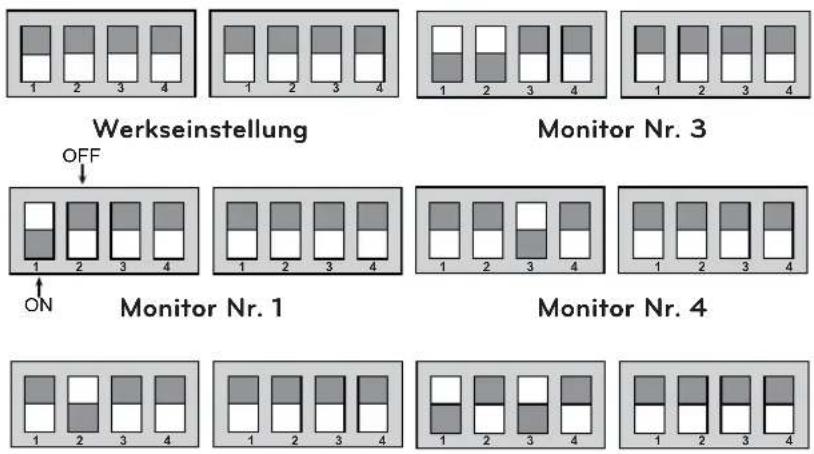
natural_image
Technical line drawing of a mechanical assembly with no visible text or symbols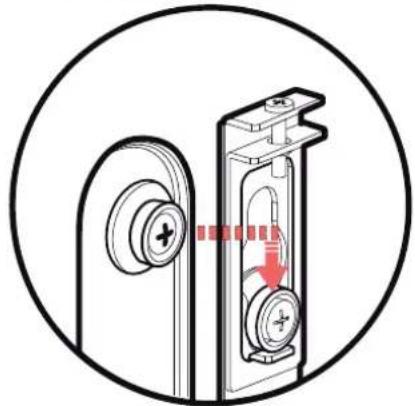
natural_image
Diagram of a door lock mechanism with a red arrow indicating clockwise motion (no text or symbols)natural_image
Technical line drawing of a mechanical assembly with multiple orthographic views (no text or symbols)flowchart
graph TD
    A["2"] --> B["5"]
    B --> C["8"]
natural_image
Technical line drawing showing mechanical assembly steps with no visible text or symbolsnatural_image
Technical line drawing of a structural frame with supports and brackets (no text or symbols)Soporte de pared MultiVision: horizontal AB-VL200X
natural_image
Technical line drawing of a structural frame with vertical supports and mounting holes (no text or symbols)Soporte de pared MultiVision: vertical AB-VP200X

Accesorios
natural_image
Illustration of two people interacting with a large rectangular panel (no text or symbols visible)natural_image
Two people handling a large rectangular object, possibly a tablet or case (no text or symbols visible)
natural_image
Technical line drawing of a rectangular electronic device with internal components and mounting brackets (no text or symbols)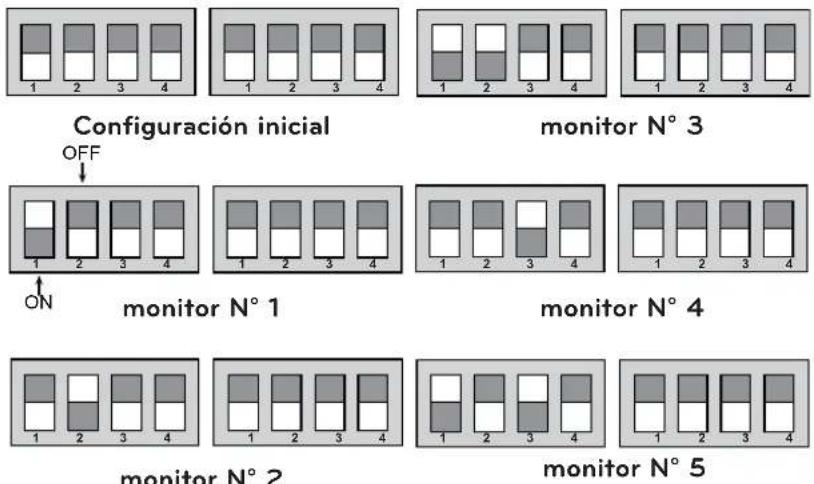
monitor N° 2
5
natural_image
Technical line drawing of a mechanical assembly with no visible text or symbols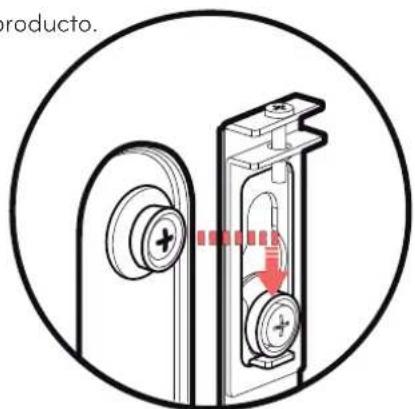
natural_image
Technical line drawing of a mechanical assembly with internal components and mounting brackets (no text or symbols)

natural_image
Technical line drawing of a mechanical assembly with multiple orthographic views (no text or symbols)ESPANOL
natural_image
Technical line drawing showing mechanical assembly with two views (top and bottom) of a bracket and shaft, no text or symbols present.flowchart
graph TD
    A["2"] --> B["5"]
    B --> C["8"]
natural_image
Technical line drawing showing mechanical assembly steps with no visible text or symbols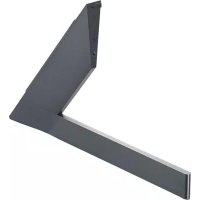

- MultiVision Mounting Bracket
- Accessories
- Safety Precautions
- Warning
- Caution
- Transportation method for panel protection
- Storage method for panel protection
- NOTE
- Before Installation
- How to Install
- 1
- Assembling the MultiVision Bracket
- 2
- Verifying Where the Brackets Are Fixed
- 3
- Attaching the Guide Spacers
- 4
- Dip switch setting
- 5
- How to Attach the Product and Bracket
- 6
- Connecting Cables
- 7
- Set Arrangement
- Product Specifications
- Accesorios
Brand : LG
Model : ABVL200X
Category : TV Mount