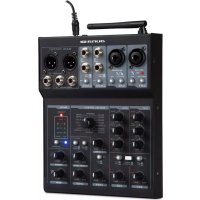
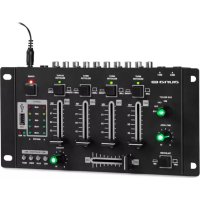
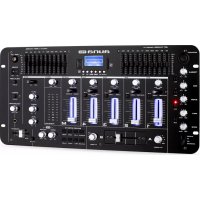
USER MANUAL Blackbird Auna
Blackbird Rushpult Mixer
Mischpult
Music Mixer
Mesa de mezclas
Console de mixage
Miscelatore di musica
3277
1003
aui
www.auna-multimedia.com

bar
| Category | Value |
|---|---|
| Category 1 | 100 |
| Category 2 | 100 |
| Category 3 | 100 |
| Category 4 | 100 |
| Category 5 | 100 |
| Category 6 | 100 |
| Category 7 | 100 |
| Category 8 | 100 |
| Category 9 | 100 |
| Category 10 | 100 |
| Category 11 | 100 |
| Category 12 | 100 |
| Category 13 | 100 |
| Category 14 | 100 |
| Category 15 | 100 |
| Category 16 | 100 |
| Category 17 | 100 |
| Category 18 | 100 |
| Category 19 | 100 |
| Category 20 | 100 |
| Category 21 | 100 |
| Category 22 | 100 |
| Category 23 | 100 |
| Category 24 | 100 |
| Category 25 | 100 |
| Category 26 | 100 |
| Category 27 | 100 |
| Category 28 | 100 |
| Category 29 | 100 |
| Category 30 | 100 |
| Category 31 | 100 |
| Category 32 | 100 |
| Category 33 | 100 |
| Category 34 | 100 |
| Category 35 | 100 |
| Category 36 | 100 |
| Category 37 | 100 |
| Category 38 | 100 |
| Category 39 | 100 |
| Category 40 | 100 |
| Category 41 | 100 |
| Category 42 | 100 |
| Category 43 | 100 |
| Category 44 | 100 |
| Category 45 | 100 |
| Category 46 | 100 |
| Category 47 | 100 |
| Category 48 | 100 |
| Category 49 | 100 |
| Category 50 | 100 |
| Category 51 | 100 |
| Category 52 | 100 |
| Category 53 | 100 |
| Category 54 | 100 |
| Category 55 | 100 |
| Category 56 | 100 |
| Category 57 | 100 |
| Category 58 | 100 |
| Category 59 | 100 |
| Category 60 | 100 |
| Category 61 | 100 |
| Category 62 | 100 |
| Category 63 | 100 |
| Category 64 | 100 |
| Category 65 | 100 |
| Category 66 | 100 |
| Category 67 | 100 |
| Category 68 | 100 |
| Category 69 | 100 |
| Category 70 | 100 |
| Category 71 | 100 |
| Category 72 | 100 |
| Category 73 | 100 |
| Category 74 | 100 |
| Category 75 | 100 |
| Category 76 | 100 |
| Category 77 | 100 |
| Category 78 | 100 |
| Category 79 | 100 |
| Category 80 | 100 |
| Category 81 | 100 |
| Category 82 | 100 |
| Category 83 | 100 |
| Category 84 | 100 |
| Category 85 | 100 |
| Category 86 | 100 |
| Category 87 | 100 |
| Category 88 | 100 |
| Category 89 | 100 |
| Category 90 | 100 |
| Category 91 | 100 |
| Category 92 | 100 |
| Category 93 | 100 |
| Category 94 | 100 |
| Category 95 | 100 |
| Category 96 | 100 |
| Category 97 | 100 |
| Category 98 | 100 |
| Category 99 | 100 |
| Total (Total) |
TECHNISCHE DATEN
https://use.berlin/10033277
natural_image
Symbol of a trash bin crossed with a diagonal line, no text or numbers present
Congratulations on purchasing this equipment. Please read this manual carefully and take care of the following hints to avoid damages. Any failure caused by ignoring the items and cautions mentioned in the instruction manual is not covered by our warranty and any liability. Scan the QR code to get access to the latest user manual and other information about the product:

TECHNICAL DATA
| Item number 10033277 | |
| Inputs |
| DJ Microphone 1.5 mV / 1 kΩ | |
| Line 150 mV / 27 kΩ | |
| Outputs |
| MASTER 1 V / 20 kΩ | |
| General |
| Frequency response | 20 Hz - 20 kHz ± 2 dB |
| THD < 0.1% | |
| S/N Ratio >80 db | |
| Headphone impedance 32 Ω | |
OVERVIEW

1 DC IN +12V
Please ensure the correct voltage is selected for your country. Failure to set the correct voltage Will cause damage to the unit.
2 POWER
Power switch.
3 USB TO PC
Use A-B USB cable to connect the computer play music.
4 BT ANT
Bluetooth antenna.
5 MIC/LINE
Microphone/line input.Support for 48V microphone.
6 PHANTOM
+48 V power switch.
7CH1 PAD
Press the switch CH1 signal to attenuate 20dB
8 MIC/LINE/INST
Microphone/line/ guitars input.
9 INST/HI-Z
Press the switch when using the guitar.
10 CH2 PAD
Press the switch CH2 signal to attenuate 20dB
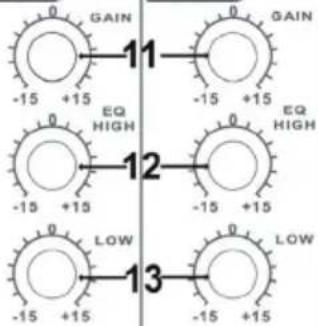
11 GAIN
CH1/CH2 gain control.
12 EQ HIGH
CH1/CH2 high regulating.
13 EQ LOW
CH1/CH2 low regulating.
14 FX
Press the switch CH1/CH2 to add DSP effect.
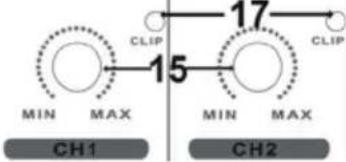
15 LEVEL
CH1/CH2 level control.
16 MONO/STEREO
Switch allow you to make the overall output mono.
17 CLIP
CH1/CH2 Signal overload indicator light.
CH3/CH4 line input.
19 CH3/CH4 PAD
Press the switch CH3/CH4 signal to attenuate 20Db
20 FX
Press the switch CH3/CH4 to add DSP effect.
21 LEVEL
CH3/CH4 level control.
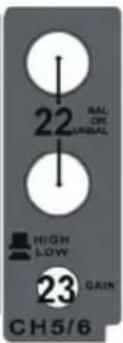
CH5/CH6 line input.
23 CH5/CH6 PAD
Press the switch CH5/CH6 signal to attenuate 20dB
24 LEVEL
CH5/CH6 level control.
25 FX LEVEL
DSP level control.
26 DIGITAL EFFECT
16 DSP effect choices.
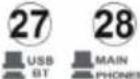
27 USB/BT
PC music and bluetooth music selector switch.
28 MONITOR
USB/BT signal earphone listening switch.
29 USB/BT LEVEL
USB/BT level control.
30 BLUETOOTH
Press the switch bluetooth device to start work.
31 BLUETOOTH LED
Bluetooth device working status indicator light.
32 LED DISPLAY
The device has two rows of leds, which display L output and R output.
33 LEVEL
Phones level control.
34 LEVEL
Master level control.
35 HEADPHONE
1/4" jack headphone out.
36 MASTER OUTPUTS
Left & Right line level Unbalanced 1/4' jack outputs.
37 BALANCE OUTPUT
The mixer support L/R balance output.

Producer:
Chal-Tec GmbH, Wallstraße 16, 10179 Berlin, Germany.
2011/65/EU (RoHS)
2014/53/EU (RED)
The complete declaration of conformity of the manufacturer can be found at the following link: https://use.berlin/10033277
HINTS ON DISPOSAL

natural_image
Symbol of a trash bin crossed out by a diagonal line, representing no waste or discharge (no text or labels present)
According to the European waste regulation 2012/19/EU this symbol on the product or on its packaging indicates that this product may not be treated as household waste. Instead it should be taken to the appropriate collection point for the recycling of electrical and electronic equipment. By ensuring this product is disposed of correctly, you will help prevent potential negative consequences for the environment and human health, which could otherwise be caused by inappropriate waste handling of this product. For more detailed information about recycling of this product, please contact your local council or your household waste disposal service.
Estimado cliente:
DATOS TÉCNICOS


CH1
FX 14
16
14 FX
OFF ON
MONO STEREO
OFF ON
flowchart
graph TD
    A["MIN"] -->|CLIP 15| B["MIN"]
    C["MAX"] -->|CLIP 17| D["MAX"]
    style A fill:#fff,stroke:#000
    style B fill:#fff,stroke:#000
    style C fill:#fff,stroke:#000
    style D fill:#fff,stroke:#000
DIGITAL EFFECT


MIN MAX
FX 20
OFF ON

MIN MAX
CH3/4
USB/BT TO

MIN MAX
USB/BT LEVEL

MIN MAX
CH5/6
MAIN

natural_image
Symbol of a trash bin crossed out by a diagonal line, representing no waste or discharge (no text or labels present)
FICHE TECHNIQUE

Fabricant :
Chal-Tec GmbH, Wallstraße 16, 10179 Berlin, Allemagne.
https://use.berlin/10033277
CONSEILS POUR LE RECYCLAGE

natural_image
Symbol of a trash bin crossed with a diagonal line, no text or numbers present
DATI TECNICI

CH1

FX 14
16
14 FX
OFF ON
MONO STEREO
OFF ON

flowchart
graph LR
    A["MIN"] -->|CLIP| B["15"]
    C["MAX"] -->|CLIP| D["17"]
    style A fill:#fff,stroke:#000
    style C fill:#fff,stroke:#000
    style B fill:#fff,stroke:#000
    style D fill:#fff,stroke:#000
DIGITAL EFFECT


MIN MAX
FX 20
OFF ON

MIN MAX
CH3/4
USB/BT TO


MIN MAX
USB/BT LEVEL

MIN MAX
CH5/6
MAIN

https://use.berlin/10033277
SMALTIMENTO

natural_image
Symbol of a trash bin crossed with a diagonal line, no text or numbers present
natural_image
Abstract white logo design on dark background, resembling stylized letter 'S' or wave form (no text or symbols)