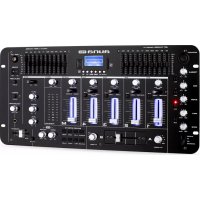
Kemistry 3 B - Mixer Auna - Free user manual and instructions
Find the device manual for free Kemistry 3 B Auna in PDF.



| Product type | DJ mixer table |
| Brand | Auna |
| Model | Kemistry 3 B |
| Power supply | 115-230 V ~ 50/60 Hz (110/230 V selector) |
| Wi-Fi | Frequency 2402-2480 MHz, transmission power 4 dBm |
| Equalizer | 3-band equalizer (bass, mid, treble) on mic and channels |
| Crossfader | Crossfader with channel selector (28) |
| Inputs | Mic (6.3mm jack), RCA line (Phono/Line selector), 12V connector for DJ light |
| Outputs | XLR, RCA Master, RCA Master2/Zine, RCA Record, headphone (jack) |
| Effects | Echo effect with Delay, repeat, volume controls; built-in sound effects |
| Bluetooth | Bluetooth section for MP3 recording |
| Recording | MP3 recording via dedicated section |
| Monitoring | Cue/PGM for headphone, effects monitoring |
| Talkover function | Automatic music attenuation when using the microphone |
| Lighting | 12V connector for DJ lighting |
| Batteries | Contains batteries; follow recycling instructions |
| Operating temperature | Avoid heat sources (radiators, etc.) |
| Cleaning | Do not spill liquids; unplug before cleaning |
| Repairability | Refer all repairs to qualified personnel; use approved parts |
| Compliance | Directive 2014/53/EU; declaration available at use.berlin/10021733 |
Frequently Asked Questions - Kemistry 3 B Auna
User questions about Kemistry 3 B Auna
0 question about this device. Answer the ones you know or ask your own.
Ask a new question about this device
Download the instructions for your Mixer in PDF format for free! Find your manual Kemistry 3 B - Auna and take your electronic device back in hand. On this page are published all the documents necessary for the use of your device. Kemistry 3 B by Auna.
USER MANUAL Kemistry 3 B Auna
INHALTSVERZEICHNIS
Member of Berlin Brands Group
Handwerkerstr. 11
15366 Dahlwitz-Hoppegarten
Deutschland
Berlin Brands Group UK Ltd
PO Box 1145
Oxford, OX1 9UW
United Kingdom
Congratulations on purchasing this device. Please read the following instructions carefully and follow them to prevent possible damages. We assume no liability for damage caused by disregard of the instructions and improper use. Scan the QR code to get access to the latest user manual and more product information.
CONTENT
Safety Instructions 12
Controls 13
Backside 15
Disposal Considerations 16
Declaration of Conformity 16
TECHNICAL DATA
| Item number 10021733, 10021734 | |
| Power supply 115-230 V ~ 50/60 Hz | |
| BT frequencyRadio-frequency power | 2402-2480 MHz4 dBm |
SAFETY INSTRUCTIONS
General information
- Lightning - If you are not going to use the device for a long time or if there is a storm, disconnect the plug from the electrical outlet and disconnect the device from the antenna connector. This will avoid damage to the product that may be caused by lightning or overvoltage.
- Overload - Do not overload power outlets, extension cords, or built-in power outlets, as this may result in a fire or electric shock.
- Foreign objects and liquid - Never push objects of any kind through openings in the device as they may touch dangerous voltage points or short out parts, which could result in a fire or electric shock. Never spill liquids of any kind on the device.
- Repairs and maintenance - Do not attempt to service this product yourself, as opening or removing covers will expose you to dangerous voltages or other hazards. Leave all maintenance to qualified service personnel.
- Damage requiring service - Disconnect the power plug from the outlet and consult a qualified specialist if any of the following conditions occur:
a) If the power cord or plug is damaged.
b) If liquid has been spilled or objects have fallen onto the product.
c) If the product has been exposed to rain or water.
d) If the product has been dropped or damaged.
e) If the product has a markedly reduced performance.
- Replacement parts - When replacement parts are required, make sure that the service professional who replaces the parts only uses replacement parts that have been approved by the manufacturer or that have the same characteristics as the original part. Unauthorized replacement may result in fire, electric shock or other hazards.
- Heat - Do not place the unit near heat sources such as radiators, heaters, stoves or other products (including amplifiers).
Note: This device may be only used by children 8 years old or older and persons with limited physical, sensory and mental capabilities and / or lack of experience and knowledge, provided that they have been instructed in use of the device by a responsible person who understands the associated risks.
CONTROLS
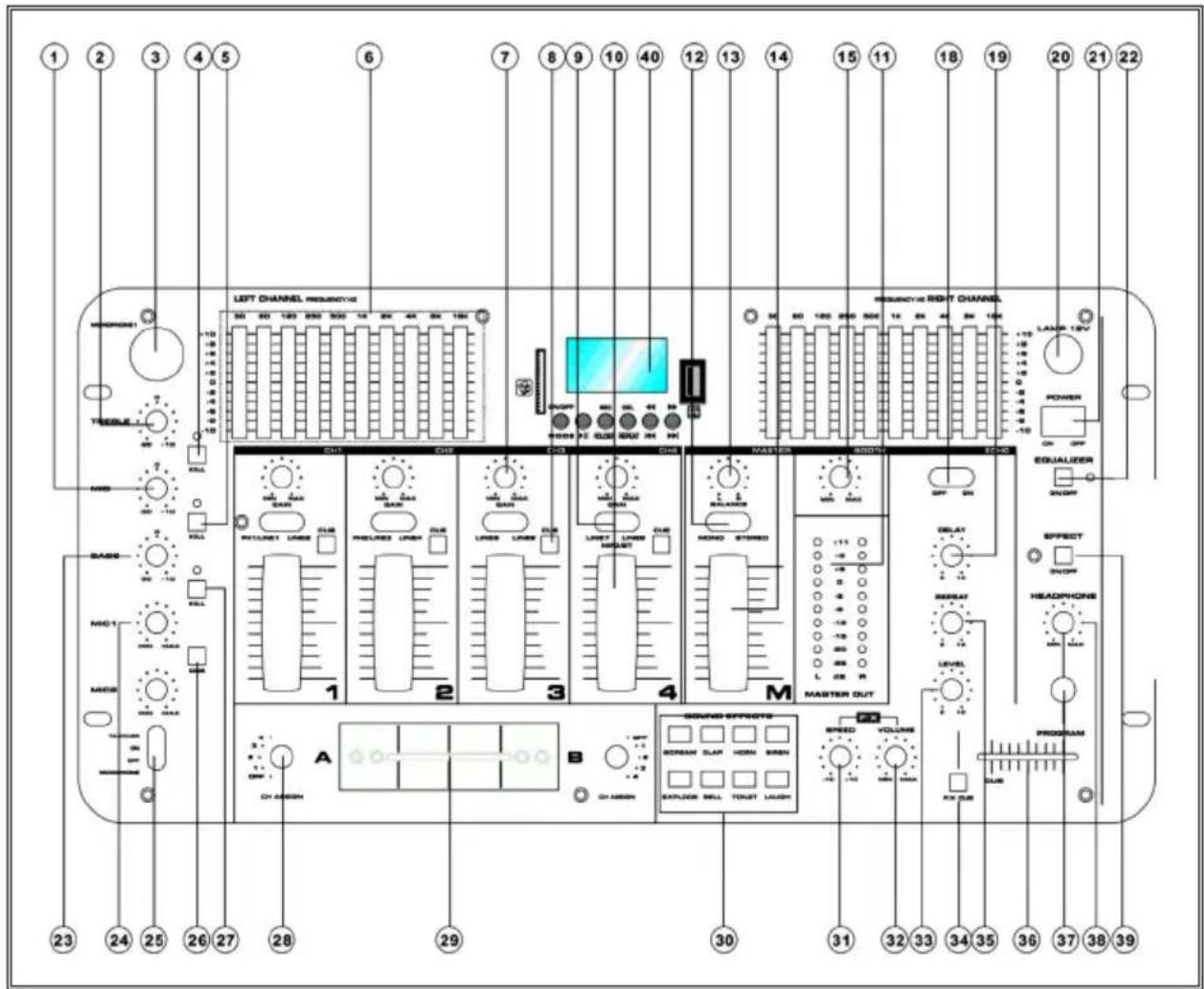
| 1 | Mid control of the microphone equalizer | 9 | Input selector switch for channel-by-channel selection of input source |
| 2 | Treble control of the microphone equalizer | 10 | Volume fader |
| 3 | Microphone input 11 | LED meter for visual mapping of the output signal | |
| 4 | Kill switch for microphone treble with LED indication | 12 | Mono/stereo switching |
| 5 | Kill switch for the microphone mids with LED indication | 13 | Master balance control |
| 6 | Equalizer for the left output channel 14 | Master volume control | |
| 7 | Gain control for channel-wise adjustment of the input volume | 15 | Master2/Booth volume control |
| 8 | Cue switch for selecting a monitoring channel | 18 | Echo effect selector switch |
| 8 | Cue switch for selecting a monitoring channel | 18 | Echo effect selector switch |
| 19 Control for the delay of the echo effect 30 | Buttons for fading in short, fixed sound effects | |
| 20 12V connector for a DJ light 31 | Slider for adjusting the sound effects playback speed | |
| 21 On/off switch 32 | Slider for adjusting the volume of the sound effects | |
| 22 On/off switch for the equalizer 33 | Slider for adjusting the volume of the echo effect | |
| 23 Bass control of the microphone equalizer | 34 Sound effect monitoring | |
| 24 Microphone volume 35 Slider for repeating the echo effect | ||
| 25 Talkover function / crosstalk function (attenuation of music volume when microphone is used) | 36 | Cue/PGM knob for the headphones to select the monitored signal. |
| 26 Microphone monitoring / cueing 37 Headphone input | ||
| 27 Kill switch for microphone bass with LED indication | 38 | Knob for headphone volume adjustment |
| 28 Switch for selecting the crossfader controlled input channels | 39 | Selection of an effect device optionally connected via the effect send-return_ section on the rear panel |
| 29 Crossfader 40 MP3 recording and Bluetooth section | ||
BACKSIDE
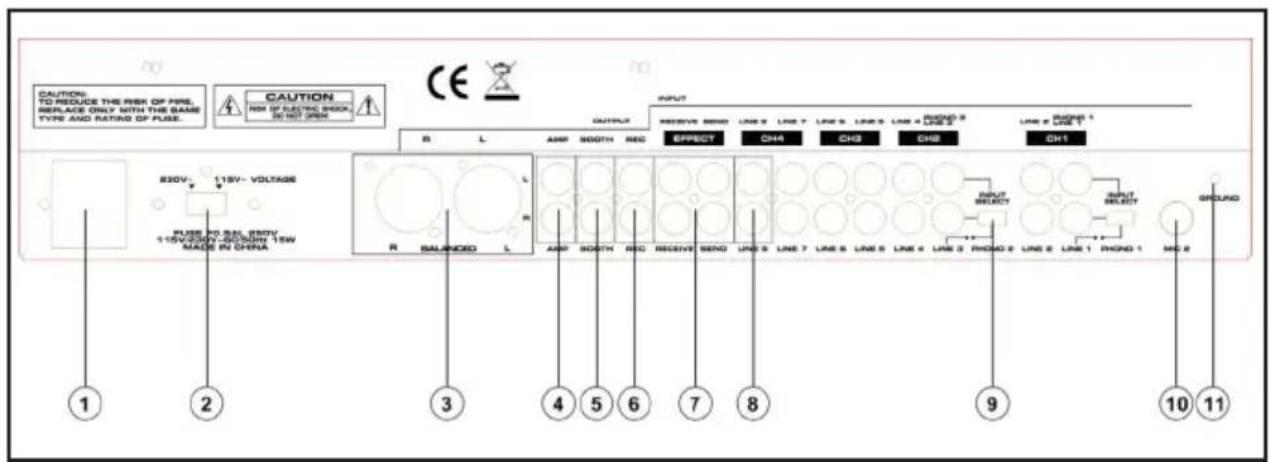
| 1 | Power connection | 7 | Effect send return connection set |
| 2 | Power supply selector switch (110/230 V) | 8 | RCA line inputs |
| 3 | XLR line outputs | 9 | Phono/Line selector switch |
| 4 | Master RCA line output | 10 | 6.3 mm jack microfn input |
| 5 | Master2/Zine RCA line output | 11 | Ground |
| 6 | Record RCA output |
DISPOSAL CONSIDERATIONS
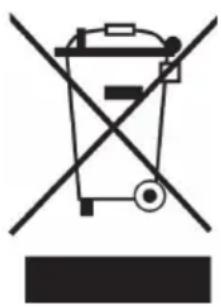
If there is a legal regulation for the disposal of electrical and electronic devices in your country, this symbol on the product or on the packaging indicates that this product must not be disposed of with household waste. Instead, it must be taken to a collection point for the recycling of electrical and electronic equipment. By disposing of it in accordance with the rules, you are protecting the environment and the health of your fellow human beings from negative consequences. For information about the recycling and disposal of this product, please contact your local authority or your household waste disposal service.
This product contains batteries. If there is a legal regulation for the disposal of batteries in your country, the batteries must not be disposed of with household waste. Find out about local regulations for disposing of batteries. By disposing of them in accordance with the rules, you are protecting the environment and the health of your fellow human beings from negative consequences.
DECLARATION OF CONFORMITY

Manufacturer:
Chal-Tec GmbH, Wallstrasse 16, 10179 Berlin, Germany.
Importer for Great Britain:
Berlin Brands Group UK Ltd
PO Box 1145
Oxford, OX1 9UW
United Kingdom
Hereby, Chal-Tec GmbH declares that the radio equipment type Kemistry 3 B is in compliance with Directive 2014/53/EU. The full text of the EU declaration of conformity is available at the following internet address: use.berlin/10021733
For Great Britain: Hereby, Chal-Tec GmbH declares that the radio equipment type Kemistry 3 B is in compliance with the relevant statutory requirements. The full text of the declaration of conformity is available at the following internet address: use.berlin/10021733
Cher client,
SOMMAIRE
DÉCLARATION DE CONFORMITÉ

Fabricant :
Chal-Tec GmbH, Wallstraße 16, 10179 Berlin, Allemagne.
Berlin Brands Group UK Ltd
PO Box 1145
Oxford, OX1 9UW
United Kingdom
ÍNDICE
Berlin Brands Group UK Ltd
PO Box 1145
Oxford, OX1 9UW
United Kingdom
INDICE
Berlin Brands Group UK Ltd
PO Box 1145
Oxford, OX1 9UW
United Kingdom

- INHALTSVERZEICHNIS
- MEMBER OF BERLIN BRANDS GROUP
- HANDWERKERSTR. 11
- 15366 DAHLWITZ-HOPPEGARTEN
- DEUTSCHLAND
- CONTENT
- SAFETY INSTRUCTIONS
- GENERAL INFORMATION
- CONTROLS
- BACKSIDE
- DISPOSAL CONSIDERATIONS
- DECLARATION OF CONFORMITY
- MANUFACTURER
- IMPORTER FOR GREAT BRITAIN
- CHER CLIENT
- SOMMAIRE
- DÉCLARATION DE CONFORMITÉ
- FABRICANT
- ÍNDICE
- INDICE
Brand : Auna
Model : Kemistry 3 B
Category : Mixer