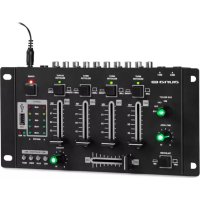
Amnesia - Mixer Auna - Free user manual and instructions
Find the device manual for free Amnesia Auna in PDF.


| Product type | DJ mixing table |
| Brand | Auna |
| Model | Amnesia |
| Power supply | DC 12 V, 500 mA (power adapter included) |
| Microphone sensitivity | 1.5 mV (10 kΩ) |
| Phono sensitivity | 3 mV (47 kΩ) |
| Master output | 775 mV (max. 1.5 V) |
| Frequency range | 20 Hz - 20 kHz (±2 dB) |
| Voice attenuation (Talkover) | -12 dB |
| Headphone output | 300 mV (32 Ω) |
| WiFi | 2.4 GHz band, 4 dBm power |
| Number of channels | 3 line channels + 1 USB channel + 2 microphones |
| Inputs | 2 x Phono (RCA), 3 x Line (RCA), 2 x Micro (6.35 mm jack), 1 x USB |
| Outputs | 1 x Master (RCA), 1 x Headphone (6.35 mm jack) |
| Functions | Crossfader, Talkover, Cue, USB recording, USB/MP3/BT playback |
| Bluetooth | Yes, built-in |
| Recording | Direct to USB device (MP3 format) |
| Safety | Safety instructions included, do not expose to water, use provided adapter |
| Maintenance | Clean with a soft, dry cloth |
| Repairability | For spare parts, contact customer service |
| General information | Article number 10033276, manufacturer Chal-Tec GmbH |
Frequently Asked Questions - Amnesia Auna
User questions about Amnesia Auna
0 question about this device. Answer the ones you know or ask your own.
Ask a new question about this device
Download the instructions for your Mixer in PDF format for free! Find your manual Amnesia - Auna and take your electronic device back in hand. On this page are published all the documents necessary for the use of your device. Amnesia by Auna.
USER MANUAL Amnesia Auna
Member of Berlin Brands Group
Handwerkerstr. 11
Congratulations on purchasing this equipment. Please read this manual carefully and take care of the following hints to avoid damages. Any failure caused by ignoring the items and cautions mentioned in the instruction manual are not covered by our warranty and any liability. Scan the QR code to get access to the latest user manual and other information about the product.

SPECIFICATIONS
| Item number 10033276 | |
| Power supply DC 12 V / 500 mA | |
| MIC L&MIC R sensitivity 1.5 mV (10 kΩ) | |
| LINE/CD sensitivity 3 mV (47 kΩ) | |
| PHONO sensitivity 3 mV (47 kΩ) | |
| MASTER OUTPUT 775 mV, max. 1.5 V | |
| Frequency response 20 Hz - 20 kHz ±2dB | |
| Talkover attenuation -12 dB | |
| Headphone output 300 mV/32 Ω | |
| BT frequency Radio-frequency power | 2402-2480 MHz4 dBm |
SAFETY INSTRUCTIONS
- Make sure power outlets conform to the power requirements listed on the back of the unit.
- Main voltage must be correct and the same as that printed on the rear of the unit.
- Do not use the unit if the electrical cord is frayed or broken.
- The unit shall not be exposed to dripping or splashing and that no objects filled with liquids, such as vases, shall be placed on unit.
- The unit shall be connected to a mains socket outlet with a protective earthing connection.
- Power plug as a equipment that separate from power supply system, it must be easy to operating..
- Using, adjusting or changing program control beyond this specification may cause dangerous radiation.
- The unit should be serviced by qualified service personnel.
- Select the voltage requirement through the voltage selector switch at the real panel. We will not be responsible for damages arising from the improper installation, wiring or operation due to the fault or negligence of the user.
FRONT PANEL
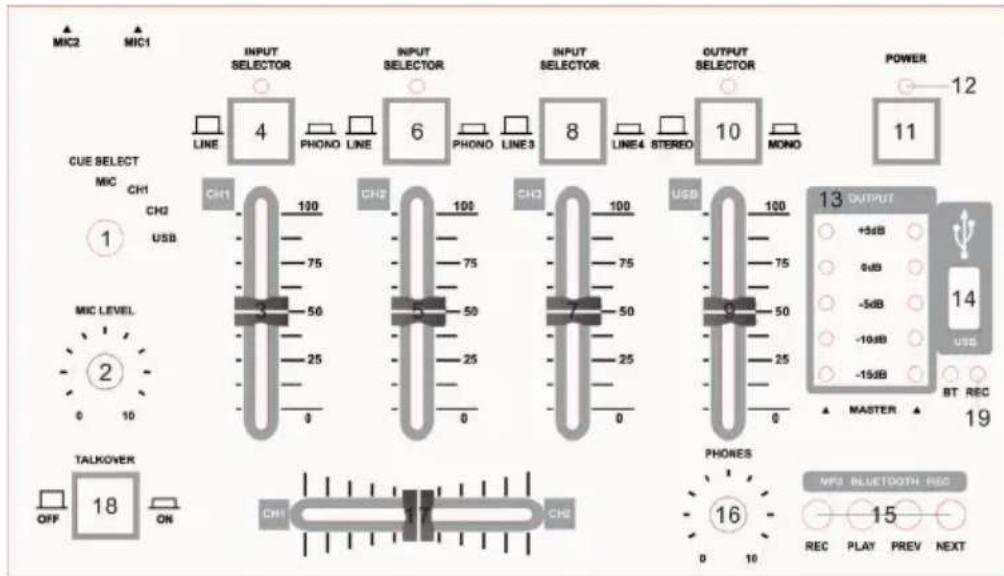
1 CUE select for MIC, CH1, CH2, USB CHANNEL.
2 The MIC LEVEL control adjusts the volume of the microphone signal
3 CHANNEL 1 fader adjusts the final channel (1) volume
4 PHONO1/LINE1 switch selects one of the input pairs on the respective channel. The PHONO setting (and inputs) is intended for turntables; for all other signal sources, i.e. a CD or MD player, use the "LINE" setting and inputs
5 CHANNEL 2 fader adjusts the final channel (2) volume
6 PHONO2/LINE2 switch (the same as the above)
7 CHANNEL 3 fader adjusts the final channel (3) volume
8 Channel 3 input selection: LINE3/LINE4 switch selects audio source chinch inputs 3 or 4
9 CHANNEL USB fader adjusts the final channel volume of USB/MP3/BT player
10 MONO/Stereo output switch
11 POWER switch
12 Power supply LED
13 Output Meter: Indicate the levels of left and right master channels
14 USB port
15 CONTROL BUTTONS for adjusting USB/MP3/BT player functions
16 The PHONOS level controls the volume of the headphones signal
17 The CROSSFADER is used to fade between channel 1 and 2
18 MIC TALKOVER allows you to lower the level of the input sources when using the microphones for announcements
19 RELED
Rear panel

20 Power supply: Use only the power adapter provided with the device.
21 Use the Master Output to connect the unit to an amplifier. The level is controlled by the resulting mix of the channel faders
22 The LINE4 inputs for channel 3 may be used for connecting tape decks, CD or MP3 players etc. Select source with button.
23 The LINE3 inputs for channel 3 may be used for connecting tape decks, CD or MP3 players etc.
24 The PHONO2 inputs for channel 2 and are only for turntable connection. The LINE2 inputs may be used for connecting tape decks, CD or MD players etc.
25 The PHONO1 inputs for channel 1 and are only for turntable connection. The LINE1 inputs may be used for connecting tape decks, CD or MD players etc.
26 The MIC1 INPUT connector is a balanced 1/4 TRS socket for microphone connection.
27 The MIC2 INPUT connector is a balanced 1/4" TRS socket for microphone connection.
28 HEADPHONES 6.35mm stereo jack allows you to connect your headphones (output signal is main mix).
USB PLAY MODE
- Press MODE button until Status LEDs display LED1=ON/LED2=OFF.
- The USB storage device is placed into USB socket. Each press of the PLAY BUTTON causes the operation to change from play to pause or from pause to play.
- PREV/NEXT button: Use this button for previous/next track. The track will fast backward/ forward play if press and holding the button for more than 3 seconds
BT MODE
- Press MODE button until Status LEDs display LED1=FLASH/LED2=OFF. The BT-
- Player is searching for a connection. The device has the memory of a connection from
- the past. Under BT mode PLAY/ PREV/NEXT functions can be used on DJ-Mixer or on your smartphone.
Each press of the PLAY button causes the operation to change from play to pause
or from pause to play. -
- PREV/NEXT button: Use this button for previous/next track. The track will fast backward/ forward play. The volume of Bluetooth audio signal will turn down/up if press PREV/NEXT on DJ-mixer and holding the button for more than 3 seconds.
RECORD MODE
- Long Press REC button until display shows LED2=ON. The USB storage device is placed into USB socket, the device is ready for record.
- Each press of the REC button changes between record and stopping record. Every time when you stop record a MP3-file will be stored into the USB storage device. After stopping the record, the recorded track will be started automatically.
- By pressing REC button the recorded files will be played (use NEXT to change to next recorded file). This function will play only files in the RECORD folder.
DISPOSAL CONSIDERATIONS

If there is a legal regulation for the disposal of electrical and electronic devices in your country, this symbol on the product or on the packaging indicates that this product must not be disposed of with household waste. Instead, it must be taken to a collection point for the recycling of electrical and electronic equipment. By disposing of it in accordance with the rules, you are protecting the environment and the health of your fellow human beings from negative consequences. For information about the recycling and disposal of this product, please contact your local authority or your household waste disposal service.
DECLARATION OF CONFORMITY
CE UK CA
Manufacturer:
Chal-Tec GmbH, Wallstrasse 16, 10179 Berlin, Germany.
Importer for Great Britain:
Berlin Brands Group UK Ltd PO Box 1145 Oxford,OX19UW United Kingdom
Hereby, Chal-Tec GmbH declares that the radio equipment type Amnesia is in compliance with Directive 2014/53/EU. The full text of the EU declaration of conformity is available at the following internet address: use.berlin/10033276
For Great Britain: Hereby, Chal-Tec GmbH declares that the radio equipment type Amnesia is in compliance with the relevant statutory requirements. The full text of the declaration of conformity is available at the following internet address: use.berlin/10033276
Chere cliente, cher client,
Berlin Brands Group UK Ltd
PO Box 1145
Oxford,OX19UW
United Kingdom

Brand : Auna
Model : Amnesia
Category : Mixer