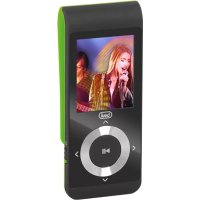
MPV 1728 SD - Mp3 player Trevi - Free user manual and instructions
Find the device manual for free MPV 1728 SD Trevi in PDF.

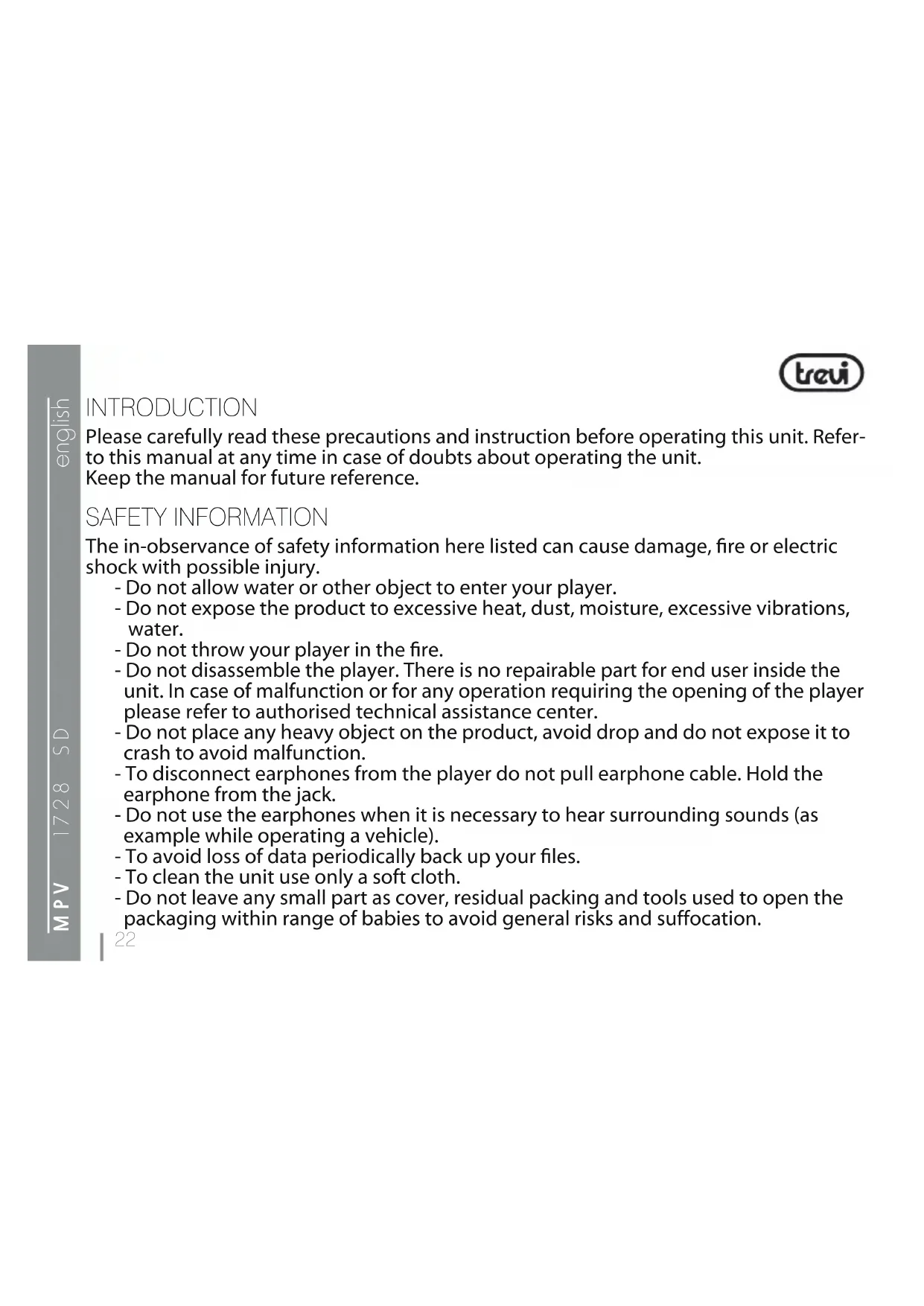


| Product type | MP3 Player |
| Brand | Trevi |
| Model | MPV 1728 SD |
| Dimensions | 94 mm x 37 mm x 17 mm |
| Weight | Not specified in the manual |
| Power supply | Rechargeable lithium battery via USB or mains adapter 230 V - 50 Hz / 5 V, 1 A (not included) on micro-USB port |
| Screen | 1.8-inch LCD |
| Storage memory | micro-SD card (8 GB included) |
| Supported audio formats | MP3, WMA, WAV |
| Supported video formats | AMV |
| Supported image formats | JPG |
| Supported text formats | TXT |
| FM Radio | 87.5 - 108 MHz |
| Voice recorder | Built-in, WAV format (qualities 32, 64, 128, 256 kbps) |
| Interface | USB 2.0 (micro-USB) |
| Signal-to-noise ratio | 22 dB |
| Operating temperature | -5 to +40 °C |
| Compatible operating systems | Windows 98/98SE/Me/2000/XP/Vista/7 |
| Main functions | Music, video, FM radio, voice recording, photo display, e-book reader, system settings (clock, language, auto-off, firmware update) |
| Maintenance and cleaning | Use a soft, dry cloth. Do not use solvents or abrasive products. |
| Safety | Do not expose to moisture or shocks. Avoid prolonged listening at high volume to preserve hearing. |
| Spare parts and repairability | Not specified in the manual. Contact Trevi after-sales service. |
Frequently Asked Questions - MPV 1728 SD Trevi
User questions about MPV 1728 SD Trevi
0 question about this device. Answer the ones you know or ask your own.
Ask a new question about this device
Download the instructions for your Mp3 player in PDF format for free! Find your manual MPV 1728 SD - Trevi and take your electronic device back in hand. On this page are published all the documents necessary for the use of your device. MPV 1728 SD by Trevi.
USER MANUAL MPV 1728 SD Trevi
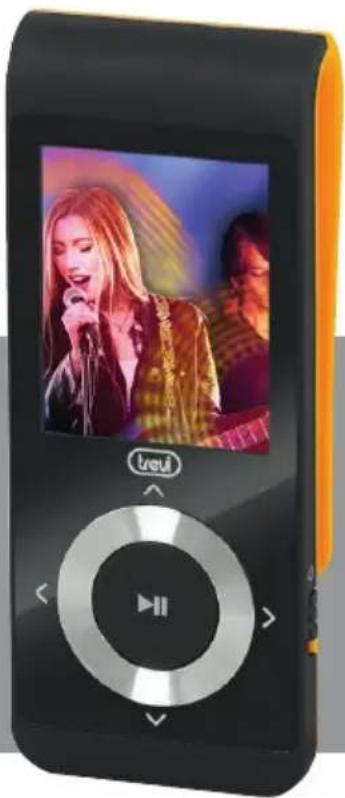
miniVIDEO/MP3 player with Clip
treui
MANUALE UTENTE

REC Type 32KBit Rate
64KBit Rate
128KBit Rate
256KBit Rate
Exit
Replay mode Replay Replay times Replay gap Exit
Power off Off time Sleep time
Memory info
Firmware version
Firmware upgrade
Exit
MP3 Player Upgrade Tool
Please carefully read these precautions and instruction before operating this unit. Refer to this manual at any time in case of doubts about operating the unit. Keep the manual for future reference.
SAFETY INFORMATION
The in-observation of safety information here listed can cause damage, fire or electric shock with possible injury.
- Do not allow water or other object to enter your player.
- Do not expose the product to excessive heat, dust, moisture, excessive vibrations, water.
- Do not throw your player in the fire.
- Do not disassemble the player. There is no repairable part for end user inside the unit. In case of malfunction or for any operation requiring the opening of the player please refer to authorised technical assistance center.
- Do not place any heavy object on the product, avoid drop and do not expose it to crash to avoid malfunction.
- To disconnect earphones from the player do not pull earphone cable. Hold the microphone from the jack.
- Do not use the earphones when it is necessary to hear surrounding sounds (as example while operating a vehicle).
- To avoid loss of data periodically back up your files.
- To clean the unit use only a soft cloth.
- Do not leave any small part as cover, residual packing and tools used to open the packaging within range of babies to avoid general risks and suffocation.

treui
TO PREVENT HEARING INJURY
Using earphones at a high volume can impair your hearing. Do not listen for long and uninterrupted period of time or at high volume. Set the volume at a low level and turn it up gradually unit you hear the sound comfortably and clearly, without distorsion. Set the volume to a safe level before your hearing adapts and leave it there. Stop listening from time to time. Do not raise up volume to a level which doesn't allow to hear other sounds. If a hum noise is heard, reduce volume level or stop the listening.
NOTE:
In rare case of strong interferences, as electrostatic discharge on power lines, the operation of the unit or the display can appear anomalous. Generally the unit will restart normal operation when the disturbance was stopped.
If the problem doesn't disappear turn the unit off and restart it.

WARNING: Do not use this product near water, in wet areas to avoid fire or injury of electric current. Always turn off the product when you don't use it or before a revision. There aren't any parts in this appliance which are reparable by consumer. Always appeal to a qualified authorized service. The product is under a dangerous tention.
WARNING FOR A CORRECT USE OF RECHARGEABLE BATTERY
- Recharge the battery in an ambient temperature between 5^ C and 35^ C .
- Don't recharge more than the suitable period to prevent the risk of overheating and burst.

- Don't recharge the battery for more than 6 hours.
- Recharging the battery over the suitable period or an extended period of inactivity may reduce battery duration.
- Rechargeable battery is liable to wear and tear and its performance will reduce gradually.
-
To extend the duration of the battery use it when is completely charged up to the complete discharging, then recharge it fully before use it again. Recharge a battery not completely consumed, will result a reduced duration. In this case, repeat the full charging/discharging cycle many times.
-
Avoid recharge the battery for the whole night.
INFORMATION NOTE ON THE REMOVAL AND DISPOSAL OF BATTERIES
Warning: Only high-qualified personnel should perform this operation!
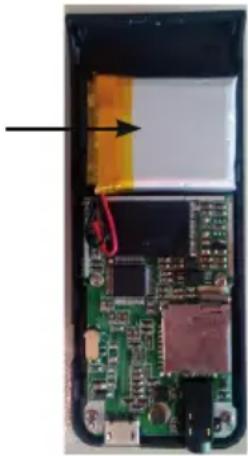
- Remove the back part of the appliance from cogs;
- Select the battery shown by the arrow;
- Disconnect and remove the battery.
Used batteries should not be disposed of with household waste or thrown into fire or water. Used batteries should be recycled or disposed of in separate waste collection centres.
To avoid possible hearing damage, limit the time listening at high volumes.
treui
KEYINSTRUCTION
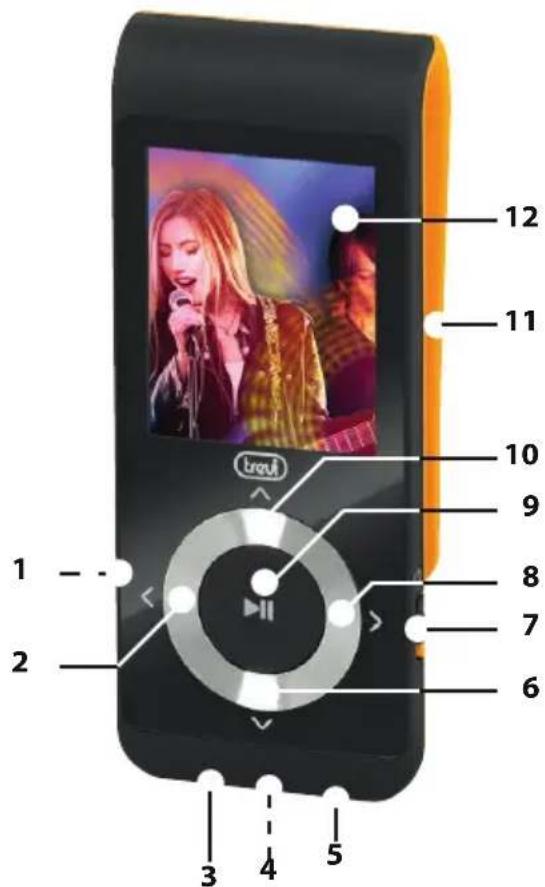
- Micro SD Card Slot
- < (LAST)/VOL- button
- Earphone jack
- Mic. inside
- Micro USB port
- REG.VOLUME
- POWER ON/OFF switch
-
(NEXT)/VOL+ button
- II (PLAY/PAUSE) button
- ^ get into main menu
- Clip
- Display 1,8"
HOW TO INSERT AND TAKE OUT MICRO SD
Before switch on the player, it is necessary to insert micro SD card (supplied) in the micro SD slot. Micro SD card has to be inserted with not silkscreen part at the top. Push the micro SD intothe slot until you hear a "click" sound.
Take out the micro SD: push the card into the slot and pull it out.
Please, format your micro SD Card at first time to make sure MP3player work properly.
BASIC OPERATION
1) Power on: first push the POWER ON/OFF switch(7) to ON side and hold PLAY/PAUSE(9) button for 3 seconds, the player will go to working condition.
2) Power off: hold PLAY/PAUSE(9) button for 3 seconds, the player will be turned off, then push the POWER ON/OFF switch(7) to OFF side.

Note: When the battery power is low, it will automatically power off.
3) Adjusting volume: With Music mode, Video mode, voice mode and FM radio mode, press REG. VOLUME and combine with > NEXT(8) and < LAST(2) for volume increase & decrease.
MAIN MENU
While switch on the player, it will direct to main menu interface. Press > NEXT(8) button or < LAST(2) button to select "Music", "Movie", "Record", "Voice", "FM Radio "Photo", "Setup", "E-book", "Game" mode, and short press (10) button to confirm. Press PLAY/PAUSE(9) button to return main Menu.
MUSIC
Press (10) button to get into music play interface, then press PLAY/PAUSE(9) to playback the song. Long press (10) button to return main Menu.
treui
Press (10) button when in stop mode and you will enter the following menu:
1) Local/Card folder: press ^ (10) button to enter list of music file.
2) Delete file: after select one file, press (10) button and select "Yes" or "No", press (10) button to confirm and return.
3) Delete all: press (10) button to enter delete all music files, press (10) button to confirm and return.
4) Exit
By pressing (10) button when in playng mode and you will enter the following submenu:
- Repeat: Normal, Repeat one, Folder, Repeat folder, Repeat all, Random, Intro.
- Equalizer: Natural, Rock, pop, Classic, Soft, Jazz and DBB.
- Replay mode: Replay, Replay times, Replay gap.
To move between option press > NEXT(8)
or < LAST(2),press ^ (10) to confirm. Press PLAY/PAUSE(9) to return to previous menu.
SONG WORDS DISPLAY
Lyrics display requires“.LRC”lyric file which may be found on the internet or may be created with a lyric file editor. Lyrics files must have the same name as its corresponding music file (e.g. "Title1.lrc" and "Title1.mp3"). When the list of displayed songs has the same file of song words, long press (10) to get into display interface when playing, short press (10) to exit.
FILE MANAGEMENT:
In stop mode, press > NEXT(8) or < LAST(2) to select next or previous folder.
MOVIE
Press (10) button to get into music play interface, then press PLAY/PAUSE(9) to playback the song. Long press (10) button to return main
Menu.
Press (10) button when in stop mode and you will enter the following submenu:
1) Local/Card folder: press (10) button to enter list of music file.
2) Delete file: after select one file, press (10) button and select "Yes" or "No", press (10) button to confirm and return.
3) Delete all: press (10) button to enter delete all music files, press (10) button to confirm and return.
4) Repeat: Normal, Repeat one, Folder, Repeat folder, Repeat all, Random, Intro.
5) Exit
Note: The movies in any format should be converted by the convert software you will find in the unit before downloading and playback it.
RECORD
Press (10) button to get into record play interface, press PLAY/PAUSE(9) button

to start/pause/continue recording. Long press (10) button to save recording file and return to main menu.
Before start recording, by pressing (10) button and you will enter the following submenu:
1) Local/Card folder
2) REC type: 32Kbps, 64kbps, 128kbps, 256kbps.
3) Exit
When recording, long press PLAY/PAUSE(9) to save recording file and prepare to start a new recording.
Note: The sound recorder in WAV format will be stored in Voice menu and played directly.
VOICE
Press (10) button to get into voice play interface, press PLAY/PAUSE(9) button to play. Long press (10) button to return to main menu.
By pressing (10) button and you will enter the following submenu:
1) Local/Card folder: press (10)
treui
button
to enter list of voice file.
2) Delete file: after select one file, press (10) button and select "Yes" or "No", press (10) button to confirm and return.
3) Delete all: press ^ (10) button to enter delete all music files, press ^ (10) button to confirm and return.
4) Exit
FM RADIO
Press (10) button to get into radio play interface, press PLAY/PAUSE(9) button to play. Long press (10) button to return to main menu.
When playing, by pressing (10) button and you will enter the following submenu:
1) Save: save current channel.
2) Record: record current playing program.
3) Delete: delete the program from saved program
4) Delete all: delete all from saved
program.
5) Auto search: press (10) button to auto search channels
6) Normal band: 87 - 108MHz
7) Japan band: 76 - 90MHz
8) Exit
Note: When radio recording, the file recorded in WAV format will be stored in Voice menu and played directly, but in MP3 format will be saved in music menu and only could be played in Music mode.
PHOTO
Press (10) button to get into photo play interface, press PLAY/PAUSE(9) button to browse photos. Long press (10) button to return to main menu.
Select one photo in photo list, press (10) button before entering photo browse and you will enter the following submenu:
1) Local/Card folder: all photos list.
2) Playback set: Manual play, auto play.
3) Delete file: after select one file,
press (10) button to delete and select "Yes" or "No", press (10) button to confirm and return.
4) Delete all: press (10) button to delete and select "Yes" or "No", press (10) button to confirm and return.
5) Exit
SETUP
Press (10) button to get into setup interface, and you will enter the following submenu:
1)Clock: setting date and clock.
2) LCD set: Dark mode, exit.
3) Language: English, Italian
4) Power off: off time, sleep time
5) Memory info: memory space used.
6) Firmware version: press (10) button to read firmware information
7) Firmware upgrade: press (10) button to read firmware information
8) Exit
To move and adjust between option press > NEXT(8) or < LAST(2), press (10) to confirm and enter.
E-BOOK
Press (10) button to get into e-book menu:
1) Local/Card folder: list of e-book file.
2) Playback set: Manual play, auto play.
3) Delete file: after select a file press (10) button to delete and select "Yes" or "No", press (10) button to confirm and return.
4) Delete all: press (10) button to delete and select "Yes" or "No", press (10) button to confirm and return.
(5) Exit
then select a file, press PLAY/PAUSE(9) button to read, press ^ (10) button to tup" submenu:
1)Bookmark select: select a
treui
A bookmark which is added and pressed (10) button to ent
2) Bookmark delete: delete a bookmark which is added.
3)Bookmark add: add a bookmark by press (10) button.
4) Exit
CONVERTVIDEOFILESINTOAMV

This program is used to convert video files into AMV format, currently only WMV format is supported.
1) Run "AMV Convert Tools", click to choose the folder where to save the AMV files, then click to select the folder where the original files are.
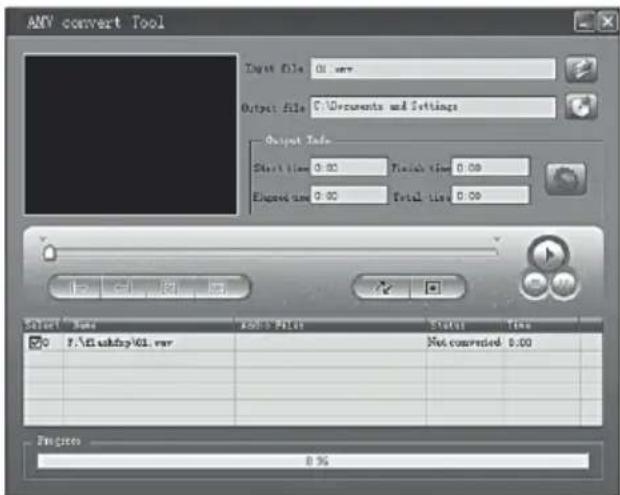
2) Select unprocessed AMV files, then click the icon will be highlighted into and a dialog box will shown. Choosing Pixels of AMV to "160120" and Frames per second to "middle", then click OK to confirm. (Note: Only pixels in "160120"an be supported)

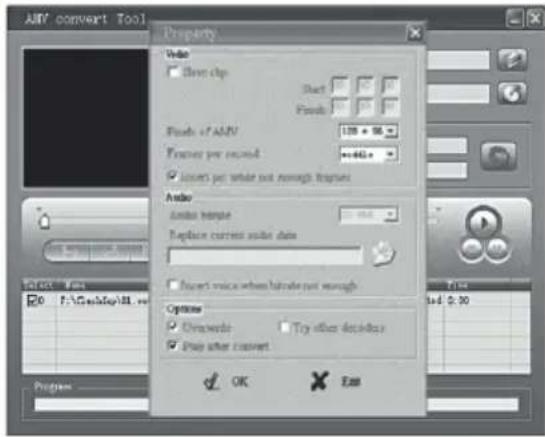
3) Click to start converting.
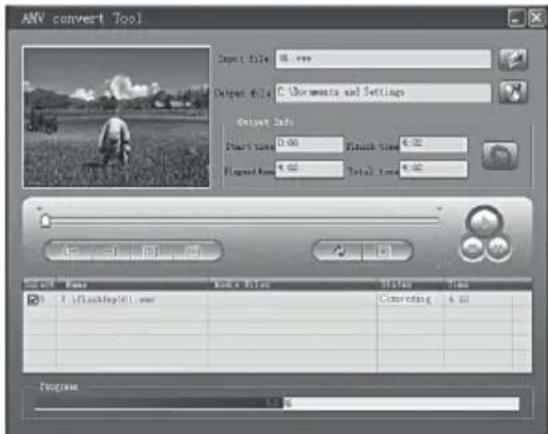
4) After convert, the AMV files will be played automatically.

WARNING:
Lithium battery inserted in the player is not removable. Pless refer to skilled technicians in case an intervention on battery is required.
SPECIFICHE TECNICHE
Memory . Micro-SD (included) 8GB
Display.....Display LCD 1,8"
USB Micro USB 2.0
Power supply. Built-in lithium rechargeable battery
by PC or adaptor (230V-50Hz/5V, 1A,
not included) with micro USB socket
File format.. MP3,WMA,WAV (music),AMV (video),JPG
(pictures) e TXT (text).
FM Radio............Frequency range: 87,5MHz - 108MHz
S/N:≥22db
Temperature -5 a +40°C
Operative system.......Windows 98/98SE/Me/2000/XP/Vista/7
Size 94 mm x 37 mm x 17 mm


Important information for correct disposal of the product.
The symbol on the equipment indicates that the waste must be subject to "separate collection" so the product must not be disposed of as urban waste.
The user should return the product to special "collection centers" provided by local government, or deliver it to the retailer against the purchase of a new product.
Separate collection of waste and subsequent processing operations, recovery and disposal will help the production of equipment with recycled materials and reduce the negative effects on the environment and health caused by improper handling of waste.
Improper disposal of the product involves the application of administrative penalties.
TREVI pursues a policy of continuous research and development, the products may show different characteristics from those described.
MODE D'EMPLOI

REC Type 32KBit Rate
64KBit Rate
128KBit Rate
256KBit Rate
Exit
VOICE en mode STOP
Local/Card Folder
Delete file
Delete all
Exit

VOICE en mode PLAY
Repeat Normal Repeat One Folder Repeat Folder Repeat All Random Intro Replay mode Replay Replay times Replay gap Exit
FM RADIO
Save
Record
Delete
Delete all
Auto Search
Normal Band
Japan Band
Exit
PHOTO
Local/Card Folder
Playback set_Manual Replay Auto Replay
Delete file
Delete all
Exit
SETUP
Clock
LCD set
Language
Power off Off time Sleep time
Memory info
Firmware version
Firmware upgrade
Exit
ACCÉS AU MENU PRINCIPAL
Programmes> MP3 Player Utilities:
AMV Converter
programme de conversion video (voir le paragraphe MOVIE CONVERTER AMV).
AMV Player
REC Type 32KBit Rate
64KBit Rate
128KBit Rate
256KBit Rate
Ausgang
MP3 Player Upgrade-Tool
EN If you will not find your language on the instruction manual, please go on our website www.trevi.it to find it
https://www.trevi.it/dms/zidi/TREVI/DOCMPV1728SD.pdf Simplified EU Declaration Of Conformity Hereby TREVI S.p.a declares that the radio equipment type "Mini Video, MP3, Radio player with clip" model MPV 1728 SD is in compliance with Directive 2014/53/EU. The full text of the EU declaration of conformity is available at the following internet address
https://www.trevi.it/dms/zidi/TREVI/DOCMPV1728SD.pdf


- MANUALE UTENTE
- MP3 Player Upgrade Tool
- SAFETY INFORMATION
- treui
- TO PREVENT HEARING INJURY
- NOTE:
- WARNING FOR A CORRECT USE OF RECHARGEABLE BATTERY
- INFORMATION NOTE ON THE REMOVAL AND DISPOSAL OF BATTERIES
- Warning: Only high-qualified personnel should perform this operation!
- KEYINSTRUCTION
- HOW TO INSERT AND TAKE OUT MICRO SD
- BASIC OPERATION
- Note: When the battery power is low, it will automatically power off.
- MAIN MENU
- MUSIC
- SONG WORDS DISPLAY
- FILE MANAGEMENT:
- MOVIE
- VOICE
- button
- FM RADIO
- program.
- PHOTO
- SETUP
- E-BOOK
- CONVERTVIDEOFILESINTOAMV
- WARNING:
- SPECIFICHE TECNICHE
- Important information for correct disposal of the product.
- MODE D'EMPLOI
- VOICE en mode STOP
- VOICE en mode PLAY
- ACCÉS AU MENU PRINCIPAL
- AMV Converter
- AMV Player
- MP3 Player Upgrade-Tool
Brand : Trevi
Model : MPV 1728 SD
Category : Mp3 player